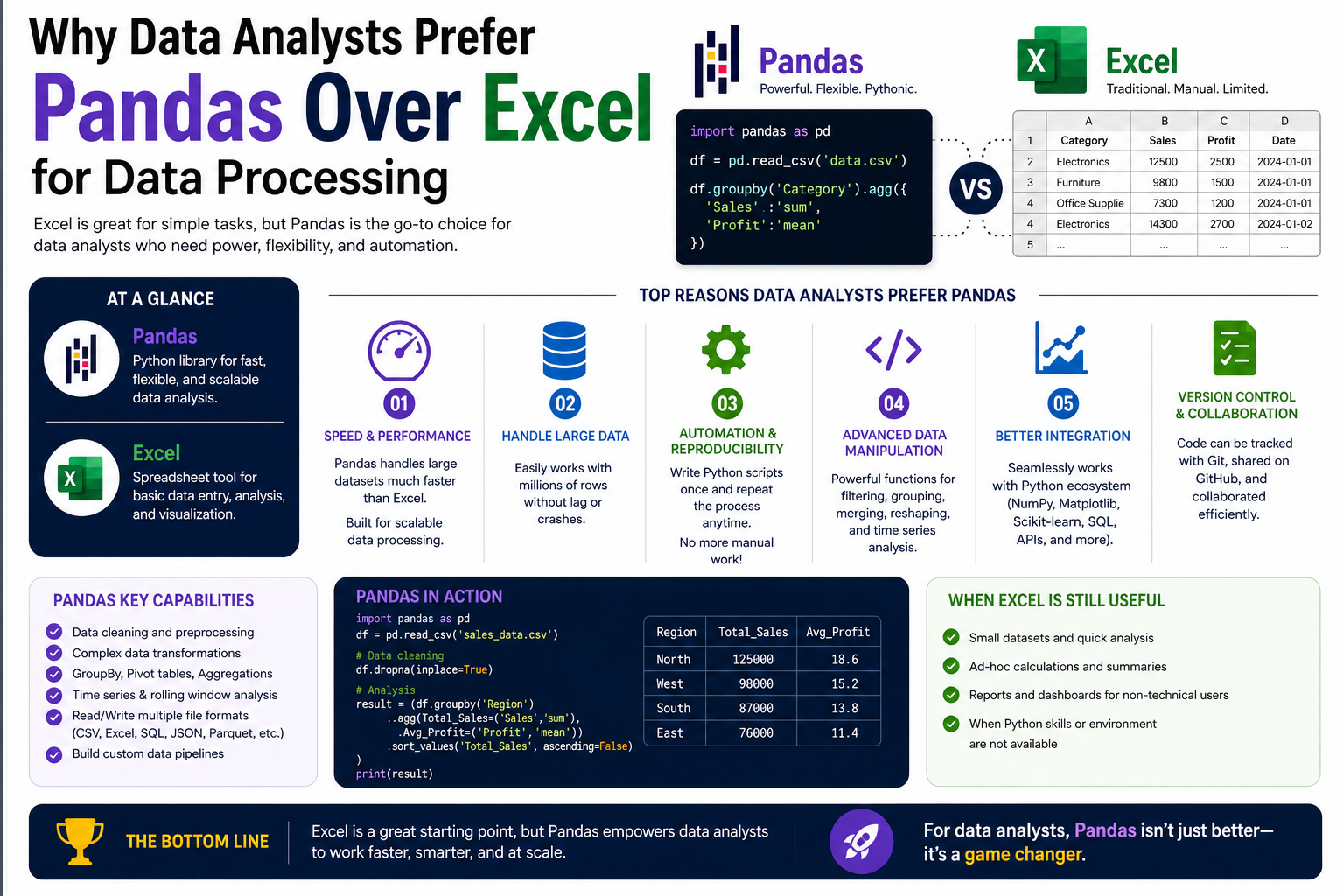
Pandas is a powerful open-source software library built for the Python programming language. It was designed to make working with structured data faster, easier, and more flexible than traditional tools. Before pandas existed, handling large datasets in Python required complex and repetitive coding. Data scientists often struggle with inefficient workflows when trying to clean, transform, or analyse data. Pandas was created to solve these challenges by introducing a structured and intuitive way to manage data.
At its core, pandas provides data structures that allow users to work with tabular data in a way that resembles spreadsheets or databases. However, unlike traditional spreadsheet software, pandas is built for scalability and automation. It allows users to perform complex data operations with minimal code, making it highly efficient for analytical tasks.
One of the key reasons pandas gained popularity is its ability to integrate seamlessly with the broader Python ecosystem. Since Python is widely used in data science, machine learning, and artificial intelligence, pandas naturally became a central tool for data manipulation within these fields. Its flexibility allows it to handle both simple datasets and highly complex data structures used in advanced analytics.
How Pandas Fits into the Python Ecosystem
Pandas do not function in isolation. Instead, it is part of a broader ecosystem of Python libraries that work together to support data analysis and scientific computing. This ecosystem includes tools for numerical computation, visualisation, and machine learning. Pandas acts as the foundation for preparing and organising data before it is passed to other tools for deeper analysis.
Because of this integration, pandas is often used as the starting point in data workflows. Data is first imported into pandas, cleaned and structured, and then passed to other libraries for modelling or visualisation. This seamless workflow reduces the need for switching between different software environments, making the entire process more efficient.
Another important aspect of pandas within Python is its reliance on a highly optimised computational structure. Unlike traditional spreadsheet tools that rely heavily on graphical interfaces, pandas uses code-based operations that are executed directly by Python. This allows for faster processing and greater control over data manipulation.
The Structure of Data in Pandas
Pandas organises data into structured formats that are designed to resemble real-world data tables. These structures allow users to work with data in a logical and organised way.
The most important structure in pandas is the tabular format, where data is arranged in rows and columns. Each column represents a variable or attribute, while each row represents an individual record or observation. This structure is similar to what users see in spreadsheet applications, but pandas enhances it with advanced functionality.
Unlike traditional spreadsheets, pandas assigns a unique index to each row. This index allows for precise data selection, filtering, and manipulation. It also enables efficient operations on large datasets without the need for manual navigation.
The column-based structure in pandas also allows for operations to be performed on entire datasets simultaneously. Instead of applying changes cell by cell, pandas applies transformations to full columns or datasets at once. This significantly improves processing speed and reduces the complexity of data operations.
Why Pandas Is Used in Data Analysis Workflows
Pandas is widely used in data analysis because it simplifies complex tasks that would otherwise require extensive manual effort. Data analysis often involves cleaning raw data, transforming it into usable formats, and extracting meaningful insights. Pandas automates many of these steps, allowing analysts to focus on interpretation rather than data preparation.
One of the most important advantages of pandas is its ability to handle messy and unstructured data. Real-world data is rarely clean or perfectly organised. It often contains missing values, duplicates, inconsistent formatting, and errors. Pandas provides built-in functions to address these issues efficiently, making it easier to prepare data for analysis.
Another reason pandas is widely used is its ability to perform high-speed computations on large datasets. Traditional tools often struggle when data size increases, but pandas is designed to handle large volumes of information efficiently. This makes it suitable for industries where data size is continuously growing.
Pandas also supports a wide range of analytical operations, including aggregation, filtering, grouping, and transformation. These capabilities allow users to explore data from multiple perspectives and extract meaningful insights without switching tools.
Data Handling Capabilities of Pandas
One of the defining strengths of pandas is its ability to handle diverse types of data. In real-world scenarios, data can come from multiple sources and in different formats. Pandas is designed to accommodate this variety and provide a unified way to manage it.
It can process structured data such as tables, as well as semi-structured data that may require cleaning and formatting. This flexibility allows pandas to be used in a wide range of industries, from finance to healthcare to technology.
Pandas also supports integration with external data sources. It can read data from files, databases, and web-based sources, making it highly versatile. Once the data is imported, it can be transformed and analysed within the same environment.
This ability to handle multiple data types and sources makes pandas a central tool in modern data workflows. It eliminates the need for multiple intermediate tools and reduces the complexity of managing data pipelines.
Data Transformation and Manipulation in Pandas
Data transformation is one of the most important aspects of data analysis. Raw data often needs to be cleaned, reshaped, or reformatted before it can be used effectively. Pandas provides a wide range of functions to perform these transformations efficiently.
Users can modify data structures, change formats, and apply transformations across entire datasets with simple commands. This eliminates the need for manual editing and reduces the risk of errors.
Pandas also allows users to combine multiple datasets into a single structure. This is particularly useful when working with data from different sources that need to be analysed together. The merging and joining capabilities in pandas are designed to handle complex relationships between datasets.
In addition, pandas supports reshaping data to fit different analytical needs. Data can be reorganised from wide formats to long formats and vice versa, depending on the requirements of the analysis.
The Role of Pandas in Data Cleaning
Data cleaning is a critical step in any analytical process. Poor-quality data can lead to inaccurate results and misleading insights. Pandas provides a comprehensive set of tools for identifying and correcting data issues.
Missing values are one of the most common problems in datasets. Pandas allows users to detect missing values and decide how to handle them. This may involve removing incomplete records or filling in missing information based on logical rules.
Duplicate data is another common issue. Pandas can easily identify duplicate entries and remove them to ensure data accuracy. This helps maintain the integrity of the dataset and prevents skewed results.
Inconsistent formatting is also addressed through pandas functions. Data may contain variations in text, dates, or numerical formats. Pandas provides tools to standardise these formats, ensuring consistency across the dataset.
Through these capabilities, pandas simplifies one of the most time-consuming aspects of data analysis and improves overall data quality.
Pandas and Data Visualisation Foundations
Although pandas is primarily a data manipulation tool, it also plays a role in data visualisation. It provides basic plotting capabilities that allow users to quickly visualise data trends and patterns.
These visualisations help analysts understand data distributions, identify trends, and detect anomalies. While more advanced visualisation tools exist, pandas offers a convenient starting point for exploratory analysis.
The integration between pandas and visualisation tools within Python enhances its usefulness. Data can be prepared and visualised within the same workflow, reducing the need for exporting and importing data between different systems.
This seamless integration supports a more efficient and streamlined analytical process.
The Importance of Learning Pandas in Data Careers
Pandas has become an essential skill for anyone working in data-related fields. Its widespread use in industry means that professionals who understand pandas are better equipped to handle real-world data challenges.
The ability to manipulate and analyse data efficiently is a core requirement in roles such as data analysis, data science, and business intelligence. Pandas provides the foundation for these skills by offering a powerful yet flexible framework for working with data.
As organisations continue to generate increasing amounts of data, the demand for efficient data processing tools continues to grow. Pandas remains one of the most important tools in this landscape due to its performance, flexibility, and integration with Python.
Understanding pandas also provides a gateway to more advanced topics in data science. Many machine learning and statistical analysis workflows rely on pandas for data preparation. This makes it a fundamental skill for anyone looking to advance in the field of data analytics.
The Fundamental Difference Between Pandas and Excel
Pandas and Excel are both widely used tools for working with data, but they are built on fundamentally different principles. Excel is a spreadsheet-based application designed for manual interaction, while pandas is a programmatic library designed for automated and scalable data processing.
Excel relies heavily on a graphical user interface where users interact directly with cells, rows, and columns. This makes it highly intuitive for small-scale tasks and quick calculations. However, this same design becomes limiting when data grows in size or complexity.
Pandas, on the other hand, is built for working through code. Instead of clicking and editing cells manually, users write instructions that describe how data should be processed. This approach allows for repeatability, automation, and scalability. The same set of instructions can be applied to small or extremely large datasets without changing the workflow.
This fundamental difference shapes how each tool is used in real-world environments. Excel is often preferred for quick, visual tasks, while pandas is chosen for structured, repeatable, and large-scale data analysis.
Performance Differences in Handling Large Datasets
One of the most noticeable differences between pandas and Excel is how they perform when dealing with large datasets. Excel has a fixed row limit and begins to slow down significantly as the data size increases. When datasets become too large, performance issues such as lag, freezing, and crashes become common.
This limitation exists because Excel was originally designed for spreadsheet calculations rather than large-scale data processing. Each cell is managed individually within a graphical environment, which adds overhead when processing large amounts of data.
Pandas, in contrast, is designed specifically for handling large datasets efficiently. It uses optimised data structures that allow operations to be performed across entire columns or datasets at once. Instead of processing data cell by cell, pandas applies vectorised operations that significantly improve speed.
This design allows pandas to handle datasets with millions of rows, limited only by system memory and processing power. In real-world data environments where data size continuously grows, this scalability becomes a major advantage.
Automation Versus Manual Interaction
Excel is primarily a manual tool. Users interact with data by clicking, dragging, and applying formulas directly in the spreadsheet interface. While Excel does support formulas and macros, most workflows still involve manual steps.
This manual approach works well for simple tasks but becomes inefficient when processes need to be repeated regularly. Repeating the same steps across multiple datasets can be time-consuming and prone to human error.
Pandas addresses this limitation by enabling full automation of data workflows. Once a set of instructions is written in code, it can be reused indefinitely without modification. This means tasks such as cleaning, filtering, and transforming data can be performed automatically whenever new data becomes available.
Automation in pandas also ensures consistency. Since the same instructions are applied every time, the risk of inconsistencies caused by manual intervention is greatly reduced. This is particularly important in professional environments where accuracy and repeatability are essential.
Flexibility in Data Structures and Formats
Excel is limited to a single type of structure: the spreadsheet. While spreadsheets are useful for many tasks, they are not always suitable for complex or diverse data formats. Excel can struggle when data does not fit neatly into rows and columns or when relationships between datasets become complex.
Pandas offers much greater flexibility in how data is structured and handled. It supports multiple data formats and can represent complex relationships between datasets. This allows users to work with data that is more representative of real-world systems.
In many cases, data does not arrive in a clean or uniform format. It may come from databases, web services, or text files. Pandas is designed to handle this variety without requiring extensive preprocessing outside the system.
This flexibility makes pandas particularly useful in environments where data sources are diverse and constantly changing.
Data Cleaning Efficiency and Accuracy
Data cleaning is one of the most time-consuming parts of working with data. In Excel, cleaning often involves manual inspection, filtering, and correction of errors. While Excel provides tools for identifying duplicates or missing values, these processes can become inefficient when working with large datasets.
Pandas significantly improves this process by providing programmatic control over data cleaning. Instead of manually inspecting data, users can define rules that automatically identify and correct issues.
Missing values, inconsistent formatting, and duplicate entries can be handled through systematic procedures. These procedures can be applied consistently across multiple datasets, ensuring uniform data quality.
This approach not only saves time but also reduces the likelihood of human error. Manual cleaning in Excel can lead to inconsistencies, especially when multiple users are involved. Pandas eliminates this issue by standardising the cleaning process through code.
Limitations of Spreadsheet-Based Analysis
Spreadsheets like Excel are widely used because of their simplicity and accessibility. However, they come with inherent limitations that become more apparent as data complexity increases.
One of the main limitations is scalability. As datasets grow larger, spreadsheets become harder to manage and slower to process. This affects both performance and usability.
Another limitation is reproducibility. In Excel, it is often difficult to track the exact sequence of steps used to manipulate data. Since many operations are performed manually, reproducing the same analysis can be challenging.
Spreadsheets also struggle with complex data relationships. When data needs to be joined, merged, or transformed across multiple sources, Excel becomes less efficient and more error-prone.
Pandas addresses these limitations by providing a structured, code-based environment where every step of the process is clearly defined and repeatable.
Data Transformation and Workflow Control
In Excel, data transformation is often performed through a combination of manual edits and formula-based calculations. While this can be effective for small tasks, it becomes difficult to manage as workflows become more complex.
Pandas provides a more controlled environment for data transformation. Each step in the process is explicitly defined, allowing users to build structured workflows that can be easily modified and reused.
This level of control is particularly useful when working with multi-step data pipelines. Each stage of the transformation process can be clearly separated, making it easier to understand and debug.
The ability to control workflows through code also allows for better integration with other systems. Data can be transformed and passed between different stages of analysis without manual intervention.
Integration with Other Data Systems
Excel operates primarily as a standalone application. While it can import and export data from external sources, integration with other systems is limited and often requires additional steps.
Pandas is designed to integrate seamlessly with a wide range of data sources and tools. It can connect with databases, read files in multiple formats, and interact with web-based data sources.
This makes pandas a central component in modern data pipelines. It acts as a bridge between raw data sources and analytical tools, allowing data to flow smoothly through different stages of processing.
This integration capability is especially important in environments where data is continuously updated or comes from multiple systems. Pandas allows this data to be consolidated and processed in a unified workflow.
Error Handling and Data Integrity
Errors in data can significantly impact analysis results. In Excel, errors are often detected visually or through formula warnings. However, managing large datasets manually increases the risk of errors or misinterpretation of data.
Pandas provides structured error-handling mechanisms that allow users to detect and manage errors systematically. Data integrity checks can be built into workflows to ensure that data remains consistent throughout the analysis process.
This approach reduces the likelihood of unnoticed errors affecting results. Since operations are defined programmatically, it is easier to trace and correct issues when they occur.
Maintaining data integrity is particularly important in professional environments where decisions are based on analytical results.
Scalability in Professional Data Environments
Modern data environments require tools that can scale with increasing data demands. Excel is suitable for small to medium-sized datasets, but it becomes less effective as data volume grows.
Pandas is designed with scalability in mind. It can handle large datasets efficiently and supports complex operations without significant performance degradation.
This scalability makes pandas suitable for industries that deal with large volumes of data, such as finance, healthcare, and technology. As data continues to grow in size and complexity, the ability to scale efficiently becomes increasingly important.
Pandas achieves this scalability through optimised data structures and efficient computation methods that reduce processing overhead.
Workflow Consistency and Reusability
One of the key advantages of pandas over Excel is the ability to create reusable workflows. In Excel, workflows are often tied to specific files and manual processes. This makes it difficult to reuse or standardise analysis procedures.
Pandas allows users to define workflows as code, which can be reused across different datasets and projects. This ensures consistency in how data is processed and analysed.
Reusability also improves efficiency. Once a workflow is created, it can be applied repeatedly without modification. This reduces the time required to process new datasets and ensures consistent results.
This approach is particularly valuable in environments where similar types of data are processed regularly.
Handling Complex Analytical Tasks
As data analysis becomes more advanced, the complexity of required operations increases. Excel can handle basic statistical and analytical tasks, but it struggles with more advanced computations involving large datasets or multi-step processes.
Pandas is better suited for complex analytical tasks because it allows users to build structured and layered operations. Multiple transformations can be applied in sequence, enabling deeper analysis of data.
This capability makes pandas a preferred tool for advanced data analysis workflows where precision and control are essential.
Working Beyond Spreadsheet Limitations in Real-World Data Systems
Modern data environments are far more complex than what traditional spreadsheet tools were originally designed to handle. Data today does not exist in isolated files or simple tables. It flows continuously from applications, databases, sensors, APIs, and online systems. This creates a need for tools that can operate beyond static grid-based environments.
Pandas is designed for this kind of dynamic data ecosystem. Instead of treating data as something manually edited in a fixed layout, it treats data as an object that can be transformed, reshaped, and analysed programmatically. This fundamental shift allows pandas to move beyond the limitations of traditional spreadsheet thinking.
In spreadsheet systems, every action depends on user interaction. Even automated features are often tied to specific file structures. In contrast, pandas operates in a logic-driven environment where transformations are defined independently of any visual interface. This allows data processes to remain stable even when datasets change in size or structure.
This adaptability is one of the main reasons pandas is widely used in professional data environments where data is continuously evolving.
High-Speed Data Processing Through Vectorised Operations
One of the most important technical advantages of pandas lies in its use of vectorised operations. Unlike spreadsheet tools that process data cell by cell, pandas applies operations to entire data structures at once.
This difference has a major impact on performance. When a calculation is applied in Excel, each cell is evaluated individually. As the dataset grows, this process becomes slower and more resource-intensive. In contrast, pandas performs operations at a structural level, allowing computations to be executed much more efficiently.
This efficiency becomes especially noticeable when working with large datasets containing thousands or millions of records. Operations such as filtering, grouping, and aggregating data are executed rapidly because pandas is optimised for batch processing rather than individual cell updates.
This design allows pandas to handle workloads that would be impractical or extremely slow in traditional spreadsheet software.
Advanced Data Filtering and Logical Operations
Data analysis often requires extracting specific subsets of information based on conditions. In spreadsheet tools, this is usually done through manual filtering or formula-based logic, which can become difficult to manage as conditions become more complex.
Pandas provides a structured way to apply multiple conditions simultaneously. Users can define logical rules that determine which rows of data should be included or excluded from analysis.
This capability allows for highly precise data selection. Instead of manually adjusting filters or creating multiple intermediate steps, pandas allows all conditions to be applied in a single structured operation.
This is particularly useful in analytical workflows where data must be segmented based on multiple variables. For example, datasets can be filtered based on time periods, categories, numerical thresholds, or combined logical conditions without breaking the workflow into separate manual steps.
Grouping and Aggregation for Deeper Insights
One of the most powerful analytical features in pandas is its ability to group data and perform aggregated calculations. Grouping allows data to be organised into categories, and aggregation allows calculations to be performed on each category.
In spreadsheet tools, grouping often requires pivot tables or manual setup, which can become complex when dealing with large or multi-dimensional datasets. Pandas simplifies this process by allowing grouping and aggregation to be performed programmatically.
This enables users to quickly analyse patterns within different segments of data. Instead of analysing data as a single block, it can be broken down into meaningful categories that reveal deeper insights.
This capability is especially important in fields such as business analysis, where understanding trends across different groups is essential for decision-making.
Handling Time Series Data Efficiently
Time-based data is one of the most common forms of data in real-world systems. Financial records, sensor readings, user activity logs, and sales data all depend on time-based analysis.
Pandas provides strong support for time series data, allowing users to manipulate and analyse data based on dates and time intervals. This includes sorting data chronologically, resampling data at different time intervals, and calculating time-based trends.
Spreadsheet tools can handle basic date operations, but they often struggle with more complex time-based transformations. Pandas, on the other hand, is specifically designed to handle these scenarios efficiently.
This makes it a preferred tool for industries where time-based analysis is critical, such as finance, logistics, and forecasting systems.
Data Merging and Relationship Management
In real-world data systems, information is often stored across multiple sources. Combining these datasets into a single coherent structure is a common requirement in data analysis.
Excel can perform basic merging operations, but it becomes limited when dealing with complex relationships or large datasets. Managing multiple joins manually can be time-consuming and error-prone.
Pandas provides advanced merging and joining capabilities that allow datasets to be combined based on shared attributes. These operations are designed to handle complex relationships between datasets efficiently.
This allows analysts to build unified datasets from multiple sources without losing structure or accuracy. It also enables more sophisticated analysis that depends on combining different types of information.
Memory Efficiency and Optimised Storage
Another important advantage of pandas is its ability to manage memory efficiently. When working with large datasets, memory usage becomes a critical performance factor.
Pandas uses optimised data structures that reduce memory overhead compared to traditional spreadsheet systems. Instead of storing each cell independently, it uses structured arrays that are more efficient in terms of storage and processing.
This allows pandas to handle larger datasets within the same system resources. It also reduces the likelihood of performance bottlenecks when working with complex data operations.
Efficient memory usage is particularly important in environments where multiple datasets are processed simultaneously or where system resources are limited.
Integration with Machine Learning Workflows
Modern data analysis often extends beyond descriptive statistics into predictive modelling and machine learning. Pandas play a crucial role in preparing data for these advanced processes.
Machine learning algorithms require structured and clean data to function effectively. Pandas provides the tools needed to transform raw data into formats suitable for modelling.
This includes handling missing values, encoding categorical data, normalising numerical values, and structuring datasets into training and testing sets.
Without this preprocessing step, machine learning models would not perform effectively. Pandas serves as the bridge between raw data and advanced analytical systems.
This integration makes pandas an essential tool in data science workflows where predictive analysis is required.
Flexibility in Data Reshaping and Transformation
Data does not always come in a format suitable for immediate analysis. In many cases, it must be reshaped or reorganised before meaningful insights can be extracted.
Pandas provides extensive capabilities for reshaping data structures. This includes converting data between wide and long formats, pivoting datasets, and reorganising columns and rows based on analytical needs.
This flexibility allows users to adapt data structures to different analytical approaches without needing to manually reconstruct datasets.
In spreadsheet tools, reshaping data often requires complex manual steps or multiple intermediate operations. Pandas simplifies this by allowing transformations to be applied directly through structured commands.
Reproducibility and Transparent Workflows
One of the major challenges in data analysis is ensuring that results can be reproduced consistently. In manual spreadsheet workflows, it is often difficult to trace exactly how results were generated.
Pandas solves this problem by making every step of the process explicit in code. Each transformation, filter, or calculation is clearly defined and can be reviewed at any time.
This transparency ensures that analytical workflows can be repeated exactly, even by different users or at different times. It also makes it easier to identify and correct errors in the analysis process.
Reproducibility is especially important in professional environments where decisions are based on analytical results and must be validated.
Scalability Across Different Data Environments
Pandas is designed to scale across different levels of data complexity. It can handle small datasets used for quick analysis as well as large datasets used in enterprise systems.
This scalability allows it to be used in a wide range of applications without requiring changes to the underlying workflow structure.
As data requirements grow, pandas workflows can be extended without needing to switch tools or redesign processes. This makes it a long-term solution for evolving data environments.
Reducing Human Error Through Structured Logic
Manual data processing is often prone to human error, especially when dealing with large or repetitive tasks. Spreadsheet-based workflows rely heavily on user input, which increases the risk of mistakes.
Pandas reduces this risk by replacing manual operations with structured logic. Once a workflow is defined, it executes consistently without variation.
This ensures that data processing remains accurate even when applied to multiple datasets or repeated over time.
Reducing human error is particularly important in fields where accuracy is critical, such as financial analysis, scientific research, and operational reporting.
Real-World Adaptability Across Industries
Pandas is used across a wide range of industries because of its adaptability. Whether it is analysing financial data, processing scientific measurements, or managing business operations, pandas provides a flexible framework for handling data.
Its ability to integrate with multiple data sources and perform complex transformations makes it suitable for diverse applications.
This adaptability ensures that pandas remains relevant across different domains and continues to be a foundational tool in modern data analysis environments.
Evolving Role of Pandas in Data-Driven Systems
As data systems continue to evolve, the role of pandas is also expanding. It is no longer just a data manipulation tool but a core component of larger data processing ecosystems.
It is used in combination with other tools to build complete data pipelines that handle ingestion, transformation, analysis, and output generation.
This evolving role highlights its importance in modern data infrastructure and reinforces its position as a critical tool for data professionals working in increasingly complex environments.
Pandas and the Shift Toward Programmatic Data Thinking
One of the deeper advantages of pandas is that it encourages a shift from manual data handling to programmatic thinking. Instead of directly manipulating visible cells like in traditional spreadsheet tools, users define logical instructions that describe how data should be transformed.
This change may seem subtle at first, but it fundamentally alters how data is approached. Rather than focusing on individual edits, analysts begin thinking in terms of patterns, rules, and repeatable processes. This mindset is essential in modern data environments where consistency and scalability matter more than isolated adjustments.
Programmatic workflows also allow for better collaboration. When data processes are written as structured instructions, they can be shared, reviewed, and improved by others. This is significantly more difficult in manual spreadsheet environments where logic is embedded in cell formulas and hidden steps.
Improved Data Consistency Across Multiple Projects
In real-world scenarios, data analysis is rarely a one-time task. Organisations often work with similar datasets repeatedly, such as monthly reports, customer records, or operational logs. Maintaining consistency across these repeated analyses is critical.
Pandas makes it easier to enforce consistent rules across multiple datasets. Once a transformation process is defined, it can be reused without modification. This ensures that every dataset is processed using the same logic, reducing variation in results.
This consistency becomes especially valuable when comparing results over time. If data processing methods change between datasets, comparisons may become unreliable. Pandas helps eliminate this issue by standardising the way data is handled.
Better Handling of Structured and Semi-Structured Data
Modern data is not always neatly organised. While some datasets come in structured formats like tables, others arrive in semi-structured forms that require interpretation and restructuring.
Pandas is capable of handling both types effectively. It can convert semi-structured data into structured formats that are easier to analyse. This includes extracting meaningful fields from complex datasets and organising them into usable structures.
This capability is particularly useful when dealing with data from external systems such as web services or log files. These sources often contain nested or irregular formats that require transformation before analysis.
By supporting both structured and semi-structured data, pandas reduces the need for separate preprocessing tools and creates a more unified workflow.
Enhanced Control Over Data Transformation Logic
Another important advantage of pandas is the level of control it provides over data transformation logic. Every operation can be defined precisely, allowing users to specify exactly how data should be modified at each step.
This level of control is difficult to achieve in spreadsheet environments where many operations are tied to visual interactions. In contrast, pandas allows transformations to be built as logical sequences that can be adjusted with precision.
This is particularly useful when working with complex datasets that require multiple stages of processing. Each stage can be clearly defined, tested, and modified independently, reducing the risk of unintended side effects.
Reduced Dependency on Manual Data Correction
In traditional spreadsheet workflows, a significant amount of time is spent manually correcting data issues. This includes fixing formatting errors, adjusting values, and cleaning inconsistencies.
Pandas reduces this dependency by allowing correction rules to be applied automatically. Instead of manually identifying and fixing issues, users define conditions that determine how data should be corrected.
This automation not only saves time but also ensures that corrections are applied uniformly across the dataset. It eliminates inconsistencies that often arise from manual intervention.
Scalability in Collaborative Data Environments
In modern organisations, data analysis is often a collaborative effort involving multiple users. Managing consistency across different contributors can be challenging when using manual tools.
Pandas supports collaborative workflows by allowing data processes to be defined in a shared, structured format. This ensures that all contributors follow the same analytical logic, even when working on different parts of a project.
This scalability in collaboration helps maintain alignment across teams and reduces discrepancies in analysis results. It also makes it easier to onboard new contributors into existing data workflows.
Adaptability to Evolving Data Requirements
Data requirements are not static. As organisations grow and evolve, their data analysis needs also change. New data sources may be introduced, and existing datasets may need to be restructured or reanalysed.
Pandas is well-suited to adapt to these changes because its workflows are modular and flexible. Individual components of a data process can be modified without rebuilding the entire system.
This adaptability ensures that pandas remains useful even as data environments become more complex. It allows analytical systems to evolve gradually without requiring complete redesigns.
Support for Advanced Analytical Thinking
Beyond basic data manipulation, pandas supports more advanced analytical thinking by enabling structured exploration of data relationships. Users can build multi-layered analyses that reveal deeper insights.
This includes examining how different variables interact, identifying patterns across subsets of data, and constructing logical frameworks for interpretation.
By enabling this level of analysis, pandas supports a more sophisticated approach to understanding data. It moves beyond simple computation and into structured reasoning about information.
Strengthening the Foundation for Data-Driven Decision Making
In modern organisations, decisions are increasingly based on data rather than intuition alone. This makes the quality and structure of data analysis extremely important.
Pandas contributes to this process by providing a reliable foundation for preparing and analysing data. Its structured approach ensures that insights are based on consistent and well-defined processes.
This reliability strengthens decision-making systems by reducing uncertainty and improving the clarity of analytical outputs.
Long-Term Value in Evolving Data Ecosystems
As data ecosystems continue to expand, tools that offer flexibility, scalability, and reliability become increasingly important. Pandas provides all of these qualities in a single framework.
Its ability to adapt to different types of data, integrate with other systems, and support complex workflows ensures that it remains relevant in evolving technological environments.
This long-term value makes pandas not just a tool for current data tasks but a foundational component of future data-driven systems.
Conclusion
Pandas has established itself as one of the most essential tools in modern data analysis, largely because it addresses many of the limitations found in traditional spreadsheet-based systems. While tools like Excel remain useful for quick calculations, small datasets, and visually driven tasks, they begin to show constraints when data grows in size, complexity, and diversity. Pandas fills this gap by offering a more structured, scalable, and automated approach to working with data.
One of the most significant strengths of pandas lies in its ability to handle large datasets efficiently. Instead of relying on manual interaction with individual cells, it processes data using optimised operations that work across entire datasets at once. This allows analysts to work with millions of records without experiencing the performance issues commonly associated with spreadsheet software. As data continues to grow in volume across industries, this capability becomes increasingly valuable.
Another major advantage of pandas is its flexibility. It supports a wide range of data formats and integrates smoothly with other tools within the Python ecosystem. This makes it suitable for diverse workflows, from simple data cleaning tasks to advanced analytical pipelines involving multiple data sources. The ability to transform, merge, and restructure data with precision gives users a level of control that is difficult to achieve in spreadsheet environments.
Pandas also improves the reliability and consistency of data analysis. By replacing manual processes with structured, repeatable code, it reduces the risk of human error and ensures that results can be reproduced accurately. This is especially important in professional settings where decisions depend on the accuracy of analytical outcomes.
At the same time, pandas encourages a more logical and systematic way of thinking about data. Instead of focusing on manual adjustments, users design workflows that define how data should be processed from start to finish. This shift not only improves efficiency but also enhances collaboration, as analytical processes can be shared and reused across teams.
Overall, pandas represent a significant advancement in how data is handled, processed, and analysed. Its combination of speed, flexibility, and scalability makes it a powerful alternative to traditional tools and a foundational component of modern data-driven environments.