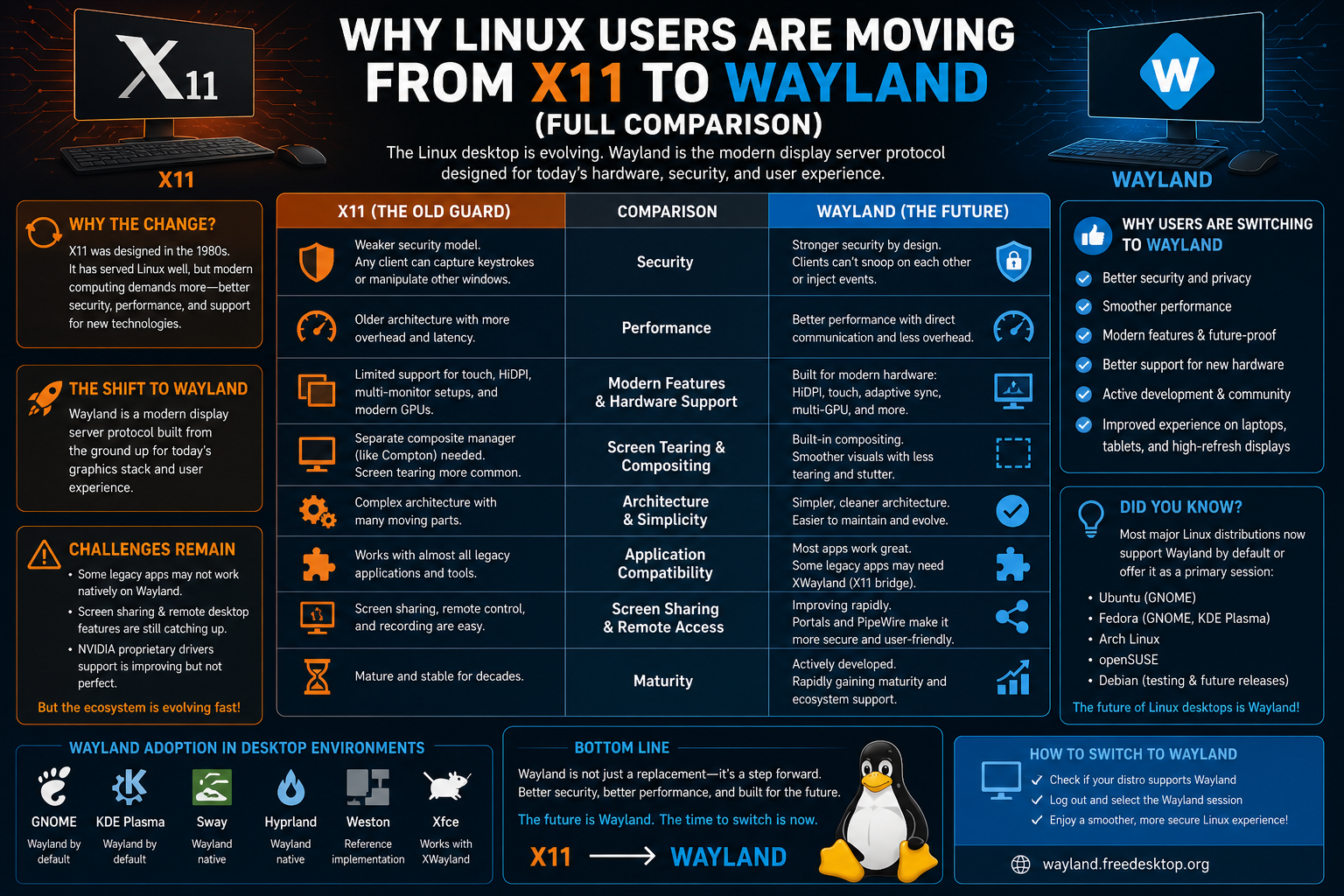
Modern Linux desktop systems rely on a complex but essential layer of software known as a display server. This component is responsible for handling how graphical applications are drawn on the screen, how windows are managed, and how user interactions like mouse movement and keyboard input are processed and delivered to applications. Without a display server, graphical interfaces would not function in the way users expect, and every application would struggle to communicate with the system’s visual environment.
For decades, one technology has dominated this space: X11. However, in recent years, a new alternative called Wayland has emerged with the goal of replacing it. To understand why this shift is happening, it is important to first understand how display servers work in general and what role X11 has played in shaping the Linux desktop experience.
A display server acts as a mediator between applications and the hardware. When a user opens an application such as a web browser or file manager, that application does not directly draw itself onto the screen. Instead, it sends instructions to the display server, which processes those instructions and communicates with the graphics hardware to render pixels on the screen. It also manages input devices, ensuring that keyboard strokes and mouse actions are correctly interpreted by the appropriate application.
This system has evolved over time, and while it has become highly functional and flexible, it has also accumulated complexity. Much of the ongoing discussion around Wayland and X11 revolves around how this complexity impacts performance, security, and maintainability in modern computing environments.
The Legacy of X11 and Its Architectural Foundations
X11, often referred to as the X Window System version 11, has been one of the foundational technologies behind graphical interfaces in Unix-like operating systems since the late 1980s. It was designed during a time when computing environments were very different from what they are today. At that time, networked computing was a central idea, and systems were often distributed across multiple machines rather than concentrated into a single powerful desktop.
One of the defining features of X11 is its client-server architecture. In this model, the X server is responsible for managing the display and input devices, while applications act as clients that communicate with the server to request graphical output. This separation was highly innovative for its time because it allowed applications to run on one machine while displaying their interface on another over a network connection.
This design is what makes remote graphical sessions possible even today. For example, a user can run an application on a remote machine and display its interface locally through network forwarding. This capability has kept X11 relevant for certain use cases, especially in server environments and academic or enterprise systems where remote access is essential.
However, the same architectural decisions that made X11 powerful in distributed environments have also introduced challenges in modern desktop computing. Over time, X11 has accumulated layers of extensions, patches, and compatibility fixes to support new hardware and evolving user expectations. As a result, the system has become increasingly complex, with many components interacting in ways that were not originally envisioned.
This complexity affects performance and maintainability. Because X11 was not designed for modern GPU-driven rendering pipelines or high-refresh-rate displays, it relies on multiple layers of communication between applications, the server, and the window manager. Each of these layers introduces potential overhead, which can lead to inefficiencies in rendering and input responsiveness.
How X11 Handles Window Management and Rendering
To understand the limitations of X11, it is useful to examine how it manages windows and rendering in practice. When an application wants to display a window, it sends a request to the X server. The server then coordinates with the window manager, which is responsible for determining how windows are positioned, resized, and decorated with borders and controls.
Once the window manager has made its decisions, the X server communicates with the graphics hardware to render the final output. This multi-step process ensures flexibility, but it also introduces multiple points where delays or inefficiencies can occur.
One of the key characteristics of X11 is that it does not enforce strict rules on how window managers should behave. This flexibility has allowed a wide variety of desktop environments to evolve, each with its own look, behavior, and feature set. However, it also means that consistency and optimization are harder to achieve.
Another important aspect of X11 is its handling of input events. Keyboard and mouse input are processed by the X server and then forwarded to the appropriate application. While this system is functional, it can introduce latency, especially when multiple layers of processing are involved. In modern computing environments where smooth animations and instantaneous responses are expected, even small delays can become noticeable.
Despite these limitations, X11 remains widely used because of its maturity and compatibility. Many applications and systems have been built around it, and transitioning away from it requires careful consideration of compatibility and stability.
The Motivation Behind Wayland’s Development
Wayland was introduced as a response to the growing complexity and limitations of X11. Instead of trying to extend X11 further, developers chose to design a completely new protocol that better reflects modern computing needs. The goal was not to replicate every feature of X11, but to simplify the architecture and remove unnecessary layers of abstraction.
At its core, Wayland is a protocol that defines how applications communicate with a display compositor. Unlike X11, it does not rely on a central server that handles all rendering requests. Instead, it allows applications to communicate more directly with the compositor, which is responsible for combining all graphical elements into a single final image displayed on the screen.
This design significantly reduces the number of intermediaries involved in rendering. By eliminating redundant steps, Wayland aims to reduce latency and improve responsiveness. It also allows better integration with modern graphics hardware, which is designed to handle compositing and rendering more efficiently than older systems.
Another important motivation behind Wayland is security. In the X11 model, applications have broad access to the display server, which can sometimes allow them to observe or interfere with other applications’ input and output. This behavior is a byproduct of the older design assumptions that prioritized flexibility over strict isolation.
Wayland addresses this issue by enforcing stronger separation between applications. Each application communicates primarily with the compositor and has limited visibility into other processes. This reduces the potential for unintended interference and improves the overall security model of the graphical system.
The Structural Simplicity of Wayland Compared to X11
One of the most notable differences between Wayland and X11 is the level of structural complexity. Wayland is intentionally designed to be minimalistic. It defines only the essential communication protocol between applications and the compositor, leaving many additional responsibilities to the compositor itself.
In this model, the compositor plays a central role. It is responsible for window management, input handling, and rendering coordination. This means that instead of having multiple layers of separate systems interacting with each other, Wayland consolidates many responsibilities into a single component.
This consolidation simplifies the overall system architecture. Developers working on compositors can optimize behavior more directly without needing to work around the constraints of a large legacy system. It also reduces the number of potential bottlenecks in the graphical pipeline.
However, this simplicity also means that Wayland is not a drop-in replacement for X11. Because it removes many built-in features of X11, applications and desktop environments must be adapted to work with it. This has led to a gradual transition rather than an immediate replacement.
Rendering Models and the Shift Toward Client-Side Drawing
One of the most significant conceptual differences between X11 and Wayland lies in how rendering is handled. X11 uses a model where the server plays a central role in coordinating rendering instructions from applications. In contrast, Wayland adopts a more modern approach where applications are responsible for rendering their own content and then passing the result to the compositor.
This approach is often referred to as client-side rendering. It allows applications to use modern graphics APIs more efficiently, taking advantage of GPU acceleration without unnecessary translation steps. The compositor then takes these rendered surfaces and combines them into a final image.
This model reduces the overhead associated with coordinating rendering across multiple components. It also allows for smoother animations and more consistent frame rates, especially in environments with high-resolution displays or multiple monitors.
However, client-side rendering also means that applications must be designed with Wayland compatibility in mind. Older applications that rely heavily on X11-specific behavior may require adaptation or compatibility layers to function correctly.
Input Handling and Responsiveness in Modern Systems
Input handling is another area where Wayland introduces significant improvements over X11. In traditional X11 systems, input events pass through the X server before reaching the application. This introduces additional processing steps that can contribute to input lag in certain scenarios.
Wayland streamlines this process by allowing the compositor to directly handle input events and deliver them to the appropriate application. This reduces the number of intermediaries and helps improve responsiveness.
The result is a more direct interaction between user actions and application responses. Movements of the mouse cursor, keyboard inputs, and touch gestures can feel more immediate because they are processed through fewer layers.
This improvement is particularly noticeable in high-performance environments such as gaming, multimedia applications, and modern desktop environments that emphasize smooth animations and transitions.
Early Adoption and Integration into Desktop Environments
Although Wayland represents a significant shift in how graphical systems are structured, its adoption has been gradual. Desktop environments such as GNOME and KDE have integrated Wayland support, allowing users to experiment with it while still maintaining compatibility with X11-based applications.
This coexistence has been an important factor in Wayland’s development. Rather than forcing a sudden transition, Linux distributions have allowed users to choose between X11 and Wayland depending on their needs and compatibility requirements.
This dual-support approach has helped identify issues, improve stability, and gradually expand application support. Over time, more applications have been updated to work natively with Wayland, reducing reliance on compatibility layers.
At the same time, X11 continues to remain present in many systems due to its maturity and widespread support. This parallel existence highlights the transitional nature of the current Linux graphical ecosystem, where both old and new technologies continue to play important roles.
Wayland Compositors and the New Desktop Architecture
One of the most important concepts in the Wayland ecosystem is the compositor. Unlike X11, where the display server and window manager are separate components with distinct responsibilities, Wayland combines much of this functionality into the compositor itself. This shift changes how the entire graphical stack is structured and how desktop environments are built.
A Wayland compositor is responsible for multiple tasks at once. It manages window placement, handles input events, coordinates rendering, and communicates directly with applications. In many ways, it becomes the central authority of the graphical session. This consolidation reduces complexity in the overall system but increases the importance of the compositor’s design and implementation quality.
Popular desktop environments such as GNOME and KDE Plasma implement their own Wayland compositors. For example, the GNOME environment uses Mutter as its compositor, while KDE Plasma relies on KWin. These components have been extended significantly to support Wayland protocols while still maintaining compatibility with older X11 applications.
Because the compositor plays such a central role, its performance directly impacts the user experience. Smooth window animations, fast input response, and efficient rendering all depend on how well the compositor manages system resources. This has led to a more tightly integrated desktop experience compared to the modular structure of X11-based systems.
The Role of XWayland in Compatibility Bridging
A major challenge in the transition from X11 to Wayland is application compatibility. Since X11 has been used for decades, a vast number of applications were built specifically for it. Rewriting or updating all of these applications is not practical in the short term, so compatibility layers are required.
This is where XWayland becomes essential. XWayland is a compatibility layer that allows X11 applications to run inside a Wayland session. It acts as an X server running on top of a Wayland compositor, translating X11 calls into Wayland-compatible instructions.
This approach ensures that older applications continue to function without modification while users transition to Wayland. From the user’s perspective, X11 applications appear to run normally alongside native Wayland applications, even though they are being translated behind the scenes.
However, this translation layer introduces some overhead. While performance is generally acceptable, it is not as efficient as native Wayland applications. Over time, as more software is updated to support Wayland directly, reliance on XWayland is expected to decrease.
XWayland plays a crucial role in making the transition gradual rather than disruptive. Without it, the adoption of Wayland would have been significantly more difficult due to the sheer volume of existing X11 software.
Security Improvements in Wayland’s Design
Security is one of the key areas where Wayland offers significant improvements over X11. The X11 architecture was designed in an era when multi-user security threats were less of a concern, and as a result, it allows applications a relatively high level of access to the display system.
In X11, any application can potentially observe or interact with input events from other applications. This means that keylogging or screen capturing can be implemented without explicit permission from the user or system. While modern extensions and security patches have mitigated some of these issues, the underlying architecture still presents challenges.
Wayland addresses these concerns by enforcing strict isolation between applications. Each application is only allowed to communicate with the compositor and does not have direct access to input events or the content of other windows. This significantly reduces the attack surface for malicious software.
Screen capturing and recording in Wayland are handled through explicit permission systems. Instead of any application being able to access the screen, applications must request access through the compositor, which can grant or deny permission based on user settings.
This design aligns more closely with modern security expectations, where applications operate within controlled boundaries rather than having broad system-level visibility.
Performance Considerations and Rendering Efficiency
Performance is often cited as one of the primary advantages of Wayland over X11. The reduction in intermediary layers allows for more efficient communication between applications and the display system. This is particularly noticeable in scenarios involving animations, video playback, and fast window interactions.
In X11, rendering involves multiple steps, including communication between the client, server, and window manager. Each of these steps introduces potential delays. In contrast, Wayland reduces this chain by allowing applications to render directly and pass the result to the compositor.
This streamlined process improves frame consistency and reduces latency. It also allows better utilization of modern GPU capabilities, which are designed to handle compositing tasks efficiently.
However, performance improvements are not universal. In some cases, especially with older hardware or poorly optimized compositors, Wayland may not always outperform X11. The efficiency of Wayland depends heavily on the implementation quality of the compositor and drivers.
Despite this, most modern systems benefit from Wayland’s architecture, particularly when running modern desktop environments designed with GPU acceleration in mind.
Multi-Monitor and High-DPI Display Handling
Modern computing environments often involve multiple monitors with varying resolutions and scaling factors. Handling these configurations efficiently is a complex task for any display system.
X11 was not originally designed with high-DPI displays or dynamic multi-monitor setups in mind. As a result, support for these features has been added gradually through extensions and workarounds. This can sometimes lead to inconsistent behavior across different applications and environments.
Wayland, on the other hand, was designed with modern display setups in mind. It provides better support for per-monitor scaling, allowing each display to maintain its own resolution and scaling factor independently. This results in clearer rendering on high-resolution displays without affecting other screens.
Multi-monitor setups also benefit from Wayland’s architecture. Because the compositor has full control over rendering, it can manage multiple displays more efficiently and consistently. This reduces issues such as screen tearing, inconsistent refresh rates, and input misalignment between monitors.
These improvements make Wayland particularly well-suited for modern workstations and laptops that frequently connect to external displays or operate in mixed-resolution environments.
Graphics Drivers and Hardware Integration
The relationship between display servers and graphics drivers is a critical part of system performance. In X11, the interaction between drivers, the X server, and the window manager can become complex, especially when dealing with proprietary drivers or multiple rendering backends.
Wayland simplifies this interaction by integrating more directly with modern graphics APIs such as EGL and Vulkan. This allows applications and compositors to communicate more efficiently with GPU hardware.
Open-source drivers, particularly those developed for Intel and AMD hardware, have strong support for Wayland. These drivers are often optimized for modern Linux graphics stacks and integrate well with compositors like GNOME Mutter and KWin.
NVIDIA support has historically been more complex due to proprietary driver design, but recent improvements have significantly increased compatibility with Wayland sessions. This has helped expand Wayland adoption across a wider range of hardware configurations.
By reducing dependency on legacy X11 rendering paths, Wayland allows for a more unified and modern graphics pipeline that aligns closely with current hardware capabilities.
Remote Desktop and Network Display Challenges
One of the strongest historical features of X11 is its ability to support network transparency. Applications can run on one machine while being displayed on another, making remote graphical sessions relatively straightforward.
Wayland does not include built-in network transparency in the same way. Instead, it focuses on local display rendering, which simplifies the architecture but removes some of the flexibility that X11 provided.
Remote desktop functionality in Wayland is typically implemented through additional services rather than being part of the core protocol. This separation allows for more secure and controlled remote access but requires additional configuration.
While this approach improves security and consistency, it also means that Wayland is less naturally suited for network-based graphical workflows compared to X11. As a result, environments that rely heavily on remote graphical sessions may still prefer X11 in certain cases.
This difference highlights the philosophical shift between the two systems: X11 prioritizes flexibility and network transparency, while Wayland prioritizes simplicity and security.
Gaming and Multimedia Performance Differences
Gaming and multimedia applications are particularly sensitive to latency and rendering performance. As a result, the differences between X11 and Wayland can become more noticeable in these contexts.
Wayland’s reduced overhead and improved synchronization with modern graphics APIs often result in smoother frame delivery and reduced input lag. This can improve the overall experience in fast-paced applications where responsiveness is critical.
Additionally, Wayland’s compositing model helps eliminate issues such as screen tearing, which can occur in X11 environments when frame synchronization is not properly managed.
However, compatibility issues can still arise with certain older games or applications that were designed specifically for X11. In these cases, XWayland provides a fallback mechanism, although performance may vary depending on the implementation.
Multimedia applications such as video players also benefit from Wayland’s efficient rendering pipeline, particularly when hardware acceleration is properly utilized.
Application Ecosystem and Development Adaptation
The transition from X11 to Wayland requires changes not only at the system level but also in application development practices. Developers must adapt their software to use Wayland protocols instead of relying on X11-specific features.
Modern toolkits such as GTK and Qt have added support for Wayland, allowing many applications to function without modification. However, older applications that directly interact with X11 require more significant updates or rely on compatibility layers.
This transition has led to a gradual evolution in the Linux application ecosystem. Developers are increasingly encouraged to adopt abstraction layers that support multiple display backends, ensuring compatibility across both X11 and Wayland environments.
Over time, this approach is expected to reduce fragmentation and improve consistency across Linux applications. However, the transition period remains ongoing as legacy software continues to be used in many environments.
Input Methods, Touch Support, and Modern Interaction Models
Modern computing devices increasingly rely on diverse input methods, including touchscreens, stylus input, and gesture-based interactions. Wayland is better positioned to handle these input types due to its modern architecture.
X11’s input system was designed primarily around keyboard and mouse interactions, with support for additional input methods added later through extensions. This can lead to inconsistencies and limited functionality in some scenarios.
Wayland integrates input handling more directly into the compositor, allowing for more flexible and consistent support for modern input devices. This includes improved touch gesture recognition, better tablet support, and more precise input event handling.
These improvements make Wayland particularly well-suited for hybrid devices such as laptops with touchscreens or convertible tablets running Linux desktop environments.
System Stability and Long-Term Maintainability
Another important aspect of the comparison between X11 and Wayland is long-term maintainability. X11’s long history has resulted in a large and complex codebase that requires ongoing maintenance and incremental improvements.
Wayland’s design avoids many of these legacy complexities by starting with a simpler foundation. This makes it easier to maintain and extend over time, especially as new hardware and interaction models emerge.
However, this simplicity also places greater responsibility on compositors and desktop environments. Since Wayland delegates many responsibilities to these components, their quality directly affects system stability and user experience.
This shift represents a change in how the Linux graphical stack is maintained. Instead of a single centralized system handling all responsibilities, multiple components now share responsibility for delivering a complete desktop experience.
The Transition Landscape and the Reality of Coexistence
The shift from X11 to Wayland is not a sudden replacement but a gradual transformation that reflects the diversity of Linux environments. Unlike tightly controlled ecosystems, Linux distributions cater to a wide range of users, from casual desktop users to enterprise administrators and developers working on specialized systems. This diversity naturally slows down any sweeping change, especially when that change affects a foundational component like the display server.
For many users, the transition is almost invisible. Modern Linux distributions often provide Wayland as the default session while still offering X11 as a fallback option. This dual availability allows users to choose the environment that best fits their needs without forcing them into an unfamiliar or incompatible system. It also provides a safety net in case certain applications or workflows do not yet function correctly under Wayland.
At the same time, this coexistence highlights the complexity of the transition. Supporting both systems requires additional maintenance and testing by developers. Desktop environments, drivers, and applications must be validated across both X11 and Wayland to ensure consistent behavior. This creates additional workload but also ensures that users are not left behind during the transition.
The reality is that both systems currently serve important roles. Wayland represents the future direction of Linux graphics, while X11 continues to provide stability and compatibility for existing software. The transition is less about replacing one with the other and more about gradually shifting the balance as technology and user expectations evolve.
Practical Use Cases Where X11 Still Holds Value
Despite the advantages of Wayland, X11 remains relevant in several practical scenarios. One of the most significant areas is legacy software support. Many applications, especially older or specialized tools, were built specifically for X11 and may not function correctly under Wayland without compatibility layers.
In enterprise environments, stability and predictability often take precedence over adopting new technologies. Systems that rely on well-established workflows may prefer X11 because it has been tested extensively over decades. Even small changes in behavior can disrupt critical operations, making organizations cautious about switching to newer systems.
Another area where X11 continues to excel is remote graphical access. Its built-in support for network transparency allows applications to run on remote servers while displaying their interface locally. This capability is particularly useful in research, development, and server administration contexts where graphical tools are used over network connections.
While Wayland can support remote access through additional tools, the experience is not as deeply integrated as it is with X11. This difference means that users who rely heavily on remote graphical workflows may continue to prefer X11 for the foreseeable future.
X11 also remains a reliable fallback in cases where hardware compatibility issues arise. Although Wayland support has improved significantly, certain configurations may still encounter problems depending on drivers or specific hardware setups. Having X11 available ensures that users can continue working without interruption.
Situations Where Wayland Clearly Excels
While X11 maintains its place in certain areas, Wayland demonstrates clear advantages in modern desktop environments. One of the most noticeable improvements is in the smoothness of graphical interactions. Animations, window transitions, and scrolling tend to feel more fluid due to reduced latency and improved synchronization with the display hardware.
Wayland also excels in handling modern display technologies. High-resolution screens, variable refresh rates, and multi-monitor setups are managed more effectively thanks to its design. Users working with high-DPI displays often notice better scaling behavior and more consistent rendering across applications.
Security is another area where Wayland stands out. Its stricter isolation model prevents applications from accessing input or display data from other applications without permission. This makes it more aligned with modern expectations of application security and privacy.
In addition, Wayland provides a more predictable environment for developers building new applications. Its simplified architecture reduces the number of edge cases and inconsistencies that developers must account for. This can lead to more reliable software and a more consistent user experience across different systems.
For everyday desktop use, especially on modern hardware, Wayland often delivers a more responsive and polished experience. This is why many distributions have chosen it as the default option for new installations.
The Evolution of Desktop Environments and User Experience
The adoption of Wayland has influenced how desktop environments are designed and developed. Because the compositor takes on a central role, desktop environments have become more integrated systems rather than collections of loosely connected components.
This integration allows for more cohesive user experiences. Features such as window snapping, workspace management, and visual effects can be implemented more efficiently when they are controlled by a single component. This results in smoother interactions and fewer inconsistencies.
At the same time, this approach changes the development model. Instead of relying on a shared display server with standardized behavior, each compositor can implement features differently. This can lead to variation between desktop environments, although common protocols help maintain a degree of consistency.
User experience improvements also extend to input handling. Touch gestures, stylus input, and advanced pointer interactions are more naturally supported in Wayland environments. This makes Linux desktops more adaptable to modern hardware trends, including touch-enabled devices and hybrid laptops.
Overall, the shift toward Wayland encourages a more unified and responsive desktop experience, although it also requires careful coordination between developers to maintain compatibility across environments.
Challenges That Continue to Affect Wayland Adoption
Despite its advantages, Wayland is not without challenges. One of the most significant obstacles is the need for application updates. While many modern applications support Wayland, some older or niche software still relies heavily on X11-specific features.
This creates a dependency on compatibility layers such as XWayland, which, while effective, do not provide the same level of performance or integration as native Wayland applications. Until more software is updated, this dependency will remain a factor in the transition.
Another challenge is fragmentation in implementation. Because Wayland delegates many responsibilities to compositors, different desktop environments may implement features in slightly different ways. This can create inconsistencies that developers must account for when building applications.
Hardware compatibility, although improved, can still present issues in certain cases. Proprietary drivers, unique hardware configurations, or less common devices may not always work seamlessly with Wayland. While these issues are becoming less frequent, they still influence user decisions.
Documentation and learning curves also play a role. Users and administrators familiar with X11 may need time to adapt to Wayland’s different tools and workflows. This includes changes in how configuration, troubleshooting, and customization are handled.
These challenges do not diminish Wayland’s potential, but they highlight the complexity of replacing a long-established system with a newer one.
The Role of Community and Open Development
The development of both X11 and Wayland is deeply rooted in the open-source community. However, Wayland’s evolution reflects a more modern approach to collaborative development. Its design encourages contributions from a wide range of developers, including those working on desktop environments, graphics drivers, and application frameworks.
This collaborative approach has accelerated the pace of improvement. Issues are identified and addressed through community feedback, and new features are developed in response to real-world use cases. This dynamic process helps ensure that Wayland continues to evolve in ways that align with user needs.
Community involvement also plays a role in testing and adoption. Users who experiment with Wayland sessions provide valuable feedback that helps identify bugs and improve stability. This iterative process is essential for refining the system and preparing it for broader use.
At the same time, the open nature of development allows for experimentation. Different compositors and tools can explore new ideas without being constrained by a single centralized design. This flexibility encourages innovation but also requires coordination to maintain compatibility.
The ongoing collaboration between developers, users, and organizations ensures that Wayland continues to mature as a viable successor to X11.
The Future Direction of Linux Graphics Systems
Looking ahead, the trajectory of Linux graphics systems suggests a gradual but steady shift toward Wayland. As more applications adopt Wayland support and hardware compatibility continues to improve, the need for X11 will diminish over time.
This transition is likely to be evolutionary rather than revolutionary. X11 will continue to exist as long as it is needed, particularly for legacy systems and specialized use cases. However, new development efforts are increasingly focused on Wayland and its associated technologies.
Advancements in graphics hardware, input devices, and display technologies will further reinforce this shift. Wayland’s design is better suited to adapt to these changes, making it a more sustainable foundation for future development.
At the same time, the lessons learned from X11’s long history continue to influence Wayland’s evolution. Developers are mindful of avoiding the accumulation of unnecessary complexity, aiming to maintain a balance between functionality and simplicity.
The future of Linux graphics is not defined by a single moment of change but by a continuous process of improvement and adaptation. Wayland represents a step toward a more modern and efficient system, but its success depends on ongoing collaboration and refinement.
Choosing Between Wayland and X11 in Practice
For users, the choice between Wayland and X11 often comes down to practical considerations rather than theoretical advantages. Factors such as hardware compatibility, application requirements, and personal preferences all play a role.
Users who prioritize stability and compatibility, particularly in environments with legacy applications, may find X11 to be the more reliable option. Its long history and widespread support make it a safe choice for many scenarios.
On the other hand, users who value performance, security, and modern features may prefer Wayland. Its improvements in responsiveness and display handling can enhance the overall desktop experience, especially on newer systems.
Experimentation is often the best approach. Many systems allow users to switch between Wayland and X11 sessions easily, making it possible to evaluate both options in real-world conditions. This hands-on experience provides valuable insight into how each system performs in specific use cases.
Ultimately, the decision is not about choosing a universally better system but about selecting the one that best aligns with individual needs and workflows. As the transition continues, the balance will gradually shift, but both systems will remain part of the Linux ecosystem for some time.
The Broader Impact on the Linux Ecosystem
The evolution from X11 to Wayland reflects broader trends within the Linux ecosystem. It highlights the community’s willingness to rethink foundational technologies and adapt to changing requirements. This adaptability is one of the strengths of open-source development.
The transition also underscores the importance of collaboration between different parts of the ecosystem. Display servers, desktop environments, drivers, and applications must all work together to deliver a seamless user experience. Changes in one area often require adjustments in others.
As Wayland continues to mature, it is likely to influence not only desktop systems but also other areas such as embedded devices, mobile platforms, and specialized computing environments. Its simplified architecture and modern design make it suitable for a wide range of applications.
At the same time, the legacy of X11 serves as a reminder of the challenges involved in maintaining long-lived systems. Balancing innovation with stability is an ongoing challenge, and the transition to Wayland represents an effort to address this balance in a forward-looking way.
The journey from X11 to Wayland is not just a technical transition but also a reflection of how the Linux community evolves. It demonstrates the ability to build on past achievements while embracing new ideas, ensuring that the ecosystem remains relevant in an ever-changing technological landscape.
Conclusion
The comparison between Wayland and X11 reflects more than just a technical debate—it represents a broader shift in how graphical systems are designed, maintained, and experienced in modern Linux environments. For decades, X11 has served as the backbone of graphical computing on Unix-like systems, offering flexibility, network transparency, and a level of stability that has stood the test of time. Its architecture, while innovative for its era, was built around assumptions that no longer fully align with today’s computing landscape. As hardware capabilities have advanced and user expectations have evolved, the limitations of X11 have become more apparent.
Wayland emerges as a response to these limitations, offering a cleaner, more efficient, and security-focused approach to managing graphical output. By simplifying the communication between applications and the display system, Wayland reduces latency, improves rendering performance, and creates a more responsive user experience. Its emphasis on modern graphics pipelines and streamlined design makes it better suited for high-resolution displays, multi-monitor setups, and advanced input methods that are increasingly common today.
At the same time, the transition from X11 to Wayland is not a straightforward replacement. The deep-rooted presence of X11 across applications, systems, and workflows means that it continues to play a crucial role in many environments. Compatibility remains a significant factor, particularly for legacy software and specialized use cases that depend on X11’s long-established behavior. This is why both systems currently coexist, allowing users to choose the one that best fits their needs while the ecosystem gradually adapts.
The introduction of compatibility layers such as XWayland highlights the practical approach taken by the Linux community. Rather than forcing an abrupt shift, the transition is being handled in a way that preserves usability and minimizes disruption. This gradual evolution ensures that users can continue working effectively while benefiting from the improvements that Wayland brings.
Security is another area where the differences between the two systems are particularly meaningful. Wayland’s stricter isolation between applications reflects modern expectations around privacy and system integrity. By limiting how applications interact with each other, it reduces the risk of unintended data access and creates a more controlled environment. This shift aligns with broader trends in software design, where security is treated as a fundamental requirement rather than an afterthought.
Performance improvements further reinforce Wayland’s role as the future direction of Linux graphics. Smoother animations, reduced input lag, and better synchronization with display hardware contribute to a more polished and fluid experience. While these improvements may vary depending on hardware and implementation, they represent a clear step forward in how graphical systems operate.
Ultimately, the choice between Wayland and X11 depends on context. Users who rely on stability, legacy compatibility, or remote graphical workflows may continue to find X11 more suitable for their needs. Those who prioritize modern features, responsiveness, and security are more likely to benefit from adopting Wayland. The ability to switch between the two provides flexibility during this period of transition.
As development continues and more applications adopt Wayland natively, its role within the Linux ecosystem will become increasingly prominent. The shift is not defined by a single moment but by a continuous process of refinement and adoption. Both systems represent different stages in the evolution of graphical computing, and understanding their strengths and limitations allows users to make informed decisions based on their specific requirements.