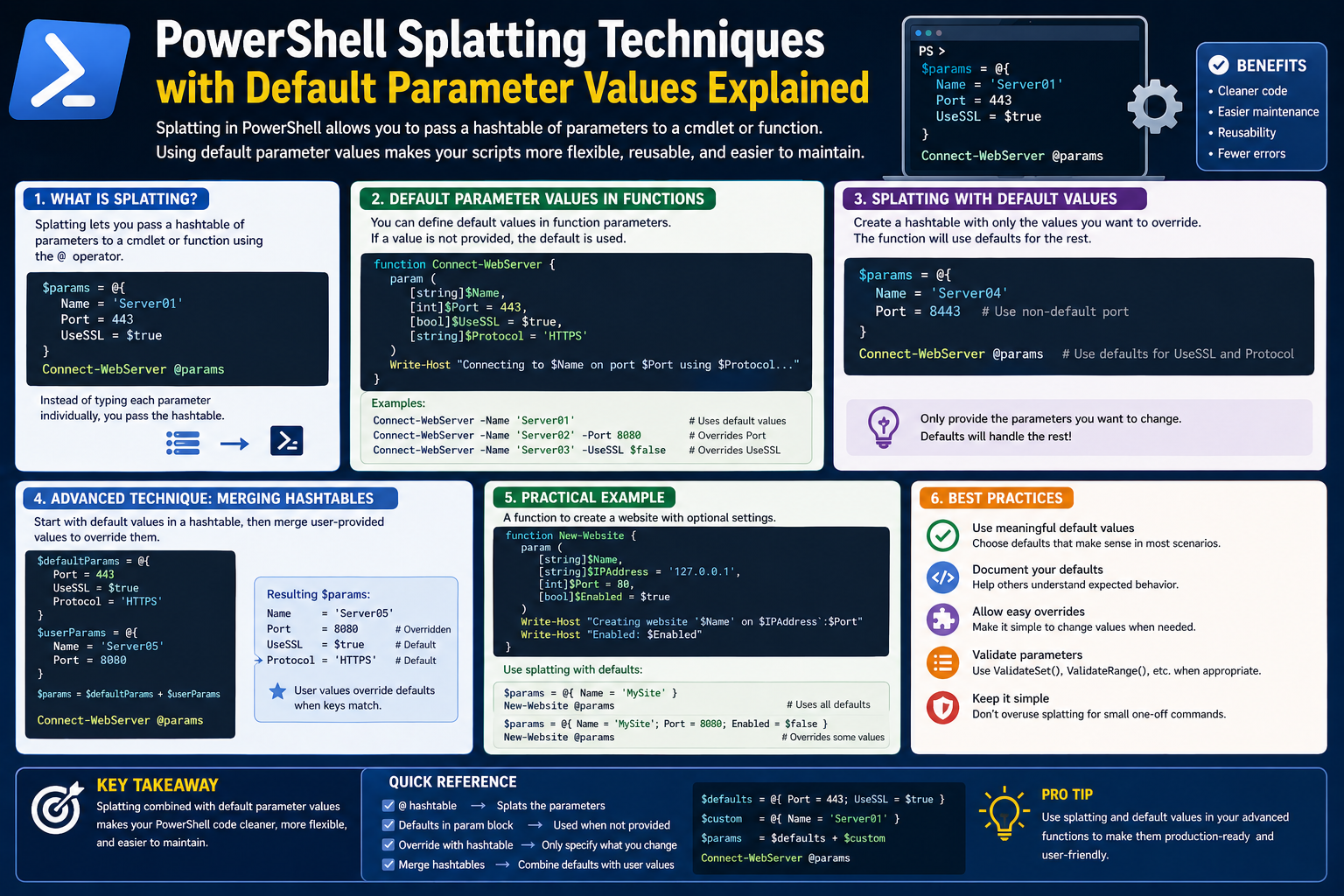
PowerShell has become one of the most important tools in modern Windows environments because it provides a consistent way to automate and control system tasks. At its core, it is built around a concept known as cmdlets, which are small, single-purpose commands designed to perform specific actions. These cmdlets form the foundation of almost everything you do inside PowerShell.
Unlike traditional graphical tools, where actions are performed through menus and windows, PowerShell relies on structured commands that can be combined and reused. This approach gives system administrators and IT professionals the ability to manage everything from a single machine to large enterprise networks in a repeatable and efficient way.
One of the reasons PowerShell is so widely adopted is that it is already included in modern Windows operating systems. This means that anyone working in a Windows-based environment already has access to it without installing additional software. As organizations continue to rely on automation, remote administration, and large-scale configuration management, PowerShell becomes an essential skill rather than an optional one.
Cmdlets are designed to be predictable and consistent. They follow a verb-noun structure that makes them easier to understand even for beginners. For example, actions like retrieving information, setting configurations, or removing items follow similar naming patterns. This consistency allows users to quickly learn how to interact with the system even when working with unfamiliar components.
However, while cmdlets are simple individually, they become significantly more powerful when combined. This is where PowerShell begins to shift from a basic command-line tool into a full automation language.
Why Parameters Matter in PowerShell Commands
Every cmdlet in PowerShell becomes more flexible through the use of parameters. Parameters are inputs that allow users to modify how a command behaves. Instead of writing multiple different commands for different scenarios, parameters let you adjust behavior dynamically.
For example, a single command might be used to retrieve system information, but parameters can control which computer to query, which type of data to return, or how the results should be filtered. This flexibility is what makes PowerShell highly scalable.
As users begin working with more advanced tasks, they naturally start adding more parameters to their commands. This is where the complexity begins to grow. A simple command that initially performs one action may evolve into something that includes multiple conditions, filters, targets, and configurations.
While this is powerful, it also introduces a new challenge: readability. When too many parameters are placed into a single line, the command becomes harder to understand at a glance. Even experienced users may struggle to quickly identify what each part of the command is doing, especially when returning to older scripts.
This is where structure becomes important. The way parameters are written and organized directly affects how maintainable and understandable a script will be over time.
The Challenge of Long Command Lines in Real-World Automation
As PowerShell usage increases in real-world environments, commands often grow beyond simple one-line instructions. In professional environments, scripts are used for automation tasks such as managing user accounts, configuring services, gathering system data, or monitoring network devices.
In these scenarios, a single command may need to include multiple parameters to ensure accuracy and control. While this is technically efficient, it creates practical issues when viewed from a human perspective.
Long command lines are difficult to read, especially when they stretch across a screen. Developers and administrators often find themselves scrolling horizontally to review or debug a single command. This makes it harder to identify mistakes, understand logic flow, or update specific values.
Another issue is maintainability. When commands are densely packed into a single line, even small changes can become risky. Modifying one parameter may accidentally affect another, especially when everything is visually compressed together.
Debugging also becomes more time-consuming. When something goes wrong, identifying the exact point of failure inside a long command requires careful inspection. This slows down troubleshooting and increases the chance of human error.
These challenges do not come from PowerShell itself but from how commands are structured. The language is designed to be flexible, but without good structure, that flexibility can turn into complexity.
Introducing a Cleaner Approach: Concept of Bundled Parameters
To address the issue of long and complex command lines, PowerShell introduces a more structured approach to handling parameters. Instead of writing every parameter directly inside a command, they can be grouped together in a logical structure and then passed as a single unit.
This approach is commonly known as parameter bundling. The idea is simple: rather than writing everything in one continuous line, parameters are organized separately and then supplied to the command in a more controlled way.
This does not change what the command does. The underlying execution remains the same. What changes is how the information is delivered to the command.
By separating parameters from the main command, users gain better control over structure and readability. Each parameter becomes easier to manage because it is no longer buried inside a long sequence of text. Instead, it exists as part of a clearly defined collection of inputs.
This approach also aligns with how modern scripting practices emphasize clarity and maintainability. Scripts are no longer just written for execution; they are written to be read, modified, and reused by others over time.
How Parameter Bundling Improves Readability and Maintenance
One of the biggest advantages of grouping parameters is improved readability. When parameters are separated from the main command, it becomes much easier to scan and understand what is happening.
Instead of interpreting a long sequence of text, users can quickly identify each parameter and its associated value. This structured view reduces cognitive load and makes scripts more approachable, even for those who did not originally write them.
Maintenance also becomes significantly easier. When changes are required, users can modify individual parameters without disturbing the overall structure of the command. This reduces the risk of accidental errors and improves confidence when making updates.
Another important benefit is consistency. When working in team environments, multiple people may need to read or modify the same scripts. A structured parameter approach ensures that everyone follows the same pattern, reducing confusion and improving collaboration.
This method also supports scalability. As automation needs grow, scripts often need additional parameters. A structured approach allows these additions to be made cleanly without turning the command into an unreadable block of text.
Over time, this leads to more stable and reliable automation systems, especially in environments where scripts are reused across multiple machines or departments.
Understanding the Structure Behind Parameter Bundles
Although parameter bundling is a conceptual improvement in how commands are written, it is based on a simple underlying structure. At its core, it relies on the idea of pairing information together in a structured format.
Each parameter consists of two parts: a name and a value. The name identifies what the parameter controls, while the value defines the specific input being provided. When grouped, these pairs form a structured collection of settings.
This structure behaves like a container that holds multiple configuration options. Instead of passing each option individually, the entire container is passed to the command at once.
This approach is powerful because it separates configuration from execution. The command itself focuses on acting, while the parameter structure defines how that action should behave.
This separation of concerns is one of the reasons PowerShell remains flexible and scalable. It allows users to build reusable configurations that can be applied across different commands and scenarios.
The concept also makes it easier to reuse parameter sets. Instead of rewriting the same inputs repeatedly, a structured set of parameters can be prepared once and used whenever needed. This reduces repetition and improves efficiency in script writing.
Practical Thinking Behind Applying Bundled Parameters in Automation Workflows
In real-world automation environments, efficiency and consistency are essential. System administrators often perform repetitive tasks across multiple systems, and even small inefficiencies can add up over time.
Bundling parameters helps streamline these workflows by reducing redundancy. Instead of rewriting the same configuration details repeatedly, users can prepare structured parameter sets that can be reused whenever needed.
This approach is especially useful when working with large environments where similar commands are executed across many systems. It ensures that the same logic is applied consistently, reducing the chance of variation or human error.
It also helps when scripts need to be updated. Instead of modifying multiple lines across different scripts, users can update a single structured parameter set and apply it wherever necessary.
Another advantage is clarity during collaboration. When multiple team members work on automation scripts, structured parameter usage ensures that everyone understands the configuration being applied without needing to interpret complex command lines.
This makes onboarding new team members easier and reduces the learning curve associated with understanding existing automation systems.
Common Misconceptions and Mental Barriers Around Structured Parameter Use
Despite its advantages, structured parameter usage is sometimes misunderstood. One common misconception is that it changes how commands behave. In reality, it does not alter execution at all. The command performs the same actions regardless of how the parameters are structured.
Another misunderstanding is that it is only useful for advanced users. While it is true that it becomes more valuable in complex environments, even beginners benefit from using structured parameters because it encourages better organization from the start.
Some users also assume that writing parameters individually is faster or simpler. While this may seem true for very small commands, it quickly becomes inefficient as complexity increases. Structured approaches actually save time in the long run by reducing repetition and improving clarity.
There is also a psychological barrier where users feel more comfortable writing everything in a single line because it feels more direct. However, this short-term comfort often leads to long-term difficulty when scripts need to be maintained or debugged.
Understanding these misconceptions is important because it helps users transition toward more scalable scripting practices.
Early Design Philosophy Behind Flexible Parameter Handling
PowerShell was designed with flexibility in mind from the beginning. Unlike older command-line systems, it was built to support both simplicity and complexity at the same time.
One of the key design ideas was to allow users to interact with commands in multiple ways depending on their needs. Whether writing quick one-line commands or building large automation scripts, the system adapts to both scenarios.
This flexibility is what enables structured parameter handling. Instead of forcing users into a single rigid format, PowerShell allows parameters to be organized in a way that best suits the task at hand.
This design philosophy reflects a broader shift in system administration toward automation and scalability. As environments became more complex, tools needed to evolve to support more structured and maintainable workflows.
By allowing parameters to be grouped and reused, PowerShell provides a foundation for building more advanced automation systems without sacrificing usability.
Transitioning from Traditional Command Writing to Structured Parameter Handling
Moving from traditional single-line command writing to structured parameter handling is more of a mindset shift than a technical change. The commands themselves remain the same, but the way they are organized becomes more intentional.
At first, users may continue writing commands in a linear format out of habit. However, as scripts grow and complexity increases, the benefits of structure become more apparent.
Over time, structured parameter usage becomes a natural part of scripting practice. It allows users to think in terms of configuration and execution separately, which leads to cleaner and more maintainable automation.
This transition is especially important in professional environments where scripts are shared, reviewed, and reused across teams. A structured approach ensures that automation remains reliable and understandable even as systems evolve.
Evolution of Parameter Handling in PowerShell Automation
As PowerShell usage expands in real-world environments, the way parameters are managed naturally evolves from simple command usage into more structured scripting techniques. Early use typically involves direct parameter entry within a command, where values are written inline and executed immediately. This works well for quick tasks, but it becomes increasingly inefficient as automation requirements grow.
When administrators begin writing scripts that handle repetitive operations, parameter management becomes a central concern. Scripts may need to target multiple systems, apply consistent configuration rules, or adapt dynamically based on input conditions. In such scenarios, writing parameters repeatedly within each command introduces redundancy and increases the risk of inconsistency.
This evolution pushes scripting practices toward abstraction. Instead of embedding configuration details directly into commands, PowerShell encourages separation of data and execution. This shift allows parameters to be managed as structured data rather than fixed text embedded in commands.
As this approach becomes more common, scripts begin to resemble modular systems rather than linear command sequences. Parameters are no longer treated as temporary inputs but as reusable components that define behavior across multiple operations. This change in thinking is what ultimately leads to more scalable and maintainable automation workflows.
Understanding the Internal Mechanics Behind Splatting
At the core of parameter splatting is a structured data container that holds key-value pairs. Each key represents a parameter name, while each value represents the data assigned to that parameter. This structure is then passed to a command in a way that PowerShell interprets as standard parameter input.
What makes this approach powerful is how PowerShell internally binds these values. When a splatted structure is passed to a command, the engine maps each key to the corresponding parameter automatically. This process is known as parameter binding, and it happens regardless of whether values are provided inline or through a structured collection.
This means that from the perspective of execution, there is no difference between a traditional command and a splatted one. The distinction exists only in how the data is organized before execution. This separation allows developers to focus on structure without affecting runtime behavior.
Splatting also supports flexibility in how data is constructed. Because the structure is built separately from the command, it can be modified, extended, or reused without rewriting the command itself. This makes it especially useful in scripts where conditions change dynamically or where multiple variations of a command need to be executed.
Another important aspect of splatting is that it supports readability at scale. As the number of parameters increases, inline commands become increasingly difficult to interpret. Splatting resolves this by externalizing parameter definitions, allowing the command itself to remain clean and focused solely on execution.
Relationship Between Named Parameters and Splatting Behavior
PowerShell supports both positional and named parameters, but splatting relies heavily on named parameter binding. Each key in a splatting structure must correspond to a valid parameter name for the target command. This explicit mapping removes ambiguity and ensures that values are correctly assigned.
Named parameters are particularly useful in complex commands because they clearly define intent. Instead of relying on position or order, each parameter is explicitly labeled, making scripts easier to understand and less prone to errors caused by misalignment.
Splatting enhances this clarity by grouping named parameters into a single structure. Instead of scattering named values across a long command line, they are centralized in one location. This improves both readability and maintainability.
When PowerShell processes a splatted structure, it validates each key against the available parameters of the cmdlet. If a key does not match a valid parameter, it is ignored or flagged depending on the context. This built-in validation helps prevent silent misconfigurations and ensures that only supported inputs are applied.
This relationship between naming and structure is one of the reasons splatting is considered a best practice in complex scripting scenarios. It reinforces clarity while maintaining strict alignment with cmdlet definitions.
Building Reusable Parameter Structures for Scalable Scripts
One of the most powerful aspects of splatting is the ability to create reusable parameter structures. Instead of defining parameters repeatedly for each command, a single structured collection can be created and reused across multiple operations.
This approach is particularly valuable in environments where the same configuration patterns are applied repeatedly. For example, when managing multiple systems with similar settings, a reusable parameter structure ensures consistency across all executions.
Reusable structures also reduce the cognitive load required to maintain scripts. Instead of reviewing multiple lines of repeated parameters, administrators can focus on a single centralized definition. This improves clarity and reduces the chance of inconsistency creeping into automation workflows.
In more advanced scenarios, reusable structures can be layered or combined. A base set of parameters can define general behavior, while additional modifications can be applied depending on context. This layered approach allows scripts to adapt dynamically while maintaining a stable foundation.
Over time, this method encourages modular scripting practices. Scripts become easier to extend, debug, and maintain because configuration logic is separated from execution logic. This separation is a key principle in scalable automation design.
Dynamic Parameter Construction in Real-Time Execution
In many automation scenarios, parameters cannot be fully defined in advance. Instead, they must be constructed dynamically based on conditions such as user input, system state, or external data sources. Splatting provides a natural way to handle this requirement.
Dynamic parameter construction involves building the parameter structure during script execution rather than defining it statically. This allows scripts to adjust behavior based on changing conditions without rewriting command logic.
For example, a script may decide whether to include certain parameters based on system availability or configuration checks. If a condition is met, additional parameters are added to the structure before execution. If not, they are excluded entirely.
This flexibility makes scripts more intelligent and adaptive. Instead of relying on rigid logic, they can respond to real-world variability in a controlled and structured manner.
Dynamic splatting also reduces unnecessary complexity in command lines. Rather than embedding conditional logic directly into commands, conditions are handled separately during parameter construction. This keeps execution clean and focused while still allowing advanced behavior.
Error Handling and Validation in Structured Parameter Usage
When working with structured parameters, error handling becomes more predictable and manageable. Because parameters are grouped, validation can occur before execution rather than during command processing.
This early validation approach helps identify issues such as missing values, incorrect parameter names, or incompatible configurations before a command is executed. As a result, scripts become more reliable and less prone to runtime failures.
PowerShell also performs internal validation when binding splatted parameters. If a required parameter is missing or incorrectly specified, the command will typically generate an error, preventing unintended execution.
This built-in safety mechanism is especially useful in automated environments where scripts may run without direct human supervision. By catching issues early, it reduces the risk of cascading failures across systems.
Structured parameter handling also makes debugging easier. Since parameters are defined in a centralized structure, it becomes simpler to inspect and verify values before execution. This improves transparency and reduces troubleshooting time when issues arise.
Performance Considerations in Large-Scale Automation
While splatting primarily improves readability and maintainability, it can also have indirect performance benefits in large-scale automation scenarios. By reducing redundancy and improving structure, scripts become easier for both humans and systems to process.
In environments where scripts are executed repeatedly across multiple systems, even small improvements in structure can lead to more efficient execution cycles. Cleaner scripts are less prone to duplication and unnecessary recalculations.
However, it is important to understand that splatting itself does not significantly change execution speed. The primary performance benefits come from improved script organization and reduced complexity, rather than changes in runtime processing.
More importantly, structured parameter usage reduces the likelihood of inefficient scripting patterns. When commands are easier to read and modify, developers are more likely to optimize logic rather than work around unclear structures.
This indirect improvement in performance is one of the long-term benefits of adopting structured scripting practices.
Improving Readability and Collaboration in Team Environments
In professional environments, scripts are rarely written by a single person. Instead, they are often created, reviewed, and maintained by multiple team members over time. In such scenarios, readability becomes a critical factor.
Splatting significantly improves collaboration by making parameter definitions more transparent. Instead of decoding long command lines, team members can quickly understand what each parameter does by reviewing a structured block of data.
This clarity reduces miscommunication and ensures that everyone working on a script has a consistent understanding of its behavior. It also makes onboarding new team members easier, as they can interpret existing scripts without needing to decode complex command structures.
Another advantage is consistency in style. When teams adopt structured parameter practices, scripts tend to follow a uniform pattern. This makes it easier to navigate and maintain large codebases, especially in environments where automation is widely used.
Over time, this consistency contributes to better documentation practices and more reliable automation systems.
Common Mistakes and Misunderstandings in Splatting Usage
Despite its advantages, splatting is sometimes used incorrectly, especially by those new to PowerShell scripting. One common mistake is using incorrect parameter names within the structure. Since keys must match valid cmdlet parameters exactly, even small spelling errors can cause failures.
Another issue arises when users attempt to mix incompatible parameter sets within a single structure. Some cmdlets have mutually exclusive parameters, and combining them incorrectly can lead to unexpected behavior.
There is also confusion around structure formatting. Because splatting relies on key-value organization, improper formatting can break the entire structure and prevent execution.
Some users also mistakenly assume that splatting changes how commands behave internally. In reality, it only changes how data is passed to the command, not how the command executes.
Understanding these common mistakes helps users adopt splatting more effectively and avoid unnecessary troubleshooting.
Expanding Script Flexibility Through Structured Design Thinking
Structured parameter usage encourages a broader shift in how scripts are designed. Instead of focusing on individual commands, developers begin thinking in terms of systems and workflows.
This shift leads to more modular scripts where configuration, logic, and execution are clearly separated. Each component becomes easier to manage independently, improving both flexibility and scalability.
As scripts become more modular, they can be reused across different scenarios with minimal modification. This reduces duplication and allows automation logic to be shared across teams and environments.
Structured design thinking also makes it easier to integrate scripts into larger automation frameworks. Because parameters are already organized logically, they can be adapted or extended without requiring major rewrites.
This approach aligns with modern automation principles, where maintainability and adaptability are prioritized over static scripting.
Introduction to Default Parameter Behavior in Structured Environments
Alongside splatting, PowerShell also supports the concept of default parameter behavior. This allows certain parameter values to be predefined so that they automatically apply when commands are executed.
This mechanism operates independently of splatting but complements it effectively. While splatting focuses on organizing parameters for individual commands, default parameter behavior focuses on setting global or contextual defaults.
When combined, these two approaches significantly reduce repetitive input. Frequently used values can be preconfigured, while splatting handles dynamic or command-specific customization.
This combination allows scripts to achieve both consistency and flexibility. Default values ensure stability, while splatting provides adaptability when needed.
Understanding how these two mechanisms interact is essential for building efficient and scalable PowerShell automation systems.
Deep Dive into PowerShell Default Parameter Values and Their Role in Automation
PowerShell introduces a powerful concept known as default parameter values, which allows certain inputs to be automatically applied whenever a command is executed. This mechanism reduces repetitive typing and ensures consistency across scripts and interactive sessions. Instead of manually specifying the same parameter values repeatedly, PowerShell can be instructed to assume predefined values unless explicitly overridden.
This capability becomes particularly valuable in environments where the same commands are executed frequently with similar configurations. For example, system administrators often interact with the same set of computers, services, or directories. By defining default values, they can streamline their workflows significantly.
Unlike splatting, which organizes parameters at the command level, default parameter values operate at a broader scope. They influence how commands behave globally or within a session, rather than being tied to a single execution. This makes them a powerful complement to structured parameter handling techniques.
The system responsible for managing these defaults is built around a specialized internal variable. This variable acts as a central registry where parameter rules are stored and referenced whenever a cmdlet is executed. When a command runs, PowerShell checks this registry to determine whether any default values apply.
This process happens automatically in the background, meaning users do not need to manually invoke or reference the defaults during execution. This seamless integration is what makes the feature so efficient in real-world automation scenarios.
How PowerShell Interprets and Applies Default Parameters
When a cmdlet is executed, PowerShell follows a structured process to determine how parameters should be resolved. First, it evaluates whether any values have been explicitly provided in the command. If a parameter is supplied directly, that value takes priority.
If a parameter is not explicitly provided, PowerShell then checks whether a default value has been defined for that parameter. If a matching default exists, it is automatically applied during execution.
This layered approach ensures that explicit user input always overrides predefined behavior. At the same time, it allows scripts to maintain consistent behavior when inputs are not provided.
This mechanism is particularly useful in scenarios where certain parameters are almost always the same. Instead of repeatedly specifying those values, users can rely on defaults to fill in the gaps.
It is important to understand that default parameters do not change the underlying behavior of cmdlets. They simply influence how missing inputs are handled. This distinction ensures that commands remain predictable and transparent, even when defaults are in use.
The Structure Behind Default Parameter Configuration
Default parameter values are stored in a structured format that maps cmdlets to parameter-value pairs. Each entry consists of a command reference, a parameter name, and the value that should be applied by default.
This structure allows PowerShell to quickly determine whether a default applies to a given command. When a cmdlet is invoked, the system checks this mapping and applies any relevant entries before execution begins.
One of the key strengths of this system is its flexibility. It supports precise targeting of individual cmdlets as well as broader patterns using wildcard matching. This means defaults can be applied selectively or across multiple commands, depending on the desired level of control.
For example, a default value can be applied to a specific cmdlet parameter combination, or it can be applied more broadly across multiple cmdlets that share similar parameter names.
This flexibility allows administrators to fine-tune behavior across different parts of their environment without needing to modify each script individually.
Enhancing Efficiency Through Predefined Parameter Behavior
One of the most significant advantages of default parameter values is the reduction of repetitive input. In many administrative workflows, the same parameters are used repeatedly across multiple commands.
Without defaults, each command would require manual input of these values, increasing both workload and the risk of inconsistency. With defaults in place, these values are automatically applied whenever needed.
This not only saves time but also improves accuracy. Human error is reduced because there are fewer opportunities to mistype or forget important parameters.
In large environments, this efficiency gain becomes even more impactful. Scripts that run across hundreds or thousands of systems benefit greatly from standardized parameter behavior.
Over time, this leads to more predictable and stable automation systems. When commands behave consistently, troubleshooting becomes easier,r and system behavior becomes more reliable.
Overriding Default Behavior for Specific Scenarios
While default parameters provide convenience, they are not rigid. One of their most important features is the ability to be overridden when necessary. This ensures that flexibility is never sacrificed for convenience.
When a command is executed with an explicitly defined parameter value, that value takes precedence over any default configuration. This allows users to temporarily adjust behavior without modifying the underlying defaults.
This override capability is essential in dynamic environments where conditions change frequently. For example, a script may typically target a local system by default,lt but occasionalneedsseed to target a remote system instead.
In such cases, the override ensures that the command behaves correctly for the specific situation without requiring changes to global configuration.
This balance between automation and control is a key design principle in PowerShell. It ensures that defaults enhance productivity without restricting flexibility.
Scoped Behavior and Context Awareness in Default Settings
Default parameter values are not always global. They can be defined within specific scopes, meaning their influence can be limited to a particular script, session, or context.
This scoped behavior allows for fine-grained control over how defaults are applied. For example, a script may define its own set of defaults that only apply during its execution. Once the script completes, those defaults no longer affect the environment.
This prevents unintended side effects and ensures that automation remains predictable. It also allows different scripts to define their own behavior without interfering with one another.
In interactive sessions, defaults can persist across multiple commands, making them useful for repetitive tasks. However, in scripted environments, scoping ensures isolation and prevents cross-contamination of settings.
This balance between persistence and isolation is what makes default parameter behavior both powerful and safe to use in complex environments.
Combining Default Parameters with Structured Parameter Handling
When default parameter values are combined with structured parameter handling techniques, the result is a highly efficient scripting environment. Splatting organizes parameters at the command level, while defaults provide baseline behavior across commands.
Together, they reduce redundancy and improve clarity. Default values handle repetitive inputs, while splatting manages dynamic or context-specific configurations.
This combination allows scripts to be both concise and expressive. Instead of repeating the same values or writing overly complex command lines, users can rely on a layered approach to parameter management.
This layered approach also improves maintainability. Changes to default behavior can be made centrally, while splatted parameters can be adjusted independently within individual scripts.
As a result, scripts become easier to scale and adapt over time. This is especially important in environments where automation requirements evolve frequently.
Advanced Use Cases for Default Parameter Customization
In more advanced scenarios, default parameter values can be used to enforce organizational standards. For example, administrators can define default behaviors that align with security policies or operational guidelines.
This ensures that all commands executed within a system adhere to predefined rules without requiring manual enforcement in every script.
Default values can also be used to simplify complex workflows. Instead of requiring users to specify multiple repetitive parameters, defaults can handle common configurations automatically.
This reduces cognitive load and allows users to focus on higher-level logic rather than repetitive configuration details.
Another advanced use case involves environment-specific configurations. Different environments, such as development, testing, and production,n may require different default behaviors. By adjusting defaults based on context, scripts can automatically adapt to their environment.
This approach reduces the need for environment-specific scripts and promotes reuse across different stages of deployment.
Debugging Challenges When Working with Default Parameters
While default parameter values provide significant benefits, they can also introduce debugging challenges if not properly understood. One common issue is unexpected behavior caused by hidden defaults.
Because defaults are applied automatically, users may not always realize that a parameter value is being set behind the scenes. This can lead to confusion when commands behave differently than expected.
To avoid this, it is important to have visibility into active default settings. Understanding which defaults are currently applied helps clarify how commands are being executed.
Another challenge arises when multiple defaults conflict with each other. In such cases, resolution rules determine which value takes precedence, but this can still lead to unexpected outcomes if not carefully managed.
Proper documentation and structured management of default settings help mitigate these issues and ensure predictable behavior.
Relationship Between Defaults and Command Predictability
Predictability is a key goal in any automation system. Commands should behave consistently under the same conditions, regardless of how or where they are executed.
Default parameter values contribute to this predictability by ensuring that missing inputs are handled consistently. Instead of relying on user memory or manual input, defaults provide a stable baseline behavior.
This consistency is especially important in automated workflows where commands may be executed without direct human supervision.
When combined with structured parameter handling, defaults help create a controlled execution environment where behavior is both predictable and adaptable.
This balance is essential for building reliable automation systems that can operate at scale without frequent manual intervention.
Impact of Default Parameters on Script Design Philosophy
The introduction of default parameter values influences how scripts are designed from the ground up. Instead of explicitly defining every detail within a script, developers can rely on predefined behavior for common scenarios.
This encourages a shift toward more abstract scripting practices. Scripts become focused on logic and flow rather than repetitive configuration details.
As a result, scripts become shorter, cleaner, and easier to understand. They also become more reusable, since they rely less on hardcoded values and more on configurable behavior.
This design philosophy aligns with modern automation principles, where flexibility and maintainability are prioritized over rigid structure.
By leveraging defaults effectively, scripts can adapt to different environments and use cases without requiring extensive modification.
Long-Term Benefits of Structured Parameter and Default Integration
When structured parameter handling and default parameter values are used together consistently, the long-term benefits become significant.
Scripts become easier to maintain because repetitive configurations are centralized. Changes can be made in one place rather than across multiple scripts.
Automation systems become more reliable because behavior is standardized across different commands and environments. This reduces variability and improves consistency.
Teams also benefit from improved collaboration. When scripts follow predictable patterns, they are easier to understand and modify by different contributors.
Over time, this leads to more mature automation practices where scripts evolve into reusable components rather than isolated pieces of logic.
This evolution supports scalability, maintainability, and long-term stability in complex Windows environments.
Conclusion
PowerShell splatting and default parameter values together represent a major shift in how command-line automation is written, maintained, and scaled in Windows environments. Instead of treating each command as a long, rigid line of instructions, these techniques encourage a more structured and intentional approach to scripting. This shift is not just about syntax or convenience—it reflects a deeper move toward clarity, reusability, and long-term maintainability in system administration.
Splatting addresses one of the most common challenges in PowerShell usage: overly long and difficult-to-read command lines. By grouping parameters into a structured collection, it separates configuration from execution. This makes scripts easier to read, modify, and debug, especially when commands grow in complexity. Rather than scanning a single dense line of text, users can clearly see each parameter and its value in an organized format. This improves understanding and reduces the likelihood of mistakes during editing or troubleshooting.
Default parameter values extend this idea by introducing a consistent baseline behavior for cmdlets. Instead of repeatedly specifying the same values across multiple commands, PowerShell allows those values to be predefined and automatically applied when needed. This reduces repetition, saves time, and ensures consistency across scripts and sessions. At the same time, defaults remain flexible because they can be overridden whenever a specific scenario requires different behavior. This balance between automation and control is what makes them especially powerful in real-world environments.
When combined, splatting and default parameters create a layered approach to script design. Defaults handle predictable and repetitive configurations, while splatting manages dynamic, context-specific inputs. Together, they allow scripts to remain both efficient and adaptable without sacrificing readability. This combination supports better collaboration among teams, as scripts become easier to interpret and maintain even when written by different individuals.
Beyond technical efficiency, these techniques also encourage better scripting habits. They promote modular thinking, where configuration is separated from logic, and reusable structures replace repetitive code. Over time, this leads to cleaner automation systems that are easier to scale and evolve as organizational needs change.
In modern IT environments where automation is essential, mastering these concepts is not just beneficial—it is foundational. They help transform PowerShell from a simple command-line tool into a structured automation framework capable of handling complex, large-scale operations with clarity and precision.