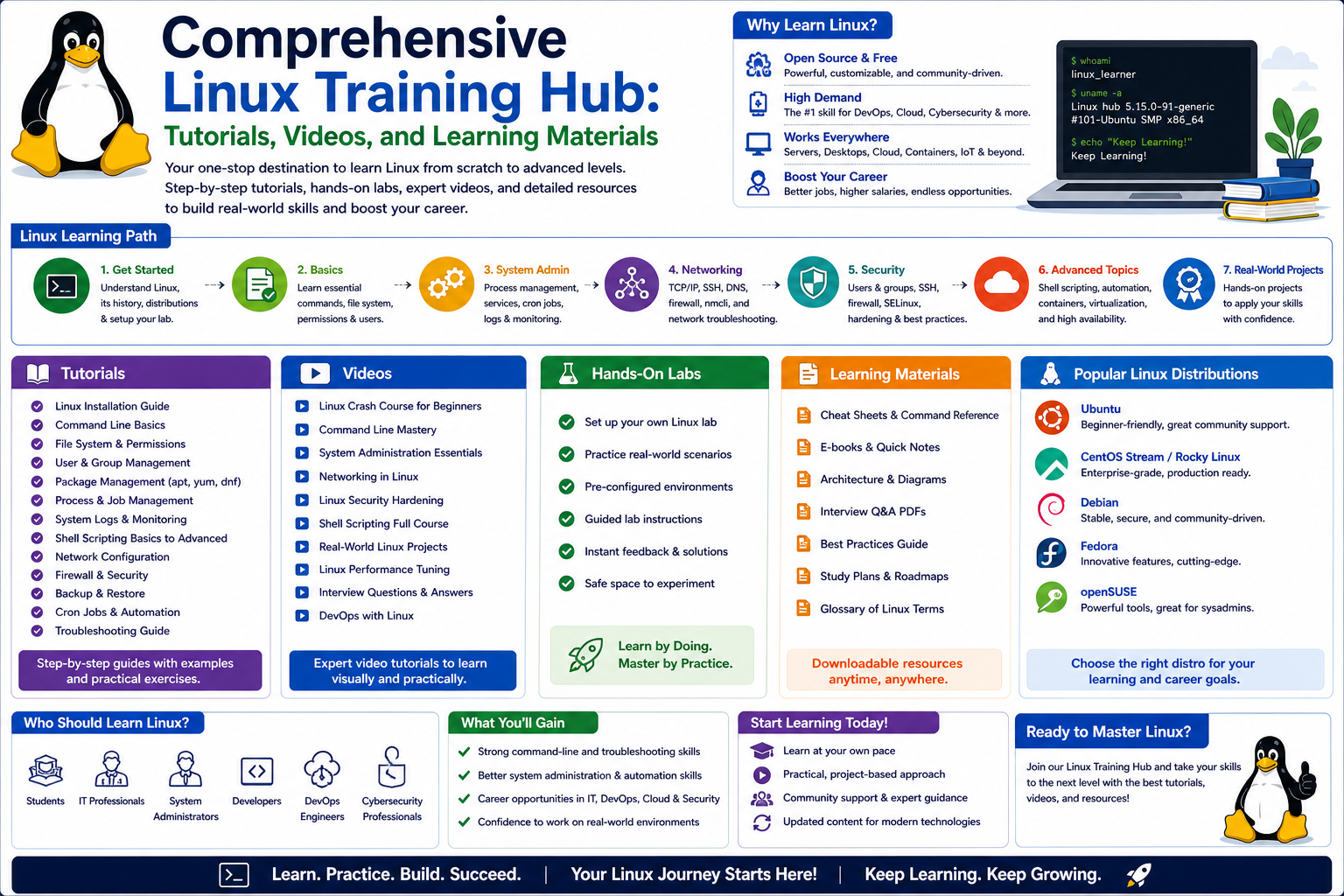
Linux has become one of the most influential operating systems in the modern digital world, quietly powering a vast portion of the technology people use every day. From websites and mobile applications to cloud platforms and enterprise servers, Linux operates behind the scenes in ways most users never notice. Its strength lies in its stability, flexibility, and open design, which allows organizations and individuals to adapt it for a wide range of computing needs.
Unlike many traditional operating systems that are tightly controlled by a single vendor, Linux is built on a collaborative model where its core components are openly available for modification and improvement. This structure has encouraged decades of innovation and community-driven development. As a result, Linux has evolved into a highly reliable system that can handle everything from small embedded devices to massive global infrastructures.
One of the key reasons Linux is so widely adopted is its efficiency in resource management. It is designed to run smoothly even on older or less powerful hardware, while also scaling effectively for modern high-performance systems. This adaptability makes it a preferred choice in environments where reliability and performance are essential, such as data centers, cloud computing platforms, and scientific research systems.
The Expanding Role of Linux in the Digital Economy
The importance of Linux has grown significantly as businesses continue to move toward digital transformation. Organizations now rely heavily on cloud services, automation tools, and virtualized environments—all of which are strongly supported by Linux-based systems. Whether it is hosting web applications, managing databases, or securing network infrastructure, Linux plays a central role in ensuring these systems function efficiently.
In the world of cybersecurity, Linux is equally important. Many security tools and frameworks are built specifically for Linux environments due to their transparency and control over system-level operations. Security professionals often prefer Linux because it allows deep access to system functions, enabling advanced monitoring, testing, and protection mechanisms.
At the same time, Linux has become a core component in mobile technology. Many mobile operating systems are built on Linux foundations, demonstrating its versatility beyond traditional computing environments. This widespread use highlights how deeply integrated Linux has become in both consumer and enterprise technologies.
Why Linux Skills Are Highly Valuable in the Job Market
As organizations continue to adopt Linux-based systems, the demand for professionals who understand Linux has increased significantly. System administrators, cloud engineers, DevOps specialists, and cybersecurity analysts all benefit from strong Linux skills. Employers value individuals who can manage servers, troubleshoot system issues, automate tasks, and maintain secure environments using Linux tools.
Linux expertise is not limited to advanced technical roles. Even entry-level IT positions often require familiarity with basic Linux commands and system navigation. This is because many infrastructure environments rely on Linux-based servers, making it essential for professionals to understand how these systems operate.
The financial value of Linux skills also reflects their importance in the industry. Professionals with Linux knowledge often earn competitive salaries, especially as they gain experience in areas like system architecture, cloud deployment, and security engineering. More advanced roles typically involve managing large-scale systems where performance, reliability, and security are critical.
However, beyond financial benefits, Linux skills also provide long-term career flexibility. Since Linux is used across multiple industries and technologies, individuals with this expertise can move between roles such as system administration, cloud computing, network engineering, and cybersecurity with relative ease.
Building a Strong Foundation in Linux
Learning Linux requires a gradual and structured approach, especially for those who are new to command-line environments. Unlike graphical operating systems that rely heavily on visual interfaces, Linux often involves text-based commands to perform tasks. This can feel unfamiliar at first, but it quickly becomes powerful once the basic concepts are understood.
The foundation of Linux knowledge begins with understanding its structure. At its core, Linux is built around a kernel, which acts as the bridge between hardware and software. Around this kernel, various tools, libraries, and utilities form a complete operating system. Different distributions of Linux package these components in slightly different ways, allowing users to choose environments that best fit their needs.
File systems in Linux are also structured differently compared to other operating systems. Instead of using drive letters, Linux organizes everything into a single hierarchical directory structure. This approach simplifies system navigation once the logic behind it is understood.
Another important foundational concept is user permissions. Linux is designed with strong security principles, meaning every file and process is associated with specific permissions. Understanding how users, groups, and permissions work is essential for managing systems safely and effectively.
The Importance of Hands-On Learning in Linux
While theoretical knowledge is helpful, Linux is best learned through practice. The system is highly interactive, and many concepts only become clear when applied in real scenarios. Working directly with the command line helps learners develop confidence and familiarity with system behavior.
Hands-on experience allows users to understand how commands interact with the system, how processes are managed, and how files are manipulated. It also helps in developing troubleshooting skills, which are essential for real-world system administration.
One of the most effective ways to learn Linux is by experimenting in controlled environments. Virtual systems and isolated setups allow learners to test commands without affecting critical data. This encourages exploration and reduces the fear of making mistakes, which is a natural part of the learning process.
Over time, repeated practice builds muscle memory for common commands and workflows. This makes it easier to perform complex tasks efficiently and reduces dependency on external references.
Navigating the Linux Command Line Environment
The command line is one of the most powerful features of Linux. It provides direct access to the system and allows users to perform tasks with precision and speed. While it may appear intimidating at first, it becomes intuitive with regular use.
The command line operates through a shell, which interprets user commands and communicates with the operating system. Users can perform tasks such as navigating directories, managing files, monitoring system processes, and configuring system settings entirely through text-based input.
One of the advantages of using the command line is efficiency. Many tasks that require multiple steps in graphical interfaces can be completed with a single command. This makes Linux particularly valuable in environments where automation and speed are important.
Additionally, the command line allows for scripting, which means users can automate repetitive tasks. This is especially useful for system administrators who manage large infrastructures and need to perform routine operations consistently.
Linux in Server and Cloud Environments
Linux dominates server environments due to its stability, security, and scalability. Most web servers, database servers, and application servers run on Linux-based systems. Its ability to handle heavy workloads while maintaining performance makes it ideal for enterprise use.
In cloud computing, Linux plays an even larger role. Many cloud platforms rely on Linux-based virtual machines and containers to deliver services efficiently. These systems allow organizations to scale resources dynamically based on demand, reducing costs and improving performance.
Linux also supports containerization technologies that enable applications to run consistently across different environments. This has transformed software development by making deployment more predictable and portable.
The combination of Linux and cloud computing has reshaped how modern applications are built and delivered. Developers and system administrators who understand Linux are better equipped to manage these environments effectively.
Security Advantages of Linux Systems
Security is one of the strongest features of Linux. Its permission-based structure ensures that users only have access to the resources they need. This reduces the risk of unauthorized changes and system vulnerabilities.
Linux systems are also less frequently targeted by malware compared to other operating systems, partly due to their architecture and partly due to their user base. However, security still requires active management, including updates, configuration, and monitoring.
Many security tools are designed specifically for Linux, allowing professionals to perform tasks such as network analysis, vulnerability scanning, and intrusion detection. The transparency of Linux also allows security experts to inspect system behavior at a deep level, which is essential for identifying potential threats.
System administrators often rely on Linux to build secure infrastructures because it offers granular control over system components. This makes it easier to implement strict security policies and maintain compliance with organizational standards.
The Role of Linux in Automation and Development
Automation is a key aspect of modern IT environments, and Linux provides strong support for automating tasks. Through scripting and scheduling tools, users can automate system maintenance, backups, updates, and monitoring processes.
This reduces manual effort and ensures consistency across systems. Automation is especially important in large-scale environments where managing systems manually would be inefficient.
Developers also benefit from Linux because it provides a flexible environment for building and testing applications. Many programming tools and frameworks are optimized for Linux, making it a preferred platform for software development.
The ability to integrate development and deployment workflows within Linux environments has contributed to faster and more efficient software delivery cycles.
Why Learning Linux Is a Long-Term Investment
Learning Linux is not just about gaining technical knowledge; it is about building a foundation for long-term career growth in technology. As systems continue to evolve toward cloud computing, automation, and cybersecurity, Linux remains a constant presence across these domains.
Its open nature ensures that it will continue to evolve with technological advancements. This makes Linux skills highly relevant even as tools and platforms change over time.
For individuals entering the IT field, Linux provides a strong starting point for understanding how systems work at a fundamental level. For experienced professionals, it offers advanced capabilities that support complex infrastructures and modern computing environments.
Mastering Linux requires patience and consistent practice, but the skills gained are widely applicable and highly valued across industries.
Exploring Linux Distributions and Their Practical Differences
One of the first things learners encounter when working with Linux is the existence of multiple distributions. Unlike a single unified operating system, Linux comes in many variations that are tailored for different purposes. These distributions share the same core kernel but differ in design, tools, package management systems, and intended use cases.
Some distributions are designed with simplicity in mind, making them suitable for beginners who are just getting started. These versions often include user-friendly interfaces and preconfigured tools that reduce the complexity of initial setup. Others are built for advanced users and professionals who need full control over system behavior, customization, and performance tuning.
In enterprise environments, stability and long-term support are often prioritized. These distributions focus on reliability over frequent updates, ensuring that systems remain consistent over time. On the other hand, development-focused distributions tend to provide the latest software versions, allowing developers to experiment with new features and technologies.
Understanding these differences is important because the choice of distribution can affect how systems are managed, updated, and secured. While the underlying commands and principles remain largely the same, the tools used for installation, package management, and system configuration may vary.
Understanding the Linux File System in Depth
The Linux file system is one of the most important concepts to understand because it forms the foundation of how data is organized and accessed. Unlike operating systems that separate storage into different drives, Linux uses a single hierarchical structure that starts from a root directory.
Everything in Linux is treated as a file, including hardware devices, system processes, and configuration settings. This design simplifies system interaction and creates a unified way of managing resources.
The directory structure is logically organized into specific folders, each serving a unique purpose. System binaries, configuration files, user data, temporary files, and device information are all stored in clearly defined locations. This structure allows administrators to quickly locate and manage system components.
Permissions play a major role in controlling access within this file system. Every file and directory is assigned ownership and access rules that determine who can read, write, or execute it. This security model ensures that system integrity is maintained even when multiple users are working on the same machine.
Understanding how the file system is structured also helps in troubleshooting. Many system issues can be resolved by identifying incorrect file locations, misconfigured permissions, or missing dependencies.
Mastering Linux Command Line Navigation
The command line is central to Linux usage, and developing fluency in it is essential for effective system management. Navigation within the system is performed using simple text-based commands that allow users to move between directories, view files, and manage system resources.
One of the key advantages of command-line navigation is speed. Instead of relying on graphical menus, users can directly access any part of the system with precise commands. This is especially useful in remote environments where graphical interfaces may not be available.
Command-line navigation also allows for automation. Commands can be combined in sequences to perform complex tasks efficiently. This ability to chain operations together makes Linux highly powerful for repetitive system tasks.
Another important aspect of command-line usage is understanding file paths. Absolute and relative paths determine how files are located within the system. Mastering these concepts helps users avoid confusion and ensures accurate file manipulation.
As users become more comfortable with navigation, they begin to rely less on graphical interfaces and more on direct system interaction, which improves efficiency and control.
Working with Linux Permissions and Security Structures
Permissions are one of the most critical components of Linux system management. They define how users interact with files and directories, ensuring that only authorized actions are permitted.
Each file in Linux has three levels of access: owner, group, and others. These levels determine what actions can be performed, such as reading content, modifying data, or executing programs. This structure allows for precise control over system security.
Beyond basic permissions, Linux also supports advanced access control mechanisms. These include special permission flags that modify how files behave in certain situations. Understanding these advanced settings is essential for managing secure environments.
Proper permission management is especially important in multi-user systems where multiple individuals interact with shared resources. Incorrect configurations can lead to security vulnerabilities or unintended data exposure.
System administrators must regularly audit permissions to ensure that they align with organizational security policies. This includes reviewing file ownership, access levels, and system logs.
Introduction to Process Management in Linux Systems
Every action in Linux is managed as a process. Processes represent running programs and system tasks that are actively using system resources. Understanding how processes work is essential for monitoring system performance and troubleshooting issues.
Each process is assigned a unique identifier, allowing administrators to track and manage its behavior. Processes can run in the foreground or background, depending on how they are initiated.
Process management includes the ability to start, stop, pause, and resume tasks. This control is important in environments where multiple applications are running simultaneously.
System monitoring tools provide visibility into CPU usage, memory consumption, and process activity. By analyzing this data, administrators can identify performance bottlenecks and optimize system efficiency.
In more advanced use cases, processes can be scheduled to run at specific times or triggered by system events. This allows for automation of maintenance tasks and system operations.
Understanding Linux Networking Fundamentals
Networking is a core component of Linux systems, especially in server and cloud environments. Linux provides a wide range of tools for configuring, monitoring, and troubleshooting network connections.
At a basic level, networking involves communication between devices using IP addresses. Linux systems can be configured to operate on local networks or connect to the internet through various protocols.
Network configuration includes assigning addresses, managing routes, and configuring interfaces. These settings determine how data flows between systems and how services are accessed.
Linux also provides tools for diagnosing network issues. These tools help identify problems such as connectivity failures, latency issues, and misconfigured settings.
Security plays a significant role in networking. Firewalls and filtering rules are used to control incoming and outgoing traffic, ensuring that only authorized connections are allowed.
Understanding networking fundamentals is essential for anyone working with Linux in server or infrastructure roles.
Introduction to Shell Scripting and Automation Logic
Shell scripting is one of the most powerful features available in Linux. It allows users to automate tasks by writing sequences of commands that the system can execute automatically.
Scripts are particularly useful for repetitive tasks such as system updates, file management, and log processing. Instead of performing these actions manually, scripts allow them to be executed consistently and efficiently.
Shell scripting also introduces basic programming logic into system administration. Concepts such as variables, loops, and conditions allow for more dynamic and flexible automation.
As scripts become more complex, they can interact with multiple system components, making it possible to manage entire workflows automatically.
This capability is widely used in professional environments where consistency and efficiency are critical. It reduces human error and ensures that tasks are performed uniformly across systems.
Linux System Logging and Monitoring Practices
System logs are essential for understanding what is happening within a Linux environment. Logs record events such as system startups, user activity, application behavior, and error messages.
Monitoring these logs helps administrators identify issues before they become serious problems. It also provides insight into system performance and security events.
Logs are typically stored in structured files that can be filtered and analyzed. By reviewing these records, users can trace system behavior and diagnose unexpected issues.
Monitoring tools provide real-time visibility into system activity. These tools help track resource usage, network activity, and process behavior.
Effective monitoring is essential for maintaining system stability, especially in environments where uptime and reliability are critical.
Package Management and Software Control Systems
Software management in Linux is handled through package systems that simplify installation, updates, and removal of applications. These systems ensure that software is properly configured and compatible with the operating environment.
Packages contain all necessary files for an application to run, including dependencies. This reduces the complexity of manual installation and ensures consistency across systems.
Updating software is an important part of system maintenance. Regular updates help improve performance, fix bugs, and address security vulnerabilities.
Package management also allows administrators to maintain control over installed software. This ensures that only approved applications are present on the system.
Different distributions may use different package management systems, but the underlying principles remain similar.
Virtualization and Container-Based Workflows in Linux
Virtualization allows multiple operating systems to run on a single physical machine. This is widely used in data centers and cloud environments to maximize resource efficiency.
Containers take this concept further by allowing applications to run in isolated environments while sharing the same operating system kernel. This makes them lightweight and highly efficient.
Linux plays a central role in both virtualization and container technologies. These tools allow developers and administrators to deploy applications quickly and consistently across different environments.
Containers are particularly useful for modern application development, where portability and scalability are important. They ensure that software behaves consistently regardless of where it is deployed.
Understanding these technologies is essential for working in modern IT environments where infrastructure is increasingly dynamic and distributed.
Developing Troubleshooting Skills in Linux Environments
Troubleshooting is one of the most important practical skills in Linux administration. It involves identifying, analyzing, and resolving system issues.
Common problems include service failures, performance degradation, network issues, and configuration errors. Each issue requires a systematic approach to diagnosis.
Troubleshooting often begins with reviewing system logs and monitoring tools. These provide clues about what is happening within the system.
Command-line tools are also used to test system behavior, check configurations, and verify connectivity. By combining these tools, administrators can isolate the root cause of problems.
Effective troubleshooting requires both technical knowledge and logical thinking. It is a skill that improves significantly with experience and exposure to real-world systems.
Building Practical Experience Through System Interaction
The most effective way to learn Linux is through continuous interaction with real systems. This involves experimenting with commands, exploring system behavior, and observing outcomes.
Practical experience helps reinforce theoretical knowledge and builds confidence in using the system. It also exposes learners to unexpected scenarios that require problem-solving.
Over time, repeated interaction leads to a deeper understanding of how Linux operates internally. This understanding is essential for advanced system administration and engineering roles.
Hands-on practice also helps develop intuition, allowing users to predict system behavior and make informed decisions quickly.
This experiential learning approach is what ultimately transforms basic knowledge into professional expertise in Linux environments.
Advancing from Basic Usage to System-Level Thinking in Linux
Once the foundational concepts of Linux become familiar, the next stage of learning involves shifting from simple command usage to system-level thinking. This means understanding how different components of the operating system interact, how resources are managed globally, and how decisions at one level affect the entire system.
At this stage, Linux is no longer just a tool for executing commands but a complete ecosystem that requires structured thinking. Every process, configuration file, service, and hardware interaction plays a role in overall system behavior. Professionals begin to analyze Linux not as isolated commands but as a connected environment where each part influences performance and stability.
System-level thinking also involves anticipating issues before they occur. Instead of reacting to problems, administrators learn to recognize patterns in system behavior that indicate potential failures. This proactive mindset is essential in environments where downtime or instability can have significant consequences.
Understanding dependencies becomes critical at this level. Applications often rely on multiple system services, libraries, and configurations. A small change in one area can impact multiple components. Learning how to map these dependencies helps prevent system disruptions and improves troubleshooting efficiency.
Deep Dive into Linux Process Architecture and System Control
Linux operates on a multi-layered process architecture where every running task is managed by the kernel. Processes are not isolated entities; they are part of a structured hierarchy that defines how system resources are allocated and managed.
Each process can spawn child processes, creating a tree-like structure that reflects system activity. Understanding this hierarchy helps administrators trace performance issues back to their origin. If a system becomes slow or unresponsive, analyzing process relationships often reveals the root cause.
Resource management is another important aspect of process architecture. The system allocates CPU time, memory, and I/O access to processes based on priority and scheduling rules. These mechanisms ensure that critical system tasks receive appropriate resources while preventing any single process from overwhelming the system.
Advanced users often work with process signals, which allow controlled communication between processes. These signals can pause, resume, or terminate tasks in a structured way, ensuring system stability even during complex operations.
System control also involves managing background services, which continuously run in the background to support system functionality. These services are essential for networking, logging, scheduling, and hardware interaction. Understanding how to enable, disable, and monitor these services is a key part of advanced Linux administration.
Advanced File System Management and Storage Optimization
At an advanced level, Linux file systems are not just about storing data but about optimizing performance, reliability, and scalability. Administrators must understand how data is physically and logically organized on storage devices.
Different file system types offer different advantages in terms of speed, reliability, and recovery capabilities. Choosing the right file system for a specific use case can significantly impact system performance.
Storage management also involves partitioning disks and organizing data in a way that improves efficiency. Proper partitioning ensures that system files, user data, and temporary files are separated logically, reducing the risk of data corruption or performance degradation.
Mounting mechanisms allow external storage devices to be integrated into the system dynamically. This flexibility is important in environments where storage requirements change frequently.
Advanced users also work with symbolic links and hard links, which provide flexible ways to reference files without duplicating data. These techniques are widely used in system organization and software deployment.
Disk usage monitoring and optimization become essential at this level. Identifying large files, unused data, and inefficient storage patterns helps maintain system performance and prevent resource exhaustion.
Linux Security Architecture and Hardening Techniques
Security in Linux is built on multiple layers that work together to protect the system from unauthorized access and malicious activity. At the core of this structure is the principle of least privilege, which ensures that users and processes only have access to the resources they need.
User authentication systems verify identities before granting access to the system. These mechanisms are often combined with encryption techniques to protect sensitive data during transmission and storage.
System hardening involves configuring Linux systems to reduce vulnerabilities. This includes disabling unnecessary services, restricting access to critical files, and enforcing strict permission policies.
Firewall configurations play a major role in controlling network access. By defining rules for incoming and outgoing traffic, administrators can limit exposure to potential threats.
Security monitoring tools help detect unusual activity within the system. These tools analyze logs, track user behavior, and identify patterns that may indicate security breaches.
Kernel-level security features provide additional protection by isolating system components and preventing unauthorized interactions. These mechanisms are essential in environments where security is a top priority.
Regular updates and patch management are also critical for maintaining system security. Vulnerabilities are continuously discovered and addressed, making it essential to keep systems up to date.
Networking at an Enterprise Level in Linux
Enterprise networking in Linux involves managing complex communication systems that connect multiple devices, services, and locations. Unlike basic networking, enterprise environments require scalability, reliability, and security.
Network interfaces must be carefully configured to ensure proper communication between systems. This includes managing IP addressing schemes, routing tables, and gateway configurations.
Advanced networking also involves load balancing, which distributes traffic across multiple servers to improve performance and reliability. This ensures that no single server becomes overwhelmed by incoming requests.
DNS systems play a critical role in translating human-readable domain names into IP addresses. Proper DNS configuration is essential for ensuring that services are accessible and responsive.
Virtual private networks are often used to create secure communication channels between remote systems. These encrypted connections protect data as it travels across public networks.
Network diagnostics at this level require deep analysis of packet flow, latency, and connection stability. Specialized tools help administrators identify bottlenecks and optimize performance.
Linux in Cloud Computing Environments
Cloud computing has significantly increased the importance of Linux in modern IT infrastructure. Most cloud platforms rely heavily on Linux-based systems due to their flexibility, scalability, and performance efficiency.
In cloud environments, Linux systems are often deployed as virtual machines that can be created, modified, or destroyed dynamically. This allows organizations to scale resources based on demand without investing in physical hardware.
Containerization has further transformed cloud computing by enabling applications to run in isolated environments. These containers share the same kernel but operate independently, making deployment faster and more efficient.
Orchestration systems manage multiple containers across distributed environments. These systems ensure that applications remain available, balanced, and scalable.
Automation plays a key role in cloud-based Linux systems. Infrastructure is often managed through scripts and configuration files that define system behavior automatically. This reduces manual intervention and increases consistency.
Security in cloud environments requires careful configuration of access controls, network policies, and encryption mechanisms. Linux provides the flexibility needed to implement these security layers effectively.
Automation, Infrastructure as Code, and System Scaling
Automation is one of the most powerful aspects of advanced Linux usage. It allows system administrators to manage large-scale environments efficiently by reducing repetitive manual tasks.
Scripts are commonly used to automate system configuration, software installation, and maintenance tasks. These scripts ensure that systems remain consistent across multiple environments.
Infrastructure as code extends this concept by treating system configuration as programmable definitions. This allows entire environments to be recreated or modified using standardized templates.
Scaling systems automatically based on demand is another key aspect of modern infrastructure management. Linux systems can be configured to adjust resources dynamically, ensuring optimal performance during varying workloads.
Automation also improves reliability by reducing human error. Tasks that are automated are executed consistently, minimizing the risk of misconfiguration.
Advanced Troubleshooting and Performance Optimization
At an advanced level, troubleshooting involves analyzing complex system interactions rather than isolated issues. Performance problems may stem from multiple sources, including hardware limitations, software conflicts, or misconfigurations.
System performance monitoring tools provide detailed insights into CPU usage, memory allocation, disk activity, and network behavior. These metrics help identify bottlenecks and inefficiencies.
Optimization involves fine-tuning system parameters to improve performance. This may include adjusting resource limits, modifying scheduling priorities, or optimizing storage usage.
In some cases, performance issues require architectural changes, such as redistributing workloads or redesigning system configurations.
Advanced troubleshooting also involves root cause analysis, which focuses on identifying the underlying source of problems rather than just addressing symptoms.
Linux in DevOps and Modern Software Delivery
Linux plays a central role in modern software development practices, particularly in DevOps environments. DevOps emphasizes collaboration between development and operations teams, with Linux serving as a common platform.
Continuous integration and continuous deployment pipelines often rely on Linux-based systems to build, test, and deploy applications automatically. This improves development speed and reduces deployment errors.
Version control systems, automated testing frameworks, and deployment tools are commonly integrated into Linux environments to streamline software delivery.
The consistency of Linux across different environments makes it ideal for maintaining predictable application behavior from development to production.
Building Professional Expertise in Linux Environments
Becoming proficient in Linux requires more than technical knowledge; it requires the ability to apply concepts in real-world scenarios. Professional expertise develops through experience, problem-solving, and continuous learning.
Advanced users develop an understanding of how systems behave under different conditions. They can predict outcomes, diagnose complex issues, and design efficient infrastructures.
Professional Linux users are also responsible for maintaining system reliability and security. This involves regular monitoring, updates, and configuration management.
As systems become more complex, collaboration becomes increasingly important. Linux professionals often work in teams to manage large infrastructures, requiring clear communication and structured workflows.
Mastery of Linux is a continuous process that evolves alongside technology. As new tools, platforms, and methodologies emerge, Linux remains a foundational skill that adapts to changing environments.
Managing Linux in Large-Scale Distributed Systems
In modern computing environments, Linux is rarely used on a single standalone machine. Instead, it operates within large-scale distributed systems where hundreds or even thousands of machines work together to deliver services. Managing Linux in such environments requires a shift in thinking from individual system control to coordinated infrastructure management.
Distributed systems depend on consistency across nodes. Each Linux machine must be configured in a predictable way to ensure that applications behave the same regardless of where they are executed. This is achieved through standardized configuration practices, automation tools, and centralized management systems.
One of the biggest challenges in distributed Linux environments is synchronization. Time accuracy, configuration consistency, and data replication all play critical roles in maintaining system stability. Even small inconsistencies between nodes can lead to performance issues or system failures.
Load distribution is another key concern. Traffic and workloads must be evenly spread across multiple servers to avoid bottlenecks. Linux systems are often configured to support load balancing mechanisms that dynamically allocate resources based on demand. This ensures that no single machine becomes a point of failure.
Fault tolerance is also essential. In large systems, hardware or software failures are inevitable. Linux-based infrastructures are designed to handle these failures gracefully by rerouting traffic, restarting services, or replacing failed nodes automatically. This resilience is one of the reasons Linux is widely used in mission-critical environments.
Evolving Role of Linux in Artificial Intelligence and Data Systems
As technology advances, Linux has become deeply integrated into artificial intelligence, machine learning, and data processing systems. These workloads require high computational power, efficient resource management, and stable environments—all of which Linux provides effectively.
AI and data processing frameworks often run on Linux due to its ability to handle parallel processing and large-scale computation. Systems that analyze massive datasets rely on Linux servers to manage memory-intensive tasks and high-speed data access.
The open nature of Linux also allows researchers and engineers to optimize system performance at a low level. This flexibility is important in environments where even small performance improvements can significantly reduce processing time.
In addition, Linux supports distributed computing frameworks that break large problems into smaller tasks executed across multiple machines. This approach is essential for training machine learning models and processing big data efficiently.
As AI systems continue to evolve, Linux remains a foundational platform that supports experimentation, scalability, and deployment in both research and production environments.
Container Ecosystems and Microservices Architecture in Linux
Modern software development increasingly relies on microservices architecture, where applications are broken into smaller, independent services. Linux plays a central role in supporting this model through containerization technologies.
Containers allow each microservice to run in an isolated environment while sharing the same underlying operating system. This reduces overhead and improves deployment efficiency. Linux provides the kernel-level features required to support this isolation securely and reliably.
In large systems, hundreds or thousands of containers may run simultaneously across multiple servers. Managing these containers requires orchestration systems that handle deployment, scaling, and monitoring automatically.
Linux-based container ecosystems also improve portability. Applications packaged in containers can run consistently across different environments without modification. This eliminates many of the compatibility issues traditionally associated with software deployment.
Microservices architecture also introduces new challenges in communication and monitoring. Services must interact efficiently while maintaining independence. Linux networking capabilities support this by enabling fast and secure inter-process communication across distributed systems.
Advanced System Reliability and High Availability Design
High availability is a critical requirement in enterprise Linux environments. Systems must remain operational even in the presence of hardware failures, software crashes, or network disruptions.
To achieve this, Linux infrastructures are designed with redundancy at multiple levels. Multiple servers often perform the same function, ensuring that if one fails, others can take over without interruption.
Clustering technologies allow multiple Linux machines to work together as a single system. These clusters monitor each node’s health and automatically redistribute workloads when necessary.
Data replication is another important component of high availability. Critical data is copied across multiple systems to prevent loss in case of failure. This ensures continuity and minimizes downtime.
System monitoring plays a key role in maintaining availability. Continuous observation of performance metrics and system logs allows administrators to detect early warning signs of potential issues.
In high-availability environments, even small improvements in response time and recovery speed can have significant operational impact. Linux provides the flexibility needed to fine-tune these systems for maximum reliability.
Career Evolution Through Advanced Linux Expertise
As professionals gain deeper experience with Linux, their career opportunities expand into more specialized and high-impact roles. Advanced Linux knowledge opens doors to positions in cloud architecture, infrastructure engineering, cybersecurity leadership, and DevOps engineering.
These roles require more than basic system administration skills. They demand the ability to design scalable systems, implement security frameworks, and manage complex distributed environments.
Professionals at this level are often responsible for making architectural decisions that affect entire organizations. They must understand how Linux systems interact with networking, storage, security, and application layers.
Problem-solving becomes more strategic rather than operational. Instead of fixing individual issues, advanced professionals design systems that prevent issues from occurring in the first place.
Continuous learning is essential in these roles because Linux technology evolves alongside cloud computing, automation, and emerging digital infrastructure trends.
Conclusion
Linux has established itself as one of the most important technologies in modern computing, powering everything from enterprise servers and cloud platforms to mobile devices and advanced security systems. Its strength lies in its flexibility, stability, and open architecture, which allows it to adapt to a wide range of technical environments and use cases. As organizations continue to rely on scalable, secure, and efficient systems, Linux remains at the center of digital infrastructure.
Learning Linux provides more than just technical knowledge; it builds a foundation for understanding how operating systems function at a deeper level. From command-line navigation and file system management to process control, networking, and automation, each concept contributes to a broader understanding of system behavior. As skills progress, Linux becomes a powerful tool for managing complex infrastructures, improving system performance, and ensuring security across environments.
In today’s technology-driven world, Linux expertise is highly valuable across multiple career paths, including system administration, cloud engineering, cybersecurity, and DevOps. Its continuous evolution ensures that it remains relevant in emerging fields such as containerization, artificial intelligence, and distributed computing. Developing strong Linux skills is not just about keeping up with current technology—it is about building long-term adaptability in a rapidly changing digital landscape.