In the early days of Linux, installing software was far from the streamlined experience most users are familiar with today. Everything revolved around manual effort, technical understanding, and a willingness to troubleshoot problems that could quickly become overwhelming. Unlike modern operating systems where applications are installed with a few clicks, Linux users were often required to compile programs directly from source code. This meant downloading raw code written in languages like C or C++, configuring it for a specific system, and then building it manually.
For many early users, this process was both empowering and frustrating. On one hand, it offered complete control over how software was built and optimized for a machine. On the other hand, it required a deep understanding of system libraries, compiler behavior, and system dependencies. Even a small mismatch in versions or missing components could break the entire installation process.
Over time, as Linux began to gain traction in both personal and enterprise environments, the need for a more structured and reliable approach to software installation became clear. Users wanted consistency. They wanted predictability. Most importantly, they wanted to avoid the repetitive cycle of manual dependency tracking and compilation errors.
This shift in expectations laid the foundation for one of the most important innovations in Linux history: the package manager.
The Early Challenges of Manual Software Installation
Before package managers became standard across distributions, installing software on Linux often felt like assembling a complex puzzle without a reference image. Developers would release source code archives, and users were expected to extract, configure, compile, and install them manually. While this approach aligned with the open nature of Linux, it introduced several significant challenges.
One of the biggest issues was inconsistency. Software developers rarely built applications in isolation. Their programs often depended on external libraries, shared components, or specific versions of system tools. If those dependencies were missing or outdated, installation would fail.
Another major challenge was version conflict. It was common for one application to require a newer version of a library, while another application on the same system required an older version of that same library. This created a fragile environment where installing or updating one program could unintentionally break another.
There was also the problem of time and repetition. Every installation required the same steps: download, configure, compile, test, and troubleshoot. For system administrators managing multiple machines, this became a significant burden.
These challenges collectively created what is now famously known as dependency complexity. Without a centralized system to manage software relationships, users were left to manually resolve conflicts and track compatibility on their own.
Understanding Dependency Complexity in Linux Systems
Dependency complexity refers to the interconnected relationships between software components required for an application to function properly. In Linux systems, applications rarely exist in isolation. Instead, they rely on shared libraries, runtime environments, and supporting tools.
For example, a simple text editor might depend on a graphical toolkit, which in turn depends on rendering libraries, which themselves rely on system-level graphics drivers. This chain of dependencies can grow quickly, forming a layered structure of requirements.
When software is installed manually, the responsibility of managing this chain falls entirely on the user. If even one dependency is missing or incompatible, the installation process fails. Worse, resolving one issue can sometimes introduce new problems elsewhere in the system.
This fragile balancing act became a defining pain point for early Linux users. It also highlighted the need for an automated system capable of understanding, resolving, and maintaining these relationships in a structured way.
That need ultimately led to the development of package managers.
The Concept of Package Management
A package manager is a system designed to automate the process of installing, updating, configuring, and removing software on a computer. Instead of dealing with individual files and dependencies manually, users interact with packages—predefined bundles of software that include all necessary components for execution.
Each package contains not only the application itself but also metadata describing its dependencies, version information, and installation instructions. This metadata allows the system to understand how different software components relate to one another.
At a high level, a package manager performs several critical functions:
It retrieves software from trusted sources, ensuring authenticity and integrity. It resolves dependencies automatically, installing required components alongside the main application. It manages updates, ensuring software remains current and secure. It also handles removal, cleaning up associated files when applications are no longer needed.
This structured approach transforms software management from a manual, error-prone process into an automated and predictable system.
The Role of Software Repositories
At the core of every Linux package manager lies the concept of repositories. A repository is a centralized storage location that contains collections of software packages. These repositories are maintained by distribution teams, community contributors, or third-party developers.
Each repository acts as a curated library of software, where every package is verified, categorized, and prepared for installation. When a user requests to install an application, the package manager searches these repositories to locate the appropriate package and its dependencies.
Repositories also play an important role in maintaining system stability. Since Linux distributions prioritize reliability, software is often tested before being added to official repositories. This ensures that users receive versions of applications that are compatible with their system environment.
In addition to official repositories, many Linux systems allow the use of external or third-party repositories. These sources can provide newer software versions or specialized tools not included in the default distribution. However, they also require careful management, as they may not always follow the same testing standards.
How Package Managers Resolve Dependencies
One of the most powerful features of a package manager is its ability to resolve dependencies automatically. When a user attempts to install a package, the system analyzes its metadata to determine what additional components are required.
Instead of requiring the user to manually locate and install each dependency, the package manager builds a dependency tree. This tree maps out all required components, including sub-dependencies that may not be immediately visible.
Once the dependency structure is understood, the package manager downloads and installs everything in the correct order. This ensures that all components are properly configured and compatible with each other.
This process eliminates much of the guesswork involved in software installation. It also reduces the likelihood of system conflicts caused by missing or mismatched libraries.
Dependency resolution is one of the defining features that separates modern Linux systems from their early counterparts. It is also one of the key reasons Linux has become more accessible to a wider range of users.
Binary Packages Versus Source-Based Packages
Linux package management systems generally fall into two broad categories: binary-based and source-based systems. Each approach reflects a different philosophy regarding how software should be installed and optimized.
Binary-based systems distribute precompiled software. This means the application has already been built and tested for a specific architecture and distribution. When a user installs a binary package, they are essentially downloading a ready-to-run version of the software.
This approach is fast, efficient, and user-friendly. It eliminates the need for compilation and significantly reduces installation time. Most mainstream Linux distributions rely on binary package systems.
Source-based systems take a different approach. Instead of distributing precompiled binaries, they provide the source code along with instructions for building the software locally on the user’s machine. This allows the system to optimize the application specifically for the hardware and configuration of the computer.
While this method offers greater customization and potential performance benefits, it also requires more time and technical knowledge. Compilation can be resource-intensive, and dependency management becomes more complex.
Both approaches have their strengths, and different Linux distributions choose one based on their design philosophy and target audience.
Diversity of Package Managers Across Linux Distributions
One of the most distinctive characteristics of Linux is its diversity. Unlike other operating systems that rely on a single standardized software management system, Linux distributions often develop their own package managers tailored to their specific goals.
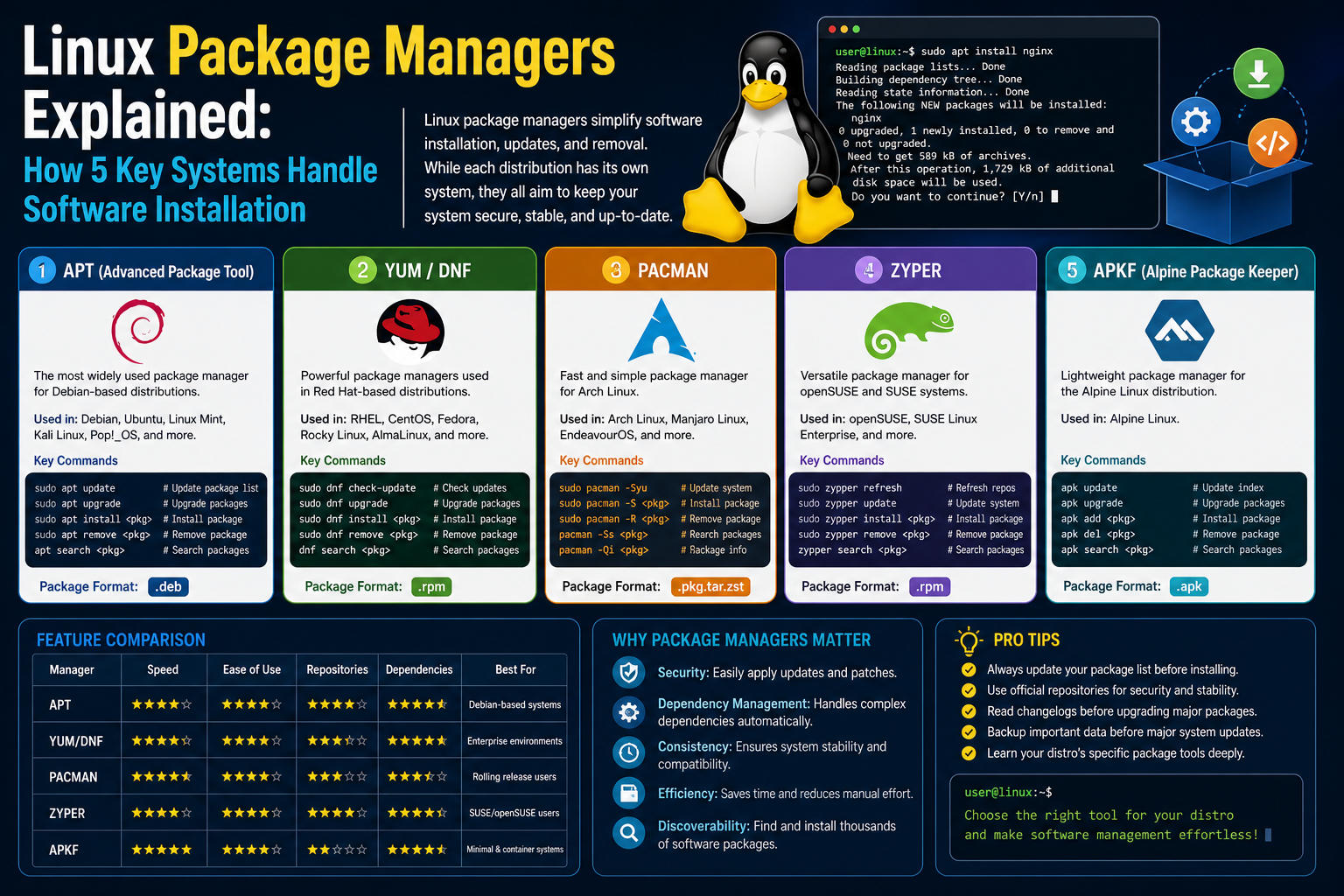
For example, Debian-based systems use a package management system centered around APT, which focuses on stability and ease of use. Red Hat-based systems rely on DNF and its predecessor YUM, which are designed for enterprise environments and long-term support.
Arch Linux uses Pacman, a lightweight and efficient package manager that emphasizes simplicity and user control. OpenSUSE uses Zypper, which integrates deeply with system configuration tools. Gentoo uses Portage, a source-based system that compiles software directly on the user’s machine for maximum customization.
Each of these systems follows the same fundamental principles of package management, but they differ in execution, philosophy, and user experience. These differences reflect the broader goals of each distribution, whether that is stability, performance, flexibility, or ease of use.
Why Package Managers Differ Between Distributions
The variation in package managers across Linux distributions is not accidental. It is the result of intentional design decisions made by developers and communities who build these systems.
Each distribution has a unique target audience. Some prioritize enterprise stability, while others focus on cutting-edge features or minimal system design. Package managers are built to support these goals.
For instance, enterprise-focused systems prioritize rigorous testing and long-term support. Their package managers are designed to ensure that software updates do not disrupt critical services. In contrast, rolling-release distributions prioritize speed and access to the latest software, requiring package managers that can handle frequent updates efficiently.
Another factor is system architecture. Some distributions are designed to be lightweight and minimal, while others include extensive graphical environments and tools. Package managers must align with these design choices to ensure smooth operation.
Ultimately, the diversity of package managers reflects the flexibility and adaptability of the Linux ecosystem as a whole.
The Role of Trust and Security in Package Management
Security is a fundamental concern in software distribution, and package managers play a crucial role in maintaining system integrity. Because software is installed from centralized repositories, users must trust that these sources are secure and reliable.
To ensure this, package managers often use digital signatures and cryptographic verification. Every package is signed by its maintainer, allowing the system to verify that it has not been tampered with. This helps prevent malicious software from being introduced into the system through compromised packages.
In addition, repositories are carefully maintained and monitored. Security updates are frequently released to address vulnerabilities, and package managers ensure that these updates are delivered efficiently to users.
This trust-based model is one of the key reasons Linux is widely regarded as a secure operating system. It reduces the risk of unauthorized software installation and ensures that users remain in control of what is installed on their systems.
The Lifecycle of Software in a Linux System
Software on a Linux system follows a structured lifecycle managed entirely by the package manager. This lifecycle begins with installation, where the package manager retrieves and configures the software.
Once installed, the software is maintained through updates. These updates may include bug fixes, performance improvements, or security patches. The package manager ensures that updates are applied consistently across the system.
When software is no longer needed, it can be removed. The package manager handles this process by uninstalling the application and cleaning up associated files. In many cases, it also removes unused dependencies to keep the system clean and efficient.
This lifecycle ensures that software management remains organized and predictable throughout the system’s operation.
Metadata and System Awareness in Package Management
Behind the scenes, package managers rely heavily on metadata. This is information embedded within each package that describes its contents, dependencies, version, and installation instructions.
Metadata allows the package manager to make intelligent decisions. It can determine compatibility, resolve conflicts, and ensure that installations proceed smoothly. Without metadata, package management would not be possible at scale.
This structured approach transforms software installation into a data-driven process. Instead of relying on manual intervention, the system uses predefined rules and relationships to manage complexity.
The Growing Importance of Package Management Systems
As Linux continues to evolve, package managers have become even more important. Modern systems handle thousands of packages, frequent updates, and complex dependency structures. Without package management systems, maintaining such environments would be nearly impossible.
Package managers have also influenced other operating systems, which have adopted similar approaches to software distribution. The idea of centralized, automated software management has become a standard across modern computing environments.
Within Linux itself, package managers remain one of the most defining features of the ecosystem. They represent a shift from manual control to structured automation, enabling both beginners and experts to manage software efficiently across a wide range of systems.
Internal Architecture of Linux Package Managers
Behind the simple commands used to install or update software lies a highly structured internal system that coordinates multiple layers of operations. A Linux package manager is not a single monolithic program but rather a collection of interconnected components working together to ensure software is installed correctly, dependencies are resolved, and system integrity is maintained.
At the core of this architecture is a separation between high-level package management tools and low-level system handlers. The high-level tool is what users interact with through commands or graphical interfaces. The low-level component is responsible for actually installing, removing, and tracking files on the system.
This layered approach allows Linux distributions to maintain flexibility while still ensuring consistency in how software is handled. It also makes it possible to swap or upgrade components of the package management system without breaking the entire ecosystem.
The architecture is designed around a simple principle: the system must always know exactly what is installed, what version is installed, and how each component relates to others.
Package Metadata and Its Critical Role
Every software package in a Linux system contains metadata, and this metadata is the foundation of package management. It acts as a structured description of the software, providing essential information that the package manager uses to make decisions.
This metadata typically includes the package name, version number, architecture compatibility, dependencies, installation scripts, and conflict declarations. It may also include descriptive information about the software’s purpose, maintainer details, and update history.
One of the most important aspects of metadata is dependency specification. This defines what other packages must be present for the software to function correctly. Dependencies can be direct or indirect, meaning a package may require another package that itself depends on additional components.
Metadata also defines conflicts, which indicate incompatible packages that cannot coexist on the same system. This prevents situations where two applications overwrite or interfere with each other’s files.
Because metadata is machine-readable, package managers can process thousands of packages efficiently, automatically building a complete map of system requirements before performing any installation or update.
How Dependency Resolution Actually Works
Dependency resolution is one of the most complex tasks performed by a package manager. It involves analyzing relationships between packages and determining the correct order in which they should be installed or updated.
When a user requests installation of a package, the package manager begins by reading its metadata. It then recursively examines all dependencies, building a dependency graph. This graph represents every required component and how they relate to one another.
Once the graph is constructed, the system must determine a valid installation order. This is not always straightforward. Some dependencies may overlap, while others may conflict or require specific versions of shared libraries.
To solve this, package managers use algorithmic approaches that prioritize compatibility and stability. They attempt to find a configuration that satisfies all constraints without introducing conflicts. If no valid solution exists, the installation is aborted before any changes are made to the system.
This pre-installation validation is critical. It ensures that the system does not enter a partially broken state where some components are installed but others are missing.
Transaction-Based Installation Systems
Modern Linux package managers treat software installation as a transaction. A transaction is a controlled process that either completes fully or does not apply any changes at all.
This concept is essential for maintaining system stability. Without transactional behavior, interrupted installations could leave systems in inconsistent or broken states.
During a transaction, the package manager performs several steps. It first downloads all required packages and verifies their integrity. It then prepares the system by checking for conflicts and ensuring sufficient space and resources are available.
Only after all checks are completed does the actual installation begin. Files are extracted, placed in appropriate directories, and system configurations are updated. If any step fails, the transaction is rolled back, restoring the system to its previous state.
This atomic approach ensures that software changes are predictable and safe, even in the event of power failures or system crashes.
Low-Level Package Handlers: dpkg and RPM
While high-level package managers like APT or DNF provide user-friendly interfaces, the actual installation and removal of software is handled by low-level systems such as dpkg and RPM.
The Debian Package system, commonly known as dpkg, is responsible for directly managing .deb packages. It handles file extraction, installation, and removal at the system level. However, it does not resolve dependencies on its own. That responsibility is delegated to higher-level tools like APT.
Similarly, the Red Hat Package Manager (RPM) handles .rpm packages. It performs the same low-level tasks but is designed for Red Hat-based systems. Like dpkg, RPM focuses on file-level operations rather than dependency management.
These low-level systems maintain a database of installed files and package states. This database allows the system to track what has been installed, modified, or removed, ensuring consistency across operations.
Repository Synchronization and Mirror Networks
Software repositories are not static entities. They are continuously updated, synchronized, and distributed across multiple servers worldwide. This ensures that users can access software quickly and reliably, regardless of their geographic location.
To achieve this, Linux distributions use mirror networks. These mirrors are copies of the main repository hosted on different servers. When a package is updated in the central repository, it is propagated to all mirrors.
Package managers are configured to select the most appropriate mirror based on location, speed, or reliability. This reduces download times and ensures high availability even if one server becomes unreachable.
Synchronization between repositories is carefully controlled. Only verified and tested packages are distributed to mirrors, ensuring that users always receive stable software versions.
Package Signing and Security Verification
Security is a fundamental component of package management systems. To prevent tampering or unauthorized modifications, every package is digitally signed by its maintainer.
When a package is downloaded, the package manager verifies its signature using cryptographic keys stored on the system. If the signature does not match, the package is rejected.
This process ensures that packages have not been altered during transmission and that they originate from trusted sources. It also protects against malicious actors attempting to inject harmful code into software repositories.
The trust model used in Linux package management is hierarchical. Repository maintainers are trusted entities, and their keys are used to sign packages. Users trust the distribution, and the distribution enforces integrity across all software.
Update Mechanisms and Incremental Changes
Updating software in Linux is not simply a matter of replacing old files with new ones. Package managers are designed to handle incremental updates efficiently, minimizing system disruption.
When an update is available, the package manager compares the installed version with the new version in the repository. It then identifies only the files that have changed and replaces them accordingly.
This selective updating process reduces bandwidth usage and speeds up installation. It also minimizes the risk of introducing errors, as only modified components are affected.
In many cases, configuration files are preserved during updates. If changes are required, the system may prompt the user or merge configurations intelligently to avoid overwriting custom settings.
Pre-Installation and Post-Installation Scripts
Many packages include scripts that execute before or after installation. These scripts allow software to perform additional configuration tasks that cannot be handled through file extraction alone.
Pre-installation scripts may check system conditions, create required directories, or stop running services. Post-installation scripts may configure services, update system caches, or register applications with system components.
These scripts are executed automatically by the package manager during installation. They ensure that software is fully integrated into the system environment without requiring manual intervention.
However, because these scripts run with elevated privileges, they are carefully reviewed and controlled to prevent security risks.
Package Conflicts and System Integrity Protection
Conflicts between packages occur when two or more packages attempt to install overlapping files or incompatible components. Package managers must detect and resolve these conflicts before installation proceeds.
Conflict detection is based on metadata declarations and file system analysis. If two packages attempt to install the same file path, the system must determine which package takes precedence or whether installation should be blocked entirely.
In some cases, packages are designed to replace or provide alternative implementations of existing software. Package managers handle these situations through explicit replacement rules defined in metadata.
Maintaining system integrity is a priority. Package managers are designed to prevent partial overwrites that could destabilize the system.
System State Tracking and Package Databases
Every Linux package manager maintains a local database that tracks the state of installed software. This database records which packages are installed, their versions, file locations, and installation history.
This information is essential for performing updates, removals, and system audits. Without it, the system would have no reliable way to determine what software is currently present.
The database also helps detect inconsistencies. If files are modified outside of the package manager, the system can identify discrepancies between expected and actual states.
In advanced scenarios, this database can be queried to generate detailed system inventories, helping administrators understand exactly what software is installed across a system.
Caching Mechanisms and Performance Optimization
To improve performance, package managers use caching systems that store repository metadata locally. This prevents the need to download full repository information every time a command is executed.
Instead, only changes are retrieved during updates, significantly reducing network usage and improving responsiveness.
Caching also applies to downloaded packages. Once a package has been downloaded, it is stored locally so it can be reused if needed again, such as during reinstallation or deployment across multiple systems.
These optimizations are particularly important in large-scale environments where multiple systems rely on the same repositories.
Delta Updates and Bandwidth Efficiency
Some modern package management systems support delta updates, which only download the differences between package versions instead of the entire package.
This approach significantly reduces bandwidth consumption, especially for large applications that receive frequent updates. Instead of downloading an entire new version, the system applies small patches to existing files.
Delta updates rely on binary diff algorithms that calculate changes between versions. These changes are then applied locally to reconstruct the updated package.
While not all systems use delta updates by default, they represent an important optimization in modern software distribution.
Logging, Auditing, and System Transparency
Package managers maintain detailed logs of all operations performed on the system. These logs include installation timestamps, package versions, dependency changes, and error reports.
Logging is essential for troubleshooting and system auditing. If a problem occurs, administrators can review logs to determine what changes were made and when.
In enterprise environments, these logs also support compliance requirements by providing a traceable record of all software modifications.
Transparency is a key principle in Linux systems, and package manager logs contribute significantly to maintaining that transparency.
Multi-Architecture and Compatibility Handling
Modern computing environments often include systems with different hardware architectures, such as x86_64, ARM, or RISC-V. Package managers must account for these differences when installing software.
Each package is built for a specific architecture, and metadata ensures that only compatible packages are installed on a given system.
In some cases, systems support multi-architecture environments where different types of packages coexist. Package managers must carefully manage these configurations to avoid conflicts and ensure compatibility across architectures.
This capability is especially important in cloud environments and embedded systems where diverse hardware is common.
Separation of Kernel and User Space Packages
Linux systems differentiate between kernel-level components and user-space applications. Package managers handle both, but they treat them differently due to their critical roles in system operation.
Kernel packages require special handling because they directly affect system stability and hardware interaction. Updates to kernel components are carefully managed and often require system reboots.
User-space packages, on the other hand, can be updated more freely without affecting core system functionality.
This separation ensures that critical system components remain stable while allowing flexibility in application management.
APT Ecosystem and Debian-Based Software Management
Among Linux package management systems, Debian-based tools built around APT remain some of the most widely used in both personal and enterprise environments. APT itself is not a single tool but a collection of utilities that coordinate package retrieval, dependency resolution, and system updates.
In practical use, APT acts as a bridge between the user and the underlying dpkg system. While dpkg handles the direct installation of package files, APT focuses on intelligence—deciding what needs to be installed, in what order, and from which repository.
Debian-based systems emphasize stability over constant change. As a result, APT repositories are carefully curated and tested before release. This ensures that updates do not introduce unexpected behavior into production systems.
One of the defining characteristics of APT-based workflows is predictability. System administrators often rely on long-term support releases where software versions remain stable for years. Instead of constantly chasing the latest features, the system prioritizes consistency and reliability.
APT also handles complex dependency chains with a high degree of automation. When a user requests a single application, APT evaluates the entire dependency tree and ensures that every required component is installed in the correct version. This process is especially important in environments where multiple services depend on shared libraries.
RPM-Based Systems and Enterprise Stability Models
RPM-based systems, commonly associated with Red Hat-derived distributions, follow a different philosophy. While they share similarities with APT in terms of dependency management, their design is heavily influenced by enterprise requirements.
In enterprise environments, stability and lifecycle management are more important than rapid feature updates. RPM-based systems are designed to support long-term deployments where software must remain stable across years of operation.
One of the key strengths of RPM-based systems is their integration with enterprise tooling. Package management is often tied directly into system configuration frameworks, security policies, and automation tools.
Unlike simpler systems, RPM-based environments often include layered repositories. These layers separate core system packages, optional software collections, and third-party extensions. This segmentation allows organizations to control exactly what software enters production systems.
Another important aspect is rollback capability. In many RPM-based environments, administrators can revert system changes to previous states. This provides an additional safety net when deploying updates across critical infrastructure.
The RPM ecosystem is also deeply integrated with system-level services, making it a central component in large-scale server environments and cloud infrastructure.
Arch Linux and the Philosophy of Rolling Releases
Arch-based systems introduce a fundamentally different philosophy known as rolling release management. Instead of releasing large versioned updates periodically, Arch continuously updates software in a steady stream.
This model is tightly coupled with its package manager, Pacman. Pacman is designed for simplicity, speed, and direct control. It avoids unnecessary abstraction and gives users precise control over system behavior.
In a rolling release system, every update is incremental but continuous. This means users always have access to the latest software versions without needing to perform major system upgrades.
However, this approach also requires users to be more engaged with system maintenance. Since updates are continuous, occasional manual intervention may be required to resolve conflicts or configuration changes.
Pacman itself is highly efficient. It uses binary packages and maintains a lightweight database of installed software. Its design prioritizes speed and minimal overhead, making it ideal for systems where performance and simplicity are key goals.
Arch-based systems appeal to users who prefer transparency and control over automated abstraction.
Gentoo and Source-Based Compilation Models
Gentoo represents one of the most flexible and complex package management systems in the Linux ecosystem. Unlike binary-based systems, Gentoo relies entirely on source code compilation through its package manager system.
This approach allows users to tailor software specifically to their hardware and preferences. Instead of downloading prebuilt binaries, the system retrieves source code and compiles it locally.
This process introduces a high degree of customization. Users can enable or disable features at compile time, optimize performance for specific CPUs, and remove unnecessary components entirely.
However, this flexibility comes at a cost. Compilation can be time-consuming, especially for large applications. Dependency management is also more complex because every component must be built in the correct order.
Gentoo’s system is designed for users who prioritize control and optimization over convenience. It is often used in specialized environments where system performance tuning is critical.
The compilation-based approach also makes Gentoo highly transparent. Every part of the system is built locally, giving users full visibility into how software is constructed.
OpenSUSE and the Role of Zypper in System Management
OpenSUSE uses a package manager called Zypper, which combines the stability of enterprise systems with the flexibility of modern Linux distributions.
Zypper is known for its powerful dependency resolver and robust transaction system. It allows administrators to perform complex system updates while maintaining strict control over package integrity.
One of Zypper’s strengths is its integration with system snapshots. Before performing major updates, the system can create snapshots that allow administrators to revert changes if something goes wrong.
This approach provides a safety layer that is particularly useful in enterprise and desktop environments where system stability is important.
Zypper also supports repository prioritization, allowing users to define which software sources take precedence. This is especially useful when mixing official repositories with third-party software sources.
The system is designed to balance automation with manual control, giving users flexibility while maintaining stability.
Universal Package Systems and Cross-Distribution Software
As Linux distributions have evolved, a new category of package management has emerged: universal packaging systems. These systems are designed to work across multiple distributions, regardless of their underlying package managers.
Unlike traditional package managers that rely on distribution-specific formats, universal systems bundle applications with their dependencies in a self-contained format.
This approach reduces dependency conflicts and simplifies software distribution. Developers can create a single package that works across multiple Linux distributions without modification.
Universal packaging also reduces fragmentation in the Linux ecosystem. Instead of maintaining separate packages for different systems, developers can distribute one version of their software.
However, this approach introduces trade-offs. Since applications include their own dependencies, they may consume more disk space and duplicate system libraries.
Despite this, universal packaging has become increasingly popular for desktop applications, especially in environments where consistency across distributions is important.
Containerization and the Shift in Software Deployment
Containerization has significantly changed how software is deployed and managed on Linux systems. Instead of installing applications directly onto the host system, containers encapsulate software and its dependencies into isolated environments.
This approach complements traditional package management but also introduces an alternative model for software distribution.
Containers ensure that applications run consistently across different environments. A containerized application behaves the same way whether it is running on a local machine, a server, or a cloud platform.
Package managers still play a role in containerized environments, but their responsibilities shift. Instead of managing individual applications, they often manage container runtimes and base images.
This separation between system software and application environments has become a key part of modern infrastructure design.
Snap, Flatpak, and Application Isolation Models
Modern Linux ecosystems have introduced additional packaging systems designed specifically for desktop applications. These systems focus on isolation, portability, and simplified distribution.
Snap packages bundle applications with their dependencies and run them in sandboxed environments. This ensures that applications do not interfere with system files or other software.
Flatpak follows a similar model but emphasizes integration with desktop environments. It allows applications to share common runtime components while still maintaining isolation from the base system.
Both systems address a long-standing issue in Linux software distribution: fragmentation across different distributions and versions.
By isolating applications from the underlying system, these packaging systems reduce compatibility issues and simplify installation for end users.
However, they also introduce additional overhead and complexity in terms of resource usage and runtime management.
System Updates and Large-Scale Deployment Strategies
In enterprise environments, package management extends beyond individual systems to entire fleets of machines. Managing updates across hundreds or thousands of systems requires careful coordination.
Automated update systems are often built on top of package managers, allowing administrators to schedule, test, and deploy updates in controlled phases.
These systems typically follow staged deployment models. Updates are first tested in controlled environments before being rolled out to production systems.
This reduces the risk of widespread failures caused by faulty updates or incompatible software changes.
In addition, configuration management tools often integrate directly with package managers to ensure that system states remain consistent across deployments.
Troubleshooting Package Conflicts and System Recovery
Despite automation, package conflicts can still occur in complex systems. These conflicts may arise due to incompatible repositories, partial updates, or manual system modifications.
When conflicts occur, package managers provide diagnostic tools that analyze system state and identify inconsistencies.
Common recovery techniques include reinstalling packages, rolling back updates, or manually resolving dependency mismatches.
Some systems also maintain snapshots or restore points, allowing administrators to revert the entire system to a previous state.
Troubleshooting requires understanding both the package manager’s behavior and the structure of installed software.
Automation and Scripting in Package Management Workflows
Package managers are often integrated into automated workflows using scripts and configuration management tools. This allows system administrators to manage software installations at scale without manual intervention.
Scripts can define entire system states, specifying exactly which packages should be installed, removed, or updated.
This approach is commonly used in cloud environments, where systems are dynamically created and destroyed based on demand.
Automation ensures consistency across systems and reduces the likelihood of human error during configuration.
It also enables rapid provisioning of new systems, making it easier to scale infrastructure efficiently.
Security Hardening Through Package Control
Package managers play a central role in system security. By controlling all software installation through centralized mechanisms, they reduce the risk of unauthorized software execution.
Security updates are distributed through official repositories, ensuring that vulnerabilities are patched quickly and consistently.
In addition, package managers can enforce signature verification, ensuring that only trusted software is installed.
Some systems also support minimal installations, where only essential packages are included to reduce the attack surface.
Security policies can be enforced at the repository level, ensuring that only approved software is available for installation.
Performance Optimization and System Efficiency
Efficient package management contributes directly to system performance. By ensuring that only necessary software is installed, package managers help reduce system overhead.
Dependency tracking also prevents duplication of libraries, ensuring that shared components are reused rather than repeatedly installed.
In addition, modern package managers optimize download and installation processes through compression, caching, and delta updates.
These optimizations reduce resource consumption and improve system responsiveness during updates.
Conclusion
Linux package managers have fundamentally reshaped how software is installed, maintained, and secured across modern computing systems. What once required manual compilation, dependency tracking, and constant troubleshooting has evolved into a structured, automated, and highly reliable process. By introducing centralized repositories, dependency resolution, and transactional updates, package managers eliminated many of the challenges that early Linux users faced.
Across different distributions, from Debian-based APT systems to Red Hat’s RPM ecosystem, Arch’s Pacman, and Gentoo’s source-based Portage, each approach reflects a unique philosophy. Some prioritize stability and long-term support, while others emphasize flexibility, performance, or continuous updates. Despite these differences, they all share a common goal: simplifying software management while preserving system integrity.
Modern advancements such as containerization, universal packaging systems, and sandboxed application formats like Snap and Flatpak have further expanded the role of package managers. They now coexist with new deployment models that prioritize portability and isolation.
Together, these systems form the backbone of Linux software management. They ensure that applications remain consistent, secure, and maintainable across a wide range of environments, from personal desktops to enterprise servers and cloud infrastructure.