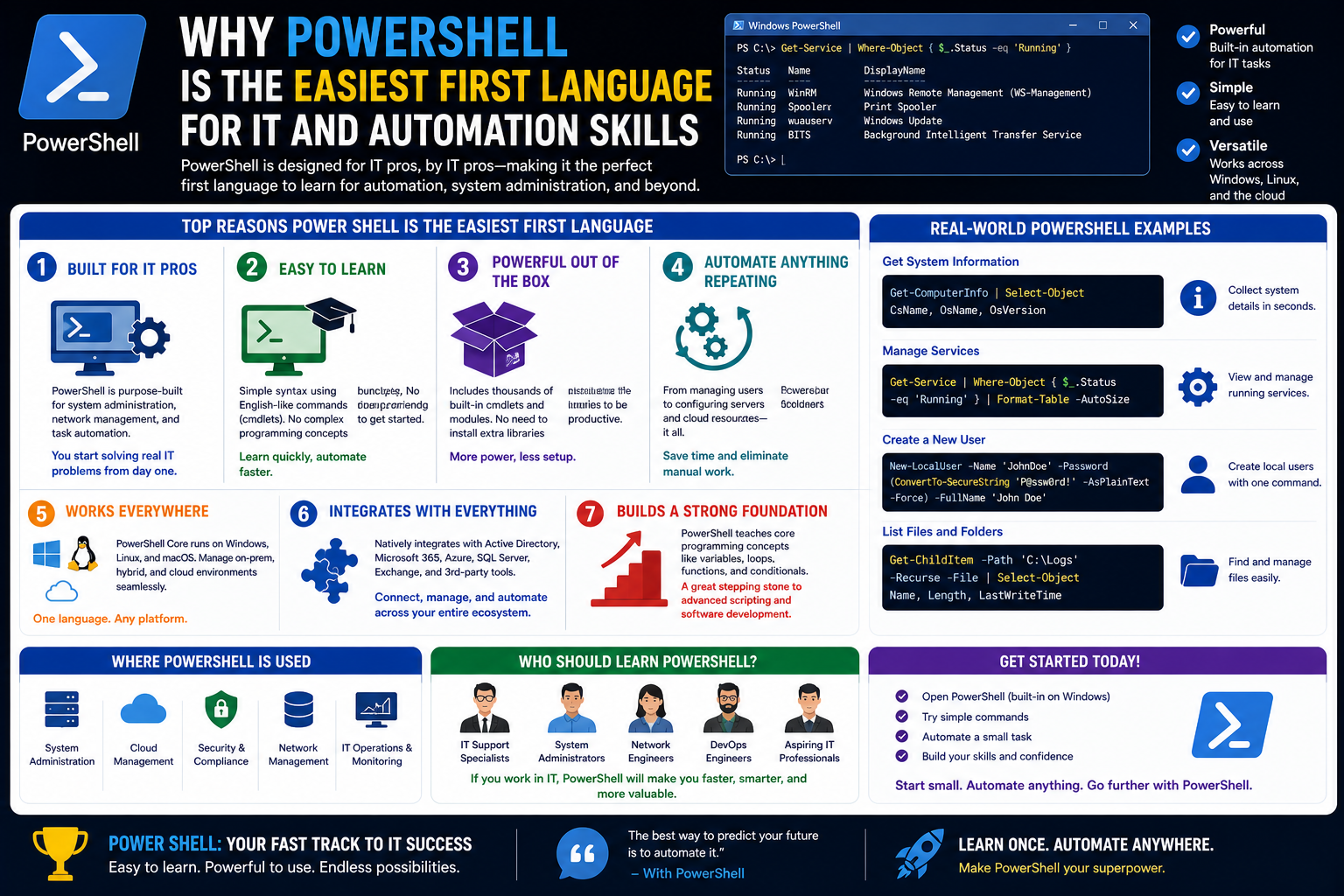
In today’s IT environments, systems are larger, more interconnected, and more demanding than ever before. Organizations rely on fast, reliable, and repeatable processes to manage servers, user accounts, applications, and security configurations. As a result, manual work is gradually being replaced by automation-driven workflows that reduce human error and increase efficiency.
This shift has changed the expectations placed on IT professionals. It is no longer enough to simply understand how systems operate through graphical interfaces or manual configuration. Employers increasingly value individuals who can automate repetitive tasks, manage systems at scale, and build consistent processes that work across hundreds or even thousands of machines.
Scripting has therefore become a core skill in IT roles. It allows professionals to translate manual actions into repeatable instructions that computers can execute. Instead of performing the same task repeatedly—such as creating user accounts, configuring permissions, or generating reports—IT staff can write instructions once and run them whenever needed.
Among the many scripting environments available, PowerShell stands out as one of the most practical starting points for learners, especially those working in Microsoft-based infrastructures. It is designed not only for advanced automation but also for accessibility, making it easier for newcomers to transition from manual system administration to scripted workflows.
The growing demand for automation skills is also closely tied to modern operational models like DevOps, where development and IT operations work more closely together. In these environments, speed, repeatability, and reliability are essential. PowerShell fits naturally into this landscape, making it a valuable entry point for anyone beginning their journey into automation and scripting.
Why PowerShell Fits Naturally Into Windows Environments
Most IT professionals, regardless of their specialization, encounter Windows systems at some point in their careers. Whether managing desktops in an office, maintaining enterprise servers, or supporting hybrid cloud environments, Windows remains a central platform in many organizations.
PowerShell integrates deeply into this ecosystem. Instead of being an external tool added on top of the operating system, it is built into Windows and designed specifically to interact with its components. This means that administrators can perform a wide range of tasks directly through PowerShell without needing additional software or third-party tools.
One of the key advantages of this integration is consistency. Many administrative tasks that are performed through graphical interfaces in Windows actually rely on underlying system commands. PowerShell provides direct access to these underlying functions in a structured and scriptable way. This makes it possible to manage systems more efficiently and with greater precision.
For example, tasks such as managing user accounts, configuring network settings, or controlling services can all be performed through PowerShell commands. These actions are not limited to a single machine; they can be extended across multiple systems simultaneously, which is especially valuable in larger environments.
Because PowerShell is designed specifically for Windows administration, it reduces the gap between what administrators do manually and what they can automate. This makes it particularly appealing for beginners, as they can immediately apply what they learn to real-world tasks without needing to switch between different tools or environments.
Understanding the Simplicity Behind PowerShell’s Design
One of the reasons PowerShell is often recommended as a first scripting language is its structured and readable design. Unlike some programming languages that require a deep understanding of abstract syntax before becoming useful, PowerShell is built around a more intuitive naming system.
Commands in PowerShell typically follow a clear verb-and-noun structure. This means that each command describes both the action being performed and the object it is being performed on. For example, instead of using complex or symbolic instructions, PowerShell uses descriptive language that closely resembles natural speech.
This approach makes scripts easier to read and understand, even for individuals who have no prior programming experience. When someone sees a command, they can often infer its purpose simply by reading it. This reduces the intimidation factor commonly associated with learning programming concepts.
Another important aspect of PowerShell’s design is its consistency. Once learners understand how one type of command works, they can often apply the same logic to many other commands. This reduces the need to memorize large amounts of unrelated syntax and instead encourages pattern recognition.
The simplicity of PowerShell does not mean it is limited. Instead, it provides a foundation that can scale with the user’s skill level. Beginners can start with simple instructions, while more advanced users can build complex automation scripts using the same underlying principles.
How Cmdlets Simplify System Management
At the core of PowerShell are cmdlets, which are specialized commands designed to perform specific tasks. These cmdlets act as building blocks for automation and system management.
Each cmdlet is designed to carry out a single function, such as retrieving information, modifying settings, or performing system operations. This modular structure makes it easier to combine commands and build more advanced workflows over time.
Cmdlets are also consistent in their naming and behavior. This consistency reduces confusion and allows users to predict how new commands might function based on ones they already know. As a result, learning PowerShell becomes a process of expanding familiar patterns rather than learning entirely new concepts each time.
Another important feature of cmdlets is their integration with system data. Instead of producing simple text output, many cmdlets return structured information that can be reused by other commands. This allows users to chain commands together, creating workflows where the output of one action becomes the input of another.
This structured approach to data handling is one of the reasons PowerShell is so effective for automation. It allows complex tasks to be broken down into smaller, manageable steps that can be executed reliably and repeatedly.
For beginners, cmdlets provide a clear and organized way to interact with the system. Instead of dealing with low-level system details, users can focus on selecting the right commands to achieve their goals.
Moving Beyond Graphical Interfaces in Everyday Tasks
Many system administration tasks in Windows are traditionally performed through graphical interfaces. These interfaces are designed to be user-friendly, allowing administrators to click through menus and settings to complete tasks.
While graphical tools are useful, they also have limitations. They are often slower for repetitive tasks, require manual effort for each operation, and can be prone to human error. As systems grow in complexity, managing everything through a graphical interface becomes increasingly inefficient.
PowerShell provides an alternative approach by allowing users to perform the same tasks through scripted commands. This means that instead of manually clicking through multiple screens, administrators can define a sequence of actions that execute automatically.
This shift from manual interaction to scripted automation is one of the most important transitions in IT careers. It allows professionals to move from reactive problem-solving to proactive system management.
Importantly, PowerShell does not completely replace graphical interfaces. Instead, it complements them. Many administrators still use graphical tools for exploration and configuration, while relying on PowerShell for repetition, scaling, and automation.
This balance makes PowerShell especially accessible for beginners. Users can start by observing how tasks are performed in the graphical interface and then gradually translate those tasks into scripted form. This creates a natural learning progression that builds confidence over time.
Learning Through Immediate Practical Results
One of the most motivating aspects of PowerShell is that learners can see immediate results from their actions. Unlike some programming environments where initial learning involves abstract concepts with no visible outcome, PowerShell allows users to interact directly with the system from the beginning.
Even simple actions, such as retrieving system information or listing resources, produce clear and understandable outputs. This immediate feedback helps learners understand how commands affect the system in real time.
This hands-on experience is especially valuable for beginners because it reinforces learning through practical application. Instead of memorizing abstract rules, users can experiment and observe outcomes directly. This makes the learning process more engaging and easier to retain.
As users become more comfortable, they naturally begin combining commands to perform more complex tasks. This progression from simple to advanced usage helps build confidence and reduces the sense of overwhelm that often comes with learning programming.
Over time, learners begin to recognize patterns in how commands are structured and how they interact with system components. This pattern recognition is a key step in developing automation skills and understanding how scripting languages function at a deeper level.
The Role of Readability in Building Confidence
Readability plays a significant role in making PowerShell approachable for beginners. Because commands are written in a descriptive format, users can often understand scripts even if they have never seen them before.
This readability reduces the barrier to entry for learning scripting. Instead of decoding complex syntax, users can focus on understanding the logic behind each command. This helps build confidence and encourages experimentation.
In many traditional programming languages, beginners often struggle with unclear syntax or abstract structures that require significant study before they become usable. PowerShell avoids much of this complexity by prioritizing clarity and consistency.
As users gain experience, they begin to appreciate how readable scripts also improve maintainability. Scripts that are easy to understand are easier to modify, troubleshoot, and share with others. This becomes increasingly important in collaborative IT environments.
Readability also supports learning in group settings, where individuals may have different levels of technical experience. Because PowerShell scripts are relatively easy to interpret, teams can more easily share knowledge and standardize practices.
Early Exposure to Automation Thinking
One of the most valuable aspects of learning PowerShell is that it introduces users to automation thinking from the very beginning. Instead of focusing only on individual tasks, learners are encouraged to think in terms of processes and repeatable actions.
This shift in mindset is essential for modern IT roles. Automation is not just about writing scripts; it is about identifying patterns in daily work and finding ways to streamline them. PowerShell naturally supports this way of thinking by making it easy to translate manual tasks into automated workflows.
As users become more familiar with scripting, they begin to recognize opportunities for automation in their everyday responsibilities. Tasks that were once performed manually start to feel inefficient, and scripting becomes the preferred method for execution.
This change in perspective is one of the reasons PowerShell is often seen as more than just a technical tool. It acts as a bridge between traditional system administration and modern infrastructure management practices.
Building a Foundation for Future Technical Growth
Learning PowerShell early in an IT career provides a strong foundation for future technical development. The concepts learned through scripting—such as logic, structure, and automation—are transferable to many other technologies and environments.
As users progress in their careers, they may encounter additional scripting and programming languages. Having experience with PowerShell makes it easier to adapt to these new environments because the core principles of automation remain consistent.
This foundational knowledge also supports progression into more advanced roles that require system design, infrastructure automation, and cloud management. Even when working with different platforms or tools, the ability to think in terms of automated processes remains valuable.
PowerShell serves as an entry point into this broader ecosystem of technical skills. It introduces users to structured thinking, system interaction, and process optimization in a way that is accessible and immediately applicable.
In this way, PowerShell is not just a tool for learning scripting—it is a starting point for developing a deeper understanding of how modern IT systems operate and how they can be managed efficiently at scale.
Understanding the Learning Curve in PowerShell Development
When people first approach scripting, they often expect a steep and technical learning curve that requires memorizing complex rules before anything meaningful can be achieved. PowerShell challenges this expectation by offering a more gradual and practical learning path.
Instead of forcing learners to understand every technical detail at once, PowerShell allows them to begin with simple actions that produce visible results. This early exposure helps reduce the psychological barrier often associated with programming. Learners are not required to become developers immediately; they can start as system users who gradually evolve into automation thinkers.
As familiarity grows, users begin to notice that PowerShell is not just about writing instructions but about understanding how systems behave. This shift in perspective is what defines the true learning curve. It is not purely technical—it is conceptual.
At first, learners focus on individual tasks. Over time, they begin to understand relationships between system components, such as how users, services, and configurations interact. This broader understanding becomes the foundation for more advanced scripting and automation practices.
The learning curve in PowerShell is therefore less about difficulty and more about expansion. Each new concept builds naturally on the previous one, allowing users to grow without feeling overwhelmed.
The Object-Based Nature of PowerShell and Why It Matters
One of the most important conceptual shifts in PowerShell is its object-based approach to data. Unlike traditional text-based command systems, PowerShell treats information as structured objects rather than simple strings of text.
This means that when a command is executed, the output is not just readable text—it is structured data that contains multiple properties and values. These properties can be used, filtered, or passed into other commands without losing meaning or structure.
For beginners, this concept may not be immediately obvious, but it becomes increasingly important as tasks grow more complex. Instead of manually interpreting output, users can rely on structured data that carries meaning across different operations.
This object-based system allows for more precise control over automation workflows. Instead of working with unorganized text, users are working with identifiable system components. This reduces ambiguity and increases reliability in scripts.
Over time, learners begin to appreciate how this approach simplifies complex tasks. It becomes possible to perform detailed operations without needing to manually extract or interpret information at every step.
This shift from text thinking to object thinking is one of the key intellectual milestones in learning PowerShell.
The Pipeline Concept as a Thinking Model
A defining feature of PowerShell is its ability to pass data between commands in a continuous flow. This concept is often described as a pipeline, where the output of one operation becomes the input of another.
While the idea may seem simple at first, it represents a powerful shift in how tasks are structured. Instead of performing isolated actions, users begin to design sequences of operations that work together as a system.
This encourages a more modular approach to problem-solving. Each step in a process can be designed independently and then combined with others to achieve a larger goal. This modularity makes scripts easier to understand, maintain, and expand.
The pipeline also encourages efficiency. Instead of writing multiple separate operations, users can chain actions together in a logical sequence. This reduces repetition and improves clarity.
From a learning perspective, the pipeline introduces an important mental model: thinking in flows rather than steps. This model is useful not only in PowerShell but in many other areas of IT and software design.
As learners become more comfortable with this concept, they begin to design more efficient and elegant solutions to everyday problems.
Developing a Troubleshooting Mindset Through Scripting
One of the hidden benefits of learning PowerShell is that it naturally develops troubleshooting skills. Because scripts interact directly with system components, users must often investigate unexpected results and understand why they occur.
This process of observation and adjustment helps build analytical thinking. Instead of simply accepting outcomes, learners begin to question and test assumptions about how systems behave.
Troubleshooting in PowerShell is not limited to fixing errors. It often involves understanding system states, checking configurations, and verifying outputs. This encourages a deeper level of engagement with the system.
Over time, users become more comfortable diagnosing issues and identifying root causes. This skill extends far beyond scripting and becomes valuable in all areas of IT work.
The structured nature of PowerShell also helps in this process. Because commands produce consistent and predictable outputs, it becomes easier to isolate problems and understand where something may have gone wrong.
This reinforces a systematic approach to problem-solving, which is a key skill in professional IT environments.
How PowerShell Encourages Logical Thinking Patterns
Learning PowerShell is not just about understanding commands—it is about developing logical thinking habits. Each script requires users to think about sequence, condition, and outcome.
This structured thinking helps learners break down complex problems into smaller, manageable parts. Instead of trying to solve everything at once, they learn to approach tasks step by step.
This type of thinking is essential in IT environments, where systems are often interconnected and complex. A single change can affect multiple components, so understanding logical flow becomes critical.
PowerShell reinforces this mindset by requiring users to define clear actions and expected results. Over time, this practice builds discipline in how problems are approached and solved.
Even outside of scripting, this logical structure influences how learners approach everyday technical challenges. They begin to think in terms of cause and effect, dependencies, and outcomes.
The Importance of System Visibility in Learning
One of the advantages of PowerShell is that it provides direct visibility into system operations. Instead of relying solely on graphical interfaces that may hide complexity, users can access detailed system information.
This transparency is important for learning because it reveals how systems actually function behind the scenes. Learners are not just interacting with interfaces—they are interacting with the system itself.
This deeper visibility helps build confidence. When users understand what is happening internally, they are more likely to trust their actions and make informed decisions.
It also helps reduce uncertainty. Many beginners feel overwhelmed by systems because they do not fully understand what is happening when they perform actions. PowerShell helps bridge this gap by exposing underlying processes in a structured way.
Over time, this visibility leads to stronger technical intuition. Users begin to anticipate system behavior based on their understanding of internal processes.
Building Confidence Through Repetition and Consistency
Confidence in scripting does not come from memorization alone. It develops through repeated exposure to consistent patterns and predictable outcomes.
PowerShell supports this by maintaining a uniform structure across its commands. Once learners understand the basic patterns, they can apply them across different scenarios.
This consistency reduces cognitive load. Instead of learning entirely new systems for each task, users build on familiar concepts and gradually expand their knowledge.
Repetition also plays an important role. As users perform similar tasks in different contexts, they begin to internalize the logic behind them. This leads to faster recognition and improved efficiency.
Over time, tasks that once seemed complex become routine. This shift is a key indicator of growing competence in scripting and automation.
Real-World Application of Scripting Principles
One of the strongest aspects of PowerShell is its direct applicability to real-world IT tasks. Unlike abstract programming exercises, scripting in PowerShell is closely tied to practical system administration.
This means that learners can immediately apply what they learn to their daily responsibilities. Tasks such as managing accounts, checking system status, or adjusting configurations can all be automated using the same principles.
This practical relevance increases motivation. When learners see immediate benefits from their efforts, they are more likely to continue developing their skills.
It also helps bridge the gap between learning and professional application. Skills developed in a learning environment are directly transferable to workplace scenarios.
Over time, users begin to recognize patterns in their work and identify opportunities for automation. This leads to continuous improvement in efficiency and productivity.
The Role of Error Handling in Skill Development
Errors are a natural part of learning any technical system, and PowerShell is no exception. However, errors in scripting are not just obstacles—they are learning opportunities.
When a script does not behave as expected, users are encouraged to investigate the cause. This process helps develop analytical skills and attention to detail.
Understanding errors requires examining system feedback and interpreting messages. This helps learners become more familiar with system behavior and improves their ability to diagnose issues.
Over time, users begin to view errors not as failures but as signals that guide improvement. This mindset shift is essential for long-term skill development.
It also builds resilience. Instead of being discouraged by mistakes, learners become more comfortable experimenting and refining their approach.
Scaling Tasks from Simple to Complex Operations
One of the key strengths of PowerShell is its ability to scale from simple tasks to complex operations. Beginners can start with basic commands and gradually build more advanced workflows.
This scalability is important because it allows learners to grow at their own pace. There is no strict boundary between beginner and advanced usage; instead, there is a continuous progression.
As users gain experience, they begin combining multiple operations into single workflows. This allows them to handle larger datasets, manage more systems, and automate more complex processes.
This progression mirrors real-world IT environments, where tasks often start small and expand in complexity over time.
The ability to scale operations also reinforces the importance of structure and organization in scripting. Well-designed scripts can handle increasing complexity without becoming difficult to manage.
Cognitive Shift from Manual Execution to Automation Thinking
Perhaps the most significant transformation that occurs when learning PowerShell is the shift from manual execution to automation thinking.
Initially, users approach tasks as individual actions that must be performed one by one. Over time, they begin to see these actions as part of larger processes that can be automated.
This cognitive shift changes how problems are approached. Instead of asking how to complete a task, learners begin asking how to design a system that completes the task automatically.
This shift has far-reaching implications. It changes not only technical skills but also how time and effort are perceived in IT environments.
Automation thinking encourages efficiency, consistency, and scalability. It also reduces repetitive workload, allowing professionals to focus on more complex and strategic tasks.
PowerShell plays a key role in facilitating this transition by making automation accessible and practical from the very beginning of the learning journey.
PowerShell in Modern Infrastructure and the Shift Toward DevOps Culture
Modern IT environments are no longer built around isolated systems or single-server management. Instead, they operate as interconnected ecosystems where applications, services, and infrastructure components must work together seamlessly. This shift has given rise to operational models that emphasize speed, automation, and collaboration across traditionally separate teams.
PowerShell fits naturally into this evolution because it is designed for managing systems at scale. Rather than focusing on individual machines, it enables administrators to think in terms of entire environments. This perspective is essential in modern infrastructure, where changes often need to be applied consistently across multiple systems at once.
In DevOps-oriented environments, the boundary between development and operations becomes less rigid. Both sides share responsibility for building, deploying, and maintaining systems. Automation plays a central role in this collaboration, ensuring that processes are repeatable and reliable.
PowerShell supports this model by providing a consistent way to interact with systems programmatically. Whether managing local servers or cloud-based resources, the same principles of scripting and automation apply. This consistency reduces friction when transitioning between different environments.
As organizations adopt DevOps practices more widely, the demand for professionals who understand automation tools continues to grow. PowerShell often becomes a foundational skill in this context, not because it is the only tool available, but because it aligns closely with how modern infrastructure is managed.
Cross-Platform Evolution and Its Impact on Skill Portability
One of the most significant developments in PowerShell’s history is its expansion beyond the Windows operating system. While it originally existed as a Windows-only tool, it has evolved into a cross-platform environment capable of running on multiple operating systems.
This evolution has had a major impact on its relevance in modern IT. Today’s infrastructure is rarely limited to a single operating system. Organizations often use a mix of Windows, Linux, and cloud-based systems. A tool that can operate across these environments provides a significant advantage.
Cross-platform capability means that skills learned in one environment are no longer confined to that environment. A script written in one context can often be adapted to another with minimal changes in logic. This increases the portability of knowledge and reduces the need to learn entirely separate tools for different systems.
For learners, this is especially valuable. It means that investing time in PowerShell does not lock them into a single ecosystem. Instead, it provides a flexible foundation that can be applied across various technologies and platforms.
This portability also reflects a broader trend in IT: the move toward unified tooling and standardized processes. Rather than maintaining separate skill sets for each environment, professionals are increasingly expected to work across systems with a common set of principles.
Automation at Scale in Enterprise Environments
As organizations grow, so does the complexity of their IT infrastructure. Managing hundreds or thousands of systems manually becomes impractical, if not impossible. Automation is therefore not just a convenience but a necessity.
PowerShell plays a key role in enabling automation at scale. It allows administrators to define processes once and apply them across large environments without repeating manual effort. This is particularly important in areas such as user management, system configuration, and software deployment.
At scale, consistency becomes critical. Even small variations in configuration can lead to system instability or security vulnerabilities. Automation helps eliminate these inconsistencies by ensuring that the same instructions are applied uniformly.
In enterprise environments, PowerShell is often used to standardize administrative tasks. Instead of relying on individual judgment or manual execution, organizations define scripted processes that ensure predictable outcomes.
This approach not only improves efficiency but also reduces risk. When processes are automated, they are less prone to human error, which is one of the most common causes of system issues in large environments.
Over time, automation becomes deeply embedded in operational workflows. It is no longer an optional enhancement but a core component of how systems are managed and maintained.
Security Awareness Through Scripting Practices
Security is a critical concern in any IT environment, and scripting plays an important role in maintaining secure systems. PowerShell contributes to this by allowing administrators to define precise and controlled actions across systems.
Instead of relying on manual configuration, which can vary between administrators, scripts provide a standardized method for applying security settings. This consistency helps reduce vulnerabilities caused by misconfiguration or oversight.
PowerShell also enables visibility into system states, making it easier to audit configurations and identify potential issues. Administrators can retrieve detailed information about system settings, user permissions, and active processes.
This level of transparency is essential for maintaining secure environments. It allows organizations to verify that systems are configured correctly and that security policies are being enforced consistently.
Another important aspect of security in scripting is control. PowerShell allows administrators to define exactly what actions are permitted and under what conditions they can be executed. This reduces the risk of unauthorized changes or accidental modifications.
As security threats become more sophisticated, the ability to automate defensive measures becomes increasingly valuable. PowerShell enables rapid response to potential issues by allowing predefined actions to be executed quickly and reliably.
Integration With Cloud-Based Systems and Services
Modern IT infrastructure is increasingly moving toward cloud-based environments. These environments offer scalability, flexibility, and reduced dependency on physical hardware. However, they also introduce new complexity in terms of management and configuration.
PowerShell integrates well with cloud platforms, allowing administrators to manage cloud resources using the same scripting principles they use for local systems. This reduces the learning curve when transitioning from traditional infrastructure to cloud environments.
Instead of learning entirely new tools for cloud management, users can extend their existing PowerShell knowledge to interact with cloud services. This continuity makes the transition smoother and more intuitive.
Cloud environments often involve managing dynamic resources that change frequently. Automation becomes essential in this context, as manual management is not practical at scale. PowerShell provides a structured way to handle these dynamic environments.
By using scripts, administrators can automate tasks such as resource provisioning, configuration updates, and system monitoring. This allows cloud environments to be managed efficiently even as they scale rapidly.
The integration between scripting and cloud systems reflects a broader shift in IT toward infrastructure that is defined and controlled through code rather than manual configuration.
The Role of Modules in Extending Functionality
As users become more advanced in PowerShell, they encounter the concept of modules. Modules are collections of related functions and commands that extend the capabilities of the scripting environment.
Instead of relying solely on built-in commands, users can incorporate modules to access additional functionality. This modular approach allows PowerShell to remain flexible and adaptable to different use cases.
Modules also support specialization. Different areas of IT, such as networking, security, and cloud management, often require specific tools and commands. Modules provide a way to organize these tools in a structured and accessible manner.
For learners, modules represent an important step in expanding capabilities. They allow users to move beyond basic scripting and begin working with more specialized tasks.
This extensibility is one of the reasons PowerShell remains relevant in diverse IT environments. It is not limited to a fixed set of features but can grow and adapt based on user needs.
Remote Management and Distributed Systems
In large IT environments, systems are rarely managed individually. Instead, administrators often need to control multiple machines from a central location. Remote management is therefore a critical capability.
PowerShell supports remote operations, allowing commands to be executed on multiple systems without requiring direct access to each machine. This capability is essential for managing distributed environments efficiently.
Remote management reduces the need for physical or direct interaction with systems. Instead, administrators can define actions centrally and apply them across the network.
This approach improves efficiency and consistency. It ensures that changes are applied uniformly and reduces the risk of configuration drift between systems.
It also supports scalability. As environments grow, remote management allows administrators to maintain control without increasing manual workload proportionally.
From a learning perspective, remote operations introduce users to the concept of distributed systems. Instead of thinking about single machines, learners begin to think about networks of interconnected systems.
Infrastructure Thinking and Code-Based Management
One of the most important conceptual shifts in modern IT is the idea that infrastructure can be managed as code. Instead of configuring systems manually, administrators define desired states through scripts and automation.
PowerShell contributes to this shift by allowing system configurations to be described and executed programmatically. This means that infrastructure becomes repeatable, versionable, and easier to manage.
Infrastructure thinking requires a different mindset compared to traditional administration. Instead of focusing on individual changes, the focus shifts to defining consistent and reusable configurations.
This approach improves reliability because systems can be rebuilt or modified using the same instructions. It also reduces dependency on individual knowledge, making systems easier to maintain across teams.
Over time, this method of thinking becomes second nature to those who work with scripting tools regularly. They begin to view systems not as static entities but as dynamic environments that can be shaped through code.
Expanding Career Opportunities Through Automation Skills
As IT roles continue to evolve, automation skills have become increasingly valuable across multiple domains. Professionals who understand scripting and system automation are often able to take on more advanced responsibilities.
PowerShell is frequently encountered in job roles related to system administration, cloud engineering, and infrastructure management. This is because it aligns closely with the operational needs of these roles.
The ability to automate tasks, manage systems at scale, and streamline processes is highly valued in modern IT environments. These skills contribute directly to efficiency and operational stability.
As organizations adopt more automated workflows, the demand for individuals who can design and maintain these systems continues to grow. PowerShell serves as an entry point into this broader skill set.
It also encourages continuous learning. As users become more comfortable with scripting, they often explore additional technologies and languages that complement their automation skills.
Building Advanced Scripting Practices Over Time
As users gain experience with PowerShell, they naturally begin to adopt more advanced scripting practices. These include structuring scripts more efficiently, organizing reusable components, and designing workflows that are easier to maintain.
Advanced scripting is not just about writing longer or more complex commands. It is about creating systems that are reliable, understandable, and scalable over time.
This involves thinking carefully about structure and organization. Scripts must be designed in a way that allows them to be updated and extended without introducing unnecessary complexity.
Over time, users develop a sense of best practices based on experience. They learn what makes scripts efficient, what makes them difficult to maintain, and how to avoid common pitfalls.
These skills are highly transferable and apply to many areas of IT beyond PowerShell. They contribute to a broader understanding of system design and automation strategy.
The Expanding Ecosystem and Continuous Evolution
PowerShell continues to evolve alongside the broader IT landscape. As new technologies emerge, scripting environments must adapt to support them. This ongoing evolution ensures that PowerShell remains relevant in changing environments.
The ecosystem around PowerShell includes a wide range of tools, extensions, and community-driven resources. These contribute to its flexibility and long-term usability.
As systems become more complex, the need for adaptable and extensible tools becomes even more important. PowerShell’s design allows it to evolve without losing compatibility with existing workflows.
This balance between stability and adaptability is one of its key strengths. It ensures that users can rely on it for long-term projects while still benefiting from ongoing improvements.
Over time, this evolving ecosystem reinforces the importance of scripting as a core IT skill. It is no longer an optional enhancement but a fundamental part of modern system management practice.
Conclusion
PowerShell has grown far beyond its origins as a simple administrative tool for Windows systems. It now stands as a central pillar in modern IT operations, automation practices, and infrastructure management. What makes it especially valuable as a first programming or scripting language is not just its technical capability, but the way it reshapes how learners think about systems, tasks, and problem-solving.
For beginners, PowerShell offers something rare in the world of programming: immediate relevance. From the very beginning, learners are not working in abstract environments or disconnected examples. Instead, they are interacting directly with real systems, performing tasks that mirror everyday IT responsibilities. This creates a learning experience that feels practical and meaningful, which helps sustain motivation over time.
Its design also plays a major role in its accessibility. The structured verb-noun syntax, combined with readable commands and consistent patterns, reduces the intimidation often associated with coding. Rather than requiring learners to decode complex logic upfront, PowerShell allows them to understand commands in a more intuitive way. This lowers the barrier to entry and encourages experimentation, which is essential for skill development.
Beyond ease of learning, PowerShell introduces foundational concepts that are essential in modern IT environments. Ideas such as pipelines, object-based output, automation workflows, and system-wide consistency are not just technical features—they are ways of thinking. Once learners become comfortable with these concepts, they naturally begin to approach problems differently, shifting from manual execution to structured automation.
This mindset shift is one of the most important outcomes of learning PowerShell. It encourages individuals to look for patterns in their daily tasks, identify repetition, and build solutions that save time and reduce errors. Over time, this leads to more efficient workflows and a deeper understanding of how systems behave at scale.
In professional environments, these skills translate directly into value. Organizations increasingly depend on automation to manage complex infrastructures, maintain security standards, and support rapid deployment cycles. As a result, individuals who understand scripting and automation are often better positioned for advanced technical roles and long-term career growth.
PowerShell also serves as a bridge into broader technical domains. The skills developed through scripting—logical thinking, system analysis, and process design—are transferable to cloud computing, DevOps practices, and other programming environments. This makes it not just a standalone skill, but a foundation for continuous learning and professional evolution.
Ultimately, PowerShell stands out because it aligns learning with real-world application. It does not separate theory from practice; instead, it integrates both into a single, cohesive experience. For anyone entering the IT field or looking to strengthen their automation capabilities, it provides a clear and practical starting point that naturally expands into more advanced areas over time.