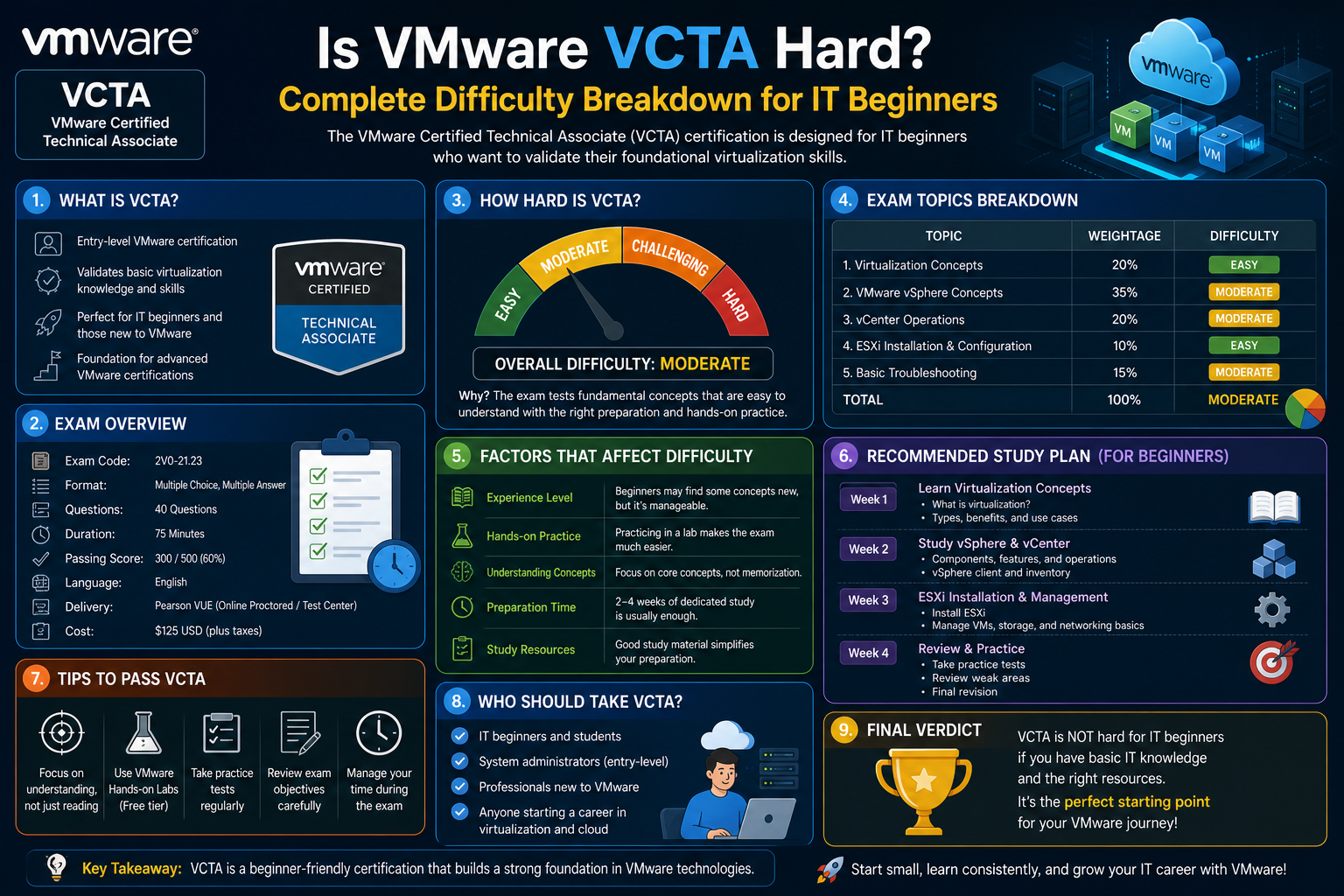
The VMware Certified Technical Associate (VCTA) represents an entry point into the broader world of virtualization and modern data center technologies. It is designed for individuals who are beginning their journey in IT infrastructure and want to develop a structured understanding of how virtual environments operate. Unlike advanced certifications that expect deep hands-on expertise, this foundation-level certification focuses on awareness, recognition, and conceptual clarity.
At its core, the VCTA is about validating that a candidate can understand the basic building blocks of a virtualized environment. This includes recognizing what components exist within a VMware-based system, how those components interact, and what their general purpose is. It does not require mastery of complex configurations or advanced troubleshooting scenarios. Instead, it emphasizes familiarity with the environment that many IT professionals will eventually manage or support.
This makes the VCTA particularly significant for beginners. It provides a structured learning path into virtualization, a technology that underpins modern cloud computing, enterprise IT infrastructure, and large-scale application hosting. Understanding virtualization is no longer optional in IT—it is foundational. The VCTA helps bridge that initial gap between general IT knowledge and specialized infrastructure expertise.
The exam is also structured to reflect real-world environments in a simplified form. Rather than isolating theoretical knowledge, it presents candidates with scenarios or concepts that mirror what they might encounter in a functioning data center. These include recognizing virtual machines, understanding host systems, identifying storage types, and grasping how virtual networking fits into a larger architecture.
Although it is entry-level, the scope of the VCTA should not be underestimated. It covers a wide conceptual surface area, requiring learners to become comfortable with terminology, system relationships, and architectural thinking. For many beginners, the challenge is not the complexity of individual topics but the breadth of knowledge required.
Where VCTA Fits in the Virtualization Career Path
To understand the difficulty of the VCTA, it is important to place it within the broader IT certification and career landscape. Virtualization is a core pillar of modern infrastructure, and VMware technologies are widely used in enterprise environments. The VCTA serves as the first formal step in understanding this ecosystem.
At the entry level, IT professionals often start with general computing knowledge, networking basics, or hardware fundamentals. The VCTA introduces a shift from physical systems to virtualized infrastructure. This means learning how physical resources such as CPU, memory, and storage are abstracted and shared across multiple virtual machines.
In a career progression sense, the VCTA sits at the awareness stage. It prepares learners for more technical certifications that require operational skills and hands-on administration. While more advanced certifications demand the ability to configure, optimize, and troubleshoot systems, the VCTA focuses on identification and conceptual understanding.
This positioning influences its perceived difficulty. For someone completely new to virtualization, the terminology alone can feel unfamiliar. Words like hypervisor, datastore, cluster, and vCenter may initially seem abstract. However, compared to advanced VMware certifications, the VCTA is intentionally designed to be more accessible.
What makes it challenging for some learners is not the technical depth but the need to mentally map how different components fit together. The transition from traditional IT environments to virtualized systems requires a shift in thinking. Instead of viewing servers as physical machines performing isolated tasks, candidates must understand shared infrastructure that dynamically allocates resources.
This conceptual shift is often where learners experience the most difficulty. The VCTA acts as a bridge into this mindset, preparing individuals for more advanced roles such as virtualization administrator, cloud infrastructure engineer, or systems specialist.
Core Virtualization Concepts Behind the Exam
Virtualization is the foundation of the VCTA, and understanding its core principles is essential to grasping the exam’s difficulty level. At a high level, virtualization is the process of creating multiple simulated computing environments from a single physical hardware system. These simulated environments are known as virtual machines.
Each virtual machine operates like an independent computer, with its own operating system and applications. However, they all share the underlying physical resources of a host machine. This abstraction is made possible through a layer of software called a hypervisor.
The hypervisor plays a critical role in virtualization. It manages resource allocation between virtual machines, ensuring that each system receives the necessary CPU cycles, memory, and storage access. It also isolates virtual machines from one another, maintaining security and stability within the environment.
Another important concept is resource pooling. In a virtualized environment, physical resources are not dedicated to a single machine. Instead, they are pooled together and distributed dynamically based on demand. This allows organizations to maximize efficiency and reduce hardware costs.
Virtualization also introduces the concept of abstraction layers. These layers separate physical hardware from the virtual systems that run on top of it. This separation allows administrators to manage infrastructure more flexibly, as changes can be made at the software level without modifying physical components.
For beginners, these concepts can be abstract and initially difficult to visualize. Unlike physical servers, where components are tangible, virtualization involves systems that exist logically rather than physically. The VCTA requires learners to become comfortable with this abstraction.
The exam tests understanding of these principles indirectly. Rather than asking candidates to perform complex configurations, it evaluates whether they can recognize how virtual environments function at a structural level. This includes understanding relationships between hosts, virtual machines, storage systems, and management tools.
VMware vSphere Environment Overview
A significant portion of the VCTA exam is based on VMware vSphere, which is the core platform used to manage virtualized environments. vSphere is a suite of technologies that enables virtualization, resource management, and centralized control of infrastructure.
At a high level, vSphere consists of multiple interconnected components that work together to create and manage virtual environments. These include the hypervisor layer, management systems, and supporting services that ensure smooth operation of virtual machines.
The environment is designed to allow administrators to control large-scale infrastructure from a centralized interface. Instead of managing individual physical servers separately, administrators can manage entire clusters of virtual machines through a unified system.
One of the key advantages of vSphere is scalability. Organizations can add or remove resources as needed without disrupting existing systems. This flexibility is a major reason why virtualization has become a standard in modern IT environments.
Another important aspect is high availability. vSphere environments are designed to minimize downtime by automatically recovering virtual machines in the event of hardware failure. This ensures continuity of services even when underlying physical systems encounter issues.
The VCTA requires learners to understand these high-level capabilities and how they are enabled by different components within the system. While advanced configuration is not required, recognizing how the environment is structured is essential.
Understanding vSphere also involves becoming familiar with its interface and organizational hierarchy. Virtual environments are structured in layers, including data centers, clusters, hosts, and virtual machines. Each layer serves a specific purpose and contributes to overall system functionality.
For beginners, visualizing this hierarchy can be challenging. Unlike traditional systems that operate in a linear fashion, virtual environments are multi-layered and interconnected. The VCTA assesses whether candidates can interpret this structure conceptually.
Data Center Architecture Fundamentals
At the foundation of any VMware environment is the concept of data center architecture. A data center in virtualization terms is a logical structure that organizes computing resources, storage systems, and networking components into a unified environment.
Understanding data center architecture is essential because it defines how resources are grouped and managed. In virtual environments, physical hardware is abstracted and organized into logical containers that simplify administration.
Within a data center, resources are typically divided into clusters. A cluster is a collection of physical hosts that work together to provide computing power for virtual machines. These hosts share resources and collaborate to ensure workload distribution.
Storage systems are also integrated into this architecture. Instead of being tied to individual machines, storage is centralized and shared across multiple hosts. This allows virtual machines to access data regardless of which physical server they are running on.
Networking is another critical component. Virtual networks allow communication between virtual machines, hosts, and external systems. These networks are configured in a way that mimics physical networking but operates entirely in software.
The VCTA expects candidates to understand how these components fit together within the data center structure. While detailed configuration is not required, recognizing the relationships between compute, storage, and networking is essential.
One of the key challenges in understanding data center architecture is the shift from physical thinking to logical thinking. In traditional IT environments, servers, storage devices, and network switches are distinct physical objects. In virtualization, these elements are abstracted and managed as part of a unified system.
This abstraction allows for greater flexibility but also introduces conceptual complexity. The VCTA helps learners develop the ability to interpret these systems at a structural level.
vSphere Components and Their Roles
The vSphere environment is composed of multiple components, each serving a specific function within the virtualization ecosystem. Understanding these components and their relationships is a central part of the VCTA exam.
At the core is the ESXi hypervisor, which runs directly on physical hardware. It is responsible for creating and managing virtual machines. ESXi allocates resources and ensures that virtual machines operate independently while sharing underlying hardware.
Another critical component is the centralized management system, which allows administrators to control multiple hosts from a single interface. This system provides visibility into the entire virtual infrastructure and enables configuration, monitoring, and maintenance tasks.
Virtual machines themselves are also key components. Each virtual machine behaves like a standalone computer, complete with its own operating system and applications. However, they are entirely software-based and dependent on the underlying hypervisor.
Storage components, often referred to as datastores, provide the space where virtual machines store their files. These datastores are accessible by multiple hosts, enabling flexibility and redundancy.
Networking components within vSphere allow communication between virtual machines and external systems. These virtual networks replicate physical networking structures but are managed entirely through software.
Each of these components plays a role in maintaining the overall functionality of the virtual environment. The VCTA requires candidates to recognize these roles and understand how they interact within the system.
The difficulty arises not from memorizing each component individually but from understanding how they function together. Virtualization is inherently interconnected, and changes in one area can affect multiple other components.
How the Exam Tests Architecture and Technology Knowledge
The VCTA exam evaluates understanding of architecture and technology through conceptual recognition rather than technical execution. Candidates are expected to identify components, understand their purpose, and recognize how they relate to each other within a virtual environment.
Questions in this area typically focus on identifying system roles, understanding infrastructure layouts, and interpreting how virtual components interact. Instead of requiring configuration steps, the exam assesses whether candidates can correctly associate functions with the appropriate components.
This approach makes the exam more accessible but still requires a solid grasp of foundational concepts. Learners must be able to visualize how virtual environments are structured and how resources are distributed across systems.
The challenge lies in the breadth of knowledge required. While each individual concept is relatively straightforward, the combination of multiple concepts within a single environment can be complex for beginners.
Candidates must also develop the ability to think in terms of systems rather than isolated components. Virtualization is not about individual machines but about interconnected environments that operate as a unified whole.
Thinking Like a Virtualization Administrator
One of the most important skills assessed indirectly by the VCTA is the ability to think like a virtualization administrator. This involves understanding how systems are structured, how resources are managed, and how different components interact within a virtual environment.
Rather than focusing on step-by-step procedures, this mindset emphasizes conceptual awareness. Administrators must be able to interpret system behavior, recognize relationships between components, and understand the impact of changes within the environment.
Developing this way of thinking is often one of the most difficult aspects for beginners. It requires shifting away from physical infrastructure thinking and adopting a more abstract perspective.
Virtualization environments are dynamic, meaning resources can be allocated, moved, or adjusted based on demand. This fluidity is a key characteristic of modern IT systems and is central to understanding VMware environments.
The VCTA encourages learners to begin developing this perspective early in their journey. While the exam itself is not deeply technical, it lays the foundation for more advanced operational thinking in future certifications.
Common Challenges Beginners Face in This Domain
Many beginners find virtualization concepts challenging not because they are overly complex, but because they represent a new way of thinking about computing systems. The abstraction of physical hardware into virtual components can initially feel unintuitive.
One common difficulty is understanding the relationship between physical and virtual layers. Learners may struggle to visualize how virtual machines run on shared physical resources while maintaining isolation.
Another challenge is terminology. The virtualization field introduces many new terms that may not exist in traditional IT environments. Without prior exposure, this vocabulary can feel overwhelming.
The interconnected nature of virtualization systems also adds complexity. Changes in one component can affect multiple others, requiring learners to think in systems rather than isolated parts.
Despite these challenges, the VCTA is designed to gradually introduce these concepts in a structured manner. It encourages learners to build familiarity over time rather than expecting immediate mastery.
Building Mental Models of Virtual Infrastructure
A key strategy for understanding VCTA-level concepts is the development of mental models. These are simplified representations of how virtual systems operate and interact.
Mental models help learners visualize complex environments by breaking them into manageable parts. For example, a data center can be imagined as a layered structure consisting of physical hosts, virtual machines, storage systems, and networking components.
By organizing information in this way, learners can more easily understand how each component fits into the larger system. This approach is particularly useful for virtualization, where abstraction plays a major role.
Developing strong mental models also improves retention and comprehension. Instead of memorizing isolated facts, learners begin to understand relationships and dependencies within the system.
Practical Interpretation of “Identify and Understand” Objectives
A defining characteristic of the VCTA exam is its emphasis on identification and understanding rather than execution. Candidates are expected to recognize components, interpret system layouts, and understand basic operational concepts.
This means that much of the exam focuses on visual and conceptual recognition. Learners must be able to distinguish between different system elements and understand their roles within the environment.
This approach aligns with the foundational nature of the certification. It is not intended to test advanced technical skills but to ensure that candidates have a solid understanding of virtualization fundamentals.
Bridging Theory and Real-World Systems
While the VCTA is primarily conceptual, it is closely tied to real-world IT environments. The concepts it covers are directly applicable to enterprise infrastructure, cloud computing platforms, and modern data center operations.
Understanding how theoretical concepts translate into practical systems is an important step in developing IT expertise. Virtualization is widely used in production environments, and familiarity with its structure provides a strong foundation for future technical roles.
The ability to connect abstract concepts with real-world systems is one of the key outcomes of studying virtualization at this level.
Installing and Deploying VMware Components in a Virtual Environment
One of the core knowledge areas within the VCTA framework revolves around understanding how VMware environments are initially installed and deployed. Although the exam does not require candidates to perform installation tasks step by step, it expects a clear conceptual understanding of how a virtual infrastructure comes into existence and how its foundational components are introduced into a working system.
At the heart of any VMware deployment is the ESXi hypervisor. This lightweight operating system is installed directly onto physical hardware and serves as the foundation for all virtualization activities. Understanding its role is essential because it represents the transition point between physical infrastructure and virtual environments.
The installation process begins with preparing compatible hardware, which must meet specific requirements for CPU, memory, and storage capabilities. Once installed, ESXi transforms a physical machine into a host capable of running multiple virtual machines simultaneously. This abstraction is what enables virtualization to function at scale.
After ESXi is deployed, the next major component introduced into the environment is centralized management software. This system allows administrators to manage multiple hosts from a single interface. Without it, each host would need to be configured and monitored individually, which would be inefficient in enterprise environments.
From a conceptual standpoint, the VCTA requires learners to understand the sequence of deployment rather than the technical steps. It is important to recognize that virtualization environments are built in layers, with each layer depending on the successful deployment of the previous one.
Once the core infrastructure is in place, additional components such as storage systems and networking configurations are integrated. These elements allow virtual machines to communicate, store data, and access shared resources across the environment.
Understanding this layered deployment approach is crucial because it reflects how real-world data centers are constructed. The exam evaluates whether candidates can mentally reconstruct this process and understand how each component contributes to the overall system.
Configuring Basic Virtual Infrastructure Settings
After installation, virtual environments require configuration to become fully operational. The VCTA focuses on the foundational aspects of this configuration process, emphasizing understanding over execution.
One of the first configuration areas involves setting up management access. This ensures that administrators can securely connect to the system and begin organizing resources. Proper access configuration is essential for maintaining control over the environment.
Another important area is time synchronization. Virtual environments rely on accurate time settings for logging, authentication, and system coordination. Without consistent time configuration, troubleshooting and monitoring become significantly more difficult.
Networking configuration is another fundamental aspect. Virtual switches are used to connect virtual machines to each other and to external networks. These virtual switches behave similarly to physical network switches but operate entirely within software.
Storage configuration is also a key part of the setup process. Virtual machines require access to shared storage locations known as datastores. These datastores must be properly configured to ensure availability, performance, and redundancy.
The VCTA does not require deep technical configuration knowledge but expects learners to understand why these settings matter. The emphasis is on recognizing the purpose of configuration tasks rather than performing them in detail.
This conceptual understanding is important because configuration choices directly affect system performance, reliability, and scalability. Even at an entry level, candidates are expected to appreciate how foundational settings influence the behavior of virtual environments.
Understanding Virtual Networking Fundamentals
Networking is one of the most important components of any virtual environment, and it plays a significant role in the VCTA knowledge base. While physical networking involves cables, switches, and routers, virtual networking replicates these functions entirely in software.
In a virtualized environment, virtual switches act as the primary communication layer between virtual machines. These switches manage traffic flow, connect systems within the same host, and facilitate communication between different hosts.
Each virtual machine connects to a virtual switch through a virtual network interface. This setup allows multiple virtual machines to share the same physical network resources while maintaining logical separation.
One of the key advantages of virtual networking is flexibility. Network configurations can be modified without changing physical hardware. This allows administrators to adapt quickly to changing workload demands.
Segmentation is another important concept in virtual networking. Different virtual networks can be created to isolate traffic for security or performance reasons. This ensures that sensitive systems remain separated from general traffic.
The VCTA expects learners to understand these basic networking concepts and how they apply within a virtual environment. While advanced routing and switching configurations are beyond the scope of the exam, foundational awareness is essential.
Understanding virtual networking also requires recognizing how it integrates with the broader infrastructure. Virtual machines, storage systems, and management tools all depend on network connectivity to function effectively.
Storage Concepts in Virtualized Environments
Storage plays a central role in virtualization, as it determines how virtual machines store and access data. In VMware environments, storage is abstracted into logical containers known as datastores.
A datastore is a shared storage location that can be accessed by multiple hosts. This shared access allows virtual machines to move between hosts without losing access to their data.
There are different types of storage technologies used in virtual environments, including traditional disk-based storage and network-based storage systems. Each type offers different advantages in terms of performance, scalability, and redundancy.
One of the key benefits of virtualized storage is centralization. Instead of relying on individual physical disks attached to specific servers, storage resources are pooled together and managed centrally.
This centralization improves efficiency and simplifies management. It also enables advanced features such as high availability and load balancing, which rely on shared storage access.
The VCTA requires learners to understand the purpose of datastores and how they support virtual machine operations. While detailed storage architecture is not required, conceptual awareness is essential.
Storage performance can directly impact virtual machine performance. If storage systems are slow or overloaded, virtual machines may experience delays or reduced responsiveness.
Understanding this relationship helps learners appreciate the importance of proper storage design in virtual environments. Even at an entry level, recognizing these dependencies is an important part of virtualization knowledge.
Administrative Tasks in Virtual Environments
Administrative tasks form a significant part of virtualization operations, and the VCTA introduces learners to the basic concepts behind these responsibilities.
One of the most fundamental administrative tasks is virtual machine management. This includes creating, starting, stopping, and deleting virtual machines. Each virtual machine operates independently but is managed centrally through virtualization tools.
Another key task is resource allocation. Administrators must ensure that virtual machines receive appropriate amounts of CPU, memory, and storage resources. Over-allocating or under-allocating resources can lead to performance issues.
Template management is also an important concept. Templates are pre-configured virtual machines that can be used to quickly deploy new systems. This improves efficiency and ensures consistency across environments.
Cloning is another administrative function that allows administrators to create copies of existing virtual machines. This is useful for testing, development, or scaling environments.
Monitoring is also a key responsibility. Administrators must keep track of system performance, resource usage, and overall health of the virtual environment.
The VCTA focuses on whether learners understand these tasks conceptually. It is not about performing them but about recognizing their purpose and impact within the system.
Understanding Snapshots and System States
Snapshots are an important concept in virtualization and play a role in VCTA-level understanding. A snapshot captures the state of a virtual machine at a specific point in time.
This includes the system’s memory, disk state, and configuration. Snapshots allow administrators to revert a virtual machine to a previous state if necessary.
They are commonly used for testing, updates, and troubleshooting. For example, before making changes to a system, an administrator might take a snapshot to ensure they can restore the previous state if something goes wrong.
While snapshots are useful, they must be managed carefully. Overusing snapshots can lead to storage inefficiencies and performance degradation.
The VCTA expects learners to understand what snapshots are and why they are used. This includes recognizing both their benefits and limitations.
Understanding snapshots also reinforces the broader concept of system state management in virtual environments. Virtual machines are flexible and dynamic, and snapshots provide a way to capture and control that flexibility.
Monitoring Virtual Infrastructure Health
Monitoring is a critical aspect of managing virtual environments. It involves observing system performance, resource usage, and operational status to ensure everything is functioning correctly.
In VMware environments, monitoring tools provide visibility into both physical and virtual components. This includes host performance, virtual machine activity, and storage utilization.
One of the key purposes of monitoring is early detection of issues. By identifying performance degradation or resource shortages early, administrators can take corrective action before problems escalate.
Monitoring also supports capacity planning. By analyzing resource usage trends, organizations can make informed decisions about scaling infrastructure.
The VCTA introduces learners to the concept of monitoring without requiring detailed configuration knowledge. The focus is on understanding why monitoring is important and what types of information it provides.
Alarms are closely related to monitoring. These are automated alerts that notify administrators when certain conditions are met, such as high CPU usage or low storage availability.
Understanding how monitoring and alarms work together is essential for maintaining system stability in virtual environments.
Troubleshooting Basic Virtual Environment Issues
Troubleshooting is another important area covered at a foundational level in the VCTA. While advanced debugging is not required, learners are expected to understand basic troubleshooting principles.
Common issues in virtual environments include network connectivity problems, storage access issues, and resource contention. Each of these can affect virtual machine performance or availability.
Troubleshooting typically begins with identifying the source of the problem. This involves checking system status, reviewing logs, and analyzing resource usage.
Virtual environments provide centralized tools that help administrators diagnose issues more efficiently. These tools allow visibility into multiple layers of the infrastructure.
One of the key challenges in troubleshooting virtual environments is the interconnected nature of components. A problem in one area can affect multiple systems, making root cause analysis more complex.
The VCTA expects learners to understand this complexity at a conceptual level. It is not about resolving specific technical issues but about recognizing how problems can arise and be investigated.
Resource Management and Performance Awareness
Resource management is a fundamental concept in virtualization. It involves allocating computing power, memory, and storage to virtual machines in a way that ensures optimal performance.
In virtual environments, resources are shared among multiple systems. This means that careful management is required to prevent overloading physical hardware.
One of the key advantages of virtualization is the ability to dynamically allocate resources based on demand. This flexibility improves efficiency and allows systems to adapt to changing workloads.
However, improper resource allocation can lead to performance issues such as slow response times or system instability. Understanding this balance is an important part of VCTA knowledge.
The exam expects learners to recognize how resources are distributed and why management is necessary. It also introduces the concept of monitoring resource usage to maintain system health.
Administrative Awareness of System Interdependencies
Virtual environments are highly interconnected, and changes in one area can affect multiple components. Understanding these interdependencies is an important part of the VCTA.
For example, a change in storage configuration can impact virtual machine performance. Similarly, network misconfigurations can affect communication between systems.
This interconnected nature requires administrators to think holistically rather than in isolated terms. Every component plays a role in the overall system.
The VCTA introduces this concept at a foundational level, helping learners understand that virtualization is not a collection of separate tools but a unified system.
Developing Foundational Virtualization Thinking Skills
One of the underlying goals of the VCTA is to develop foundational thinking skills related to virtualization. This includes the ability to interpret system structures, understand resource relationships, and recognize operational dependencies.
These skills are essential for progressing into more advanced roles in virtualization and cloud infrastructure. While the VCTA itself is entry-level, it lays the groundwork for more complex technical understanding.
Developing these thinking skills requires exposure to multiple concepts and the ability to connect them logically. Over time, learners begin to form a mental framework for how virtual environments operate.
This framework becomes the basis for more advanced learning and practical experience in virtualization technologies.
Administrative Operations and Day-to-Day Virtual Machine Management
Once a VMware environment is installed and configured, the focus naturally shifts toward daily operations. This is where most of the concepts tested in the VCTA begin to feel more practical, even though the exam itself remains conceptual rather than hands-on. Understanding how virtual machines are managed in routine scenarios is essential for building confidence with virtualization fundamentals.
At the center of daily operations is the lifecycle of a virtual machine. A virtual machine is not a static object; it goes through multiple states such as creation, powering on, running, suspension, shutdown, and deletion. Each of these states reflects a different operational condition, and administrators must understand what happens behind the scenes when a virtual machine transitions between them.
When a virtual machine is powered on, the hypervisor allocates CPU, memory, and storage resources from the physical host. The operating system inside the virtual machine behaves as if it is running on a dedicated physical computer, even though it is sharing underlying hardware with other systems. This abstraction is one of the most important ideas in virtualization and forms the foundation of VCTA-level understanding.
Shutting down a virtual machine involves releasing those allocated resources back into the shared pool. This process ensures that other virtual machines can use available capacity efficiently. While this may seem simple, it reflects the dynamic nature of virtual environments where resources are constantly redistributed.
Suspension is another important operational state. Instead of fully shutting down, a suspended virtual machine pauses execution and preserves its current memory state. This allows it to resume quickly from the same point later. The VCTA expects learners to understand this concept at a high level, particularly how it differs from a full shutdown.
These lifecycle operations are essential because they reflect real-world usage patterns. In enterprise environments, virtual machines are frequently started, stopped, cloned, and adjusted based on workload demands. Even though the VCTA does not require performing these tasks, it expects candidates to understand their purpose and impact.
Working with Virtual Machine Templates and Clones
Another important operational concept in virtualization is the use of templates and clones. These tools are designed to simplify and standardize virtual machine deployment.
A template is a master copy of a virtual machine that cannot be powered on or modified directly. Instead, it serves as a blueprint for creating new virtual machines. This ensures consistency across deployments, especially in environments where multiple identical systems are required.
For example, an organization might create a template for a standard server configuration. Every time a new server is needed, it can be deployed from this template, ensuring that it has the same operating system, settings, and baseline applications.
Cloning, on the other hand, creates a direct copy of an existing virtual machine. Unlike templates, clones are fully functional and independent from the original system once created. This makes cloning useful for testing, development, or scaling environments quickly.
The VCTA focuses on understanding why these tools exist rather than how to configure them. Candidates are expected to recognize that templates support standardization while clones support flexibility.
Both concepts highlight one of the key strengths of virtualization: rapid deployment. In traditional physical environments, setting up a new machine could take hours or even days. In virtual environments, it can be done in minutes using templates or clones.
Understanding Snapshots and Recovery Concepts
Snapshots are another essential concept in virtual machine management. A snapshot captures the exact state of a virtual machine at a specific point in time. This includes the memory state, disk state, and system configuration.
The primary purpose of snapshots is recovery. If a system update or configuration change causes issues, administrators can revert the virtual machine back to its previous state using the snapshot. This provides a safety net for experimentation and maintenance.
Snapshots are particularly useful in testing environments. Before applying changes, administrators can create a snapshot, perform the changes, and then decide whether to keep or discard them based on the outcome.
However, snapshots are not intended to be long-term backup solutions. Over time, multiple snapshots can consume significant storage space and affect system performance. The VCTA expects learners to understand both the benefits and limitations of snapshots.
Another important concept is snapshot chaining. When multiple snapshots are taken, they form a chain of system states. Managing these chains requires careful planning to avoid performance degradation or storage inefficiencies.
Understanding snapshots reinforces the broader idea of system state management. Virtual machines are flexible, and snapshots provide a controlled way to manage that flexibility.
Monitoring and Observing System Behavior
Monitoring is a critical part of virtualization management and plays a significant role in maintaining system stability. It involves continuously observing the performance and health of virtual machines and underlying infrastructure.
In a virtual environment, monitoring tools provide visibility into CPU usage, memory consumption, storage performance, and network activity. This information helps administrators understand how resources are being utilized across the system.
One of the key benefits of monitoring is early detection of issues. For example, if a virtual machine is consuming excessive CPU resources, administrators can take corrective action before it affects other systems.
Monitoring also plays a role in capacity planning. By analyzing usage trends over time, organizations can predict when additional resources will be needed and plan accordingly.
The VCTA introduces monitoring as a conceptual tool rather than a technical process. Candidates are expected to understand why monitoring is important and what types of information it provides.
Closely related to monitoring are alarms. Alarms are automated notifications that trigger when specific conditions are met, such as high resource usage or system errors. These alerts help administrators respond quickly to potential issues.
Together, monitoring and alarms form the foundation of proactive system management in virtual environments.
Basic Troubleshooting in Virtual Environments
Troubleshooting is an essential skill in any IT environment, and virtualization is no exception. While the VCTA does not require advanced diagnostic skills, it does expect an understanding of basic troubleshooting principles.
Issues in virtual environments can arise from multiple sources, including networking misconfigurations, storage limitations, or resource contention between virtual machines.
The first step in troubleshooting is identifying the symptom. This could be a slow-performing virtual machine, a connectivity issue, or a system failure. Once the symptom is identified, the next step is to narrow down the possible causes.
Because virtual environments are interconnected, problems are often not isolated. A storage issue, for example, might affect multiple virtual machines simultaneously. This makes understanding system dependencies critical.
Virtualization platforms provide centralized tools that help administrators analyze logs, monitor performance, and inspect system behavior. These tools simplify the troubleshooting process by providing visibility across multiple layers of the infrastructure.
The VCTA focuses on conceptual troubleshooting awareness. Candidates should understand that problems can originate from different layers, including compute, storage, and networking.
Resource Allocation and Performance Considerations
Resource allocation is one of the most important aspects of virtualization management. It involves distributing CPU, memory, and storage resources among virtual machines in an efficient manner.
In a virtual environment, resources are shared, which means that careful planning is required to avoid overloading physical hardware. Each virtual machine is assigned a portion of the available resources, but these allocations must be balanced to ensure system stability.
If too many virtual machines are assigned more resources than the host can provide, performance degradation occurs. This condition is known as resource contention.
To prevent this, administrators must monitor usage patterns and adjust allocations as needed. Virtualization platforms often provide tools that help manage resource distribution dynamically.
The VCTA introduces the concept of resource management at a foundational level. Candidates are expected to understand why it is necessary and how it affects system performance.
Conclusion
The VMware VCTA represents an entry-level yet meaningful step into virtualization, offering learners a structured introduction to the core concepts that underpin modern IT infrastructure. While it is often described as one of the more accessible certifications in the VMware ecosystem, its true value lies not in difficulty alone but in the way it reshapes how beginners understand computing environments. For those with little or no prior exposure to virtualization, the concepts may initially feel abstract, especially when transitioning from physical systems to virtualized architectures. However, the exam is intentionally designed to focus on recognition, awareness, and conceptual clarity rather than deep technical execution. This makes it achievable for motivated learners who dedicate time to understanding foundational topics such as virtual machines, hypervisors, storage systems, and networking structures. The perceived difficulty of the VCTA is therefore highly dependent on prior experience. Individuals already familiar with IT basics will likely find it manageable, while complete beginners may need more time to adjust to its terminology and layered thinking. Ultimately, the certification serves as a gateway rather than a barrier, helping learners build confidence before progressing to more advanced VMware certifications. It encourages the development of a systems-oriented mindset, which is essential for any future role in virtualization, cloud computing, or infrastructure management. In this sense, the VCTA is less about testing difficulty and more about establishing a strong foundation for long-term technical growth in the evolving digital landscape. It also helps learners align with industry practices and prepares them for real-world administrative environments where adaptability and continuous learning are essential skills.