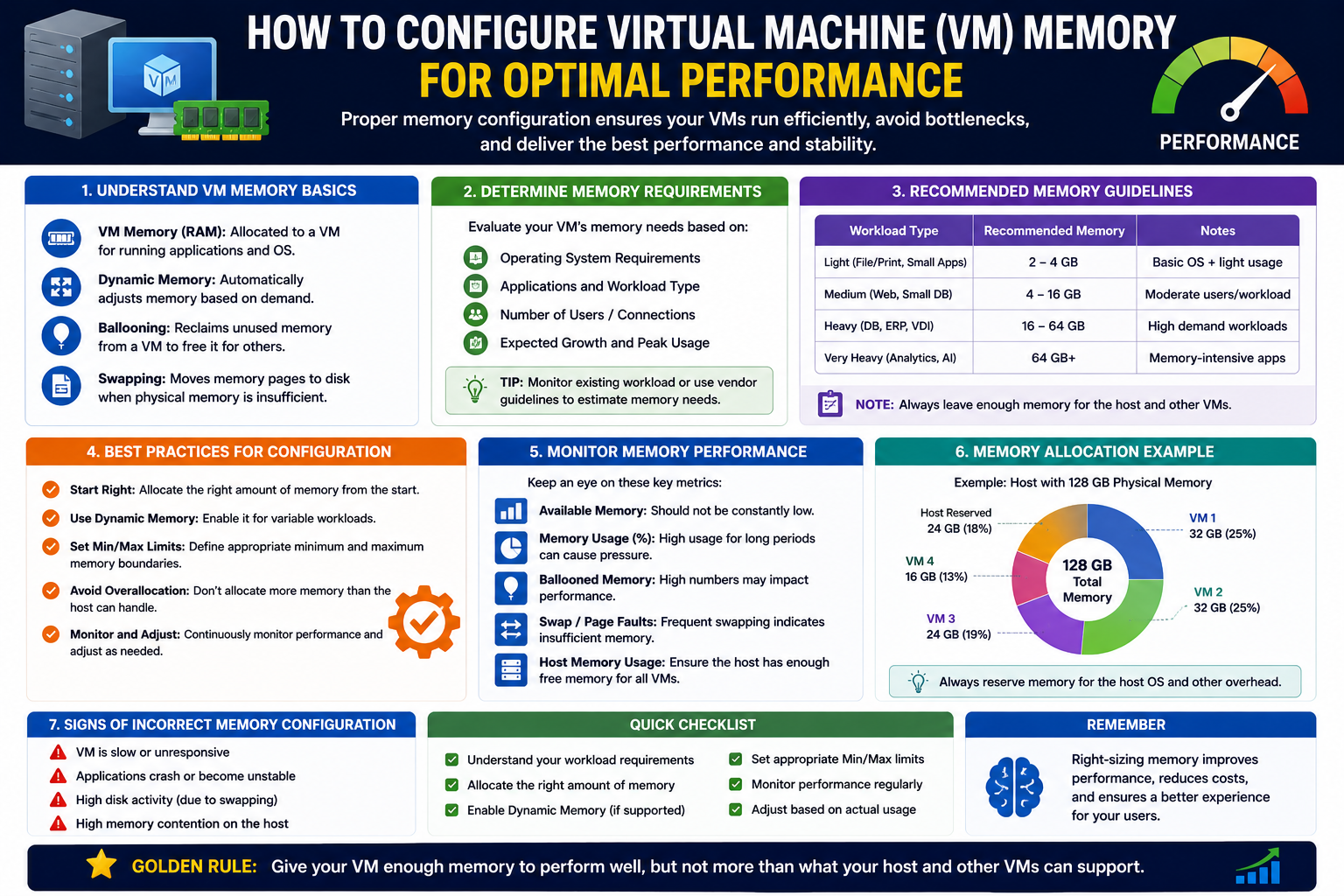
Virtual machine memory configuration is one of the most important foundations of any virtualized environment, yet it is also one of the most commonly misunderstood. At its core, VM memory refers to the portion of physical RAM on a host machine that is assigned to a virtual machine so it can operate as if it were a standalone system. This abstraction is what allows multiple operating systems to run simultaneously on a single physical server, each believing it has dedicated resources.
Modern virtualization platforms, including Hyper-V, rely heavily on memory management to balance performance, efficiency, and stability across multiple workloads. Unlike traditional physical systems where memory is fixed and isolated, virtual environments introduce flexibility but also complexity. This flexibility means memory can be shared, adjusted, and reallocated dynamically depending on demand, but it also requires careful planning.
When memory is not properly configured, the effects are immediate and noticeable. A VM with too little memory may struggle to boot applications, respond slowly, or even crash under load. On the other hand, assigning too much memory can starve other virtual machines and reduce overall host efficiency. The challenge is finding a balance that aligns with workload demands without wasting system resources.
Understanding VM memory is not just about technical configuration; it is about understanding workload behavior, application requirements, and host capacity. Every virtual machine represents a slice of a larger resource pool, and memory is often the most sensitive and contested of those resources. This makes memory planning a critical skill for anyone managing virtual infrastructure.
Determining How Much Memory a VM Actually Needs
One of the most difficult aspects of virtual machine design is estimating memory requirements accurately. Unlike storage or CPU allocation, memory usage is often less predictable and can fluctuate significantly based on workload activity, user behavior, and application design.
The first step in determining memory needs is understanding the purpose of the virtual machine. A VM running a lightweight utility service will require significantly less memory than one hosting databases, enterprise applications, or user-facing services. However, even within similar roles, usage patterns can vary widely depending on traffic and operational demands.
A key concept to understand is baseline memory usage. Every operating system consumes a certain amount of memory just to function, even before applications are launched. On top of that baseline, each application adds its own memory footprint. This combined usage forms the minimum memory requirement for stable operation.
Beyond minimum requirements, it is also important to account for peak usage scenarios. Many systems do not operate at constant load; instead, they experience spikes during business hours, processing cycles, or user demand surges. Allocating memory based solely on idle usage often leads to performance issues during these peak periods.
Another important consideration is future growth. Virtual machines are rarely static. Applications evolve, user bases expand, and workloads increase over time. Allocating a small buffer of additional memory beyond current needs can help avoid frequent reconfiguration and reduce the risk of performance bottlenecks later.
The goal is not to maximize memory allocation per VM but to optimize it. Efficient environments distribute memory based on real need rather than perceived importance, ensuring that all virtual machines operate smoothly without unnecessary waste.
Configuring VM Memory in Hyper-V
Configuring memory in Hyper-V involves more than simply assigning a number; it requires understanding how that allocation interacts with the host system and other virtual machines. The Hyper-V management environment provides a structured interface where administrators can define memory settings for each virtual machine individually.
When configuring a VM, the initial memory assignment determines how much RAM the system receives at startup. This value acts as the guaranteed memory allocation, ensuring the virtual machine has enough resources to boot and operate under normal conditions. If this value is set too low, the VM may fail to start or operate inefficiently. If set too high, it can unnecessarily restrict resources available to other VMs on the same host.
The configuration process also involves understanding how memory changes are applied. In many cases, adjustments can be made while the VM is running, although some changes may require a restart depending on system state and workload type. This flexibility allows administrators to fine-tune performance without significant downtime.
A critical aspect of configuration is alignment with workload behavior. A server hosting a web application may require moderate memory at startup but experience spikes during high traffic periods. In contrast, a file server might maintain a more stable and predictable memory footprint. These differences should guide how memory is initially assigned.
Proper configuration also involves monitoring. Memory settings should not be treated as static values. Instead, they should be periodically reviewed based on performance metrics, usage trends, and system behavior. This ongoing adjustment ensures that the virtual environment remains efficient and responsive over time.
Dynamic Memory Explained and How It Changes Allocation Strategy
Dynamic memory introduces a more flexible approach to memory management in Hyper-V environments. Instead of assigning a fixed amount of RAM that remains constant regardless of usage, dynamic memory allows the hypervisor to adjust memory allocation in real time based on demand.
This system works by setting a minimum and maximum memory range for each virtual machine. The minimum ensures that the VM always has enough memory to operate, even under constrained conditions, while the maximum defines the upper limit it can use when additional resources are available.
The advantage of this approach is efficiency. In environments where multiple virtual machines share a limited pool of physical memory, dynamic allocation ensures that idle or low-demand systems do not consume unnecessary resources. Instead, memory is redistributed to VMs that require it at any given moment.
However, dynamic memory also requires careful configuration. If the minimum value is set too low, the VM may experience instability during sudden workload spikes. If the maximum is too restrictive, it may prevent the system from scaling performance when needed.
Another important factor is memory responsiveness. Some applications react poorly to fluctuating memory availability, while others are designed to scale efficiently. Understanding application behavior is essential when deciding whether to enable and how to configure dynamic memory.
Overall, dynamic memory represents a shift from static allocation to adaptive resource management, allowing virtual environments to operate more efficiently while still maintaining performance stability when properly configured.
Memory Buffer and Memory Weight: Fine-Tuning Performance Priorities
Beyond basic memory allocation and dynamic settings, Hyper-V introduces additional mechanisms for refining how memory is distributed among virtual machines. Two of the most important concepts in this area are memory buffer and memory weight.
Memory buffer acts as a reserve margin that allows a virtual machine to temporarily exceed its expected memory usage. This is particularly useful for workloads that experience sudden spikes or unpredictable activity. By providing a buffer, the system ensures that short-term increases in demand do not immediately degrade performance or cause resource contention.
This buffer does not represent permanently allocated memory but rather a flexible allowance that the hypervisor can utilize when needed. It helps maintain stability in environments where workloads are not perfectly predictable.
Memory weight, on the other hand, determines priority. In situations where physical memory is limited, the hypervisor must decide which virtual machines receive priority access to available resources. A higher memory weight indicates greater importance, meaning that the VM will be favored when allocating memory under constrained conditions.
This prioritization is essential in multi-tenant or enterprise environments where not all workloads have equal importance. Critical systems such as authentication services or database servers may be assigned higher weight, while less essential systems operate with lower priority.
Together, memory buffer and memory weight provide a nuanced control system that goes beyond simple allocation. They allow administrators to define not only how much memory a VM receives, but also how flexibly it can use it and how it compares to other workloads in priority.
Conclusion
Configuring virtual machine memory is both a technical task and a strategic decision that directly impacts system performance, stability, and resource efficiency. In Hyper-V environments, memory allocation is not simply about assigning available RAM but about understanding how workloads behave, how resources are shared, and how performance priorities are defined.
Effective memory management begins with accurate assessment of workload requirements and continues with thoughtful configuration of both static and dynamic memory settings. Features such as dynamic memory, memory buffer, and memory weight provide powerful tools for optimizing resource distribution, but they must be used with care and awareness of application behavior.
Poor memory configuration can lead to performance bottlenecks, wasted resources, and system instability, while well-planned allocation enables virtual machines to operate smoothly even under demanding conditions. The key lies in balance—ensuring that each VM has enough memory to function effectively without compromising the overall efficiency of the host system.
Ultimately, mastering VM memory configuration is about developing a deeper understanding of how virtual environments operate as interconnected systems rather than isolated machines. When memory is managed thoughtfully, virtualization becomes not only more efficient but also more reliable and scalable for future demands.