Wi-Fi performance often feels unpredictable. One moment everything is fast and smooth, and the next, videos buffer or games lag without warning. While many people assume this is just “bad internet,” a big part of the problem often comes down to a hidden but powerful setting inside your router: channel width.
Channel width determines how much wireless spectrum your Wi-Fi uses at once. It directly impacts speed, stability, and how well your network handles interference from nearby devices and networks. Choosing between 20 MHz, 40 MHz, and 80 MHz isn’t just a technical detail—it can completely change how your Wi-Fi behaves in real life.
Understanding when to use each option helps you balance speed and reliability, especially across different environments like apartments, offices, or large homes.
Understanding Wi-Fi Channel Width and Why It Matters
Wi-Fi sends data over radio waves, which are divided into channels. Channel width is basically the “size” of that channel. Think of it like a road:
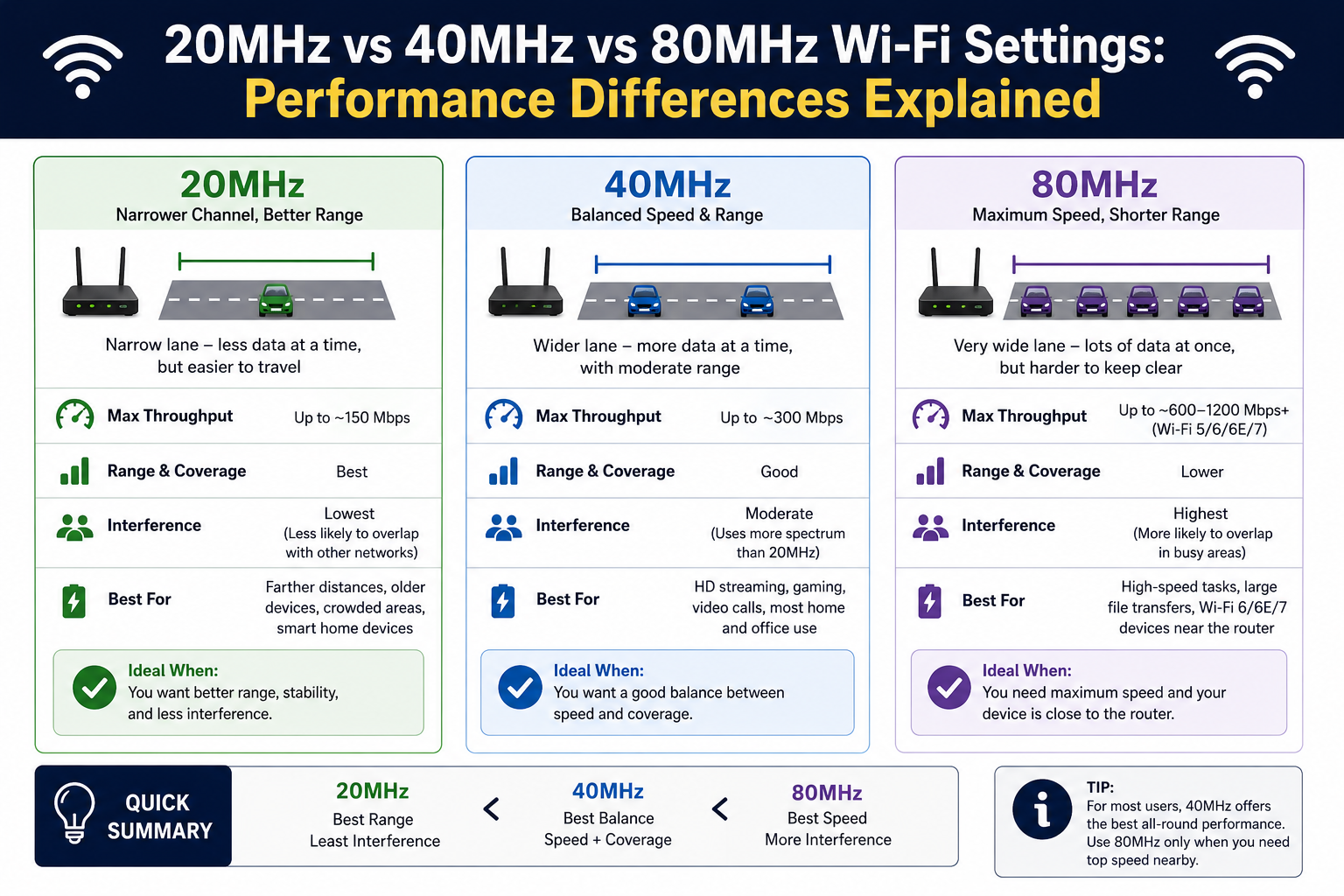
A 20 MHz channel is a single-lane road where traffic flows steadily but moderately. A 40 MHz channel is a two-lane road with more capacity. An 80 MHz channel is a wide highway that can carry much more data at once.
The wider the channel, the more data your Wi-Fi can transmit simultaneously. That means higher speeds—but only under the right conditions.
However, there’s a tradeoff. Wider channels also increase the chance of interference. In crowded areas with many Wi-Fi networks, Bluetooth devices, and smart electronics, wider channels can actually reduce performance instead of improving it.
This is why “bigger is better” does not always apply in wireless networking.
2.4 GHz Band: Stability Over Speed
The 2.4 GHz band is the oldest and most widely used Wi-Fi frequency. It is known for its long range and strong ability to pass through walls and obstacles. However, it is also heavily congested because many devices use it, including older routers, smart home gadgets, and even non-Wi-Fi electronics.
In this band, 20 MHz is almost always the best choice.
Using 40 MHz on 2.4 GHz often creates more overlap with nearby networks. Since there are only a few non-overlapping channels available, expanding channel width tends to increase interference rather than improve speed. The result is often unstable performance, frequent drops, and inconsistent latency.
A 20 MHz channel, on the other hand, keeps your network stable and compatible with nearly all devices, including older hardware. It also reduces the chance of signal collisions in crowded environments like apartment buildings or urban neighborhoods.
In simple terms, 2.4 GHz is designed for coverage, not speed. Keeping it at 20 MHz helps it do its job effectively.
5 GHz Band: The Balance Between Speed and Interference
The 5 GHz band offers a major improvement over 2.4 GHz in terms of speed and capacity. It supports more channels and experiences less interference because fewer household devices use it.
This is where channel width choices become more flexible.
At 20 MHz, the 5 GHz band behaves very similarly to 2.4 GHz in terms of stability. It minimizes interference and works well in environments with many overlapping networks. However, it does not fully take advantage of the band’s speed potential.
At 40 MHz, you get a strong balance between performance and stability. This is often considered the “sweet spot” for many real-world environments. It provides noticeably faster speeds than 20 MHz without significantly increasing interference risk.
At 80 MHz, performance becomes much faster, especially for activities like streaming high-definition video, online gaming, or transferring large files. However, this mode is more sensitive to distance and interference. Devices need to be relatively close to the router, and performance can drop quickly if there are walls or competing networks nearby.
So while 5 GHz supports higher speeds, the best choice depends heavily on your environment and how crowded your wireless space is.
6 GHz Band: Maximum Speed in a Clean Environment
The 6 GHz band represents the newest evolution in Wi-Fi technology. It provides a large amount of clean spectrum, meaning there is very little interference compared to older bands.
This makes it ideal for wide channel usage like 80 MHz and even higher.
Because the 6 GHz band is relatively new, fewer devices and networks operate on it. This allows for extremely stable high-speed connections, especially when using wide channels. Unlike 2.4 GHz and 5 GHz, there is far less congestion, which means performance is more consistent.
However, there is a tradeoff: range. The higher the frequency, the shorter the distance the signal can travel. This means 6 GHz works best in close-range environments, such as the same room or nearby rooms without too many walls in between.
It also requires modern devices that support newer Wi-Fi standards. Older devices cannot access this band at all.
In short, 6 GHz is designed for speed and efficiency, not long-distance coverage.
Choosing Between 20 MHz, 40 MHz, and 80 MHz
Deciding between channel widths depends on three main factors: interference, distance, and device capability.
20 MHz is best when stability is more important than speed. It works well in crowded environments, large buildings, and for general everyday use where consistency matters more than peak performance.
40 MHz is the middle ground. It offers improved speed while maintaining reasonable stability. This is often the best choice for mixed environments where some congestion exists but is not overwhelming.
80 MHz is designed for maximum performance. It should be used when you are close to the router, have minimal interference, and want the highest possible throughput. It is ideal for gaming setups, media streaming, and high-speed file transfers.
The key idea is that wider channels are not always better. They are more sensitive to environmental conditions and can degrade quickly if the network is not optimized for them.
Real-World Scenarios for Better Decision Making
In a small apartment surrounded by many other Wi-Fi networks, 20 MHz or 40 MHz is usually the most reliable choice. The environment is crowded, and narrower channels reduce interference.
In a large home with fewer nearby networks, 40 MHz or 80 MHz can be used more effectively, especially if the router is centrally located.
For gaming setups, 5 GHz or 6 GHz with 80 MHz can provide low latency and high throughput, but only if the device is close enough to the router.
In office environments, stability is more important than peak speed. Multiple devices operate simultaneously, so 20 MHz or 40 MHz helps reduce congestion and keeps connections stable.
Understanding your environment is just as important as understanding the technology itself.
Common Mistakes When Choosing Channel Width
One of the most common mistakes is assuming that higher bandwidth always means better performance. In reality, increasing channel width in a crowded environment often leads to worse results.
Another mistake is ignoring device compatibility. Some older devices may not support wider channels, leading to connection issues or reduced performance.
Many users also forget about physical distance. Wide channels degrade quickly over distance and through walls, so using 80 MHz in a large home can backfire.
Finally, leaving everything on automatic without understanding what it does can sometimes lead to inconsistent performance, especially in complex environments.
Optimizing Wi-Fi Performance in Practice
The best approach is to match channel width to your environment instead of forcing a single setting everywhere.
Use narrower channels when stability is critical or interference is high. Use wider channels when conditions are clean and devices are close to the router. In many cases, combining different settings across bands (2.4 GHz, 5 GHz, and 6 GHz) gives the best overall experience.
Modern routers often include automatic optimization features, but understanding what happens behind the scenes helps you make better decisions when performance issues arise.
Conclusion
Choosing between 20 MHz, 40 MHz, and 80 MHz Wi-Fi channels is not about picking the fastest option—it’s about selecting the most appropriate one for your environment. Each channel width serves a different purpose, and understanding their strengths and limitations can significantly improve your wireless experience.
Narrower channels like 20 MHz prioritize stability and compatibility, making them ideal for crowded or interference-heavy environments. Mid-range options like 40 MHz provide a balanced mix of speed and reliability, suitable for most everyday use cases. Wider channels such as 80 MHz deliver maximum performance but require ideal conditions, including low interference, close proximity, and modern devices.
The key takeaway is that Wi-Fi performance is highly contextual. What works well in one location may perform poorly in another. By considering factors like distance, congestion, and device capability, you can fine-tune your network for consistent and efficient performance.
A well-optimized Wi-Fi setup is not just about speed tests or theoretical maximums—it’s about creating a stable, responsive connection that works reliably in real-world conditions every day. It should deliver consistent performance across all rooms, handle multiple connected devices without slowdown, and adapt smoothly to changing network demands. True optimization also means minimizing interference, reducing latency, and ensuring seamless coverage for streaming, gaming, and work activities so users experience dependable connectivity without constant drops or fluctuations.