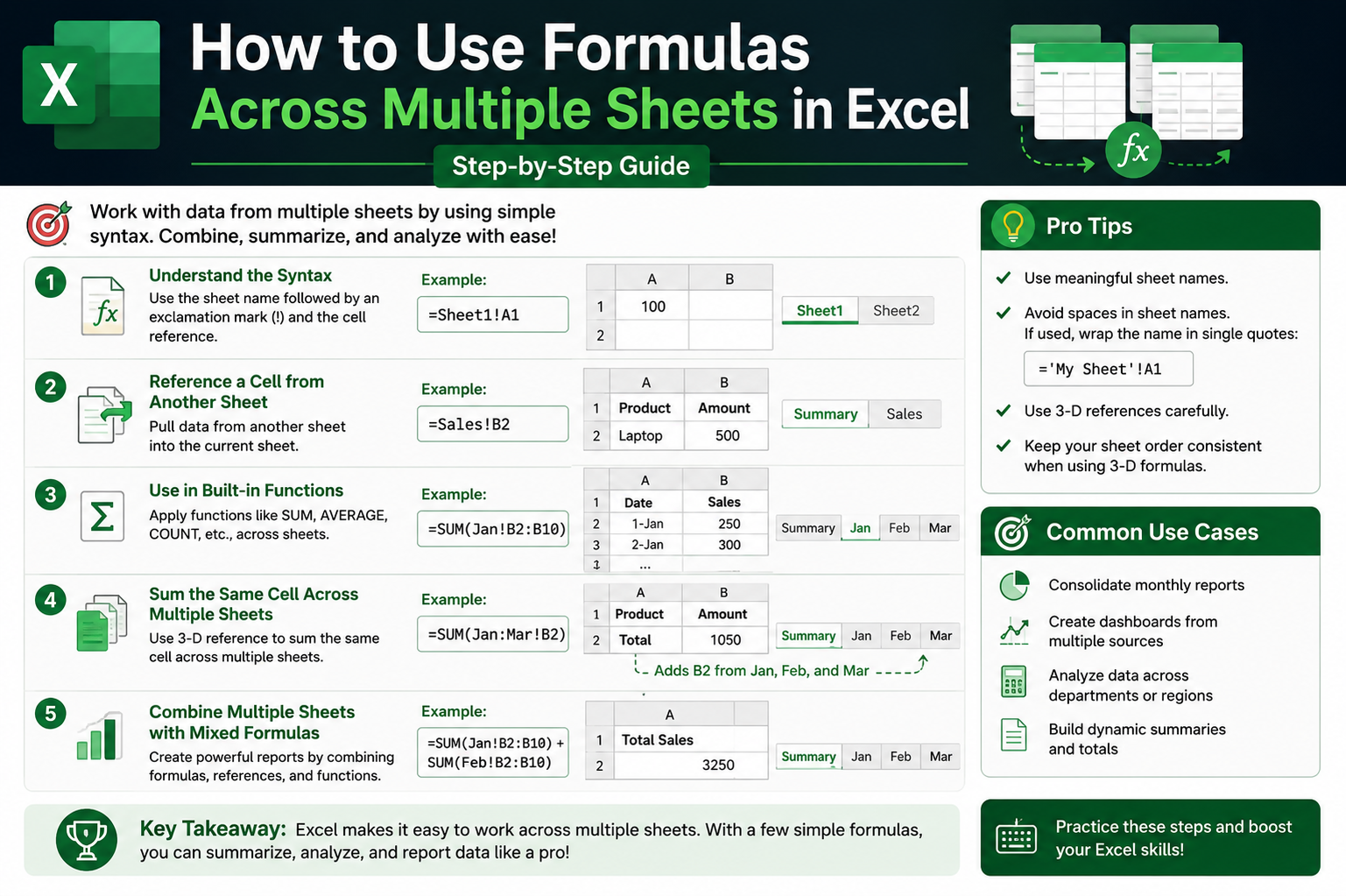
Microsoft Excel is widely used for organizing, analyzing, and calculating data across different contexts, from business reports to personal budgeting. One of its most powerful capabilities is the ability to use formulas across multiple sheets within the same workbook. This feature allows users to connect related data sets, reduce duplication, and build more dynamic and efficient spreadsheets.
When working with Excel, each workbook can contain multiple sheets. These sheets function like separate pages within a single file, but they can also communicate with each other. This communication is made possible through cross-sheet formulas, which allow data from one sheet to be referenced and used in calculations on another sheet.
At a basic level, referencing data across sheets follows a simple structure. Excel uses a combination of the sheet name and the cell reference to locate the data. This structure is essential because Excel needs to know exactly where to pull information from. Without specifying the sheet name, Excel would only look at the current sheet, which limits functionality.
Understanding this structure is the foundation for building more advanced formulas later. Once users become comfortable with cross-sheet references, they can perform calculations involving multiple datasets, create summary sheets, and build dashboards that automatically update when source data changes.
One of the most important concepts in cross-sheet formulas is the idea of linking data rather than copying it. Instead of duplicating values from one sheet to another, Excel allows users to create a live connection. When the original data changes, the linked formula updates automatically. This reduces errors and ensures consistency across a workbook.
This feature is especially useful in business environments where data is frequently updated. For example, sales figures might be recorded in separate sheets for each month, while a summary sheet calculates total performance. Instead of manually updating totals, cross-sheet formulas handle the calculations automatically.
Another important advantage of cross-sheet formulas is organization. Large datasets can become difficult to manage when everything is stored on a single sheet. By separating data into different sheets and linking them through formulas, users can maintain a cleaner and more structured workbook.
Cross-sheet formulas also improve scalability. As datasets grow, it becomes easier to manage multiple sheets than to continuously expand a single sheet. This approach allows users to build more complex models without sacrificing clarity.
A common starting point for cross-sheet formulas involves simple arithmetic operations. Users may add, subtract, multiply, or divide values located in different sheets. These basic operations help build familiarity with referencing techniques before moving on to more advanced functions.
Excel also supports combining multiple sheet references within a single formula. This allows users to perform calculations that involve several datasets at once. For example, a user might add values from multiple sheets to calculate a total across different categories or time periods.
As users gain confidence, they begin to understand how Excel evaluates formulas across sheets. The software processes each reference individually before completing the calculation. This means that each linked cell behaves as if it were part of the same equation, even though it is located in a different sheet.
This behavior is important because it allows users to build formulas that are both flexible and powerful. Instead of relying on static values, cross-sheet formulas create dynamic connections between datasets.
Another key concept in cross-sheet formulas is consistency. When building formulas that reference multiple sheets, it is important that data is structured in a similar way across all sheets. For example, if cell A1 represents total sales in one sheet, it should represent the same type of data in all related sheets. This consistency ensures that formulas return accurate results.
Without consistent structure, formulas can produce incorrect or misleading results. This is why planning the layout of worksheets is an important step before building cross-sheet formulas.
Naming conventions also play a role in making formulas easier to manage. Sheet names should be clear and descriptive, especially when multiple sheets are involved. This helps users quickly identify where data is coming from and reduces confusion when reviewing formulas later.
In addition to basic referencing, Excel provides several functions that work well with cross-sheet data. Functions such as SUM, AVERAGE, and COUNT can be applied across multiple sheets to perform aggregated calculations. These functions simplify complex operations and reduce the need for repetitive formulas.
As users become more experienced, they often begin to combine multiple functions within cross-sheet formulas. This allows for more advanced calculations, such as conditional analysis or multi-step data processing.
Even though cross-sheet formulas are powerful, they require careful construction. Small errors, such as incorrect sheet names or missing references, can lead to calculation errors. Excel typically displays error messages when this happens, helping users identify and correct issues.
Understanding the basics of cross-sheet formulas is the first step toward mastering Excel’s more advanced capabilities. Once these foundational skills are in place, users can begin exploring more complex techniques that involve multiple functions, dynamic ranges, and automated reporting structures.
Cross-sheet formulas also form the foundation for more advanced Excel features such as dashboards and data models. These tools rely heavily on structured relationships between sheets to provide meaningful insights.
In many professional environments, Excel workbooks are designed with a clear separation of data input, calculations, and reporting. Cross-sheet formulas play a central role in connecting these components together. This separation improves clarity and makes large spreadsheets easier to maintain over time.
As users continue working with Excel, they begin to appreciate how cross-sheet formulas reduce manual effort. Instead of repeatedly entering the same data, users can build systems that automatically update based on changes in source sheets.
This efficiency is one of the main reasons Excel remains such a widely used tool in business, finance, education, and data analysis. The ability to connect information across sheets transforms Excel from a simple spreadsheet tool into a dynamic data management system.
Understanding these foundational concepts prepares users for more advanced techniques involving structured references, lookup functions, and multi-sheet analysis. Each of these builds on the same principle of linking and referencing data across different parts of a workbook.
Cross-sheet formulas are not just a technical feature; they represent a shift in how data is organized and processed. Instead of working with isolated pieces of information, users begin to think in terms of connected systems where each sheet contributes to a larger dataset.
This mindset is essential for anyone looking to use Excel effectively in professional environments.
Intermediate Techniques for Using Formulas Across Sheets in Excel
Once the basics of cross-sheet formulas in Excel are understood, the next step is learning how to apply these concepts in more practical, real-world scenarios. At this stage, users move beyond simple cell references and begin building structured formulas that can handle larger datasets, multiple conditions, and more complex calculations across different sheets.
In professional environments, Excel workbooks are rarely limited to a single sheet. Instead, they are usually organized into multiple sheets that each serve a specific purpose. One sheet might contain raw data, another might handle calculations, and a third might present summarized results. Cross-sheet formulas act as the bridge that connects these layers together.
This structure is especially useful in environments where data is constantly updated. Instead of manually copying information from one sheet to another, formulas ensure that changes in one location automatically reflect everywhere they are referenced. This reduces manual work and helps maintain accuracy.
A key intermediate skill in Excel is working with structured references across multiple sheets. While basic formulas use simple cell references, more advanced formulas often involve ranges of cells. These ranges allow users to perform calculations on groups of data rather than individual values.
For example, instead of referencing a single cell from another sheet, users may reference a full column or a range of rows. This approach allows functions like summing, averaging, or counting to operate across larger datasets efficiently.
When working with multiple sheets, it is important to understand how Excel evaluates ranges. Each sheet reference is processed separately, and then the function combines the results. This allows users to build powerful calculations that span multiple datasets while maintaining clarity in the formula structure.
One of the most common intermediate techniques involves aggregating data from multiple sheets into a single summary sheet. This is frequently used in financial reporting, sales tracking, inventory management, and performance analysis.
In these scenarios, each sheet often represents a specific category, time period, or department. The summary sheet then uses cross-sheet formulas to combine all relevant data into a unified view. This allows decision-makers to see overall trends without manually reviewing each individual sheet.
As workbooks grow larger, consistency becomes even more important. Each sheet must follow a predictable structure so that formulas can reference the same type of data across different sheets. For example, if one sheet uses column B for revenue, all other sheets should use the same column structure for similar data.
Without this consistency, formulas become difficult to maintain and more prone to errors. Even a small change in layout can cause formulas to break or return incorrect results. This is why planning sheet structure is an essential part of working with cross-sheet formulas at an intermediate level.
Another important concept is formula scalability. As more sheets are added to a workbook, formulas must be designed in a way that allows them to expand without requiring complete rewrites. This is especially important in dynamic environments where new data sheets are added regularly.
Instead of building separate formulas for each sheet, users often create patterns that can be extended. This reduces complexity and ensures that the workbook remains manageable even as it grows.
Intermediate users also begin working with more advanced Excel functions that integrate well with cross-sheet data. Functions such as SUM, AVERAGE, MIN, MAX, and COUNT become significantly more powerful when applied across multiple sheets.
These functions allow users to quickly analyze large amounts of data without manually combining values. For example, a user might calculate total performance across multiple departments or determine average values across several time periods.
At this level, users also begin to understand how Excel handles errors in cross-sheet formulas. When a referenced sheet is missing or a cell contains invalid data, Excel may return error messages. These errors are not just problems; they also provide valuable feedback that helps users identify issues in their workbook structure.
Common issues often include incorrect sheet names, deleted sheets, or mismatched data types. Learning how to identify and resolve these issues is an important part of becoming proficient with cross-sheet formulas.
Another important intermediate skill involves using logical functions across multiple sheets. Logical functions allow users to evaluate conditions and return results based on whether those conditions are met.
When combined with cross-sheet references, logical functions become powerful tools for decision-making within spreadsheets. For example, a formula might evaluate data from one sheet and return results based on values stored in another sheet.
This type of structure is commonly used in performance tracking systems, budgeting models, and operational dashboards where different sheets represent different input sources.
As formulas become more complex, readability becomes increasingly important. Long formulas that reference multiple sheets can become difficult to understand if not properly structured. Intermediate users often begin organizing formulas in a way that improves clarity, even within a single cell.
This includes using consistent naming conventions for sheets, breaking down calculations into logical steps, and ensuring that references are easy to follow. While Excel does not require these practices, they greatly improve maintainability in larger workbooks.
Another key concept is dependency tracking. Cross-sheet formulas create relationships between different sheets, where changes in one sheet directly affect others. Understanding these dependencies helps users avoid unintended consequences when modifying data.
For example, changing a value in a source sheet may update multiple calculated results across different sheets. While this is one of the strengths of cross-sheet formulas, it also means that users must be careful when editing shared data sources.
Intermediate Excel users also begin working with conditional aggregation across sheets. This involves calculating results based on specific conditions applied to data from multiple sheets.
For example, users might want to calculate totals only for values that meet certain criteria, such as sales above a specific threshold or entries within a certain time range. These calculations become more powerful when combined with cross-sheet references.
At this stage, users also start to appreciate the importance of workbook design. A well-designed workbook separates data input, processing, and output into distinct areas. Cross-sheet formulas play a key role in connecting these areas together in a structured way.
Data input sheets are typically used for entering raw information. Calculation sheets process this information using formulas. Output sheets present the final results in a clean and organized format. This separation makes large spreadsheets easier to manage and understand.
Another intermediate technique involves referencing multiple sheets dynamically. While basic formulas require explicit sheet names, more advanced approaches allow users to build formulas that adapt to changing sheet structures.
This is particularly useful in environments where new sheets are added regularly, such as monthly reports or departmental tracking systems. Instead of manually updating formulas, users can design systems that automatically include new sheets in calculations.
As users continue developing their skills, they begin to recognize patterns in how cross-sheet formulas behave. These patterns make it easier to predict results and troubleshoot issues when they arise.
Understanding how Excel processes formulas internally also becomes helpful at this stage. Each formula is evaluated step by step, with sheet references resolved before calculations are performed. This helps users understand why certain results appear the way they do.
Intermediate users also start combining multiple formulas across sheets to create layered calculations. For example, one sheet may calculate intermediate values, while another sheet uses those results for higher-level analysis.
This layered approach allows for more organized and modular spreadsheet design. Instead of creating one large, complex formula, users break calculations into smaller components spread across multiple sheets.
This method improves both performance and readability. It also makes it easier to update individual parts of the workbook without affecting the entire structure.
As spreadsheets become more advanced, collaboration becomes an important consideration. Multiple users may work on different sheets within the same workbook. Cross-sheet formulas ensure that data remains connected even when multiple contributors are involved.
However, collaboration also introduces challenges. Changes made in one sheet can affect formulas in another sheet, so coordination and communication become important.
At this stage, users often begin developing best practices for managing shared workbooks. These practices include maintaining consistent structures, documenting sheet purposes, and avoiding unnecessary complexity in formulas.
Intermediate Excel skills involving cross-sheet formulas form the foundation for more advanced analytical techniques. Once users are comfortable with these methods, they can begin exploring more sophisticated tools such as dynamic arrays, advanced lookup functions, and automated reporting systems that rely heavily on cross-sheet relationships.
The ability to effectively use formulas across sheets transforms Excel from a simple data entry tool into a powerful analytical platform capable of handling complex real-world problems.
Advanced Cross-Sheet Formulas, Dynamic Models, and Real-World Excel Applications
At an advanced level, using formulas across sheets in Excel becomes less about simple references and more about building structured, intelligent systems that can handle large-scale data analysis. In real-world environments, spreadsheets are rarely static. They grow, evolve, and interact with multiple data sources, which is why advanced cross-sheet techniques focus heavily on scalability, automation, and reliability.
One of the most important developments at this stage is the shift from manual formula building to dynamic spreadsheet design. Instead of writing formulas that only work for a fixed set of sheets or cells, advanced users design formulas that can adapt when data changes or expands. This is especially important in business environments where new records, time periods, or categories are continuously added.
A common advanced approach involves consolidating information from multiple sheets into a single analytical structure. Rather than treating each sheet as an isolated dataset, advanced users design workbooks where sheets are interconnected components of a larger system. Each sheet contributes a specific layer of data, and formulas combine these layers to produce meaningful insights.
At this level, users often deal with scenarios where data is split across many sheets representing time periods, departments, regions, or product categories. Instead of manually updating formulas for each new sheet, advanced Excel users build structured models that automatically include new data sources.
This requires a strong understanding of consistent formatting across sheets. Even small differences in structure can break formulas or produce inaccurate results. For this reason, advanced spreadsheet design emphasizes strict consistency in layout, naming, and data organization.
Another important concept in advanced cross-sheet usage is multi-layer calculation design. Instead of performing all calculations in a single formula, advanced users break complex logic into multiple steps distributed across different sheets. Each sheet may handle a specific stage of processing, such as raw data cleaning, intermediate calculations, and final reporting.
This modular approach improves clarity and makes troubleshooting easier. When an error occurs, it is easier to identify which stage of the process is responsible. It also allows teams to collaborate more effectively, as different users can manage different parts of the workbook.
Advanced users also frequently work with large-scale aggregation across multiple sheets. This involves combining data from many sources into a unified result. In business environments, this might include calculating total revenue across multiple branches, summarizing performance across departments, or analyzing trends over time.
At this level, efficiency becomes important. Large spreadsheets can become slow if formulas are not structured properly. Advanced users therefore design formulas that minimize unnecessary calculations and avoid redundant references.
Another major concept in advanced Excel usage is dynamic referencing. Instead of manually specifying each sheet in a formula, advanced users often design systems where sheet names are referenced indirectly. This allows formulas to adjust automatically when new sheets are added or renamed, reducing maintenance effort.
Dynamic models are especially useful in reporting systems where new data is added regularly. For example, monthly reporting workbooks may contain a separate sheet for each month. Rather than updating formulas every month, advanced designs allow the system to automatically include new monthly sheets in calculations.
In addition to dynamic referencing, advanced Excel users often work with cross-sheet conditional logic. This involves applying conditions across multiple sheets to filter, evaluate, or analyze data. For example, a formula might only include values from certain sheets if they meet specific criteria.
This type of logic is commonly used in performance tracking systems, financial modeling, and operational dashboards. It allows users to create more intelligent spreadsheets that respond to changing data conditions.
Error handling also becomes more important at this stage. In complex workbooks with many interconnected sheets, errors can spread quickly if not managed properly. Advanced users design formulas that anticipate missing data, renamed sheets, or invalid values.
Instead of allowing errors to disrupt calculations, these systems are built to handle issues gracefully. This ensures that reports remain stable even when underlying data changes unexpectedly.
Another advanced technique involves cross-sheet data validation. In large systems, ensuring data accuracy is essential. Users may design formulas that check consistency between sheets, ensuring that values align correctly across different datasets.
For example, a validation system might compare totals across multiple sheets to ensure that no data is missing or duplicated. This type of cross-checking improves reliability in financial and operational reporting environments.
Advanced Excel users also begin working with performance optimization techniques. As workbooks grow larger, inefficient formulas can slow down calculations significantly. Optimizing cross-sheet formulas involves reducing unnecessary references, simplifying logic, and avoiding redundant calculations.
Efficient design becomes especially important in workbooks with hundreds or thousands of interconnected formulas. Poorly structured spreadsheets can become difficult to maintain and slow to update.
Another important concept is data model separation. Advanced users often separate raw data, calculations, and reporting into clearly defined layers. This structure ensures that each sheet has a specific role within the overall system.
Raw data sheets contain unprocessed information. Calculation sheets process and transform the data using formulas. Reporting sheets present final outputs in a readable format. Cross-sheet formulas connect all these layers together.
This separation improves organization and makes large spreadsheets easier to scale. It also reduces the risk of accidental changes to critical formulas or raw data.
Advanced users also frequently work with cross-sheet lookup systems. These systems allow data to be retrieved from different sheets based on specific criteria. Instead of manually searching for values, formulas automatically locate and return relevant information.
This is particularly useful in environments where data is distributed across many sheets representing different categories or time periods. Lookup systems make it possible to retrieve information quickly and accurately.
As spreadsheet systems become more advanced, collaboration becomes increasingly important. Multiple users may work on different sections of a workbook simultaneously. Cross-sheet formulas ensure that all parts remain connected, even when different contributors are responsible for different sheets.
However, collaboration also introduces challenges such as version control, inconsistent formatting, and accidental overwriting of formulas. Advanced users develop structured workflows to minimize these risks and maintain data integrity.
Documentation becomes another critical factor at this level. In complex spreadsheets with many interconnected formulas, understanding how data flows between sheets is essential. Advanced users often document sheet purposes, formula logic, and data relationships to ensure long-term maintainability.
Without proper documentation, even well-designed spreadsheets can become difficult to understand over time, especially when multiple users are involved in maintenance.
Advanced Excel systems also often include automated reporting structures. Cross-sheet formulas are used to generate summaries, dashboards, and performance indicators that update automatically as data changes.
These systems reduce the need for manual reporting and allow organizations to access real-time insights. This is especially valuable in fast-paced business environments where decisions must be made quickly based on current data.
Another emerging trend in advanced Excel usage is integration with external data sources. While this discussion focuses on cross-sheet formulas, many real-world systems combine internal sheet data with external inputs. Advanced formulas must therefore be designed to remain stable even when external data changes.
Scalability remains one of the most important considerations in advanced spreadsheet design. A well-designed system should be able to grow without requiring complete restructuring. Cross-sheet formulas play a key role in enabling this scalability by linking components in a flexible and adaptable way.
Security and access control also become relevant in larger spreadsheet systems. When multiple users access different sheets, it is important to ensure that sensitive data is protected while still allowing necessary calculations to function correctly.
Advanced users often design spreadsheets that separate sensitive information into controlled sheets while still allowing formulas to reference necessary values without exposing unnecessary details.
Ultimately, advanced cross-sheet formula usage in Excel represents the transition from simple spreadsheet work to structured data system design. At this level, Excel is no longer just a calculation tool; it becomes a platform for building interconnected analytical systems.
Professionals who master these techniques gain the ability to design scalable, efficient, and intelligent spreadsheets capable of supporting complex decision-making processes across a wide range of industries.
Building Scalable Excel Systems with Cross-Sheet Formulas in Real Work Environments
At the most practical and mature stage of working with Excel, cross-sheet formulas are no longer just a technical skill—they become part of a larger system design mindset. In real workplace environments, spreadsheets often evolve into long-term tools that support reporting, tracking, forecasting, and decision-making across entire teams or departments. At this level, the focus shifts toward building systems that are stable, scalable, and easy to maintain over time.
A key characteristic of professional Excel work is that data rarely stays in one place or remains unchanged. New information is constantly added, old records are updated, and reporting requirements evolve. Because of this, cross-sheet formulas must be designed in a way that supports continuous change without breaking the overall structure of the workbook.
One of the most important ideas in scalable Excel design is separation of concerns. This means dividing a workbook into clearly defined sections where each group of sheets has a specific role. Instead of mixing raw data, calculations, and reporting in a single area, advanced users organize these functions into distinct layers.
Raw data sheets are typically used for storing unprocessed information. These sheets are not designed for analysis but rather for input and storage. Calculation sheets take this raw data and apply formulas across multiple sheets to generate meaningful results. Reporting sheets then present the final output in a structured and readable format.
Cross-sheet formulas act as the connecting framework between these layers. They allow data to flow smoothly from one stage to another, ensuring that updates in raw data automatically reflect in calculations and reports.
Another important aspect of scalable Excel systems is consistency in structure. When multiple sheets are involved, especially in large workbooks, even small inconsistencies can lead to major issues. For example, if one sheet stores values in a different column than another, cross-sheet formulas may return incorrect results.
To avoid this, professional Excel systems are built using standardized layouts. Each sheet follows the same structure, even if it contains different data sets. This ensures that formulas can be reused across multiple sheets without modification.
Naming conventions also play a major role in maintaining scalability. Clear and consistent sheet names make it easier to understand formulas and reduce confusion when navigating large workbooks. Instead of vague labels, structured naming systems help identify the purpose of each sheet instantly.
As Excel systems grow, formula management becomes increasingly important. A workbook with hundreds of cross-sheet formulas can become difficult to manage if not properly organized. At this stage, users often adopt structured approaches to formula design, ensuring that each formula has a clear purpose and logical structure.
Instead of creating overly complex formulas, advanced users break calculations into smaller steps distributed across multiple sheets. This modular approach improves readability and makes troubleshooting easier when issues arise.
For example, one sheet might calculate intermediate values such as totals or averages, while another sheet uses those results to generate higher-level summaries. This layered approach reduces complexity within individual formulas and distributes workload across the workbook.
Another important concept in scalable systems is minimizing dependency chains. A dependency chain occurs when one formula relies on another, which relies on another, across multiple sheets. While this structure is sometimes necessary, overly long dependency chains can make workbooks fragile and difficult to debug.
To improve stability, advanced users design systems that limit unnecessary dependencies. Wherever possible, calculations are kept as direct and simple as possible, reducing the risk of cascading errors.
Performance optimization also becomes a critical concern in large Excel systems. As the number of cross-sheet formulas increases, recalculation time can slow down significantly. This is especially noticeable in workbooks with large datasets or complex logic.
To improve performance, users often reduce unnecessary references, avoid repeated calculations, and simplify formula logic. Efficient design ensures that spreadsheets remain responsive even as they grow in size and complexity.
Another important factor in scalable Excel systems is change management. In real-world environments, spreadsheets are rarely static. New sheets may be added regularly, especially in systems that track time-based data such as weekly, monthly, or yearly reports.
Cross-sheet formulas must be designed to handle these changes gracefully. Instead of requiring manual updates every time a new sheet is added, scalable systems are designed to adapt automatically or require minimal adjustment.
This approach significantly reduces maintenance effort and ensures that systems remain functional even as they expand.
Error resilience is another essential feature of professional Excel design. In complex workbooks, errors are inevitable due to missing data, incorrect inputs, or structural changes. Rather than allowing these errors to disrupt the entire system, advanced users design formulas that can handle unexpected situations.
This might involve ensuring that missing data does not break calculations or that invalid references are handled in a controlled way. The goal is not to eliminate errors entirely but to ensure that they do not compromise the integrity of the entire workbook.
Cross-sheet validation techniques are often used to maintain accuracy in large systems. These techniques involve comparing data across multiple sheets to ensure consistency. For example, totals from different sheets may be checked against summary values to ensure that no discrepancies exist.
This type of validation is especially important in financial, operational, and reporting environments where accuracy is critical.
Another key aspect of scalable Excel systems is user accessibility. In many professional environments, multiple people interact with the same workbook. Some users may only input data, while others manage calculations or generate reports.
Cross-sheet formulas help simplify this process by separating complexity from user interaction. End users can input data without needing to understand how calculations are structured across sheets. The system handles the complexity in the background.
This separation improves usability and reduces the likelihood of accidental errors caused by manual formula changes.
Documentation also becomes increasingly important in large Excel systems. When multiple sheets and formulas are interconnected, it is essential to understand how data flows through the system. Without documentation, even well-built spreadsheets can become difficult to maintain over time.
Professional Excel systems often include structured notes or internal documentation that explain the purpose of each sheet and how formulas are connected. This ensures that future users can understand and maintain the system without needing to reconstruct its logic from scratch.
Security considerations may also play a role in advanced Excel environments. Some sheets may contain sensitive data that should not be modified or viewed by all users. In such cases, cross-sheet formulas are designed to reference necessary data without exposing sensitive information unnecessarily.
This helps maintain data integrity while still allowing the system to function as a connected whole.
As Excel systems become more advanced, automation becomes increasingly common. Cross-sheet formulas often form the foundation of automated reporting systems where data updates trigger automatic recalculations across multiple sheets.
These automated systems reduce manual workload and ensure that reports are always up to date. They are particularly valuable in fast-paced environments where timely information is essential.
Another important aspect of scalability is adaptability. Business requirements change over time, and Excel systems must be able to adjust without requiring complete redesigns. Cross-sheet formulas support this adaptability by allowing components of a system to be modified independently.
For example, new data sources can be added as new sheets without disrupting existing calculations, provided the system is designed with flexibility in mind.
Ultimately, building scalable Excel systems with cross-sheet formulas is about more than just technical skill. It requires structured thinking, careful planning, and an understanding of how data flows across multiple layers of a workbook.
When designed correctly, these systems can support complex analysis, streamline reporting, and reduce manual effort across a wide range of professional environments.
Practical Challenges and Best Practices for Cross-Sheet Formulas in Excel
Even though cross-sheet formulas in Excel are powerful and widely used, real-world implementation often comes with challenges that are not immediately obvious when learning the basics. As spreadsheets grow in size and complexity, users begin to encounter issues related to accuracy, performance, structure, and long-term maintenance. Understanding these challenges is essential for building reliable and efficient Excel systems.
One of the most common challenges is broken references. This occurs when a sheet name changes, a sheet is deleted, or a referenced cell is moved. Since cross-sheet formulas depend heavily on exact references, even a small change can cause errors across multiple parts of a workbook. In large spreadsheets, a single broken reference can affect calculations in several connected sheets, making it difficult to trace the original issue.
Another frequent issue is inconsistent data structure across sheets. When different sheets use different layouts, formulas that rely on fixed positions may return incorrect results. For example, if one sheet stores sales data in column B and another stores it in column C, a formula referencing both sheets will not behave correctly unless adjusted. This highlights the importance of maintaining uniform structure across all sheets in a workbook.
Performance degradation is another challenge in large Excel models. Cross-sheet formulas that reference many sheets or large ranges can slow down calculation speed. This becomes more noticeable when multiple complex formulas are recalculating simultaneously. Over time, workbooks may become sluggish, especially if they contain thousands of interconnected formulas.
To address this, efficient design practices are essential. Reducing unnecessary references, simplifying formulas, and avoiding repeated calculations can significantly improve performance. Structuring data properly also helps Excel process formulas more efficiently.
Readability is another important concern. As cross-sheet formulas become more advanced, they can become difficult to understand at a glance. Long formulas with multiple references across sheets may work correctly but can be hard to interpret later. This becomes a major issue when multiple people collaborate on the same workbook.
To improve readability, it is important to use clear sheet names and maintain logical structure within formulas. Breaking complex calculations into smaller steps across multiple sheets also helps make the system easier to understand and maintain.
Another challenge is dependency management. In interconnected spreadsheets, one formula often depends on the result of another located on a different sheet. If one part of the system changes, it can affect multiple downstream calculations. Without careful planning, this can lead to unexpected results or cascading errors.
To reduce this risk, it is important to design formulas with clear and controlled dependencies. Limiting unnecessary cross-sheet connections helps keep the system stable and easier to debug.
Data accuracy is also a key concern. Since cross-sheet formulas rely on linked data, any error in the source sheet automatically affects all dependent calculations. This means that ensuring accuracy at the data entry stage is critical. Validation practices and consistent formatting help reduce the likelihood of incorrect inputs affecting the entire system.
Despite these challenges, cross-sheet formulas remain one of the most valuable tools in Excel. When used correctly, they allow users to build highly organized and dynamic systems that reduce manual work and improve efficiency.
The key to success lies in following best practices. Maintaining consistent structure across sheets ensures that formulas behave predictably. Using clear and descriptive sheet names improves readability and reduces confusion. Designing formulas with simplicity in mind helps prevent errors and improves performance.
It is also important to plan workbook structure before building complex formulas. A well-organized spreadsheet design reduces the likelihood of issues later and makes scaling easier. Thinking ahead about how data will grow and change helps ensure that cross-sheet formulas remain functional over time.
Ultimately, mastering cross-sheet formulas is not just about knowing how to write them, but also about understanding how to design stable and efficient spreadsheet systems. With careful planning, consistent structure, and attention to detail, Excel can be transformed into a powerful tool for managing complex data across multiple sheets.
Conclusion
Using formulas across sheets in Excel is one of the most powerful skills for managing structured data, and it plays a major role in turning simple spreadsheets into dynamic, interconnected systems. Across all levels—from basic referencing to advanced multi-sheet models—this capability allows users to link information, automate calculations, and build organized workflows that reduce manual effort while improving accuracy.
At its core, cross-sheet functionality is about connection. Instead of treating each sheet as an isolated space, Excel allows users to build relationships between datasets. This means changes in one area can automatically update results in another, creating a responsive and efficient system. This approach is especially valuable in environments where data is frequently updated, such as financial tracking, reporting systems, inventory management, or performance analysis.
As users progress, they begin to understand that effective spreadsheet design is not only about writing correct formulas but also about structuring data properly. Consistency across sheets, clear naming conventions, and logical organization all contribute to how well cross-sheet formulas perform. Without this structure, even simple formulas can become difficult to manage or prone to errors.
Advanced usage introduces additional layers of complexity, including scalability, performance optimization, and dependency management. At this stage, Excel is no longer just a calculation tool—it becomes a system for organizing and processing large volumes of information. Cross-sheet formulas act as the backbone of this system, connecting different layers of data and ensuring everything works together seamlessly.
However, with greater power comes greater responsibility. Poorly designed cross-sheet systems can become fragile, slow, and difficult to maintain. Issues such as broken references, inconsistent formatting, and overly complex dependencies can disrupt entire workflows. This is why best practices such as simplification, modular design, and careful planning are essential.