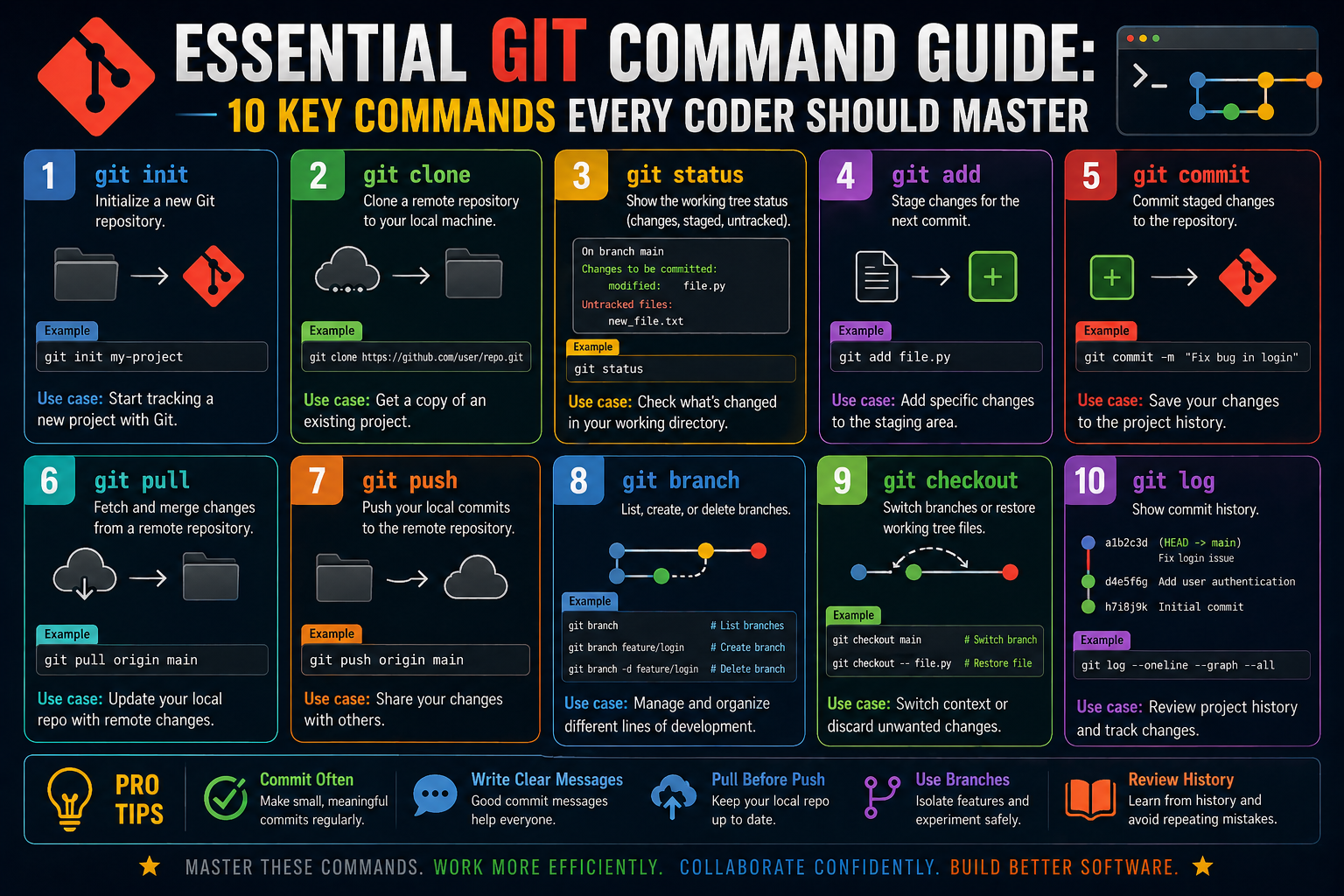
Modern software development relies heavily on the ability to track changes over time without losing control of progress. This is where version control becomes essential. At its core, version control is a system that records changes made to files so that you can revisit, compare, or restore earlier versions whenever needed. It acts like a structured memory for your project, ensuring that every modification is accounted for in a reliable way.
Git is one of the most widely used version control systems because of its speed, flexibility, and ability to manage projects of any size. Unlike simple file-saving methods, where new versions are stored manually with different names, Git builds a structured timeline of changes. This timeline allows developers to move backward and forward through the evolution of a project with confidence. It also reduces the risk of losing work, as every meaningful change can be preserved as part of the project history.
Another important reason Git is so widely adopted is its distributed nature. Instead of relying on a single central system, each user has a full copy of the project history on their own device. This means work can continue even without constant access to a central server. It also makes collaboration more resilient, as multiple people can contribute changes independently and later combine their work in a controlled manner.
Understanding Git begins with understanding its mindset. Git does not see files the way humans do. Instead, it sees snapshots of a project at different points in time. Every change you make contributes to a growing sequence of snapshots, which together form the complete history of the project. This approach allows developers to revisit any moment in the project’s evolution, making it easier to debug issues, understand decisions, and refine development strategies.
Learning Git is not just about memorizing commands; it is about understanding how it structures and preserves work. Once this mindset is clear, the workflow becomes more intuitive, and the system becomes a powerful extension of the developer’s thinking process.
How Git Organizes Your Work Environment
To use Git effectively, it is important to understand how it organizes your work behind the scenes. A Git project is structured around three main areas: the working area, the staging area, and the repository. Each of these areas plays a specific role in managing changes and ensuring that your project evolves in a controlled and predictable way.
The working area is where active development takes place. It includes all the files you can see and edit directly. Whenever you make changes to a file, those modifications first appear in this space. However, changes in the working area are not automatically saved in the project history. This separation ensures that you have control over what gets recorded and when.
The staging area acts as a middle step between your active work and the permanent project history. It allows you to select specific changes that you want to include in your next snapshot. This is particularly useful when working on multiple updates at the same time, but wanting to commit them in organized parts. Instead of saving everything at once, you can carefully decide what belongs together in a single update.
The repository is where all confirmed snapshots are stored. Once changes move from the staging area into the repository, they become part of the project’s permanent history. This history is what allows Git to track evolution over time and makes it possible to revisit or analyze past versions.
This three-part structure is what gives Git its power. It allows developers to work freely in the working area, selectively prepare changes in the staging area, and permanently record meaningful progress in the repository. By separating these responsibilities, Git ensures that development remains organized even in complex projects with many moving parts.
Starting a New Project and Initializing Structure
When beginning a new project with Git, the first step is to initialize the repository. This action transforms a regular folder into a structured environment that Git can track. Once initialization is done, Git begins monitoring changes within that directory, allowing you to start building a version-controlled history from scratch.
Before initialization, a folder is just a collection of files with no tracking or awareness of changes. After initialization, Git creates a hidden internal structure that stores all the information needed to manage version history. This structure does not interfere with your actual files but quietly supports every operation that happens afterward.
Initializing a project is significant because it marks the beginning of controlled tracking. From this moment onward, Git is aware of every modification you make within the project folder. It does not automatically record everything, but it prepares the system to begin capturing meaningful updates whenever you decide.
This initial setup is also important because it establishes consistency. Every Git project, regardless of size or complexity, begins with the same foundational structure. This uniformity ensures that developers can move between different projects without needing to learn new systems or workflows each time.
Once a project has been initialized, it becomes ready for structured development. Files can be created, edited, and organized, but Git remains in the background, waiting for instructions on what should be tracked. This separation of readiness and action is what makes Git both flexible and powerful.
Understanding the Working Directory and Active Changes
The working directory is the most immediate space in Git where all active development takes place. It represents the visible state of your project, including all files and folders you are currently editing. Every change you make first appears here before Git begins tracking it formally.
This environment is dynamic, meaning it changes constantly as you work. Adding new content, modifying existing files, or removing elements all happen in this space. However, these changes are not yet part of the project’s history. They remain temporary until you decide to move them forward in the Git workflow.
One of the key ideas in Git is that the working directory is intentionally flexible. It allows experimentation and iteration without immediately affecting the project’s official record. This means you can test ideas, make adjustments, and refine your work freely before deciding what should be preserved.
Because the working directory is separate from the official history, it also acts as a safety layer. Mistakes made here do not immediately affect the recorded versions of your project. This gives developers the freedom to explore different approaches without risking permanent damage to the project’s structure.
Understanding this space is essential because it forms the foundation of all Git activity. Every tracked change begins here before moving through the rest of the system. Without a clear understanding of the working directory, it becomes difficult to manage how changes progress through the Git workflow.
The Role of the Staging Area in Managing Changes
The staging area plays a crucial role in bridging the gap between active work and permanent project history. It acts as a selection space where you decide which changes should be included in the next recorded snapshot of your project. This makes it one of the most powerful features in Git’s workflow.
When working on a project, it is common to make multiple changes at once. Some of these changes may be related, while others may not. The staging area allows you to separate and organize these updates before committing them. This ensures that each recorded snapshot is meaningful and logically structured.
By using the staging area, developers can create a clean and focused project history. Instead of saving everything in one large update, changes can be grouped based on purpose or feature. This makes it easier to understand the evolution of the project over time.
Another important aspect of the staging area is control. It gives developers the ability to review and refine changes before they become permanent. If something is not ready to be saved, it can remain in the working directory until it is complete. This reduces the risk of recording incomplete or unintended updates.
The staging area also encourages thoughtful development practices. Instead of rushing to save changes, developers are encouraged to consider the structure and clarity of each update. This leads to a more organized and maintainable project history, which becomes extremely valuable as projects grow in size and complexity.
Capturing Project History Through Commit Snapshots
A commit represents a snapshot of your project at a specific point in time. It captures all staged changes and records them permanently in the project history. This makes commits one of the most important elements in Git, as they define how a project evolves.
Each commit acts like a checkpoint. It preserves the exact state of the project at the moment it was created, allowing you to revisit or restore that version whenever needed. This ability is essential for tracking progress, identifying issues, and understanding how different parts of a project developed.
Commits also serve as a form of documentation. Each one can include a description that explains what changes were made and why. These descriptions help future readers understand the intent behind updates, making collaboration and long-term maintenance much easier.
The commit process encourages careful thinking. Since each snapshot becomes part of the permanent history, developers are motivated to ensure that only meaningful and complete changes are recorded. This leads to a cleaner and more structured evolution of the project.
Over time, commits form a detailed timeline of development. This timeline provides insight into how the project has changed, which decisions were made at different stages, and how problems were solved along the way. It becomes a valuable resource for both individual developers and teams working together.
Viewing Project State and Understanding Change Awareness
Being aware of the current state of a project is essential when working with Git. As files are edited and modified, it becomes important to understand which changes are active, which are prepared for recording, and which have already been saved. This awareness helps maintain control over the development process.
Git provides visibility into the status of your project at any moment. This includes identifying modified files, newly created files, and files that are ready to be recorded in the next snapshot. This transparency ensures that developers always know what stage their changes are in.
Without this awareness, it would be easy to lose track of modifications or accidentally overlook important updates. Git’s ability to clearly show the state of the project helps prevent confusion and ensures that nothing is unintentionally left out of the development process.
This visibility also supports better decision-making. By understanding what changes are pending or untracked, developers can decide how to group updates, when to record them, and how to structure future work. It creates a clearer sense of control over the project’s evolution.
Change awareness is not just about tracking files; it is about understanding the flow of development. It connects the working directory, staging area, and repository into a coherent system where every change has a defined place and purpose within the overall workflow.
Working With Remote Repositories and Shared Development
As projects grow beyond a single developer, Git becomes most powerful when it connects local work to shared environments. A remote repository is essentially a version of the project hosted elsewhere, allowing multiple developers to contribute, review, and synchronize changes. This shared structure is what enables collaboration at scale.
When working with remote repositories, the key idea is synchronization. Your local version of the project is not isolated; it is part of a larger system where updates may come from different contributors. Git provides mechanisms to send your changes outward and bring external changes inward, ensuring that everyone stays aligned.
This connection between local and remote environments is fundamental in team-based development. Without it, each developer would be working in isolation, leading to conflicts and duplication of effort. With it, all contributions can be integrated into a single evolving project.
Remote repositories also act as a central reference point. Even though Git is distributed, teams often rely on a shared version of the project to coordinate progress. This helps maintain consistency and ensures that the latest approved work is always accessible.
Understanding how local and remote systems interact is essential before diving into specific commands. Once this relationship is clear, the process of sharing, updating, and integrating code becomes much easier to manage.
Bringing External Projects Into Your Environment
One of the first interactions developers have with a remote repository is copying an existing project to their local machine. This process allows you to work on a complete project history from the beginning, rather than starting from scratch.
When a repository is brought into your local environment, you receive not only the current files but also the full history of changes. This means you can explore how the project evolved and understand previous decisions made by other developers.
This initial copy becomes your working version of the project. From here, you can modify files, create new features, or fix issues while maintaining a connection to the source. The ability to work locally while staying linked to a shared repository is one of Git’s core strengths.
Once the project is copied, it behaves like any other Git repository. You can track changes, create new updates, and manage versions independently. However, the key difference is that it remains connected to its origin, allowing synchronization when needed.
This process is essential for contributing to open or shared projects. It ensures that every developer starts with the same baseline and can work independently without interfering with others until changes are ready to be shared.
Updating Your Local Project With Team Changes
In collaborative environments, multiple developers may be making changes to the same project at the same time. Because of this, your local copy can gradually become outdated if others update the shared repository.
To address this, Git provides a way to bring in the latest changes from the remote source. This ensures that your local environment stays aligned with the rest of the team. Without this step, conflicts and inconsistencies could arise when attempting to integrate your work later.
When updates are retrieved from the remote repository, Git compares them with your local version and integrates the differences. This process helps maintain continuity across all contributors while preserving your local work.
Keeping your project updated is not just about staying current; it is also about reducing the risk of conflicts. The more frequently you synchronize, the smoother the integration process becomes when combining different contributions.
This continuous updating cycle is what keeps collaborative development efficient. Instead of working in isolation and merging large sets of changes later, developers stay aligned with ongoing progress throughout the project lifecycle.
Sending Completed Work to the Shared Repository
Once you have made changes locally and are satisfied with your progress, the next step is to share those updates with the remote repository. This process ensures that your contributions become part of the shared project history.
Before sending changes, it is important that they are properly organized and finalized. Only completed and meaningful updates should be shared, as this maintains the clarity and stability of the shared repository.
When changes are sent to the remote system, they become visible to other developers working on the same project. This allows teams to review progress, integrate features, and build upon each other’s work.
This process also helps maintain accountability. Every contribution is recorded and associated with a specific history, making it easy to track who made what changes and when.
Sending work to the remote repository is a critical step in collaboration. It transforms local progress into shared progress, ensuring that the entire team benefits from individual contributions.
Understanding Branches as Independent Work Paths
Branches are one of the most important concepts in Git because they allow multiple lines of development to exist simultaneously. Instead of working on a single linear progression, branches enable developers to explore different ideas without affecting the main project.
Each branch acts as an independent path where changes can be made in isolation. This means new features, experiments, or fixes can be developed without disrupting stable parts of the project.
This separation is especially useful in larger projects where multiple tasks need to be handled at the same time. Developers can focus on their specific work without worrying about interfering with others.
Branches also encourage experimentation. Since they are separate from the main project flow, developers can try new approaches freely. If the changes work well, they can later be integrated into the main project. If not, they can be discarded without affecting the core system.
Over time, branches help organize development into structured paths. Each branch represents a specific goal or task, making it easier to manage complex projects with many moving parts.
Moving Between Different Development Contexts
As multiple branches exist within a project, developers often need to switch between them depending on what task they are working on. This ability allows seamless movement across different lines of development.
Switching contexts means changing the active branch so that your working environment reflects a different version of the project. Each branch has its own set of files and changes, so moving between them effectively changes the state of your project.
This flexibility is important because it allows developers to multitask efficiently. One moment you may be working on a new feature, and the next you may need to fix an issue in a different part of the project.
When switching between branches, Git ensures that your work environment updates accordingly. This includes adjusting files and reflecting the correct version of the project for that branch.
This system helps maintain clarity, ensuring that each development context remains separate and organized. It reduces confusion and prevents changes from overlapping unintentionally.
Combining Separate Lines of Work Into One Project
At some point in development, work done in separate branches needs to be combined into the main project. This process allows completed features or fixes to become part of the final product.
Combining branches involves integrating changes from one branch into another. This ensures that all progress made in isolated environments eventually contributes to the shared project.
This integration process is carefully managed to ensure consistency. Git compares changes from both branches and merges them into a unified version. If there are differences between them, they are resolved to maintain a stable result.
Merging branches is a key part of collaborative development because it brings together contributions from multiple developers. It ensures that independent work does not remain isolated but instead becomes part of the larger system.
This process also helps maintain project stability. By keeping development separate until changes are ready, teams can avoid disruptions while still allowing continuous progress.
Maintaining Control Over Project Evolution Through Structured Workflow
As development progresses, Git provides a structured workflow that ensures every change is intentional, traceable, and manageable. This structure is what allows projects to scale without losing clarity or control.
Each stage of development serves a specific purpose, from initial changes in the working environment to final integration into the shared project. This layered approach ensures that no change is accidental or untracked.
The structured workflow also helps teams coordinate effectively. By following a consistent process, developers can understand how changes move through the system and what steps are required at each stage.
This clarity reduces confusion and improves productivity. Instead of guessing how changes should be handled, developers follow a predictable path that supports both individual work and team collaboration.
Over time, this structured approach creates a stable and organized development environment. It allows projects to grow in complexity while remaining manageable and transparent.
Reading the Evolution of a Project Through Its History
Every Git project carries a complete record of how it has changed over time. This history is not just a technical feature but a structured narrative of development decisions, improvements, and adjustments. Understanding this history allows developers to trace how a project evolved from its initial state to its current form.
The history of a project is built from snapshots that capture the state of files at different moments. These snapshots are arranged in chronological order, creating a timeline that reflects the progression of work. By reviewing this timeline, developers can understand why certain changes were made and how different parts of the system came together.
This historical structure is particularly valuable when working on large or long-running projects. Instead of guessing how a feature was implemented or why a change occurred, developers can refer directly to the recorded progression. This reduces uncertainty and improves decision-making.
Project history also supports accountability. Each change is associated with a specific point in time and often includes descriptive context. This makes it easier to understand not only what changed but also the intent behind those changes.
Over time, this structured history becomes a knowledge base for the project. It reflects the evolution of ideas and provides a reliable reference for both current and future development work.
Comparing Changes and Understanding Differences
In active development, it is common for files to change frequently. Understanding exactly what has changed between different versions of a project is essential for maintaining clarity. Git provides mechanisms to compare versions and highlight differences between them.
These comparisons allow developers to see what has been added, removed, or modified. This is especially useful when reviewing work before it becomes part of the permanent project history. Instead of assuming changes are correct, they can be carefully examined.
Comparing differences also helps in understanding the impact of changes. A small modification in one part of the system may have wider effects elsewhere. By analyzing differences, developers can anticipate potential issues before they become problems.
This ability to compare versions is also valuable during collaboration. When multiple developers contribute to the same project, differences between their work must be clearly understood before integration. Comparison tools help make these differences visible and manageable.
Ultimately, understanding changes at this level ensures that development remains controlled and intentional. It prevents unexpected modifications from being introduced without review and helps maintain the integrity of the project.
Correcting Mistakes Without Breaking Progress
Mistakes are a natural part of development, especially in complex projects. Git provides structured ways to address these mistakes without disrupting the overall progress of the project. This ability is one of the key reasons it is widely trusted in professional environments.
When an unwanted change is introduced, it does not need to permanently affect the project. Instead, Git allows developers to adjust or remove changes while preserving the rest of the work. This ensures that progress is not lost due to individual errors.
Correcting mistakes often involves moving the project back to a previous known state or creating a new adjustment that neutralizes the unwanted change. The important idea is that history is not erased but extended in a controlled way.
This approach provides safety. Even when changes are corrected, the original record remains available for reference. This makes it possible to understand what went wrong and how it was resolved.
By handling mistakes in this structured manner, Git supports a stable development environment where experimentation is possible without fear of permanent damage.
Navigating Complex Development States and Detached Contexts
Git allows developers to move through different points in project history, not just the latest state. In some cases, this involves working directly with a specific snapshot rather than an active branch. This state is often referred to as a detached context, where the project is temporarily viewed from a historical perspective.
Working in this way is useful for examining past versions or testing specific states of the project. It allows developers to explore how the system behaves at different stages without altering the main development flow.
However, this mode requires careful awareness. Since it is not tied to an active branch, changes made in this state are not automatically integrated into the main project structure. This makes it more suitable for inspection and analysis rather than long-term development.
Despite its temporary nature, this capability adds flexibility to Git. It allows developers to move beyond linear development and interact directly with the project’s history in a meaningful way.
Understanding how to navigate these states improves a developer’s ability to troubleshoot issues and explore alternative development paths without affecting ongoing work.
Establishing Stable Release Points in Development
In many projects, certain versions are considered more stable or important than others. These points in the project’s history often represent completed milestones, releases, or significant stages of development. Git allows these points to be marked clearly so they can be easily referenced later.
Marking important states in the project provides structure and clarity. Instead of searching through the entire history, developers can quickly identify meaningful versions that represent stable progress.
These markers also help in organizing long-term development. As projects evolve, having clearly defined reference points ensures that important versions are not lost in a large sequence of changes.
Stable points in development are especially useful when coordinating releases or maintaining production systems. They provide a reliable baseline that can be used for testing, deployment, or rollback if necessary.
By establishing these reference points, teams create a structured map of their project’s evolution, making it easier to manage both current development and historical analysis.
Building Consistency Through Commit Discipline
A well-structured project history depends heavily on consistency in how changes are recorded. Commit discipline refers to the practice of organizing changes in a clear, logical, and meaningful way over time.
When changes are recorded consistently, the project history becomes easier to understand and navigate. Each snapshot represents a distinct and purposeful update rather than a collection of unrelated modifications.
This discipline also improves collaboration. When multiple developers follow consistent patterns, it becomes easier to interpret each other’s work and integrate changes smoothly.
Commit discipline is not just about frequency but also about clarity. Each recorded change should reflect a meaningful step in development, making the history useful for both current and future reference.
Over time, this approach creates a clean and readable project timeline that supports efficient development and reduces confusion.
Resolving Conflicts in Collaborative Environments
When multiple developers work on the same project, it is natural for overlapping changes to occur. These overlaps can sometimes lead to conflicts when different modifications affect the same part of a file or system.
Resolving these conflicts is an important part of collaborative development. It involves understanding the differences between changes and deciding how they should be combined into a single coherent result.
This process requires careful evaluation. Each conflicting change must be examined in context to determine the most appropriate outcome. The goal is not simply to choose one version over another but to integrate them in a way that preserves functionality and intent.
Conflict resolution also improves communication within teams. It encourages developers to be aware of each other’s work and to coordinate more effectively during development.
Although conflicts may seem challenging, they are a natural part of collaborative systems. When handled properly, they contribute to a more refined and accurate final product.
Strengthening Team Coordination Through Review Cycles
In collaborative development, changes are often reviewed before being fully integrated into the main project. This review process ensures that updates meet quality standards and align with project goals.
Review cycles allow multiple perspectives to be applied to a single change. Instead of relying on one developer’s judgment, feedback from others helps refine and improve the work.
This process also improves communication within the team. It creates a structured environment where changes are discussed, evaluated, and refined before becoming permanent.
Review cycles help maintain stability in the project. By ensuring that changes are carefully examined before integration, the risk of introducing errors or inconsistencies is reduced.
Over time, this structured review process builds a culture of quality and accountability within development teams.
Managing Large Projects and Long-Term Scalability Considerations
As projects grow, managing complexity becomes increasingly important. Git supports large-scale development by providing tools and structures that keep progress organized over time.
In large projects, many developers may be working simultaneously on different features. Without proper structure, this can quickly become difficult to manage. Git’s system of tracking changes, organizing work, and integrating updates helps maintain order even in complex environments.
Scalability in development also depends on clarity. As more changes are added, having a structured history ensures that the project remains understandable and maintainable.
Long-term projects benefit from consistent workflows and disciplined development practices. These practices help ensure that growth does not lead to confusion or loss of control.
By maintaining structure and organization, Git enables projects to expand without sacrificing clarity, making it suitable for both small tasks and large, evolving systems.
Strengthening Stability Through Controlled Integration Practices
In complex development environments, one of the most important aspects of maintaining a healthy project is ensuring that new changes do not destabilize existing functionality. As projects evolve, new updates must be integrated in a way that preserves reliability while still allowing progress. Git supports this balance by encouraging controlled integration practices where changes are introduced in a structured and deliberate manner.
This structured approach ensures that development does not become chaotic as multiple contributors work simultaneously. Instead of merging changes randomly, updates are introduced through a predictable flow that allows for review, verification, and alignment with the project’s objectives. This reduces the likelihood of unexpected behavior appearing in stable areas of the system.
Controlled integration also improves long-term maintainability. When changes are introduced predictably, it becomes easier to understand how and why the system evolved in a particular direction. This clarity is especially important in environments where systems must remain stable over extended periods of time.
Another benefit of structured integration is reduced risk during collaboration. When multiple contributors are working on different features, careful integration ensures that one set of changes does not unintentionally disrupt another. This separation of development concerns helps maintain a smooth workflow even in active, fast-moving projects.
Over time, this discipline contributes to a more resilient development process. It allows teams to continue building new features while maintaining confidence that the existing system remains stable and functional.
Improving Development Clarity Through Structured Change Tracking
As a project grows, the number of changes can become substantial, making it difficult to understand the current state of development without proper organization. Git addresses this challenge by providing a structured system that clearly tracks how each modification contributes to the overall project.
This structured tracking ensures that every change has context. Instead of being isolated or unclear, modifications are recorded in relation to the project’s ongoing evolution. This helps developers understand not only what changed, but also where it fits within the broader development timeline.
Clarity in change tracking is particularly valuable when revisiting older parts of a project. Without a structured history, understanding why certain decisions were made can become difficult. Git preserves this context, allowing developers to trace decisions back to their origin and understand the reasoning behind them.
This level of clarity also improves onboarding for new contributors. When joining an existing project, having access to a well-organized history makes it easier to understand how the system works and how it reached its current state.
By maintaining structured change tracking, development teams create an environment where complexity remains manageable, even as the project continues to expand.
Enhancing Reliability Through Reproducible Development States
One of the most powerful aspects of Git is its ability to reproduce specific states of a project at any point in time. This means that developers can return to previous versions of the system exactly as they existed, without ambiguity or missing context.
Reproducibility is important because it ensures that development is not dependent on memory or assumptions. Instead, every version of the project is preserved in a consistent and retrievable form. This makes it possible to test, analyze, or compare different stages of development with accuracy.
This capability is especially useful when diagnosing issues. If a problem arises, developers can examine earlier versions of the project to determine when the issue first appeared. This helps isolate the cause and identify the specific change responsible for the behavior.
Reproducible states also support experimentation. Developers can explore new ideas knowing that they can always return to a stable version if needed. This encourages innovation without increasing risk.
Over time, reproducibility strengthens the reliability of the entire development process. It ensures that progress is always reversible and that no stage of development is permanently lost or inaccessible.
Supporting Parallel Development Without Interference
Modern development often requires multiple features or improvements to be worked on simultaneously. Git supports this through a structure that allows independent development paths to exist side by side without interfering with one another.
This separation ensures that progress on one feature does not disrupt progress on another. Each development path operates independently, allowing teams to focus on specific tasks without concern for unrelated changes.
This parallel structure is essential for efficiency. Instead of waiting for one feature to be completed before starting another, multiple tasks can progress at the same time. This significantly reduces development time while improving flexibility.
It also improves organization within teams. Each development path can be assigned a clear purpose, making it easier to track progress and manage responsibilities. This reduces confusion and ensures that work remains structured even when multiple efforts are active simultaneously.
Once independent work is completed, it can be carefully combined into the main system. This ensures that parallel development contributes to a unified final product without losing the benefits of separation during the development process.
Maintaining Long-Term Project Health Through Structured Discipline
Sustaining a large project over time requires more than just technical capability; it requires consistent discipline in how changes are managed and recorded. Without structure, even well-designed systems can become difficult to maintain as they grow.
Structured discipline ensures that every part of the development process follows a clear and repeatable pattern. This includes how changes are made, how they are organized, and how they are integrated into the broader system.
One of the key benefits of this discipline is predictability. When development follows a consistent structure, it becomes easier to understand how the system will behave and how future changes will fit into it.
This predictability also improves collaboration. When all contributors follow the same approach, it reduces misunderstandings and ensures that work can be combined smoothly.
Over time, structured discipline helps prevent technical complexity from becoming unmanageable. It ensures that growth does not lead to confusion, allowing projects to scale while maintaining clarity and control.
Conclusion
Mastering Git is less about memorizing commands and more about understanding how structured development actually works. At its core, Git provides a disciplined way to manage change, allowing developers to move from simple file edits to a controlled system of tracking, organizing, and preserving project history. This structured approach is what makes it possible to build software collaboratively without losing clarity or stability.
Through its layered workflow, Git separates active work, staged changes, and permanent history, ensuring that every modification is intentional before it becomes part of the project. This separation reduces errors and gives developers full control over what gets recorded and when. It also supports experimentation, since changes can be explored freely before being finalized.
The ability to work with branches introduces even more flexibility, allowing multiple lines of development to progress independently. This makes it possible to build new features, fix issues, and test ideas simultaneously without disrupting the main project. When these efforts are ready, they can be carefully integrated into a unified system.
Equally important is Git’s emphasis on history and traceability. Every change becomes part of a long-term record that can be reviewed, compared, and restored at any time. This not only improves accountability but also strengthens collaboration by making project evolution transparent to everyone involved.
Ultimately, Git is a system designed to bring order to complexity. As projects grow and teams expand, its structured approach ensures that development remains predictable, recoverable, and manageable. Developers who understand these principles gain far more than technical capability—they gain a reliable framework for building and maintaining software with confidence.