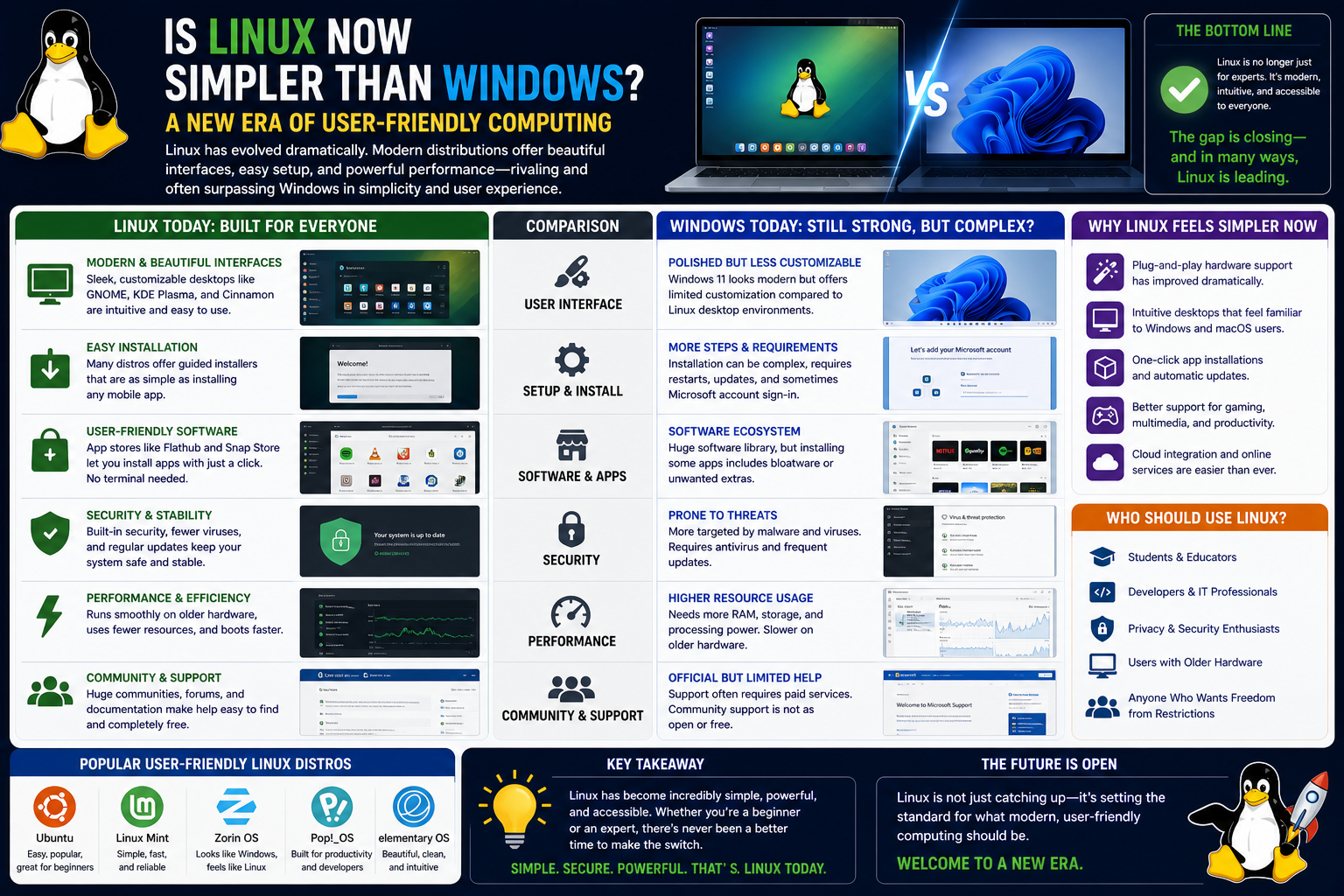
Linux began as a project driven by curiosity and collaboration, designed to give users more control over their computing environment. In its earliest stages, it was never positioned as a polished consumer product. Instead, it functioned as a flexible foundation that technical users could shape according to their needs. That flexibility, while powerful, also meant complexity. For many years, Linux required a level of comfort with technical concepts that most everyday users simply did not have.
Over time, however, the computing landscape changed significantly. Servers, mobile devices, cloud systems, and embedded technologies began to rely heavily on Linux-based systems. What was once a niche operating system quietly became a backbone of modern digital infrastructure. This shift pushed developers and communities to improve usability, simplify installation processes, and reduce barriers that had previously limited broader adoption.
Today, Linux is no longer confined to enthusiasts or specialists. It is embedded in enterprise environments, educational institutions, government systems, and even consumer devices. This widespread adoption has driven continuous improvement in usability. The focus gradually shifted from whether Linux could be used, to how easily it could be used by different types of users. As a result, modern Linux distributions now prioritize accessibility, visual clarity, and streamlined workflows.
One of the most significant transformations has been the effort to make Linux approachable without sacrificing its underlying power. Unlike earlier versions, which often demanded manual configuration and deep system knowledge, modern versions aim to deliver a balance between simplicity and control. This evolution has contributed to the growing perception that Linux is no longer just a technical tool, but a practical operating system suitable for a broad audience.
Early Barriers to Adoption
In its early years, Linux presented a steep learning curve that discouraged many potential users. The system was heavily command-line driven, meaning most tasks required typed instructions rather than graphical interaction. For experienced developers or system administrators, this was acceptable and even efficient. For average users, however, it created an intimidating environment.
One of the most persistent challenges was hardware compatibility. Unlike more commercially standardized systems, Linux relied on community-developed drivers for many devices. This meant that certain printers, graphics cards, network adapters, and sound systems did not always work out of the box. Users frequently had to search for compatible drivers, compile them manually, or apply configuration changes that required technical understanding.
Software availability was another limiting factor. Many mainstream applications were designed primarily for other operating systems, and Linux alternatives were either incomplete or inconsistent. While open-source equivalents existed, they were not always intuitive or fully compatible with widely used file formats. This created friction for users who needed seamless interaction with colleagues or clients using different systems.
The installation process itself was also more complex in earlier distributions. Partitioning disks, selecting system components, and configuring boot loaders were tasks that required careful attention. Mistakes could result in unstable systems or failed installations. Unlike modern systems that guide users step by step, early Linux installers often assumed a level of prior knowledge.
Despite these challenges, Linux continued to develop because of its strong community support and adaptability. Enthusiasts contributed improvements, documented solutions, and created distributions aimed at simplifying the experience. These efforts laid the foundation for the more accessible systems we see today.
Installation Experience Then vs Now
The installation process of Linux has undergone a dramatic transformation over the years. In the past, installing Linux often involved multiple manual steps that required both patience and technical understanding. Users had to decide how to partition their storage, select packages individually, and configure system components through text-based interfaces. While this level of control was powerful, it was not user-friendly for beginners.
Modern Linux distributions have significantly streamlined this process. Installation now typically involves a graphical interface that guides users through each step in a clear and structured manner. Options such as language selection, keyboard layout, disk setup, and user account creation are presented in a logical sequence that reduces confusion.
One of the most notable improvements is automatic configuration. Instead of requiring users to manually detect and install hardware drivers, most modern systems handle this process during installation. The system identifies connected devices and installs appropriate drivers without user intervention. This alone eliminates one of the most frustrating aspects of early Linux setup.
Another major improvement is installation speed. Where older systems could take a considerable amount of time and effort to configure, modern installations are often completed in a fraction of the time. In many cases, a fully functional system can be ready within minutes, with essential applications already available.
The installation experience has also become more forgiving. Errors that once required restarting the entire process can now often be corrected within the installer itself. This reduces frustration and encourages experimentation, especially for users who are new to the system.
The overall result is a far more approachable experience. Instead of being a technical hurdle, installation has become a straightforward process that allows users to focus on using the system rather than configuring it.
Hardware Drivers and Compatibility Challenges
One of the most significant obstacles in the early days of Linux was hardware compatibility. Many devices were designed primarily with other operating systems in mind, leaving Linux users to rely on community-developed drivers or manual configuration. This often resulted in incomplete functionality or devices that did not work at all.
Network adapters were a particularly common challenge. Without proper drivers, users could find themselves unable to connect to the internet immediately after installation. This created a frustrating paradox where the solution to the problem required internet access, which was not yet available. Users often had to download drivers on another system and transfer them manually.
Graphics support also presented difficulties. High-performance graphics cards required specialized drivers that were not always readily available or easy to install. As a result, users sometimes experienced limited display resolution or reduced graphical performance until proper drivers were configured.
Over time, hardware manufacturers began to recognize the importance of Linux compatibility. Many now provide native support or collaborate with developers to ensure smoother integration. This shift has dramatically reduced the frequency of driver-related issues.
Modern Linux systems benefit from large driver libraries and automatic detection mechanisms. When hardware is connected, the system can often identify it instantly and load the appropriate driver without user input. This plug-and-play experience has significantly improved usability and reduced setup complexity.
In addition, kernel-level improvements have expanded support for a wide range of devices. The Linux kernel now includes built-in support for many common hardware components, eliminating the need for external installations in many cases.
These advancements have transformed hardware compatibility from a major barrier into a largely invisible background process. For most users today, hardware simply works, allowing them to focus on productivity rather than configuration.
Modern Linux Distributions and Simplified Setup
Modern Linux distributions are designed with usability in mind. Unlike earlier versions that prioritized technical flexibility above all else, today’s systems aim to balance power with accessibility. This shift has led to the development of user-friendly interfaces, simplified workflows, and more intuitive system design.
Graphical desktop environments now play a central role in the user experience. Instead of relying solely on command-line input, users can interact with their system through visual menus, icons, and windows. These environments are designed to be familiar even to those transitioning from other operating systems.
Application management has also become significantly easier. Software centers allow users to browse, install, and update applications through simple graphical interfaces. This eliminates the need for complex command-line instructions for everyday tasks.
System settings have been reorganized into centralized control panels that group related options together. This reduces the need to navigate through multiple layers of configuration files or menus. Users can adjust network settings, display preferences, and system behavior from a single location.
Another important improvement is consistency across distributions. While Linux remains highly customizable, many modern distributions follow similar design principles, making it easier for users to transition between systems without relearning basic navigation.
These improvements reflect a broader goal of reducing friction in everyday use. Instead of requiring users to adapt to the system, the system increasingly adapts to the user.
The Role of Automation in Hardware Detection
Automation has become a key factor in improving the Linux experience. In earlier systems, hardware detection required manual intervention and configuration. Users often needed to identify their devices, search for compatible drivers, and apply settings manually.
Today, much of this process is automated. When a system boots, it performs a comprehensive scan of connected hardware and matches each component with appropriate drivers. This process happens quickly and without user involvement, creating a seamless experience from the moment installation begins.
Automation also extends to system updates and maintenance tasks. Background processes handle routine system optimization, security updates, and hardware adjustments without interrupting the user’s workflow. This reduces the need for manual system management and ensures consistent performance.
Another important aspect of automation is error handling. Modern systems are designed to detect and resolve common issues automatically. If a configuration conflict arises, the system can often correct it without requiring user input.
This level of automation significantly reduces the technical burden on users. Tasks that once required advanced knowledge are now handled quietly in the background, allowing users to focus on their work rather than system maintenance.
How Installation Time and Stability Have Improved
System installation and stability have both improved significantly over the years. Early Linux installations could take considerable time, often requiring users to manually configure multiple components before the system was usable. In contrast, modern installations are designed to be fast and efficient.
Installation speed has improved due to optimized system architecture and pre-configured installation packages. Many distributions now include essential drivers and applications by default, reducing the need for post-installation setup.
Stability has also become a defining characteristic of modern Linux systems. Once installed, systems are known for their reliability and long uptime. Unlike environments that require frequent restarts or maintenance cycles, Linux systems can often run continuously for extended periods without disruption.
System updates are designed to minimize downtime. Instead of forcing immediate restarts, updates are often applied in the background, allowing users to continue working uninterrupted. Only major system changes require a restart, and even these are less frequent than in earlier systems.
The combination of faster installation and improved stability has contributed to a smoother overall experience. Users can deploy systems quickly and rely on them for consistent performance over time without constant intervention.
Linux and Windows in Modern Everyday Use
When comparing modern Linux systems with Windows in terms of usability, the conversation is no longer about whether one is functional and the other is not. Instead, it is about how each system approaches the idea of user experience. Windows has traditionally focused on a highly standardized experience, where most users interact with a familiar interface across devices. Linux, on the other hand, offers multiple environments that can be tailored to different preferences and workflows.
This difference has become more noticeable as Linux desktop environments have matured. Users today are no longer limited to a single way of interacting with the system. Instead, they can choose from a variety of interfaces that prioritize either simplicity, performance, or customization. This flexibility is one of the key reasons Linux is increasingly seen as easier to use by certain groups of users, especially those who value efficiency and control over uniformity.
Windows, while highly polished, often introduces changes that affect user familiarity. Interface updates, layout adjustments, and bundled features can sometimes disrupt established workflows. Linux avoids this by allowing users to choose environments that remain stable over time, reducing the learning curve once a preferred setup is selected.
Desktop Environments and User Interaction Models
One of the most distinctive features of Linux is the availability of multiple desktop environments. These environments define how the user interacts with the system visually and functionally. Unlike systems that enforce a single interface design, Linux allows users to choose environments that match their comfort level and performance needs.
Some desktop environments prioritize minimalism, offering a clean interface with limited distractions. Others focus on advanced features, providing extensive customization options for panels, shortcuts, and visual effects. This variety allows users to build a computing environment that aligns with their workflow rather than adapting to a fixed design.
The experience of launching applications, managing files, and navigating system settings is therefore not uniform across Linux systems. However, this diversity is also a strength. It means that users can select an interface that feels intuitive to them personally, rather than adapting to a one-size-fits-all model.
In contrast, Windows provides a consistent interface across installations, which can be helpful for standardization but less flexible for personalization. Linux’s approach encourages exploration and optimization, allowing users to refine their environment over time.
Software Management and Application Accessibility
Software management is another area where Linux has evolved significantly. In earlier systems, installing applications often required manual compilation or dependency resolution, which could be challenging for non-technical users. Modern Linux systems have addressed this through centralized software management tools.
These tools allow users to browse applications, install them with a single action, and receive updates automatically. This experience is similar in simplicity to mobile app stores, making software installation more accessible to a wider audience.
Beyond ease of use, Linux software management systems also emphasize transparency. Users can often see what components are being installed and how they interact with the system. This level of visibility appeals to those who prefer understanding what is happening behind the scenes.
Another important aspect is the availability of repositories containing thousands of applications. These repositories are maintained by communities and organizations, ensuring that software is regularly updated and tested for compatibility. This reduces reliance on external downloads and minimizes security risks.
While Windows also offers centralized software distribution through its own platform, Linux’s approach is often more integrated into the system itself, making application management feel like a natural extension of the operating system rather than an external feature.
System Updates and User Control Over Maintenance
System updates have historically been a source of frustration for many users across operating systems. The key difference lies in how updates are handled and the level of control given to the user.
Linux systems typically allow users to decide when updates are applied. Updates can be installed in the background without interrupting active work, and restarts are only required when absolutely necessary. This reduces disruption and allows users to maintain control over their workflow.
In contrast, some systems enforce updates at scheduled intervals or during startup and shutdown processes. While this ensures systems remain current, it can sometimes interfere with user activity.
Linux also provides granular control over update components. Users can choose to update the entire system or specific packages, depending on their needs. This flexibility is particularly useful in environments where stability is critical, and changes must be carefully managed.
The update process in Linux is also designed to be efficient. Instead of requiring large system-wide replacements, updates are often incremental, reducing download size and installation time. This makes maintenance less resource-intensive and more predictable.
The Role of the Command Line in Modern Usage
Although graphical interfaces have become the primary mode of interaction for most users, the command line remains an important part of Linux. However, its role has changed significantly over time.
In earlier systems, the command line was essential for almost all tasks, from installing software to configuring hardware. Today, it serves more as an advanced tool rather than a requirement for basic use. Most everyday tasks can be completed through graphical interfaces, while the command line is available for users who need deeper control.
For IT professionals and developers, the command line offers speed and precision. Complex operations that might require multiple steps in a graphical interface can often be completed with a single instruction. This efficiency is one of the reasons it remains widely used in professional environments.
At the same time, modern Linux distributions have made the command line more approachable. Improvements in documentation, autocomplete features, and clearer command structures have reduced the learning barrier. Users can gradually adopt command-line usage as needed rather than being forced to rely on it from the beginning.
This balanced approach allows Linux to serve both beginners and advanced users without compromising either experience.
Performance Efficiency and Resource Management
One of the areas where Linux often stands out is resource efficiency. The operating system is designed to be lightweight and modular, allowing it to run effectively on a wide range of hardware configurations.
This efficiency is particularly noticeable on older or lower-spec machines. Where some systems may become slow or unresponsive over time, Linux can continue to perform smoothly due to its minimal background resource consumption.
Processes in Linux are managed in a way that prioritizes system stability and responsiveness. Users can monitor system activity in real time and adjust resource allocation as needed. This level of transparency helps users understand how their system is performing and identify potential bottlenecks.
Memory usage is also optimized through efficient caching and process handling. Instead of consuming large amounts of resources for background services, Linux allows users to enable only the components they need.
This approach contributes to longer hardware lifespan and improved performance consistency, particularly in environments where systems must run continuously for extended periods.
Customization and User Control
Customization is one of the defining characteristics of Linux. Users are not limited to predefined system behaviors or interface layouts. Instead, they can modify nearly every aspect of the operating system to suit their preferences.
This includes visual elements such as themes, icons, and window layouts, as well as functional components like system behavior, shortcuts, and process management. The level of control available allows users to create highly personalized environments.
For some users, this customization leads to improved productivity. By organizing workflows in a way that matches their habits, they can reduce unnecessary steps and streamline tasks.
However, customization is not mandatory. Many modern Linux systems provide default configurations that work well out of the box. Users can choose to remain with these defaults or gradually explore more advanced customization options over time.
This balance between simplicity and control contributes to the perception that Linux can be easier to use, as it does not force users into a rigid structure.
Enterprise Adoption and Practical Deployment
In enterprise environments, Linux has become a foundational technology. It is widely used in server infrastructure, cloud computing, and development environments. This adoption has influenced improvements in usability, as organizations demand systems that are both powerful and manageable.
One of the reasons Linux is favored in enterprise settings is its stability. Systems can run for long periods without requiring frequent restarts or maintenance interruptions. This reliability is essential in environments where downtime directly impacts operations.
Another advantage is scalability. Linux systems can be deployed across a wide range of hardware configurations, from small devices to large data centers. This flexibility allows organizations to standardize infrastructure while adapting to different workloads.
Management tools have also improved significantly. System administrators can now automate deployments, monitor performance, and manage updates across large networks efficiently. These capabilities reduce operational overhead and improve consistency across systems.
As Linux continues to evolve in enterprise contexts, improvements in usability often filter down to desktop environments as well. This cross-pollination contributes to the overall refinement of the system.
Security Model and User Awareness
Security in Linux is built around a permission-based model that separates user privileges from system-level access. This structure reduces the risk of accidental system changes and limits the impact of malicious software.
Users typically operate with restricted permissions, requiring elevated access for system modifications. This separation encourages safer computing practices and reduces the likelihood of system-wide damage from user actions.
Another important aspect of Linux security is transparency. Users can inspect system processes, monitor activity, and control services directly. This visibility allows for greater awareness of what is happening within the system at any given time.
Regular updates and community oversight also contribute to security improvements. Vulnerabilities are often identified and patched quickly due to the collaborative nature of development.
While no system is immune to security risks, Linux’s design encourages proactive management and user awareness, which can contribute to a more controlled and predictable environment.
Learning Curve and User Adaptation Over Time
The learning experience of Linux has changed significantly compared to earlier years. While it once required substantial technical knowledge, modern systems are designed to support gradual learning.
New users can begin with graphical interfaces and simple workflows, gaining familiarity without needing to interact with advanced system components immediately. Over time, they can explore more complex features as their confidence grows.
This incremental learning approach reduces the intimidation factor often associated with Linux. Instead of requiring users to understand everything at once, the system allows them to grow into its capabilities.
Documentation, community support, and improved interface design all contribute to this smoother learning process. Users are no longer isolated when encountering challenges, and solutions are often accessible in a variety of formats.
As a result, the perception of Linux as difficult to use has shifted for many users who approach it today.
Changing Expectations of Operating Systems
The idea of what makes an operating system “easy to use” has changed significantly over the years. In earlier computing environments, ease of use was often defined by how little a user needed to think about technical details. The system was expected to guide users through predefined workflows, and deviation from those workflows was generally discouraged.
Modern computing has shifted this expectation. Users now interact with systems across multiple devices, cloud platforms, and remote environments. As a result, ease of use is no longer just about simplicity, but about adaptability. An operating system is now expected to support different types of users without forcing a single rigid interaction model.
Linux has benefited from this shift in expectations. Instead of trying to impose a single standardized experience, it offers a framework that can be shaped according to the user’s needs. This flexibility aligns well with modern workflows, where users frequently switch between development tools, web applications, virtual environments, and cloud services.
At the same time, Windows has also evolved toward more integrated services and cloud-connected features. However, these additions sometimes introduce complexity in areas where users prefer predictability. Linux, by contrast, tends to separate core system functionality from optional components, allowing users to build a more controlled environment.
This difference in design philosophy has made Linux increasingly attractive to users who value clarity and intentional control over their computing experience.
Hybrid Environments: Windows and Linux Working Together
The idea that users must choose between Windows and Linux is becoming less relevant in modern computing. Instead, many environments now support hybrid usage, where both systems coexist and complement each other.
One of the most significant developments in this area is the ability to run Linux environments directly within Windows systems. This allows users to access Linux tools and workflows without leaving their primary operating system. Developers, in particular, benefit from this integration because it enables them to work across platforms seamlessly.
Virtualization has also played a major role in bridging the gap between operating systems. Users can run Linux as a virtual machine inside Windows or vice versa. This approach allows experimentation, testing, and development without requiring dedicated hardware or full system replacement.
Dual-boot configurations remain another option, though they are less commonly used for daily switching. Instead, hybrid environments tend to rely on integration rather than separation.
This blending of systems reflects a broader trend in computing: operating systems are no longer isolated environments but interconnected layers within a larger ecosystem. Linux fits naturally into this model due to its modular design and compatibility with a wide range of tools and platforms.
As a result, users are increasingly able to choose Linux not as a replacement for other systems, but as a complementary tool within a larger workflow.
Linux in Cloud and Containerized Computing
One of the most significant areas where Linux has become dominant is cloud computing. Modern cloud infrastructure is heavily built on Linux-based systems due to their stability, scalability, and efficiency. This has had a direct impact on how Linux is perceived in terms of usability.
In cloud environments, systems are often managed remotely, configured programmatically, and scaled dynamically based on demand. Linux is well suited for these requirements because it provides consistent behavior across different hardware and virtual environments.
Containerization technologies have further strengthened this role. Instead of deploying entire virtual machines, applications can be packaged with their dependencies and run in isolated environments. These containers typically rely on Linux at their core, reinforcing its importance in modern software deployment.
From a usability perspective, this shift means that Linux is no longer just a desktop operating system. It is also a foundational layer for modern application delivery. Users interacting with cloud services may be indirectly using Linux systems without even realizing it.
This abstraction of complexity contributes to the perception that Linux is easier to use in professional environments. Users interact with simplified interfaces while the underlying system handles complex operations in the background.
As cloud computing continues to expand, Linux’s role as a stable and consistent platform becomes even more important.
Desktop Productivity and Modern Workflows
Modern productivity workflows involve a combination of web applications, communication tools, document editing, and development environments. Linux has adapted to support these workflows through improved application support and system integration.
Web browsers play a central role in this environment. Since many productivity tools are now web-based, the underlying operating system becomes less restrictive. Linux systems can run modern browsers efficiently, allowing users to access cloud-based services without limitation.
Communication tools, collaboration platforms, and document editing systems are also widely supported. This reduces the dependency on traditional desktop-specific applications and shifts focus toward platform-independent workflows.
File management and system organization in Linux also contribute to productivity. Users can structure their environments in ways that match their personal or organizational workflows. This flexibility allows for more efficient task management and reduces unnecessary complexity.
Another important aspect is system responsiveness. Linux systems often remain stable under heavy workloads, allowing users to run multiple applications simultaneously without significant performance degradation.
These factors combine to create a productive environment that supports both casual and professional use cases without requiring extensive system management.
Gaming and Multimedia Evolution on Linux
Historically, gaming and multimedia support were considered weak points for Linux. Many popular games and creative applications were designed primarily for other operating systems, limiting Linux adoption in these areas.
However, this landscape has changed significantly. Compatibility layers and improved graphics support have enabled many modern games to run effectively on Linux systems. This has expanded the usability of Linux for entertainment and creative purposes.
Graphics drivers and rendering systems have also improved, allowing better performance in demanding visual applications. While not every proprietary tool is natively available, alternative solutions and compatibility systems have filled many gaps.
Multimedia editing, audio production, and visual design tools have also seen increased support. Open-source alternatives provide functionality comparable to traditional applications, and many professional tools now offer Linux versions.
Gaming platforms have also expanded their compatibility strategies, enabling a wider range of titles to run on Linux-based systems. This shift has contributed to a more balanced perception of Linux as not only a professional or server environment but also a viable desktop option.
As a result, users no longer need to switch operating systems solely for entertainment or creative work in many cases.
System Administration Tools and Automation at Scale
Linux has long been favored in system administration due to its flexibility and control mechanisms. In modern environments, this advantage has been amplified by the rise of automation tools and centralized management systems.
System administrators can manage large networks of machines using automated scripts, configuration tools, and remote execution frameworks. This reduces the need for manual intervention and allows consistent deployment across multiple systems.
Monitoring tools provide real-time insights into system performance, resource usage, and potential issues. This visibility allows administrators to proactively address problems before they impact users.
Automation also plays a key role in maintenance tasks. Routine updates, backups, and system checks can be scheduled and executed without manual input. This reduces operational workload and improves reliability.
In large-scale environments, these capabilities are essential. The ability to manage thousands of systems consistently and efficiently is one of the reasons Linux remains dominant in enterprise infrastructure.
From a usability standpoint, this level of automation reduces complexity for end users, as many system-level tasks are handled behind the scenes.
Migration Strategies for Organizations
Transitioning from one operating system environment to another is a complex process for any organization. It involves technical, operational, and cultural considerations that must be addressed carefully.
When organizations consider adopting Linux, they often begin with partial integration rather than full replacement. Specific systems or departments may transition first, allowing teams to evaluate performance and compatibility in real-world conditions.
Training plays a significant role in successful migration. Users must become familiar with new workflows, system structures, and application environments. However, modern Linux systems are designed to minimize the learning curve by providing familiar interfaces and intuitive tools.
Application compatibility is another important factor. Organizations often evaluate whether critical software can run on Linux or whether alternative solutions are available. In many cases, web-based applications reduce this barrier significantly.
Infrastructure planning is also essential. Systems must be configured to ensure stability, security, and scalability during and after migration. This includes planning for data transfer, system integration, and long-term maintenance.
When implemented carefully, migration can lead to improved system efficiency and reduced operational overhead. However, it requires structured planning rather than immediate full-scale replacement.
Common Misconceptions About Linux Usability
Despite significant improvements, several misconceptions about Linux persist. One common belief is that Linux is only suitable for advanced users. While this may have been true in the past, modern systems are designed to accommodate users with varying levels of technical knowledge.
Another misconception is that Linux lacks application support. While certain proprietary applications may not be available natively, many alternatives exist, and compatibility layers have expanded support significantly.
Some users also believe that Linux requires constant manual configuration. In reality, most modern systems operate with minimal maintenance requirements, with many processes automated by default.
There is also a perception that Linux is visually outdated or less polished. However, modern desktop environments offer highly refined interfaces that are comparable in design quality to other systems.
These misconceptions often stem from outdated experiences or early versions of Linux that no longer reflect current capabilities. As systems continue to evolve, the gap between perception and reality continues to narrow.
Accessibility and Inclusivity Improvements
Accessibility has become an important focus in modern operating system design, and Linux has made steady progress in this area. Features such as screen readers, magnification tools, and customizable input methods are now widely supported.
Users with different physical abilities can configure systems to match their needs, adjusting visual contrast, font sizes, and input behaviors. This flexibility ensures that Linux can be adapted for a wide range of accessibility requirements.
Language support has also expanded significantly. Modern systems support multiple languages and regional settings, allowing users from different backgrounds to interact with the system comfortably.
Keyboard navigation, voice input, and assistive technologies are also integrated into many desktop environments. These tools help reduce barriers for users who rely on alternative interaction methods.
Accessibility improvements are often driven by community contributions, which allows rapid iteration and adaptation to user needs. This collaborative approach contributes to continuous refinement of usability features.
Future Direction of Linux Usability and Operating Systems
The future of operating system design is moving toward greater integration, automation, and adaptability. Users are increasingly expecting systems to adjust dynamically to their needs rather than requiring manual configuration.
Linux is well positioned within this trend due to its modular structure and open development model. This allows continuous experimentation and improvement without being constrained by a single design direction.
Artificial intelligence and machine learning are also beginning to influence system behavior. Predictive resource management, automated optimization, and intelligent user assistance are emerging areas of development that may further simplify system interaction.
Cloud integration will continue to blur the line between local and remote computing. Operating systems will increasingly function as interfaces to distributed environments rather than isolated platforms.
As these trends continue, the definition of usability will keep evolving. Systems will be expected to anticipate user needs, reduce unnecessary complexity, and provide seamless interaction across devices and environments.
Conclusion
The perception that Linux has become easier to use than Windows is not a sudden development but the result of years of steady refinement, changing user expectations, and broader shifts in how computing itself is experienced. What was once seen as a highly technical operating system reserved for specialists has gradually evolved into a flexible, approachable, and widely usable platform. This transformation reflects not only improvements in Linux itself but also the changing nature of modern digital environments, where adaptability and efficiency matter as much as simplicity.
One of the most important changes behind this shift is how Linux has redefined usability. In earlier computing eras, ease of use was often associated with limiting user control in favor of simplicity. Modern Linux systems challenge this idea by offering both simplicity and depth at the same time. New users can interact with clean graphical interfaces that require no technical background, while advanced users retain access to powerful tools that allow deep customization and control. This dual-layer design makes Linux uniquely flexible compared to more rigid operating systems.
Another key factor is the dramatic improvement in hardware compatibility and system installation. Tasks that once required manual configuration and technical troubleshooting are now handled automatically in most modern distributions. Drivers are detected and installed without user intervention, installations are faster and more guided, and system setup is significantly more reliable than in earlier generations. These improvements have removed many of the barriers that once defined the Linux experience, making it far more accessible to everyday users.
The evolution of software management has also played a crucial role. Modern Linux systems provide centralized software centers and repositories that simplify application installation and updates. Instead of searching the internet for installers or dealing with complex dependency issues, users can now install applications with a few clicks or simple commands. This streamlined approach mirrors the expectations of modern users who are accustomed to quick and intuitive digital interactions.
At the same time, Linux has benefited from its strong presence in enterprise environments, cloud computing, and server infrastructure. Its stability, security model, and performance efficiency have made it a preferred choice for large-scale systems around the world. These professional demands have driven continuous improvements in reliability and automation, which have indirectly enhanced usability for desktop users as well. Systems that are built for stability and scalability often become easier to maintain, reducing the need for constant user intervention.
User experience design has also improved significantly. Modern desktop environments are visually polished, intuitive, and consistent. Tasks such as launching applications, managing files, and adjusting system settings are now straightforward and accessible. The interface no longer feels like a barrier between the user and the system, but rather a natural extension of the user’s workflow. This shift has helped reshape the perception of Linux from a complex tool into a practical everyday operating system.
Another important aspect is the growing role of automation. Many background processes, including updates, hardware detection, and system optimization, now occur without requiring user involvement. This reduces the technical burden on users and allows them to focus on their tasks rather than system maintenance. Automation has effectively bridged the gap between power and simplicity, making Linux both efficient and unobtrusive.
Despite these advancements, it is also important to recognize that usability is subjective. Windows continues to offer a highly consistent and familiar experience for millions of users worldwide. Its standardized interface and widespread adoption make it an effective choice for environments where uniformity is essential. However, Linux offers a different kind of advantage—one based on choice, control, and adaptability. For users and organizations willing to explore its capabilities, it provides a level of flexibility that is difficult to match.
Ultimately, the idea that Linux is now easier to use than Windows reflects a broader truth about modern computing. Ease of use is no longer defined solely by simplicity, but by how well a system adapts to different needs, reduces unnecessary friction, and empowers users to work efficiently. Linux has made significant progress in all of these areas, transforming from a specialized system into a mainstream option capable of serving a wide range of users.
As technology continues to evolve, the distinction between operating systems will likely become less about competition and more about suitability for specific tasks and environments. In that context, Linux stands as a strong example of how open development, community-driven improvement, and adaptability can reshape an entire ecosystem, making computing more accessible, flexible, and user-focused than ever before.