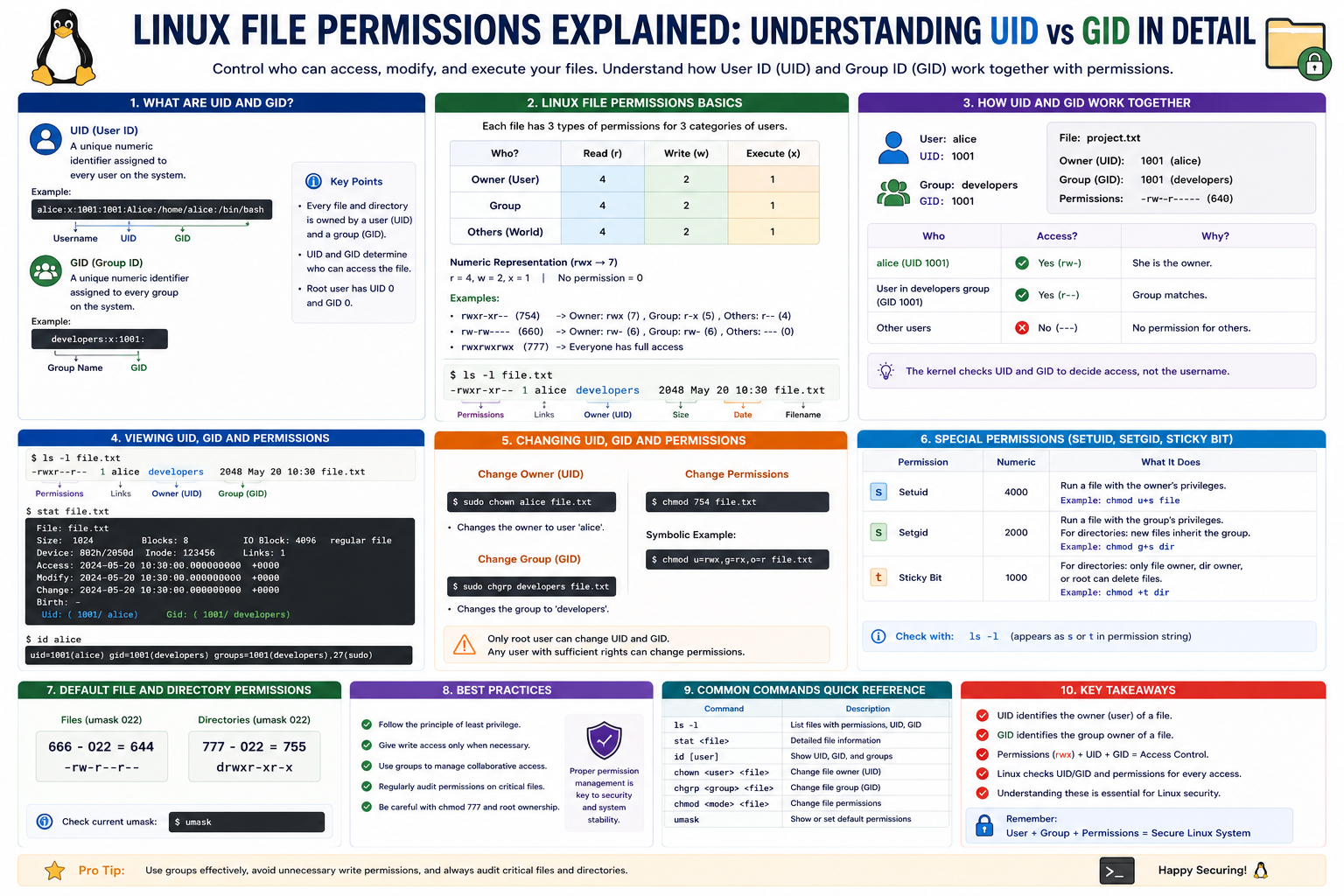
In Linux systems, every file, process, and user is part of a tightly controlled environment where permissions determine who can access what. At the core of this structure are two important identifiers: UID (User Identifier) and GID (Group Identifier). These two values form the backbone of Linux access control and are essential for managing security, system behavior, and user privileges.
UID and GID may appear as simple numeric labels, but they represent a sophisticated system that ensures multiple users can safely share the same machine without interfering with each other’s data. To fully understand Linux file permissions, it is important to explore how these identifiers work, why they exist, and how they influence everything from file ownership to system processes.
What UID Means in Linux Systems
UID, or User Identifier, is a unique number assigned to every user account on a Linux system. Instead of relying on usernames alone, the operating system uses UID values internally to track and manage users. This numerical approach makes system processes faster and more consistent because numbers are easier to process than text-based names.
Each user created on a Linux system receives a UID at the time of account creation. The system uses this identifier to determine ownership of files, control access to resources, and manage running processes. For example, when a user creates a file, that file is automatically tagged with the user’s UID, establishing ownership.
In most Linux environments, UID values follow a structured pattern. The root user, which is the administrative account with full system control, is always assigned UID 0. This special UID gives root unrestricted access to all files and commands on the system. Because of its importance, UID 0 is reserved exclusively for the root user.
System accounts, which are used internally by services and background processes, are typically assigned low UID values after root. These accounts are not meant for human login but are essential for system operations. Regular user accounts usually begin from a higher range, ensuring a clear separation between system-level users and standard users.
The UID system plays a crucial role in maintaining security boundaries. Even if two users have similar names or belong to similar roles, their UID values uniquely identify them within the system. This prevents confusion and ensures that permissions are enforced accurately.
Understanding GID and Its Role in Group Management
While UID represents individual users, GID (Group Identifier) represents groups of users. A group is a collection of users who share certain permissions and access rights. Each group is assigned a unique GID, which the system uses to manage shared access to files and directories.
The concept of groups simplifies permission management in multi-user environments. Instead of assigning permissions individually to every user, administrators can assign permissions to a group. Any user who belongs to that group automatically inherits the group’s access rights.
For example, in a workplace environment, all developers might belong to a “development” group, while designers belong to a “design” group. Files relevant to each department can then be assigned appropriate group ownership using GID values, making collaboration easier and more secure.
Just like UID, the GID system follows a structured assignment pattern. The root group is typically assigned GID 0. System groups are assigned low numbers, while regular user groups are assigned higher values. This separation helps the operating system distinguish between system-level groups and user-created groups.
Every file in Linux has both a UID and a GID associated with it. The UID determines who owns the file, while the GID determines which group the file belongs to. Together, they define the primary access rules for that file.
How UID and GID Control File Permissions
File permissions in Linux are built around three core levels of access: owner, group, and others. UID and GID directly influence how these permissions are applied.
When a file is created, the system automatically assigns ownership based on the UID of the user who created it. At the same time, it assigns group ownership based on the user’s primary GID. This dual assignment ensures that both individual and group-based access rules can be enforced.
The operating system then uses these identifiers to determine what actions are allowed on a file. If a user attempts to read, modify, or execute a file, the system checks the UID and GID associated with both the user and the file. Based on this comparison, it decides whether to grant or deny access.
UID determines whether the user is the owner of the file. If the UID of the user matches the file’s owner UID, the system applies owner-level permissions. These permissions are usually the most flexible and allow full control depending on configuration.
If the UID does not match, the system checks whether the user belongs to the group associated with the file’s GID. If there is a match, group-level permissions are applied. These permissions are generally more restrictive than owner permissions but still allow controlled collaboration.
If neither UID nor GID matches, the system applies “others” permissions, which are the most limited. This structure ensures a layered security model where access is granted based on identity and group membership.
This system is fundamental to Linux security because it allows multiple users to safely share the same system without risking unauthorized access to sensitive files.
UID and GID in Processes and System Behavior
UID and GID are not only important for file permissions; they also play a major role in how processes run in Linux. Every process started on a Linux system inherits the UID and GID of the user who launched it. This determines what the process is allowed to do.
For example, if a standard user runs a command, that process will operate with the same UID as the user. As a result, it cannot access files or system resources that the user does not have permission for. This prevents accidental or malicious system modifications.
On the other hand, processes started by the root user inherit UID 0, giving them full system privileges. These processes can modify any file, change system configurations, and manage other users. Because of this power, root-level processes must be handled carefully.
In some advanced cases, special permission mechanisms can temporarily change the UID or GID of a running process. This allows programs to perform specific tasks with elevated privileges without giving full administrative access. This behavior is important for system utilities and security-controlled applications.
The relationship between UID, GID, and processes ensures that Linux remains a secure and stable operating system even in multi-user environments. It prevents unauthorized privilege escalation and maintains strict control over system resources.
How Linux Displays UID and GID Information
Linux provides several ways to view UID and GID values, making it easier for administrators and users to understand ownership and permissions.
One of the most direct methods is through system account files that store user information. These files map usernames to their corresponding UID and GID values. By examining this mapping, users can understand how the system identifies each account internally.
Another common method is using system tools that display identity information for the current user. These tools show not only the UID and GID but also any additional groups the user belongs to. This is important because a user can be part of multiple groups, each with its own set of permissions.
When viewing this information, it becomes clear that a single user may have a primary group and several secondary groups. The primary GID is assigned at login, while additional group memberships allow access to shared resources across different teams or functions.
Understanding these values helps users troubleshoot permission issues. For example, if a file is not accessible, checking UID and GID relationships can quickly reveal whether the issue is related to ownership or group membership.
This visibility into system identity is one of the reasons Linux is widely used in environments where security and transparency are critical.
Conclusion
UID and GID are foundational elements of Linux system architecture that define how users, groups, and files interact within the operating system. UID uniquely identifies each user, ensuring that every action can be traced back to a specific account. GID, on the other hand, organizes users into groups, making it easier to manage shared access and collaboration.
Together, these identifiers form the basis of Linux file permissions and system security. They determine who owns a file, which group it belongs to, and what level of access is granted to different users. Beyond file management, UID and GID also influence how processes behave, ensuring that system operations remain secure and controlled.
By understanding how UID and GID work, users gain deeper insight into Linux permissions and system behavior. This knowledge is essential for anyone working with Linux, whether for administration, development, or security purposes. It also helps in troubleshooting permission issues more efficiently, designing safer multi-user environments, and maintaining better control over system resources. A strong grasp of these concepts ultimately leads to more reliable and secure Linux system management in real-world scenarios.