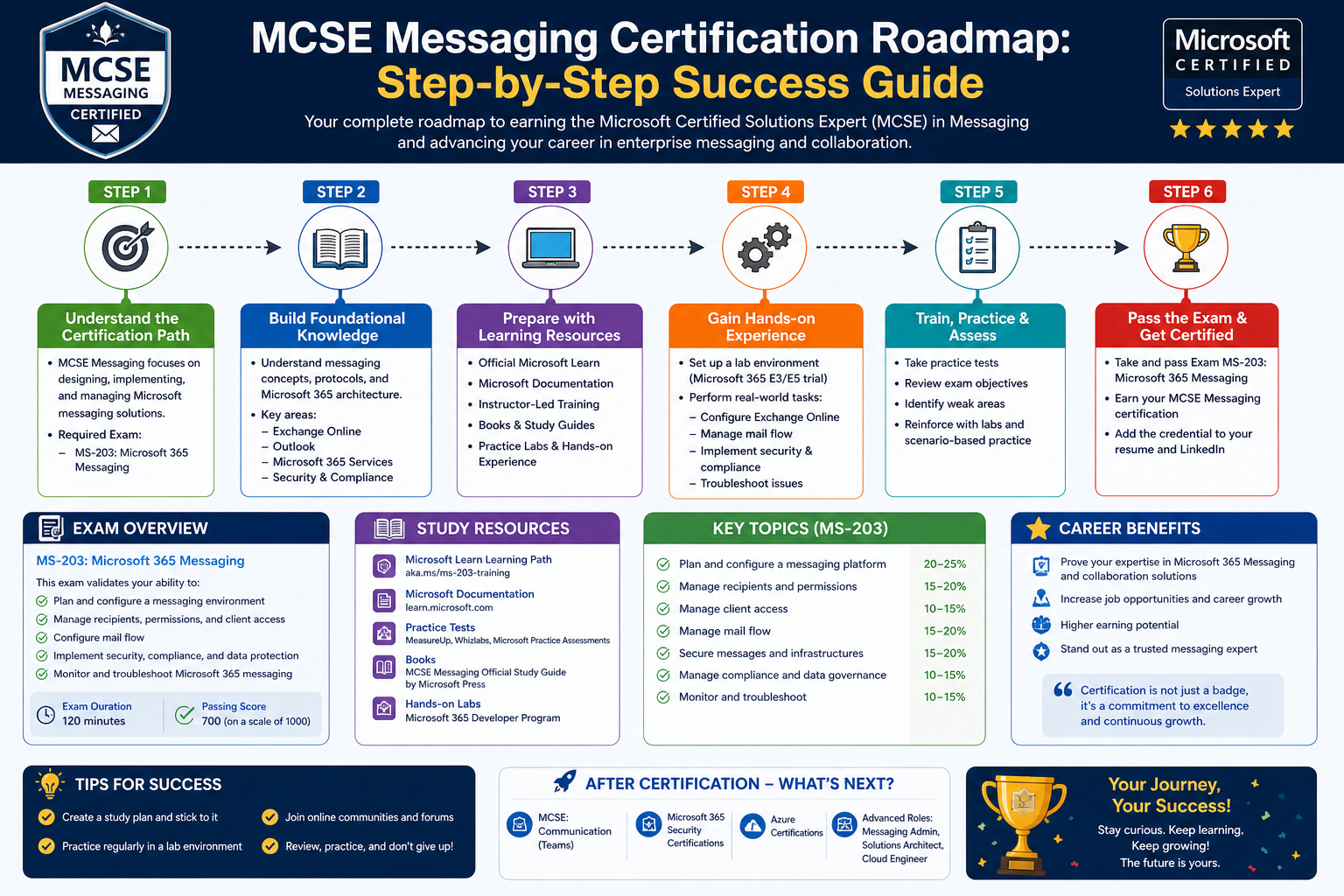
The Microsoft Certified Solutions Expert: Messaging certification represented one of the most specialized credentials within Microsoft’s certification structure, designed to validate deep technical knowledge in enterprise communication systems. It focused primarily on two major technologies that were central to modern workplace communication environments: Microsoft Exchange Server and Microsoft Office 365. These platforms formed the backbone of email, collaboration, identity management, and cloud-based productivity solutions for organizations across industries.
The certification was positioned at an advanced level, meaning it was not intended for beginners. Instead, it targeted professionals who already had practical experience managing messaging systems in real-world environments. At its core, MCSE: Messaging was about proving the ability to design, deploy, configure, and maintain messaging infrastructures that were reliable, secure, and scalable.
Over time, this certification became a benchmark for IT professionals working in systems administration, messaging architecture, and enterprise communication management. It also reflected the broader industry shift toward cloud computing, hybrid infrastructures, and integrated productivity services.
The Role of Messaging Systems in Modern IT Infrastructure
Messaging systems are often underestimated in their complexity, yet they are among the most critical components in any organization’s IT environment. Email remains a primary communication tool in business, even with the rise of instant messaging and collaboration platforms. Beyond email, modern messaging systems also handle calendars, contacts, task management, compliance policies, and data retention requirements.
Microsoft Exchange Server played a foundational role in this ecosystem. It provided organizations with full control over their messaging infrastructure, allowing on-premises deployment, customization, and integration with internal systems. Exchange Server environments required careful planning, including mailbox database configuration, high availability design, backup strategies, and security enforcement.
With the introduction of Office 365, messaging systems evolved further into cloud-based services. Instead of managing physical infrastructure, organizations could rely on Microsoft’s cloud platform to deliver messaging capabilities at scale. This shift introduced new responsibilities for IT professionals, including identity synchronization, hybrid deployment management, and cloud security configuration.
MCSE: Messaging was designed to ensure professionals understood both of these worlds: traditional on-premises messaging and modern cloud-based communication systems.
Evolution of the MCSE Certification Structure
The Microsoft certification framework has undergone several major transformations over the years. Initially, certifications were heavily product-focused, meaning each certification was tied to specific versions of software. As technology evolved, Microsoft shifted toward role-based and solution-based certifications that aligned more closely with real job functions.
MCSE: Messaging emerged during a transitional phase in this evolution. It belonged to the MCSE-level certifications, which represented expert-level skills above the associate level. These certifications were structured to validate advanced expertise rather than basic operational knowledge.
At that time, the certification landscape included multiple MCSE specializations, each focusing on a different domain such as server infrastructure, communication systems, desktop environments, and private cloud solutions. Messaging was one of the most critical domains because communication systems were central to almost every business operation.
As cloud adoption accelerated, Microsoft began restructuring its certification paths to better reflect industry demands. This restructuring eventually led to the retirement of MCSE: Messaging as a standalone certification and its replacement with more integrated and flexible certification tracks.
Transition from MCSE: Messaging to Modern Certification Paths
A significant shift occurred when Microsoft restructured its certification ecosystem to align more closely with cloud-first technologies. MCSE: Messaging was formally retired in 2017, marking the end of an era for product-specific expert certifications.
This retirement did not indicate that the skills were no longer relevant. Instead, it reflected the fact that messaging systems had become part of broader productivity and cloud ecosystems. Rather than treating messaging as an isolated domain, Microsoft integrated it into a larger framework that included collaboration tools, identity services, and cloud productivity platforms.
The successor to MCSE: Messaging concepts became part of broader certification pathways focused on productivity and cloud services. These newer structures emphasized adaptability, continuous learning, and real-world role alignment rather than static product versions.
Despite its retirement, MCSE: Messaging continues to hold historical significance because it represents a foundational stage in the evolution of modern cloud communication certifications.
Core Technologies Behind MCSE: Messaging
At the heart of the certification were two major technologies that defined enterprise messaging environments: Exchange Server and Office 365.
Exchange Server provided organizations with complete control over messaging infrastructure. IT professionals working with Exchange needed to understand server architecture, mailbox database management, transport rules, high availability configurations, and disaster recovery planning. They also had to manage security features such as anti-spam filtering, encryption, and compliance policies.
Office 365 introduced a cloud-based approach to messaging. Instead of managing servers locally, organizations could rely on Microsoft’s global infrastructure. This required professionals to understand cloud identity management, directory synchronization, service configuration, and hybrid deployment models that combined on-premises and cloud systems.
The combination of these two technologies meant that MCSE: Messaging professionals needed hybrid expertise. They had to understand both traditional infrastructure and modern cloud environments, often bridging the gap between legacy systems and emerging technologies.
Skill Domains Covered in Messaging Environments
MCSE: Messaging was not limited to basic email administration. It covered a wide range of technical domains that reflected real enterprise needs.
One of the primary skill areas was identity and access management. Messaging systems rely heavily on user authentication and directory services. Professionals needed to understand how identities were created, synchronized, and managed across different environments.
Another major area was messaging infrastructure design. This included planning server roles, configuring network topology, and ensuring system redundancy. Messaging systems must remain highly available, meaning downtime must be minimized even during maintenance or failure scenarios.
Security was also a critical component. Messaging systems are frequent targets for cyber threats such as phishing, spam, and malware. Professionals needed to implement protective measures, enforce encryption, and configure policies that ensured compliance with organizational and regulatory standards.
Finally, hybrid integration became increasingly important. As organizations transitioned to cloud platforms, IT professionals had to manage environments where on-premises Exchange Server systems worked alongside Office 365 services. This required careful synchronization and consistent configuration management.
Certification Pathways and Exam Structure Overview
The MCSE: Messaging certification was unique in that it did not follow a single linear path. Instead, it offered multiple routes depending on a learner’s specialization and organizational needs.
One pathway focused primarily on Office 365 technologies. This route emphasized cloud identity management and service configuration. It included examinations that validated the ability to manage user identities, configure Office 365 services, and support enterprise-level cloud deployments.
Another pathway combined Office 365 expertise with Exchange Server knowledge. This hybrid approach required additional examinations that focused on both modern cloud services and traditional on-premises infrastructure. It provided a more comprehensive skill set for professionals working in complex enterprise environments.
The Office 365-focused route generally included topics such as identity management, service configuration, and cloud deployment strategies. The hybrid route expanded this knowledge to include advanced messaging architecture, server configuration, and system optimization techniques.
Each examination within these pathways assessed practical knowledge rather than theoretical understanding. Candidates were expected to demonstrate their ability to apply concepts in real-world scenarios, often involving troubleshooting, system design, and configuration challenges.
Exchange Server and Its Role in Messaging Certification
Exchange Server played a central role in the MCSE: Messaging certification. It was one of Microsoft’s most widely deployed enterprise messaging platforms and required in-depth technical expertise to manage effectively.
Exchange Server environments consist of multiple components, including mailbox servers, client access servers, and transport servers. Each component has a specific role in ensuring that messages are delivered securely and efficiently.
Professionals working with Exchange needed to understand how to design scalable architectures that could handle large volumes of email traffic. They also needed to implement backup and recovery strategies to protect against data loss.
In addition, Exchange Server required ongoing maintenance, including updates, performance monitoring, and security patching. These responsibilities made it a complex but highly valuable system for IT professionals to master.
Office 365 and the Shift Toward Cloud Messaging
Office 365 introduced a fundamental change in how messaging systems were managed. Instead of maintaining physical servers, organizations could rely on cloud-based services that were continuously updated and maintained by Microsoft.
This shift reduced infrastructure overhead but introduced new challenges. IT professionals now had to manage cloud identities, configure synchronization tools, and ensure seamless integration between cloud and on-premises environments.
Office 365 also introduced new administrative tools and service models. These tools required professionals to understand cloud architecture, subscription models, and service-level management.
The inclusion of Office 365 in MCSE: Messaging reflected the growing importance of cloud computing in enterprise IT environments.
Experience Requirements and Professional Readiness
MCSE: Messaging was designed for experienced IT professionals rather than entry-level learners. Typically, individuals pursuing this certification were expected to have several years of experience working with messaging systems.
This experience was essential because the certification involved advanced topics such as hybrid deployment configuration, system optimization, and enterprise-level troubleshooting.
Professionals preparing for this certification were generally already working in roles such as systems administrators, network engineers, or IT infrastructure specialists. Their daily responsibilities often included managing servers, supporting users, and maintaining communication systems.
The certification served as a formal validation of skills they were already applying in real-world environments.
Industry Relevance and Career Context
Messaging systems remain a core component of enterprise IT infrastructure, even as new communication tools emerge. Organizations rely on email and collaboration platforms for internal communication, client interaction, and operational coordination.
As a result, professionals with expertise in messaging systems have historically been in strong demand. MCSE: Messaging helped validate that expertise and provided a structured path for career development.
The skills associated with this certification translated into a variety of roles, including systems administration, infrastructure engineering, and enterprise messaging architecture. These roles often involved responsibility for critical communication systems that supported entire organizations.
The certification also aligned with broader trends in IT, including cloud adoption, hybrid infrastructure design, and security-focused system management.
Certification Lifecycle and Structural Changes in Microsoft Programs
Microsoft certifications have always evolved in response to technological change. Over time, the company moved from product-specific certifications toward role-based models that reflect real-world job functions.
MCSE: Messaging existed during a period when certifications were still closely tied to specific technologies such as Exchange Server versions and Office 365 configurations. However, as cloud computing became dominant, Microsoft shifted toward more flexible certification structures.
This shift led to the integration of messaging concepts into broader productivity and cloud certifications. Rather than maintaining separate certifications for each system, Microsoft combined related skills into unified learning paths.
This approach reflects the reality of modern IT environments, where messaging, identity management, collaboration tools, and cloud services are deeply interconnected.
Designing Enterprise Messaging Architectures in Real-World Environments
Building a reliable enterprise messaging system is not simply a matter of installing software and configuring email accounts. It involves designing an architecture that can support thousands or even millions of messages daily, while maintaining security, availability, and performance. In professional environments, messaging systems are treated as mission-critical infrastructure, meaning any downtime can directly affect business operations, communication flow, and productivity.
In the context of Microsoft messaging technologies, professionals working with Exchange Server and Office 365 are expected to understand how to design systems that scale efficiently. This includes planning server roles, database distribution, network connectivity, and redundancy mechanisms.
A well-designed messaging architecture begins with understanding organizational requirements. Different organizations have different needs based on size, industry, regulatory requirements, and communication volume. For example, a small business may only need basic email hosting, while a large enterprise may require distributed messaging across multiple geographic regions with strict compliance rules.
Designing messaging systems also involves forecasting future growth. IT professionals must anticipate increases in user count, message volume, and storage requirements. Without proper planning, systems can quickly become overloaded, leading to performance degradation and service interruptions.
Exchange Server Architecture and Component Interaction
Microsoft Exchange Server is built on a modular architecture composed of several key components that work together to deliver messaging services. Understanding these components is essential for designing and maintaining a stable environment.
Mailbox servers are responsible for storing user mailboxes and handling data storage operations. These servers are central to the messaging system, as they contain the actual user data including emails, calendars, and contacts.
Client access components manage incoming connections from users. Whether users are accessing email through web browsers, mobile devices, or desktop applications, client access services ensure secure and consistent connectivity.
Transport services handle the routing of messages between servers and external systems. This includes message delivery, queuing, and policy enforcement. Proper configuration of transport systems is critical for ensuring reliable communication flow.
Each of these components must be properly balanced and configured to ensure optimal system performance. Poor design choices in one area can affect the entire messaging environment.
Office 365 Identity and Cloud-Based Messaging Integration
Office 365 introduced a fundamentally different approach to messaging by shifting infrastructure management from local servers to cloud-based services. However, this transition does not eliminate complexity. Instead, it shifts the focus from physical infrastructure to identity management, synchronization, and cloud configuration.
Identity management becomes the foundation of Office 365 environments. Users must be properly authenticated and authorized before accessing messaging services. This is typically achieved through directory synchronization between on-premises Active Directory environments and cloud-based identity systems.
Synchronization ensures that user accounts remain consistent across environments. Changes made in local systems are reflected in the cloud, and vice versa. This process must be carefully configured to avoid conflicts, duplication, or data inconsistencies.
Cloud messaging environments also require understanding of service endpoints, authentication protocols, and access control mechanisms. Unlike traditional systems where everything is controlled internally, cloud environments involve interaction with external infrastructure managed by Microsoft.
Hybrid Messaging Environments and Their Complexity
One of the most challenging aspects of modern messaging systems is the hybrid environment, where on-premises Exchange Server systems coexist with Office 365 cloud services. These environments are common in organizations transitioning gradually to the cloud.
Hybrid messaging allows organizations to maintain existing infrastructure while adopting cloud services at their own pace. However, this approach introduces significant complexity in terms of configuration and management.
In a hybrid environment, mail flow must be carefully configured to ensure messages are properly routed between on-premises servers and cloud services. This requires precise configuration of connectors, routing rules, and security policies.
Identity synchronization becomes even more critical in hybrid environments. Users may exist in both on-premises and cloud directories, and changes must be consistently replicated to avoid inconsistencies.
Administrators must also manage coexistence features such as shared calendars, global address lists, and unified messaging policies. These features ensure that users experience a seamless communication environment regardless of where their mailbox resides.
Security Challenges in Messaging Infrastructure
Security is one of the most important aspects of messaging system management. Email remains one of the most common attack vectors for cyber threats, including phishing, malware distribution, and unauthorized access attempts.
Messaging systems must therefore implement multiple layers of security to protect data and users. These layers include authentication mechanisms, encryption protocols, spam filtering, and malware detection systems.
Authentication ensures that only authorized users can access messaging systems. This typically involves password policies, multi-factor authentication, and identity verification systems.
Encryption protects data both in transit and at rest. Messages traveling across networks must be secured to prevent interception, while stored data must be protected against unauthorized access.
Spam filtering and malware detection systems analyze incoming messages to identify and block malicious content. These systems use pattern recognition, reputation scoring, and behavioral analysis to detect threats.
In enterprise environments, compliance requirements also play a significant role in security design. Organizations may be required to retain messages for specific periods, monitor communications for regulatory purposes, or restrict access to sensitive information.
Performance Optimization and System Reliability
Maintaining performance in messaging systems is a continuous process that involves monitoring, tuning, and optimization. As user demand increases, systems must be adjusted to maintain responsiveness and reliability.
Performance optimization begins with proper system design. Load balancing across servers ensures that no single component becomes a bottleneck. Distributed architectures allow workloads to be shared efficiently across multiple systems.
Database optimization is also critical. Messaging systems rely heavily on database operations, and inefficient database design can lead to slow performance and storage issues. Proper indexing, storage allocation, and maintenance routines help maintain efficiency.
Network performance also plays a key role. Messaging systems depend on reliable network connectivity to deliver messages and synchronize data. Network latency or congestion can significantly impact user experience.
Monitoring tools are used to track system performance in real time. These tools provide insights into resource usage, message flow, and potential bottlenecks. Administrators use this data to make informed decisions about system adjustments.
Troubleshooting Messaging System Failures
Troubleshooting is a critical skill for professionals managing messaging systems. When issues occur, they must be diagnosed quickly to minimize disruption.
Messaging system failures can occur at multiple levels, including hardware, software, network, and configuration layers. Identifying the root cause requires a structured approach.
The first step in troubleshooting is identifying the scope of the problem. This involves determining whether the issue affects a single user, a group of users, or the entire organization.
Once the scope is identified, administrators analyze system logs, error messages, and performance data. These sources provide clues about the underlying cause of the issue.
Common messaging problems include delivery failures, synchronization issues, authentication errors, and performance degradation. Each of these issues requires a different diagnostic approach.
For example, delivery failures may be caused by transport configuration issues, while authentication errors may be related to identity synchronization problems.
Effective troubleshooting requires not only technical knowledge but also the ability to interpret system behavior and isolate variables systematically.
Migration Strategies from On-Premises to Cloud
Migrating messaging systems from on-premises infrastructure to cloud-based platforms is a complex process that requires careful planning and execution. Organizations rarely move everything at once; instead, they often adopt phased migration strategies.
A common approach is gradual migration, where users are moved to the cloud in stages. This allows administrators to test configurations, resolve issues, and ensure stability before completing the transition.
Migration begins with assessment of the existing environment. This includes analyzing mailbox sizes, user dependencies, and system configurations. Understanding the current state is essential for planning a successful migration.
Data synchronization plays a key role in migration. User data must be transferred accurately between environments without loss or corruption. Synchronization tools help ensure consistency during the transition period.
Mail flow configuration must also be adjusted during migration. Messages may need to be routed between on-premises and cloud systems during the transition phase.
Post-migration validation ensures that users can access their data and services without disruption. This includes testing email delivery, calendar synchronization, and identity authentication.
Administrative Tools and Management Interfaces
Managing messaging systems requires a range of administrative tools designed to simplify configuration and monitoring tasks. These tools provide graphical interfaces, command-line utilities, and web-based dashboards.
Administrative interfaces allow IT professionals to manage user accounts, configure messaging policies, and monitor system performance. They also provide access to diagnostic tools and reporting features.
Command-line tools are often used for advanced configuration tasks. These tools allow administrators to automate repetitive tasks, script configurations, and perform bulk operations efficiently.
Web-based management portals provide centralized access to cloud-based messaging systems. These portals allow administrators to manage users, services, and policies from anywhere with internet access.
Effective use of administrative tools requires both technical knowledge and operational discipline. Misconfiguration can lead to service disruptions or security vulnerabilities.
Role of Messaging Systems in Organizational Communication
Messaging systems are more than just technical infrastructure; they are the foundation of organizational communication. Nearly every business process relies on the ability to send, receive, and store messages.
Email remains the primary method of formal communication in most organizations. It is used for internal coordination, client communication, documentation, and reporting.
Beyond email, messaging systems also support collaboration features such as calendars, shared mailboxes, and task management. These features enhance productivity and coordination across teams.
In modern workplaces, messaging systems are integrated with other productivity tools. This integration allows users to schedule meetings, share documents, and collaborate in real time.
The reliability of messaging systems directly impacts organizational efficiency. Any disruption in communication can lead to delays, misunderstandings, and operational inefficiencies.
Enterprise Deployment Considerations and Scalability
Deploying messaging systems in enterprise environments requires careful consideration of scalability and resilience. Systems must be designed to handle increasing workloads without degradation in performance.
Scalability can be achieved through horizontal or vertical expansion. Horizontal scaling involves adding more servers to distribute workload, while vertical scaling involves increasing the capacity of existing systems.
Enterprise deployments also require redundancy to ensure continuity in case of failure. Redundant systems allow messaging services to continue operating even if one component fails.
Geographic distribution is another important factor. Large organizations often deploy messaging systems across multiple locations to improve performance and ensure disaster recovery capabilities.
Capacity planning is an ongoing process that involves analyzing usage trends and adjusting infrastructure accordingly. Without proper planning, systems can become overloaded and unstable over time.
Managing Large-Scale Messaging Environments in Enterprise Organizations
Large-scale messaging environments introduce a level of complexity that goes far beyond basic system administration. In enterprise organizations, messaging platforms must support thousands of users, multiple geographic locations, strict security requirements, and continuous uptime expectations. Systems built around Microsoft Exchange Server and Office 365 are designed to handle these demands, but only when properly architected and maintained.
At this scale, messaging is no longer just a communication tool. It becomes a core business service that supports operations, customer interactions, internal workflows, and compliance reporting. Any disruption can have immediate financial and operational consequences.
Managing these environments requires a deep understanding of infrastructure design, resource allocation, system monitoring, and operational governance. Administrators must balance performance, security, scalability, and reliability while ensuring that users experience seamless communication across devices and locations.
High Availability Design in Messaging Systems
High availability is a fundamental requirement for enterprise messaging systems. Organizations expect email and collaboration services to remain accessible at all times, even during hardware failures, maintenance operations, or unexpected outages.
To achieve this level of reliability, messaging systems are designed with redundancy at multiple layers. This includes server redundancy, database replication, network failover mechanisms, and load balancing strategies.
In Microsoft Exchange environments, high availability is often achieved through database availability groups. These groups allow multiple copies of mailbox databases to be maintained across different servers. If one server fails, another can immediately take over without disrupting user access.
Load balancing plays an equally important role. Incoming requests are distributed across multiple servers to prevent overload on any single system. This ensures consistent performance even during peak usage periods.
Network redundancy is also critical. Multiple network paths are established to ensure connectivity remains intact if one route becomes unavailable. This is especially important in geographically distributed environments.
High availability design is not a one-time setup. It requires continuous monitoring, testing, and refinement to ensure systems remain resilient under changing conditions.
Disaster Recovery Planning for Messaging Infrastructure
Disaster recovery is closely related to high availability but focuses on restoring services after a major failure or catastrophic event. While high availability aims to prevent downtime, disaster recovery ensures that systems can be restored when downtime occurs.
Messaging systems require carefully designed recovery strategies that include data backups, replication, and failover procedures. These strategies must be tested regularly to ensure they function correctly when needed.
Backup systems play a central role in disaster recovery. Mailbox data, configuration settings, and system logs must be backed up at regular intervals. These backups must be stored securely and in multiple locations to prevent data loss.
Recovery time objectives and recovery point objectives define how quickly systems must be restored and how much data loss is acceptable. These metrics guide the design of disaster recovery strategies.
In enterprise environments, disaster recovery often involves secondary data centers or cloud-based recovery environments. These systems can be activated when primary systems fail, allowing operations to continue with minimal disruption.
Testing disaster recovery procedures is essential. Without regular testing, organizations cannot be confident that recovery systems will function correctly during an actual emergency.
Security Hardening and Threat Protection Strategies
Security hardening is a continuous process aimed at reducing vulnerabilities and protecting messaging systems from attacks. Given that email is one of the most common entry points for cyber threats, messaging systems require multiple layers of protection.
One of the primary security measures is access control. Only authorized users should be able to access messaging systems, and their permissions should be carefully managed. Role-based access control ensures that users only have access to the functions they need.
Authentication mechanisms such as multi-factor authentication add additional layers of security by requiring users to verify their identity using multiple methods.
Threat protection systems analyze incoming messages for suspicious content. These systems can detect phishing attempts, malware attachments, and malicious links before they reach end users.
Encryption ensures that sensitive data remains protected during transmission and storage. This prevents unauthorized parties from intercepting or accessing messages.
Security logging and monitoring systems track system activity and detect unusual behavior. These logs are essential for identifying potential security incidents and responding to them quickly.
Security hardening also involves regular updates and patch management. Keeping systems updated ensures that known vulnerabilities are addressed before they can be exploited.
Compliance and Regulatory Requirements in Messaging Systems
Many organizations operate under strict regulatory frameworks that govern how data must be handled, stored, and transmitted. Messaging systems must be designed to comply with these requirements.
Compliance requirements vary depending on industry and region. Some organizations must retain email records for several years, while others must ensure that sensitive data is encrypted and access-controlled.
Messaging systems often include archiving features that store historical data for compliance purposes. These archives must be searchable and secure, allowing organizations to retrieve information when needed.
Data retention policies define how long messages are stored and when they should be deleted. These policies must be carefully configured to align with legal and organizational requirements.
Audit logging is another important aspect of compliance. It tracks user activity and system changes, providing a detailed record of actions within the messaging environment.
In regulated industries, failure to comply with messaging requirements can result in legal penalties, financial losses, and reputational damage.
Identity Federation and Authentication Management
Identity management is one of the most critical components of modern messaging systems. In both on-premises and cloud environments, users must be authenticated before they can access services.
Identity federation allows different systems to trust each other for authentication purposes. This means users can access multiple systems using a single identity without needing separate credentials.
In hybrid environments, identity synchronization ensures that user accounts remain consistent across on-premises and cloud systems. Changes made in one environment are reflected in the other.
Authentication protocols ensure that user identities are verified securely. These protocols may include password-based authentication, token-based systems, or certificate-based authentication.
Single sign-on capabilities improve user experience by allowing users to access multiple services without repeatedly entering credentials. This is achieved through centralized authentication systems.
Proper identity management is essential for maintaining both security and usability in messaging environments.
Performance Bottlenecks and System Optimization Techniques
Performance issues in messaging systems can arise from multiple sources, including hardware limitations, network congestion, configuration errors, and inefficient resource usage.
Identifying bottlenecks requires detailed monitoring of system performance metrics. These metrics include CPU usage, memory consumption, disk I/O, and network throughput.
Once bottlenecks are identified, optimization strategies can be applied. These may include upgrading hardware, adjusting system configurations, or redistributing workloads.
Database performance is often a key factor in messaging system efficiency. Poorly optimized databases can significantly slow down message delivery and retrieval.
Caching mechanisms can improve performance by storing frequently accessed data in memory, reducing the need for repeated database queries.
Load balancing also plays a role in performance optimization by distributing traffic evenly across multiple servers.
Regular performance testing helps ensure that systems continue to meet operational requirements as usage patterns change.
Monitoring, Logging, and System Diagnostics
Continuous monitoring is essential for maintaining healthy messaging environments. Monitoring systems track performance, availability, and security metrics in real time.
Logging systems record detailed information about system activity. These logs are used for troubleshooting, auditing, and performance analysis.
Diagnostic tools help administrators identify the root causes of system issues. These tools can analyze message flow, server performance, and network connectivity.
Alerting systems notify administrators when predefined thresholds are exceeded. This allows issues to be addressed before they escalate into major problems.
Effective monitoring requires not only tools but also structured processes for responding to alerts and analyzing data.
Cloud Migration Challenges and Optimization Strategies
Migrating messaging systems to cloud environments introduces both opportunities and challenges. While cloud platforms offer scalability and reduced infrastructure management, migration requires careful planning.
One of the main challenges is data migration. Large volumes of email data must be transferred securely and efficiently without disrupting user access.
Network bandwidth limitations can affect migration speed, especially in organizations with large mailboxes or limited connectivity.
Application compatibility must also be considered. Some legacy systems may not function properly in cloud environments without modification.
Hybrid migration strategies are often used to reduce risk. These approaches allow organizations to move users gradually rather than all at once.
Post-migration optimization ensures that cloud environments are configured for performance, security, and cost efficiency.
Messaging System Governance and Administrative Policies
Governance defines how messaging systems are managed and controlled within an organization. It includes policies for usage, security, access, and compliance.
Administrative policies ensure that systems are used consistently and securely. These policies may define password requirements, data retention rules, and access restrictions.
Governance frameworks also define roles and responsibilities. Different administrators may be responsible for different aspects of system management.
Change management processes ensure that system modifications are properly reviewed and documented before implementation.
Without strong governance, messaging systems can become inconsistent, insecure, and difficult to manage over time.
Evolution of Messaging Systems in Modern IT Landscapes
Messaging systems have evolved significantly over the past decades. What began as simple email services has transformed into complex communication and collaboration platforms.
Modern messaging systems integrate email, calendars, file sharing, video conferencing, and real-time communication tools.
Cloud computing has played a major role in this evolution, enabling organizations to scale services globally without maintaining physical infrastructure.
Artificial intelligence is also beginning to influence messaging systems through features such as spam detection, automated responses, and predictive text analysis.
As technology continues to evolve, messaging systems will likely become even more integrated with broader digital workplace ecosystems, supporting seamless collaboration across platforms and devices.
Advanced Automation in Messaging System Administration
As enterprise messaging environments grow in size and complexity, manual administration becomes increasingly inefficient and error-prone. To address this challenge, organizations rely heavily on automation techniques to manage routine tasks, enforce policies, and maintain system consistency across large infrastructures.
Automation in messaging systems is typically applied to user provisioning, mailbox management, policy enforcement, and system monitoring. Instead of manually creating and configuring user accounts, administrators use automated workflows that ensure consistency and reduce operational overhead.
For example, when a new employee joins an organization, automation systems can automatically create a mailbox, assign permissions, configure security policies, and add the user to relevant distribution groups. This ensures that the user is fully operational from the first day without requiring manual intervention.
Automation also plays a key role in maintaining compliance. Messaging policies related to retention, encryption, and access control can be automatically applied based on predefined rules. This reduces the risk of human error and ensures that organizational standards are consistently enforced.
In hybrid and cloud environments, automation becomes even more important due to the distributed nature of the infrastructure. Scripts and orchestration tools help synchronize configurations across on-premises servers and cloud services, ensuring uniform behavior across all environments.
Another important area of automation is system maintenance. Tasks such as database cleanup, log rotation, and performance optimization can be scheduled to run automatically at regular intervals. This helps maintain system health without requiring constant manual oversight.
Future Trends in Messaging Infrastructure and Cloud Integration
Messaging systems continue to evolve in response to changing business needs and technological advancements. One of the most significant trends is the increasing integration of artificial intelligence into messaging platforms.
AI-driven features are being used to enhance spam detection, prioritize important messages, and provide intelligent suggestions for responses. These capabilities help users manage large volumes of communication more efficiently.
Another emerging trend is deeper integration between messaging systems and collaboration platforms. Modern workplaces rely on seamless communication across email, chat, video conferencing, and file sharing tools. Messaging systems are increasingly becoming part of unified communication ecosystems that support real-time collaboration.
Cloud-native architectures are also shaping the future of messaging infrastructure. Instead of relying on traditional server-based deployments, organizations are adopting fully cloud-based solutions that offer greater scalability, resilience, and flexibility.
Security will continue to be a major focus area. As cyber threats become more sophisticated, messaging systems will need to adopt advanced threat detection mechanisms, behavioral analytics, and zero-trust security models.
In addition, regulatory requirements will continue to influence system design. Organizations will need to ensure that messaging systems can adapt to evolving compliance standards across different regions and industries.
Finally, automation and orchestration will play an increasingly central role in managing messaging environments. As systems become more complex, automated management will be essential for maintaining efficiency, consistency, and reliability across global infrastructures.
Conclusion
Messaging systems have long stood at the center of enterprise communication, and their importance continues even as technologies evolve. Across organizations of all sizes, the ability to reliably send, receive, store, and secure information determines how effectively teams collaborate and how smoothly business operations function. From traditional on-premises infrastructures built around Microsoft Exchange Server to modern cloud-based ecosystems like Office 365, messaging platforms have transformed into highly sophisticated environments that support far more than simple email exchange.
Throughout this series, it becomes clear that the MCSE: Messaging certification represented more than just a technical credential. It reflected a deep understanding of enterprise communication systems at a time when organizations were transitioning from fully localized infrastructure to hybrid and cloud-based models. Professionals who pursued this certification were expected to master a wide range of skills, including system design, identity management, security enforcement, performance optimization, and disaster recovery planning.
Another important takeaway is the shift toward cloud integration. The rise of Office 365 marked a turning point in how organizations approach messaging infrastructure. Instead of maintaining everything internally, businesses began adopting hybrid or fully cloud-based solutions. This transition changed the role of IT professionals, shifting their focus from physical hardware maintenance to configuration management, identity synchronization, and service optimization in distributed environments.
At the same time, security has become increasingly critical. Messaging systems are frequent targets for cyberattacks, particularly phishing and data breaches. As a result, professionals working in this field must understand not only how to configure systems but also how to protect them. Encryption, authentication, access control, and threat detection are no longer optional skills—they are essential components of modern messaging administration.
The evolution of certification paths, including the retirement of MCSE: Messaging, reflects broader changes in the IT industry. Certifications are no longer tied strictly to specific product versions but are instead aligned with job roles and real-world responsibilities. This shift ensures that professionals remain adaptable in an industry where technologies change rapidly.
Despite structural changes in certification programs, the knowledge areas associated with MCSE: Messaging remain highly relevant. Concepts such as hybrid deployment, identity management, messaging security, and system scalability continue to form the foundation of enterprise communication systems today. These skills are still applicable in modern cloud-centric environments, even if they are no longer packaged under the same certification title.
Ultimately, the study of messaging systems highlights a broader lesson about IT infrastructure: technology is constantly evolving, but core principles such as reliability, security, scalability, and efficiency remain constant. Professionals who understand these principles are better equipped to adapt to new tools, platforms, and architectural models as they emerge.
Messaging systems will continue to evolve alongside advancements in cloud computing, automation, and artificial intelligence. However, their fundamental role in enabling communication, collaboration, and information exchange ensures that they will remain a vital component of enterprise IT for years to come.