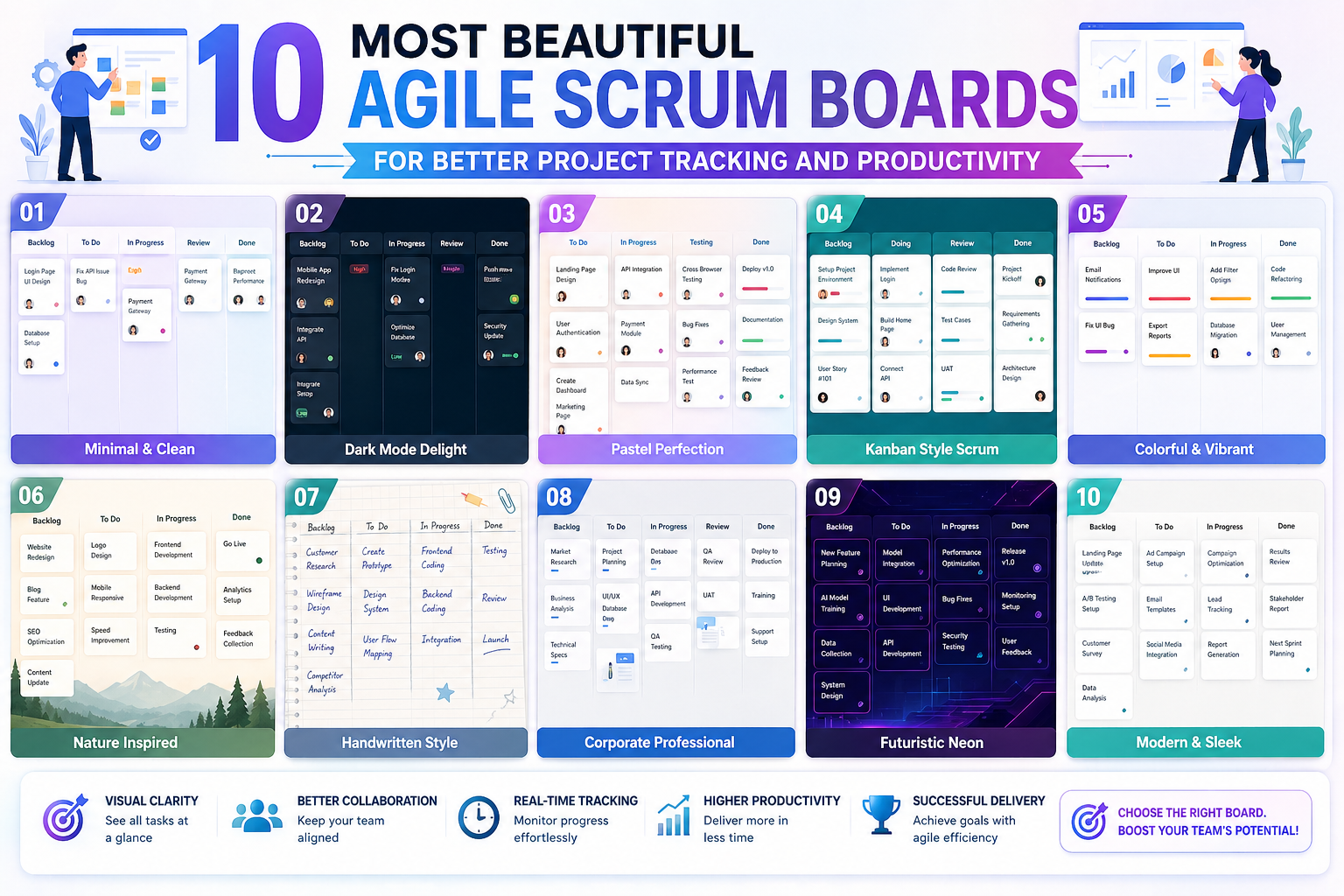
Scrum boards have become one of the most recognizable visual tools in modern project management. What started as a simple way for software development teams to organize tasks has evolved into a widely adopted system used across industries ranging from marketing and education to manufacturing and event planning. The core idea remains the same: make work visible, structured, and easier to manage in real time.
At their heart, Scrum boards support Agile thinking. Instead of relying on rigid, long-term planning, teams break work into smaller, manageable parts that can be completed in short cycles. These cycles, often called sprints, help teams stay focused and adaptable. Scrum boards make this process visible so that everyone involved can quickly understand what is being worked on, what is coming next, and what has already been completed.
Over time, Scrum boards have evolved far beyond their original whiteboard-and-sticky-note format. Today, they can be physical, digital, highly creative, or even designed as artistic installations. Despite these variations, their purpose remains consistent: improving clarity, accountability, and workflow efficiency.
How Scrum Boards Support Agile Thinking and Team Collaboration
Scrum boards are closely connected to Agile methodology, which emphasizes flexibility, continuous improvement, and collaboration. Instead of planning every detail, Agile teams adjust their approach as the project evolves. Scrum boards make this philosophy practical by translating abstract plans into visible tasks.
Each task on a Scrum board typically represents a piece of work that contributes to a larger goal. These tasks move through stages such as “To Do,” “In Progress,” and “Completed.” This movement helps teams understand progress at a glance without needing lengthy status meetings or detailed reports.
One of the most important benefits of Scrum boards is transparency. Every team member can see what others are working on, which reduces confusion and duplication of effort. It also encourages accountability, since tasks are clearly assigned and their status is visible to everyone.
Scrum boards also support better communication. Instead of relying solely on verbal updates or written reports, teams can use the board itself as a shared reference point. This reduces misunderstandings and keeps discussions focused on actual progress rather than assumptions.
Beyond software teams, Scrum boards are now used in environments such as product design, healthcare administration, education planning, and even personal productivity systems. Their adaptability makes them suitable for almost any situation where tasks need to be organized and tracked visually.
The Classic Sticky Note Scrum Board and Its Enduring Popularity
One of the most widely recognized forms of Scrum boards is the traditional sticky note board. This version typically uses a whiteboard divided into columns, with each sticky note representing a task. Despite its simplicity, this format remains popular because it is highly flexible and easy to use.
Teams often customize sticky note boards with color-coded systems. Different colors may represent task types, departments, priorities, or stages of completion. This visual coding makes it easy to identify patterns and understand the distribution of work without reading every individual note.
The physical nature of sticky note boards also creates a strong sense of presence in the workspace. Team members can physically move tasks from one column to another, reinforcing a sense of progress. This tactile interaction often makes the workflow feel more engaging and immediate compared to digital systems.
Another advantage of sticky note boards is their accessibility. They do not require special tools or software, making them ideal for teams that prefer simplicity or operate in shared physical spaces. They also encourage spontaneous updates, as team members can quickly adjust tasks during discussions or stand-up meetings.
However, despite their popularity, sticky note boards do have limitations. They are less effective for remote teams and can become cluttered when managing large or complex projects. Still, their ease of use and visual clarity ensure they remain a foundational example of Scrum implementation.
Structured Column-Based Scrum Boards for Clear Workflow Stages
A more structured version of the Scrum board uses clearly defined columns to represent stages of work. While sticky notes are still often used within this format, the emphasis is on the flow of tasks across defined stages rather than individual customization.
A typical column-based board might include stages such as “Not Started,” “In Progress,” and “Completed.” Some teams expand this structure to include additional stages like “Testing,” “Review,” or “Blocked,” depending on the complexity of their workflow.
This format is especially useful for teams that need a clear and consistent process. By defining exact stages, it becomes easier to identify bottlenecks. For example, if too many tasks are stuck in the “In Progress” column, it may indicate that resources are stretched too thin or that certain tasks require additional support.
Column-based Scrum boards also help with prioritization. Tasks can be arranged vertically within columns to show urgency or importance. This ensures that team members know not only what to work on, but also what to focus on first.
In many organizations, this structured approach is combined with daily or weekly check-ins. These sessions allow teams to review the board together, discuss progress, and make adjustments as needed. The board acts as a central reference point for all decision-making.
Creative Scrum Board Designs That Improve Engagement
As Scrum boards have become more widely used, teams have begun experimenting with creative designs that go beyond traditional layouts. These innovative approaches are not just visually appealing—they often improve engagement and make project tracking more intuitive.
Some teams design boards that incorporate physical objects such as blocks, cards, or magnetic pieces. Others create themed layouts that reflect the nature of their projects. For example, a marketing team might design a board that resembles a campaign timeline, while a product development team might use a visual roadmap structure.
One particularly interesting approach involves combining different materials, such as index cards attached to objects or symbols used to represent task types. These designs add a layer of meaning to each task, making it easier to understand its context at a glance.
Creative Scrum boards also help improve team motivation. When a board is visually engaging, team members are more likely to interact with it regularly. This increases awareness of progress and encourages more active participation in task management.
In some environments, Scrum boards even become part of the workspace design itself. Instead of being temporary tools, they are integrated into walls, desks, or collaborative spaces. This integration helps reinforce the importance of workflow visibility in daily operations.
Personal Scrum Boards for Individual Productivity
While Scrum boards are often associated with teams, they are also highly effective for individual use. Personal Scrum boards allow individuals to organize their tasks using the same principles of visibility and structured workflow.
A personal board typically includes simple columns that represent stages of personal tasks, such as planning, active work, and completion. This structure helps individuals manage responsibilities more effectively by breaking down larger goals into smaller actions.
One of the key benefits of personal Scrum boards is improved focus. By limiting the number of tasks in progress at any given time, individuals can avoid multitasking and concentrate on completing one task before moving on to the next.
Personal boards can also be customized to reflect different areas of life, such as work projects, learning goals, or household responsibilities. This flexibility makes them useful for a wide range of personal planning needs.
In addition, personal Scrum boards help create a sense of accomplishment. Moving tasks into the completed column provides a clear visual representation of progress, which can be motivating and help maintain momentum over time.
Some individuals prefer physical boards placed in their workspace, while others use digital tools for convenience. Regardless of format, the underlying principle remains the same: making work visible and manageable.
The Role of Visual Thinking in Scrum Board Design
A key reason Scrum boards are so effective is that they rely heavily on visual thinking. Humans naturally process visual information faster than text-based information, making boards an efficient way to understand complex workflows.
By organizing tasks visually, Scrum boards reduce cognitive load. Instead of remembering every detail of a project, team members can simply look at the board to understand what needs attention. This simplifies decision-making and improves overall efficiency.
Visual structure also helps identify patterns that might not be obvious in written lists. For example, clusters of tasks in one column may indicate workflow imbalances, while empty columns may signal delays or missed dependencies.
Color coding, shapes, and spatial arrangement all contribute to this visual clarity. Even subtle design choices can significantly impact how easily information is understood. As a result, many teams invest time in designing boards that are not only functional but also visually intuitive.
The effectiveness of visual thinking in Scrum boards explains why they continue to evolve in creative ways. Whether simple or complex, their design always aims to make information easier to process and act upon.
Expanding Scrum Boards Beyond Traditional Work Environments
Scrum boards are no longer limited to technical or corporate environments. Their adaptability has led to widespread use in areas such as education, event planning, healthcare coordination, and personal development.
In educational settings, teachers use Scrum boards to manage lesson planning, student projects, and classroom activities. This helps students understand progress and encourages responsibility in group work.
In healthcare environments, Scrum-style boards are used to track patient care processes, ensuring that tasks are completed efficiently and transparently. This improves coordination among different departments and reduces the risk of miscommunication.
Event planners also use Scrum boards to manage logistics, schedules, and task assignments. The visual structure helps ensure that every detail is accounted for and that nothing is overlooked during preparation.
Even in personal development contexts, Scrum boards are used to track habits, goals, and long-term projects. Their simplicity and flexibility make them suitable for almost any situation that involves structured task management.
This wide range of applications demonstrates the universal value of Scrum boards. Their ability to adapt to different contexts is one of the reasons they remain relevant in both professional and personal environments.
The Psychology Behind Visual Task Management Systems
Scrum boards are not just organizational tools; they also influence how people think, prioritize, and make decisions. At the core of their effectiveness is a strong psychological principle: humans process visual information more efficiently than abstract lists or verbal instructions. When tasks are displayed in a structured visual format, the brain can quickly interpret status, workload, and progress without needing detailed explanations.
This visual clarity reduces cognitive overload. In traditional task management systems, individuals often keep multiple priorities in their memory, which increases stress and reduces focus. Scrum boards externalize this mental load by placing tasks in a visible space. Once a task is on the board, it no longer needs to be mentally tracked in the same way, allowing individuals and teams to concentrate on execution rather than recall.
Another psychological benefit is the sense of progress reinforcement. Moving a task from one stage to another creates a small but meaningful reward signal in the brain. This reinforces productive behavior and encourages continued momentum. Over time, this cycle of visible progress contributes to stronger motivation and a greater sense of accomplishment.
Scrum boards also help reduce ambiguity, which is one of the biggest sources of workplace stress. When tasks are unclear or poorly defined, people tend to hesitate or delay action. A well-structured board removes this uncertainty by clearly showing what needs to be done and where each task currently stands.
Work-in-Progress Limits and Their Impact on Productivity Flow
One of the most powerful concepts associated with Scrum boards is the idea of limiting work in progress. This principle focuses on restricting the number of tasks that can be active at the same time. Instead of starting many tasks simultaneously, teams concentrate on completing a smaller number of tasks before moving on to new ones.
This approach improves productivity by reducing task switching. When individuals switch between multiple tasks, their attention is divided, and efficiency decreases. By limiting active work, Scrum boards encourage deeper focus and faster completion of tasks.
Work-in-progress limits also help expose bottlenecks in a workflow. If a particular stage of the board becomes overcrowded while others remain empty, it signals an imbalance. This allows teams to identify where delays are occurring and adjust their process accordingly.
Another benefit is improved quality of work. When too many tasks are handled at once, errors are more likely to occur. By reducing the number of simultaneous tasks, teams can dedicate more attention to each item, leading to more consistent and reliable outcomes.
Over time, this disciplined approach to task management creates a smoother workflow. Instead of constant starting and stopping, work moves steadily through the system, improving both efficiency and predictability.
Digital Scrum Boards and the Shift to Remote Collaboration
As work environments have become more distributed, digital Scrum boards have grown in importance. These tools replicate the structure of physical boards but add additional features that support remote collaboration, real-time updates, and integration with other systems.
One of the key advantages of digital boards is accessibility. Team members can view and update tasks from different locations without needing to be physically present. This is especially important for global teams working across multiple time zones.
Digital boards also allow for greater scalability. While physical boards can become crowded or difficult to manage with large projects, digital systems can handle hundreds or even thousands of tasks without losing clarity. Filtering, tagging, and search features make it easier to navigate complex workflows.
Another important feature is automation. Many digital Scrum systems can automatically move tasks, send notifications, or update statuses based on predefined rules. This reduces manual effort and ensures that information remains current.
However, digital boards also require careful design to remain effective. Without a clear structure, they can become cluttered or overwhelming. Successful digital implementations often replicate the simplicity of physical boards while adding layers of functionality that enhance rather than complicate the workflow.
Comparing Scrum Boards and Kanban Flow Structures
Scrum boards are often discussed alongside Kanban systems, and while they share similarities, they are built on different principles. Understanding the distinction helps teams choose the most appropriate structure for their needs.
Scrum boards are typically associated with time-bound work cycles. Tasks are organized into sprints, and the focus is on completing a set amount of work within a fixed timeframe. This creates a rhythm of planning, execution, and review.
Kanban systems, on the other hand, emphasize continuous flow. Instead of working in fixed cycles, tasks move through stages without strict time boundaries. The focus is on maintaining steady progress and minimizing delays.
Despite these differences, many modern teams blend the two approaches. They may use Scrum-style planning with Kanban-style workflow visualization. This hybrid approach allows for structured planning while maintaining flexibility in execution.
The choice between these systems often depends on the nature of the work. Projects with clear deadlines and deliverables may benefit from Scrum, while ongoing operational work may be better suited to Kanban-style flow.
In both cases, the visual board remains central. Whether structured around sprints or continuous flow, the board provides a shared understanding of work status and priorities.
Designing Effective Workflow Columns for Maximum Clarity
The structure of columns on a Scrum board plays a major role in how effectively it communicates information. While simple boards may use only a few columns, more advanced setups often include multiple stages that reflect the complexity of the workflow.
Each column represents a distinct phase in the lifecycle of a task. Common stages include planning, execution, review, and completion. However, teams often customize these stages based on their specific needs.
One important design principle is clarity. Each column should represent a clearly defined state so that there is no confusion about where a task belongs. Ambiguity in column definitions can lead to inconsistent usage and reduced effectiveness.
Another key principle is balance. If one column consistently accumulates too many tasks, it may indicate a structural issue in the workflow. Adjusting column definitions or redistributing responsibilities can help restore balance.
Some teams also include intermediate columns that represent waiting periods or dependencies. These help identify tasks that are blocked or awaiting input from others, improving visibility into delays.
Well-designed columns create a natural flow that guides tasks from start to finish. Instead of requiring constant oversight, the board itself becomes a self-organizing system that reflects the real state of work.
Hybrid Scrum Systems and Custom Workflow Innovations
As teams gain experience with Scrum boards, many begin to customize them beyond traditional formats. These hybrid systems combine elements from multiple methodologies to better suit specific workflows.
One common hybrid approach integrates Scrum structure with visual enhancements such as timelines, priority zones, or dependency markers. These additions help teams understand not just what needs to be done, but also how tasks relate to one another.
Another variation includes combining physical and digital systems. For example, a team may use a physical board for daily visibility while maintaining a digital version for long-term tracking and reporting. This dual-system approach allows for both immediacy and scalability.
Some organizations also adapt their boards to reflect industry-specific processes. In creative industries, boards may include stages like concept development, drafting, and revision. In operational environments, they may include approval stages or compliance checks.
The flexibility of Scrum boards is one of their greatest strengths. They are not rigid systems but adaptable frameworks that can evolve alongside the needs of a team. This adaptability allows them to remain relevant across different industries and project types.
Handling Complex Projects with Multi-Layered Boards
As projects grow in complexity, simple board structures may no longer be sufficient. Multi-layered Scrum boards address this challenge by introducing additional levels of organization.
These boards may separate work into categories such as teams, departments, or project phases. Each layer provides a different perspective on the overall workflow, allowing for more detailed tracking.
For example, one layer might show high-level project stages, while another breaks those stages into smaller tasks. This hierarchy helps teams maintain both strategic and operational visibility.
Multi-layered boards are particularly useful in large organizations where multiple teams contribute to a single project. They ensure that dependencies are visible and that coordination between teams is maintained.
However, these systems require careful management. Without a clear structure, they can become confusing or difficult to interpret. Successful implementation depends on maintaining simplicity within each layer while ensuring that the overall system remains coherent.
The Role of Consistency in Scrum Board Effectiveness
Consistency is one of the most important factors in maintaining an effective Scrum board. Without consistent usage, even the most well-designed board can lose its value.
Consistency begins with how tasks are defined. Each task should follow a similar level of detail so that comparisons across the board remain meaningful. If some tasks are overly broad while others are highly specific, it becomes difficult to assess progress accurately.
Another aspect of consistency is updating frequency. A Scrum board is only useful if it reflects the current state of work. Regular updates ensure that the information remains reliable and actionable.
Teams also need to maintain consistency in how they interpret columns and stages. If different team members use the board in different ways, it can lead to confusion and misalignment.
Over time, consistent use of a Scrum board creates shared understanding. The board becomes a common language that everyone in the team can rely on for communication and decision-making.
Visual Hierarchies and Task Prioritization Techniques
Not all tasks on a Scrum board carry equal importance, and visual hierarchies help communicate this difference. By organizing tasks based on priority, teams can ensure that critical work receives appropriate attention.
One common approach is vertical prioritization, where higher-priority tasks are placed at the top of a column. This simple visual cue helps team members quickly identify what should be addressed first.
Another method involves using visual markers such as labels, symbols, or positioning to indicate urgency. These markers add a layer of meaning without complicating the structure of the board.
Some teams also use grouping techniques, where related tasks are clustered together. This helps maintain focus on specific areas of work and reduces fragmentation.
Effective prioritization ensures that the board not only shows what needs to be done but also guides decision-making about what should be done next.
The Rise of Hybrid Physical–Digital Scrum Environments
As work environments continue to evolve, many teams no longer rely exclusively on either physical or digital Scrum boards. Instead, hybrid systems have become increasingly common, blending the tactile clarity of physical boards with the scalability and accessibility of digital tools. This combination reflects a practical response to modern work realities, where teams are often distributed but still benefit from shared physical presence in certain contexts.
In a hybrid setup, a physical board is often used in a central workspace for daily collaboration, while a digital version mirrors the same structure for remote team members. This ensures that everyone has access to the same information, regardless of location. Updates made in one system are reflected in the other, maintaining consistency across environments.
The physical board provides immediate visibility and encourages spontaneous communication. Team members can gather around it during stand-up meetings, quickly rearranging tasks and discussing priorities. The digital version, meanwhile, ensures continuity outside the office and supports long-term tracking, reporting, and integration with other systems.
One of the key challenges in hybrid environments is synchronization. Without disciplined updates, discrepancies can arise between the physical and digital boards. Successful teams establish clear rules for updating both systems to maintain alignment.
Hybrid Scrum environments also encourage flexibility in workflow design. Teams can experiment with different layouts physically while testing structured processes digitally. This dual approach allows continuous refinement of how work is visualized and managed.
Advanced Visualization Techniques in Modern Scrum Boards
As Scrum boards have matured, teams have developed increasingly sophisticated visualization methods to represent complex workflows. These techniques go beyond simple columns and sticky notes, incorporating spatial design, color logic, and symbolic representation to enhance clarity.
One common technique is layered visualization, where tasks are grouped not only by stage but also by category, priority, or dependency. This allows teams to see multiple dimensions of work at once without overwhelming the board.
Another approach involves using spatial zones instead of linear columns. In this design, the board is divided into regions that represent different types of activity or workflow states. Tasks move between zones based on their progress, creating a more fluid representation of work.
Color coding remains one of the most powerful visualization tools. By assigning specific meanings to colors, teams can quickly identify patterns such as urgent tasks, blocked items, or department-specific work. However, effective use of color requires consistency and restraint to avoid visual overload.
Symbolic markers are also increasingly used in advanced boards. These may include icons or shapes that indicate task type, risk level, or required approval. When used carefully, these symbols add depth to the information without making the board harder to read.
The goal of these visualization techniques is not complexity for its own sake, but clarity at scale. As projects grow larger and more interconnected, visual systems must evolve to represent relationships that simple lists cannot capture.
Managing Dependencies and Interconnected Tasks
In many real-world projects, tasks are not independent. One task may depend on the completion of another, creating a network of relationships that must be carefully managed. Scrum boards help visualize these dependencies so that teams can coordinate more effectively.
Dependencies are often represented through linking markers or positional alignment on the board. For example, tasks that depend on others may be placed adjacent to or below their prerequisite items. This spatial relationship helps teams understand the order in which work must be completed.
Identifying dependencies early is critical for preventing delays. If a blocked task is not visible, it may remain inactive for extended periods without anyone realizing the cause. Scrum boards make these relationships visible, allowing teams to address blockers proactively.
In more advanced setups, dependency tracking may include dedicated sections of the board. These sections highlight tasks that are waiting on external input, approvals, or resource availability. This separation helps teams distinguish between active work and waiting states.
Managing dependencies effectively also improves communication between teams. When dependencies are visible, it becomes easier to coordinate handoffs and ensure that work flows smoothly across different groups.
Scrum Boards in Large-Scale Organizational Structures
While Scrum boards often begin as small team tools, they can scale to support large organizational structures. In these environments, multiple boards may exist simultaneously, each representing different teams, departments, or project layers.
At a larger scale, Scrum boards are often connected through hierarchical relationships. High-level boards represent overall project goals, while lower-level boards break those goals into specific tasks and actions. This structure ensures alignment between strategy and execution.
One of the main challenges in large-scale Scrum systems is maintaining consistency across boards. Without standardized practices, different teams may interpret workflow stages differently, leading to misalignment. Establishing shared conventions helps maintain coherence across the organization.
Another challenge is visibility. In large organizations, it can be difficult for stakeholders to see the full picture of progress. Aggregated views or summary boards are often used to provide a high-level overview without overwhelming detail.
Despite their complexity, large-scale Scrum systems retain the same core principle: making work visible. Whether at the level of a single team or an entire organization, visibility remains essential for coordination and accountability.
The Influence of Scrum Boards on Decision-Making Processes
Scrum boards do more than track tasks; they actively influence how decisions are made within teams. By presenting work visually, they create a shared understanding that informs prioritization and planning decisions.
When teams gather around a Scrum board, discussions are grounded in visible data rather than abstract assumptions. This reduces ambiguity and helps ensure that decisions are based on actual workload and progress.
The board also highlights constraints. If certain columns are overloaded or blocked, it becomes immediately clear that adjustments are needed. This visibility allows teams to respond quickly rather than discovering issues after delays occur.
Decision-making becomes more collaborative when Scrum boards are used effectively. Instead of decisions being made in isolation, teams can evaluate options together while viewing the same information. This shared context improves alignment and reduces miscommunication.
Over time, Scrum boards help develop more disciplined decision-making habits. Teams become more aware of capacity limits, dependencies, and workflow balance, leading to more realistic planning and execution.
Behavioral Patterns That Emerge from Scrum Usage
As teams use Scrum boards consistently, certain behavioral patterns begin to emerge. These patterns reflect how individuals and groups interact with structured workflows over time.
One common pattern is increased task ownership. When tasks are visibly assigned and tracked, individuals tend to take greater responsibility for their completion. This visibility reinforces accountability without requiring external enforcement.
Another pattern is improved task decomposition. Teams gradually learn to break larger tasks into smaller, more manageable units. This makes work easier to track and reduces the likelihood of stalled progress.
Scrum boards also encourage more frequent communication. Because progress is visible to everyone, team members naturally engage in more discussions about status, blockers, and priorities. This reduces the need for formal reporting structures.
Over time, teams may also develop rhythm-based working patterns aligned with their Scrum cycles. These rhythms create predictability in workflow, which can improve planning and coordination.
The Aesthetic Dimension of Scrum Board Design
While Scrum boards are functional tools, their visual design can also influence how teams interact with them. A well-designed board is not only clear but also engaging, encouraging regular use and interaction.
Aesthetic design elements include layout balance, spacing, color harmony, and visual hierarchy. When these elements are thoughtfully arranged, the board becomes easier to read and more pleasant to use.
Some teams intentionally design their boards to reflect their organizational culture. For example, creative teams may use more expressive layouts, while technical teams may prioritize minimalism and structure.
The physical environment also plays a role in aesthetic effectiveness. Boards placed in central, visible locations are more likely to be used consistently. Lighting, accessibility, and proximity to workspaces all influence engagement.
Even in digital environments, aesthetic considerations remain important. Clean interfaces, intuitive layouts, and clear visual cues help ensure that users interact with the board regularly and effectively.
Adaptability of Scrum Boards in Changing Work Conditions
One of the defining strengths of Scrum boards is their adaptability. As work conditions change, teams can modify their boards to reflect new priorities, structures, or constraints without abandoning the underlying system.
This adaptability makes Scrum boards suitable for both stable and rapidly changing environments. When priorities shift, new columns can be added, removed, or reorganized to reflect updated workflows.
Teams working in uncertain or fast-moving environments often rely on this flexibility to maintain control over complex tasks. Instead of rigid systems that require complete restructuring, Scrum boards allow incremental adjustments.
Adaptability also extends to team size. Small teams may use simple boards with minimal structure, while larger teams may expand their boards into multi-layered systems. The core concept remains consistent even as complexity increases.
This ability to evolve ensures that Scrum boards remain relevant across different stages of a project’s lifecycle, from initial planning to final execution.
Communication Efficiency Through Visual Workflow Systems
Scrum boards significantly improve communication efficiency by reducing the need for repeated verbal or written updates. Instead of asking for status reports, team members can simply refer to the board.
This shift reduces unnecessary interruptions and allows conversations to focus on problem-solving rather than information gathering. It also ensures that everyone is working from the same set of data.
Visual systems also help reduce miscommunication. When tasks are clearly displayed, there is less room for misunderstanding about priorities or responsibilities. This clarity improves coordination across teams.
In meetings, Scrum boards act as central reference points. Discussions become more structured and focused because the visual representation of work guides the conversation.
Over time, this leads to more efficient communication habits. Teams rely less on lengthy explanations and more on shared visual understanding.
Continuous Refinement of Scrum Board Practices Over Time
Scrum boards are not static tools; they evolve continuously as teams gain experience using them. This evolution often happens gradually through small adjustments rather than large redesigns.
Teams may refine column definitions, adjust workflow stages, or introduce new visual markers based on what they learn from daily usage. These incremental improvements help optimize the system without disrupting existing workflows.
Feedback plays a key role in this refinement process. Team members regularly identify areas where the board could be clearer or more efficient. These insights lead to ongoing improvements in structure and usability.
Over time, Scrum boards become highly customized systems that reflect the unique working style of each team. While they may share common principles, no two boards are exactly alike in practice.
This continuous refinement ensures that Scrum boards remain effective even as projects, teams, and organizational needs evolve.
Scaling Scrum Boards for Enterprise-Level Coordination
As organizations grow, the complexity of managing work increases exponentially. What works for a small team often becomes insufficient when dozens or even hundreds of teams are involved. In these environments, Scrum boards evolve into interconnected systems rather than isolated tools. Enterprise-level Scrum implementations focus on alignment, ensuring that every layer of work contributes toward broader organizational goals.
At this scale, boards are often structured hierarchically. High-level boards represent strategic objectives, while subordinate boards break those objectives into actionable deliverables. This layered approach allows leadership teams to maintain visibility over progress without getting lost in operational detail. At the same time, individual teams retain autonomy over how they manage their own workflows.
A key challenge in large-scale coordination is maintaining consistency across all boards. If each team interprets workflow stages differently, communication gaps can emerge. To prevent this, organizations often establish standardized definitions for each column or stage. These shared definitions act as a common language that ensures everyone interprets progress in the same way.
Another important aspect is synchronization between teams. In complex projects, one team’s output often becomes another team’s input. Scrum boards help visualize these dependencies, reducing delays caused by miscommunication or misalignment. When dependency relationships are clearly visible, teams can coordinate more effectively and anticipate potential delays before they escalate.
Enterprise Scrum systems also benefit from aggregated visibility dashboards. These dashboards compile information from multiple boards into a single overview, allowing decision-makers to assess progress across the organization at a glance. This macro-level visibility supports strategic planning and resource allocation without requiring constant micro-management.
Despite their scale, these systems still rely on the same foundational principle: transparency. Whether at the level of a single task or an entire organization, visibility remains the key to effective coordination and execution.
Emotional and Cognitive Effects of Visual Progress Tracking
Beyond organizational benefits, Scrum boards also have a measurable impact on emotional and cognitive performance. One of the most significant effects is the reduction of mental clutter. When tasks are stored only in memory, they create continuous background stress as the brain attempts to track incomplete work. By externalizing tasks onto a visible board, this cognitive burden is reduced.
Visual progress tracking also strengthens motivation. Seeing tasks move steadily toward completion creates a sense of momentum. This perception of progress is psychologically rewarding and encourages continued effort. Even small movements across the board can reinforce positive working habits.
Another important effect is improved task clarity. When work is visually structured, it becomes easier to distinguish between urgent and non-urgent tasks. This reduces decision fatigue, allowing individuals to conserve mental energy for execution rather than constant prioritization.
Scrum boards also support emotional regulation within teams. When progress is visible to everyone, it reduces uncertainty and builds trust. Team members are less likely to feel disconnected from overall progress because they can see contributions accumulating over time.
In environments where work is complex or long-term, this visibility helps maintain engagement. Instead of focusing on distant outcomes, teams can focus on immediate, achievable steps. This shift in focus reduces overwhelm and supports sustained productivity over longer periods.
Future Directions of Scrum Board Innovation
As work environments continue to evolve, Scrum boards are expected to integrate more advanced technologies and adaptive systems. One emerging direction involves intelligent task management, where boards can suggest task prioritization or highlight potential bottlenecks based on historical data patterns.
Another development area is adaptive visualization, where boards dynamically change layout based on workload distribution. Instead of static columns, future systems may reorganize themselves to highlight areas requiring attention or to simplify complex workflows in real time.
Conclusion
Scrum boards have evolved far beyond their original role as simple task-tracking tools for software development teams. What began as a practical way to organize work on whiteboards has grown into a versatile system used across industries, adapting to both physical and digital environments. Their enduring value lies in their ability to make work visible, structured, and easier to manage, regardless of the complexity of the project or the size of the team involved.
At the core of their effectiveness is clarity. By transforming abstract tasks into visible items that move through defined stages, Scrum boards reduce confusion and improve focus. Teams can instantly understand what is in progress, what is pending, and what has been completed without relying on lengthy explanations or documentation. This visibility naturally supports better communication, stronger collaboration, and more informed decision-making.
Another key strength is adaptability. Scrum boards can be simple or highly advanced, physical or digital, linear or multi-layered. They can be customized to fit nearly any workflow, whether it is software development, education planning, business operations, or personal productivity. This flexibility ensures that they remain relevant even as work environments continue to change.
Equally important is their impact on behavior and productivity. By limiting work in progress, encouraging task completion, and reinforcing a sense of achievement through visual progress, Scrum boards help teams and individuals work more efficiently. They promote discipline without rigidity and structure without complexity.
In modern workplaces where priorities shift quickly and collaboration often spans across locations, Scrum boards provide a stable yet adaptable framework. They do not dictate how work must be done; instead, they support how work naturally flows. This balance between structure and flexibility is what makes them one of the most enduring and widely used tools in modern project management.