In modern organizations, managing files across multiple locations has become one of the most demanding responsibilities for IT teams. Businesses no longer operate from a single office with a single file server. Instead, they span multiple branches, remote sites, cloud platforms, and hybrid infrastructures where data must remain consistent everywhere it is needed.
At first glance, file synchronization seems straightforward. The idea appears simple: keep two or more folders identical across different machines. If a file changes in one place, it should update everywhere else. However, in real-world environments, this simplicity quickly disappears. Networks vary in speed, devices differ in reliability, and users continuously modify data from multiple locations at the same time.
As organizations grow, so does the complexity of keeping files in sync. What once worked for a small office with a handful of computers becomes increasingly difficult when applied to distributed systems. The challenge is not just copying files but ensuring consistency, reliability, conflict resolution, and performance across all connected environments.
This growing complexity is what pushes organizations toward more structured and managed solutions for synchronization, especially in hybrid IT environments where both on-premises infrastructure and cloud services must work together seamlessly.
Traditional File Syncing and Its Limitations
Before cloud-based synchronization systems became widely available, many IT teams relied on traditional tools and custom-built solutions to keep data consistent across systems. One of the most widely known tools in this category is Rsync. It has been a dependable utility for decades and is still used in many environments today.
Rsync works by comparing files between a source and a destination and then transferring only the differences. This delta-based approach makes it efficient compared to full file transfers. It is especially useful in environments where bandwidth is limited or expensive.
However, despite its efficiency, Rsync is fundamentally a manual or script-driven tool. It requires configuration, scheduling, monitoring, and maintenance. In small environments, this might be manageable. In large-scale enterprise systems, it becomes increasingly difficult to maintain consistency without ongoing administrative effort.
One of the key limitations of traditional syncing tools is the lack of centralized control. Each sync relationship must be configured separately. If something breaks, there is no unified dashboard that shows the overall health of the system. Troubleshooting often requires digging through logs, verifying configurations, and manually checking file states across systems.
Another limitation is conflict handling. When multiple users modify the same file in different locations, resolving those conflicts can become complicated. Without a robust conflict resolution mechanism, data inconsistencies can occur, leading to overwritten files or mismatched versions.
Network instability is another challenge. In distributed environments, connections between sites are not always reliable. If a sync job fails halfway, recovering from that failure and ensuring consistency requires additional effort.
Over time, these limitations make traditional file synchronization approaches less practical for modern organizations. What starts as a simple setup gradually turns into a fragile system that requires constant attention.
The Shift Toward Hybrid IT Environments
As organizations adopt cloud computing, they rarely move everything at once. Instead, they transition gradually, maintaining existing on-premises infrastructure while integrating cloud services. This combination is known as a hybrid IT environment.
In a hybrid model, data may exist in multiple places simultaneously. Some files are stored locally for fast access, while others are stored in the cloud for scalability and redundancy. Users might work from branch offices, headquarters, or remote locations, all requiring access to the same shared data.
This shift introduces a new challenge: how do you keep data consistent across both on-premises systems and cloud storage without overwhelming IT teams?
Traditional tools struggle in this environment because they were not designed for hybrid integration. They often treat cloud storage and local storage as separate systems rather than parts of a unified infrastructure.
This is where modern synchronization approaches become essential. Instead of relying on scripts and manual processes, organizations need managed services that can handle synchronization automatically, reliably, and at scale.
Introducing a Managed Approach to File Synchronization
In response to these challenges, cloud-based file synchronization services were developed to simplify and centralize data management. Rather than treating synchronization as a manual process, these services provide a structured framework where data flow is controlled, monitored, and maintained by a centralized system.
A managed synchronization system typically removes much of the operational burden from IT teams. Instead of configuring individual sync jobs, administrators define synchronization groups and endpoints. The system then handles the underlying data movement, conflict resolution, and replication logic automatically.
This shift represents a fundamental change in how file synchronization is approached. Instead of focusing on individual file transfers, IT teams focus on defining policies and structures, while the service handles execution.
One of the most widely used implementations of this concept in hybrid environments is Azure File Sync, which is designed specifically to bridge the gap between on-premises file servers and cloud-based storage systems.
What Azure File Sync Represents in a Hybrid Architecture
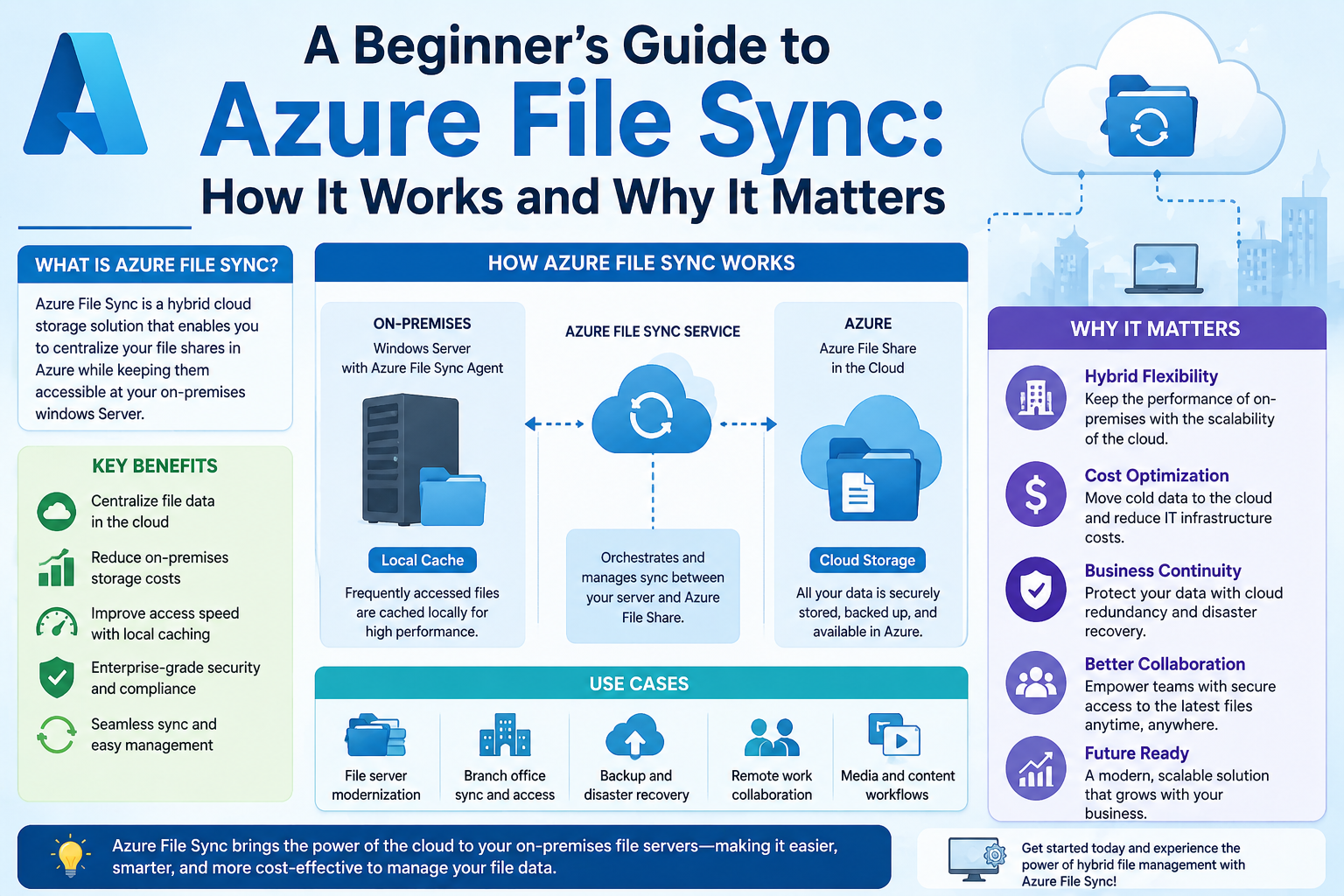
Azure File Sync is a service that enables organizations to centralize their file shares in the cloud while maintaining local access performance on-premises. It allows files to be stored in a cloud-based file share while simultaneously caching frequently used files on local servers.
This approach provides the benefits of both cloud and local storage. The cloud offers scalability, redundancy, and centralized management, while local servers provide fast access to frequently used data.
Rather than replacing traditional file servers, Azure File Sync enhances them. It transforms local servers into intelligent caching layers that work in coordination with cloud storage.
At its core, Azure File Sync is not just about copying files. It is about synchronizing file systems in a way that optimizes performance, reduces latency, and ensures consistency across environments.
Key Components Behind Azure File Synchronization
To understand how Azure File Sync operates, it is important to break down its main components. Each component plays a specific role in ensuring that data moves efficiently between local systems and cloud storage.
Storage Sync Service
The Storage Sync Service acts as the central management layer. It is the control plane where synchronization configurations are created and managed. Administrators define how data should be synchronized, which servers participate, and how file shares are structured.
This service does not store the files themselves. Instead, it orchestrates synchronization activities between cloud storage and registered servers.
Sync Group
A Sync Group is a logical container that defines which file shares should be synchronized together. Each Sync Group includes a cloud endpoint and one or more server endpoints.
This structure allows administrators to organize synchronization relationships in a clear and manageable way. Instead of configuring individual connections between servers, everything is grouped under a unified structure.
Cloud Endpoint
The cloud endpoint represents the Azure-based file share where data is centrally stored. This is the authoritative version of the data in most configurations.
All changes from connected servers eventually flow into the cloud endpoint, ensuring that it remains up to date. It acts as the central repository that synchronizes with all connected environments.
Server Endpoint
A server endpoint is a path on an on-premises file server that participates in synchronization. Each server endpoint connects to a Sync Group and mirrors the data from the cloud endpoint.
These endpoints allow local servers to cache and serve files while staying synchronized with the cloud. They form the bridge between local infrastructure and cloud storage.
How Data Moves Through the System
The process of synchronization in Azure File Sync follows a structured flow. When a file is created or modified on a server endpoint, the change is detected by the system’s agent. This change is then recorded and sent to the cloud endpoint through the synchronization pipeline.
Once the change reaches the cloud endpoint, it is processed and stored centrally. From there, the update is distributed to other connected server endpoints within the same Sync Group.
This bidirectional flow ensures that changes made anywhere in the system eventually propagate everywhere else. Whether a file is updated in the cloud or on a local server, the system ensures consistency across all endpoints.
The synchronization process is incremental, meaning only changes are transferred rather than entire files. This improves efficiency and reduces network load.
The Role of the Local Agent in Synchronization
On each server participating in synchronization, a lightweight agent is installed. This agent is responsible for monitoring file changes, communicating with the cloud service, and managing data transfers.
The agent operates in the background and continuously tracks file system activity. When changes occur, it captures them and queues them for synchronization.
This design ensures that file operations remain transparent to users. From their perspective, they are simply working with local files. Behind the scenes, the system is continuously coordinating updates with the cloud.
The agent also handles conflict detection and ensures that changes are applied in a consistent manner. If multiple changes occur simultaneously in different locations, the system applies rules to determine how those changes are reconciled.
Understanding Cloud Tiering in Synchronization
One of the important capabilities within modern synchronization systems is cloud tiering. This feature allows frequently accessed files to remain locally available while less frequently used files are stored in the cloud.
When a file is accessed for the first time, it is stored locally. Over time, if it is not accessed, it may be replaced with a placeholder while the actual data remains in cloud storage. If the file is needed again, it is retrieved on demand.
This approach optimizes local storage usage while still ensuring full data availability. It allows organizations to maintain large datasets without requiring equally large local storage infrastructure.
Cloud tiering is especially useful in environments where data access patterns vary widely. Some files are accessed frequently, while others are rarely used but must still be retained.
Why Hybrid Synchronization Requires a Managed System
As file systems grow more distributed, the need for structured synchronization becomes critical. Manual tools and scripts are no longer sufficient to handle the scale, complexity, and reliability requirements of modern IT environments.
A managed synchronization system reduces operational overhead by centralizing configuration, automating data movement, and providing consistent behavior across all connected systems.
Instead of focusing on individual file transfers, IT teams can focus on defining how data should behave across the organization. The system handles the underlying mechanics.
This shift is essential in hybrid environments where cloud and on-premises systems must operate as a unified ecosystem rather than separate silos.
Azure File Sync represents this evolution by combining cloud storage capabilities with local file server performance, creating a synchronized environment that adapts to modern business needs without requiring constant manual intervention.
The Architectural Foundation of a Distributed Sync System
Modern file synchronization systems are built on the principle of separating control, storage, and access layers. Azure File Sync follows this model closely, distributing responsibilities across cloud services and on-premises components while maintaining a unified logical structure.
At the center of the architecture is the idea that the cloud acts as the authoritative control plane, while local servers act as distributed caching and access nodes. This separation allows organizations to scale storage independently from compute resources while still maintaining consistent data access patterns.
The architecture is designed to handle large-scale environments where multiple servers, branches, and users interact with the same datasets. Instead of relying on point-to-point synchronization between servers, all communication is coordinated through a central cloud-based service.
This design reduces complexity significantly. Rather than maintaining a mesh of connections between servers, each server communicates only with the cloud endpoint, which simplifies management and improves scalability.
The Role of the Storage Sync Service in Coordination
The Storage Sync Service is the core orchestration layer of Azure File Sync. It does not store user data but instead manages synchronization relationships, policies, and registered servers.
When an organization begins implementing file synchronization, the Storage Sync Service acts as the first configuration point. It defines how data will be structured, which servers will participate, and how synchronization groups will behave.
Each configuration created within this service represents a logical synchronization boundary. These boundaries allow administrators to isolate workloads, define data scopes, and control replication behavior.
One of the most important aspects of this service is that it maintains metadata about all connected endpoints. This includes information about server health, sync status, last synchronization time, and file change tracking.
By centralizing this metadata, the system provides visibility into the entire synchronization ecosystem without requiring administrators to inspect individual servers manually.
Sync Groups as Logical Data Boundaries
A Sync Group is the fundamental organizational unit within Azure File Sync. It defines a relationship between a single cloud endpoint and multiple server endpoints.
Each Sync Group is designed to represent a specific dataset or file share. For example, an organization might create separate Sync Groups for engineering files, accounting documents, and operational data.
This separation ensures that different workloads remain isolated while still benefiting from centralized management.
Within each Sync Group, all connected endpoints share a consistent view of the data. Any change made in one endpoint is eventually reflected across all others in the same group.
This structure eliminates the need for direct server-to-server replication, reducing complexity and improving reliability.
Cloud Endpoint as the Source of Truth
The cloud endpoint is the central repository where all synchronized data is ultimately stored. It is hosted within an Azure file share and serves as the authoritative version of all files within a Sync Group.
When changes occur on a local server, they are first detected by the synchronization agent and then transmitted to the cloud endpoint. Once the cloud endpoint processes these changes, they are propagated back to other server endpoints.
This ensures that the cloud always maintains the most complete and consistent version of the dataset.
Unlike traditional file replication systems, where any node could potentially act as a source, Azure File Sync enforces a structured hierarchy where the cloud plays the central role in maintaining consistency.
Server Endpoints as Local Access Nodes
Server endpoints represent the local entry points for file access. Each endpoint corresponds to a folder or directory on an on-premises server.
These endpoints allow users to interact with files locally, even when the authoritative version of the data resides in the cloud.
From the user’s perspective, file access feels entirely local. They open, modify, and save files as they normally would, without being aware of the underlying synchronization process.
Behind the scenes, however, every change is tracked and queued for synchronization. The server endpoint acts as a bridge between local file operations and cloud-based storage.
This architecture ensures low-latency access for users while still maintaining centralized control over data integrity.
The Synchronization Agent and Change Detection
At the heart of each server endpoint is a lightweight synchronization agent. This agent is responsible for monitoring file system activity and detecting changes in real time.
When a file is created, modified, renamed, or deleted, the agent captures this event and records it in a change log. This log is then processed and transmitted to the cloud endpoint.
The change detection process is optimized to minimize performance impact. Instead of continuously scanning entire directories, the agent relies on file system notifications and incremental tracking mechanisms.
This allows the system to scale efficiently, even in environments with millions of files.
The agent also handles retry logic in case of network interruptions. If a synchronization attempt fails, it is automatically retried without user intervention.
Lifecycle of a File Change in Synchronization
Understanding how a file change moves through the system provides clarity on how synchronization operates at a technical level.
When a user modifies a file on a server endpoint, the local file system registers the change. The synchronization agent detects this modification and logs it as a pending event.
The agent then establishes communication with the cloud endpoint and transmits metadata about the change. This includes information such as file path, timestamp, and type of modification.
Once the cloud receives this update, it processes the change and updates its central metadata store. After processing, the cloud propagates the change to other connected server endpoints.
Each receiving server then applies the update locally, ensuring consistency across all environments.
This lifecycle is continuous and bidirectional, meaning changes can originate from either the cloud or any connected server endpoint.
Conflict Detection and Resolution Mechanisms
In distributed systems, conflicts are inevitable. When multiple users modify the same file in different locations simultaneously, the system must determine how to reconcile those changes.
Azure File Sync handles conflicts using a structured resolution strategy based on timestamps and version tracking.
When conflicting changes are detected, the system does not overwrite data immediately. Instead, it preserves both versions by renaming one of them and marking it as a conflict copy.
This ensures that no data is lost during synchronization. Administrators can later review conflicting files and manually resolve differences if needed.
The system prioritizes data preservation over automatic overwriting, which is critical in enterprise environments where data integrity is essential.
Cloud Tiering and Storage Optimization
Cloud tiering is one of the most important features in Azure File Sync because it allows organizations to optimize local storage usage without sacrificing data availability.
In this model, frequently accessed files remain stored locally for fast access. Less frequently accessed files are replaced with lightweight placeholders known as file stubs.
These stubs contain metadata about the file but not the full content. When a user accesses a stub, the full file is retrieved from the cloud and restored locally.
This process is transparent to users. They interact with files normally, without needing to know whether the data is stored locally or in the cloud.
Cloud tiering significantly reduces the amount of on-premises storage required, making it possible to manage large datasets without investing heavily in local infrastructure.
The system continuously evaluates file usage patterns to determine which files should remain local and which should be tiered to the cloud.
Performance Considerations in Distributed Synchronization
Performance is a critical aspect of any synchronization system. Azure File Sync is designed to minimize latency while maximizing throughput across distributed environments.
One of the key performance optimizations is incremental synchronization. Instead of transferring entire files during updates, only changed blocks are transmitted.
This reduces network bandwidth usage and improves synchronization speed, especially for large files.
Another optimization is parallel processing. The system can handle multiple synchronization operations simultaneously across different endpoints.
Local caching also plays a significant role in performance. Frequently accessed files remain available on local servers, reducing the need for repeated cloud access.
In environments with high file activity, these optimizations ensure that synchronization does not interfere with normal business operations.
Network Behavior and Data Transfer Efficiency
Azure File Sync is designed to operate efficiently over wide area networks, where latency and bandwidth limitations are common.
Data transfers are compressed and optimized before being sent over the network. This reduces the amount of data transmitted and improves synchronization speed.
The system also prioritizes changes based on importance and recency. Recent modifications are synchronized first, ensuring that the most relevant data is available quickly across all endpoints.
In cases of network instability, synchronization processes are paused and resumed automatically once connectivity is restored.
This resilience ensures that data consistency is maintained even in unreliable network conditions.
Security Model and Data Protection Layers
Security is integrated into every layer of Azure File Sync. Data is encrypted both in transit and at rest to ensure protection against unauthorized access.
Communication between server endpoints and the cloud endpoint is secured using encrypted channels. This prevents interception or tampering during data transfer.
Access to synchronization resources is controlled through identity-based authentication mechanisms. Only authorized servers and users can participate in synchronization groups.
Storage-level encryption ensures that data stored in the cloud remains protected even if the underlying infrastructure is compromised.
In addition, administrative access is governed by role-based access controls, allowing organizations to restrict configuration permissions based on user roles.
Handling Offline Scenarios and Recovery Behavior
One of the strengths of Azure File Sync is its ability to handle offline scenarios gracefully.
If a server loses connectivity to the cloud, it continues to operate locally without interruption. Users can still access and modify files as usual.
Once connectivity is restored, the server automatically synchronizes all pending changes with the cloud endpoint.
This offline-first design ensures continuous availability even in environments with unstable connectivity.
During recovery, the system carefully reconciles changes made during the offline period to ensure consistency across all endpoints.
Large-Scale Deployment Behavior
In large enterprise environments, Azure File Sync can scale across hundreds or even thousands of servers.
Each server operates independently while still participating in centralized synchronization groups. This distributed model allows organizations to expand without introducing significant management overhead.
The cloud-based control plane ensures that all servers remain coordinated regardless of geographic distribution.
As the system scales, metadata tracking and synchronization scheduling become increasingly important. Azure File Sync is designed to handle high metadata volumes efficiently, ensuring that performance remains stable even in large deployments.
Monitoring, Telemetry, and System Visibility
Visibility is essential in any distributed system. Azure File Sync provides detailed telemetry about synchronization activity, server health, and data consistency.
Administrators can monitor sync status, track file changes, and identify potential issues before they impact operations.
The system also logs synchronization events, allowing for historical analysis of file activity across the organization.
This level of visibility helps IT teams understand usage patterns, detect anomalies, and optimize performance over time.
Monitoring is especially important in environments where multiple locations rely on synchronized data for critical operations.
Behavioral Characteristics Under Continuous Load
When operating under continuous file modification workloads, Azure File Sync dynamically adjusts its synchronization behavior.
The system prioritizes stability over speed, ensuring that file consistency is maintained even during high activity periods.
If a large number of changes occur simultaneously, the system queues updates and processes them in an optimized sequence.
This prevents network congestion and ensures that synchronization remains predictable.
Over time, the system learns usage patterns and adjusts synchronization efficiency accordingly, improving overall performance in steady-state conditions.
Integration of Local and Cloud-Based Workflows
Azure File Sync is designed to support hybrid workflows where users interact with both local and cloud-based data seamlessly.
From a workflow perspective, users do not need to change how they access files. Whether data is stored locally or in the cloud, the experience remains consistent.
This abstraction layer is one of the most important aspects of the system because it allows organizations to adopt cloud storage without disrupting existing operational habits.
The synchronization system quietly maintains consistency in the background while users continue working without interruption.
The Role of Azure File Sync in Real Organizational Environments
In real-world IT environments, file synchronization is not just a technical feature but a core part of how organizations operate daily. Files are constantly being created, edited, shared, and archived across departments, branches, and remote teams. This continuous movement of data creates a need for a system that can maintain consistency without disrupting workflows.
Azure File Sync fits into this environment as a bridge between traditional file servers and cloud-based storage systems. Instead of forcing organizations to abandon existing file server setups, it extends them into the cloud, allowing both environments to function together.
In practice, this means organizations can continue using familiar file shares while gradually adopting cloud storage as the central repository. This hybrid model reduces migration pressure and allows IT teams to modernize infrastructure step by step.
What makes this especially useful is that users do not need to change their behavior. They continue accessing files through mapped drives or network shares, unaware that synchronization is occurring in the background. This seamless experience is one of the reasons hybrid file synchronization has become widely adopted in enterprise environments.
File Synchronization in Distributed Work Environments
Modern organizations rarely operate from a single location. Instead, they are distributed across cities, countries, and sometimes continents. Each location may have different network conditions, storage capacities, and user requirements.
In such environments, maintaining consistent file access becomes a significant challenge. Without synchronization, each branch would operate independently, leading to outdated or inconsistent data.
Azure File Sync addresses this by ensuring that all connected locations share a unified view of data. When a file is updated at one site, the change is propagated to all other connected endpoints.
This creates a shared working environment where teams can collaborate without worrying about version mismatches or manual file transfers.
However, distributed environments also introduce variability in performance. Some locations may have high-speed connectivity to the cloud, while others may operate over slower or less reliable networks. Azure File Sync accounts for this variability by using incremental updates and intelligent caching strategies.
The Importance of Local Access in Hybrid Storage Systems
While cloud storage offers scalability and centralized control, local access remains critical for performance-sensitive workloads. Many organizations still rely on fast file access for applications such as engineering tools, accounting systems, and design software.
Azure File Sync solves this by maintaining local copies of frequently accessed data. These local copies ensure that users experience low latency when working with files.
At the same time, less frequently used data is offloaded to cloud storage, reducing the burden on local infrastructure. This balance between local performance and cloud scalability is a key strength of hybrid synchronization systems.
Local access also plays a role in resilience. If cloud connectivity is interrupted, users can continue working with locally cached data without disruption. Once connectivity is restored, changes are synchronized automatically.
This ensures that business operations are not dependent on continuous internet connectivity, which is particularly important in regions with unstable networks.
Data Consistency Challenges in Multi-Site Environments
One of the most complex aspects of file synchronization is maintaining consistency across multiple sites where changes can occur simultaneously.
In a distributed system, two users might modify the same file at different locations before synchronization occurs. This creates a potential conflict where both versions of the file contain valid but different changes.
Azure File Sync handles this through conflict detection mechanisms that identify when multiple versions of a file exist. Instead of overwriting data, the system preserves both versions and flags them for review.
This approach ensures that no data is lost, even in complex conflict scenarios. It prioritizes data integrity over automatic resolution, which is essential in enterprise environments where accuracy is critical.
In many cases, conflicts are rare because synchronization occurs frequently. However, in environments with high latency or intermittent connectivity, conflicts can become more common.
The Impact of Network Latency on Synchronization Behavior
Network performance plays a major role in how effectively file synchronization operates. In high-latency environments, synchronization delays can increase, leading to temporary inconsistencies between endpoints.
Azure File Sync is designed to minimize the impact of latency by using asynchronous communication and incremental data transfers. Instead of waiting for full file transfers, the system processes changes in small chunks.
This allows synchronization to continue even when network conditions are not ideal. However, latency still affects how quickly changes propagate across the system.
In environments with extremely poor connectivity, synchronization may occur in batches rather than in real time. This means that updates are still eventually consistent, but not instantaneous.
Despite these limitations, the system ensures that data integrity is preserved, even if synchronization speed is temporarily reduced.
Storage Optimization Through Tiering and Intelligent Caching
One of the most important operational features in Azure File Sync is its ability to optimize storage usage through intelligent tiering.
In traditional file server environments, all files must be stored locally, regardless of how often they are accessed. This leads to inefficient storage usage, especially when large volumes of data are rarely used.
Azure File Sync addresses this by dynamically managing which files remain on local storage and which are moved to cloud storage. Frequently accessed files remain on-premises, while inactive files are tiered to the cloud.
This process is driven by usage patterns. The system monitors file activity and makes decisions based on how often files are accessed.
For example, a project folder that is actively being used will remain fully cached locally. Once the project is completed and file activity decreases, older files may be tiered to the cloud to free up space.
This dynamic approach allows organizations to scale storage efficiently without constantly upgrading physical infrastructure.
File Recall and User Experience in Tiered Storage
When a file that has been tiered to the cloud is accessed, it must be retrieved before it can be opened. This process is known as file recall.
From the user’s perspective, this process is mostly transparent. They open a file as they normally would, and the system retrieves it in the background.
However, there may be a slight delay during the first access depending on network speed and file size. Once retrieved, the file is cached locally again for faster future access.
This behavior ensures that the system maintains a balance between storage efficiency and user experience.
Repeatedly accessed files remain local, while rarely used files remain in the cloud until needed again.
Operational Monitoring and System Health Management
In large-scale environments, monitoring synchronization health is essential. Without proper visibility, issues such as failed sync operations, network interruptions, or storage bottlenecks can go unnoticed.
Azure File Sync provides operational telemetry that allows administrators to track system performance across all connected servers.
This includes information such as synchronization status, file change rates, server connectivity, and error logs.
By analyzing this data, IT teams can identify potential issues before they escalate into system-wide problems.
For example, if a server begins experiencing synchronization delays, it may indicate network congestion or storage limitations. Early detection allows for proactive troubleshooting.
Monitoring also helps organizations understand usage patterns. This information can be used to optimize storage allocation and improve system efficiency over time.
Security Considerations in Distributed File Synchronization
Security is a critical aspect of any file synchronization system. In distributed environments, data is constantly moving between local servers and cloud storage, creating multiple potential points of exposure.
Azure File Sync addresses these concerns through layered security mechanisms that protect data at every stage.
Data is encrypted during transfer to prevent interception. It is also encrypted at rest in cloud storage to ensure protection against unauthorized access.
Access control mechanisms ensure that only authorized servers and users can participate in synchronization groups.
In addition, administrative actions are logged and monitored to maintain accountability.
These security layers work together to create a controlled environment where data remains protected even in complex distributed systems.
Handling Scalability in Growing Organizations
As organizations grow, their data requirements increase significantly. More users, more locations, and more applications all contribute to higher synchronization demands.
Azure File Sync is designed to scale with these growing requirements. Additional servers can be added to synchronization groups without redesigning the entire system.
Each new server becomes part of the existing synchronization structure and immediately begins participating in data exchange.
This scalability is one of the key advantages of hybrid synchronization systems. Instead of rebuilding infrastructure, organizations can expand gradually.
Cloud-based storage also ensures that capacity limitations are not a concern. As data grows, cloud storage can be expanded without impacting local systems.
Behavioral Differences Between Cloud-First and Hybrid Models
Organizations adopting Azure File Sync often transition from traditional file server models to hybrid architectures. This transition changes how data is accessed and managed.
In a traditional model, all data resides locally, and backups are typically performed separately. In a cloud-first model, data resides primarily in the cloud and is accessed remotely.
The hybrid model combines both approaches. Data exists in the cloud but is also cached locally for performance.
This creates a more flexible environment where organizations can balance cost, performance, and accessibility.
The hybrid model also allows gradual migration. Instead of moving all data at once, organizations can transition workloads incrementally.
Long-Term Data Behavior and Lifecycle Management
Over time, data in a synchronization system follows a lifecycle based on usage patterns. Active data remains local, while inactive data is gradually moved to cloud storage.
This lifecycle is dynamic and continuously evolving. Files may move between local and cloud storage multiple times, depending on usage.
For example, a seasonal project may be actively used during certain periods and inactive during others. The system adapts to these changes automatically.
This behavior ensures that storage resources are used efficiently without manual intervention.
It also reduces the need for long-term storage planning at the local level, since cloud storage handles long-term retention.
Operational Limitations and Practical Considerations
While Azure File Sync provides many advantages, it also comes with practical limitations that must be considered.
Synchronization is not instantaneous. There is always a delay between changes occurring and those changes being reflected across all endpoints.
Large file operations can also impact performance temporarily, especially during initial synchronization or large-scale updates.
Network dependency is another consideration. While local access is maintained during outages, synchronization requires connectivity to the cloud.
Understanding these limitations is important for designing systems that rely on file synchronization for critical operations.
Real-World Value of Hybrid Synchronization Systems
Despite its complexity, hybrid file synchronization provides significant value in modern IT environments. It reduces operational overhead, improves scalability, and enhances data availability across distributed systems.
By combining local performance with cloud scalability, organizations can maintain efficient workflows without sacrificing flexibility.
The system allows IT teams to focus on higher-level infrastructure management rather than manual file synchronization tasks.
Over time, this leads to more stable, predictable, and manageable data environments, especially in organizations with multiple locations and large datasets.
Conclusion
Azure File Sync represents a practical evolution in how modern organizations manage and distribute file data across hybrid environments. Instead of relying on traditional, manual synchronization tools or complex point-to-point replication systems, it introduces a structured and managed approach that connects on-premises file servers with cloud-based storage in a unified way. This shift is not just about technology improvement—it reflects a broader change in how enterprises think about data accessibility, scalability, and operational efficiency.
At its core, Azure File Sync simplifies what has historically been a difficult problem: keeping data consistent across multiple locations while maintaining performance and reliability. Traditional methods often required extensive scripting, constant monitoring, and manual troubleshooting, especially in environments with multiple branches or high data movement. These systems were not only time-consuming to maintain but also prone to synchronization errors, version conflicts, and performance bottlenecks.
By introducing a cloud-driven architecture, Azure File Sync reduces much of this complexity. The cloud becomes the central coordination point, while local servers act as intelligent caching nodes that provide fast access to frequently used data. This hybrid approach allows organizations to maintain familiar file server workflows while gradually adopting cloud storage without disrupting end users or requiring complete infrastructure replacement.
One of the most significant advantages of this model is its adaptability. Whether an organization is managing a small number of branch offices or operating across a global network of locations, the same synchronization principles apply. Data is continuously monitored, changes are efficiently propagated, and storage is dynamically optimized based on usage patterns. This ensures that both performance and scalability are maintained even as data volumes grow.
Another important aspect is resilience. Azure File Sync is designed to handle real-world conditions such as network interruptions, latency variations, and offline scenarios. Local access ensures that users can continue working even when connectivity to the cloud is temporarily unavailable. Once connectivity is restored, synchronization processes resume automatically, maintaining data consistency without manual intervention.
However, like any distributed system, it is not without considerations. Organizations must understand that synchronization is not instantaneous, and proper planning is required for workloads that depend on real-time data consistency. Additionally, while cloud tiering improves storage efficiency, it introduces file recall delays that must be accounted for in performance-sensitive environments.
Despite these factors, Azure File Sync offers a balanced and modern approach to file management in hybrid IT infrastructures. It reduces operational burden, improves data availability, and enables organizations to scale storage more efficiently than traditional file server models.
In an era where data is constantly growing and distributed across multiple environments, having a reliable synchronization strategy is no longer optional—it is essential. Azure File Sync provides a framework that aligns with these demands, enabling organizations to manage file data more intelligently while supporting both current operations and future growth.