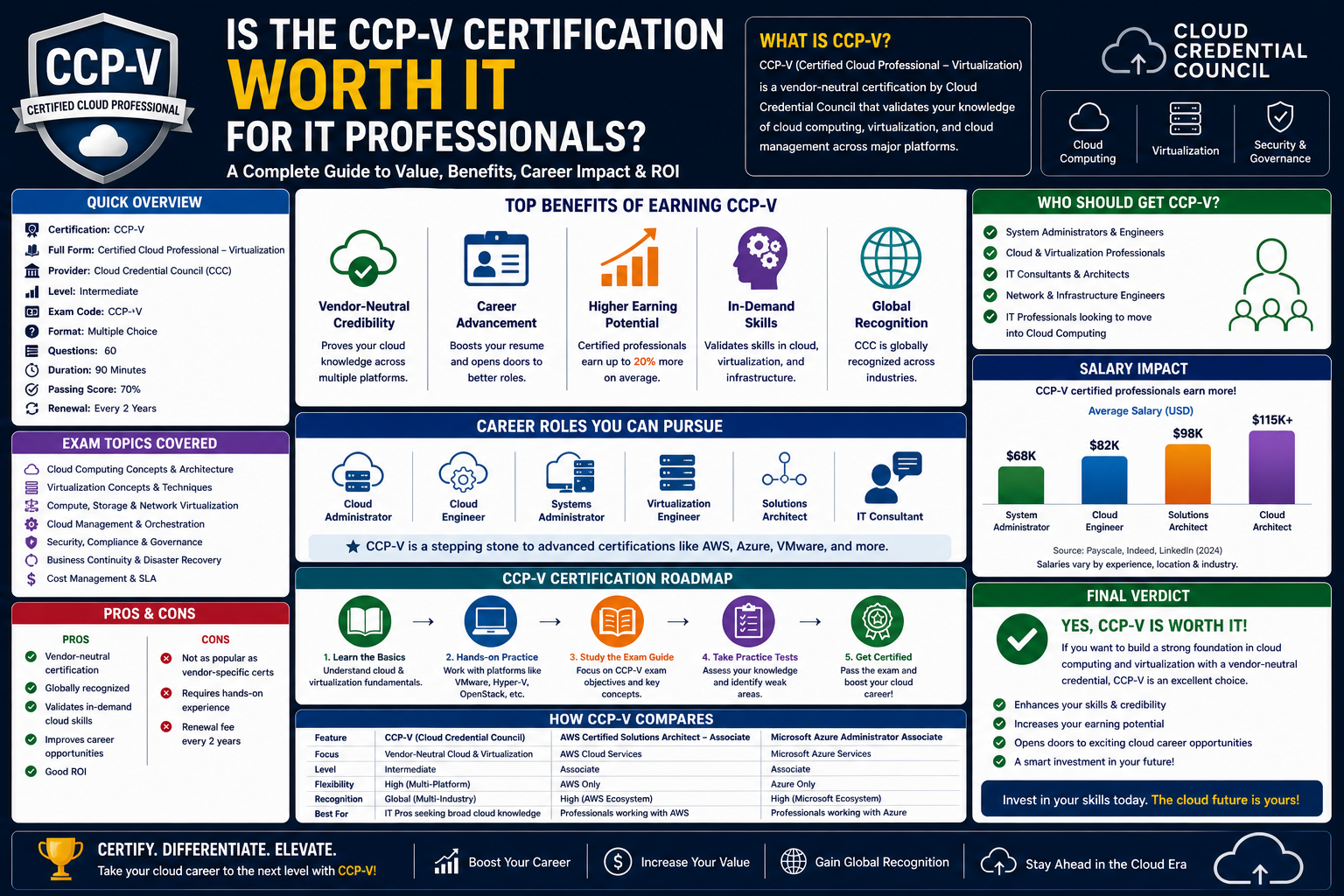
Long before modern cloud platforms and container-based delivery models became mainstream, the idea of running applications on a centralized system and delivering them remotely was already taking shape. Citrix emerged as one of the earliest and most influential players in this space, shaping how organizations thought about application delivery, remote access, and centralized computing. To understand why the Citrix Certified Professional – Virtualization (CCP-V) certification matters today, it is important to first understand the environment from which Citrix technologies evolved and the problems they were designed to solve.
In the early days of enterprise computing, most applications were tightly bound to physical desktop machines. Software had to be installed locally, updates had to be manually deployed, and troubleshooting required physical access or direct intervention on each endpoint. This model worked in smaller environments but quickly became inefficient as organizations scaled. Managing hundreds or thousands of machines meant significant administrative overhead, inconsistent configurations, and high maintenance costs.
Citrix introduced a fundamentally different approach. Instead of installing applications on every device, the idea was to host applications on a centralized server and allow users to access them remotely. This shift allowed organizations to simplify management while giving users a consistent experience regardless of their endpoint device. In many ways, this was the beginning of what we now broadly call application virtualization.
During the early stages of this technology, Citrix built solutions on top of Microsoft’s terminal services. At the time, remote desktop protocols were still developing and were not always stable or efficient. Citrix added enhancements that improved performance, user experience, and reliability. Over time, Citrix’s Independent Computing Architecture (ICA) protocol became a key differentiator, offering better performance and more flexibility than early implementations of Remote Desktop Protocol (RDP).
As enterprise IT environments grew more complex, Citrix solutions evolved alongside them. What started as simple remote application access expanded into full desktop virtualization platforms. This allowed entire desktop environments, not just individual applications, to be delivered from centralized infrastructure. Users could log in from almost any device and access a complete desktop experience hosted in a data center.
This shift was especially important in industries that required secure, controlled access to sensitive data. Financial institutions, healthcare organizations, and large enterprises began adopting Citrix solutions to reduce data exposure on endpoints. Instead of storing sensitive information on local machines, everything remained within the controlled environment of the data center. The endpoint became a window into the environment rather than a storage location for critical data.
From MetaFrame to Modern Citrix Virtual Apps and Desktops
The evolution of Citrix products reflects the broader evolution of enterprise computing itself. Early solutions such as MetaFrame and Presentation Server laid the groundwork for modern virtualization platforms. These early systems were primarily focused on delivering Windows applications to remote users. At that time, the concept of thin clients began to gain traction.
Thin clients are lightweight devices designed primarily to connect to remote systems rather than run applications locally. They typically have minimal processing power, storage, and memory. The real computing happens on centralized servers. This model significantly reduced hardware costs and simplified device management. Instead of maintaining powerful desktops for every user, organizations could deploy simpler endpoints and rely on centralized infrastructure.
As network bandwidth improved and virtualization technology matured, Citrix expanded its capabilities. Presentation Server evolved into XenApp and XenDesktop, which later merged and were rebranded as Citrix Virtual Apps and Desktops. Each iteration added improvements in scalability, performance optimization, and user experience management.
One of the most significant advancements during this evolution was the improved handling of graphics, multimedia, and real-time applications. Early remote sessions were primarily suited for simple business applications such as word processing and spreadsheets. However, as user expectations increased, Citrix had to adapt to support more demanding workloads. This included video conferencing tools, design applications, and data visualization platforms.
The introduction of technologies like HDX (High Definition Experience) played a crucial role in addressing these challenges. HDX optimized how data was transmitted between the server and the client, reducing latency and improving responsiveness. It allowed remote sessions to feel much closer to local computing experiences, even over slower network connections.
At the same time, Citrix began integrating more deeply with Windows Server technologies and Active Directory environments. This integration allowed IT administrators to manage users, policies, and application delivery in a more unified way. Group policies, security configurations, and resource allocations could be centrally controlled, reducing administrative complexity.
Understanding the Core Concept of Virtualization in Citrix Environments
At the heart of Citrix technology is the concept of virtualization. In simple terms, virtualization refers to the abstraction of physical computing resources into logical, software-defined environments. Instead of running everything directly on hardware, virtualization introduces a layer that separates physical infrastructure from the services delivered to users.
In a Citrix environment, this means applications and desktops are hosted on centralized servers, often referred to as delivery controllers or virtual machines within a data center. Users connect to these resources remotely, and the system handles the rendering and transmission of the interface to the user’s device.
This approach offers several advantages. One of the most important is centralized management. IT administrators can install, update, or remove applications on a single server rather than managing multiple endpoints individually. This significantly reduces operational overhead and ensures consistency across the organization.
Another key benefit is improved security. Since applications and data remain within the data center, the risk of data leakage from endpoint devices is greatly reduced. Even if a device is lost or compromised, sensitive information is not stored locally. Instead, it remains protected within the controlled environment of the virtualization infrastructure.
Scalability is another major advantage. Virtualization allows organizations to allocate resources dynamically based on demand. If more users need access to applications, additional virtual machines can be deployed or existing resources can be scaled up. This flexibility is particularly useful in environments with fluctuating workloads.
However, virtualization also introduces complexity. Proper configuration is essential to ensure performance, reliability, and user satisfaction. Network latency, storage performance, and server capacity all play critical roles in the overall experience. Poorly designed environments can lead to slow response times and user frustration.
This is where Citrix expertise becomes important. Professionals working with Citrix solutions must understand not only the software components but also the underlying infrastructure. Networking, storage systems, operating system optimization, and security policies all intersect within a Citrix deployment.
The Role of Citrix in Modern IT Infrastructure
Modern IT environments are increasingly distributed and hybrid in nature. Organizations often operate across on-premises data centers, cloud platforms, and remote work environments. Citrix technologies have adapted to support this shift by enabling flexible deployment models.
In many cases, Citrix environments are used to support remote work strategies. Employees can access corporate applications from home, travel locations, or personal devices without compromising security. This became especially important as organizations shifted toward remote and hybrid work models in recent years.
Citrix also plays a key role in Bring Your Own Device (BYOD) strategies. Instead of requiring employees to use company-issued hardware, organizations can allow personal devices to connect to virtual desktops. This reduces hardware costs while maintaining control over data and applications.
From an infrastructure perspective, Citrix integrates with virtualization platforms such as hypervisors and cloud services. This allows organizations to deploy virtual machines across different environments depending on their needs. Workloads can be balanced between on-premises servers and cloud infrastructure, providing flexibility and resilience.
Storage systems are also a critical part of Citrix environments. Since multiple virtual desktops may rely on shared storage, performance and redundancy become important considerations. Storage provisioning solutions help ensure that virtual machines can access data efficiently without bottlenecks.
Networking is equally important. Citrix sessions depend heavily on stable and low-latency connections. Even small delays in data transmission can affect user experience. As a result, network optimization is a key part of designing and maintaining Citrix environments.
The Growing Importance of Specialized Citrix Knowledge
As Citrix environments have become more complex, the demand for specialized knowledge has increased. It is no longer enough for IT professionals to understand general server administration. They must also be familiar with virtualization concepts, application delivery methods, and Citrix-specific tools.
This is where structured learning and certification pathways become relevant. Citrix certifications are designed to validate knowledge at different levels of expertise. These levels typically progress from foundational understanding to advanced design and implementation skills.
The professional-level certification focuses on individuals who already have experience working with Citrix environments or similar virtualization technologies. It assumes familiarity with system administration, networking fundamentals, and Windows server environments. Rather than teaching basic concepts, it builds on existing knowledge and focuses on deeper architectural understanding.
In real-world scenarios, professionals working with Citrix must often troubleshoot complex issues involving multiple layers of infrastructure. A performance problem might not originate from the Citrix software itself but from network congestion, storage latency, or misconfigured policies. Understanding how these components interact is essential for maintaining stable environments.
Another important aspect of Citrix expertise is user experience management. Unlike traditional server applications, virtualization environments must deliver a consistent and responsive experience to users across different devices and network conditions. This requires careful tuning and continuous monitoring.
Citrix Virtual Apps and Desktops in Enterprise Environments
One of the most widely used Citrix solutions today is Citrix Virtual Apps and Desktops. This platform allows organizations to deliver both individual applications and full desktop environments to users. The flexibility of this model makes it suitable for a wide range of use cases.
For example, some employees may only need access to specific business applications such as accounting software or customer relationship management tools. In such cases, delivering individual applications is more efficient than providing a full desktop environment. Other users, such as developers or designers, may require complete desktop environments with access to multiple tools and configurations.
The platform also supports different delivery methods based on user requirements. Some sessions may be persistent, meaning users return to the same environment each time they log in. Others may be non-persistent, where the environment resets after each session. This flexibility allows organizations to balance performance, security, and resource utilization.
Application layering and image management are also important components of Citrix environments. Instead of creating separate virtual machines for every application combination, administrators can use layered approaches to simplify management. This reduces duplication and makes updates easier to manage.
Monitoring and analytics are increasingly important in modern Citrix deployments. Administrators need visibility into session performance, resource usage, and user behavior. This data helps identify bottlenecks and optimize system performance over time.
As organizations continue to adopt cloud-based infrastructure, Citrix solutions have also adapted to support hybrid and cloud-native environments. Virtual desktops can be deployed across multiple platforms while maintaining consistent management and user experience.
Understanding the CCP-V Certification Landscape in Modern Virtualization Environments
As enterprise environments continue to evolve toward distributed computing and hybrid infrastructure models, the role of virtualization specialists becomes increasingly important. Citrix environments, in particular, require a deep understanding of how applications, desktops, networking, and user sessions interact across multiple layers of infrastructure. The Citrix Certified Professional – Virtualization (CCP-V) certification exists to validate this level of expertise, focusing on real-world deployment, configuration, and troubleshooting of Citrix Virtual Apps and Desktops environments.
Unlike entry-level certifications that focus on general concepts, CCP-V is designed for professionals who are already familiar with virtualization fundamentals. It assumes hands-on experience with Windows Server environments, basic networking, and previous exposure to Citrix technologies. The certification emphasizes practical implementation rather than theoretical knowledge, making it highly relevant for engineers actively working in enterprise infrastructure roles.
At its core, CCP-V evaluates how well a professional can design, configure, and manage Citrix environments that are both scalable and efficient. This includes understanding how different components interact, how user sessions are delivered, and how performance is optimized across diverse network conditions. In real-world deployments, these environments must support hundreds or thousands of users simultaneously, often across geographically distributed locations.
The Architecture of Citrix Virtual Apps and Desktops
A key focus of CCP-V is understanding the architecture behind Citrix Virtual Apps and Desktops. This architecture is composed of multiple interconnected components, each playing a specific role in delivering applications and desktops to end users. While these components function independently, they must be carefully configured to work together seamlessly.
At the center of the architecture is the delivery controller. This component acts as the brain of the Citrix environment, managing user connections, brokering sessions, and coordinating communication between different system components. When a user attempts to access a virtual application or desktop, the delivery controller determines which resources are available and assigns the appropriate session.
Another critical component is the Virtual Delivery Agent (VDA). The VDA is installed on virtual machines or physical machines that host applications and desktops. It enables those machines to register with the delivery controller and accept user connections. Without the VDA, machines cannot participate in the Citrix environment.
The interaction between the delivery controller and the VDA is essential for session management. When a user logs in, the controller identifies an available machine with the appropriate resources and instructs the VDA to establish a session. This process happens in real time and must be optimized for speed and reliability.
The Role of StoreFront in User Access Experience
StoreFront is another important component in Citrix environments. It serves as the user-facing portal where applications and desktops are presented. When users log in, StoreFront authenticates them and displays the resources they are authorized to access.
The design of StoreFront is critical to the overall user experience. A well-configured StoreFront environment provides quick access to applications, organized layouts, and seamless authentication processes. It also integrates with identity management systems such as Active Directory to ensure secure access control.
From a technical perspective, StoreFront communicates with the delivery controller to retrieve available resources. It then presents those resources in a structured format to the user. This separation of responsibilities allows Citrix environments to maintain both security and scalability.
StoreFront also plays a role in session reliability. If a user disconnects from a session, StoreFront can help re-establish the connection without requiring a full login process. This improves usability and reduces downtime for end users.
Workspace Environment Management and User Experience Optimization
Workspace Environment Management (WEM) is a critical component of modern Citrix deployments and a key topic within the CCP-V certification. WEM is designed to optimize user experience by dynamically managing system resources, user profiles, and application performance.
In traditional desktop environments, user experience is often affected by static configurations that do not adapt to changing workloads. WEM addresses this issue by applying real-time adjustments based on user activity and system conditions. For example, it can prioritize CPU resources for active applications while reducing resource allocation for background processes.
WEM also plays a significant role in logon optimization. In large enterprise environments, logon times can become a major performance issue due to the number of policies, scripts, and profile loads applied during startup. WEM helps streamline this process by consolidating and optimizing these tasks.
Another important function of WEM is profile management. User profiles can become large and inefficient over time, especially in environments where users access multiple applications and systems. WEM helps manage these profiles more efficiently, reducing load times and improving session responsiveness.
In addition, WEM provides granular control over user environment settings. Administrators can define policies that adjust based on user roles, device types, or network conditions. This flexibility allows organizations to tailor the user experience to specific needs without compromising performance.
Virtual Delivery Agent Configuration and Optimization
The Virtual Delivery Agent is one of the most critical components in a Citrix environment, and CCP-V places significant emphasis on understanding its configuration and behavior. The VDA is responsible for enabling communication between virtual machines and the delivery controller, making it the foundation of session delivery.
Proper configuration of the VDA is essential for ensuring stability and performance. This includes ensuring compatibility with the operating system, configuring communication ports, and optimizing resource allocation. Misconfigured VDAs can lead to registration failures, session instability, or performance degradation.
One of the key aspects of VDA management is registration. When a virtual machine starts, the VDA must register with the delivery controller before it can accept user sessions. This process involves authentication, network communication, and policy validation. If registration fails, the machine becomes unavailable for user connections.
Performance optimization of the VDA often involves tuning system resources such as CPU, memory, and disk usage. Since multiple users may be sharing the same virtual machine, resource contention can become a challenge. Proper balancing ensures that no single session negatively impacts others.
Another important consideration is operating system optimization. Citrix environments often require customized Windows configurations to reduce overhead and improve responsiveness. This may include disabling unnecessary services, optimizing startup processes, and configuring performance settings.
Provisioning Services and Image Management Strategies
Citrix Provisioning Services (PVS) is another major topic within the CCP-V certification. PVS is designed to simplify the deployment and management of virtual machines by streaming operating system images over the network instead of installing them locally on each machine.
In a traditional environment, each virtual machine requires its own installed operating system, which can lead to duplication and management complexity. PVS addresses this by allowing multiple machines to share a single master image. This image is streamed to target devices at runtime, ensuring consistency across the environment.
One of the main advantages of PVS is simplified image management. When updates are required, administrators only need to modify the master image. These changes are then automatically applied to all target devices the next time they boot. This reduces administrative overhead and ensures consistency across large environments.
PVS also improves scalability. Since machines do not require local storage for operating systems, they can be deployed more quickly and efficiently. This makes it easier to scale environments up or down based on demand.
However, PVS introduces additional complexity in terms of network dependency. Since operating system images are streamed over the network, performance and reliability are heavily dependent on network infrastructure. High latency or packet loss can significantly impact system performance.
Administrators must carefully design PVS environments to ensure redundancy and fault tolerance. This often involves configuring multiple streaming servers, optimizing network paths, and balancing load across infrastructure components.
User Session Management and Delivery Optimization
A major focus of Citrix environments is the management of user sessions. In virtualization systems, a session represents the connection between a user and a hosted application or desktop. Managing these sessions efficiently is essential for maintaining performance and user satisfaction.
When a user initiates a connection, the delivery controller determines which virtual machine will host the session. This decision is based on factors such as resource availability, user policies, and load balancing rules. Once assigned, the session is established through the VDA, and the user gains access to their virtual environment.
Session reliability is a critical aspect of Citrix environments. Users expect consistent access to applications without interruptions, even in cases of network instability. Citrix systems include features that allow sessions to be preserved and reconnected automatically when connectivity is restored.
Load balancing plays an important role in session management. In large environments, multiple virtual machines may host identical applications or desktops. Load balancing ensures that sessions are distributed evenly across available resources, preventing any single machine from becoming overloaded.
Session performance is also influenced by display protocol optimization. Citrix uses advanced protocols to transmit screen updates, keyboard input, and mouse movements between the client and server. These protocols are designed to minimize bandwidth usage while maintaining responsiveness.
Networking Considerations in Citrix Deployments
Networking is one of the most important aspects of any Citrix environment. Since all user interactions depend on network communication, even small issues can have significant impacts on performance.
Latency is a key factor in user experience. High latency can cause delays in screen updates, input response, and application loading times. Citrix environments must be designed to minimize latency through optimized routing and infrastructure placement.
Bandwidth is another critical consideration. Although Citrix protocols are optimized for efficiency, certain applications such as video conferencing or multimedia tools can consume significant bandwidth. Proper planning is required to ensure that network resources are not overwhelmed.
Quality of Service (QoS) mechanisms are often implemented to prioritize Citrix traffic over less critical network traffic. This ensures that user sessions remain responsive even during periods of high network usage.
In distributed environments, network segmentation and optimization become even more important. Users may be connecting from different geographic locations, each with varying network conditions. Citrix environments must account for these differences to maintain consistent performance.
Troubleshooting and Operational Challenges in Citrix Environments
Managing Citrix environments involves continuous monitoring and troubleshooting. Because multiple components interact within the system, issues can arise from various sources, making diagnosis complex.
Common issues include session disconnects, slow logon times, application crashes, and registration failures. Each of these problems may originate from different layers of the infrastructure, including networking, storage, or configuration settings.
Effective troubleshooting requires a structured approach. Administrators must analyze logs, monitor system performance, and identify patterns that indicate underlying issues. Understanding how different components interact is essential for isolating root causes.
Performance monitoring tools play an important role in operational management. These tools provide visibility into resource usage, session performance, and system health. By analyzing this data, administrators can proactively address issues before they impact users.
In large environments, automation is often used to streamline operational tasks. Automated monitoring, alerting, and remediation processes help reduce manual workload and improve system reliability.
Advanced Citrix Infrastructure Design and Real-World Deployment Strategies
As Citrix environments grow in scale and complexity, the focus shifts from basic configuration to advanced design principles that ensure stability, performance, and long-term maintainability. The Citrix Certified Professional – Virtualization (CCP-V) certification reflects this shift by emphasizing real-world deployment scenarios rather than isolated technical features. At this level, professionals are expected to understand how architectural decisions impact user experience, operational efficiency, and system resilience across enterprise environments.
Modern Citrix deployments are rarely standalone systems. Instead, they are deeply integrated into broader IT ecosystems that include cloud platforms, identity management systems, storage architectures, and hybrid networking environments. This integration introduces both flexibility and complexity, requiring administrators to think holistically about design decisions.
One of the most important aspects of advanced Citrix design is scalability. Enterprise environments must be able to support fluctuating workloads, seasonal demand spikes, and long-term organizational growth. A poorly designed infrastructure may function well under normal conditions but fail under peak usage. CCP-V level expertise requires understanding how to design systems that scale horizontally and vertically without compromising performance.
Horizontal scaling involves adding more virtual machines or delivery resources to distribute workload. Vertical scaling involves increasing the capacity of existing machines by allocating more CPU, memory, or storage resources. In Citrix environments, both approaches are often combined depending on workload characteristics and infrastructure constraints.
Designing for scalability also requires careful planning of resource pools. Virtual machines must be grouped and allocated in a way that ensures balanced load distribution. This prevents situations where some servers are overloaded while others remain underutilized. Load balancing policies play a key role in achieving this balance.
Identity Management and Authentication Integration
Identity management is a foundational component of any Citrix environment. Since users access applications and desktops remotely, secure and efficient authentication mechanisms are essential. Citrix integrates closely with identity providers such as Active Directory, enabling centralized user management and policy enforcement.
Authentication in Citrix environments typically occurs at multiple layers. First, users authenticate to access the StoreFront portal. Then, session authentication occurs when connecting to virtual applications or desktops. In some environments, additional security layers such as multi-factor authentication are implemented to enhance protection.
Single Sign-On (SSO) is another important feature that improves user experience. With SSO, users only need to authenticate once to access multiple applications and services. This reduces login fatigue and streamlines access to resources. However, implementing SSO requires careful configuration to ensure compatibility across all integrated systems.
Conditional access policies are also increasingly common in modern deployments. These policies allow organizations to control access based on factors such as device type, location, and user role. For example, a user connecting from an unmanaged device may be restricted to certain applications or required to use additional authentication steps.
Identity integration also extends to cloud environments. As organizations adopt hybrid infrastructure models, Citrix systems must integrate with cloud-based identity providers. This ensures consistent authentication across on-premises and cloud-hosted resources.
Advanced StoreFront and Access Layer Optimization
StoreFront plays a critical role in the Citrix user experience, acting as the gateway between users and virtual resources. At an advanced level, optimizing StoreFront involves more than just configuration—it requires careful design of access workflows, authentication methods, and resource presentation.
One of the key considerations is load distribution. In large environments, multiple StoreFront servers are often deployed to handle user traffic. These servers are typically placed behind load balancers to ensure even distribution of authentication requests. This prevents performance bottlenecks during peak usage periods.
Another important aspect is resource aggregation. StoreFront can combine resources from multiple delivery controllers or farms, presenting them as a unified catalog to users. This simplifies access and reduces confusion, especially in environments with multiple application sets.
Customization of the StoreFront interface is also common in enterprise environments. Organizations often tailor the user interface to reflect branding, simplify navigation, and highlight frequently used applications. While this does not directly impact performance, it significantly improves usability.
Caching mechanisms within StoreFront help improve performance by reducing repeated authentication and resource enumeration requests. Proper configuration of caching policies ensures faster logins and smoother user experiences.
Delivery Controller High Availability and Redundancy Design
The delivery controller is one of the most critical components in a Citrix environment, and ensuring its availability is essential for system stability. In CCP-V-level deployments, high availability is achieved through redundancy and clustering strategies.
Multiple delivery controllers are typically deployed within a single site to ensure that if one controller fails, others can continue handling requests. These controllers share a common configuration database and communicate with each other to maintain consistency.
Database availability is equally important. The Citrix site database stores configuration data, session information, and system state. If this database becomes unavailable, the entire Citrix environment may be disrupted. As a result, database redundancy and failover mechanisms are essential components of the design.
Network connectivity between controllers, VDAs, and databases must also be highly reliable. Even brief interruptions in communication can lead to session instability or registration issues. Proper network segmentation and redundancy planning help mitigate these risks.
In larger environments, multiple sites may be deployed across different geographic locations. These sites can operate independently or in coordination, depending on organizational requirements. Multi-site architecture adds complexity but also improves resilience and disaster recovery capabilities.
Storage Architecture and Performance Optimization in Citrix Environments
Storage systems play a vital role in Citrix performance. Since virtual desktops and applications rely heavily on centralized storage, any bottleneck in storage performance can directly impact user experience.
In traditional environments, each virtual machine may store its operating system and applications on dedicated storage. However, in Citrix environments, shared storage models are often used to simplify management and improve scalability.
One of the key challenges in storage design is I/O performance. Virtual desktop environments generate significant read and write operations, especially during logon storms when many users access the system simultaneously. Storage systems must be designed to handle these peak loads efficiently.
Caching mechanisms are commonly used to improve storage performance. By storing frequently accessed data in faster storage tiers, systems can reduce latency and improve responsiveness. Tiered storage architectures combine high-speed storage with lower-cost capacity storage to balance performance and cost.
Provisioning strategies also impact storage efficiency. Thin provisioning allows virtual machines to consume storage dynamically rather than reserving full capacity upfront. This improves utilization but requires careful monitoring to avoid overcommitment.
In environments using Citrix Provisioning Services, storage load is further reduced because operating systems are streamed over the network instead of being stored locally on each machine. This significantly changes the storage design requirements and shifts focus toward network performance.
Security Architecture and Data Protection in Citrix Deployments
Security is a central concern in all Citrix environments, particularly because sensitive applications and data are accessed remotely. CCP-V-level knowledge includes understanding how to design environments that protect data without compromising usability.
One of the key security principles in Citrix is data centralization. Since applications and data remain within the data center, endpoints do not store sensitive information locally. This reduces the risk of data leakage from lost or compromised devices.
Encryption is used extensively in Citrix environments. Communication between clients and servers is typically encrypted to prevent interception. This includes session traffic, authentication data, and application communication.
Access control policies ensure that users only have access to the resources they are authorized to use. These policies are enforced at multiple layers, including StoreFront, delivery controllers, and virtual machines.
Endpoint security is also important, especially in BYOD environments. Since users may connect from personal devices, additional security measures are often implemented to ensure compliance with organizational policies.
Monitoring and auditing tools provide visibility into user activity and system behavior. These tools help detect suspicious activity, enforce compliance, and support incident response efforts.
Performance Monitoring and Optimization Techniques
Maintaining optimal performance in Citrix environments requires continuous monitoring and proactive optimization. CCP-V-level professionals must understand how to interpret performance data and identify potential issues before they impact users.
Key performance indicators include logon times, session responsiveness, resource utilization, and network latency. Monitoring tools collect this data and present it in a structured format for analysis.
Logon performance is often one of the first indicators of system health. Slow logon times may indicate issues with authentication, profile loading, or policy processing. Identifying the root cause requires analyzing each stage of the logon process.
Session performance is influenced by multiple factors, including CPU usage, memory consumption, and network conditions. High resource utilization can lead to sluggish application performance and reduced user satisfaction.
Proactive optimization involves adjusting system configurations based on observed performance trends. This may include resizing virtual machines, adjusting load balancing policies, or optimizing storage configurations.
Automation plays an important role in modern performance management. Automated systems can detect anomalies, trigger alerts, and even apply corrective actions without human intervention. This reduces downtime and improves system reliability.
Disaster Recovery and Business Continuity Planning in Citrix Systems
Disaster recovery is a critical aspect of enterprise Citrix deployments. Organizations must ensure that virtual applications and desktops remain available even in the event of system failures or site outages.
A common approach to disaster recovery involves deploying secondary sites that can take over operations if the primary site becomes unavailable. These secondary sites are typically configured with synchronized infrastructure and data replication mechanisms.
Recovery time objectives (RTO) and recovery point objectives (RPO) are key metrics used in disaster recovery planning. RTO defines how quickly systems must be restored after a failure, while RPO defines how much data loss is acceptable.
Data replication between primary and secondary sites ensures that configuration and user data remain consistent. This allows for seamless failover when needed.
Backup strategies are also essential. Regular backups of system configurations, virtual machine images, and user data help ensure that environments can be restored in case of catastrophic failure.
Testing disaster recovery plans is equally important. Regular simulations help identify weaknesses in the recovery process and ensure that systems can be restored effectively under real-world conditions.
Real-World Operational Challenges in Large Citrix Environments
Operating large Citrix environments introduces a variety of challenges that go beyond initial deployment. These challenges often involve balancing performance, security, scalability, and user experience simultaneously.
One common challenge is managing user expectations. Users often expect instant access to applications, regardless of system complexity. Meeting these expectations requires careful optimization and continuous monitoring.
Another challenge is maintaining consistency across distributed environments. In multi-site deployments, ensuring that configurations remain synchronized can be complex. Even small inconsistencies can lead to unexpected behavior.
Resource contention is also a frequent issue. As user demand increases, competition for CPU, memory, and storage resources can impact performance. Proper capacity planning helps mitigate these issues.
Finally, troubleshooting in large environments can be time-consuming due to the number of interconnected components. Effective logging, monitoring, and diagnostic tools are essential for maintaining operational efficiency.
Continuous Evolution of Citrix Environments and the Role of Operational Maturity
As Citrix environments mature within enterprise infrastructure, they naturally shift from being purely technical deployments into strategically managed service platforms. At this stage, success is no longer defined by whether applications simply launch or desktops simply load. Instead, it is measured by consistency, predictability, and the ability to maintain performance under changing conditions. This is where operational maturity becomes a defining factor in how effectively a Citrix environment serves the organization.
One of the key aspects of operational maturity is standardization. In large environments, inconsistency is one of the biggest sources of instability. Small differences in virtual machine configurations, policy settings, or image versions can create unpredictable behavior across user sessions. Mature Citrix deployments focus heavily on standardizing golden images, ensuring that every virtual machine originates from a controlled and tested baseline. This reduces variability and makes troubleshooting significantly easier.
Change management also becomes increasingly important as environments scale. Even minor modifications, such as updating a driver or adjusting a policy, can have widespread effects across thousands of sessions. Structured change control processes help ensure that updates are tested in controlled environments before being deployed into production. This reduces the risk of service disruption and maintains system stability over time.
Another important element of operational maturity is capacity forecasting. Citrix environments are dynamic by nature, with user demand fluctuating based on time of day, business cycles, and organizational growth. Without proper forecasting, environments may become either over-provisioned, leading to wasted resources, or under-provisioned, leading to performance degradation. Mature environments use historical usage data to predict future demand and adjust infrastructure accordingly.
Automation plays a growing role in achieving this level of maturity. Routine tasks such as machine provisioning, policy updates, and performance monitoring can be automated to reduce manual workload and human error. Automation also enables faster response times when issues arise, as systems can detect and resolve certain conditions without administrator intervention.
Conclusion
The Citrix Certified Professional – Virtualization (CCP-V) certification represents a focused step into one of the most established and widely used areas of enterprise IT infrastructure. As organizations continue to rely on centralized application delivery and virtual desktop environments, the need for professionals who understand how these systems operate at a deep technical level remains strong. Citrix technologies have evolved significantly over the years, moving from early remote application solutions to highly scalable, secure, and performance-optimized virtual environments that support modern hybrid workplaces.
What makes CCP-V particularly valuable is its emphasis on real-world implementation rather than theoretical knowledge. It requires an understanding of how multiple components—such as delivery controllers, StoreFront, Virtual Delivery Agents, Workspace Environment Management, and provisioning services—work together as a unified system. This interconnected nature means that professionals must think beyond isolated configurations and instead focus on how each decision affects performance, scalability, and user experience across the entire infrastructure.
In practical terms, the certification helps bridge the gap between foundational virtualization knowledge and advanced enterprise deployment skills. It prepares IT professionals to handle complex environments where issues are rarely caused by a single factor. Instead, problems often arise from the interaction of networking, storage, authentication, and session delivery layers. Developing the ability to diagnose and optimize these environments is a key outcome of working toward CCP-V-level expertise.
From a career perspective, CCP-V aligns well with roles that require specialization in desktop virtualization and application delivery. It supports growth into positions that involve infrastructure design, performance optimization, and enterprise-level system management. While it is not an entry-level certification, it provides meaningful value for those already working in IT environments that rely on Citrix technologies.
Ultimately, CCP-V is most valuable when applied in the right context. In organizations that actively use Citrix Virtual Apps and Desktops, it strengthens both technical capability and operational confidence. In broader terms, it reflects a deeper understanding of how modern digital workspaces are built, delivered, and maintained in today’s evolving IT landscape.