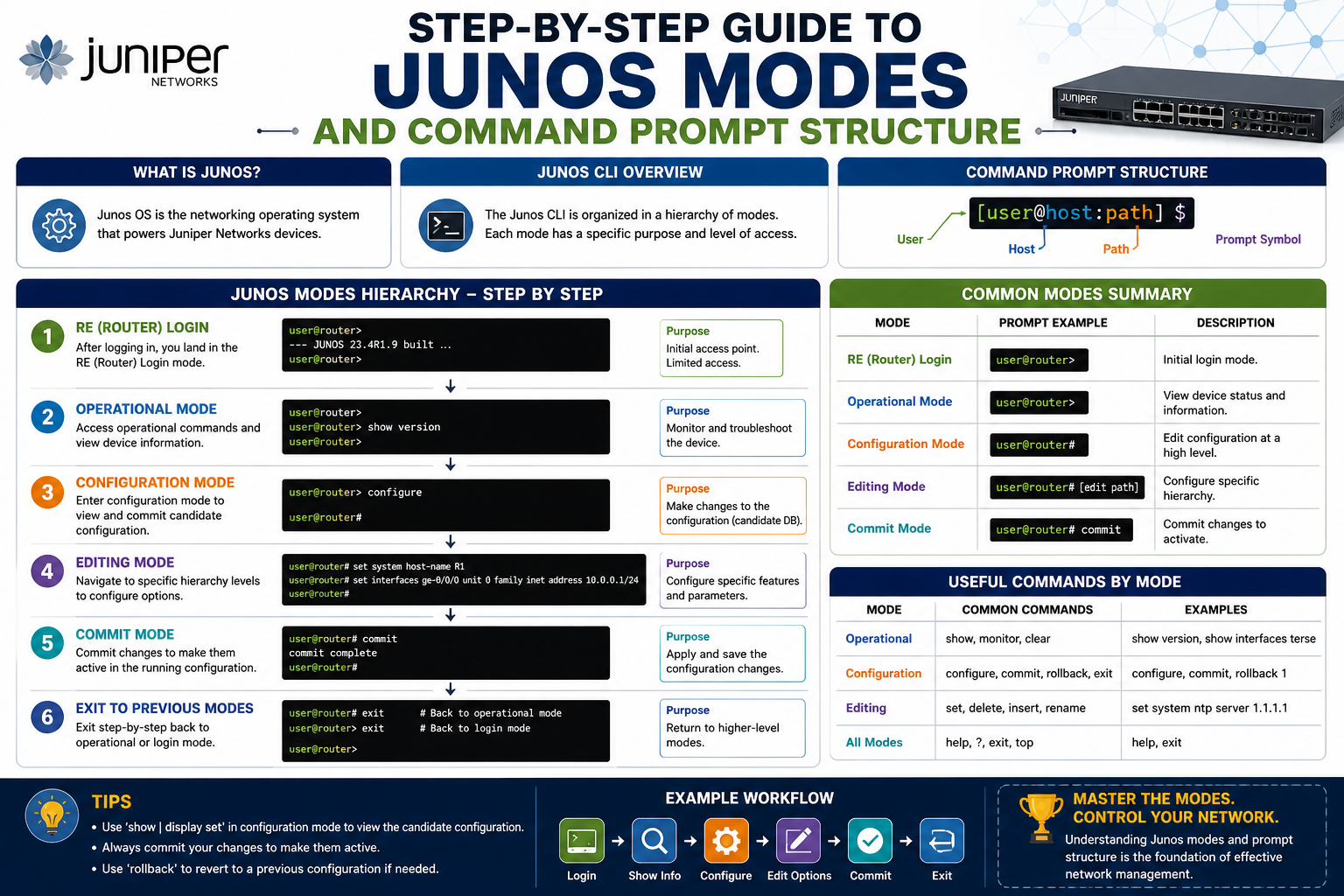
Juniper Networks devices are built with a strong focus on stability, scalability, and structured control. Unlike many systems that try to simplify everything into a single unified interface, Junos takes a more layered approach. This means that instead of one flat environment where every command behaves the same way, Junos separates responsibilities into different working contexts.
At first interaction, this design can feel unfamiliar. Users coming from other networking platforms often expect a straightforward command experience where configuration and monitoring blend together. Junos, however, deliberately separates those activities. This separation is not accidental—it is part of the operating philosophy that keeps large-scale networks more predictable and easier to troubleshoot.
The interface you interact with is called the CLI, or command line interface. This is the primary method for controlling Junos devices. It may appear minimal at first glance because it is text-based, but beneath the surface it provides deep access to every function of the system. The CLI is not just a command input tool; it is a structured environment that changes behavior depending on the mode you are in.
Understanding Junos starts with understanding that the system is not static. It shifts based on context, user privilege, and operational intent. This is why prompts and symbols become so important—they are visual indicators of the environment you are currently working in.
The Role of the Command Line Interface in Junos
The command line interface in Junos is the central point of interaction between the user and the operating system. While graphical interfaces exist for some management tasks, the CLI remains the most powerful and complete way to control the device.
What makes the Junos CLI unique is its consistency and structure. Commands are not randomly placed or loosely interpreted. Instead, they follow a predictable hierarchy that mirrors the internal organization of the system itself.
When a user interacts with the CLI, they are not simply sending commands to hardware. They are interacting with a layered operating system that interprets those commands based on the current mode. This is why the same input can produce different outcomes depending on where you are in the system.
For example, a command entered in one mode might display system information, while in another mode it might configure a system parameter. This behavior is intentional and reinforces the importance of understanding context before executing actions.
The CLI is also designed to minimize ambiguity. Instead of relying on guesswork, Junos provides clear visual cues in the form of prompts. These prompts are not decorative—they are functional indicators that define your current environment.
Understanding the Importance of Modes in Junos
One of the most important concepts in Junos is the idea of modes. Modes define what type of actions you are allowed to perform at any given moment. They act as boundaries that separate different categories of system interaction.
In simple terms, modes determine whether you are observing the system, modifying its behavior, or interacting directly with its underlying structure. This separation is what gives Junos its reliability in enterprise environments.
There are two primary operational environments most users interact with: operational mode and configuration mode. However, beneath these sits another layer that is often encountered by advanced users or administrators with elevated privileges: the shell environment.
Each of these environments has its own purpose, rules, and visual indicators. The system does not allow random switching without explicit actions, which helps prevent unintended changes.
Modes in Junos are not just technical divisions—they are safety mechanisms. They ensure that routine monitoring does not accidentally alter system configuration, and that configuration changes are intentionally applied rather than casually executed.
The Language of Prompts in Junos
One of the most distinctive features of Junos is its use of prompts. These prompts appear at the end of every command line and indicate exactly where you are in the system.
Instead of relying on menus or graphical cues, Junos uses symbols to communicate mode status. There are three primary symbols you will encounter: the greater-than symbol (>), the percent symbol (%), and the hash symbol (#).
Each of these symbols represents a different operational context. They are not random characters but carefully assigned indicators that define your interaction level with the system.
The simplicity of these symbols is intentional. Even though Junos is a highly advanced system, its interface communicates status in a very minimal and consistent way. This reduces confusion and allows users to quickly identify their environment without needing to run additional commands.
Understanding these symbols is essential because they are the first line of feedback the system provides. Before you even type a command, the prompt already tells you what kind of actions are possible.
The Operational Nature of Junos Environments
Before diving into specific modes, it is important to understand that Junos environments are built around operational control. This means the system is designed to prioritize stability and controlled changes over free-form interaction.
Every action in Junos is evaluated within a context. That context is determined by the mode you are in. If you are in a monitoring context, the system expects observation commands. If you are in a configuration context, the system expects structural changes.
This separation allows Junos to maintain a high level of predictability. In large networks, unpredictable behavior can lead to serious issues, so Junos avoids this by enforcing clear boundaries.
Even though the system feels like a simple text interface, it is actually enforcing strict rules behind the scenes. These rules ensure that users do not accidentally disrupt services while performing routine tasks.
The environment is designed in such a way that every transition between modes is intentional. You cannot simply drift between states; you must explicitly enter or exit them.
The Shell Environment and Its Relationship to Junos
At the lowest level of interaction, Junos devices operate on a Unix-based system. This underlying system is what allows the device to function at a fundamental level.
When a user accesses the shell, they are no longer interacting with Junos directly. Instead, they are interacting with the operating system beneath it. This is why the shell is considered a more sensitive environment.
The shell provides access to system-level functions that bypass Junos abstractions. This means users can interact directly with files, processes, and system services.
Because of this power, the shell is typically reserved for advanced troubleshooting or administrative tasks. It is not part of everyday network management and is usually accessed intentionally.
The presence of the shell also explains why Junos has multiple prompts. The system must clearly distinguish when a user is interacting with Junos itself versus when they are interacting with the underlying operating system.
This separation is critical because it prevents confusion between configuration commands and system-level commands.
How the CLI Connects the User to System Functions
The CLI in Junos acts as a bridge between the user and different layers of the system. It is not just a command interpreter but a structured gateway that routes input to the appropriate subsystem.
When a user enters a command, the CLI evaluates the current mode and determines how that command should be processed. This evaluation happens instantly and transparently.
The system is designed so that users do not need to know the internal mechanics of how commands are executed. Instead, they only need to understand the context in which they are working.
This abstraction is one of the strengths of Junos. It allows complex system interactions to be simplified into structured commands without sacrificing control or flexibility.
However, this abstraction also requires users to be aware of their environment at all times. Because the same command can behave differently in different modes, misunderstanding the context can lead to unexpected results.
This is why prompts are so important—they provide constant feedback about your current state within the system.
The Transition Between System States
One of the most important aspects of Junos is the ability to transition between different system states. These transitions are not automatic; they require explicit commands.
For example, moving from a general user environment into a configuration environment requires a deliberate action. Similarly, moving from the shell back into Junos requires an explicit command to re-enter the CLI.
These transitions are designed to prevent accidental changes and ensure that users are always aware of their current context.
The system does not assume intent. Instead, it requires confirmation through actions. This design philosophy contributes to the stability and reliability of Junos in production environments.
Transitions also play a role in system security. By requiring explicit movement between environments, Junos reduces the risk of unauthorized or accidental changes.
The Relationship Between Users and System Privileges
User privileges in Junos determine what actions are available within each mode. Not all users have the same level of access, and this hierarchy is an essential part of system security.
At a basic level, users may be restricted to operational commands only. At higher privilege levels, users may be allowed to modify configurations or access deeper system functions.
At the highest level, certain users can access the shell environment, which provides unrestricted access to the underlying system.
This structure ensures that responsibility is distributed appropriately across users. It also ensures that sensitive actions are limited to authorized individuals.
Privilege levels are not just about access—they are about control. They define how far a user can go within the system and what types of changes they can make.
Why Junos Separates Monitoring and Configuration
One of the defining features of Junos is the strict separation between monitoring and configuration. This separation is not just a design choice—it is a stability mechanism.
Monitoring tasks involve observing the system, checking status, and analyzing performance. These actions do not modify the system.
Configuration tasks, on the other hand, involve changing system behavior. These changes can affect routing, interfaces, security policies, and more.
By separating these two activities into different modes, Junos ensures that observation does not accidentally lead to modification.
This separation also makes troubleshooting more effective. When monitoring is isolated from configuration, it becomes easier to identify issues without introducing new variables.
In large-scale environments, this distinction becomes even more important because multiple users may be interacting with the system simultaneously.
The Structural Philosophy Behind Junos Design
The architecture of Junos is built around predictability and control. Every layer of the system is designed to reduce ambiguity and increase clarity.
The CLI is not just a tool—it is a reflection of this philosophy. It enforces structure through modes, prompts, and controlled transitions.
This structure ensures that even complex systems remain manageable. Instead of overwhelming users with unrestricted access, Junos guides them through defined paths of interaction.
This approach may feel restrictive at first, but it ultimately leads to greater stability and fewer configuration errors.
The design philosophy behind Junos is what makes it widely used in enterprise and service provider environments where reliability is critical.
The Hidden Logic Behind Junos Interaction Flow
Once you move beyond the basic idea of prompts and modes, Junos begins to reveal something more structured and deliberate underneath its surface. It is not simply a command system where inputs trigger outputs. Instead, it is built around a controlled workflow that guides how changes are observed, prepared, and applied.
This workflow is what makes Junos fundamentally different from many other networking environments. Every action is part of a larger lifecycle, and no change is considered final until it passes through specific validation stages.
The system is designed this way to ensure predictability. In complex networks, even small misconfigurations can cascade into larger disruptions. Junos reduces that risk by ensuring that every modification follows a structured path from intention to execution.
This structure is most visible when working between operational mode and configuration mode. These two environments are not just different views of the system—they represent entirely different ways of interacting with it.
Operational Mode as the Observational Layer of Junos
Operational mode is where users spend a significant portion of their time, especially when monitoring live systems. It is the layer of observation, inspection, and diagnostics.
In this mode, the system is in a read-focused state. That does not mean it is passive; rather, it is optimized for retrieving information without altering system behavior.
Operational mode allows users to understand what the device is doing at any given moment. This includes checking system status, viewing routing information, inspecting interfaces, and verifying connectivity.
What makes this mode particularly important is that it provides a safe environment for analysis. Even if a user executes complex queries or diagnostic commands, the system remains unchanged.
The greater-than symbol (>) at the end of the prompt is the visual confirmation that you are in this observational state. It signals that the system is ready to accept operational instructions only.
In large networks managed by Juniper Networks devices, operational mode becomes the primary interface for network engineers during troubleshooting. It allows them to gather real-time insights without risking unintended modifications.
Operational mode is also where most performance validation happens. When a network behaves unexpectedly, engineers rely on this environment to understand what is currently happening before making adjustments.
The Expansive Role of System Monitoring in Operational Mode
Within operational mode, the system offers a wide range of monitoring capabilities. These are not limited to simple status checks. Instead, they provide layered visibility into different aspects of the device.
The network layer can be inspected to understand routing behavior and packet flow. The system layer can be checked to evaluate resource usage, CPU load, and memory consumption. The interface layer can be used to verify physical and logical connectivity.
Each of these areas contributes to a full picture of device health. Operational mode is essentially a diagnostic lens that allows users to view different parts of the system without altering them.
What is important to understand is that operational mode does not just show static information. Many of its functions provide continuously updated outputs, reflecting real-time system changes.
This makes it especially useful in environments where conditions change rapidly. Instead of relying on historical data alone, engineers can observe live system behavior as it evolves.
The Transition from Observation to Control
While operational mode focuses on observation, configuration mode represents control. Moving from one to the other is not automatic. It requires an explicit action that signals intent to modify the system.
This separation is intentional. It prevents accidental changes while ensuring that configuration activities are deliberate.
When a user transitions into configuration mode, the system shifts from a read-oriented environment to a write-oriented environment. This change is reflected immediately in the prompt, which becomes the hash symbol (#).
This symbol is not just a cosmetic change. It represents a fundamental shift in how the system interprets user input.
In configuration mode, commands are no longer interpreted as queries. Instead, they are treated as potential changes to system structure. This includes modifications to interfaces, routing policies, system services, and security rules.
The system does not apply these changes immediately. Instead, it stores them in a temporary state known as the candidate configuration.
The Candidate Configuration and Its Importance
One of the most powerful concepts in Junos is the idea of a candidate configuration. This is a temporary version of the system configuration that exists independently of the active running configuration.
When a user enters configuration mode and makes changes, those changes are not immediately applied. Instead, they are staged in the candidate configuration.
This approach allows users to make multiple modifications without affecting the live system. It also provides a safety net in case changes need to be reviewed or discarded.
The candidate configuration acts as a workspace. It is where ideas are tested, adjusted, and refined before being committed to the system.
This separation between candidate and active configurations is one of the key reasons Junos is considered highly stable in production environments.
It ensures that incomplete or incorrect changes do not immediately impact network behavior. Instead, they remain isolated until explicitly approved.
The Commit Process as a Control Mechanism
Once changes are made in configuration mode, they must be committed before they take effect. The commit process is what transitions changes from the candidate configuration to the active configuration.
This step is critical because it introduces validation into the system. Before applying changes, Junos checks for consistency, conflicts, and potential errors.
If issues are detected, the commit may fail, preventing unstable configurations from being applied.
This process ensures that only valid configurations become active. It also provides an opportunity to review changes before they impact live systems.
The commit mechanism is one of the defining features of Junos. It introduces a level of control that is not always present in other networking systems.
By requiring explicit confirmation before applying changes, the system reduces the risk of accidental misconfigurations.
The Safety Net of Rollback Configurations
Another important aspect of configuration management in Junos is the rollback system. Every time a configuration is committed, the system retains previous versions.
These saved configurations can be used to revert the system back to a known stable state if something goes wrong.
This means that even after changes are applied, there is always a recovery path available. This is particularly important in environments where uptime and stability are critical.
Rollback configurations provide a historical record of system changes. They allow administrators to compare different versions and identify when a change may have caused an issue.
This layered approach to configuration management ensures that no change is ever truly irreversible.
Hierarchical Structure of Configuration Mode
Configuration mode in Junos is not flat. It is hierarchical, meaning that settings are organized in a structured tree-like format.
This hierarchy reflects the logical organization of the system itself. At the top level are broad system categories, which branch into more specific components.
For example, system settings, interfaces, routing policies, and security configurations are all organized into distinct sections.
This structure makes it easier to navigate complex configurations. Instead of searching through a flat list of parameters, users can move through logical groupings.
The hierarchical design also improves readability. It allows configurations to be understood as structured relationships rather than isolated commands.
This is especially useful in large environments where configurations can become extensive and complex.
How Configuration Mode Interprets User Intent
In configuration mode, Junos does not treat commands as isolated instructions. Instead, it interprets them as modifications to the configuration tree.
This means that every command affects a specific location within the hierarchy.
The system understands relationships between configuration elements. For example, modifying one part of the configuration may impact related sections.
This contextual awareness is part of what makes Junos powerful. It ensures that changes are not applied blindly but are integrated into the overall system structure.
Because of this, configuration mode requires careful attention to detail. Small changes can have broader implications depending on where they are applied in the hierarchy.
The Role of Syntax Consistency in Configuration Mode
One of the strengths of Junos is its consistent syntax structure. Configuration commands follow predictable patterns that align with the hierarchical model.
This consistency reduces confusion and makes it easier to learn how the system behaves.
Instead of memorizing unrelated commands, users learn a structured language that reflects system architecture.
This approach also reduces errors. Because commands follow a predictable format, it becomes easier to identify mistakes or inconsistencies.
Over time, this consistency allows users to develop a mental model of how the system is organized.
The Relationship Between Operational and Configuration Modes
Although operational and configuration modes serve different purposes, they are closely connected. They are not isolated environments but complementary parts of the same system.
Operational mode provides visibility into the system. Configuration mode provides control over it.
Together, they form a complete management framework.
Users often move between these modes during troubleshooting or configuration tasks. For example, they may observe system behavior in operational mode, then switch to configuration mode to adjust settings based on their observations.
This back-and-forth workflow is a natural part of Junos usage.
The system is designed to support this transition seamlessly while maintaining clear boundaries between observation and modification.
Understanding the Importance of Mode Awareness
One of the most critical skills when working with Junos is maintaining awareness of the current mode.
Because the same user input can behave differently depending on context, losing track of the current mode can lead to confusion.
The prompt symbols play a key role in maintaining this awareness. The greater-than symbol indicates operational mode, while the hash symbol indicates configuration mode.
These visual cues act as constant reminders of the system state.
Experienced users develop an instinct for recognizing these prompts, which helps prevent mistakes during configuration or troubleshooting.
Command Interpretation and Context Sensitivity
Junos does not interpret commands in isolation. Instead, it evaluates them based on the current environment.
This context sensitivity is what allows the same system to support both monitoring and configuration within a single interface.
The system determines how to process each command based on mode, user privilege, and configuration context.
This ensures that commands are always executed in a controlled and predictable manner.
It also prevents unintended actions by restricting what commands are valid in each mode.
The Structural Discipline of Junos Interaction
The overall design of Junos reflects a strong emphasis on discipline and structure. Every interaction follows defined rules, and every change passes through controlled stages.
This discipline is what makes Junos suitable for large-scale, mission-critical environments.
Instead of allowing unrestricted access, the system enforces a workflow that prioritizes stability over convenience.
While this may require users to learn specific processes, it ultimately leads to more reliable system behavior.
The combination of operational mode, configuration mode, candidate configurations, and commit validation creates a layered control system that governs every interaction.
The Role of Feedback in Configuration Workflow
Feedback is a critical part of the Junos configuration process. The system continuously provides responses that indicate whether actions are valid, pending, or complete.
This feedback loop ensures that users are always aware of the state of their changes.
If a configuration is incorrect, the system provides immediate feedback before it can be committed.
If a configuration is valid, it remains staged until explicitly applied.
This constant feedback helps reduce errors and improves confidence during system management.
It also ensures that users remain informed at every stage of the configuration process.
Moving Beyond Basic Modes into Real-World Junos Behavior
Once you understand operational mode and configuration mode, Junos starts to feel more predictable. But real environments rarely stay within neat boundaries. In production networks, systems behave dynamically, administrators switch contexts frequently, and troubleshooting often requires moving across multiple layers of the operating environment.
This is where Junos reveals its deeper structure. The CLI is not just two modes with different purposes—it is a layered system with controlled pathways between environments, each designed for a specific level of interaction.
The three prompt symbols you see in Junos—>, %, and #—are not just indicators. They are checkpoints in a structured operational model that governs how far you are allowed to go and what type of system interaction you are currently performing.
Understanding these symbols in isolation is useful. Understanding how they behave in real operational flow is what makes Junos manageable in large-scale environments.
The Greater-Than Symbol and the Reality of Operational Mode
The greater-than symbol (>) is often the first thing users notice after logging into Junos. It represents operational mode, but in real environments, it represents something broader: controlled observation.
Operational mode is where the system is stable, live, and observable. Nothing you do here changes configuration. Instead, everything you do is read-oriented, diagnostic, or informational.
In real-world usage, operational mode becomes the daily workspace of network engineers. It is where system health is constantly checked, where routing tables are inspected, and where interface states are monitored.
But operational mode is not just passive observation. It is also the first layer of troubleshooting. When something goes wrong in a network, the first step is almost always to remain in operational mode and gather evidence before making changes.
This is where Junos differs from many other systems. It encourages investigation before action. The structure of the CLI ensures that users can fully understand system behavior before altering it.
In environments running Juniper Networks infrastructure, operational mode is the foundation of all decision-making. Engineers rely on it not just for quick checks, but for deep diagnostic workflows that can involve multiple layers of system analysis.
Operational Mode as a Diagnostic Environment
Operational mode is often misunderstood as a simple viewing interface, but in practice, it functions as a full diagnostic environment.
Within this mode, users can examine system logs, track network performance, verify protocol states, and analyze packet flows. These operations are essential in understanding how a device is behaving in real time.
Unlike configuration mode, operational mode does not require staged changes or commits. Everything is immediate and non-destructive. This makes it ideal for live environments where stability must not be compromised.
Operational mode also plays a key role in performance verification. After configuration changes are made, engineers return to operational mode to confirm whether the system behaves as expected.
This creates a continuous feedback loop between configuration and observation. The system is constantly being tuned based on what is observed in operational mode.
The importance of this mode becomes more evident in large distributed networks where multiple systems interact simultaneously. In such environments, operational mode is the only safe way to observe behavior without introducing additional risk.
The Percent Symbol and the Shell Layer Beneath Junos
Below the Junos CLI lies another environment entirely: the shell. This is indicated by the percent symbol (%).
The shell is not part of Junos itself. Instead, it is part of the underlying operating system that supports Junos. This operating system is Unix-based, which means the shell behaves like a traditional system command interface.
When a user reaches the shell, they are no longer interacting with Junos abstractions. Instead, they are interacting directly with system-level components.
This includes access to files, processes, and system services that are normally hidden from the Junos CLI.
Because of this level of access, the shell is considered a powerful but sensitive environment. It bypasses many of the safeguards built into Junos.
In real-world network operations, shell access is typically restricted to advanced troubleshooting scenarios. It is not used for routine configuration or monitoring.
The presence of the shell is one of the reasons Junos is so flexible. It provides both a structured CLI for daily operations and a low-level environment for deep system diagnostics when needed.
Why the Shell Exists in a Structured System
At first glance, it may seem unnecessary for a structured operating system like Junos to expose a shell. However, its inclusion is intentional.
The shell provides access to underlying system behavior that cannot be fully abstracted by the CLI. This is important when diagnosing complex issues that involve the operating system itself rather than just network configuration.
For example, if a process is behaving unexpectedly or a system service is failing, the CLI alone may not provide enough visibility. The shell allows direct interaction with system logs, processes, and configurations that are otherwise hidden.
However, this power comes with risk. Because the shell bypasses Junos safeguards, incorrect actions can impact system stability.
This is why access to the shell is typically limited to users with elevated privileges, often including root-level access.
Returning from the Shell to Junos CLI
One of the most important transitions in Junos is moving from the shell back into the CLI environment. This transition is not automatic. It requires explicit action.
When a user exits the shell, they return to operational mode within Junos. This is indicated by the greater-than symbol (>) replacing the percent symbol (%).
This transition is significant because it represents a shift from system-level access back to structured network management.
In real operational environments, engineers often move between the shell and CLI during advanced troubleshooting sessions. They may inspect system-level logs in the shell and then return to the CLI to analyze network behavior.
This back-and-forth movement is part of advanced Junos usage and requires a clear understanding of context at all times.
The Hash Symbol and the Power of Configuration Mode
The hash symbol (#) represents configuration mode in Junos. This is where system behavior is defined, modified, and structured.
Unlike operational mode, configuration mode is not about observation. It is about intent.
Every action in configuration mode represents a change that could potentially affect system behavior. However, these changes are not immediately applied. They remain in a staged state until explicitly committed.
This separation between intention and execution is one of the most important design principles in Junos.
In real-world environments, configuration mode is where network architecture is built and maintained. Interfaces are defined, routing policies are established, and system services are configured.
Because of its impact, configuration mode is treated with caution. Every change is deliberate and often reviewed before being applied.
Configuration Mode as a Controlled Workspace
Configuration mode functions as a controlled workspace where changes are prepared rather than executed immediately.
This workspace is structured hierarchically, meaning every configuration element belongs to a defined section of the system.
This structure ensures that changes are organized logically and consistently.
In large systems, this organization is essential. Without it, configurations would become unmanageable and difficult to troubleshoot.
The hierarchical nature of configuration mode also makes it easier to visualize system structure. Instead of dealing with isolated commands, users work within a structured configuration tree.
This tree reflects the actual architecture of the system, making it easier to understand relationships between different components.
The Commit Process in Real Operational Environments
One of the most critical steps in Junos configuration is the commit process. This is where staged changes become active.
In real environments, the commit process is treated as a controlled deployment step. It is not something done casually. Instead, it is often reviewed, validated, and sometimes even scheduled.
Before changes are committed, the system performs validation checks. These checks ensure that the configuration is syntactically correct and logically consistent.
If errors are found, the commit is rejected. This prevents unstable configurations from being applied.
In production networks, this step is essential for maintaining uptime and stability. It acts as a safeguard against human error.
Once a commit is successful, the system transitions from candidate configuration to active configuration.
This transition is immediate and affects live system behavior.
Real-World Importance of Configuration Safety
In enterprise environments, configuration safety is one of the most important aspects of network management.
A single misconfiguration can affect routing, connectivity, or even system availability.
Junos addresses this risk through its structured configuration workflow.
By separating changes into a candidate configuration and requiring explicit commits, the system ensures that nothing is applied unintentionally.
This design is especially important in environments where multiple engineers may be working on the same system.
It provides a clear boundary between proposed changes and active configuration.
Prompt Awareness in Live Operations
In real-world usage, one of the most important skills in Junos is maintaining awareness of the current prompt.
Because each prompt represents a different operational state, losing track of context can lead to mistakes.
Engineers working in live environments often rely on prompt recognition as a safety mechanism.
The greater-than symbol indicates safe observation mode. The hash symbol indicates configuration mode with potential impact. The percent symbol indicates shell-level access with elevated system control.
Each symbol provides immediate feedback about the level of control currently active.
This constant visual feedback is essential in fast-paced network environments.
Mode Switching as an Operational Workflow
In practice, Junos is not used in isolated modes. Instead, users constantly switch between them as part of a workflow.
A typical operational cycle might begin in operational mode, where the system is analyzed. Based on findings, the user may enter configuration mode to adjust settings. After changes are made, they are committed, and the user returns to operational mode to verify results.
This cycle repeats continuously during troubleshooting, maintenance, and system optimization.
Each mode plays a specific role in this workflow. Operational mode provides insight, configuration mode provides control, and the shell provides deep system access when needed.
Together, they form a complete operational ecosystem.
The Integrated Nature of Junos Interaction Layers
Although Junos separates environments into distinct modes, they are all part of a unified system.
Operational mode, configuration mode, and shell access are not independent systems. They are interconnected layers of the same operating environment.
This integration ensures that users can move between levels of abstraction without losing system continuity.
It also ensures that each layer has a specific purpose while contributing to the overall functionality of the system.
This layered design is what makes Junos both powerful and structured.
The Discipline Required for Effective Junos Usage
Working effectively with Junos requires discipline. Because the system enforces structure, users must also adopt structured thinking.
This includes understanding context, respecting mode boundaries, and following configuration workflows carefully.
In real operational environments, this discipline is what ensures system stability.
Without it, even the most advanced system can become difficult to manage.
Junos provides the tools, but it is the user’s understanding of structure that determines how effectively those tools are used.
How the Entire System Works Together in Practice
When viewed as a whole, Junos is not just a CLI system. It is a structured operational framework.
Each mode contributes to a specific stage of interaction. The shell provides system-level access, operational mode provides visibility, and configuration mode provides control.
The prompts act as constant indicators of where you are within this framework.
In real-world usage, these elements work together seamlessly. Engineers move between modes, analyze system behavior, apply changes, and validate results in a continuous cycle.
This cycle is what makes Junos both stable and adaptable in complex network environments.
Conclusion
Understanding Junos CLI modes is ultimately about understanding structure, discipline, and context. What initially appears to be a simple command-line system is actually a carefully layered environment designed to separate observation, control, and system-level access in a way that reduces risk and improves clarity.
The three prompt symbols—>, %, and #—are not decorative markers. They are functional indicators that define the entire interaction model of Junos. Each one represents a different operational state, and each state serves a distinct purpose in how the system is used and managed.
The greater-than symbol (>) reflects operational mode, where the focus is on visibility and diagnostics. In this state, the system is safe to explore. Engineers can inspect configurations, review system status, and analyze network behavior without altering anything. This makes it the foundation of monitoring and troubleshooting in real environments.
The hash symbol (#) represents configuration mode, where intention becomes structured change. This is where network behavior is defined and adjusted. However, even though changes are prepared here, they are not immediately applied. They remain in a controlled staging area until explicitly committed. This separation between planning and execution is one of the strongest safeguards in Junos, ensuring that modifications are deliberate and reviewed before they affect live systems.
The percent symbol (%) represents the shell environment, which sits beneath Junos itself. This is the lowest level of interaction, providing direct access to the underlying operating system. While powerful, it is also the most sensitive layer, typically reserved for advanced troubleshooting and system-level diagnostics rather than routine network tasks.
Together, these three symbols form a structured map of interaction. They guide users through different layers of control, ensuring that actions are always performed in the correct context. This prevents confusion, reduces operational risk, and supports stability in complex network environments.
What makes Junos particularly effective is not just the existence of these modes, but the way transitions between them are controlled. Users do not drift between states; they explicitly move from one environment to another. This deliberate movement reinforces awareness and reduces the likelihood of unintended actions.
The system’s design reflects a broader philosophy: stability comes from structure. By separating observation from configuration and isolating system-level access, Junos ensures that each layer has a clear purpose. This clarity becomes especially important in large-scale networks where multiple administrators may be working simultaneously.
In practice, Junos encourages a workflow that cycles between modes. Engineers observe system behavior in operational mode, make targeted changes in configuration mode, and verify results again in operational mode. In more advanced cases, they may briefly enter the shell for deep diagnostics before returning to the CLI. This controlled movement between layers creates a disciplined operational rhythm.