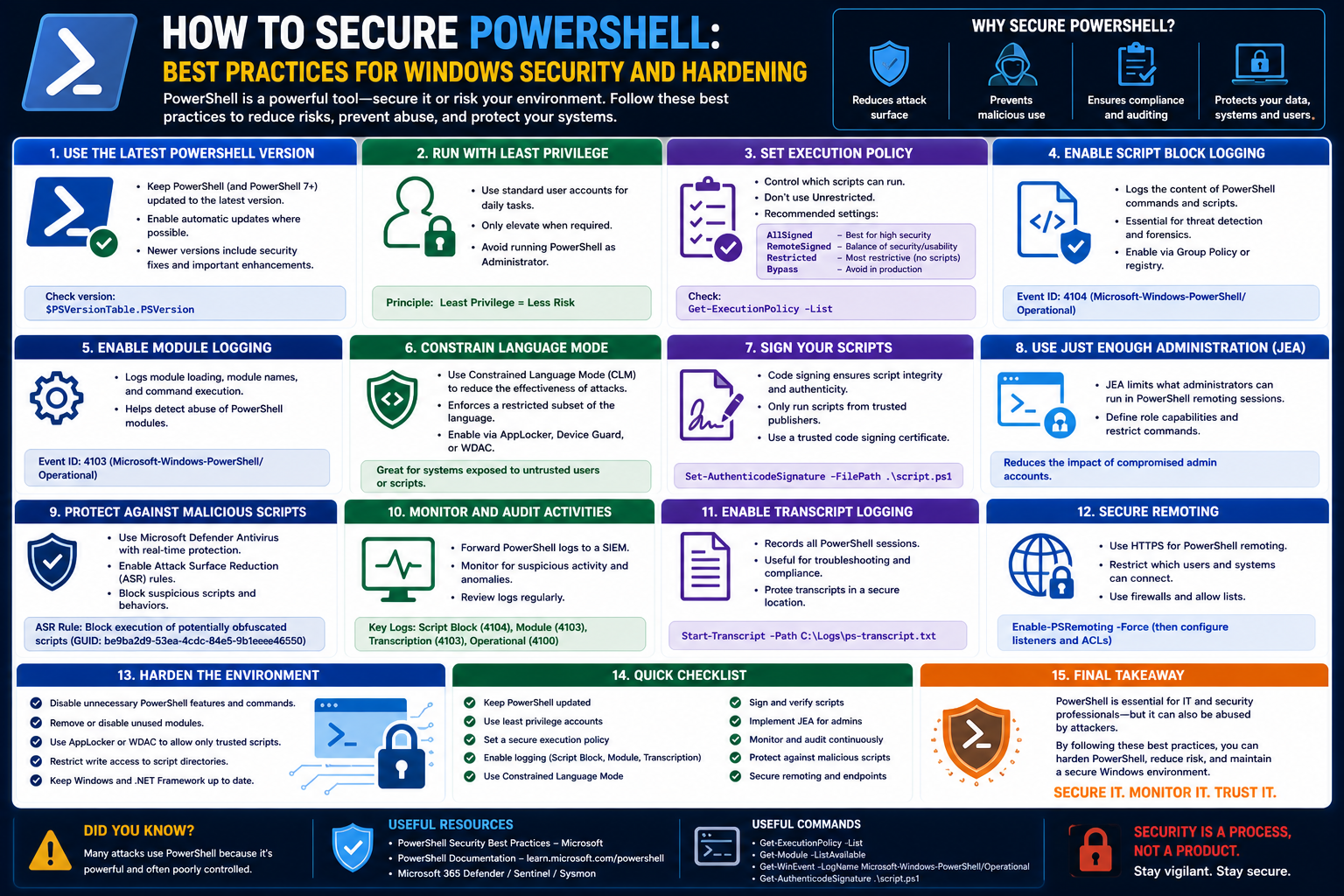
PowerShell has become one of the most important tools in modern IT environments because it brings automation, consistency, and control to system administration. It is deeply integrated into Windows systems and is also widely used across hybrid and cloud infrastructures. What makes it particularly powerful is its ability to interact with almost every component of an operating system, from file systems and registry settings to network configurations, user management, and application services.
This deep level of access is exactly what makes PowerShell both valuable and potentially risky. When used correctly, it reduces manual effort, improves efficiency, and allows administrators to manage large-scale environments with precision. However, the same capabilities that make it efficient also make it an attractive target for attackers.
In many organizations, PowerShell is treated as a trusted internal tool, which often leads to relaxed security configurations. This assumption of trust can create gaps that malicious actors may exploit if proper safeguards are not in place.
Why PowerShell Becomes a Security Concern
Unlike many traditional applications, PowerShell is not just a tool—it is an execution environment. It can run commands directly in memory, interact with system-level components, and perform actions without leaving obvious traces on disk. This makes it extremely efficient for automation but also difficult to monitor when misused.
Attackers often prefer tools like PowerShell because it is already present in most Windows environments. There is no need to install additional software, which helps malicious activity blend in with normal administrative tasks. This approach is commonly referred to as “living off the land,” where legitimate system tools are repurposed for unauthorized actions.
In real-world scenarios, PowerShell can be used for tasks such as downloading and executing remote scripts, modifying system settings, harvesting credentials, or moving laterally across a network. When security controls are weak or misconfigured, these actions may go unnoticed until significant damage has occurred.
The Importance of Security by Design
Security in PowerShell is not a single feature but a combination of layered controls designed to reduce risk. These controls work together to ensure that only trusted scripts are executed and that unauthorized modifications are prevented or detected.
One of the key principles behind PowerShell security is the idea of restricting execution by default. Instead of allowing all scripts to run freely, PowerShell environments are designed to limit execution unless specific conditions are met. This reduces the likelihood of accidental or malicious script execution.
Another important principle is trust verification. Scripts should not only be allowed or blocked; they should be verified for authenticity. This is where digital signatures and certificate-based validation play an important role.
Understanding Execution Policies in PowerShell
Execution policies are one of the first lines of defense in PowerShell security. They determine how scripts are allowed to run on a system. These policies do not act as a complete security boundary on their own, but they provide an important layer of control that helps reduce risk in everyday operations.
There are several execution policy levels, each designed for different security needs and organizational environments.
Restricted Policy
The most restrictive policy is the one that blocks all script execution. In this mode, PowerShell only allows interactive commands, meaning scripts cannot run at all. This setting is typically used in highly secure environments or systems where scripting is not required.
While this provides strong protection, it also limits automation capabilities significantly. As a result, it is rarely used in enterprise environments where automation is essential.
AllSigned Policy
In environments where security is a priority but scripting is still required, the AllSigned policy is often used. This policy requires that every script must be digitally signed by a trusted certificate before it can run.
This approach ensures that only verified scripts are executed, regardless of whether they are created internally or externally. If a script is modified after signing, it will no longer be considered valid, which helps protect against tampering.
RemoteSigned Policy
The RemoteSigned policy is one of the most commonly used configurations in business environments. It allows scripts created locally to run without requiring a digital signature, while scripts downloaded from external sources must be signed.
This distinction is important because it helps reduce the risk associated with untrusted external content while maintaining flexibility for internal automation.
Unrestricted Policy
The least restrictive policy allows all scripts to run, regardless of origin or signature. While this provides maximum flexibility, it also introduces significant security risks. In environments where this policy is used, it becomes much harder to distinguish between legitimate administrative scripts and potentially harmful code.
Because of these risks, this policy is generally discouraged in enterprise environments unless additional controls are in place.
The Role of Digital Signatures in Script Trust
Digital signatures are a critical component of PowerShell security. They provide a way to verify the identity of the script creator and ensure that the script has not been altered since it was signed.
At a high level, a digital signature works by using cryptographic technology to attach a unique identifier to a script. This identifier is linked to a certificate issued by a trusted authority. When the script is executed, PowerShell checks the signature to confirm its authenticity.
If the script has been modified in any way after signing, the signature becomes invalid. This helps prevent tampering and ensures that only trusted versions of scripts are executed.
In enterprise environments, digital signatures also help establish accountability. Administrators can track which scripts were created by which individuals, adding a layer of traceability that is important for auditing and compliance.
Certificates and Trust Infrastructure
Certificates are at the core of PowerShell script signing. They act as digital identities that validate the source of a script. These certificates can be issued by internal systems or external authorities, depending on the organization’s requirements.
In many enterprise environments, certificate management is handled through centralized infrastructure. This allows administrators to control who can issue signatures and which certificates are trusted across the organization.
The trust model ensures that only authorized individuals are able to sign scripts, reducing the risk of unauthorized or malicious code being distributed within the environment.
Common Threats Targeting PowerShell
Because PowerShell is widely available and highly capable, it is frequently targeted by attackers. One of the most common attack methods involves executing malicious scripts that are disguised as legitimate administrative tasks.
These scripts may be delivered through phishing emails, compromised websites, or infected attachments. Once executed, they can perform a wide range of harmful actions without requiring additional software.
Another common threat involves script obfuscation. Attackers often modify scripts to make them difficult to read or detect. This can include encoding commands, splitting instructions into multiple parts, or using indirect execution methods.
There is also the risk of credential theft. Since PowerShell can access system memory and authentication components, improperly secured environments may expose sensitive credentials that can be used for further attacks.
Execution Control as a Defensive Layer
Execution control is the mechanism that determines which scripts are allowed to run and under what conditions. In PowerShell, this control is not just about blocking or allowing scripts but also about enforcing trust and integrity.
By controlling execution, organizations can reduce the risk of unauthorized scripts running on critical systems. This is especially important in environments with multiple administrators, distributed teams, or remote access scenarios.
Without proper execution control, it becomes difficult to maintain visibility over script activity, increasing the likelihood of security incidents going unnoticed.
Identity and Integrity in Script Execution
Two of the most important concepts in PowerShell security are identity and integrity. Identity refers to knowing who created or signed a script, while integrity ensures that the script has not been altered since it was created.
Together, these concepts help establish trust in automation processes. Without them, it becomes difficult to determine whether a script is safe to execute or whether it has been compromised.
Integrity is particularly important in environments where scripts are transferred between systems or stored in shared repositories. Even small changes to a script can significantly alter its behavior, making integrity validation essential.
The Enterprise Challenge of PowerShell Security
In small environments, managing PowerShell security is relatively straightforward because the number of administrators and systems is limited. Communication is often direct, and changes are easier to track.
However, in enterprise environments, complexity increases significantly. Multiple teams may manage different parts of the infrastructure, often across different locations and time zones. This makes it harder to maintain consistent security policies.
In such environments, even a small misconfiguration can create vulnerabilities. For example, if one system allows unrestricted script execution while others enforce strict signing requirements, attackers may exploit the weakest point to gain access.
This is why standardized security policies are essential in large organizations. Without them, maintaining control over script execution becomes increasingly difficult.
Balancing Security and Usability
One of the ongoing challenges in PowerShell security is finding the right balance between protection and usability. Overly strict policies can hinder productivity and slow down automation processes. On the other hand, overly relaxed policies can expose systems to unnecessary risk.
Organizations must carefully evaluate their operational needs and security requirements when configuring PowerShell environments. In many cases, a layered approach is used, where different levels of control are applied depending on the sensitivity of the system.
For example, development environments may allow more flexibility, while production systems enforce stricter controls. This approach helps maintain efficiency without compromising security.
The Growing Importance of Script Governance
As organizations increasingly rely on automation, script governance becomes more important. Governance refers to the policies, procedures, and controls that define how scripts are created, signed, distributed, and executed.
Without proper governance, scripts can quickly become difficult to manage, leading to inconsistent security practices and increased risk exposure. Governance helps ensure that all scripts follow the same standards and are subject to appropriate review and approval processes.
In modern IT environments, script governance is not optional. It is a necessary part of maintaining control over automation and ensuring that security policies are consistently applied across the infrastructure.
Building a Trusted PowerShell Signing Infrastructure
Securing PowerShell at scale begins with establishing a trusted signing infrastructure. This is the foundation that allows organizations to verify the authenticity and integrity of scripts before they are executed. Without this structure, execution policies alone cannot provide meaningful protection in complex environments.
A signing infrastructure is built around the idea that every script running in the organization should be traceable to a verified identity. This identity is represented through digital certificates. When a script is signed, it carries a cryptographic assurance that it was created by an approved source and has not been altered after signing.
In enterprise environments, this system typically involves a centralized authority that issues and manages certificates. Administrators and authorized developers are granted certificates based on their roles and responsibilities. These certificates are then used to sign scripts before deployment.
The process introduces accountability into automation. Instead of scripts being anonymous files, they become identifiable assets tied to specific individuals or teams. This significantly reduces ambiguity when investigating system behavior or auditing changes.
Certificate Authorities and Enterprise Trust Chains
At the heart of script signing is a certificate authority system. This system establishes trust by issuing digital certificates that are recognized across the organization. When properly configured, every system in the environment trusts certificates issued by this authority.
In many organizations, this trust is built using an internal certificate infrastructure that integrates with directory services. This allows centralized control over who can request certificates and what type of certificates they can obtain.
The trust chain is critical because it ensures that PowerShell does not rely on individual system configurations for validation. Instead, trust is established at a higher level, and all connected systems inherit the same security assumptions.
If the certificate authority is compromised or misconfigured, the entire trust model can be weakened. This is why strict administrative control and monitoring of certificate issuance is essential.
Certificates used for PowerShell signing are typically restricted in scope. They are designed specifically for code signing and are not interchangeable with other types of authentication certificates. This specialization helps limit misuse and reduces the risk of certificate abuse.
Implementing Script Signing Workflows in Organizations
Once a certificate infrastructure is in place, organizations must define how scripts are created, signed, and deployed. This workflow is essential for maintaining consistency and ensuring that security policies are enforced across all environments.
A typical workflow begins with script development. Developers or administrators create PowerShell scripts to automate tasks or manage systems. Before these scripts can be used in production, they must go through a signing process.
The signing process involves using a valid code signing certificate to apply a digital signature to the script. This step confirms both the identity of the author and the integrity of the script content.
After signing, scripts are often stored in controlled repositories or deployment systems. These systems ensure that only approved versions of scripts are distributed to production environments.
In more mature environments, scripts may also go through review and approval stages before signing. This introduces an additional layer of validation, ensuring that scripts are not only technically correct but also compliant with organizational policies.
This workflow transforms scripting from an informal activity into a governed process. It reduces the risk of unauthorized changes and helps ensure that automation remains secure and predictable.
Managing Certificates Across Teams and Systems
Managing certificates in large environments is a complex task. Certificates must be distributed to authorized users while ensuring they are not misused or exposed. This requires careful control over certificate storage, access, and lifecycle management.
Certificates used for script signing are typically stored in secure certificate stores on user systems or centralized management systems. Access to these certificates is restricted based on user roles and responsibilities.
One of the key challenges in certificate management is ensuring that certificates are not shared or duplicated across unauthorized systems. If a certificate is compromised, it can be used to sign malicious scripts that appear legitimate.
To mitigate this risk, organizations often implement expiration policies and regular renewal cycles for certificates. This limits the window of opportunity for misuse and ensures that compromised credentials do not remain valid indefinitely.
Another important aspect of certificate management is revocation. If a certificate is found to be compromised or misused, it can be revoked. Once revoked, systems configured to check certificate status will reject any scripts signed with that certificate.
Proper certificate management ensures that trust remains dynamic rather than static. It allows organizations to adapt to changing security conditions and maintain control over script execution.
Enforcing Execution Control with Group Policy
While execution policies define how PowerShell behaves on a single system, enforcement at scale requires centralized management. This is where group policy mechanisms become important in enterprise environments.
Group-based configuration allows administrators to apply consistent PowerShell security settings across large numbers of systems. These settings can define which execution policies are allowed, how scripts are signed, and which users have permission to run scripts at all.
By applying these controls centrally, organizations reduce the risk of inconsistent configurations. Without centralized enforcement, individual systems may drift into insecure states, creating vulnerabilities that are difficult to detect.
Group-based enforcement can also be used to segment environments. For example, high-security systems may enforce strict script signing requirements, while development systems may allow more flexibility. This segmentation helps balance security with operational needs.
In addition to execution policies, group-based management can control logging, script restrictions, and user permissions. This creates a layered security model that is consistently applied across the entire infrastructure.
Monitoring PowerShell Activity for Security Visibility
Security is not only about prevention but also about visibility. Monitoring PowerShell activity is essential for detecting suspicious behavior and responding to potential threats.
PowerShell generates a wide range of activity signals that can be monitored, including command execution, script loading, and module usage. When properly configured, these signals provide valuable insight into how the system is being used.
Monitoring is particularly important because attackers often attempt to blend malicious activity with legitimate administrative actions. Without visibility, it becomes difficult to distinguish between normal operations and potential threats.
Security teams rely on monitoring to identify unusual patterns, such as unexpected script execution, repeated access attempts, or the use of obfuscated commands. These indicators can help detect attacks in their early stages.
Effective monitoring requires both system-level logging and centralized aggregation. This allows security teams to correlate events across multiple systems and identify broader attack patterns.
Understanding Script Logging and Audit Mechanisms
PowerShell includes several logging mechanisms designed to improve visibility and support auditing. These mechanisms capture detailed information about script execution and command usage.
One of the most important logging features is script block logging. This records the content of scripts as they are executed, allowing administrators to see exactly what code was run on a system.
Another important feature is module logging, which tracks the use of specific PowerShell modules. This helps identify which system components are being accessed and how they are being used.
Transcription logging is another layer of visibility that records all PowerShell input and output. This creates a complete record of interactive sessions, which can be useful for forensic analysis.
Together, these logging mechanisms provide a comprehensive view of PowerShell activity. They help organizations reconstruct events after a security incident and identify the source of suspicious behavior.
However, logging alone is not enough. It must be combined with proper analysis and alerting systems to be effective. Without active monitoring, logs may contain valuable information that goes unnoticed.
Common Attack Techniques Against PowerShell Security
Despite its security features, PowerShell is frequently targeted by attackers due to its power and flexibility. Many attack techniques focus on bypassing or evading security controls rather than directly breaking them.
One common technique involves script obfuscation. Attackers modify scripts to make them difficult to read or detect. This can include encoding commands, splitting logic across multiple sections, or using indirect execution methods.
Another technique involves in-memory execution. Instead of writing malicious scripts to disk, attackers execute them directly in memory. This reduces the chances of detection by traditional file-based security tools.
Attackers may also attempt to exploit trusted processes. Since PowerShell is a legitimate administrative tool, malicious activity can sometimes blend in with normal operations, making detection more difficult.
Credential harvesting is another frequent objective. Because PowerShell has deep system access, it can be used to extract sensitive information such as authentication tokens or stored credentials.
These techniques highlight the importance of layered security. Relying on a single control is not sufficient to defend against modern attack strategies.
Living-off-the-Land and Abuse of Legitimate Tools
One of the most significant challenges in PowerShell security is its role in living-off-the-land attacks. This approach involves using legitimate system tools to carry out malicious activities.
PowerShell is particularly useful for this type of attack because it is trusted by the operating system and widely available across Windows environments. Attackers do not need to install additional software, which makes detection more difficult.
By using built-in commands and system features, attackers can perform actions such as network discovery, file manipulation, and remote execution while appearing as normal administrative activity.
This blending of legitimate and malicious behavior is one of the reasons PowerShell security is so important. Traditional security tools that focus on detecting unknown applications may not be effective against these types of attacks.
Understanding this threat model is essential for designing effective defenses. It requires shifting focus from blocking tools to analyzing behavior.
Bypassing Execution Policies and Why They Fail Alone
Execution policies are often misunderstood as strict security boundaries, but in reality, they are designed as safety controls rather than enforcement mechanisms. This means they can be bypassed in certain conditions.
Attackers may use various techniques to bypass execution policies, such as modifying how scripts are loaded or executed. Because execution policies are evaluated at runtime and not enforced at a deeper system level, they are not sufficient on their own to prevent malicious activity.
This limitation does not mean execution policies are useless. They still provide valuable friction that can stop accidental execution and low-sophistication attacks. However, they must be combined with other security controls to be effective.
Relying solely on execution policies creates a false sense of security. Organizations that assume these policies provide complete protection may overlook other critical vulnerabilities.
Effective PowerShell security requires a combination of script signing, logging, monitoring, access control, and behavioral analysis.
Defensive Layers Beyond Execution Policy
Modern PowerShell security relies on multiple layers of defense that work together to reduce risk. These layers include identity verification, execution control, monitoring, and behavioral restrictions.
One important layer is constrained execution environments. These environments limit what PowerShell can do, reducing the potential impact of malicious scripts. By restricting available commands and system access, organizations can significantly reduce risk.
Another layer involves real-time script analysis. Some systems can analyze scripts as they are executed, identifying potentially malicious behavior based on patterns or structure.
Endpoint security tools also play a role by monitoring PowerShell activity and detecting anomalies. These tools can identify unusual behavior that may indicate compromise.
Access control is another critical layer. By limiting who can execute scripts and under what conditions, organizations reduce the likelihood of unauthorized activity.
When combined, these layers create a defense-in-depth model that is much more resilient than any single control.
Evolving Threat Landscape Around PowerShell
As PowerShell has become a standard tool in modern Windows environments, its role in security has shifted from convenience to critical concern. Attackers no longer rely on traditional malware alone. Instead, they increasingly depend on legitimate system tools that already exist inside enterprise environments. PowerShell sits at the center of this shift because it provides direct access to system functions, automation layers, and administrative controls.
What makes this evolution especially important is that modern attacks are no longer dependent on installing visible malicious programs. Instead, adversaries often operate through trusted processes already approved by system policies. This allows them to blend into normal administrative activity while performing harmful actions in the background.
In many real-world cases, attackers use PowerShell to move laterally between systems, collect sensitive data, or establish persistence. These actions are often executed in memory, leaving very little traditional forensic evidence behind. As a result, security teams must rely on behavioral analysis and system-level monitoring rather than file-based detection alone.
The challenge is no longer just preventing unauthorized scripts from running. It is about identifying when legitimate tools are being used in illegitimate ways.
Constrained Execution Environments and Their Role
One of the most effective approaches to reducing PowerShell risk in enterprise environments is the use of constrained execution environments. These environments limit what PowerShell can do based on predefined security rules.
Instead of providing unrestricted access to the full system, constrained environments restrict available commands, modules, and system interactions. This reduces the potential impact of both accidental misconfiguration and malicious activity.
In a constrained environment, even if an attacker gains access to PowerShell, their ability to execute harmful actions is significantly reduced. They may still be able to run basic commands, but access to sensitive system functions or administrative operations is restricted.
This approach is particularly useful in environments where users require PowerShell for automation but do not need full administrative capabilities. By limiting functionality, organizations can maintain productivity while reducing risk exposure.
Constrained environments also help reduce attack surface. Since fewer commands are available, there are fewer opportunities for exploitation or misuse.
Understanding Script Execution in Memory
One of the most significant challenges in PowerShell security is its ability to execute scripts directly in memory. Unlike traditional applications that rely on files stored on disk, PowerShell can load and execute commands dynamically.
This behavior is extremely powerful for automation but also creates challenges for detection. When scripts execute in memory, they may never touch the file system, making them harder to identify using traditional security tools.
Attackers take advantage of this capability by delivering payloads that exist only temporarily in system memory. Once executed, these payloads may self-destruct or disappear without leaving obvious traces.
Because of this, security strategies must focus on runtime behavior rather than file existence. Monitoring how PowerShell behaves during execution becomes more important than simply tracking whether a script file exists.
This shift requires more advanced detection methods that analyze patterns of activity rather than static signatures.
Antimalware Integration and Behavioral Detection
Modern security systems often integrate directly with PowerShell to monitor behavior in real time. Instead of waiting for malicious files to be written to disk, these systems analyze commands as they are executed.
Behavioral detection focuses on identifying patterns that are consistent with malicious activity. This may include unusual command sequences, unexpected system modifications, or attempts to access sensitive resources.
One of the key advantages of behavioral detection is that it does not rely on known signatures. This allows it to identify previously unseen threats, including custom or obfuscated scripts.
However, behavioral detection also introduces challenges. Legitimate administrative activity can sometimes resemble malicious behavior, especially in complex automation environments. This requires careful tuning to reduce false positives while maintaining security effectiveness.
Security teams must continuously refine detection rules to align with changing usage patterns.
PowerShell Logging at Scale and Centralized Analysis
In large environments, logging becomes one of the most important tools for understanding PowerShell activity. However, logging alone is not sufficient. The real value comes from centralized analysis.
When logs are collected from multiple systems and aggregated into a central platform, they provide a broader view of system activity. This allows security teams to identify patterns that would not be visible at the individual system level.
For example, a single system may show unusual script execution, but when combined with logs from other systems, it may reveal a coordinated attack pattern.
Centralized logging also enables correlation between different types of events. PowerShell activity can be analyzed alongside network traffic, authentication events, and system changes to build a more complete picture of security incidents.
Without centralized analysis, logs remain isolated and less useful for threat detection.
Security Information and Event Correlation
Modern security operations rely heavily on event correlation. This involves analyzing multiple sources of data to identify relationships between seemingly unrelated activities.
PowerShell logs are a critical part of this process. When combined with other system logs, they help build timelines of activity that can reveal attack chains.
For example, an attacker may first gain access through compromised credentials, then use PowerShell to explore the system, and finally move laterally across the network. Each step may appear normal in isolation, but when correlated, they reveal a coordinated attack.
Event correlation requires both data collection and intelligent analysis. Raw logs alone are not enough. They must be processed and interpreted in context.
This is where centralized security platforms play an important role, as they can automate much of the correlation process and highlight suspicious patterns.
PowerShell Remoting and Associated Risks
PowerShell remoting is a feature that allows administrators to execute commands on remote systems. While this is extremely useful for managing large environments, it also introduces additional security considerations.
Because remoting allows commands to be executed across multiple systems, it expands the potential attack surface. If not properly secured, it can be used to move laterally within a network.
Attackers who gain access to a single system may attempt to use remoting capabilities to expand their control across other systems. This makes securing remoting endpoints a critical part of PowerShell security.
Restricting access to remoting features, monitoring remote sessions, and enforcing authentication controls are all important strategies for reducing risk.
In secure environments, remoting should be treated as a privileged capability rather than a default feature.
Identity-Based Controls and Least Privilege Enforcement
One of the core principles of modern security is least privilege. This principle states that users and systems should only have the minimum level of access required to perform their tasks.
In PowerShell environments, this means carefully controlling who can execute scripts, who can access administrative functions, and who can use remote execution capabilities.
Identity-based controls ensure that access is tied to user roles rather than individual systems. This allows organizations to enforce consistent security policies regardless of where users are working from.
By limiting privileges, organizations reduce the potential impact of compromised accounts. Even if an attacker gains access to a user account, their ability to perform harmful actions is restricted.
Least privilege is especially important in environments with automated scripts and shared administrative responsibilities.
Integrating PowerShell Security with DevOps Practices
As organizations adopt automation and continuous delivery practices, PowerShell often becomes part of DevOps workflows. This introduces both opportunities and challenges for security.
On one hand, automation improves consistency and reduces manual errors. On the other hand, it increases the number of scripts and processes that must be managed securely.
In DevOps environments, scripts are often developed, tested, and deployed rapidly. Without proper controls, this speed can introduce security risks.
Integrating security into the development lifecycle is essential. Scripts should be reviewed, validated, and signed before being deployed into production environments.
This approach ensures that security is not an afterthought but part of the development process itself.
Automation pipelines should also include validation steps that verify script integrity and compliance with security policies.
Detecting Obfuscation and Evasive Techniques
One of the most common methods used to bypass PowerShell security controls is obfuscation. This involves modifying scripts to make them difficult to read or analyze.
Obfuscation does not change what a script does, but it changes how it appears. This makes it harder for security tools and analysts to understand its behavior.
Attackers may use encoding techniques, fragmented commands, or indirect execution methods to hide malicious intent.
Detecting obfuscation requires more advanced analysis techniques. Instead of relying on simple pattern matching, security systems must analyze behavior and structure.
For example, scripts that heavily manipulate strings or dynamically construct commands may be flagged for further investigation.
While not all obfuscated scripts are malicious, obfuscation is often a strong indicator of suspicious activity.
Endpoint Security and PowerShell Monitoring
Endpoint security systems play a critical role in monitoring PowerShell activity. These systems operate directly on individual machines, providing real-time visibility into script execution and system behavior.
By monitoring PowerShell at the endpoint level, security tools can detect unusual activity as it occurs. This allows for faster response times and reduces the window of opportunity for attackers.
Endpoint monitoring can include tracking command execution, analyzing script content, and identifying unusual system interactions.
When combined with centralized analysis, endpoint data provides a detailed and comprehensive view of system activity.
However, endpoint security must be carefully configured to avoid excessive performance impact or unnecessary alerts.
Incident Response and PowerShell Forensics
When a security incident occurs, PowerShell activity often becomes a key area of investigation. Because PowerShell can execute complex actions quickly and in memory, it is often involved in both initial compromise and post-exploitation activity.
Forensic analysis of PowerShell activity involves reconstructing what commands were executed, when they were executed, and what impact they had on the system.
This requires access to detailed logs, including script execution records and system event data.
One of the challenges in PowerShell forensics is dealing with incomplete information. If logging is not properly enabled, some activity may not be recorded.
This highlights the importance of proactive logging configuration before incidents occur.
Incident response teams use PowerShell logs to trace attacker behavior, identify compromised systems, and determine the scope of an attack.
Governance Models for Long-Term Security Control
Sustainable PowerShell security requires governance. Governance refers to the policies, processes, and structures that define how PowerShell is used within an organization.
Without governance, security controls may become inconsistent over time. Different teams may apply different rules, leading to gaps in protection.
Governance ensures that all PowerShell usage follows a consistent framework. This includes script development standards, signing requirements, execution policies, and monitoring practices.
It also defines roles and responsibilities, ensuring that accountability is clearly established.
In mature environments, governance is not static. It evolves as new threats emerge and new technologies are introduced.
Continuous Improvement in PowerShell Security Posture
PowerShell security is not a one-time configuration task. It is an ongoing process that requires continuous monitoring, adjustment, and improvement.
As attackers develop new techniques, security controls must adapt. This includes refining detection rules, updating execution policies, and improving logging coverage.
Regular reviews of PowerShell activity help identify gaps in security and opportunities for improvement.
Organizations that treat security as a continuous process are better positioned to respond to evolving threats.
This ongoing improvement cycle is essential for maintaining long-term resilience in dynamic IT environments.
Conclusion
PowerShell has evolved far beyond a simple scripting utility. It now sits at the center of modern Windows administration, cloud integration, and enterprise automation. Its ability to manage systems at scale, automate complex workflows, and interact deeply with operating system components makes it indispensable in today’s IT environments. At the same time, this same power makes it a high-value target for misuse, requiring organizations to approach its security with careful planning and ongoing attention.
A secure PowerShell environment is not achieved through a single configuration change or a one-time setup. Instead, it is the result of multiple layered controls working together. Execution policies provide a basic level of restriction, but they are only the starting point. Real security comes from combining these policies with stronger mechanisms such as digital script signing, certificate-based trust models, centralized logging, behavioral monitoring, and strict identity controls.
One of the most important lessons in securing PowerShell is understanding that trust must be explicitly defined, not assumed. By default, systems often prioritize usability over strict security, which can create gaps that attackers are quick to exploit. Introducing digital signatures ensures that scripts are not only executed but verified, helping organizations distinguish between trusted automation and potentially harmful code. When combined with proper certificate management, this approach builds a strong foundation of accountability and integrity.
Equally important is the recognition that execution control alone is not enough. Many real-world attacks bypass traditional restrictions by exploiting legitimate system tools or executing commands in memory without leaving visible traces on disk. This is why modern PowerShell security relies heavily on behavior-based monitoring and real-time analysis rather than static rules alone. Detecting unusual patterns of activity, rather than just known malicious files, allows organizations to identify threats that would otherwise go unnoticed.
Centralized logging and correlation further strengthen this visibility. In large environments, individual system logs may not reveal the full picture of an attack. However, when data from multiple systems is combined and analyzed together, patterns begin to emerge that highlight coordinated activity or lateral movement. This holistic view is essential for understanding how attacks unfold across an environment and for responding effectively.
Identity and access management also play a central role. Applying the principle of least privilege ensures that users and systems only have the permissions they need to perform their tasks. This limits the potential damage that can occur if credentials are compromised or scripts are misused. When combined with role-based access controls, it becomes possible to tightly regulate who can execute scripts, modify configurations, or access sensitive systems.
As organizations continue to adopt automation and DevOps practices, PowerShell security must also evolve. Scripts are no longer static files executed occasionally by administrators; they are now part of continuous deployment pipelines and automated workflows. This increases both their importance and their risk profile. Integrating security checks into these workflows ensures that scripts are validated and approved before they reach production environments, reducing the chance of introducing vulnerabilities.
Ultimately, securing PowerShell is about building trust into every layer of the system. From script creation and signing to execution and monitoring, every stage plays a role in ensuring that automation remains safe and reliable. No single control is sufficient on its own. Instead, resilience comes from combining multiple defenses that reinforce each other and reduce the likelihood of successful exploitation.
In modern IT environments, where speed and automation are essential, security cannot be an afterthought. It must be embedded into the way PowerShell is used, managed, and governed. Organizations that take this approach are better equipped to handle evolving threats, maintain operational stability, and protect critical systems from misuse.