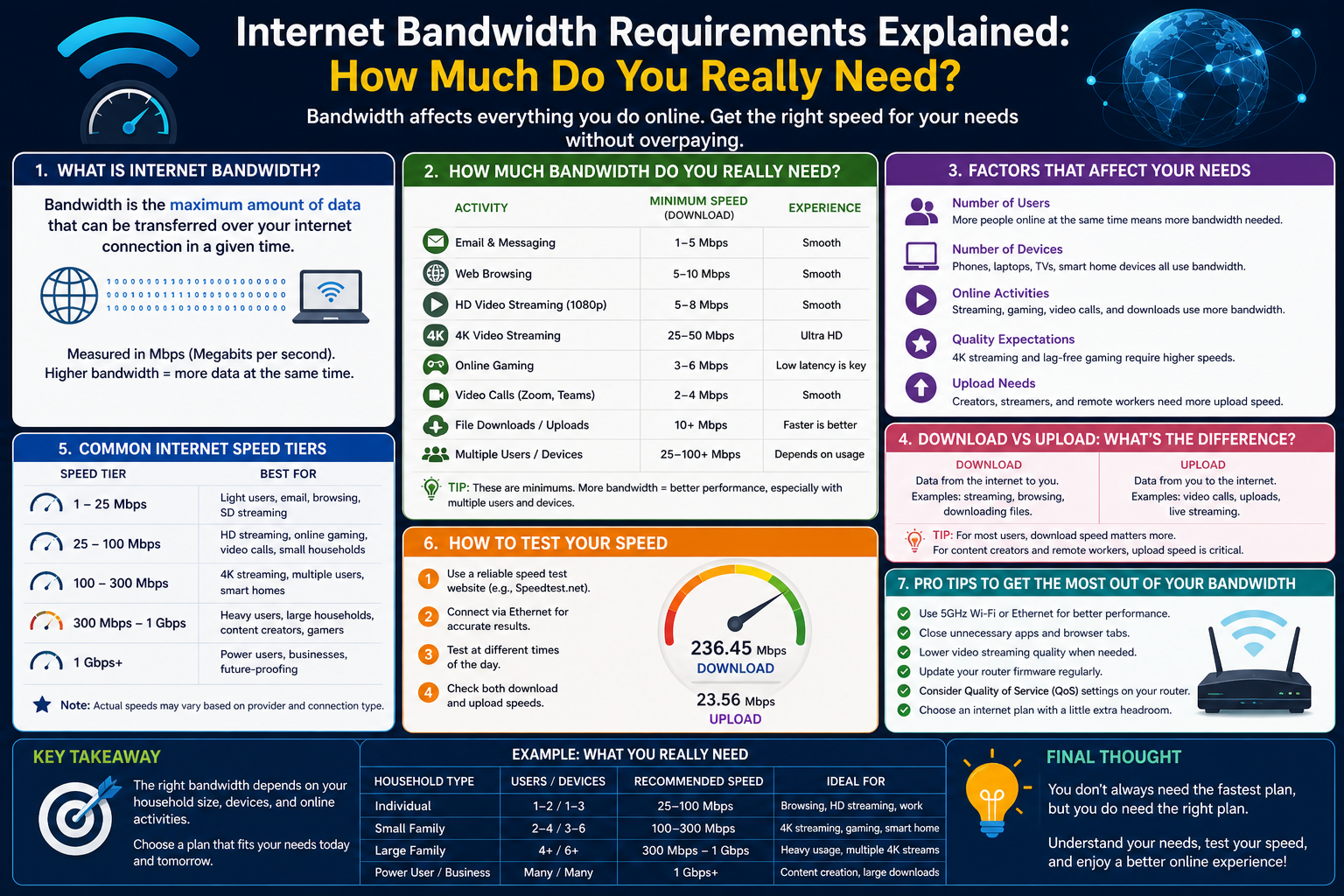
When people talk about internet performance, the conversation usually starts and ends with a single figure: the number provided by the Internet Service Provider. It is often described as the “speed” of the connection, such as 50 Mbps, 100 Mbps, or even 1 Gbps. This number becomes the default way most users judge whether their internet is fast or slow. However, this figure alone does not tell the full story of how well a network will actually perform in everyday use.
Internet performance is influenced by multiple interconnected factors. Bandwidth is only one part of a much larger system that includes hardware capability, network congestion, signal quality, and the nature of the applications being used. A connection that looks powerful on paper may still feel slow in real life if other elements in the system are not aligned.
For example, two users with the same internet plan can experience completely different performance. One might enjoy smooth video streaming and fast downloads, while the other struggles with buffering and delays. The difference is rarely the internet plan itself. Instead, it is usually related to how the connection is being used, what devices are connected, and how efficiently data is being handled across the network.
Understanding internet performance requires shifting focus away from a single advertised number and toward a broader view of how data moves, how it is shared, and how it is processed. This broader understanding is what allows users to make informed decisions about upgrades, troubleshooting, and overall network optimization.
What Bandwidth Actually Means in Simple Terms
Bandwidth is one of the most commonly used terms in networking, but it is also one of the most misunderstood. In simple terms, bandwidth refers to the maximum amount of data that can be transmitted over an internet connection in a given period of time. It is essentially the capacity of the connection rather than the actual speed at which data is moving.
A helpful way to understand bandwidth is to imagine a water pipe. The pipe itself represents the internet connection, and the amount of water that can flow through it represents data. A wider pipe allows more water to pass through at once, just as higher bandwidth allows more data to travel simultaneously. However, the speed at which the water moves through the pipe is influenced by pressure, blockages, and other conditions, not just the size of the pipe.
In real-world terms, bandwidth determines how much activity your network can handle at the same time. For instance, a household with multiple users streaming videos, attending video meetings, and downloading files will require more bandwidth than a household where only basic browsing and messaging occur.
It is also important to understand that bandwidth does not guarantee performance. A high-bandwidth connection can still feel slow if other limiting factors exist. These factors may include outdated hardware, poor Wi-Fi signal strength, or high network congestion. Bandwidth sets the ceiling for performance, but it does not control how close you get to that ceiling.
Because of this, increasing bandwidth alone does not always solve performance issues. It simply raises the potential capacity of the network, which may or may not translate into noticeable improvements depending on how the network is being used.
How Data Travels Across a Network
To understand bandwidth more clearly, it helps to visualize how data moves through a network. Every online activity, whether it is loading a webpage, streaming a video, or sending an email, involves data being broken into small units and transmitted across multiple systems before reaching its destination.
When you perform an action online, your device sends a request through a router, which then passes it through your internet connection to your Internet Service Provider. From there, the data travels across a series of networks, often passing through multiple servers and routing points, before reaching the server that hosts the information you requested. The response then travels back through the same general path to your device.
This process happens extremely quickly, often in milliseconds, but it involves many steps. Each step introduces potential delays or limitations. The efficiency of this journey depends on available bandwidth, network congestion, routing efficiency, and hardware performance.
Bandwidth plays a key role in determining how much data can move through each segment of this journey at the same time. If too much data is trying to pass through a limited connection, some of it must wait. This waiting creates delays, which users experience as buffering, slow downloads, or lag.
However, it is important to note that data does not travel in a continuous stream like water flowing through a pipe. Instead, it moves in packets. These packets can take different routes and may arrive out of order, requiring reassembly at the destination. The system is designed to handle this complexity, but it also means that performance depends on more than just raw bandwidth capacity.
Bandwidth vs Speed Misconceptions
One of the most common misunderstandings in networking is the assumption that bandwidth is the same as speed. While the two terms are often used interchangeably in everyday conversation, they refer to different aspects of network performance.
Speed, in practical terms, refers to how quickly data is transferred from one point to another. Bandwidth, on the other hand, refers to how much data can be transferred at once. These are related concepts, but they are not identical.
A useful analogy is a highway system. Bandwidth is like the number of lanes on the highway, while speed is how fast the cars are traveling. A highway with many lanes can carry more vehicles simultaneously, but if traffic is slow due to congestion or accidents, overall travel time will still be affected.
Similarly, a high-bandwidth internet connection can support large volumes of data, but it does not guarantee that each individual data transfer will be fast. If the network is congested or if other limiting factors exist, the experience may still feel slow.
This distinction becomes especially important when troubleshooting performance issues. Many users assume that upgrading their internet plan will automatically solve slow performance problems. In reality, if the issue is related to latency, hardware limitations, or Wi-Fi interference, increasing bandwidth alone may not produce noticeable improvements.
Understanding this difference helps users avoid unnecessary upgrades and focus instead on identifying the real cause of performance issues.
Throughput Explained in Real-World Terms
While bandwidth represents potential capacity, throughput represents actual performance. Throughput is the amount of data that successfully travels from one point to another in a given time. It reflects real-world conditions rather than theoretical maximums.
In ideal conditions, throughput may come close to the available bandwidth. However, in most real-world scenarios, throughput is lower due to various limiting factors. These may include network congestion, signal interference, hardware limitations, or inefficient routing paths.
Throughput is what users actually experience when downloading files, streaming videos, or browsing websites. If a connection has high bandwidth but low throughput, it may feel slow despite having a high-speed plan.
Several factors influence throughput. Network congestion is one of the most significant. When many users share the same network resources, each user receives a smaller portion of available capacity. This reduces overall performance.
Another factor is protocol overhead. Data transmission involves additional information beyond the actual content being sent. This overhead consumes part of the available bandwidth, reducing effective throughput.
Distance and routing complexity also play a role. Data that travels through multiple networks or over long distances may experience delays, reducing effective transfer rates.
Understanding throughput helps explain why real-world internet performance often differs from advertised speeds. It also highlights why performance optimization requires more than just increasing bandwidth.
Why Your Real Speed Differs from Your Plan
Many users notice a gap between the internet speeds they pay for and the speeds they actually experience. This difference is normal and can be explained by several technical factors.
First, internet service providers advertise maximum available bandwidth under ideal conditions. These conditions are rarely met in real-world environments. Network congestion, shared infrastructure, and peak usage times all affect actual performance.
Second, the quality of internal network hardware plays a significant role. Devices such as routers, switches, and network cables have their own limitations. If any component in the network cannot handle high speeds, it becomes a bottleneck that reduces overall performance.
Third, wireless connections introduce additional variability. Wi-Fi signals are affected by distance, walls, interference from other devices, and environmental conditions. This can significantly reduce throughput compared to wired connections.
Fourth, the performance of remote servers also matters. If a website or service is experiencing high demand or limited capacity, your connection speed will be affected regardless of your internet plan.
These combined factors explain why real-world performance often falls below advertised bandwidth levels. Understanding these limitations helps set realistic expectations and encourages a more comprehensive approach to network optimization.
Understanding Mbps, MBps, and Data Units
Data measurement units are another source of confusion when discussing internet performance. The most common terms are Mbps and MBps, which are often misunderstood.
Mbps stands for megabits per second, while MBps stands for megabytes per second. The difference between the two is based on how data is measured. A byte consists of eight bits, meaning one MBps is equal to eight Mbps.
Internet service providers typically use Mbps when describing connection speeds. This means that a 100 Mbps connection does not transfer 100 megabytes per second, but rather 100 megabits per second, which is significantly smaller in actual data size.
Understanding this distinction is important when estimating download times or comparing performance metrics. A file size measured in megabytes will take longer to download than it might initially appear if only Mbps is considered.
Data units also extend beyond megabits and megabytes to gigabits and gigabytes, which represent larger scales of data measurement. These units follow the same relationship, where eight bits make up one byte.
Clear understanding of these units helps users interpret internet speeds more accurately and avoid misconceptions about expected performance.
How Multiple Devices Share Bandwidth
Modern internet usage rarely involves a single device. Most households and workplaces have multiple devices connected to the same network simultaneously. Each of these devices competes for available bandwidth.
When only one device is active, it can use most of the available capacity. However, when multiple devices are streaming videos, downloading files, or participating in video calls, the available bandwidth is divided among them.
This division can lead to noticeable performance drops if the total demand exceeds available capacity. For example, if several users are streaming high-definition video at the same time, the network may become congested, resulting in buffering or reduced video quality.
This shared nature of bandwidth makes network planning important. It is not enough to consider individual usage patterns; overall combined usage must also be taken into account.
Devices also vary in their bandwidth consumption. Some applications, such as video streaming and online gaming, require continuous data flow, while others, such as email and browsing, use data in short bursts. Understanding these differences helps in managing network performance more effectively.
The Role of Network Equipment in Performance
Network hardware plays a critical role in determining how effectively bandwidth is used. Even with a high-speed internet plan, outdated or low-quality equipment can limit performance.
Routers are especially important because they manage traffic between devices and the internet. If a router cannot handle high data speeds, it becomes a bottleneck that restricts performance across the entire network.
Similarly, switches and network cables must be capable of supporting the desired speeds. Older hardware may only support lower bandwidth levels, which prevents users from fully utilizing their internet plan.
Wireless access points also influence performance. Wi-Fi standards vary in speed and efficiency, and older standards may not support modern bandwidth requirements.
In addition to hardware capability, proper configuration also matters. Poor placement of routers or interference from physical obstacles can reduce signal strength and overall performance.
Ensuring that network equipment is compatible with available bandwidth is essential for achieving optimal performance. Without this alignment, upgrading internet service alone will not result in significant improvements.
Early Signs You Are Running Out of Bandwidth
When a network approaches or exceeds its bandwidth capacity, certain performance issues begin to appear. These early signs are important indicators that the network may need adjustment or upgrading.
One common sign is buffering during video playback. When data cannot be delivered quickly enough, videos pause to load additional content.
Another sign is slow file downloads, especially when multiple devices are active on the network. This indicates that available bandwidth is being shared among too many users or applications.
Lag during online gaming is another indicator. Games require consistent data flow, and interruptions or delays can significantly impact performance.
Slow loading of websites, especially those with rich media content, can also indicate limited bandwidth or network congestion.
Inconsistent performance at different times of day may suggest peak usage congestion within the network or ISP infrastructure.
Recognizing these signs early allows users to evaluate whether bandwidth is the limiting factor or whether other elements such as hardware or latency are contributing to the issue.
The Hidden Factors That Shape Real Internet Performance
Once the basic concepts of bandwidth and throughput are understood, the next step is to look at the less obvious forces that shape real-world internet performance. These are the factors that users often do not see directly, yet they heavily influence whether a connection feels fast, stable, or frustrating.
In many cases, users assume performance is controlled only by their internet plan. However, behind every online activity is a complex interaction between networks, servers, devices, and transmission paths. Even with high bandwidth, performance can degrade if any part of this chain introduces delays or inefficiencies.
These hidden factors include latency variations, packet loss, jitter, routing inefficiencies, and congestion at multiple points in the network. Each of these contributes to the final experience in different ways. Understanding them helps explain why two identical internet connections can behave very differently in practice.
Instead of focusing only on capacity, it becomes important to understand quality of transmission. This shift in perspective is key to diagnosing performance issues more accurately.
Latency Variability and Why It Matters More Than Expected
Latency refers to the time it takes for data to travel from one point to another and back again. While often discussed as a single number, latency is rarely constant. It fluctuates depending on network conditions, distance, routing paths, and device performance.
Even small variations in latency can have a noticeable impact on user experience. Applications that rely on real-time communication, such as video calls or online gaming, are especially sensitive to these fluctuations.
For example, a stable connection with moderate latency can feel smoother than a faster connection with unstable latency. This is because consistency matters as much as speed. When latency spikes unexpectedly, it creates delays that disrupt real-time interaction.
These fluctuations are often caused by temporary congestion in network routers or changes in routing paths between servers. Data packets may take different routes depending on network load, which introduces variability.
Latency is also affected by physical distance. The farther data must travel, the more time it naturally takes. This is why connections to distant servers often feel slower even if bandwidth is high.
Understanding latency variability helps explain why performance can change from moment to moment, even when no obvious changes have been made to the network.
Packet Loss and Its Impact on Stability
Packet loss occurs when data packets fail to reach their destination during transmission. Unlike latency, which involves delay, packet loss involves missing data entirely. When this happens, systems must resend the lost information, which slows down communication and reduces efficiency.
Even a small amount of packet loss can have a noticeable effect on performance. Applications may freeze briefly, video streams may degrade in quality, and downloads may slow down significantly.
Packet loss is often caused by network congestion, faulty hardware, or unstable wireless connections. When routers or switches become overloaded, they may drop packets to maintain overall stability.
Wireless networks are particularly prone to packet loss due to interference from physical objects, other devices, and signal weakening over distance. This makes Wi-Fi environments more variable compared to wired connections.
The impact of packet loss becomes more severe in real-time applications. Unlike standard downloads, which can simply retry missing data, live communication requires continuous flow. Interruptions in this flow create noticeable disruptions.
Reducing packet loss involves improving network stability, optimizing hardware, and minimizing interference sources. It is a critical factor in achieving smooth and reliable performance.
Jitter and Why Consistency Is Crucial
Jitter refers to the variation in delay between data packets. While latency measures how long data takes to travel, jitter measures how consistent that travel time is. High jitter means that packets arrive at uneven intervals, even if average latency remains stable.
This inconsistency can cause major issues in real-time applications. For example, in a video call, audio and video streams may become out of sync. In online gaming, movement may appear choppy or delayed.
Jitter is often caused by network congestion, overloaded routers, or unstable wireless connections. When multiple data streams compete for bandwidth, packet timing becomes irregular.
Even high-bandwidth connections can experience jitter if the network is not properly managed. This is because bandwidth alone does not guarantee smooth timing or consistent delivery.
Reducing jitter requires stabilizing network traffic flow. This can involve prioritizing certain types of data or improving hardware performance to handle traffic more efficiently.
Understanding jitter highlights the importance of consistency in network performance, not just raw speed or capacity.
Network Congestion Beyond the Home Network
While home network congestion is commonly discussed, congestion can also occur at larger levels within the internet infrastructure. Internet Service Providers share resources among many users, and during peak usage hours, this shared infrastructure can become overloaded.
When this happens, users may experience slower speeds even if their individual connection is not fully utilized. This is because the limitation is not within the home network but in the wider network path.
Congestion can also occur at regional exchange points where multiple networks connect. These points handle large volumes of data traffic, and when demand increases, performance can be affected across multiple users.
This type of congestion explains why internet performance often varies depending on time of day. Evening hours, when more users are active, tend to experience slower speeds compared to off-peak hours.
Understanding external congestion helps clarify why upgrading home equipment or internet plans may not always resolve performance issues. Sometimes, the limitation exists outside the user’s direct control.
The Role of Internet Routing Paths
Every piece of data sent over the internet follows a routing path that may include multiple intermediate servers and networks. These paths are not always fixed and can change dynamically based on network conditions.
Routing efficiency has a direct impact on performance. A shorter or less congested path results in faster data delivery, while longer or congested routes introduce delays.
Sometimes, data may take an indirect path due to how networks are interconnected. Even if two servers are geographically close, inefficient routing can cause data to travel through distant locations before reaching its destination.
These routing decisions are made automatically by network infrastructure systems designed to balance load and maintain stability. However, the chosen path is not always the fastest possible route.
Understanding routing behavior helps explain why performance can vary when accessing different websites or services, even from the same device and connection.
Adaptive Streaming and Dynamic Bandwidth Usage
Modern streaming services use adaptive technology to adjust video quality based on available bandwidth and throughput. Instead of requiring a fixed data rate, these systems continuously adjust quality to match current network conditions.
When bandwidth is high and stable, high-definition or ultra-high-definition content is delivered. When bandwidth drops or becomes unstable, the system automatically reduces quality to prevent buffering.
This adaptive behavior helps maintain continuous playback but can create noticeable fluctuations in video quality. Users may see sudden changes in resolution depending on network performance.
Adaptive streaming also relies heavily on short-term throughput measurements rather than long-term averages. This means temporary drops in performance can immediately affect video quality.
This system highlights the difference between capacity and actual performance. Even if a connection has high bandwidth, short-term instability can still affect the user experience.
Wireless Network Interference and Environmental Impact
Wireless networks are highly sensitive to environmental conditions. Unlike wired connections, Wi-Fi signals must travel through open space, making them vulnerable to interference.
Common sources of interference include walls, furniture, electronic devices, and other wireless networks. Each of these can weaken or distort signals, reducing effective throughput.
Different Wi-Fi frequencies behave differently. Lower frequencies travel farther but may be more crowded, while higher frequencies offer faster speeds but shorter range.
Environmental changes such as moving furniture or adding new electronic devices can also impact signal quality. This makes wireless performance less predictable compared to wired connections.
In dense environments, multiple overlapping networks can create congestion in the wireless spectrum. This leads to reduced performance even if individual bandwidth capacity is sufficient.
Understanding wireless interference is essential for optimizing home or office networks, especially in environments with many connected devices.
Wired Connections and Stability Advantages
Wired connections offer significantly more stability compared to wireless networks. By using physical cables, data transmission avoids many of the interference issues associated with wireless communication.
Ethernet connections provide consistent throughput and lower latency, making them ideal for applications that require stable performance. This includes gaming, video conferencing, and large file transfers.
Unlike wireless signals, wired connections are not affected by physical obstacles or environmental interference. This results in more predictable performance.
However, wired networks still depend on hardware quality and configuration. Poor-quality cables or outdated equipment can still create bottlenecks.
Despite these limitations, wired connections remain the most reliable option for achieving consistent network performance, especially in high-demand environments.
Router Processing Power and Internal Bottlenecks
Routers are responsible for directing traffic between devices and the internet. However, they also have limited processing power, which can become a bottleneck in high-traffic environments.
When too many devices are connected or when data demand is high, routers may struggle to process traffic efficiently. This can lead to delays, packet loss, or reduced throughput.
Advanced routers are designed to handle higher loads and more complex traffic management tasks. However, even these devices have limits based on their hardware specifications.
Internal bottlenecks can also occur when routers are running outdated firmware or are not properly configured. These issues can reduce performance even if bandwidth is sufficient.
Understanding router limitations helps explain why upgrading internet service alone may not resolve performance issues in some cases.
Traffic Prioritization and Quality Management
Network traffic is not always treated equally. Some types of data require higher priority to maintain performance. For example, video calls and gaming require real-time responsiveness, while file downloads can tolerate delays.
Traffic prioritization systems help manage this balance by allocating resources based on application needs. This ensures that time-sensitive data receives priority over less urgent traffic.
Without proper prioritization, important applications may suffer from delays when the network becomes congested. This can lead to poor user experience even if overall bandwidth is sufficient.
Effective traffic management requires both capable hardware and proper configuration. When implemented correctly, it helps maximize the efficiency of available bandwidth.
Real-World Bandwidth Planning Challenges
Determining how much bandwidth is needed in a real environment is complex because usage patterns vary widely. Households and organizations often have unpredictable demand, with multiple users performing different tasks at the same time.
Some activities consume large amounts of data continuously, while others use bandwidth in short bursts. This variability makes it difficult to calculate exact requirements.
Peak usage periods must also be considered. Even if average usage is low, occasional spikes can overwhelm available capacity.
Planning for bandwidth involves anticipating both current and future needs. As more devices become connected and applications become more data-intensive, demand continues to increase over time.
Understanding these challenges helps explain why bandwidth planning is not a simple calculation but an ongoing assessment of usage behavior and network performance patterns.
How Modern Applications Shape Bandwidth Demand
Modern internet usage is very different from what it was even a decade ago. Earlier, most online activity revolved around simple tasks such as browsing websites, sending emails, or downloading small files. Today, the internet is driven by data-heavy applications that continuously consume bandwidth in the background.
Video streaming, cloud storage, video conferencing, online gaming, and real-time collaboration tools have transformed how networks are used. These applications do not just request data occasionally; they maintain constant communication with remote servers. This shift has significantly increased baseline bandwidth requirements for almost every user type.
One important change is that many applications now run in the background even when they are not actively being used. Cloud syncing services continuously upload and download data. Messaging apps maintain real-time connections. Software updates often download large files automatically.
This means that even when a user is not actively streaming or downloading anything, their network may still be under load. As a result, available bandwidth is constantly being shared between visible and invisible processes.
Understanding this background activity is essential when evaluating performance. Many users assume their network is idle when it is not, which leads to underestimating actual bandwidth demand.
The Shift Toward Always-On Connectivity
One of the biggest changes in modern networking is the expectation of always-on connectivity. Devices are no longer used intermittently; instead, they remain connected to the internet continuously.
Smartphones, laptops, tablets, smart TVs, and IoT devices all maintain persistent connections. These devices regularly exchange data with remote servers to stay updated and synchronized.
This always-on behavior increases baseline network usage significantly. Even when users are not actively interacting with devices, background processes continue consuming bandwidth.
For example, cloud photo backups may upload images automatically in the background. Operating systems may download updates silently. Applications may sync files or refresh content periodically.
This constant background activity creates a steady demand on available bandwidth, even during periods of low user engagement.
As more devices are added to a network, this baseline load increases. What once required minimal bandwidth now requires a continuous allocation of network resources.
Cloud Computing and Remote Data Dependency
Cloud computing has fundamentally changed how data is stored and accessed. Instead of relying on local storage, many applications now depend on remote servers to store and process information.
This shift means that every action often requires communication with a remote system. Opening a document, editing a file, or even saving changes may involve uploading and downloading data in real time.
Cloud-based applications are highly dependent on both bandwidth and throughput. If either is insufficient, performance issues become immediately noticeable.
Unlike traditional applications that operate locally, cloud applications cannot function effectively without stable internet connectivity. This increases the importance of consistent bandwidth availability.
Cloud dependency also means that network performance is influenced by external systems. If cloud servers experience high demand or latency, users may experience delays regardless of their own internet speed.
This interconnected dependency makes modern bandwidth requirements more complex and less predictable than in earlier computing environments.
Video Communication and Real-Time Data Flow
Video communication has become one of the most bandwidth-intensive everyday activities. Unlike static content such as webpages or emails, video calls require continuous two-way data transmission.
Both audio and video streams must be sent and received in real time. This requires not only sufficient bandwidth but also stable latency and minimal jitter.
Even small disruptions in network performance can lead to noticeable issues such as frozen video, delayed audio, or dropped connections.
The quality of video communication depends heavily on consistent throughput rather than peak bandwidth. A connection that fluctuates frequently may struggle even if its maximum capacity is high.
Different video resolutions also require different bandwidth levels. Higher resolution video requires more data to be transmitted continuously, increasing network demand.
In multi-participant video calls, bandwidth requirements increase further because multiple streams are processed simultaneously. This creates a layered demand that can quickly exceed available capacity if not properly managed.
Online Gaming and Sensitivity to Network Conditions
Online gaming places unique demands on internet connections because it requires both speed and precision. Unlike downloading or streaming, gaming involves continuous interaction between the player and remote servers.
Every action taken by the player must be transmitted instantly and reflected in the game environment. Even small delays can affect gameplay significantly.
Gaming performance is influenced more by latency and jitter than raw bandwidth. While sufficient bandwidth is necessary, it is not the primary factor determining responsiveness.
A stable connection with moderate bandwidth often performs better for gaming than a high-bandwidth connection with unstable latency.
Packet loss can also severely impact gaming experience. Missing data packets can cause lag, rubber-banding, or sudden disconnections.
Because of these requirements, gaming networks prioritize consistency over capacity. Smooth, predictable data flow is more important than maximum speed.
Streaming Services and Adaptive Bandwidth Consumption
Streaming platforms have changed how bandwidth is consumed by dynamically adjusting video quality based on available network conditions.
Instead of requiring a fixed data rate, streaming services continuously monitor throughput and adjust video resolution accordingly.
When bandwidth is high and stable, high-definition content is delivered. When bandwidth decreases, quality is automatically reduced to prevent interruptions.
This adaptive system helps maintain uninterrupted playback but can lead to fluctuating video quality during unstable network conditions.
Streaming also involves buffering strategies that pre-load data to reduce the impact of temporary drops in bandwidth. However, this buffer is limited and cannot compensate for prolonged instability.
The result is a highly dynamic relationship between available bandwidth and perceived quality. Users may not always notice their exact bandwidth level, but they will notice changes in streaming quality.
The Growth of Smart Devices and IoT Traffic
The rise of smart devices has significantly increased the number of connected endpoints in modern networks. These devices include smart speakers, cameras, thermostats, appliances, and sensors.
Although each device may use relatively small amounts of data individually, collectively they create a constant stream of background traffic.
Smart cameras, for example, may continuously upload video to cloud storage. Smart assistants may constantly listen for commands and process data in real time.
This steady flow of small data packets adds to overall network load. In larger environments, this can become a significant contributor to bandwidth usage.
Unlike traditional devices that only use bandwidth when actively in use, IoT devices often operate continuously in the background.
This makes network planning more complex because total demand is not only driven by user activity but also by automated system behavior.
Household Network Complexity and Shared Usage Patterns
Modern households often have multiple users performing different activities simultaneously. One person may be streaming video, another may be attending a video call, while others may be gaming or browsing.
Each activity consumes a different amount of bandwidth and places different demands on the network.
When combined, these activities can quickly saturate available capacity. Even if individual tasks do not require high bandwidth, their simultaneous execution can create congestion.
Shared usage patterns also vary throughout the day. Peak usage often occurs during evenings when multiple users are active at the same time.
This variability makes it difficult to predict exact bandwidth requirements. Instead, networks must be designed to handle peak demand rather than average usage.
Understanding shared usage patterns is essential for determining appropriate bandwidth levels in multi-user environments.
The Importance of Upstream and Downstream Balance
Internet connections are often described in terms of download speed, but upload speed is equally important in many modern applications.
Download speed refers to how quickly data is received from the internet, while upload speed refers to how quickly data is sent to the internet.
Many activities require both directions simultaneously. Video calls, cloud backups, and online gaming all depend on balanced upload and download performance.
If upload capacity is too low, performance issues may occur even if download speed is high.
For example, a video call may appear clear in one direction but lag or freeze in the other if upload bandwidth is insufficient.
Understanding this balance is important when evaluating internet performance, especially in environments where users frequently send large amounts of data.
The Impact of Network Saturation Over Time
Network saturation occurs when demand exceeds available bandwidth. When this happens, data begins to queue, leading to delays and reduced performance.
Saturation does not always occur continuously. Instead, it often happens during peak usage periods when multiple high-demand activities occur simultaneously.
As saturation increases, performance degradation becomes more noticeable. Video quality may drop, downloads may slow, and interactive applications may become less responsive.
Over time, frequent saturation can lead to a perception of poor internet quality, even if the connection performs well under light usage.
Understanding saturation helps explain why performance can vary significantly depending on time of day and usage patterns.
Misconceptions About Unlimited Bandwidth Plans
Many users assume that unlimited bandwidth plans guarantee unlimited performance. However, “unlimited” typically refers to data usage rather than speed or capacity.
Even with unlimited data, physical network limitations still apply. Bandwidth, throughput, latency, and hardware constraints all continue to influence performance.
This means that unlimited plans do not eliminate congestion or improve hardware limitations. They only remove restrictions on total data usage over time.
Performance still depends on available capacity and network conditions at any given moment.
Understanding this distinction helps set realistic expectations about what internet plans can and cannot deliver.
Device Capability and Internal Processing Limits
Even when network conditions are optimal, device performance can still limit internet experience. Devices must be able to process incoming and outgoing data efficiently.
Older devices may struggle to handle high-speed connections due to limited processing power or outdated network interfaces.
Browsers, applications, and operating systems also play a role in how efficiently data is handled. Inefficient software can slow down perceived performance even if network speed is high.
This means that upgrading internet service without considering device capability may not result in noticeable improvements.
Performance depends on the entire system working together, not just the external connection.
Environmental and External Network Dependencies
Internet performance is also influenced by external systems beyond the user’s control. These include server performance, routing infrastructure, and regional network conditions.
If a remote server is overloaded or experiencing issues, users may experience delays even if their local connection is strong.
Similarly, routing inefficiencies between networks can introduce delays or reduce throughput.
These external dependencies make internet performance inherently variable. Even identical setups can produce different results depending on external conditions.
Understanding these dependencies highlights the complexity of modern internet systems.
Preparing for Increasing Future Bandwidth Demand
As digital services continue to evolve, bandwidth requirements are expected to increase further. Applications are becoming more data-intensive, and the number of connected devices continues to grow.
High-definition media, real-time collaboration, virtual environments, and cloud-based systems all contribute to rising demand.
This trend suggests that networks must be designed not only for current needs but also for future scalability.
Planning for future demand involves considering potential increases in device usage, application complexity, and data consumption patterns.
As technology continues to advance, the definition of “enough bandwidth” will continue to change, making adaptability an essential part of network planning.
Conclusion
Understanding how much bandwidth you really need is less about chasing higher numbers and more about understanding how networks actually behave in real life. Bandwidth sets the maximum capacity of your connection, but it does not guarantee smooth performance on its own. Real-world internet experience is shaped by several interconnected factors, including throughput, latency, jitter, packet loss, hardware capability, and the number of connected devices sharing the network.
Many performance issues are mistakenly attributed to insufficient bandwidth when the actual cause may lie elsewhere. A congested Wi-Fi environment, outdated router, unstable signal, or inefficient routing path can all create slowdowns even when the subscribed internet plan is more than adequate. Similarly, modern applications such as video streaming, cloud services, and real-time communication continuously adjust their behavior based on network conditions, making performance feel dynamic rather than fixed.
As digital activity continues to grow, bandwidth requirements are also increasing. Households and workplaces now depend on multiple simultaneous connections, background syncing, and always-on services. This makes it essential to consider overall usage patterns rather than focusing on a single device or activity.
Choosing the right bandwidth is ultimately about balance. Too little leads to congestion and frustration, while excessive upgrades without addressing underlying issues may not deliver meaningful improvements. A well-optimized network considers both capacity and efficiency, ensuring that hardware, usage habits, and service levels work together effectively.
By understanding these principles, users can make more informed decisions, improve network performance, and avoid unnecessary upgrades while ensuring a stable and responsive internet experience.