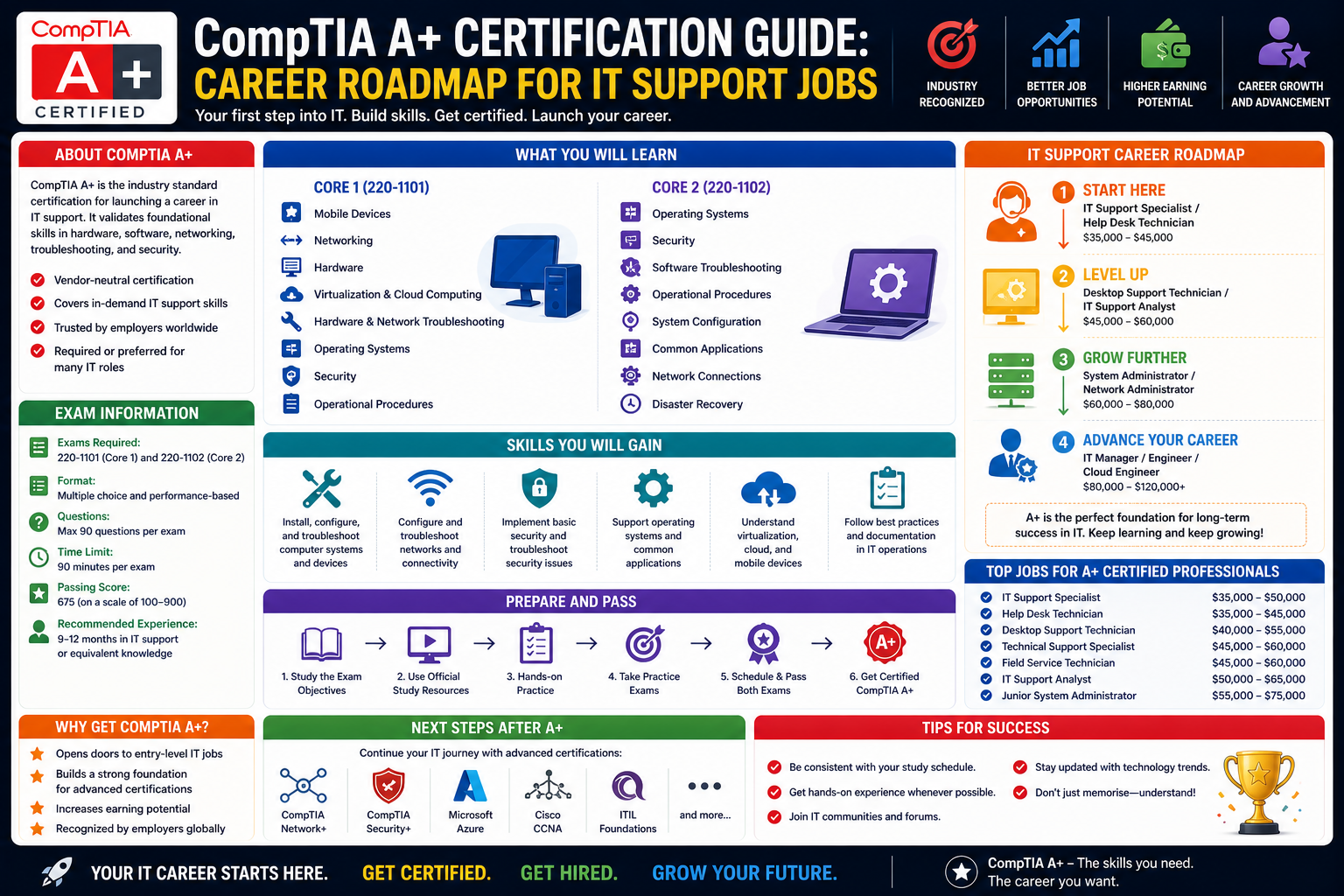
The CompTIA A+ certification is widely recognized as one of the most important starting points for individuals entering the field of information technology. It is designed to validate foundational knowledge and practical skills that are essential for entry-level IT roles. Unlike highly specialized certifications that focus on a single technology or platform, CompTIA A+ provides a broad overview of core IT concepts, making it suitable for beginners who are still exploring different career directions within the industry.
At its core, this certification represents a structured introduction to the world of IT support and technical problem-solving. It focuses on equipping learners with the ability to understand, maintain, and troubleshoot a wide range of devices and systems commonly used in modern workplaces. These include desktop computers, laptops, mobile devices, printers, and basic network components.
The importance of CompTIA A+ lies in its industry recognition. Employers across different sectors view it as a reliable indicator that a candidate possesses the essential skills required for technical support roles. It bridges the gap between theoretical knowledge and practical application, ensuring that learners are not only familiar with concepts but also capable of applying them in real-world environments.
In many cases, individuals pursuing this certification are either new to IT or transitioning from unrelated fields. The certification acts as a structured pathway that guides them through the essential building blocks of IT knowledge, gradually preparing them for more advanced certifications and specialized career paths.
Entry-Level IT Careers and Industry Expectations
One of the key reasons CompTIA A+ remains highly relevant is its alignment with entry-level IT job roles. Organizations consistently seek professionals who can provide first-line technical support, manage user issues, and maintain basic IT infrastructure. These roles are often the foundation of IT departments and serve as the first point of contact for troubleshooting and technical assistance.
Common job roles associated with CompTIA A+ include help desk technician, service desk analyst, desktop support specialist, field service technician, and IT support associate. Each of these roles requires a strong understanding of fundamental IT systems and the ability to resolve common technical issues efficiently.
Help desk and service desk positions typically involve assisting users with software problems, password resets, connectivity issues, and hardware malfunctions. Desktop support specialists may work more closely with physical devices, ensuring systems are properly configured and maintained. Field service technicians often travel to different locations to install or repair equipment, requiring both technical knowledge and adaptability.
Employers in these roles expect candidates to demonstrate not only technical skills but also communication abilities. Since entry-level IT professionals frequently interact with non-technical users, the ability to explain solutions clearly and patiently is highly valued. Problem-solving, time management, and attention to detail are also critical competencies.
CompTIA A+ helps align candidates with these expectations by introducing them to real-world troubleshooting scenarios and structured methodologies for diagnosing and resolving issues. This ensures that individuals entering the workforce are prepared to handle the demands of day-to-day IT support environments.
Core Technical Domains Covered in CompTIA A+
The CompTIA A+ certification is structured around several key technical domains that collectively represent the foundation of IT knowledge. These domains are designed to ensure that learners gain a balanced understanding of hardware, software, networking, and security concepts.
Each domain focuses on practical skills that are directly applicable in workplace environments. Rather than emphasizing theoretical memorization, the certification encourages hands-on understanding and real-world problem-solving.
Hardware Fundamentals
Hardware knowledge forms one of the most critical components of the certification. This includes understanding the physical components that make up computing devices, such as processors, memory modules, storage devices, power supplies, and motherboards.
Learners are expected to identify different hardware components, understand their functions, and recognize how they interact within a system. For example, understanding how RAM affects system performance or how storage types influence data access speed is essential for troubleshooting performance issues.
Peripheral devices such as printers, scanners, and external drives are also included in this domain. Professionals must know how to install, configure, and maintain these devices, as they are commonly used in office environments.
In addition, mobile devices such as smartphones and tablets are covered, reflecting the increasing reliance on portable technology in modern workplaces. Understanding how these devices connect to networks, sync data, and interact with enterprise systems is an important skill for IT support professionals.
Software and Operating Systems
Software knowledge is another major pillar of CompTIA A+. This includes understanding different operating systems, application software, and system utilities. The certification typically focuses on commonly used operating systems such as Windows, macOS, Linux, Android, and iOS.
Learners are expected to understand installation processes, configuration settings, and basic administrative tasks. This includes managing user accounts, configuring system preferences, installing applications, and performing system updates.
Troubleshooting software issues is a major focus area. This involves diagnosing problems such as application crashes, system slowdowns, compatibility issues, and boot errors. Learners must be able to identify the root cause of issues and apply appropriate solutions.
System utilities and maintenance tools are also important. These include antivirus software, disk cleanup utilities, backup tools, and system monitoring applications. Understanding how to use these tools effectively helps ensure system stability and performance.
Networking Fundamentals
Networking is a critical component of modern IT environments, and CompTIA A+ introduces learners to the basic principles of network connectivity. This includes understanding how devices communicate within local networks and over the internet.
Key concepts include IP addressing, subnetting basics, network types, and common networking protocols. Learners are also introduced to wireless networking concepts such as Wi-Fi standards, encryption methods, and access point configuration.
Understanding network hardware such as routers, switches, modems, and access points is essential. These devices form the backbone of any network infrastructure and play a key role in ensuring connectivity and data flow.
Basic troubleshooting of network issues is also covered. This includes identifying connectivity problems, diagnosing slow network performance, and resolving configuration errors. IT support professionals must be able to quickly restore network functionality to minimize downtime.
Security Fundamentals
Security awareness is an essential part of modern IT support roles. CompTIA A+ introduces foundational security concepts that help professionals protect systems and data from threats.
Key topics include malware types, phishing attacks, social engineering, and basic security best practices. Learners are taught how to recognize potential threats and take preventive measures to protect systems.
Device security is also emphasized, including password management, user authentication, and access control. IT professionals must ensure that systems are configured securely to prevent unauthorized access.
In addition, basic data protection concepts such as backups, encryption, and secure data handling are introduced. These practices help ensure that sensitive information remains protected in case of system failure or security breaches.
Troubleshooting Methodologies and Problem-Solving Approaches
One of the most valuable aspects of CompTIA A+ is its focus on structured troubleshooting methodologies. Rather than relying on guesswork, learners are taught a step-by-step approach to diagnosing and resolving technical issues.
This process typically begins with identifying the problem through user interaction and observation. IT professionals must gather relevant information, ask targeted questions, and analyze symptoms carefully.
Once the problem is identified, the next step involves establishing a theory of probable cause. This requires logical thinking and knowledge of common issues associated with specific systems or components.
After forming a hypothesis, professionals test possible solutions in a controlled manner. This may involve checking hardware connections, updating software, adjusting configurations, or running diagnostic tools.
If the issue is resolved, the final step involves verifying system functionality and ensuring that the solution is stable. Documentation is also an important part of the process, as it helps build a knowledge base for future reference.
This structured approach ensures consistency in problem-solving and reduces the likelihood of recurring issues. It also helps IT professionals develop critical thinking skills that are essential for career growth.
Practical Skills for Workplace Readiness
Beyond technical knowledge, CompTIA A+ emphasizes practical skills that are directly applicable in workplace environments. These skills help bridge the gap between learning and real-world job performance.
Communication is one of the most important skills for IT support professionals. Since they often interact with users who may not have technical backgrounds, the ability to explain solutions in simple terms is essential.
Time management is another critical skill. IT support environments are often fast-paced, requiring professionals to prioritize tasks and manage multiple issues simultaneously.
Customer service skills also play a significant role. Providing clear, patient, and respectful support helps improve user experience and builds trust within the organization.
Adaptability is equally important, as technology environments are constantly evolving. IT professionals must be willing to learn new tools, systems, and procedures as they emerge.
Understanding the Certification Structure and Exam Format
The CompTIA A+ certification is typically divided into two separate exams, each focusing on different aspects of IT knowledge. This structure ensures that learners gain a comprehensive understanding of both hardware and software-related concepts.
Each exam includes a variety of question types designed to test both theoretical knowledge and practical application. These may include multiple-choice questions, scenario-based questions, and performance-based tasks that simulate real-world situations.
The performance-based questions are particularly important, as they require learners to demonstrate hands-on problem-solving abilities. These questions often involve simulated environments where candidates must complete tasks such as configuring systems or diagnosing issues.
The certification structure encourages balanced preparation, ensuring that learners are well-versed in all major domains before attempting the exams. This helps build confidence and improve overall competence in IT support roles.
Building a Strong Foundation for Future IT Growth
CompTIA A+ serves as the foundation for a wide range of advanced IT certifications and career paths. It introduces learners to essential concepts that are further developed in more specialized areas such as networking, cybersecurity, cloud computing, and systems administration.
By establishing a strong understanding of core IT principles, learners are better prepared to pursue additional certifications and take on more complex roles in the future. The knowledge gained through CompTIA A+ remains relevant throughout an IT career, regardless of specialization.
This foundational stage is critical because it shapes how professionals approach technical challenges later in their careers. A strong grasp of basics ensures that advanced concepts are easier to understand and apply effectively in real-world scenarios.
As individuals progress in their careers, the skills developed during CompTIA A+ training continue to serve as a reference point for problem-solving and system analysis, reinforcing their long-term value in the IT industry.
Building a Strategic Roadmap for CompTIA A+ Preparation
Preparing for the CompTIA A+ certification requires more than simply memorizing technical terms or reading study material. It involves building a structured roadmap that gradually develops both conceptual understanding and hands-on skills. A strategic approach helps learners avoid overwhelm and ensures steady progress across all exam domains.
A well-designed preparation path begins with understanding the scope of the certification. Since CompTIA A+ covers hardware, software, networking, and security fundamentals, learners must allocate time evenly across these areas. Ignoring one domain can lead to knowledge gaps that affect both exam performance and real-world readiness.
An effective roadmap typically starts with foundational IT concepts before moving into practical application. Early stages focus on understanding how computers function at a basic level, including system architecture, operating systems, and essential components. Once this foundation is established, learners can gradually transition into troubleshooting, configuration, and scenario-based practice.
Consistency plays a major role in success. Instead of intensive, irregular study sessions, a steady learning schedule helps reinforce concepts over time. This approach allows learners to retain information more effectively and build confidence as they progress through increasingly complex topics.
Developing Core Hardware Understanding Through Practical Exposure
Hardware knowledge forms a significant portion of the CompTIA A+ certification, and developing familiarity with physical components is essential. Rather than relying solely on theoretical descriptions, hands-on exposure provides a deeper understanding of how systems operate.
Learning begins with identifying internal components such as processors, memory modules, storage devices, and motherboard architecture. Understanding how these components interact helps learners diagnose performance issues and system failures more effectively.
For example, recognizing the difference between solid-state drives and traditional hard drives is not just about definitions. It involves understanding how storage speed affects system boot times, application performance, and data retrieval processes. Similarly, understanding RAM functionality helps explain why insufficient memory leads to system lag or application crashes.
External devices also play an important role in hardware knowledge. Printers, scanners, monitors, and input devices are commonly used in office environments. Knowing how to install, configure, and troubleshoot these devices is essential for IT support roles.
Mobile devices add another layer of complexity. Smartphones and tablets have become integral to workplace environments, requiring IT professionals to understand synchronization, connectivity, and basic troubleshooting for portable systems.
Strengthening Software Proficiency Across Multiple Platforms
Software knowledge is equally important in CompTIA A+ preparation, as modern IT environments rely heavily on a variety of operating systems and applications. Developing proficiency across multiple platforms ensures that learners can adapt to different workplace environments.
Windows remains the most widely used operating system in business settings, making it a primary focus. Learners must understand system configuration, user management, file organization, and built-in administrative tools. Familiarity with system settings allows professionals to customize environments and resolve common issues efficiently.
Linux introduces a different structure, often command-line based, which helps learners develop logical thinking and precision in system management. While not always required for entry-level roles, exposure to Linux strengthens overall technical understanding.
macOS is also relevant in many workplaces, especially in creative industries and organizations that use Apple hardware. Understanding its interface, system settings, and troubleshooting methods ensures broader compatibility skills.
Application software is another key area. IT professionals must be able to install, update, and troubleshoot software applications used for productivity, communication, and system management. Issues such as compatibility errors or application crashes are common in real-world environments and require structured troubleshooting approaches.
System utilities such as antivirus programs, disk cleanup tools, and backup solutions also play a critical role in maintaining system health. Understanding how these tools function helps ensure system stability and data protection.
Expanding Networking Knowledge for Real-World Connectivity
Networking is one of the most essential components of IT infrastructure, and CompTIA A+ introduces learners to the foundational principles of network communication. Understanding how devices connect and communicate is crucial for troubleshooting connectivity issues in any environment.
At a basic level, networking involves the transmission of data between devices. This requires knowledge of IP addressing, subnetting basics, and network classification. Learners must understand how devices are identified on a network and how data is routed between them.
Wireless networking has become increasingly important in modern workplaces. Understanding Wi-Fi standards, encryption protocols, and access point configuration is essential for maintaining secure and reliable connections.
Network hardware, such as routers, switches, and modems, forms the backbone of communication systems. Each device plays a specific role in directing and managing data flow. For example, switches manage internal network traffic, while routers connect local networks to external systems.
Troubleshooting network issues requires a logical approach. Common problems include connectivity loss, slow performance, and configuration errors. IT professionals must be able to isolate the source of the issue, whether it is hardware-related, software-related, or configuration-based.
Understanding basic network security is also important. This includes recognizing unauthorized access attempts, securing wireless networks, and ensuring proper configuration of firewalls and authentication systems.
Understanding Security Principles in Everyday IT Operations
Security awareness is a fundamental requirement in all IT environments. CompTIA A+ introduces essential security concepts that help professionals protect systems, networks, and data from common threats.
One of the primary areas of focus is malware recognition. This includes viruses, spyware, ransomware, and other malicious software that can compromise system integrity. Understanding how these threats operate helps professionals implement preventive measures.
Phishing and social engineering attacks are also common security risks. These attacks often target users rather than systems, exploiting human behavior to gain unauthorized access. IT professionals must be able to identify suspicious activity and educate users on safe practices.
Password security and authentication methods play a key role in protecting systems. Strong password policies, multi-factor authentication, and access control mechanisms help reduce the risk of unauthorized access.
Data protection strategies such as backups and encryption are also essential. Regular backups ensure that data can be recovered in case of system failure or cyberattacks, while encryption protects sensitive information from unauthorized access.
Physical security is another important aspect. This includes securing devices, restricting access to sensitive areas, and ensuring that hardware is protected from theft or damage.
Developing Troubleshooting Skills Through Structured Thinking
Troubleshooting is one of the most valuable skills developed through CompTIA A+ training. It involves a systematic approach to identifying, analyzing, and resolving technical issues logically and efficiently.
The process begins with gathering information. IT professionals must understand the symptoms of a problem by interacting with users and observing system behavior. This step is critical because accurate information leads to better diagnosis.
Once the issue is identified, professionals form a theory about the possible cause. This step involves applying technical knowledge to narrow down potential sources of the problem.
Testing is the next stage. Possible solutions are implemented one at a time to determine their effectiveness. This controlled approach ensures that changes do not create additional issues.
After resolving the issue, verification is necessary to ensure that the system is functioning correctly. This step confirms that the solution is stable and effective.
Documentation is also an important part of troubleshooting. Recording the issue and its resolution helps build institutional knowledge and supports future problem-solving efforts.
Building Practical Experience Through Simulated Environments
Practical experience is essential for mastering CompTIA A+ concepts. While theoretical knowledge provides understanding, hands-on practice builds confidence and real-world problem-solving ability.
Simulated environments allow learners to practice hardware installation, software configuration, and troubleshooting without risk. These environments replicate real IT systems, enabling learners to experiment with different scenarios.
For example, practicing operating system installation helps learners understand partitioning, configuration settings, and setup processes. Similarly, simulating network configurations helps reinforce understanding of connectivity and routing.
Virtual environments also allow learners to explore system errors and practice troubleshooting techniques. This exposure helps build familiarity with common issues and improves response time in real situations.
Repetition plays a key role in skill development. Repeated exposure to similar scenarios helps reinforce learning and improve retention of technical concepts.
Strengthening Analytical Thinking for IT Problem Solving
Analytical thinking is a core skill for IT professionals, and CompTIA A+ encourages its development through structured learning and troubleshooting exercises. This skill involves breaking down complex problems into smaller, manageable components.
Instead of viewing a system issue as a single problem, analytical thinking allows professionals to examine each layer of the system. This may include hardware, software, network, or user-related factors.
For example, a slow computer may not simply be a hardware issue. It could be caused by background applications, insufficient memory, malware, or network-related delays. Analytical thinking helps identify the correct source of the problem.
This approach improves efficiency and reduces unnecessary troubleshooting steps. It also helps professionals develop confidence in their decision-making abilities.
Workplace Communication and User Interaction Skills
Technical knowledge alone is not sufficient for IT support roles. Communication skills play an equally important role in ensuring effective problem resolution and positive user experiences.
IT professionals often interact with users who may have limited technical knowledge. The ability to explain solutions in simple, clear language is essential for reducing confusion and improving satisfaction.
Active listening is also important. Understanding user concerns accurately ensures that problems are diagnosed correctly. Miscommunication can lead to incorrect solutions and repeated issues.
Patience and professionalism are key qualities in IT support environments. Users may experience frustration when facing technical issues, and it is the responsibility of IT professionals to remain calm and supportive.
Documentation and reporting are also part of communication skills. Clear records of issues and solutions help maintain consistency and improve team collaboration.
Preparing for Real-World IT Support Environments
CompTIA A+ prepares learners for real-world IT environments by simulating the types of challenges they will encounter in professional roles. These environments are often fast-paced and require quick, accurate problem-solving.
IT support professionals must handle multiple issues simultaneously, prioritize tasks effectively, and ensure minimal disruption to business operations. Time management becomes essential in maintaining efficiency.
Adaptability is also important, as technology environments vary widely between organizations. Professionals must be able to adjust to different systems, tools, and workflows.
Team collaboration plays a significant role in larger IT departments. Working with other technicians, engineers, and administrators ensures that complex issues are resolved efficiently.
Attention to detail is critical in preventing small issues from escalating into larger problems. Careful observation and precise execution of tasks help maintain system stability.
Building Confidence Through Progressive Skill Development
Confidence in IT skills develops gradually through consistent learning and practice. CompTIA A+ provides a structured pathway that allows learners to build confidence step by step.
Early stages focus on basic concepts, which help reduce intimidation when approaching technical topics. As learners progress, they begin to handle more complex scenarios, reinforcing their abilities.
Each successfully resolved issue contributes to growing confidence. Over time, learners develop a sense of familiarity with common IT challenges and learn how to approach them systematically.
This progressive development ensures that by the time learners complete their preparation, they are not only knowledgeable but also capable of applying their skills effectively in real-world situations.
Transitioning from Entry-Level Knowledge to Advanced IT Understanding
The final stage of a CompTIA A+ learning journey is less about introducing new concepts and more about strengthening how all previously learned topics connect in real-world environments. At this point, learners begin to shift from isolated technical knowledge toward integrated systems thinking, where hardware, software, networking, and security are no longer separate subjects but parts of a unified IT ecosystem.
This transition is important because real IT environments do not present problems in neat categories. A single issue—such as a system failing to connect to the network—can involve multiple layers, including hardware faults, incorrect operating system settings, misconfigured network adapters, or even security restrictions. Developing the ability to see these connections is what distinguishes a beginner from a competent IT support professional.
Learners at this stage begin refining how they interpret system behavior. Instead of focusing only on obvious symptoms, they start identifying underlying causes. For example, slow performance may not just be a hardware limitation but could involve background processes, storage fragmentation, insufficient updates, or malware activity. This shift in thinking is essential for effective troubleshooting in real environments.
The CompTIA A+ foundation supports this transition by ensuring that learners are exposed to a wide range of scenarios. These scenarios simulate workplace conditions where multiple systems interact, helping individuals understand how small changes in one area can affect overall system performance.
Deepening Understanding of Operating System Behavior and Management
Operating systems are the central layer that connects hardware and software, making them one of the most important components in IT environments. As learners advance, they begin to understand not just how to use operating systems but how they function internally.
This includes deeper awareness of system processes, memory management, file systems, and user permissions. Understanding how an operating system allocates resources helps explain why certain applications perform better than others or why systems slow down under heavy workloads.
File system structures also become more important at this stage. Learners begin to recognize how data is organized, stored, and retrieved. This understanding is essential when troubleshooting issues such as corrupted files, missing data, or slow access times.
User management becomes more advanced as well. IT professionals must understand how to create, modify, and manage user accounts while applying appropriate permission levels. This ensures that users have access only to the resources they need, reducing security risks and improving system organization.
System updates and patch management also play a critical role in maintaining stability. Regular updates ensure that operating systems remain secure and compatible with new software. Understanding how updates interact with existing configurations helps prevent system conflicts and downtime.
Expanding Knowledge of Network Infrastructure and Communication Flow
As learners progress beyond basic networking concepts, they begin to understand how larger network infrastructures operate. This includes how multiple devices, servers, and systems communicate across complex environments.
At this stage, networking is no longer just about connecting devices but about understanding data flow across systems. Learners begin to explore how packets travel through networks, how routing decisions are made, and how network performance is influenced by design.
Subnetting becomes more relevant as networks scale. Dividing networks into smaller segments improves performance and security. Understanding how subnetting works helps IT professionals manage IP address distribution more effectively.
DNS and DHCP systems also play a crucial role in network communication. DNS translates domain names into IP addresses, while DHCP automatically assigns IP configurations to devices. Understanding how these services operate helps resolve connectivity issues more efficiently.
Network troubleshooting becomes more structured and analytical. Instead of randomly testing solutions, professionals follow a logical sequence to identify whether the issue lies in hardware, configuration, service failure, or external connectivity.
Wireless networking also becomes more complex at this stage. IT professionals must understand interference issues, signal strength optimization, and security configurations that protect wireless environments from unauthorized access.
Strengthening Cybersecurity Awareness in Real Environments
Security becomes increasingly important as IT environments grow more complex. At an advanced foundational level, CompTIA A+ introduces learners to practical cybersecurity awareness that applies across all systems and networks.
Rather than focusing only on theoretical threats, learners begin to understand how security incidents occur in real environments. This includes recognizing how human behavior, system misconfiguration, and outdated software contribute to vulnerabilities.
Endpoint security becomes a key focus. Each device connected to a network represents a potential entry point for threats. IT professionals must ensure that endpoints are protected through antivirus software, firewalls, and proper configuration settings.
Access control becomes more refined. Instead of simply creating user accounts, professionals must consider role-based access, ensuring that users only have access to the resources necessary for their job functions.
Security policies also become more relevant. Organizations rely on structured guidelines to maintain consistent security practices across all systems. Understanding how these policies are implemented helps IT professionals enforce security standards effectively.
Incident response awareness is another important area. While entry-level professionals may not handle full security incidents, they must understand how to identify suspicious activity and escalate issues appropriately.
Advanced Troubleshooting in Multi-Layer IT Systems
At this stage of learning, troubleshooting evolves into a more complex and layered process. Instead of focusing on single-component failures, IT professionals begin analyzing how multiple systems interact to produce issues.
For example, a connectivity problem may involve hardware failure, incorrect IP configuration, DNS issues, or even firewall restrictions. Identifying the root cause requires systematic elimination of possibilities across multiple layers.
The troubleshooting process becomes more refined and efficient. Instead of trial-and-error methods, professionals rely on structured diagnostics, monitoring tools, and system logs to gather accurate information.
System logs become particularly important for identifying hidden issues. These logs provide detailed records of system activity, errors, and warnings that help pinpoint the exact cause of a problem.
Performance monitoring tools also play a key role. These tools help track CPU usage, memory consumption, disk activity, and network traffic. By analyzing this data, professionals can identify bottlenecks and optimize system performance.
Preventive troubleshooting also becomes important. Instead of waiting for issues to occur, IT professionals begin identifying potential problems before they impact users. This proactive approach improves system reliability and reduces downtime.
Understanding Hardware Lifecycle and Maintenance Practices
Hardware management extends beyond basic installation and configuration. At an advanced level, IT professionals must understand the full lifecycle of hardware components, from deployment to replacement.
This includes recognizing signs of hardware degradation, such as declining performance, overheating, or frequent system crashes. Identifying these signs early helps prevent system failures and data loss.
Preventive maintenance becomes an essential practice. Regular cleaning, component checks, and system inspections help extend the lifespan of hardware and maintain performance consistency.
Firmware updates also play a role in hardware management. These updates improve compatibility, fix bugs, and enhance device functionality. Understanding when and how to apply firmware updates is important for maintaining system stability.
Replacement strategies are also considered at this stage. IT professionals must evaluate when hardware is no longer cost-effective to maintain and plan for upgrades or replacements accordingly.
Building Operational Efficiency in IT Support Environments
Efficiency becomes a key focus as learners prepare for real-world IT roles. Support environments often involve multiple users, systems, and issues that must be managed simultaneously.
Time management skills become essential. IT professionals must prioritize tasks based on urgency and impact, ensuring that critical issues are resolved quickly while less urgent tasks are scheduled appropriately.
Workflow optimization also plays a role. Efficient processes reduce response times and improve service quality. This includes using ticketing systems, standardized procedures, and documentation practices.
Collaboration within IT teams improves efficiency further. Complex issues often require input from multiple specialists, and effective communication ensures that problems are resolved quickly and accurately.
Automation tools may also be introduced at this stage. Simple automated tasks, such as system updates or backup scheduling, reduce manual workload and improve consistency.
Developing Professional Behavior in Technical Environments
Technical skills alone are not enough to succeed in IT environments. Professional behavior plays a significant role in how effectively IT support services are delivered.
Reliability is one of the most important traits. Users depend on IT professionals to resolve issues quickly and accurately. Consistent performance builds trust and improves organizational efficiency.
Accountability is also essential. IT professionals must take responsibility for their actions, especially when implementing changes that affect systems or users.
Adaptability continues to be important as technology evolves. New tools, systems, and procedures are constantly introduced, requiring professionals to remain flexible and open to learning.
Ethical behavior is also critical in IT environments. Professionals often have access to sensitive data and systems, making it essential to follow ethical guidelines and maintain confidentiality.
Preparing for Real-World IT Infrastructure Complexity
Modern IT environments are highly complex, often involving hybrid systems that combine local infrastructure, cloud services, and remote access technologies. Understanding this complexity is essential for long-term career growth.
At a foundational level, CompTIA A+ introduces learners to the building blocks of these environments. As learners progress, they begin to understand how different systems integrate and interact.
Cloud computing introduces new dimensions to IT infrastructure. While CompTIA A+ focuses on foundational knowledge, learners begin to understand how cloud services complement traditional systems.
Remote access technologies have also become more important. IT professionals must understand how users connect to systems from different locations and how to secure those connections.
Data management becomes increasingly complex in distributed environments. Ensuring data consistency, availability, and security across multiple systems requires careful planning and coordination.
Strengthening Long-Term Career Adaptability in IT
One of the most important outcomes of CompTIA A+ preparation is long-term career adaptability. The IT industry evolves rapidly, and professionals must be prepared to continuously learn and adjust.
The foundational knowledge gained through this certification provides a stable base for future growth. Whether transitioning into networking, cybersecurity, cloud computing, or systems administration, the core principles remain relevant.
Adaptability is built through exposure to diverse systems and problem-solving scenarios. This exposure helps professionals develop confidence in unfamiliar environments.
Continuous learning becomes a natural part of career development. IT professionals must stay updated with emerging technologies, evolving security threats, and changing system architectures.
Career progression in IT is often nonlinear, with professionals moving between different roles and specialties. The foundational skills developed during CompTIA A+ preparation support this flexibility.
Strengthening Analytical Depth in IT Decision Making
As learners mature in their understanding of IT systems, their decision-making process becomes more analytical and structured. Instead of reacting to problems, they begin evaluating situations based on data, patterns, and system behavior.
This analytical depth allows professionals to make informed decisions about system upgrades, troubleshooting priorities, and infrastructure improvements.
For example, deciding whether to replace or repair hardware involves analyzing cost, performance impact, and long-term reliability. Similarly, choosing between different software solutions requires evaluating compatibility, security, and usability.
This level of thinking is essential for moving beyond entry-level roles and progressing into more advanced IT positions.
Conclusion
The CompTIA A+ certification represents far more than an entry point into the IT industry; it serves as a structured foundation for understanding how modern technology environments function at their core. Across its domains—hardware, software, networking, and security—it builds a balanced skill set that prepares learners for both immediate job roles and long-term career growth. When viewed as part of a broader professional journey, it becomes clear that CompTIA A+ is not just about passing an exam, but about developing a mindset aligned with problem-solving, adaptability, and continuous learning.
One of the most significant outcomes of pursuing this certification is the transformation in how learners approach technology-related challenges. At the beginning of the learning process, IT systems often appear as separate components—hardware on one side, software on another, and networking as a distinct field. However, as learners progress, they begin to see how deeply interconnected these elements are. A single issue in a workplace environment rarely has a single cause. Instead, it often involves multiple layers working together or failing together. This shift in perspective is essential for anyone entering the IT field because real-world troubleshooting demands holistic thinking rather than isolated knowledge.
Another important aspect of the CompTIA A+ journey is the development of structured problem-solving skills. Instead of relying on guesswork or trial-and-error methods, learners are trained to follow a logical sequence of steps when diagnosing issues. This disciplined approach—gathering information, forming hypotheses, testing solutions, and verifying outcomes—becomes a professional habit that extends far beyond certification preparation. It is a skill that remains relevant across all IT roles, whether in technical support, system administration, or cybersecurity.
Equally important is the emphasis on practical, workplace-ready abilities. Many individuals entering the IT field underestimate the importance of communication, time management, and user interaction. However, CompTIA A+ highlights that technical expertise alone is not sufficient. IT professionals must be able to explain solutions clearly to non-technical users, manage multiple tasks efficiently, and maintain professionalism under pressure. These soft skills often determine how effectively technical knowledge is applied in real environments.
The certification also plays a key role in shaping career direction. Because it covers a wide range of foundational topics, it allows learners to explore different areas of IT before committing to a specialization. Some may choose to move toward networking, others toward cybersecurity, and others toward systems administration or cloud technologies. This flexibility is one of the strongest advantages of starting with CompTIA A+, as it ensures that future career decisions are informed by practical exposure rather than assumptions.
In addition to career flexibility, the certification builds confidence. Many beginners enter the IT field with uncertainty about their abilities or understanding of technical systems. Through consistent learning and hands-on practice, they gradually develop confidence in their skills. Each successfully resolved technical issue, each correctly configured system, and each understood concept contributes to a growing sense of capability. This confidence is crucial when transitioning into real-world job roles where quick decision-making and technical accuracy are required.
CompTIA A+ also introduces learners to the importance of adaptability in a rapidly changing industry. Technology is constantly evolving, with new devices, operating systems, and security threats emerging regularly. Professionals who rely only on static knowledge quickly fall behind. However, those who build a strong foundation through CompTIA A+ are better equipped to adapt, learn, and grow with these changes. The certification encourages a mindset of continuous improvement, which is essential for long-term success in IT.
Another key takeaway from the CompTIA A+ journey is the understanding of IT as a service-oriented field. At its core, IT is not just about machines and systems; it is about supporting people and enabling productivity. Whether resolving a software issue for an employee or ensuring network stability for an entire organization, IT professionals play a critical role in keeping operations running smoothly. This service-driven perspective adds meaning to technical work and reinforces the importance of reliability and responsibility.
Furthermore, the certification helps learners understand the structure of professional IT environments. From help desks to enterprise systems, IT operations rely on organized workflows, documentation practices, and collaboration between teams. Exposure to these concepts during CompTIA A+ preparation helps learners transition more smoothly into professional roles, where such structures are standard practice.