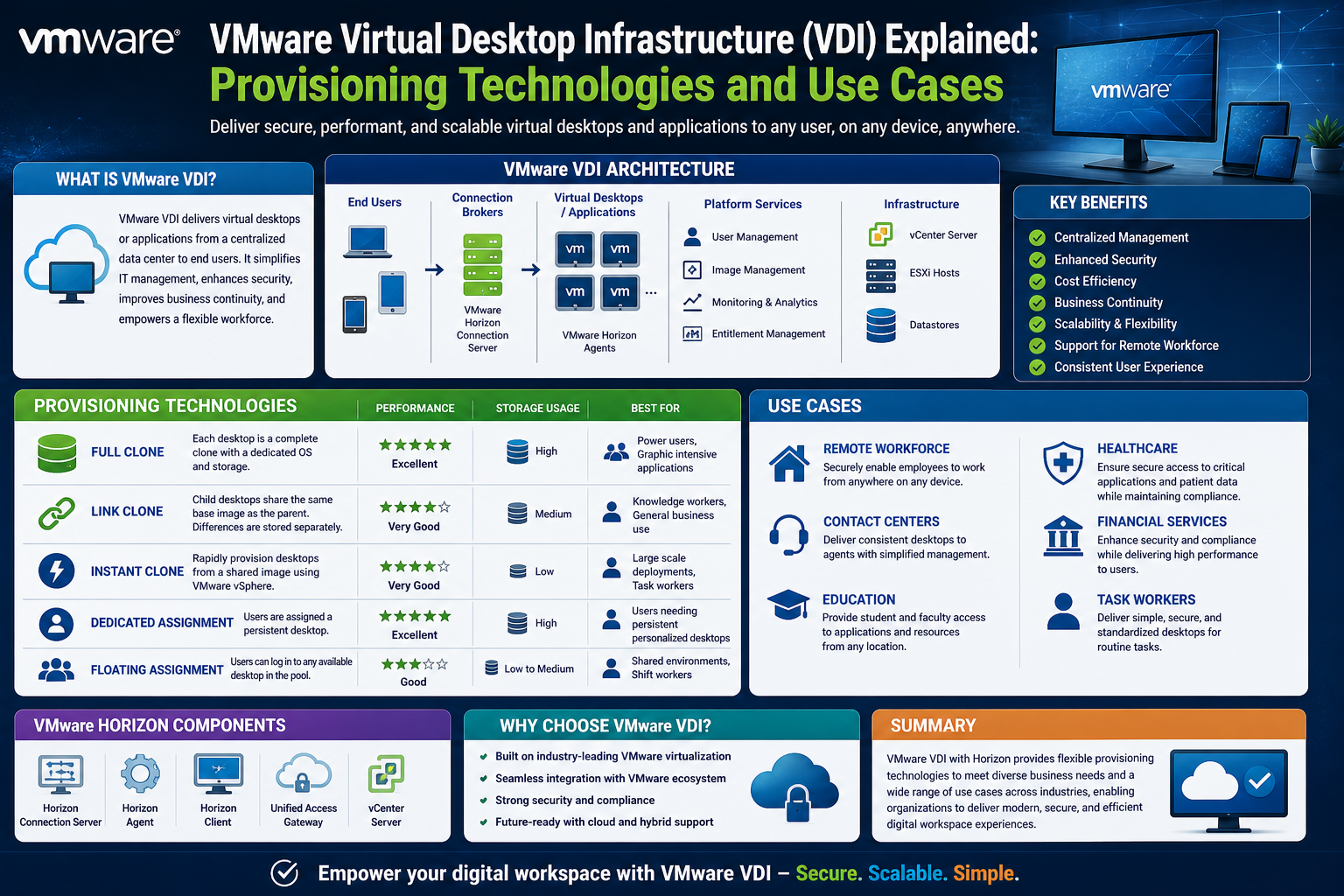
Virtual Desktop Infrastructure (VDI) has become a foundational approach for organizations that want to centralize desktop environments, improve security, and simplify large-scale IT management. Instead of relying on traditional physical desktops scattered across an organization, VDI allows desktops to be hosted centrally in a data center or cloud environment and delivered to users on demand. Within this model, VMware has played a major role in shaping how virtual desktops are created, delivered, and maintained through its provisioning technologies.
At the heart of VDI lies a critical challenge: how to efficiently create and manage large numbers of virtual desktops without introducing inconsistency, excessive administrative overhead, or performance bottlenecks. This is where provisioning technologies become essential. They determine how desktops are built, how they inherit configurations, and how quickly they can be deployed or refreshed across an entire organization.
VMware’s provisioning approach is built around the idea that desktop environments should not be individually managed like traditional PCs. Instead, they should be treated as reproducible, centrally controlled units derived from a known baseline. This shift in thinking is what allows IT teams to scale from managing a handful of machines to managing thousands with consistent behavior and predictable performance.
Understanding VMware provisioning is not just about learning a set of tools. It is about understanding a philosophy of centralized control, automation, and repeatability that underpins modern virtual desktop environments.
Understanding Virtual Desktop Infrastructure in Practice
To understand provisioning properly, it is important to first understand how VDI operates in real-world environments. In a traditional desktop setup, each user has a physical machine with its own operating system, applications, updates, and configuration settings. Over time, these machines diverge from one another due to software installations, updates, user behavior, and system changes.
In a VDI environment, however, desktops are virtual machines running on shared infrastructure. Users connect to these virtual desktops remotely, often through a secure client. While the user experience may feel identical to a physical desktop, the underlying architecture is fundamentally different.
Instead of every machine being independently managed, VDI environments are designed around centralized control. The operating system, applications, and core configuration are typically defined once and then reused across many virtual desktops. This is where provisioning becomes essential. It ensures that every new virtual desktop is created from a consistent source, reducing variability and simplifying maintenance.
VDI environments are commonly used in organizations that require strict security controls, such as financial institutions, healthcare providers, and government agencies. They are also widely used in remote work setups, call centers, and educational institutions where standardized computing environments are necessary.
The effectiveness of VDI depends heavily on how well desktops can be deployed and maintained at scale. Without efficient provisioning, the advantages of virtualization would quickly be outweighed by administrative complexity.
The Role of Provisioning in Modern IT Environments
Provisioning in the context of VDI refers to the process of creating and configuring virtual machines that serve as user desktops. This includes installing the operating system, applying configuration settings, deploying applications, and ensuring that each desktop is ready for use.
In modern IT environments, provisioning is no longer a manual, one-off task. Instead, it is an automated and repeatable process that can be executed hundreds or thousands of times with minimal human intervention. This automation is critical because of the scale at which organizations operate today.
VMware provisioning technologies are designed to solve several key problems. First, they reduce the time required to deploy new desktops. Instead of manually installing and configuring each machine, administrators can define a standard image and deploy multiple instances from it. Second, they improve consistency. Every virtual desktop created from the same source behaves in the same way, which reduces support issues and configuration discrepancies. Third, they simplify updates. Changes made to the base configuration can be propagated across all desktops derived from it.
Provisioning also plays a central role in maintaining security and compliance. When desktops are consistently built from a controlled image, it becomes easier to ensure that security patches, policies, and configurations are correctly applied across the entire environment.
In large-scale environments, provisioning is not just a convenience—it is a necessity. Without it, managing hundreds or thousands of virtual desktops would be operationally unsustainable.
How VMware Approaches Desktop Provisioning at a High Level
VMware’s approach to provisioning is rooted in abstraction and centralization. Instead of treating each virtual desktop as a standalone entity, VMware environments typically rely on a shared base image that defines the core operating system and configuration.
From this base image, virtual desktops are created in a controlled and structured manner. This ensures that every desktop inherits a known configuration, reducing variability and simplifying management.
At a high level, VMware provisioning focuses on three main principles:
First, standardization. Every desktop begins from a consistent baseline, ensuring that core configurations remain uniform across the environment.
Second, automation. The creation and management of desktops are handled through automated workflows rather than manual processes.
Third, scalability. The system is designed to handle large numbers of virtual desktops without requiring proportional increases in administrative effort.
These principles work together to create a provisioning model that is both efficient and reliable. However, the specific mechanisms used to achieve this efficiency vary depending on the provisioning method being used.
One of the most foundational approaches to provisioning in VMware environments is manual provisioning. Although it is the simplest conceptually, it is also the least scalable and most labor-intensive method.
Manual Provisioning Explained in Depth
Manual provisioning refers to the process of creating virtual machines individually, either by installing an operating system from scratch or by manually cloning an existing virtual machine. In this model, each virtual desktop is treated as a separate entity that must be configured independently.
In a manual setup, an administrator typically begins by creating a virtual machine within a hypervisor environment. The operating system is installed, the necessary drivers are configured, and applications are added manually. Once the machine is fully configured, it can be used as a reference or cloned to create additional machines.
Alternatively, administrators may clone an already configured virtual machine to create new instances. While this approach saves some time compared to full manual installation, it still results in independently managed machines.
The key characteristic of manual provisioning is that each virtual machine operates independently after creation. There is no inherent dependency between the original machine and its clones. This means that any changes made to one machine do not automatically propagate to others.
In small environments, manual provisioning may still be viable. It allows administrators to have complete control over each machine and may be useful in testing environments or specialized use cases where unique configurations are required.
However, as the number of virtual desktops increases, manual provisioning becomes increasingly difficult to manage. The lack of centralized control leads to inconsistencies, and administrative overhead grows significantly.
Challenges of Manual Desktop Provisioning in VDI
While manual provisioning offers simplicity in concept, it introduces several challenges when used in VDI environments at scale.
One of the most significant challenges is inconsistency. Since each virtual machine is configured individually, even small differences in setup can lead to variations in behavior. Over time, these differences accumulate, resulting in what is commonly referred to as configuration drift.
Another challenge is scalability. Manually creating and managing hundreds or thousands of virtual desktops requires a substantial amount of administrative effort. Each new machine must be individually configured, updated, and maintained, which quickly becomes unsustainable in large environments.
Maintenance is also more complex in manual provisioning models. If a security update or configuration change is required, each machine must be updated individually. This increases the risk of errors and delays in applying critical updates.
Resource utilization can also become inefficient. Since each virtual machine is treated independently, there is often duplication of system files, applications, and configurations across multiple machines. This redundancy consumes additional storage and compute resources.
Troubleshooting is another area where manual provisioning introduces complexity. Because each machine may differ slightly from others, diagnosing issues can require machine-specific investigation rather than applying a standardized solution.
These challenges highlight why manual provisioning is generally considered unsuitable for large-scale VDI deployments. While it remains useful in limited scenarios, more advanced provisioning methods are typically preferred in enterprise environments.
Lifecycle Management of Virtual Machines in Manual Models
In a manual provisioning model, the lifecycle of a virtual machine is entirely independent of other machines in the environment. Each desktop follows its own path from creation to retirement.
The lifecycle begins with provisioning, where the virtual machine is created and configured. Once deployed, the machine enters an operational state where it is used by an end user. During this phase, the machine may undergo various changes, including software installations, updates, and configuration adjustments.
Over time, these changes accumulate, leading to divergence from the original configuration. This divergence is natural in traditional desktop environments, but becomes problematic in VDI environments where consistency is important.
When updates or changes are required, they must be applied individually to each machine. This can include security patches, application upgrades, or configuration changes. The lack of centralized control means that ensuring consistency across all machines requires significant effort.
Eventually, virtual machines reach the end of their lifecycle and are decommissioned. In manual provisioning models, decommissioning involves removing the machine from the environment and reclaiming its resources.
Unlike more advanced provisioning models, manual lifecycle management does not include built-in mechanisms for resetting or refreshing machines to a known state. Once a machine diverges from its original configuration, it remains in that state unless manually corrected.
Configuration Drift and Why It Matters in VDI
Configuration drift refers to the gradual divergence of systems from their original baseline configuration. In manual provisioning environments, this is one of the most common and challenging issues.
Drift occurs naturally as users install applications, modify settings, and apply updates to their individual machines. Over time, even machines that were originally identical begin to behave differently.
In a VDI environment, configuration drift undermines one of the key benefits of virtualization: consistency. When desktops are no longer uniform, troubleshooting becomes more complex, support costs increase, and user experience becomes less predictable.
Drift also complicates compliance management. Organizations that need to enforce strict security or configuration policies may find it difficult to ensure that all machines remain aligned with required standards.
Another consequence of configuration drift is increased storage and maintenance overhead. As machines diverge, maintaining them requires more individualized attention, reducing the efficiency gains that VDI is meant to provide.
Addressing configuration drift is one of the primary reasons why more advanced provisioning methods exist. By relying on centralized images and controlled deployment mechanisms, modern provisioning approaches aim to minimize or eliminate drift.
Image Management Concepts: Master Images and Snapshots
At the core of VMware provisioning lies the concept of image management. Instead of building each machine from scratch, administrators rely on predefined images that serve as templates for virtual desktops.
A master image is a fully configured virtual machine that includes the operating system, necessary applications, and baseline settings. This image serves as the foundation for all virtual desktops derived from it.
Once the master image is prepared, a snapshot is typically taken. This snapshot captures the exact state of the machine at a specific point in time. It acts as a reference point from which new virtual desktops can be created.
Snapshots play an important role in ensuring consistency. By using a snapshot as the source for provisioning, administrators can ensure that all new desktops begin from an identical state.
Image management also simplifies updates. Instead of modifying each virtual machine individually, administrators can update the master image and use it as the basis for future deployments.
While image management is more commonly associated with advanced provisioning methods, its principles are relevant even in manual provisioning environments. Understanding how images and snapshots work is essential for grasping how VMware provisioning technologies evolve toward greater efficiency and automation.
Preparing the Ground for Scalable Provisioning Models
As organizations grow and their VDI environments expand, the limitations of manual provisioning become increasingly apparent. The need for scalability, consistency, and automation drives the evolution toward more advanced provisioning approaches.
Manual provisioning provides a useful foundation for understanding how virtual machines are created and managed, but it does not scale effectively in enterprise environments. This creates the need for systems that can automate deployment, reduce duplication, and maintain consistency across large numbers of desktops.
VMware’s provisioning ecosystem builds upon these foundational concepts, introducing more sophisticated methods that address the challenges of manual management. These methods are designed to reduce administrative overhead while improving performance, scalability, and operational efficiency in large-scale VDI deployments.
Transition Toward Linked Clone Architecture in VMware VDI
As VDI environments matured, the limitations of purely manual provisioning became increasingly difficult to ignore. Organizations were no longer deploying a handful of virtual desktops—they were deploying entire digital workforces. This shift required a more structured and automated approach to desktop creation, one that could maintain consistency while significantly reducing administrative overhead.
VMware’s response to this need was the introduction of linked clone technology. Rather than treating each virtual machine as a fully independent entity, linked clones introduced a model where desktops could be derived from a shared base image while still maintaining a degree of individuality. This approach represented a major step forward in virtualization efficiency and marked a turning point in how virtual desktops were deployed at scale.
Linked clones are best understood as a hybrid between full cloning and centralized image management. They maintain a dependency on a parent image while allowing individual virtual desktops to operate independently. This balance between shared structure and individualized operation is what made linked clones so influential in early enterprise VDI adoption.
Unlike manual provisioning, where each machine is a standalone system, linked clones rely on a structured relationship between base images, replicas, and child machines. This relationship is what enables large-scale deployment without duplicating entire operating systems for every user.
Core Concept of VMware Linked Clones
A linked clone is a virtual machine that shares a virtual disk with a parent or base image while maintaining its own independent state through delta changes. Instead of copying an entire virtual machine for each user, VMware’s linked clone approach allows multiple desktops to reference a shared read-only base disk.
This design significantly reduces storage consumption and accelerates provisioning times. Since the base operating system and core applications are not duplicated for every desktop, only incremental changes need to be stored separately for each virtual machine.
At a conceptual level, linked clones introduce three key components: a base image, a replica disk, and a delta disk. Each of these components plays a distinct role in the provisioning and runtime behavior of the virtual desktop.
The base image serves as the master template. It contains the operating system, installed applications, and core configuration settings. From this image, all linked clones are derived.
The replica disk is a read-only copy of the base image. It is optimized for storage efficiency and shared across multiple virtual desktops. This ensures that the bulk of system data is not duplicated unnecessarily.
The delta disk is unique to each virtual machine. It stores all changes made after the clone is created, including user data, configuration changes, and system updates. This allows each desktop to behave independently while still relying on a shared foundation.
Together, these components create a layered storage architecture that is both efficient and scalable.
Role of VMware View Composer in Linked Clone Provisioning
In VMware’s linked clone architecture, View Composer plays a central role in orchestrating the provisioning process. It acts as the management layer that coordinates the creation, linking, and lifecycle operations of virtual desktops.
View Composer is responsible for generating linked clones from a master image and ensuring that all dependencies between replica disks and delta disks are correctly maintained. Without this orchestration layer, the relationship between base images and virtual desktops would be difficult to manage at scale.
When a linked clone pool is created, View Composer initiates the provisioning process by interacting with the hypervisor to generate a replica disk from the base image. This replica disk becomes the shared foundation for all virtual machines within that pool.
Once the replica disk is created, View Composer instructs the system to generate linked clones that reference this shared disk. Each clone is assigned its own delta disk, which stores unique changes for that specific machine.
View Composer also manages lifecycle operations such as refresh, recompose, and rebalance. These operations allow administrators to maintain consistency across large pools of virtual desktops without manually modifying each machine.
Although View Composer significantly improves automation and scalability, it also introduces an additional layer of complexity into the architecture. This complexity becomes more evident in large deployments where storage performance and lifecycle operations must be carefully managed.
Storage Architecture Behind Linked Clones
One of the most important aspects of linked clone technology is its storage model. Unlike full clones, which duplicate entire virtual machines, linked clones rely on shared storage components to reduce redundancy.
The replica disk is the cornerstone of this architecture. It is a read-only copy of the master image and serves as the shared foundation for all linked clones within a pool. Because it is read-only, it can be safely shared across multiple virtual machines without risk of modification.
Each linked clone also includes a delta disk. This disk captures all changes made after the virtual machine is created. Every write operation performed by the user is redirected to this delta disk, ensuring that the replica remains unchanged.
In addition to the replica and delta disks, linked clone architectures may include an internal disk used for identity management. This disk stores machine-specific information such as computer names, security identifiers, and domain-related data.
This layered storage design provides both efficiency and flexibility. It reduces the amount of duplicated data while still allowing each virtual machine to maintain a unique state.
However, this architecture also introduces dependencies between components. Since multiple virtual machines rely on a shared replica disk, any issue affecting that disk can potentially impact the entire pool of desktops.
Provisioning Workflow of Linked Clones
The provisioning process for linked clones follows a structured workflow that ensures consistency and efficiency across all virtual desktops.
It begins with the creation of a master image. This image is fully configured with the operating system, required applications, and baseline settings. Once the image is finalized, a snapshot is taken to capture its state.
From this snapshot, a replica disk is created. This disk becomes the shared read-only source for all linked clones in the pool. The replica disk is then distributed or made accessible to the storage locations where virtual desktops will reside.
Once the replica disk is in place, linked clones are generated. Each clone references the replica disk for its base operating system and uses its own delta disk to store changes.
During this process, View Composer ensures that all dependencies are properly mapped. It tracks which virtual machines are linked to which replica disks and manages the allocation of delta storage.
After provisioning, each virtual desktop is registered within the VDI environment and made available to end users. From the user’s perspective, the desktop behaves like a standard virtual machine, even though it is heavily dependent on shared infrastructure.
This workflow enables rapid deployment of large numbers of virtual desktops while maintaining consistency across the environment.
Lifecycle Operations: Refresh, Recompose, and Rebalance
One of the defining features of linked clone technology is its support for lifecycle management operations that allow administrators to maintain and update virtual desktops efficiently.
A refresh operation resets a linked clone to its original state based on the base snapshot. This process discards changes stored in the delta disk and restores the machine to a clean configuration. Refresh operations are commonly used in non-persistent environments where user changes are not intended to be preserved long-term.
A recompose operation allows administrators to update the base image used by a linked clone pool. When a new image is created, or an existing one is modified, a recompose operation replaces the old replica disk with a new one and updates all linked clones accordingly. This enables large-scale updates without manually modifying each virtual machine.
A rebalance operation redistributes virtual machines across available resources to optimize performance and storage utilization. This is particularly useful in environments where storage or compute resources are unevenly distributed.
These lifecycle operations are central to the efficiency of linked clone environments. They allow administrators to manage large pools of virtual desktops with minimal manual intervention while maintaining consistency across the entire system.
Performance Characteristics and Storage Efficiency
Linked clones were designed with storage efficiency as a primary objective. By sharing a common replica disk, they significantly reduce the amount of storage required for large VDI deployments.
This efficiency becomes especially important in environments with hundreds or thousands of virtual desktops. Instead of storing multiple copies of the operating system and applications, only one shared copy is maintained.
However, this efficiency comes with trade-offs. Since all write operations are directed to the delta disks, these disks can grow rapidly depending on user activity. Over time, heavy write operations can lead to increased storage consumption and potential performance bottlenecks.
Another performance consideration is I/O behavior. Because multiple virtual machines share the same underlying replica disk, storage systems must handle a high volume of read operations efficiently. In environments with limited storage performance, this can lead to increased latency.
Boot storms are another well-known challenge in linked clone environments. When many virtual desktops are powered on simultaneously, they all access the shared replica disk at the same time, creating a spike in storage demand.
Despite these challenges, linked clones were a significant improvement over manual provisioning in terms of scalability and efficiency.
User Data Handling and Persistence Strategies
One of the key considerations in linked clone environments is how user data is handled. Since virtual desktops are derived from a shared base image, administrators must decide how much user data should persist across sessions.
In non-persistent configurations, changes made by users are discarded when the virtual machine is refreshed or restarted. This approach ensures that each session begins with a clean environment, reducing the risk of configuration drift and security issues.
In persistent configurations, certain user data or settings are retained across sessions. This may involve the use of separate storage mechanisms or profile management systems that store user-specific data independently from the virtual machine itself.
Linked clones can be configured to support either approach, depending on organizational requirements. Non-persistent environments are commonly used in high-turnover scenarios such as call centers or training labs, while persistent environments are used where user customization is required.
The flexibility of linked clones in supporting both models contributed significantly to their adoption in enterprise environments.
Operational Complexity and Troubleshooting Challenges
While linked clones introduced significant improvements in scalability and efficiency, they also introduced new layers of operational complexity.
One of the primary challenges is dependency tracking. Since each virtual machine is linked to a shared replica disk, administrators must carefully manage these relationships to avoid disruption.
Troubleshooting can also be more complex compared to full clones. Issues may originate from the base image, replica disk, or individual delta disks, making root cause analysis more difficult.
Additionally, because many components are interdependent, changes to the base image can have wide-reaching effects across multiple virtual desktops. This requires careful planning when performing updates or modifications.
Another challenge is the reliance on View Composer as an additional management layer. This introduces another component that must be maintained, monitored, and secured within the environment.
Despite these challenges, linked clones remained widely used due to their balance of efficiency and functionality.
Limitations That Shaped the Evolution Beyond Linked Clones
Over time, several limitations of linked clone architecture became more apparent, especially in large-scale enterprise environments.
Storage performance constraints, dependency complexity, and lifecycle management overhead all contributed to the search for more advanced provisioning models.
As organizations scaled their VDI deployments, the need for faster provisioning, reduced operational complexity, and improved resource utilization became more pressing.
These challenges set the stage for the development of more advanced technologies that would eventually evolve beyond the linked clone model, focusing on deeper integration with hypervisor-level capabilities and more efficient memory and disk handling techniques.
The next stage of this evolution would shift away from dependency-heavy architectures toward more streamlined and high-performance provisioning models designed for modern enterprise workloads.
Evolution Beyond Linked Clones: The Shift Toward Instant Clones
As VDI environments continued to scale, the limitations of linked clone architectures became more visible in real-world enterprise operations. While linked clones delivered major improvements over manual provisioning, they still depended on layered storage structures, external management components, and relatively heavy lifecycle processes. These factors introduced complexity that became increasingly difficult to manage in large, dynamic environments where speed, efficiency, and simplicity were critical.
VMware’s answer to these challenges came in the form of Instant Clones, a provisioning model designed to dramatically reduce complexity while increasing speed and scalability. Rather than relying heavily on storage layering and external orchestration, Instant Clones leverage deep integration with the hypervisor to create virtual desktops almost instantly.
This shift represents not just a technical improvement but a fundamental architectural evolution in how virtual desktops are created and managed.
Instant Clones and the Concept of VM Forking
At the core of Instant Clone technology is a mechanism often referred to as VM Forking. This process allows a running virtual machine to be rapidly duplicated in memory, rather than relying solely on traditional disk-based cloning methods.
In a traditional model like linked clones, provisioning requires disk operations, snapshot handling, and dependency mapping. In contrast, Instant Clones take advantage of the active state of a running parent virtual machine. This includes both memory and CPU state, enabling child virtual machines to be created almost instantly.
When an Instant Clone is generated, it inherits the running state of a parent virtual machine. This eliminates the need for a full boot process, significantly reducing provisioning time. Instead of waiting for an operating system to start from scratch, the new virtual desktop is already in a running state at the moment of creation.
This approach fundamentally changes the provisioning timeline. What once took minutes can now be achieved in seconds.
Simplified Architecture Compared to Linked Clones
One of the most significant improvements introduced by Instant Clones is the simplification of the underlying architecture.
In linked clone environments, multiple components such as replica disks, delta disks, and View Composer must work together to maintain functionality. Each of these components introduces dependency chains that must be carefully managed.
Instant Clones reduce this complexity by eliminating the need for external management components like View Composer. Instead, provisioning is handled natively within the hypervisor environment, reducing the number of moving parts involved in desktop creation.
The architecture typically revolves around a master image, a running parent virtual machine, and transient child virtual machines. The parent VM serves as the source for rapid cloning, while the child VMs are immediately detached and operate independently after creation.
This streamlined structure reduces administrative overhead and simplifies troubleshooting, since there are fewer dependency layers to analyze when issues arise.
The Role of Parent Virtual Machines
In Instant Clone architecture, parent virtual machines play a critical role. These are pre-initialized virtual machines that are prepared from a master image and kept in a ready state for cloning operations.
Unlike traditional virtual machines, parent VMs are not directly used by end users. Instead, they act as templates that exist in a running state, allowing new desktops to be created rapidly through memory sharing and state duplication.
When a new Instant Clone is required, the system forks from the parent VM. This process captures the current memory state and disk reference points, allowing the new virtual machine to be created without going through a full boot sequence.
Once the Instant Clone is created, it becomes independent of the parent VM. This means that the parent can continue to serve as a source for additional clones, while existing clones operate without ongoing dependency.
This design allows for extremely rapid scaling, as new desktops can be created on demand without waiting for traditional provisioning steps.
Memory Sharing and Efficiency Improvements
One of the most powerful aspects of Instant Clone technology is memory sharing. Instead of allocating entirely separate memory resources for each virtual machine during creation, Instant Clones leverage shared memory pages from the parent VM.
This significantly reduces memory overhead and allows for higher desktop density on physical hosts. Since multiple virtual machines can reference the same memory pages initially, resource utilization becomes much more efficient.
As each Instant Clone operates independently, it gradually diverges from the shared memory state as users interact with the system. However, the initial sharing provides a significant performance advantage during provisioning and peak load scenarios.
This memory efficiency also contributes to faster boot times and reduced strain on underlying hardware during large-scale desktop deployments.
Disk Handling in Instant Clone Environments
While memory sharing is a key feature of Instant Clones, disk handling is also optimized for performance and simplicity.
Instead of maintaining complex layered disk structures like linked clones, Instant Clones use a more streamlined approach. Each virtual desktop typically references a shared read-only disk from the parent image while writing changes to a temporary or delta-based storage area.
However, unlike linked clones, these delta structures are much more transient in nature. They are not designed to persist long-term and are often discarded when the session ends or when the virtual machine is refreshed.
This approach reduces storage complexity and eliminates many of the bottlenecks associated with traditional clone-based architectures.
Rapid Provisioning and Elastic Scaling
One of the most transformative benefits of Instant Clone technology is its ability to support elastic scaling. Virtual desktops can be created and destroyed rapidly based on demand, allowing IT environments to respond dynamically to user needs.
In traditional linked clone environments, provisioning new desktops often involved multiple steps, including disk creation, replication, and dependency mapping. This process could take several minutes or longer, depending on system load.
With Instant Clones, provisioning is reduced to a near-instant operation. This makes it possible to scale desktop environments quickly during peak usage periods, such as morning login surges or seasonal demand spikes.
This elasticity also supports more efficient resource utilization. Instead of maintaining a large number of idle virtual machines, environments can dynamically generate desktops only when needed.
Operational Simplification and Reduced Management Overhead
Another major advantage of Instant Clones is the reduction in operational complexity.
By eliminating external components like View Composer and reducing dependency chains, administrators have fewer systems to manage. This simplifies maintenance, reduces potential points of failure, and improves overall system stability.
Troubleshooting is also simplified. Since Instant Clones are ephemeral and closely tied to the parent image, many issues can be resolved by updating or refreshing the base image rather than diagnosing individual virtual machines.
This shift represents a move away from machine-centric management toward image-centric management, where the focus is on maintaining a clean and consistent base rather than managing individual desktops.
Limitations and Operational Considerations
Despite their advantages, Instant Clones are not without limitations or operational considerations.
One of the key considerations is their ephemeral nature. Because Instant Clones are designed to be rapidly created and discarded, they are not well-suited for environments requiring long-term persistence at the individual machine level.
This means that user data and personalization often need to be handled separately using profile management systems or external storage solutions.
Another consideration is the dependency on a tightly controlled infrastructure. Instant Clones rely heavily on vSphere integration and require environments that are properly configured to support VM forking and memory sharing mechanisms.
Additionally, because Instant Clones operate at such high speed, traditional troubleshooting methods can be more challenging. Virtual machines may be created and destroyed so quickly that capturing diagnostic data requires specialized configurations.
Impact on Large-Scale VDI Deployments
In large enterprise environments, Instant Clones have significantly changed how VDI infrastructures are designed and managed.
They enable organizations to support thousands of virtual desktops with reduced infrastructure overhead and faster response times. This makes them particularly well-suited for environments with high user concurrency and dynamic workload patterns.
By minimizing provisioning time and simplifying architecture, Instant Clones allow IT teams to focus more on strategic management rather than routine maintenance tasks.
The shift toward Instant Clones also aligns with broader trends in virtualization, where efficiency, automation, and rapid scalability are increasingly prioritized over static infrastructure models.
As VDI continues to evolve, Instant Clone technology represents a key step toward more agile, responsive, and efficient desktop virtualization environments.
Conclusion
VMware’s provisioning technologies for Virtual Desktop Infrastructure represent a clear progression in how enterprise computing environments have been designed, delivered, and managed over time. From manual provisioning to linked clones and ultimately to instant clones, each stage reflects a response to growing demands for scalability, performance, and operational simplicity in modern IT infrastructures.
At the earliest stage, manual provisioning provided complete control but quickly revealed its limitations in any environment beyond small-scale deployments. While it allowed administrators to configure virtual machines individually, it introduced significant challenges in consistency, maintenance, and scalability. Each desktop effectively became its own isolated system, leading to configuration drift and increasing administrative overhead as environments expanded. Over time, this model proved impractical for organizations managing hundreds or thousands of users, where uniformity and efficiency are essential.
The introduction of linked clone technology marked a major turning point in VDI provisioning. By allowing multiple virtual desktops to share a common base image through a replica disk and maintain individual changes via delta disks, VMware significantly reduced storage requirements and improved deployment efficiency. Linked clones enabled administrators to manage large pools of desktops with greater consistency and less duplication of effort. The ability to perform operations such as refresh, recompose, and rebalance further strengthened administrative control over large-scale environments.
However, linked clones also introduced a new layer of complexity. Dependency on View Composer, reliance on layered storage architecture, and challenges such as boot storms and storage I/O bottlenecks highlighted the limitations of this model in high-demand enterprise environments. As organizations scaled further and expectations for rapid provisioning increased, these limitations became more pronounced. Managing large numbers of interdependent virtual machines required careful orchestration and introduced operational risks that were increasingly difficult to ignore.
Instant Clones emerged as a direct response to these challenges, representing a significant architectural shift in VMware’s approach to VDI provisioning. By leveraging VM Fork technology and deep integration with the hypervisor, Instant Clones eliminated many of the complexities associated with linked clones. The ability to rapidly fork running virtual machines from a parent state allowed desktops to be created in seconds rather than minutes, dramatically improving provisioning speed and responsiveness.
This evolution also simplified the overall architecture by removing the need for external components like View Composer and reducing dependency chains. With fewer moving parts, Instant Clone environments became easier to manage, troubleshoot, and scale. Memory sharing, streamlined disk usage, and rapid lifecycle operations contributed to a more efficient and responsive VDI infrastructure capable of meeting modern enterprise demands.
Despite their advantages, Instant Clones are not a universal replacement for all scenarios. Certain use cases still require persistent environments, specialized configurations, or legacy compatibility considerations that may not align perfectly with ephemeral desktop models. However, the direction of technological development clearly indicates a strong industry preference toward faster, more automated, and more scalable provisioning mechanisms.
Across all three provisioning models—manual, linked clone, and instant clone—the underlying goal remains consistent: delivering reliable, standardized, and efficient virtual desktop environments. What has changed over time is the method by which this goal is achieved. Each generation of technology has built upon the lessons of its predecessor, gradually reducing complexity while increasing performance and scalability.
In modern enterprise environments, provisioning is no longer simply a deployment mechanism. It has become a strategic component of IT infrastructure design, directly influencing user experience, security posture, and operational efficiency. VMware’s progression in this space reflects a broader industry shift toward automation, abstraction, and infrastructure simplification.
As organizations continue to adopt cloud-based models, hybrid infrastructures, and increasingly dynamic workloads, provisioning technologies will continue to evolve. The focus will likely remain on reducing friction between infrastructure and end-user experience, enabling IT teams to deliver desktops that are not only consistent and secure but also rapidly adaptable to changing business needs.
Ultimately, VMware’s provisioning journey demonstrates how innovation in virtualization is driven by the need to balance control, efficiency, and scalability. From manually configured desktops to instantly generated virtual machines, the evolution of VDI provisioning highlights a continuous effort to simplify complexity while expanding capability in enterprise computing environments.