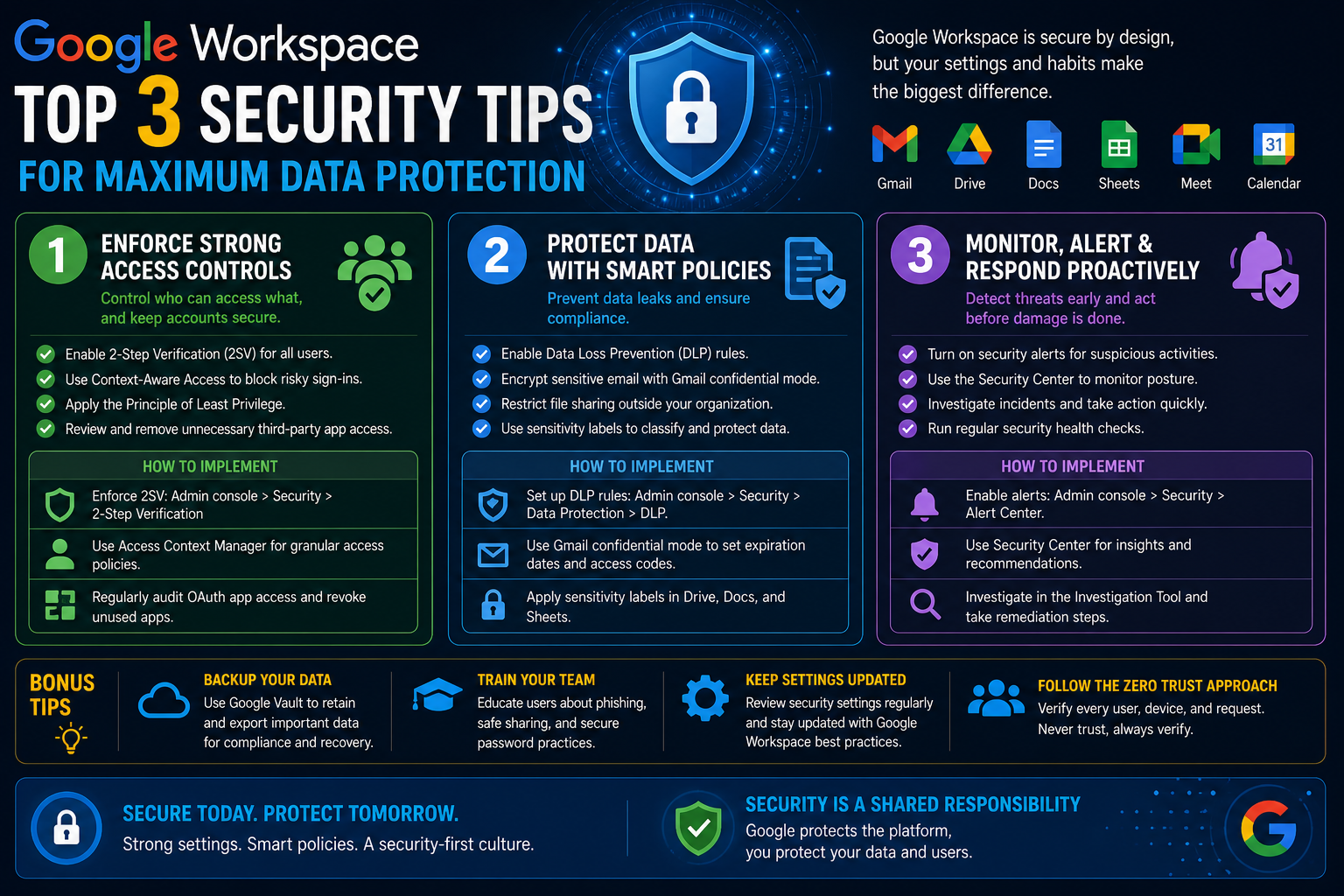
In any Google Workspace environment, user identity is the first and most critical layer of security. Every email sent, file shared, meeting scheduled, or application accessed ultimately depends on a user’s ability to sign in. If that identity is compromised, the attacker does not just gain access to a single account—they potentially gain entry into the entire ecosystem of organizational data and tools.
Modern work environments are no longer limited to a single device or location. Employees access their accounts from laptops, mobile phones, tablets, and even shared systems. They also connect multiple third-party applications through single sign-on (SSO), which means a single login can unlock dozens of services. This convenience, while powerful, also increases risk. If authentication is weak, attackers only need to break one credential to cause widespread disruption.
For administrators, securing user logins is not simply a technical requirement—it is a continuous responsibility. It involves setting rules, educating users, monitoring behavior, and regularly adjusting policies as threats evolve. A strong identity security strategy ensures that even if attackers attempt to break in, they are stopped at the earliest possible point.
Building Strong Password Policies That Actually Work
Passwords remain one of the most widely used authentication methods, even though they are also one of the most frequently exploited. A weak password is like an unlocked door, and in large organizations, attackers often rely on predictable human behavior to gain access.
A strong password policy begins with enforcing minimum complexity requirements. Users naturally prefer simple passwords because they are easier to remember, but simplicity also makes them easier to guess or crack. Organizations must require passwords that are long, unique, and resistant to automated guessing attempts.
Length is especially important. While older systems often accepted short passwords, modern security standards emphasize longer passphrases. A minimum length of eight characters may technically meet basic requirements, but it is no longer sufficient in a real-world threat landscape. Longer passwords—twelve characters or more—significantly increase resistance to brute-force attacks.
Complexity should also be considered carefully. Rather than relying solely on complicated rules like mandatory symbols or numbers, it is more effective to encourage passphrases that combine unrelated words. These are easier for humans to remember but harder for machines to predict.
Equally important is preventing password reuse. Many users tend to recycle passwords across different services, which creates a dangerous chain reaction. If one service is breached, attackers will attempt to reuse those credentials elsewhere. In a Workspace environment, reused passwords can lead to cascading compromise across multiple systems.
Administrators should also enforce password expiration policies cautiously. While frequent forced changes were once considered best practice, modern guidance suggests that overly frequent resets can lead to weaker user behavior, such as minor predictable modifications. Instead, password changes should be enforced when risk is detected, such as after a suspected breach or policy violation.
Another key element is ensuring that password rules apply consistently. Policies must not only exist but must also be enforced at every login point. Users should be required to update weak or outdated passwords during their next sign-in to ensure compliance across the entire organization.
Encouraging Better Password Hygiene Across Teams
Even the strongest password policy is ineffective if users do not understand or follow it. Human behavior plays a central role in login security, and administrators must focus on shaping secure habits.
One of the most common issues in organizations is password fatigue. When users are required to manage multiple accounts, they often take shortcuts, such as writing passwords down, reusing them, or creating predictable patterns. These behaviors introduce vulnerabilities that attackers frequently exploit.
To reduce this risk, organizations should encourage the use of password managers. These tools generate and store complex passwords securely, reducing the burden on users while increasing overall security. When users rely on password managers, they no longer need to remember every credential, which eliminates the temptation to simplify passwords.
Another important practice is educating users about phishing attempts that target login credentials. Attackers often create fake login pages designed to capture usernames and passwords. Even the strongest password policy cannot protect users if they willingly enter their credentials into fraudulent sites. Awareness training should emphasize how to recognize suspicious login prompts and unexpected authentication requests.
Administrators should also ensure that login policies are clearly communicated. Users are more likely to comply with security rules when they understand why those rules exist. Explaining how compromised credentials can affect not only individual accounts but also shared drives, organizational emails, and sensitive files helps reinforce responsible behavior.
Strengthening Authentication with Multi-Factor Methods
Passwords alone are no longer sufficient to protect modern accounts. Multi-factor authentication (MFA) adds an additional layer of defense by requiring users to verify their identity using more than one method. Even if a password is stolen, an attacker cannot access the account without the second factor.
MFA typically combines something the user knows (a password) with something they have (a device or token). This significantly reduces the likelihood of unauthorized access.
One common method is verification codes sent to a mobile device. These codes are time-sensitive and expire quickly, making them more secure than static passwords alone. However, SMS-based verification has certain vulnerabilities, including interception and SIM swapping attacks.
A more secure alternative is the use of authenticator applications. These apps generate time-based codes directly on the user’s device without relying on mobile networks. Because the codes are generated locally, they are less susceptible to interception. Users simply enter the temporary code during login to verify their identity.
Push notifications provide another layer of convenience and security. Instead of entering a code, users receive a prompt on their device asking them to approve or deny the login attempt. This method is particularly effective at detecting unauthorized access attempts, as users can instantly reject suspicious activity.
Organizations should enforce MFA across all accounts, especially those with administrative privileges. Admin accounts have elevated access to sensitive settings, making them high-value targets for attackers. Without MFA, a single compromised password could grant complete control over the system.
Understanding the Role of Security Keys in Modern Protection
Security keys represent one of the strongest forms of authentication available today. These physical devices verify user identity by requiring direct interaction during the login process.
Unlike passwords or codes, security keys cannot be easily intercepted or duplicated. They rely on cryptographic authentication that occurs between the device and the system being accessed. This makes them highly resistant to phishing attacks, where users are tricked into entering credentials on fake websites.
Security keys can take different forms. Some are USB devices that plug directly into a computer, while others are built into mobile phones or connected via Bluetooth or NFC. Regardless of form, their purpose is the same: to confirm that the person logging in physically possesses the authorized device.
One of the major advantages of security keys is their resistance to social engineering. Even if an attacker convinces a user to reveal their password, they still cannot complete the login process without the physical key. This separates knowledge-based authentication from possession-based authentication, significantly improving security strength.
For organizations handling sensitive data or operating in high-risk environments, security keys are often considered the gold standard for authentication. They are especially valuable for administrators, executives, and employees with access to critical systems.
Managing Session Security and Trusted Devices
Authentication does not end once a user logs in. Active sessions and trusted devices also play a significant role in overall security. If a device remains logged in indefinitely, it can become a potential entry point for unauthorized access.
Administrators should ensure that session timeouts are appropriately configured. Inactive sessions should automatically log out after a defined period of inactivity. This reduces the risk of unauthorized access from unattended devices.
Trusted device management is also essential. While it may be convenient to allow users to remain signed in on personal devices, this convenience must be balanced with security considerations. Devices that are lost, stolen, or shared can expose sensitive accounts if not properly managed.
Organizations should also maintain the ability to remotely revoke access from devices. If an employee leaves the organization or a device is compromised, administrators must be able to immediately terminate all active sessions associated with that account.
Monitoring device activity helps identify unusual patterns. For example, simultaneous logins from geographically distant locations may indicate account compromise. Similarly, repeated login attempts from unfamiliar devices may signal an ongoing attack attempt.
Monitoring Login Activity and Detecting Suspicious Behavior
Continuous monitoring is a critical part of identity security. Even with strong authentication systems in place, attackers may still attempt to exploit weaknesses or stolen credentials. Early detection is essential to minimizing damage.
Login activity logs provide valuable insight into account behavior. Administrators should regularly review access patterns, including login times, locations, devices, and IP addresses. Unusual activity should be investigated promptly.
For example, if a user typically logs in from one geographic region but suddenly attempts access from another, this may indicate suspicious behavior. Similarly, repeated failed login attempts can signal a brute-force attack or credential stuffing attempt.
Automated alerts can help detect anomalies in real time. These alerts notify administrators when certain conditions are met, such as multiple failed logins or access from unrecognized devices. This allows for rapid response before unauthorized access is fully established.
It is also important to differentiate between legitimate anomalies and actual threats. Users may occasionally travel or change devices, which can trigger alerts. A well-designed monitoring system balances security with usability by reducing false positives while still detecting genuine risks.
Responding to Suspicious Login Attempts
When suspicious activity is detected, immediate action is required. The first step is usually to secure the affected account by forcing a password reset and terminating active sessions. This ensures that any unauthorized users are immediately removed.
Next, administrators should investigate the source of the breach. This may involve reviewing login logs, checking device history, and identifying whether credentials were compromised through phishing or another method.
In cases where multiple accounts are affected, broader security measures may be necessary. This could include temporarily tightening login restrictions, enforcing additional authentication requirements, or reviewing system-wide access policies.
Communication also plays an important role. Users should be informed when security incidents occur so they can take appropriate precautions, such as updating passwords or reviewing account activity.
Over time, patterns in suspicious behavior can help organizations improve their security posture. By analyzing attempted breaches, administrators can refine policies, strengthen authentication methods, and reduce future risks.
Why Email Security Defines Organizational Safety
Email remains one of the most heavily used communication channels in any organization, and at the same time, it is one of the most exploited entry points for cyberattacks. In a Google Workspace environment, Gmail is not just a messaging tool—it is a gateway to documents, shared drives, calendars, and integrated third-party applications.
Because of this deep integration, compromising email security can have far-reaching consequences. Attackers often do not need to break into multiple systems individually. Instead, they target email accounts because they can reset passwords, intercept sensitive communication, impersonate users, and gain indirect access to other connected services.
Most successful attacks begin with a simple email. It may appear to be a routine invoice, a password reset request, or a shared document notification. Once a user interacts with a malicious email, the attacker can move deeper into the system. This makes email security not just a protective layer, but a foundational defense strategy for the entire organization.
Understanding Built-In Email Protection in Google Workspace
Google Workspace provides strong built-in protections designed to filter spam, phishing attempts, and malicious content before they reach users’ inboxes. These protections operate continuously in the background and analyze billions of signals to detect suspicious behavior.
Spam filtering is one of the first lines of defense. It identifies unwanted messages based on patterns such as sender reputation, message structure, and known malicious indicators. Most spam is automatically diverted away from user inboxes, reducing exposure to harmful content.
Phishing detection goes beyond basic spam filtering. It evaluates whether an email is attempting to deceive the user into revealing sensitive information such as login credentials or financial data. These messages often mimic legitimate organizations, making them more difficult to identify without automated systems.
Malware detection scans attachments and embedded content for known threats. Even if an email appears legitimate, attached files may contain harmful scripts or executables designed to compromise devices once opened.
These protections are enabled by default, but administrators still play a key role in ensuring they are configured correctly and aligned with organizational risk tolerance.
Strengthening Spam and Phishing Filters for Better Control
While default protections are strong, organizations often benefit from refining filtering settings to match their specific needs. Not all spam is obvious, and some sophisticated phishing attempts can bypass basic filters.
Administrators can create allowlists and blocklists to manage email flow more precisely. Allowlists ensure that trusted domains or senders are always permitted, while blocklists prevent specific sources from reaching users altogether. This helps reduce exposure to known threats and ensures consistent communication with trusted partners.
However, these lists must be managed carefully. Overuse of allowlists can create blind spots, where malicious emails from compromised trusted domains are mistakenly accepted. Regular review is essential to maintain balance between accessibility and security.
Advanced filtering also allows organizations to set policies for handling suspicious messages. Instead of delivering potentially harmful emails directly to inboxes, messages can be quarantined for review. This gives administrators control over whether emails are safe before they reach end users.
Quarantine systems are particularly useful for handling borderline cases where automated systems are uncertain. Rather than risking exposure, these messages are held temporarily until further inspection.
Protecting Users with Gmail Safety Features
Beyond filtering, Gmail includes multiple safety mechanisms designed to protect users during everyday interactions. These features focus on preventing harmful actions even after an email has reached the inbox.
One of the most important protections is attachment scanning. Every file attached to an email is automatically analyzed for malware or suspicious behavior. This includes both known threats and newly emerging patterns that may indicate malicious intent.
Even seemingly harmless file types can be dangerous if manipulated correctly. For example, documents may contain embedded scripts, or compressed files may hide executable malware. Attachment scanning helps detect these risks before users open the file.
Link protection is another critical feature. Emails often contain links that direct users to external websites. These links are scanned and evaluated for safety. If a link leads to a known malicious domain or suspicious destination, users are warned before proceeding.
This protection is especially important for phishing attacks, where fake login pages are designed to steal credentials. Even if the email itself appears legitimate, the destination link may not be.
Gmail also uses real-time analysis of sender behavior. If a message originates from a domain with unusual activity patterns or a history of abuse, additional warnings may be displayed to users.
Understanding Email Spoofing and Identity Impersonation
One of the most dangerous email-based threats is spoofing. This occurs when an attacker sends an email that appears to come from a trusted domain, even though it originates elsewhere. The goal is to trick recipients into believing the message is legitimate.
Spoofing attacks are often used in financial fraud, invoice manipulation, and executive impersonation. For example, an attacker may send an email that appears to come from a senior executive requesting urgent fund transfers or sensitive information.
To prevent spoofing, organizations must implement domain authentication protocols. These systems verify whether an email is genuinely authorized by the domain it claims to represent.
Strengthening Domain Protection with SPF Records
Sender Policy Framework (SPF) is one of the core mechanisms used to prevent email spoofing. It works by defining which mail servers are allowed to send emails on behalf of a domain.
When an email is received, the recipient server checks the SPF record associated with the sender’s domain. If the sending server is not listed as an authorized source, the email may be rejected or marked as suspicious.
SPF records are published in DNS settings and must be carefully maintained. Organizations often use multiple services to send emails, such as cloud platforms, customer support systems, and internal applications. All legitimate sending sources must be included in the SPF configuration.
If SPF records are too restrictive, legitimate emails may be blocked. If they are too broad, attackers may exploit loopholes. Maintaining accurate SPF records is therefore an ongoing responsibility.
Adding an Extra Layer of Trust with DKIM Authentication
DomainKeys Identified Mail (DKIM) provides another layer of protection by verifying that an email has not been altered during transmission.
DKIM works by attaching a digital signature to outgoing emails. This signature is generated using a private key stored by the sending server. When the email is received, the recipient server uses a public key published in DNS records to verify the signature.
If the signature matches, it confirms that the email has not been tampered with and that it originates from an authorized source. If the signature does not match, the message may be flagged as suspicious or rejected.
DKIM is particularly important for detecting message tampering. Even if an attacker intercepts an email, they cannot modify its content without breaking the cryptographic signature.
Together, SPF and DKIM provide strong protection against spoofing and unauthorized email sending. However, they must be properly configured and regularly maintained to remain effective.
Monitoring Email Activity for Early Threat Detection
Security is not only about prevention—it is also about detection. Monitoring email activity helps administrators identify unusual patterns that may indicate compromised accounts or ongoing attacks.
One important indicator is abnormal sending behavior. If an account suddenly begins sending large volumes of emails, especially to unfamiliar recipients, it may indicate that the account has been compromised and is being used for spam or phishing campaigns.
Another warning sign is unusual login activity associated with email access. For example, if an account is accessed from unexpected locations or devices, it may suggest unauthorized entry.
Email logs provide valuable insight into message flow, delivery status, and recipient patterns. By reviewing these logs regularly, administrators can identify anomalies early and respond before damage escalates.
Automated alerts can also help detect suspicious behavior in real time. These alerts notify administrators when predefined conditions are met, such as mass email sending or repeated delivery failures.
Managing Email Attachments and Reducing Risk Exposure
Attachments are one of the most common vectors for malware delivery. Attackers often disguise malicious files as invoices, reports, or documents to trick users into opening them.
To reduce this risk, organizations should enforce strict attachment handling policies. This may include blocking certain file types entirely or restricting access based on user roles.
Executable files are particularly dangerous and are often blocked by default. However, attackers may use compressed files or renamed extensions to bypass filters. Continuous scanning and updated threat detection are necessary to counter these tactics.
Users should also be discouraged from opening unexpected attachments, even if they appear to come from known contacts. In many cases, compromised accounts are used to distribute malware internally.
Reducing Risk Through Email Content Analysis
Modern email threats are increasingly sophisticated and may not rely on attachments or links at all. Instead, attackers may use carefully crafted messages designed to manipulate user behavior.
Content analysis tools evaluate email text for suspicious patterns, such as urgency, financial requests, or impersonation attempts. These messages often rely on psychological manipulation rather than technical exploits.
For example, an email claiming to be from a senior executive requesting immediate action without proper verification may be flagged as suspicious. Similarly, messages asking users to bypass standard procedures or share credentials are strong indicators of phishing attempts.
By analyzing message content alongside technical indicators, security systems can detect a wider range of threats.
Supporting Secure Communication Practices Across the Organization
Even with advanced filtering and authentication systems, user behavior remains a critical factor in email security. Employees must understand how to identify suspicious messages and respond appropriately.
One common risk is overtrusting familiar-looking emails. Attackers often replicate branding, language, and formatting to make messages appear legitimate. Users should be encouraged to verify requests independently, especially when sensitive actions are involved.
Another important practice is avoiding direct responses to unexpected requests for sensitive information. Instead, users should verify such requests through alternative communication channels.
Training should emphasize caution without creating unnecessary fear. The goal is to build awareness so users can recognize risks while maintaining productivity.
Controlling Email Flow Between Internal and External Sources
Organizations often need to communicate with external partners, clients, and vendors. However, this also introduces potential security risks.
External email controls allow administrators to define how messages from outside the organization are handled. For example, external emails may be clearly labeled to help users distinguish them from internal communications.
Additional restrictions may be applied to sensitive departments, limiting their exposure to external communication unless explicitly approved.
Internal email flow should also be monitored to prevent unauthorized forwarding or leakage of sensitive data. In some cases, restricting automatic forwarding to external addresses can reduce the risk of data exfiltration.
By managing both inbound and outbound email flow, organizations can reduce exposure while maintaining necessary communication channels.
Why External Access Has Become a Major Security Concern
Modern organizations rarely operate inside a closed system. Google Workspace is designed to be connected, flexible, and extensible, which is one of its greatest strengths—but also one of its most overlooked security challenges. The ability to integrate third-party applications with Gmail, Drive, Calendar, Sheets, and other Workspace services allows teams to automate workflows, share data, and improve productivity.
However, every external connection introduces a new trust boundary. Instead of only protecting internal users and systems, administrators must also evaluate external applications that request access to organizational data. These apps may be helpful, but they also expand the attack surface significantly.
The real challenge is not just about malicious applications. Even legitimate apps can become risky if they request excessive permissions, are poorly maintained, or are compromised later. A tool that seems harmless today can become a security risk tomorrow if its security posture changes.
Because of this, controlling external access is not a one-time configuration task. It is an ongoing governance process that requires visibility, evaluation, restriction, and continuous monitoring.
Understanding How Third-Party Apps Connect to Workspace
Third-party applications connect to Google Workspace through permission-based access systems. When a user installs or authorizes an application, they are essentially granting that app permission to interact with certain parts of their Google account.
These permissions may include access to emails, files, calendars, contacts, or even the ability to modify or delete data. In many cases, users do not fully understand the extent of access they are granting, especially when permission prompts are lengthy or technical.
For example, an application designed to schedule meetings might request access to a user’s entire calendar. A document editing tool might request permission to view and edit all files stored in Drive. While these permissions may be necessary for functionality, they also introduce risk if the application is not trustworthy.
From a security perspective, every authorized app becomes a potential entry point into organizational data. If that app is compromised, it can act as a bridge for attackers to access sensitive information.
The Hidden Risks of Over-Permissioned Applications
One of the most common security issues in Workspace environments is excessive permissions granted to third-party applications. Many apps request broader access than they actually need in order to function.
This overreach often goes unnoticed because users tend to approve permissions without carefully reviewing them. Once granted, these permissions may remain active indefinitely unless manually revoked.
Over-permissioned applications create several risks. First, they increase the amount of data exposed to external systems. Even if the application is legitimate, it may store or process data in ways that are not fully transparent to the organization.
Second, they create dependency risks. If a third-party service experiences a breach or security failure, any connected Workspace data may also be exposed.
Third, they can lead to privilege escalation. Some applications request access levels that allow them to modify or delete data, not just view it. If compromised, such access could be used to cause significant disruption.
Administrators must therefore adopt a principle of minimal access, ensuring that applications only receive the permissions they truly require.
Establishing Application Trust Through Verification and Review
Not all third-party applications are inherently risky. Many are widely used, well-maintained, and secure. The key is to evaluate trust before granting access.
Application trust should be based on several factors, including the reputation of the developer, the transparency of data usage policies, and the scope of requested permissions.
Applications developed by unknown or unverified publishers present higher risk, especially if they request broad access to sensitive data. Even if the interface appears professional, lack of transparency in ownership or development history should raise caution.
Another important factor is update frequency. Applications that are not regularly maintained may contain unpatched vulnerabilities. Security is an ongoing process, and outdated software can become an easy target for attackers.
Organizations should maintain internal criteria for evaluating applications before approval. This helps ensure consistency in decision-making and reduces reliance on individual user judgment.
Controlling Application Installation Through Admin Policies
One of the most effective ways to manage external access is to control which applications users are allowed to install. Without restrictions, users may independently connect multiple third-party tools, some of which may not meet organizational security standards.
By implementing centralized control, administrators can define which applications are approved for use across the organization. This approach prevents uncontrolled expansion of third-party access and ensures that every integration is reviewed before being deployed.
In more secure environments, users may be restricted from installing applications entirely unless they are explicitly approved. This whitelist approach ensures that only trusted applications are allowed to interact with Workspace data.
Alternatively, organizations may adopt a tiered approval system, where applications are categorized based on risk level. Low-risk apps may be automatically approved, while higher-risk apps require administrative review.
Regardless of the model used, the key objective is to maintain visibility and control over all external integrations.
Understanding OAuth Permissions and Data Access Scope
Many third-party applications use OAuth authorization to connect with Google Workspace. OAuth is a secure protocol that allows users to grant access to their data without sharing their passwords.
When a user authorizes an application, they are presented with a list of requested permissions. These permissions define what the application can do within their account.
However, permission descriptions can sometimes be broad or difficult to interpret. For example, a request to “view and manage your files” may not clearly explain whether the app can modify or delete sensitive documents.
This ambiguity creates a security challenge. Users may unintentionally grant more access than intended simply because they do not fully understand the scope of the permissions.
Administrators should educate users about interpreting permission requests carefully and encourage skepticism toward applications that request excessive or unclear access.
Reducing Risk Through Granular Permission Control
Where possible, organizations should enforce granular permission control. Instead of granting full access to entire services, applications should be restricted to specific functions or data subsets.
For example, an application that needs access to calendar events should not automatically receive access to email or Drive files. By limiting permissions to only what is necessary, organizations reduce the potential impact of a compromised application.
Granular control also helps minimize data exposure. Even if an application is breached, the amount of accessible information is limited by its permission scope.
This approach aligns with the principle of least privilege, which is a core concept in security architecture. It ensures that every system, user, and application only has the access required to perform its intended function.
Monitoring Third-Party Application Activity
Granting access is only the beginning. Continuous monitoring is essential to ensure that applications behave as expected after authorization.
Administrators should regularly review connected applications and assess their activity levels. Applications that are no longer actively used may still retain access to sensitive data, creating unnecessary risk.
Monitoring also helps detect unusual behavior. For example, if an application suddenly begins accessing large volumes of data or interacting with unfamiliar services, it may indicate a security issue.
Audit logs provide valuable insight into application behavior. These logs can show when an application accessed data, what actions it performed, and whether any anomalies occurred.
By analyzing this information, administrators can identify potentially risky applications and take corrective action before damage occurs.
Revoking and Managing Unused Application Access
Over time, organizations accumulate a large number of connected applications. Some of these may no longer be in use but still retain access to Workspace data.
Unused applications represent a hidden risk. Even if they are inactive, they can still be exploited if compromised. Regularly reviewing and revoking unnecessary access is therefore essential.
Application access should be treated as temporary unless there is a clear ongoing need. If an application is no longer required, its permissions should be revoked immediately.
This practice reduces the number of potential entry points available to attackers and helps maintain a cleaner, more secure environment.
Protecting Against Malicious Application Behavior
While most applications are legitimate, some may be intentionally malicious. These applications are designed to appear useful while secretly collecting data or performing unauthorized actions.
Malicious applications often rely on excessive permission requests and unclear functionality descriptions. They may also mimic legitimate tools to gain user trust.
Once authorized, these applications can silently access sensitive data without obvious signs of compromise. This makes detection difficult without proper monitoring.
To reduce this risk, organizations should enforce strict approval processes and limit application installations to verified sources.
Additionally, users should be encouraged to question applications that request unusually broad access or come from unfamiliar developers.
Securing Data Flow Between Workspace and External Systems
Third-party applications often act as bridges between Google Workspace and external systems. For example, an application may transfer data from Drive to another cloud platform or synchronize calendar events with external scheduling tools.
While these integrations improve efficiency, they also create data transfer pathways that must be secured.
Administrators should understand how data flows between systems and ensure that external platforms meet appropriate security standards.
Data should not be shared blindly with external systems without understanding where it is stored, how it is processed, and who has access to it.
In some cases, organizations may choose to restrict certain types of data from leaving Workspace entirely. This is particularly important for sensitive information such as financial records, internal communications, or confidential documents.
Managing Risk Through Tiered Access Strategies
Not all users require the same level of access to third-party applications. A tiered access strategy allows organizations to assign different levels of integration permissions based on roles and responsibilities.
For example, administrative staff may require access to productivity tools, while finance teams may need integration with accounting systems. Each role should only be granted access to applications relevant to their work.
This approach reduces unnecessary exposure and ensures that sensitive data is only accessible through approved pathways.
Tiered access also simplifies auditing. By grouping permissions based on roles, administrators can more easily track and manage application usage across the organization.
Responding to Compromised Third-Party Integrations
If a third-party application is found to be compromised, immediate action is required. The first step is to revoke its access to Workspace data, preventing further interaction with organizational systems.
Next, administrators should assess what data may have been exposed. This may involve reviewing logs, identifying affected users, and determining the scope of access the application had.
Depending on the severity of the incident, additional steps may be required, such as resetting user credentials, notifying stakeholders, or temporarily restricting other related integrations.
After containment, a review should be conducted to understand how the application was approved in the first place and whether policy improvements are needed.
Building a Sustainable External Access Security Model
Securing external access is not a static task. As organizations grow and adopt new tools, the number of integrations will naturally increase. Without proper governance, this growth can lead to uncontrolled complexity and increased risk.
A sustainable security model requires continuous evaluation, clear approval processes, and strong visibility into all connected applications.
By maintaining control over external access, organizations can enjoy the benefits of integration and automation without sacrificing security.
Conclusion
Securing Google Workspace is not defined by a single setting, tool, or configuration. It is the result of multiple layers of protection working together in a structured and continuously managed system. Across identity security, email protection, and external application control, the central idea remains consistent: access must be intentional, limited, and actively monitored. When these principles are applied correctly, they create a resilient environment where users can work efficiently without exposing the organization to unnecessary risk.
At the foundation lies user authentication. Strong login security ensures that only verified individuals can access organizational resources. Password policies, multi-factor authentication, and security keys are not isolated features—they form a progressive defense system. Each layer reduces dependency on the one before it. A password alone is vulnerable, but combined with a second factor or a physical security key, the likelihood of unauthorized access decreases significantly. This layered approach reflects a broader shift in security thinking, where no single method is expected to provide complete protection.
However, authentication alone is not enough. Once access is granted, email becomes the primary communication channel, and therefore one of the most targeted areas for attackers. Email security systems must operate both invisibly and continuously, filtering threats before they reach users while still allowing legitimate communication to flow without disruption. Spam filters, phishing detection, attachment scanning, and link verification all work together to reduce exposure. Yet the effectiveness of these tools depends heavily on proper configuration and ongoing oversight. Even the most advanced filtering systems cannot fully compensate for poor organizational practices or lack of awareness among users.
Domain authentication protocols such as SPF and DKIM add another critical layer of trust. They ensure that emails claiming to originate from an organization are genuinely authorized. Without these safeguards, attackers can easily impersonate trusted domains, leading to financial fraud, data theft, or reputational damage. When properly implemented, these protocols significantly reduce the success rate of spoofing attacks and reinforce confidence in legitimate communication.
Beyond email and authentication, the expansion of third-party applications introduces a different category of risk. Modern organizations rely on integrations to improve productivity and automate workflows, but each integration represents a potential pathway into sensitive data. This makes external access governance a central part of Workspace security strategy. It is no longer sufficient to simply allow or deny applications on a basic level. Instead, access must be evaluated based on necessity, scope, and trustworthiness.
Excessive permissions remain one of the most common weaknesses in many environments. Applications that request broad access to emails, files, or calendars can unintentionally expose large amounts of data. Even when these applications are legitimate, their security depends on how well they are maintained and protected from compromise. By enforcing minimal access principles, organizations reduce the impact of potential vulnerabilities and ensure that applications only interact with data that is essential to their function.
Continuous monitoring plays an equally important role. Security is not a one-time setup but an ongoing process of observation and adjustment. Login activity, email behavior, and application usage patterns must all be reviewed regularly. Unusual behavior—such as unexpected login locations, abnormal email sending activity, or sudden increases in data access—can serve as early indicators of compromise. Detecting these signals early allows administrators to respond before small issues escalate into major incidents.
Equally important is the ability to revoke access quickly when necessary. Whether dealing with compromised accounts or unused applications, removing unnecessary permissions reduces exposure and simplifies the security environment. A system with fewer active connections is inherently easier to protect and monitor.
Ultimately, securing Google Workspace requires a balance between usability and protection. Overly restrictive systems can hinder productivity, while overly permissive systems create unnecessary risk. The goal is not to eliminate all external connections or limit user functionality, but to ensure that every access point is justified, controlled, and observable.
Organizations that adopt this layered and disciplined approach build a security posture that is both flexible and resilient. Users are empowered to work efficiently, while administrators maintain visibility and control over the entire ecosystem. As digital environments continue to evolve, this balance becomes even more critical, ensuring that security grows alongside innovation rather than lagging behind it.