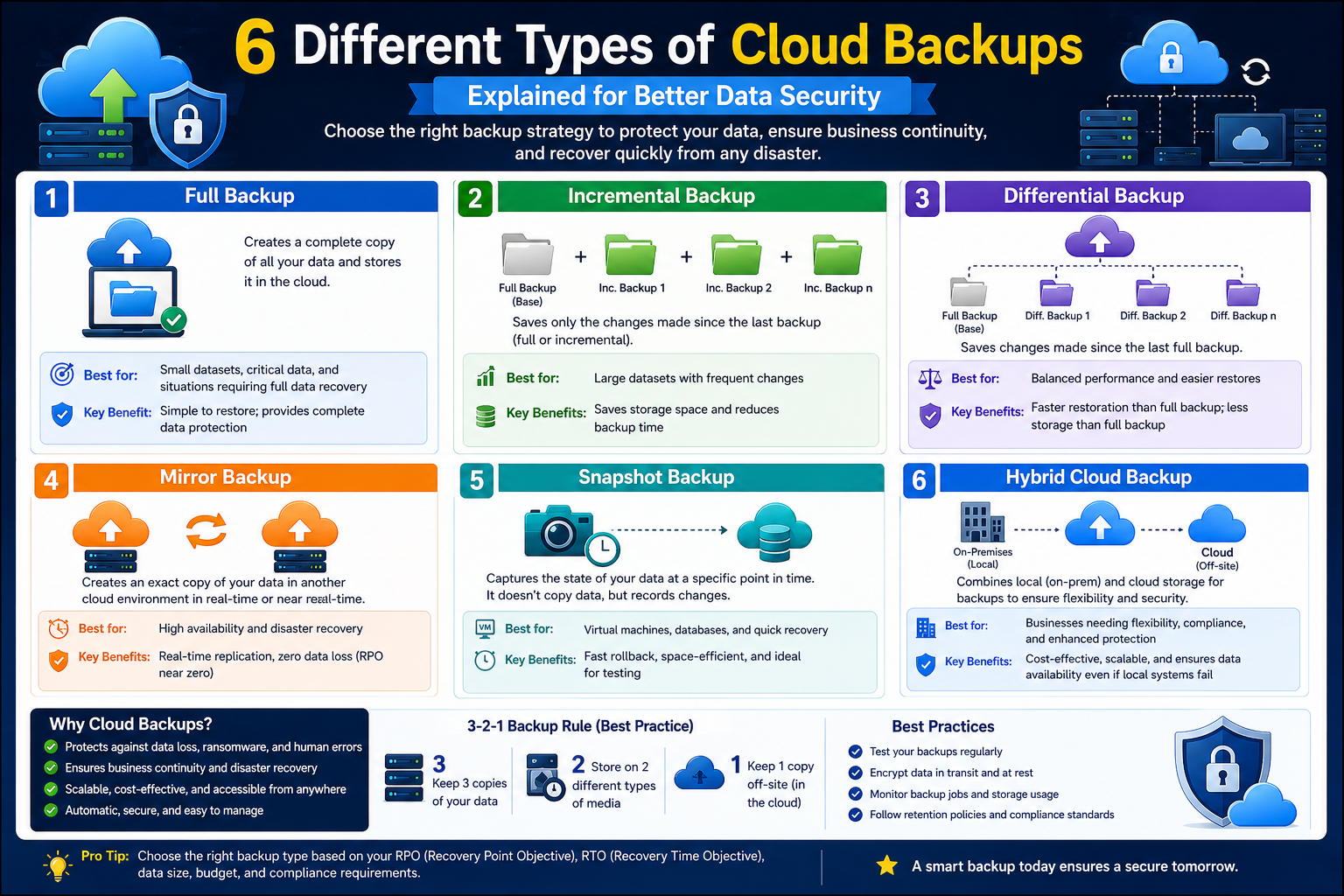
In cloud environments, data protection is not something that should be treated as an optional layer added at the end of system design. It is a core part of how systems remain reliable, recoverable, and operational under unexpected conditions. While modern cloud platforms provide built-in redundancy and durability, those features alone do not replace a structured backup strategy. They serve different purposes, and understanding that distinction is essential when preparing for enterprise-level workloads or certification-level knowledge.
A backup strategy is primarily about control and recovery. It ensures that when something goes wrong—whether due to human error, software failure, malicious activity, or infrastructure issues—there is a way to return systems and data to a known working state. In cloud computing, this often becomes even more critical because systems are highly dynamic. Virtual machines are created and destroyed frequently, applications are updated continuously, and data flows across distributed environments.
One of the key ideas behind cloud backup planning is that not all data has the same value or recovery requirement. Some information may need near-instant restoration, while other datasets may only require periodic archival. This variation is why backup types exist in the first place. Each method offers a different balance between storage consumption, performance impact, and recovery speed.
Before selecting any backup method, organizations typically evaluate business requirements. These requirements shape how backup systems are designed and implemented. For example, a company operating an e-commerce platform may prioritize minimal downtime and fast recovery, while an archival data system may prioritize long-term retention and cost efficiency. These differences significantly influence whether snapshots, full backups, or incremental methods are used.
Another important consideration is compliance. Many industries are subject to regulations that require data to be retained for specific periods or restored within defined time limits. These rules influence not only how backups are created but also where and how they are stored. In cloud environments, this often includes considerations like geographic redundancy, encryption standards, and access controls.
Understanding these requirements is the foundation for all backup decisions. Without this clarity, organizations risk choosing backup methods that either cost too much, take too long to restore, or fail to meet recovery objectives when they are needed most.
Snapshot Backups Using Redirect-on-Write Technology
Snapshots are one of the most widely used backup mechanisms in cloud and virtualized environments. They provide a quick and efficient way to capture the state of a system at a specific point in time. Unlike traditional backups, snapshots do not necessarily involve copying all data immediately. Instead, they rely on intelligent storage mechanisms that track changes at the block level.
One of the most efficient snapshot implementations uses a method known as redirect-on-write. In this approach, the storage system maintains a mapping table that points to data blocks. When a snapshot is created, the system essentially preserves the current state of these pointers. The actual data remains in place, and only changes are tracked going forward.
When a modification occurs after the snapshot is taken, the system does not overwrite the original data. Instead, it redirects the write operation to a new location. The mapping table is then updated to reflect this change, while the snapshot continues to point to the original data. This allows the system to preserve historical states without duplicating entire datasets.
This method is highly efficient because it reduces performance overhead. There is no need to copy large volumes of data at the moment the snapshot is created. Instead, the system only handles changes as they occur. This makes snapshot creation almost instantaneous in many cloud environments.
Snapshots are commonly used before performing major system changes. For example, before upgrading an operating system or applying critical software patches, administrators often create a snapshot. If something goes wrong during the update process, the system can be rolled back to the exact state it was in before the change began.
This ability to quickly revert to a previous state makes snapshots extremely valuable in environments where uptime and stability are critical. However, snapshots are not designed for long-term storage. Over time, as more changes occur, the snapshot can grow in size because it must preserve older data blocks that have been modified.
This means that while snapshots are excellent for short-term protection and rapid rollback scenarios, they must be managed carefully. Leaving snapshots active for extended periods can lead to increased storage consumption and potential performance impacts depending on the underlying storage system.
Practical Use Cases of Snapshots in Cloud Systems
Snapshots are particularly useful in environments where frequent changes occur and rapid recovery is essential. One common scenario is software deployment. When new application versions are deployed, there is always a risk that unexpected issues may arise. A snapshot taken just before deployment allows teams to quickly restore the previous stable state if needed.
Another important use case is testing and development environments. Developers often need to experiment with system configurations, updates, or new features. Snapshots allow them to safely explore changes without permanently affecting the base system. If a test fails or produces unintended results, they can simply revert to the original snapshot.
Snapshots are also widely used in disaster recovery planning. While they are not a complete disaster recovery solution on their own, they form a key part of many recovery strategies. In combination with other backup methods, snapshots help ensure that systems can be restored quickly after unexpected failures.
In cloud infrastructures, snapshots are often integrated into storage services and virtual machine platforms. This integration allows them to be created automatically or manually, depending on system requirements. Some environments even use scheduled snapshot creation to maintain rolling restore points.
Despite their advantages, snapshots should not be confused with full backups. They are dependent on the original storage system and typically cannot function independently. If the underlying storage is lost or corrupted, snapshots alone may not be sufficient for full recovery. This is why they are usually combined with other backup methods for complete protection.
Clone Backups for Rapid System Duplication
Cloning is another important backup-related technique used in cloud environments, but it serves a slightly different purpose compared to traditional backup methods. A clone is essentially an exact copy of an existing system, including its data, configuration, and sometimes even its runtime state. Unlike snapshots, which track changes relative to a base system, clones create a fully independent duplicate.
One of the main advantages of cloning is speed in deployment. When a system needs to be replicated quickly, cloning allows administrators to create a ready-to-use instance without going through the entire installation and configuration process again. This is particularly useful in environments where scalability is important.
Cloning is often used to replicate production systems in testing environments. This allows teams to simulate real-world conditions without affecting live systems. Because the clone is identical to the original, it provides a highly accurate environment for testing upgrades, patches, or configuration changes.
However, cloning is also one of the most storage-intensive backup methods. Since it creates a full duplicate of the original system, it requires significant storage capacity. This can become expensive in large-scale cloud environments where multiple clones are maintained.
Another important aspect of cloning is independence. Once a clone is created, it operates as a separate system. Changes made to the original system do not affect the clone, and vice versa. This makes cloning particularly useful for scenarios where isolated environments are needed.
Full Backups as a Complete Data Protection Method
Full backups represent one of the most traditional and straightforward approaches to data protection. In a full backup, all selected data is copied and stored in its entirety. This includes files, system configurations, and application data depending on the scope of the backup.
The main advantage of a full backup is simplicity. Because all data is captured in a single operation, restoration is straightforward. There is no need to combine multiple backup sets or apply incremental changes. This makes recovery faster and easier to manage from an operational perspective.
Full backups are often used as baseline restore points. They provide a complete snapshot of a system at a given moment in time and serve as the foundation for other backup types, such as incremental or differential methods.
In cloud environments, full backups are typically stored in optimized formats that support compression and deduplication. This helps reduce storage requirements while still maintaining complete data integrity. However, despite these optimizations, full backups still require more storage and time compared to other backup methods.
Because of their size and resource requirements, full backups are not always performed frequently. Instead, they are often scheduled at regular intervals, such as weekly or monthly, depending on business requirements. Between these full backups, other methods like incremental or differential backups are used to capture changes more efficiently.
Full backups also play a key role in disaster recovery planning. In the event of a major system failure or data corruption, a full backup provides a reliable starting point for restoration. Additional backup layers can then be applied to bring the system up to its most recent state.
In cloud storage systems, full backups are often integrated with automation tools that manage scheduling, retention, and lifecycle policies. This ensures that backups remain consistent and up to date without requiring constant manual intervention.
As cloud environments continue to evolve, full backups remain a foundational element of data protection strategies. Even with the introduction of more advanced techniques like snapshots and incremental backups, full backups continue to provide the most reliable and comprehensive form of data recovery baseline available in modern systems.
Differential Backups and How They Track Change Since the Last Full Backup
Differential backups are designed to simplify the recovery process while still reducing the amount of data that must be stored compared to a full backup every time. The key idea behind a differential backup is that it captures all changes made since the last full backup was created. This makes it different from other backup types that may track changes in shorter or more continuous intervals.
In a cloud environment, differential backups are especially useful when organizations want a balance between storage efficiency and restore simplicity. Instead of restoring multiple layers of incremental backups, a system only needs the last full backup and the most recent differential backup to restore data to its latest state within that cycle.
The way differential backups work is based on change detection. After a full backup is completed, the system begins monitoring modifications to data blocks or files. Every time a change occurs, it is marked as part of the differential set. However, unlike incremental backups, differential backups do not reset their tracking after each backup. They continue accumulating changes until the next full backup is performed.
This accumulation pattern means that the size of differential backups gradually increases over time. The first differential backup after a full backup is usually small because it only contains recent changes. However, as more changes accumulate, each subsequent differential backup becomes larger because it still includes all changes since the last full backup.
This characteristic has a direct impact on storage planning. Cloud architects must anticipate that differential backups will grow over time until the next full backup cycle resets the baseline. This makes scheduling an important part of managing storage consumption effectively.
Differential backups are often preferred in environments where restore speed is more important than backup speed. Since only two datasets are needed for recovery—the full backup and the latest differential—the restore process is relatively straightforward. This reduces operational complexity during recovery scenarios.
Restoration Behavior and Performance Considerations for Differential Backups
One of the most important aspects of differential backups is how they behave during restoration. The recovery process always begins with the most recent full backup. After that, only the latest differential backup is applied. This two-step process simplifies recovery compared to methods that require multiple incremental layers.
This simplicity becomes particularly valuable in cloud systems where downtime must be minimized. Because fewer backup sets need to be processed, recovery operations are generally faster and less error-prone. This can be critical in environments where service availability is tightly linked to business operations.
However, there is a tradeoff in terms of backup size and efficiency. As more changes accumulate after the full backup, differential backups become larger and require more storage space. This can lead to increased storage costs, especially in systems with high data change rates.
Performance during backup creation is also affected by how frequently data changes. In systems where data is highly dynamic, differential backups may become resource-intensive as they repeatedly capture growing sets of changes. This can place additional load on storage systems during backup windows.
Despite these challenges, differential backups remain widely used because they offer a predictable and reliable recovery model. Organizations often choose them when they want to avoid the complexity of managing multiple incremental backups while still reducing backup size compared to full backups.
Incremental Backups and Continuous Change Tracking in Cloud Systems
Incremental backups take a different approach compared to both full and differential backups. Instead of capturing all changes since the last full backup, incremental backups only capture changes made since the last backup of any type. This means that each incremental backup is dependent on the one before it.
This chain-like structure makes incremental backups highly efficient in terms of storage and backup speed. Because only the most recent changes are captured each time, incremental backups are typically much smaller than both full and differential backups. This makes them ideal for environments where storage optimization and backup window reduction are priorities.
In cloud systems, incremental backups are often used in environments with large volumes of data or frequent changes. By minimizing the amount of data processed during each backup operation, incremental backups reduce the load on storage systems and network resources.
However, the efficiency gained during backup comes at the cost of complexity during restoration. To restore a system using incremental backups, the process must start with the most recent full backup and then apply each incremental backup in sequence until the desired recovery point is reached.
This sequential dependency means that the more incremental backups exist, the longer the restoration process may take. It also increases the risk of recovery failure if any one backup in the chain is corrupted or missing. For this reason, incremental backup chains must be carefully managed and monitored in production environments.
Despite these challenges, incremental backups remain a core part of many cloud backup strategies. Their efficiency during backup operations makes them especially useful in environments where systems cannot tolerate long backup windows or high resource consumption.
Balancing Backup Speed and Recovery Time in Incremental Strategies
One of the most important considerations when using incremental backups is the tradeoff between backup speed and recovery time. Incremental backups are extremely fast to perform because they only process changes since the last backup. This reduces the load on storage systems and minimizes disruption to running applications.
However, recovery time can become significantly longer compared to other methods. Since each incremental backup builds upon the previous one, the restoration process requires applying multiple layers of data in the correct order. This sequential dependency can extend downtime during recovery operations.
In cloud environments, this tradeoff is often evaluated based on recovery time objectives. If a system can tolerate longer recovery times, incremental backups become an attractive option due to their efficiency. However, if rapid recovery is required, organizations may prefer differential or hybrid approaches.
Another factor that influences this decision is data criticality. For less critical systems, longer recovery times may be acceptable in exchange for reduced storage costs. For mission-critical systems, faster recovery methods are usually prioritized even if they require more storage or processing power.
Incremental backups are also commonly used in combination with other backup types. For example, a system may perform a full backup weekly and then use incremental backups daily. This reduces the size of daily backups while still maintaining a structured recovery baseline.
Change Block Tracking and Delta-Based Backup Optimization
Change block tracking is not a backup method itself but a supporting technology that significantly improves the efficiency of backup operations. It is often used in cloud storage systems and virtualization platforms to track changes at the block level within storage volumes.
Instead of scanning entire datasets to identify what has changed, change block tracking maintains a record of modified blocks. This allows backup systems to quickly identify exactly which portions of data need to be backed up during incremental or differential operations.
This optimization reduces the time required to perform backups and minimizes the load on storage systems. Without change block tracking, backup software would need to compare large volumes of data to determine what has changed, which can be resource-intensive and slow.
In cloud environments, this feature is particularly valuable because systems often operate at a large scale. Virtual machines, containerized applications, and distributed storage systems generate continuous changes. Tracking these changes efficiently is essential for maintaining performance during backup operations.
Delta tracking operates on a similar principle, focusing on capturing only the differences between data states. These differences, or deltas, represent changes that have occurred since the last recorded state. Backup systems use these deltas to construct incremental or differential backups without needing to reprocess entire datasets.
By combining change block tracking with incremental and differential backup strategies, cloud systems achieve a high level of efficiency. This combination allows backups to run more frequently without significantly impacting system performance.
Backup Scheduling Strategies and Their Impact on Cloud Workloads
Backup scheduling plays a critical role in determining how backup types are used in cloud environments. The timing and frequency of backups directly affect system performance, storage consumption, and recovery capabilities.
In many environments, full backups are scheduled less frequently due to their resource-intensive nature. They are often performed during periods of low system activity to minimize performance impact. Once a full backup is completed, other backup types such as incremental or differential backups are used to maintain up-to-date recovery points.
Scheduling must also consider system workload patterns. For example, systems with predictable daily usage patterns may schedule backups during off-peak hours. This helps reduce interference with normal operations and ensures that backup processes do not compete with production workloads.
Cloud systems also support automated backup scheduling, which allows administrators to define policies that control when and how backups are executed. These policies can include retention rules, frequency settings, and storage tiering configurations.
Another important aspect of scheduling is backup overlap prevention. Running multiple backup processes simultaneously can lead to performance degradation. Proper scheduling ensures that backups are staggered and optimized for system capacity.
Storage Efficiency and Cost Management Across Backup Types
Each backup type has a different impact on storage consumption, and understanding these differences is essential for cost management in cloud environments. Full backups require the most storage because they duplicate entire datasets. Clones also consume significant storage due to their identical nature.
Differential backups consume moderate storage, with usage increasing over time until the next full backup resets the baseline. Incremental backups are typically the most storage-efficient because they only store changes since the last backup.
Snapshots occupy a unique position because they rely on change tracking rather than full duplication. Their storage consumption depends on how many changes occur after the snapshot is created.
Change block tracking itself does not consume significant storage, but enables more efficient use of storage by reducing redundant data capture.
In cloud environments where storage costs scale with usage, selecting the appropriate backup strategy is essential. Efficient backup design helps reduce unnecessary data duplication while still maintaining reliable recovery options.
Storage tiering is often used alongside backup strategies to further optimize costs. Frequently accessed backups may be stored in high-performance storage, while older backups are moved to lower-cost archival storage tiers.
Data Consistency and Application-Aware Backup Considerations
In modern cloud systems, ensuring data consistency during backups is critical, especially for applications that continuously process transactions. Without proper consistency mechanisms, backups may capture incomplete or corrupted states of data.
Application-aware backups address this issue by coordinating with running applications to ensure that data is in a consistent state before the backup process begins. This is particularly important for databases, file systems, and transactional systems.
Consistency can be achieved through various techniques, including temporary write suspension or checkpoint creation. These methods ensure that the data being backed up reflects a stable and recoverable state.
In incremental and differential backup systems, consistency becomes even more important because each backup depends on previous states. Any inconsistency introduced in one backup layer can affect the entire recovery chain.
Cloud platforms often provide built-in tools to support application-aware backups. These tools integrate with backup systems to ensure that data integrity is maintained across all backup types.
Maintaining consistency also involves coordination with change tracking systems. When changes are being recorded at the block level, backup systems must ensure that those changes do not interfere with application operations or data integrity.
By combining consistency mechanisms with efficient backup strategies, cloud environments achieve both reliability and performance in data protection systems.
Designing a Complete Cloud Backup Strategy Using Multiple Backup Types
A strong cloud backup strategy is rarely built around a single method. Instead, it combines multiple backup types to balance performance, storage efficiency, and recovery speed. Each backup type has strengths and limitations, and understanding how to combine them is what separates a basic setup from an enterprise-grade protection strategy.
In real-world cloud environments, systems are rarely static. Applications evolve, workloads fluctuate, and data grows continuously. Because of this, backup strategies must be flexible enough to adapt to changing requirements. A well-designed approach typically layers full backups, incremental backups, and sometimes differential backups in a structured cycle.
The foundation of most strategies is the full backup. It provides a complete baseline of system data and serves as the starting point for all other backup operations. However, full backups are resource-intensive, so they are usually scheduled less frequently. Weekly or monthly cycles are common, depending on the size and criticality of the system.
Between full backups, incremental and differential backups help maintain up-to-date recovery points. These methods reduce the need to repeatedly copy entire datasets while still ensuring that changes are captured regularly. The combination of these techniques allows organizations to maintain both efficiency and reliability.
Snapshots and cloning may also be included in the broader strategy, but they serve different purposes. Snapshots are often used for short-term rollback scenarios, while clones are used for duplication and testing environments. These tools complement traditional backups rather than replacing them.
The key to designing an effective strategy is understanding how these methods interact. A backup system that is too heavily dependent on one method may become inefficient or difficult to restore. A balanced approach ensures that no single failure point can disrupt recovery operations.
Hybrid Backup Models in Modern Cloud Infrastructure
Modern cloud environments often use hybrid backup models that combine multiple techniques into a single cohesive system. These models are designed to optimize both performance and resilience by leveraging the strengths of different backup types.
In a typical hybrid model, full backups are performed at defined intervals to establish recovery baselines. Incremental backups are then used to capture frequent changes efficiently. Differential backups may be used in specific scenarios where faster recovery is required without the complexity of multiple incremental layers.
Snapshots are often integrated into hybrid models as well, especially in virtualized environments. They provide quick recovery points that can be used before system updates or configuration changes. However, they are usually temporary and managed carefully to avoid storage overhead.
Cloning may be used in hybrid environments for scaling or testing purposes. For example, a production system may be cloned into a staging environment for performance testing or validation before deployment changes are applied.
The advantage of hybrid models is flexibility. Instead of relying on a single backup method, the system adapts based on workload, application type, and business requirements. This adaptability is especially important in cloud-native architectures where workloads are highly dynamic.
Hybrid models also help distribute risk. If one backup method fails or becomes inefficient under certain conditions, other methods can compensate. This redundancy improves overall system resilience.
Recovery Time Objectives and Recovery Point Objectives in Backup Planning
Two critical concepts in backup strategy design are recovery time objectives and recovery point objectives. These metrics define how quickly systems must be restored and how much data loss is acceptable in the event of failure.
Recovery time objectives define the maximum acceptable downtime after an incident. This directly influences which backup methods are chosen. For example, systems with strict recovery time requirements often rely on snapshots or differential backups because they allow faster restoration.
Recovery point objectives define how much data can be lost between backups. This determines how frequently backups must be performed. Systems with low tolerance for data loss require more frequent backups, often using incremental or continuous backup methods.
These two objectives are closely related but not identical. A system may require very fast recovery but can tolerate some data loss, or it may require minimal data loss but allow longer recovery times. The backup strategy must be designed to balance these requirements.
Incremental backups are often used when recovery point objectives are strict, but storage efficiency is also important. Differential backups may be preferred when faster recovery is prioritized over backup efficiency.
Snapshots can support both objectives in short-term scenarios by providing near-instant rollback capabilities. However, they are not typically used as long-term solutions for meeting strict recovery requirements.
Understanding these objectives is essential for designing cloud backup systems that align with business expectations and operational constraints.
Backup Automation and Policy-Driven Management in Cloud Systems
Automation plays a major role in modern cloud backup strategies. Manual backup management is not practical in environments where systems operate at scale and data changes continuously. Automation ensures consistency, reduces human error, and improves reliability.
Policy-driven backup systems allow administrators to define rules that govern how backups are created, stored, and retained. These policies can specify backup frequency, retention duration, storage location, and encryption requirements.
For example, a policy may define that full backups are performed weekly, incremental backups are performed daily, and snapshots are taken before any major system update. Once defined, these policies are executed automatically without manual intervention.
Automation also helps optimize resource usage. Backup processes can be scheduled during off-peak hours to reduce impact on system performance. Additionally, automated systems can adjust backup behavior based on system load or storage availability.
Retention policies are another important aspect of automation. These rules determine how long backups are kept before being deleted or archived. This helps manage storage costs while ensuring compliance with regulatory requirements.
In cloud environments, automation is often integrated with monitoring systems. This allows backup operations to be tracked in real time, and alerts can be generated if backup failures or anomalies occur.
Security Considerations in Cloud Backup Systems
Security is a fundamental aspect of any backup strategy. Backups contain sensitive data, and if they are not properly protected, they can become a target for unauthorized access or data breaches.
Encryption is one of the most important security mechanisms used in backup systems. Data is typically encrypted both during transfer and while stored. This ensures that even if backup data is intercepted or accessed without authorization, it remains unreadable.
Access control is another critical component. Only authorized users or systems should be able to create, modify, or restore backups. Role-based access control is commonly used to enforce these restrictions in cloud environments.
Backup integrity is also important from a security perspective. Systems often use verification mechanisms to ensure that backup data has not been tampered with or corrupted. This helps maintain trust in recovery processes.
In addition to technical safeguards, secure backup strategies also include isolation practices. Backup data is often stored separately from production systems to prevent it from being affected by the same vulnerabilities or attacks.
Air-gapped backups, where data is physically or logically isolated from the network, are sometimes used for high-security environments. This reduces the risk of ransomware or malicious attacks affecting backup data.
Disaster Recovery Integration with Backup Systems
Backup systems are closely linked to disaster recovery planning. While backups provide the data needed for restoration, disaster recovery defines the overall process of restoring systems and services after a major failure.
In cloud environments, disaster recovery often involves multiple layers of redundancy. Backup data may be stored across different geographic regions to ensure availability even if one location is affected by an outage.
Replication is another important component of disaster recovery. While backups are point-in-time copies, replication continuously copies data to another location. This reduces recovery time but does not replace traditional backups.
Backup systems provide the foundation for rebuilding infrastructure in disaster scenarios. Full backups are often used to restore core systems, while incremental or differential backups are applied to bring systems up to the most recent state.
Snapshots may be used for rapid recovery of specific components, especially when only partial restoration is required. Clones can also be used to quickly spin up replacement systems during recovery operations.
The integration between backup and disaster recovery systems ensures that organizations can respond effectively to different types of failures, ranging from minor data corruption to complete infrastructure loss.
Performance Optimization in Backup Operations
Backup operations can place a significant load on cloud systems, especially when dealing with large datasets or frequent changes. Performance optimization is, therefore, an important consideration in backup design.
One way to optimize performance is by selecting appropriate backup types based on workload patterns. Incremental backups reduce data volume, while differential backups reduce restoration complexity. Snapshots minimize disruption during creation.
Another optimization technique is throttling backup operations to prevent them from consuming excessive system resources. This ensures that production workloads remain unaffected during backup processes.
Parallel processing is also commonly used in cloud backup systems. By distributing backup tasks across multiple nodes or storage systems, overall performance can be improved.
Deduplication and compression further reduce the amount of data that needs to be stored and transferred. This helps improve both backup speed and storage efficiency.
Change tracking technologies also play a key role in performance optimization. By identifying only modified data blocks, backup systems avoid unnecessary processing and reduce system overhead.
Evolution of Backup Strategies in Cloud-Native Environments
As cloud computing continues to evolve, backup strategies have also changed significantly. Traditional backup models designed for physical infrastructure are no longer sufficient for modern cloud-native systems.
Cloud-native environments are highly dynamic, with containers, microservices, and distributed applications constantly changing state. This requires backup systems that can operate at scale and adapt to rapid changes.
Instead of relying solely on periodic backups, modern systems often use continuous data protection techniques. These methods capture changes in real time or near real time, reducing the risk of data loss.
Backup strategies are also becoming more integrated with application architecture. Rather than treating backups as external processes, they are now embedded into system design.
Automation, orchestration, and policy-based management are central to this evolution. These tools allow backup systems to scale alongside cloud infrastructure without requiring manual intervention.
The increasing complexity of cloud environments has also led to greater emphasis on observability. Backup systems now include detailed monitoring and reporting capabilities to ensure reliability and compliance.
As data volumes continue to grow and systems become more distributed, backup strategies will continue to evolve, focusing on efficiency, resilience, and seamless integration with cloud-native technologies.
Continuous Backup Strategies and Real-Time Data Protection in Cloud Systems
Modern cloud environments are increasingly shifting toward continuous backup strategies, where data protection is not limited to scheduled intervals. Instead, changes are captured almost in real time, reducing the gap between data creation and backup availability. This approach significantly lowers the risk of data loss, especially in systems where transactions occur constantly.
Continuous data protection works by monitoring changes at a granular level. Every modification to a file, database entry, or system configuration is recorded as it happens. These changes are then stored in a structured way that allows recovery to any specific point in time. This provides far greater flexibility compared to traditional scheduled backups.
One of the key advantages of continuous backup systems is their ability to minimize recovery point objectives. Since data is constantly updated in the backup system, the amount of potential data loss in a failure scenario becomes extremely small. This is particularly important in financial systems, healthcare platforms, and real-time analytics environments.
However, continuous backups require careful resource management. Because changes are tracked constantly, storage systems must be optimized to handle high volumes of write operations. Deduplication and compression techniques are often used to reduce redundancy and control storage growth.
Role of Data Versioning in Cloud Backup Environments
Data versioning is another important concept that enhances cloud backup strategies. Instead of storing only the latest version of data, versioning systems maintain multiple historical states. This allows users and administrators to access previous versions of files or system states when needed.
Versioning is particularly useful in environments where accidental modifications or deletions are common. For example, if a file is overwritten or corrupted, an earlier version can be restored without needing to roll back the entire system.
In cloud storage systems, versioning is often integrated with backup mechanisms. Each change creates a new version that is indexed and stored alongside previous versions. This creates a timeline of data evolution, which can be used for both recovery and auditing purposes.
The combination of versioning and backup systems provides a stronger safety net. While backups ensure system-level recovery, versioning ensures granular control over individual data changes.
Multi-Region Backup Architecture for High Availability
Cloud environments often use multi-region backup architectures to improve resilience and availability. In this approach, backup data is stored in multiple geographic locations. This ensures that even if one region experiences failure, data can still be recovered from another location.
Multi-region strategies are especially important for organizations with global operations. They reduce dependency on a single infrastructure point and improve disaster recovery capabilities.
However, distributing backups across regions introduces challenges such as latency, synchronization, and compliance requirements. Data must be transferred securely between regions, and consistency must be maintained across all backup copies.
Cloud providers often address these challenges using automated replication systems. These systems ensure that backup data is consistently updated across regions without requiring manual intervention.
Backup Integrity Verification and Data Validation Techniques
Ensuring the integrity of backup data is critical in any cloud strategy. A backup is only useful if it can be restored accurately and completely when needed. To achieve this, systems use integrity verification techniques that validate data consistency.
One common method is checksum validation, where backup data is compared against calculated values to detect corruption. If discrepancies are found, the backup may be flagged for repair or re-creation.
Another technique involves periodic restoration testing. In this process, backups are restored in a controlled environment to verify that they function correctly. This helps identify potential issues before they affect production recovery.
Validation also extends to metadata consistency. Backup systems must ensure that file structures, permissions, and relationships between data components are preserved accurately.
Conclusion
In cloud environments, backup strategies are a foundational part of maintaining reliable and resilient systems. As data continues to grow in volume and importance, organizations cannot depend on a single method to protect information. Instead, they must combine multiple backup types, such as full, incremental, differential, snapshots, cloning, and change tracking techniques, to achieve a balanced approach. Each method serves a specific purpose, whether it is fast recovery, efficient storage use, or quick system duplication.
A well-planned backup strategy begins with understanding business requirements, including recovery time objectives, recovery point objectives, and compliance needs. These factors determine how frequently backups should run, how long data should be retained, and how quickly systems must be restored after failure. Without this alignment, even the most advanced backup system may fail to meet operational expectations.
Cloud-based backup systems also benefit greatly from automation, policy-driven management, and performance optimization techniques. These ensure consistency, reduce manual effort, and improve overall reliability. At the same time, security remains essential, requiring encryption, access control, and proper isolation of backup data.
Ultimately, effective backup design is about balance. It is not just about storing data, but ensuring it can be recovered quickly, safely, and efficiently whenever needed in an ever-changing cloud environment.