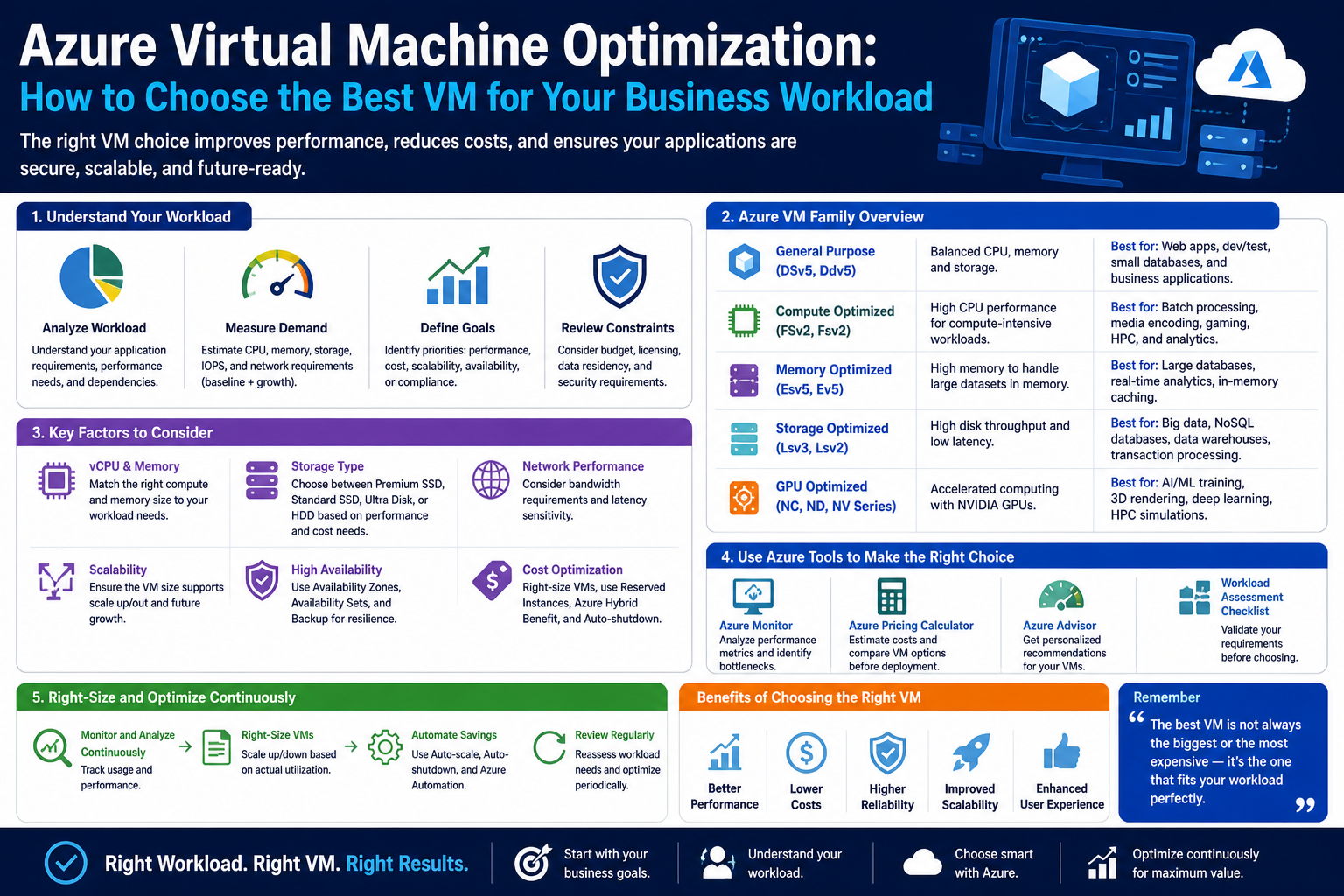
Choosing a virtual machine in Azure is one of those decisions that looks simple on the surface but becomes more nuanced the deeper you go. At a basic level, a virtual machine is just a software-based computer that runs in the cloud. It has processing power, memory, storage, and networking capabilities, just like a physical machine. However, unlike physical hardware, you can scale it up or down, switch configurations, and tailor it to different workloads without touching any physical infrastructure.
This flexibility is what makes Azure powerful, but it is also what makes decision-making important. If you choose too small a machine, your applications may struggle with performance issues, slow response times, or even failure under load. If you choose something too large, you may end up paying for capacity you never fully use. The challenge is finding the balance between performance, cost efficiency, and workload requirements.
Every application behaves differently. A simple blog website does not need the same computing power as a the large financial analytics system. Similarly, a development environment used for testing code behaves very differently from a production system handling thousands of users at the same time. Azure provides a wide range of virtual machine families designed to handle these different needs, but understanding how to match them correctly is where the real skill lies.
Instead of thinking of Azure virtual machines as a single pool of resources, it helps to think of them as specialized toolsets. Each category is designed with a specific purpose in mind. Some are optimized for low-cost, burstable workloads. Others are designed for heavy computation, high memory usage, or even GPU-based processing. The key is to understand what your workload actually demands before choosing the machine that supports it.
How Workloads Shape Virtual Machine Choices
Workloads are the foundation of any decision you make when selecting a virtual machine. A workload refers to the type of processing an application performs, how much data it handles, how often it is used, and how quickly it needs to respond.
Some workloads are predictable and steady. For example, a small internal business application that is used during working hours might have consistent but low traffic. Other workloads are unpredictable and spiky, such as an online retail platform during a sales event where traffic suddenly increases. Some workloads are compute-heavy, meaning they require a lot of processing power, while others are memory-heavy, requiring large amounts of RAM to store and process data in real time.
Understanding workload behavior helps determine the kind of virtual machine that should be used. If a workload is lightweight and inconsistent, a smaller and more flexible machine may be enough. If a workload is continuous and demanding, a more powerful and stable configuration becomes necessary.
Another important factor is whether the workload is stateful or stateless. Stateless applications do not retain data between sessions, making them easier to scale horizontally. Stateful applications, on the other hand, rely heavily on stored data and require more careful planning around storage performance and memory allocation.
Workloads also vary in terms of latency sensitivity. Some applications can tolerate slight delays, while others require near-instant response times. For example, a reporting tool used for daily summaries can handle some delay, but a real-time trading application cannot afford even small performance lags.
By analyzing these characteristics, it becomes easier to narrow down which virtual machine family fits best. Azure’s design is intentionally structured to map different workload patterns to specific VM categories, which simplifies the process once the workload is clearly understood.
Core Building Blocks of Azure Virtual Machines
Before diving into specific machine types, it is important to understand the fundamental building blocks that define every virtual machine in Azure. Regardless of category, every VM is made up of compute power, memory, storage, and network capability. The way these components are balanced determines the suitability of the machine for different tasks.
Compute power refers to the virtual CPU resources allocated to a machine. This is what drives processing performance. Applications that involve calculations, logic execution, or heavy data processing depend heavily on compute resources.
Memory, often referred to as RAM, plays a different role. It determines how much data can be actively held and processed at any given moment. Applications like databases, caching systems, and in-memory analytics tools require large memory allocations to function efficiently.
Storage defines how data is persisted. This includes both temporary and long-term storage. Some virtual machines are optimized for high-speed storage access, while others prioritize capacity over speed. The type of storage used can significantly impact performance, especially for data-heavy applications.
Networking determines how quickly data moves in and out of the virtual machine. This becomes critical in distributed systems where multiple services communicate with each other. High network performance is essential for modern cloud applications that rely on microservices architecture.
What makes Azure interesting is that these components are not fixed in a single configuration. Instead, they are bundled in different ratios depending on the virtual machine family. Some machines prioritize compute over memory, while others do the opposite. This is why understanding workload requirements is essential before making a selection.
Another key aspect is hardware generation. Different virtual machine families are built on different underlying processor technologies. Newer generations generally offer better performance efficiency, improved energy use, and higher throughput. However, older generations may still be suitable for less demanding workloads or cost-sensitive environments.
The combination of compute, memory, storage, networking, and hardware generation creates a wide spectrum of virtual machine options. This variety is intentional, allowing organizations to fine-tune their infrastructure based on precise needs rather than relying on a one-size-fits-all model.
Understanding Azure VM Families at a High Level
Azure organizes its virtual machines into families, each designed with a specific type of workload in mind. These families help simplify selection by grouping similar performance characteristics together.
Some families are designed for general-purpose computing. These are too balanced machines that provide moderate compute, memory, and storage resources. They are typically used for web servers, small applications, and development environments. Their strength lies in flexibility rather than specialization.
Other families are optimized for memory-intensive workloads. These machines allocate a larger portion of resources to RAM, making them suitable for applications like large databases, caching systems, and analytics platforms that require fast data access in memory.
There are also compute-optimized families that prioritize processing power over memory. These are used in scenarios where raw computational ability is more important than storing large amounts of data in memory. Scientific modeling, batch processing, and large-scale calculations often fall into this category.
In contrast, storage-optimized families focus on high throughput and low-latency disk access. These machines are used for applications that involve frequent reading and writing of large datasets. They are commonly used in database systems that require fast disk performance.
For specialized workloads, Azure also provides GPU-enabled virtual machines. These are designed for parallel processing tasks such as machine learning, artificial intelligence, video rendering, and scientific simulations. Instead of relying solely on CPUs, these machines use graphical processing units to handle massive amounts of parallel computations.
There are also burstable machine types designed for workloads that do not require constant high performance. These machines can operate at a lower baseline level and temporarily burst to higher performance when needed. They are ideal for intermittent workloads such as development environments or low-traffic websites.
Understanding these categories is the first step toward making an informed decision. Instead of focusing on individual machine sizes, it is more effective to think in terms of family characteristics and workload alignment.
Matching Compute, Memory, and Storage to Real Workloads
One of the most important aspects of choosing a virtual machine is aligning resource distribution with application behavior. Every workload has a unique pattern of resource usage, and mismatching these patterns can lead to inefficiencies.
Applications that rely heavily on computation benefit from higher CPU allocation. These include systems that process large datasets, perform complex calculations, or execute intensive algorithms. In such cases, compute-optimized machines provide better performance stability.
Memory-heavy applications require a different approach. If an application frequently accesses large datasets or relies on caching mechanisms, insufficient memory can create bottlenecks. This leads to increased disk usage, which slows performance significantly. Memory-optimized machines help reduce this dependency by keeping more data readily available in RAM.
Storage performance is another critical factor. Applications that handle large databases or perform frequent read/write operations depend heavily on disk speed. If storage is too slow, even a powerful CPU and large memory pool cannot compensate for the performance gap.
Balancing these three elements is not always straightforward. Many modern applications require a combination of all three. For example, an e-commerce platform may need strong compute performance for transaction processing, high memory for caching product data, and fast storage for order management systems.
The key is to identify the dominant requirement of the workload. While every application uses all resources to some degree, one component usually stands out as the most critical. That component should guide the selection process.
The Role of Scaling and Performance Planning
Virtual machines in Azure are not static resources. One of their biggest advantages is the ability to scale based on demand. This means that workloads are not locked into a single performance level forever. Instead, they can evolve as requirements change.
Scaling can happen vertically or horizontally. Vertical scaling involves increasing the size of a virtual machine by allocating more resources such as CPU, memory, or storage. Horizontal scaling involves adding more virtual machines to distribute workload across multiple instances.
Understanding when and how to scale is just as important as selecting the initial machine type. Some applications are designed to scale easily, while others require significant architectural changes to support scaling.
Performance planning also involves anticipating future needs. A system that works well today may become insufficient as user demand grows. Planning ahead helps avoid performance bottlenecks and reduces the need for frequent restructuring.
Common Mistakes When Choosing Azure Virtual Machines
One of the most common mistakes is overestimating workload requirements. Many users choose larger virtual machines than necessary to avoid performance issues. While this may seem safe, it often leads to unnecessary cost overhead without meaningful performance benefits.
Another mistake is underestimating storage performance needs. Applications may run smoothly during initial testing, but the slow down significantly when real data loads increase. This happens when storage capabilities are not properly aligned with workload demands.
A third mistake is ignoring workload variability. Some applications experience fluctuating demand, and choosing a static configuration for such workloads can lead to inefficiencies. Without considering variability, systems may either underperform during peak times or waste resources during low usage periods.
Another overlooked issue is failing to consider long-term growth. Many systems are designed for immediate needs without accounting for future expansion. This can result in repeated migrations or restructuring later on.
Understanding these common pitfalls helps in making more informed decisions and building more stable cloud environments.
Azure Virtual Machine Families and How Their Architecture Shapes Performance
Once you move beyond the basic idea of virtual machines, the real decision-making process in Azure becomes centered on VM families and their underlying architecture. Each family is not just a different size option—it is a deliberately engineered configuration built to serve a specific class of workloads. This is where understanding performance behavior becomes more important than memorizing instance names.
At a high level, Azure organizes virtual machines into categories that reflect how resources are distributed. Some families prioritize balanced performance, while others push heavily toward compute, memory, storage, or specialized processing like GPUs. The key idea is that Azure is not trying to provide a single “best” machine, but rather a spectrum of optimized machines.
What makes this system powerful is that it allows infrastructure design to mirror application design. Instead of forcing every workload into the same structure, Azure provides flexibility to match different performance needs precisely. However, this flexibility also introduces complexity because each family behaves differently under load, especially when scaling or handling unpredictable demand patterns.
General-Purpose Virtual Machines and Balanced Workloads
General-purpose virtual machines are often the starting point for many workloads because they provide a balanced ratio of CPU, memory, and storage. These machines are not designed to excel in one specific area but instead aim to perform consistently across a wide range of scenarios.
This balance makes them suitable for applications that do not have extreme resource demands. Typical use cases include standard web servers, small enterprise applications, internal tools, and development environments. In these situations, workloads are often predictable, and no single resource becomes a dominant bottleneck.
The strength of general-purpose machines lies in their flexibility. They can support a variety of workloads without requiring deep optimization. This is especially useful in early-stage deployments where application behavior is still evolving. Developers and system architects often rely on these machines during testing phases because they provide a stable baseline for evaluation.
However, the same balance that makes them versatile can also limit performance in specialized scenarios. If an application becomes memory-intensive or compute-heavy, general-purpose machines may struggle to keep up. This is where workload analysis becomes critical, because using a balanced machine in an imbalanced workload often leads to inefficiencies.
Another important factor is how general-purpose machines behave under scaling conditions. Since they are not optimized for any single resource type, scaling often requires careful monitoring. Increasing size does not always solve performance issues if the bottleneck is tied to a specific resource dimension such as memory or disk throughput.
Compute-Optimized Virtual Machines and High-Processing Demands
Compute-optimized virtual machines are designed for workloads that rely heavily on processing power. These machines allocate a larger proportion of resources to CPU performance, making them ideal for tasks that involve continuous calculations, logic processing, or large-scale data transformation.
In practical terms, compute-heavy workloads include scientific modeling, batch processing systems, web servers handling high request rates, and applications that execute complex algorithms. These systems are less concerned with storing large datasets in memory and more focused on executing instructions as quickly as possible.
The architecture of compute-optimized machines is tuned to maximize instruction throughput. This means they are particularly effective when tasks can be parallelized or broken into smaller computational units. In environments where processing speed directly impacts output time, these machines provide a clear advantage.
However, compute-optimized machines also come with trade-offs. Because more resources are dedicated to CPU performance, memory allocation is often relatively lower compared to other families. This can create limitations for applications that require large in-memory datasets.
Another important consideration is sustained performance. Compute-heavy workloads often run continuously, and performance consistency becomes more important than short bursts of speed. These machines are designed to maintain stable processing under long durations of load, making them suitable for production environments where reliability matters.
Scaling compute-optimized machines is generally straightforward, but it must be aligned with workload architecture. If the application is not designed for parallel execution or distributed processing, simply increasing CPU power may not lead to proportional performance improvements.
Memory-Optimized Virtual Machines and Data-Heavy Applications
Memory-optimized virtual machines are designed for workloads that require large amounts of RAM. These machines prioritize memory capacity and bandwidth over raw CPU performance, making them suitable for applications that depend heavily on fast data access.
Memory-intensive workloads often include large relational databases, caching systems, real-time analytics platforms, and in-memory computing applications. In these scenarios, performance is heavily influenced by how quickly data can be accessed and manipulated in memory rather than retrieved from disk storage.
One of the key advantages of memory-optimized machines is reduced latency. When data is stored in RAM, access times are significantly faster than disk-based retrieval. This makes these machines ideal for applications that require near real-time responsiveness.
Another important use case is in-memory databases and distributed caching systems. These systems rely on holding large datasets in memory to reduce the need for repeated disk access. As a result, memory capacity directly impacts the scalability and performance of the application.
However, memory-optimized machines are not always necessary. Using them for workloads that do not require high memory usage can lead to unnecessary cost increases without meaningful performance benefits. This is why workload profiling is essential before selecting this family.
Memory-optimized architectures also require careful consideration of data persistence strategies. Since RAM is volatile, applications must ensure that critical data is safely stored elsewhere to prevent loss in case of system failure or restart.
Storage-Optimized Virtual Machines and High-Throughput Systems
Storage-optimized virtual machines are designed for workloads that involve heavy disk input and output operations. These machines prioritize fast storage access and high throughput, making them ideal for large databases, data warehousing systems, and applications that process large volumes of structured or unstructured data.
In many modern systems, storage performance is a hidden bottleneck. Even if CPU and memory resources are sufficient, slow disk access can significantly reduce overall performance. Storage-optimized machines address this issue by providing high-speed storage technologies that reduce latency and increase throughput.
Typical use cases include large-scale transactional databases, log processing systems, and applications that continuously read and write data. These systems often generate massive amounts of data that must be processed efficiently in real time.
One of the key strengths of storage-optimized machines is their ability to handle sustained I/O operations without performance degradation. This makes them suitable for enterprise environments where data volume is consistently high.
However, these machines are not designed for compute-heavy or memory-heavy workloads. Their architecture is focused on storage performance, which means other resources may be relatively balanced or secondary in priority.
Another important aspect is data durability and redundancy. Storage-optimized systems often work in environments where data integrity is critical, requiring robust backup and replication strategies.
GPU-Enabled Virtual Machines and Parallel Processing Workloads
GPU-enabled virtual machines represent a specialized category designed for workloads that require massive parallel processing power. Instead of relying solely on CPUs, these machines use graphics processing units to handle large-scale computations simultaneously.
This architecture is particularly effective for tasks that can be divided into many smaller operations executed in parallel. Examples include machine learning model training, artificial intelligence inference, video rendering, scientific simulations, and complex visual processing.
The main advantage of GPU-based computing is speed. Tasks that would take hours or days on traditional CPU-based systems can often be completed significantly faster using parallel processing techniques.
Machine learning is one of the most common use cases for GPU-enabled virtual machines. Training deep learning models involves processing large datasets repeatedly, which benefits greatly from parallel computation.
However, GPU-based systems also require specialized software support. Not all applications are designed to take advantage of GPU acceleration, meaning that selecting this type of machine without proper workload alignment may result in underutilized resources.
Another consideration is cost efficiency. GPU-enabled machines are typically more expensive than general-purpose virtual machines, so they should only be used when the workload genuinely requires parallel processing capabilities.
The Relationship Between Hardware Generations and Performance Efficiency
Beyond VM family categories, hardware generation plays a major role in performance behavior. Different virtual machine types are built on different generations of processors, each offering improvements in speed, efficiency, and instruction handling.
Newer processor generations generally provide better performance per core, improved energy efficiency, and enhanced support for modern workloads. This means that two virtual machines with similar specifications may still perform differently depending on underlying hardware.
Older hardware generations are still useful for less demanding workloads, particularly where cost efficiency is more important than peak performance. However, as applications become more complex, newer architectures provide noticeable improvements in responsiveness and scalability.
Another important aspect is instruction per cycle efficiency. Modern processors are designed to execute more operations per clock cycle, which directly impacts application performance in compute-heavy scenarios.
Memory bandwidth improvements in newer hardware also contribute to faster data processing, especially in memory-intensive workloads. This reduces bottlenecks and allows applications to handle larger datasets more efficiently.
Understanding Resource Bottlenecks in Real-World Scenarios
One of the most important concepts in virtual machine selection is understanding bottlenecks. A bottleneck occurs when one resource limits the overall performance of the system.
For example, an application with sufficient CPU and memory may still perform poorly if storage access is slow. Similarly, a system with fast storage may still struggle if memory capacity is insufficient.
Identifying bottlenecks requires observing how applications behave under load. CPU utilization, memory consumption, disk activity, and network throughput all provide clues about where limitations exist.
In many real-world scenarios, performance issues are not caused by a single factor but by a combination of small inefficiencies across multiple resources. This makes workload analysis essential before selecting or scaling virtual machines.
Another important factor is workload variability. Some applications behave consistently, while others experience sudden spikes in demand. Designing infrastructure that can adapt to these changes is a key part of cloud architecture planning.
Aligning Virtual Machines with Application Architecture Patterns
Modern applications are often built using distributed architectures such as microservices. In these environments, different components of an application may have very different resource requirements.
For example, one service may handle authentication and require minimal resources, while another service processes large datasets and requires significant compute power. In such cases, using a single virtual machine type for the entire system is inefficient.
Instead, each component should be matched with a virtual machine type that aligns with its specific workload characteristics. This approach improves performance, reduces cost, and enhances scalability.
Application architecture also influences scaling behavior. Stateless services are easier to scale horizontally, while stateful services require more careful planning around data consistency and storage.
Understanding how application design interacts with infrastructure selection is essential for building efficient cloud systems that remain stable under changing demand conditions.
Advanced Azure Virtual Machine Selection Strategies for Real-World Workloads
By the time organizations reach the stage of selecting Azure virtual machines for production-grade systems, the decision is no longer just about picking a “good fit.” It becomes a structured exercise in aligning application behavior, performance expectations, cost constraints, and long-term scalability. At this level, virtual machine selection is not isolated—it is deeply tied to architecture design, operational planning, and system lifecycle management.
In real-world environments, workloads rarely stay static. Applications evolve, traffic patterns change, datasets grow, and business requirements shift. This means VM selection is not a one-time decision but part of an ongoing optimization process. The most effective cloud environments are those that continuously adapt infrastructure to match workload realities rather than forcing workloads to conform to fixed infrastructure choices.
A key principle at this stage is understanding that Azure virtual machines are not simply compute units. They are performance profiles that define how an application behaves under load. Choosing correctly means anticipating not only current needs but also how those needs will evolve over time.
Understanding Workload Behavior in Production Environments
Production workloads behave very differently from development or testing environments. In early stages, applications often run with minimal data, limited users, and controlled conditions. However, once deployed, they begin interacting with real users, real data volumes, and unpredictable usage patterns.
One of the most important characteristics of production workloads is variability. Traffic may spike during certain hours, drop during others, and fluctuate based on external events such as marketing campaigns, seasonal demand, or system integrations. This variability directly impacts how virtual machines should be selected and scaled.
Another key factor is concurrency. As user bases grow, multiple operations occur simultaneously. This places pressure on CPU, memory, and storage systems in ways that are not always visible during initial testing. A VM that performs well under single-user testing may behave very differently under thousands of concurrent requests.
Latency sensitivity also becomes more important in production environments. Even small delays in response time can significantly impact user experience. This is especially critical for applications such as financial systems, e-commerce platforms, and real-time analytics dashboards.
Data growth is another major factor. Over time, databases expand, logs accumulate, and application states become more complex. This gradual increase in data volume often exposes weaknesses in initial VM selection if storage or memory resources were underestimated.
Performance Profiling as a Foundation for VM Selection
One of the most effective strategies for choosing virtual machines is performance profiling. Instead of guessing resource requirements, profiling involves observing how an application behaves under different conditions and measuring actual resource consumption.
CPU profiling helps identify how much processing power is required during peak and average usage. Some applications may show short bursts of high CPU usage followed by long periods of inactivity. Others may maintain a steady processing load over time.
Memory profiling reveals how much RAM is actively used and whether applications rely heavily on caching or in-memory computation. Memory leaks or inefficient data structures can also be detected through profiling, helping refine VM selection decisions.
Storage profiling focuses on input/output patterns. Some applications perform frequent small reads and writes, while others handle large sequential data transfers. Understanding these patterns helps determine whether storage-optimized virtual machines are necessary.
Network profiling is often overlooked but equally important. Applications that communicate frequently between services or rely on external APIs can become network-bound rather than compute-bound.
By combining these profiling insights, it becomes possible to build a detailed performance profile that maps directly to Azure VM characteristics. This removes guesswork and leads to more precise infrastructure alignment.
The Role of Scaling Patterns in Virtual Machine Decisions
Scaling behavior is one of the most important factors in cloud architecture. Unlike traditional infrastructure, cloud systems are designed to adapt dynamically to demand. However, this flexibility only works effectively when scaling strategies are aligned with workload behavior.
Vertical scaling involves increasing the size of a virtual machine. This approach is useful when an application is not easily distributed or when performance bottlenecks are tied to a single instance. However, vertical scaling has limits because there is a maximum size for each VM type.
Horizontal scaling involves adding more instances of a virtual machine to distribute workload. This approach is more flexible and is commonly used in modern cloud-native applications. It allows systems to handle increased load by expanding capacity rather than relying on a single large machine.
The choice between vertical and horizontal scaling influences VM selection significantly. Applications designed for horizontal scaling often benefit from smaller, more numerous instances. Applications that require strong internal state consistency may rely more on larger, vertically scaled machines.
Auto-scaling systems further complicate this decision. These systems automatically adjust resource allocation based on demand. However, auto-scaling is most effective when underlying VM types are chosen correctly. Poor VM selection can lead to inefficient scaling behavior or increased operational cost.
Cost Optimization Through Intelligent VM Selection
Cost is a major factor in any cloud environment, and virtual machine selection plays a central role in controlling expenses. However, cost optimization is not simply about choosing the cheapest option. It is about selecting the most efficient configuration for a given workload.
Overprovisioning is one of the most common cost inefficiencies. This occurs when a virtual machine provides more resources than the application actually uses. While this may improve performance headroom, it often leads to unnecessary spending.
Underprovisioning can also lead to cost inefficiency. Although smaller machines are cheaper, they may cause performance issues that result in downtime, slower response times, or increased need for manual intervention. These indirect costs often outweigh the savings from reduced VM size.
The most effective cost strategy involves right-sizing workloads. This means selecting a VM that closely matches actual resource usage patterns rather than estimated peak requirements. Right-sizing requires continuous monitoring and adjustment.
Another cost consideration is workload scheduling. Some applications do not need to run continuously. In such cases, shutting down virtual machines during idle periods can significantly reduce costs.
Reserved capacity models also influence VM selection strategy. Committing to long-term usage can reduce costs, but it requires confidence in workload stability.
Architectural Alignment Between Applications and Virtual Machines
Modern cloud applications are rarely monolithic. Instead, they are built using modular architectures where different components perform specialized roles. This architectural approach has a direct impact on virtual machine selection.
For example, a web application may consist of a frontend interface, backend API services, authentication modules, and database systems. Each of these components has different performance requirements.
Frontend services typically require lightweight compute resources and benefit from horizontal scaling. Backend services may require more compute power depending on business logic complexity. Authentication systems often require low latency but moderate resource usage.
Databases, on the other hand, are often memory-intensive and storage-sensitive. They require careful tuning to ensure fast query performance and data integrity.
This separation of concerns allows each component to be deployed on a virtual machine type that matches its specific workload. Instead of using a single large VM for everything, distributed architectures improve efficiency and scalability.
Microservices architectures take this concept further by breaking applications into even smaller independent services. Each service can be optimized individually, resulting in more precise VM selection and better resource utilization.
Real-Time Systems and Low-Latency Requirements
Some applications operate in real-time environments where latency is a critical factor. These systems require immediate processing and response, often within milliseconds.
Examples include financial trading platforms, real-time monitoring systems, and live data analytics dashboards. In these cases, even small delays can have significant consequences.
Virtual machine selection for real-time systems focuses heavily on CPU performance, memory speed, and network throughput. Storage latency is also a major concern, as delayed data access can impact overall system responsiveness.
In such environments, consistency is more important than peak performance spikes. Systems must deliver predictable behavior under all conditions.
Another important consideration is jitter, which refers to variability in response times. Even if average performance is acceptable, inconsistent response times can degrade system reliability.
Data-Intensive Workloads and Memory-Driven Design
Data-intensive applications often rely heavily on memory and storage systems. These workloads include analytics platforms, data lakes, machine learning pipelines, and large-scale reporting systems.
In these environments, the ability to process large datasets efficiently is more important than raw CPU speed. Memory capacity becomes a key limiting factor because it determines how much data can be processed in real time.
Storage systems must also be optimized for throughput rather than just capacity. High-speed access to large datasets is essential for maintaining performance.
One of the challenges in data-intensive workloads is balancing memory and storage usage. Applications often need to decide what data should remain in memory and what should be offloaded to disk.
Caching strategies play an important role in optimizing performance. Frequently accessed data is stored in memory to reduce latency, while less frequently used data is stored in persistent storage.
GPU Workloads and Parallel Processing Evolution
GPU-enabled virtual machines represent a specialized category that continues to grow in importance as workloads become more computationally intensive.
These machines are designed for parallel processing, where thousands of operations are executed simultaneously. This makes them ideal for machine learning, artificial intelligence, scientific modeling, and high-resolution rendering tasks.
In machine learning workloads, GPUs accelerate both training and inference processes. Training large models requires repeated processing of large datasets, which benefits significantly from parallel execution.
However, GPU workloads require careful optimization. Not all algorithms are designed for parallel execution, and inefficient implementations may not fully utilize GPU capabilities.
Another challenge is memory transfer between CPU and GPU. Data movement can become a bottleneck if not properly managed.
Long-Term Infrastructure Planning and VM Lifecycle Management
Virtual machine selection is not a static decision. Over time, applications evolve, usage patterns change, and infrastructure requirements shift. This means VM lifecycle management is an ongoing process.
One important aspect of lifecycle management is modernization. As newer VM families and hardware generations become available, older systems may become less efficient.
Migration strategies are often required to move workloads to newer VM types without disrupting service. This involves careful planning to ensure compatibility and performance stability.
Another aspect is decommissioning outdated infrastructure. Continuing to run legacy virtual machines can lead to inefficiencies and increased operational costs.
Continuous monitoring plays a key role in lifecycle management. By tracking performance metrics over time, organizations can identify when VM configurations need adjustment.
Resource optimization is not a one-time task but an ongoing cycle of measurement, adjustment, and improvement.
Strategic Decision-Making in Azure Virtual Machine Selection
At a strategic level, choosing virtual machines in Azure becomes a balance between performance engineering, cost management, and architectural design. It requires understanding both technical and business requirements.
Technical factors include CPU, memory, storage, and network performance. Business factors include cost efficiency, scalability, reliability, and user experience expectations.
The most effective approach is to treat VM selection as part of a larger system design process rather than an isolated infrastructure decision. When virtual machines are aligned with application architecture, workload behavior, and scaling strategy, they become an integrated part of a high-performance cloud ecosystem.
Conclusion
Choosing the right virtual machine in Azure is ultimately less about memorizing VM series names and more about understanding how applications actually behave under real conditions. Across all three parts of this discussion, one idea remains consistent: every workload has a pattern, and the job of infrastructure design is to match that pattern as closely as possible.
At a surface level, Azure makes VM selection appear simple because it organizes machines into clear families such as general-purpose, compute-optimized, memory-optimized, storage-optimized, and GPU-enabled categories. This structure is helpful, but it is only the starting point. The real complexity emerges when you begin mapping these categories to real-world applications that rarely behave in a predictable or uniform way.
A small website, for example, may appear to need minimal resources, but under sudden traffic spikes, it can behave like a high-demand system. Similarly, a data processing application might seem stable during development but later reveal memory or storage bottlenecks when exposed to real datasets. These differences highlight why workload understanding is more important than theoretical specifications.
One of the key lessons is that virtual machine selection should always begin with workload profiling rather than assumptions. CPU usage, memory consumption, storage behavior, and network activity all tell a story about what type of machine is actually required. Without this understanding, it becomes easy to either overprovision resources—leading to unnecessary cost—or underprovision them, resulting in performance issues and instability.
Scaling strategies also play a major role in long-term success. Vertical scaling offers simplicity by increasing the power of a single machine, but it has natural limits. Horizontal scaling offers flexibility by distributing workloads across multiple instances, but it requires careful architectural design. The most effective systems often combine both approaches depending on the nature of the workload.
Cost efficiency is another critical dimension that cannot be ignored. One of the advantages of cloud computing is flexibility, but that flexibility can quickly lead to inefficiency if resources are not managed carefully. Overprovisioning may provide comfort in terms of performance headroom, but it often results in wasted spending. Underprovisioning, on the other hand, may reduce costs initially but create long-term operational issues. The most sustainable approach is right-sizing—continuously adjusting VM configurations based on actual usage patterns.
It is also important to recognize that different application components often require different types of virtual machines. Modern systems are rarely monolithic. Instead, they are composed of multiple services such as front-end interfaces, backend APIs, databases, analytics engines, and background processing systems. Each of these components has unique resource needs. Matching each service with an appropriate VM type leads to better performance, improved scalability, and more efficient resource utilization.
Specialized workloads such as machine learning, artificial intelligence, and high-performance simulations introduce even more complexity. These applications often require GPU-enabled virtual machines and rely heavily on parallel processing capabilities. In these cases, traditional CPU-focused thinking is not sufficient. Instead, architecture must be designed around data flow, parallel execution, and optimized hardware acceleration.
Ultimately, the process of selecting an Azure virtual machine is both technical and strategic. It requires understanding not only how applications function today, but also how they are expected to evolve. It involves balancing performance needs with financial constraints, and short-term requirements with long-term scalability.