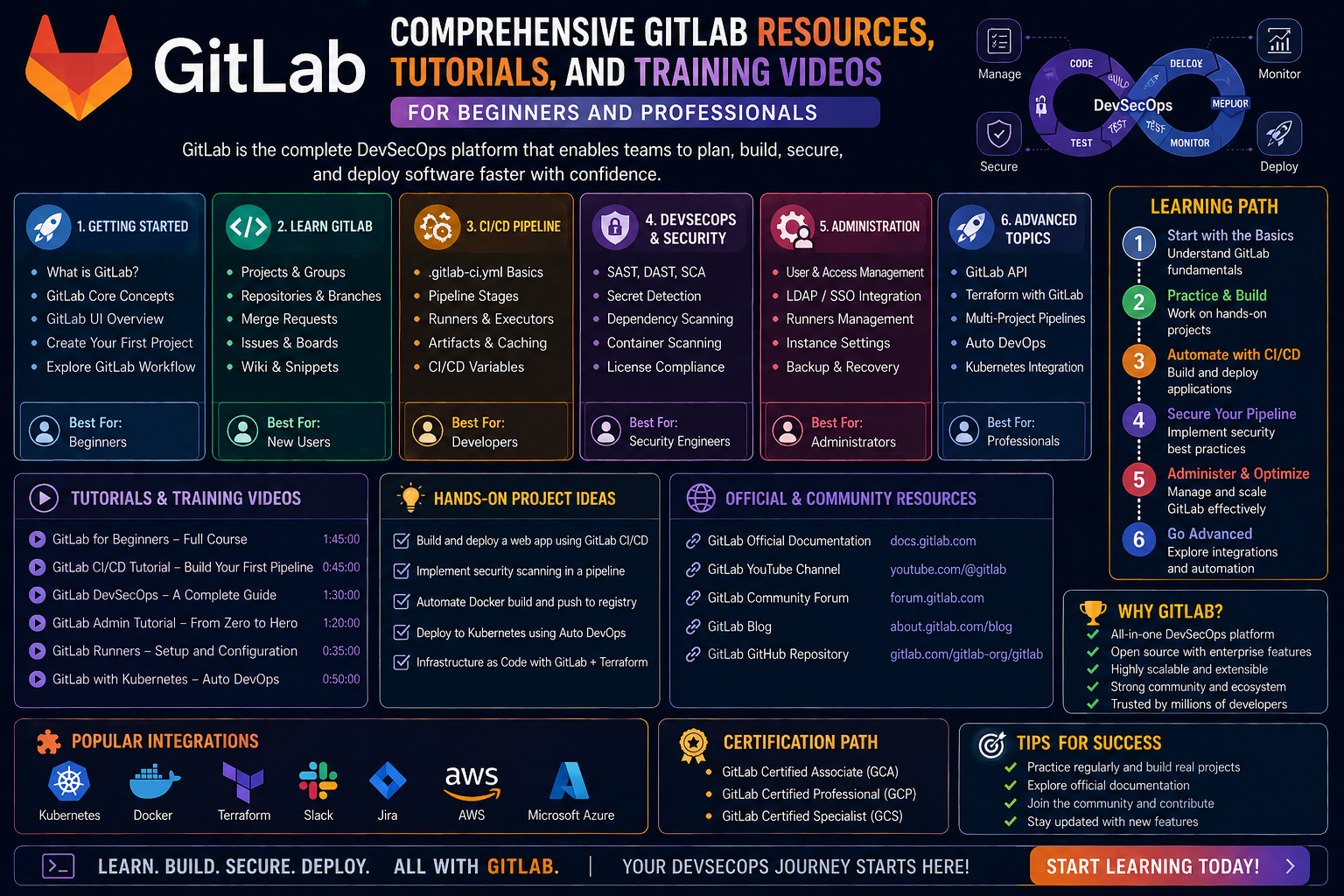
GitLab is widely recognized as a platform designed to support the entire software development lifecycle in one integrated environment. Rather than acting as a single-purpose tool, it brings together multiple capabilities that software teams typically use separately. This includes source code management, collaboration features, automation tools, and deployment workflows. The core idea behind GitLab is to reduce fragmentation in development processes so that teams can plan, build, test, and release software without constantly switching between different systems.
In modern software development, efficiency and coordination are critical. Teams are often distributed across locations, time zones, and roles, which makes it difficult to maintain consistency in how work is done. GitLab addresses this by providing a unified space where developers, testers, project managers, and operations teams can interact with the same set of tools and data. This reduces miscommunication and helps ensure that everyone is working from a single source of truth.
At its foundation, GitLab is built around version control concepts that track changes to code over time. However, it extends far beyond that by embedding workflows that support planning, reviewing, testing, and deploying applications. This makes it especially relevant in environments where software is updated frequently, and reliability is essential.
Core Philosophy and How GitLab Organizes Work
The structure of GitLab is shaped by a philosophy that emphasizes transparency, collaboration, and automation. Instead of treating development, testing, and operations as separate phases, GitLab integrates them into a continuous workflow. This approach allows teams to work more fluidly, where changes move through a structured pipeline from idea to production.
Work in GitLab is typically organized around projects. A project serves as a central container that includes code, documentation, tasks, and automation configurations. Within each project, team members can contribute in different ways depending on their role. Developers focus on writing and reviewing code, while other contributors may focus on tracking progress, managing tasks, or monitoring system behavior.
Another important aspect of GitLab’s organization is its emphasis on visibility. Every change, discussion, and update is recorded in a way that can be reviewed later. This creates accountability and makes it easier to understand how a project evolves. Instead of relying on scattered communication channels, teams can reference a clear history of decisions and changes.
Automation also plays a central role in GitLab’s structure. Many repetitive tasks, such as testing code or checking for errors, can be handled automatically through predefined workflows. This allows teams to focus more on building features and less on manual processes.
Version Control Fundamentals Inside GitLab
Version control is one of the most important foundations of GitLab. It allows developers to track changes made to files over time and ensures that multiple people can work on the same project without overwriting each other’s work. Every modification is recorded as a commit, which acts as a snapshot of changes at a specific point in time.
This system makes it possible to revisit previous versions of a project if needed. If an error is introduced, teams can identify when and where it occurred and roll back to a stable state. This level of control significantly reduces risk during development and encourages experimentation, since changes are not permanent until they are confirmed.
GitLab builds on this concept by providing a structured environment where version control is not just a background system but an active part of the workflow. Developers can create branches to work on new features independently from the main codebase. Once the work is complete, it can be reviewed and merged back into the primary project.
The branching model helps teams work in parallel without interference. Multiple developers can contribute to different features at the same time, and their work remains isolated until it is ready to be integrated. This makes development faster and more organized, especially in larger teams where coordination is essential.
Repositories and Project Structure in GitLab
A repository in GitLab serves as the central storage location for all project-related files and history. It includes not only the source code but also configuration files, documentation, and automation scripts. This centralized structure ensures that everything needed to understand and build a project is stored in one place.
Each repository is designed to maintain a complete history of changes. This history includes information about who made changes, what was modified, and when it occurred. This traceability is essential for maintaining accountability and understanding the evolution of a project.
Within a repository, files are typically organized in a logical structure that reflects the architecture of the application. This organization helps developers quickly locate specific components and understand how different parts of the system interact with each other.
GitLab also supports multiple repositories within a larger ecosystem of projects. This is especially useful for organizations that build complex systems composed of many interconnected services. Each service can have its own repository while still being part of a unified workflow.
By centralizing project assets and maintaining a clear history of changes, repositories in GitLab create a reliable foundation for collaborative software development.
Collaboration Through Merge Requests and Code Review
Collaboration in GitLab is largely centered around the concept of merge requests. A merge request represents a proposal to introduce changes from one branch into another. It acts as a structured way for developers to review and discuss modifications before they become part of the main codebase.
When a merge request is created, it provides a detailed view of what has changed. Team members can examine modifications line by line, leave comments, and suggest improvements. This process ensures that multiple perspectives are considered before changes are finalized.
Code review is a critical part of this workflow. It helps maintain code quality, prevents errors, and encourages knowledge sharing among team members. Developers can learn from each other by reviewing different approaches and solutions.
Discussion within merge requests also plays an important role. Instead of relying on separate communication tools, conversations about code happen directly in context. This keeps feedback organized and ensures that decisions are documented alongside the changes they relate to.
Once a merge request is approved, the changes are integrated into the main project. This controlled process ensures that only reviewed and validated code becomes part of the production system.
Issue Tracking and Work Management System
GitLab includes a built-in system for tracking tasks, bugs, and feature requests. This system helps teams organize work and prioritize development activities. Each task, often referred to as an issue, represents a specific piece of work that needs to be completed.
Issues can include descriptions, discussions, attachments, and labels that categorize them based on priority or type. This structure helps teams understand what needs to be done and how it fits into the broader project goals.
One of the strengths of this system is its flexibility. Issues can represent anything from small bug fixes to large feature developments. They can also be grouped into milestones, which represent larger objectives or release cycles.
Tracking work in this way improves visibility across the team. Everyone can see what is currently being worked on, what has been completed, and what is planned for the future. This reduces confusion and helps ensure that efforts are aligned.
The issue system also integrates closely with other parts of GitLab. For example, code changes can be linked directly to specific issues, creating a clear connection between tasks and implementation.
Continuous Integration and Automated Pipelines
Continuous integration is a key component of GitLab’s automation capabilities. It refers to the practice of automatically testing and validating code whenever changes are made. This helps detect problems early and ensures that new code does not break existing functionality.
In GitLab, continuous integration is implemented through pipelines. A pipeline is a sequence of automated steps that are triggered when changes are introduced. These steps may include compiling code, running tests, or checking for errors.
Each stage of a pipeline is designed to verify a specific aspect of the project. If any stage fails, the process stops, and developers are notified so they can address the issue. This immediate feedback loop is essential for maintaining code quality.
Pipelines also support parallel execution, meaning multiple tests or processes can run simultaneously. This reduces the time needed to validate changes and allows teams to work more efficiently.
By automating these processes, GitLab reduces the need for manual testing and ensures that code is consistently evaluated under the same conditions. This leads to more reliable software and faster development cycles.
Continuous Deployment and Release Workflows
Beyond testing, GitLab also supports continuous deployment, which automates the process of delivering software to different environments. This means that once code passes all required checks, it can be automatically deployed to staging or production systems.
Deployment workflows are highly configurable, allowing teams to define exactly how and when changes should be released. This flexibility is important because different projects have different requirements for stability, testing, and approval.
In many cases, deployment is divided into stages. Code may first be deployed to a testing environment where it is evaluated in conditions similar to production. If everything functions correctly, it can then be promoted to live systems.
This structured approach reduces the risk of introducing errors into production environments. It also speeds up the release process by eliminating manual steps that would otherwise slow down deployment.
Automation in deployment ensures that releases are consistent and repeatable. Every time, the same process is followed, reducing variability and improving reliability across updates.
Security, Permissions, and Access Control
Security is an essential aspect of GitLab, especially in collaborative environments where multiple users interact with the same projects. GitLab provides detailed access control mechanisms that define what each user is allowed to do within a project.
Permissions can be assigned at different levels, allowing administrators to control access to code, settings, and deployment processes. This ensures that sensitive operations are restricted to authorized individuals.
Security features also include scanning tools that help identify vulnerabilities in code. These tools can automatically detect potential risks and notify developers before issues reach production.
Another important aspect of security is auditability. GitLab records actions taken within a project, making it possible to track changes and identify who performed specific operations. This transparency supports accountability and compliance requirements.
By combining access control with automated security checks, GitLab helps organizations maintain a secure development environment while still enabling collaboration.
GitLab Interface and Developer Experience
The user interface of GitLab is designed to provide a clear and organized experience for managing complex development workflows. It brings together code, tasks, pipelines, and collaboration tools into a single environment.
Navigation within GitLab is structured around projects, making it easy to switch between different areas of work. Developers can quickly access repositories, review merge requests, or monitor pipeline status without leaving the platform.
The interface also emphasizes visibility. Important information, such as build status, recent changes, and active tasks, is displayed in a way that helps users understand the current state of a project at a glance.
Customization options allow teams to adjust the interface based on their workflow preferences. This flexibility ensures that both small teams and large organizations can adapt the system to their needs.
Overall, the developer experience is designed to reduce complexity and bring all essential tools into one cohesive environment.
DevOps Integration Across the Lifecycle
GitLab is closely associated with DevOps practices, which focus on integrating development and operations into a unified workflow. Instead of treating these as separate disciplines, GitLab connects them through automation and shared processes.
The DevOps lifecycle in GitLab includes planning, coding, building, testing, releasing, deploying, and monitoring. Each stage is connected through automated workflows that ensure smooth transitions between phases.
This integration allows teams to respond more quickly to changes and maintain a continuous flow of updates. It also improves collaboration between different roles, since everyone works within the same system.
Monitoring tools provide feedback after deployment, allowing teams to observe how applications perform in real environments. This feedback is then used to guide future improvements.
By connecting all stages of the lifecycle, GitLab supports a continuous improvement model where software evolves through ongoing updates rather than isolated releases.
Building Practical Understanding Through Structured Learning Approaches
Learning GitLab effectively requires more than simply exploring its interface. The platform is built around interconnected workflows, which means understanding one feature often depends on understanding several others. A structured learning approach helps break down these layers into manageable parts so that users can gradually build confidence.
A practical starting point is to focus on the core flow of work inside GitLab. This includes how code is created, how changes are proposed, how reviews are conducted, and how updates are delivered. Each of these stages connects to the next, forming a continuous cycle rather than isolated tasks. When learners understand this cycle, they begin to see how different features work together instead of viewing them as separate tools.
Another important part of learning GitLab is recognizing how different roles interact with the platform. Developers interact with repositories and code changes, while project contributors focus on task tracking and planning. Operations-focused users pay attention to deployment and system behavior. Understanding these perspectives helps learners see why GitLab is structured the way it is.
Hands-on practice plays a central role in building familiarity. Even basic interactions, such as creating a project, making changes, or reviewing updates, help reinforce how the system behaves. Over time, repeated exposure builds intuition, allowing users to navigate more advanced features with ease.
Navigating Advanced Project Organization Structures
As projects grow in complexity, GitLab provides organizational structures that help maintain clarity across large systems. These structures go beyond individual repositories and focus on grouping related work into meaningful hierarchies.
At a higher level, projects can be grouped to reflect broader initiatives. This grouping allows teams to manage multiple related systems under a unified structure. It becomes easier to apply consistent rules, permissions, and workflows across connected projects.
Within these structures, naming conventions and organizational patterns play an important role. Clear organization helps teams quickly identify where specific components belong and how they relate to the overall system. This reduces confusion and improves coordination across contributors.
Large-scale organizations also benefit from standardized workflows. When teams follow consistent patterns for how work is created, reviewed, and deployed, it becomes easier to scale operations without losing control. GitLab supports this through configurable templates and reusable structures that help maintain consistency.
As complexity increases, visibility becomes even more important. Structured organization ensures that stakeholders can still understand what is happening across different parts of a system without needing deep technical knowledge of every component.
Deep Dive Into GitLab Runners and Execution Systems
One of the most important components behind GitLab’s automation capabilities is the system responsible for executing tasks. These execution systems allow automated workflows to run outside the main application environment, ensuring that processes such as testing and building do not interfere with normal development activity.
These systems operate by picking up defined tasks and executing them in isolated environments. This isolation ensures that each task runs independently, reducing the risk of interference between processes. It also allows multiple tasks to run simultaneously, improving overall efficiency.
The configuration of execution systems is flexible, allowing organizations to tailor how tasks are processed based on available resources and workload demands. Some environments may prioritize speed, while others focus on stability or security.
These systems are essential for continuous integration workflows, where frequent updates require constant validation. Without reliable execution systems, automated workflows would not be able to scale effectively in larger development environments.
Understanding how these systems function helps users appreciate the underlying mechanics of automation in GitLab. It also highlights why performance and configuration choices can significantly impact overall development speed.
Pipeline Configuration and Workflow Logic Design
Automated workflows in GitLab are defined through structured configuration logic that determines how and when tasks are executed. This logic is typically organized into stages, each representing a specific phase of the workflow.
Each stage must be completed successfully before the next one begins, creating a controlled progression from start to finish. This ensures that errors are detected early and prevents faulty changes from moving further along the workflow.
Within each stage, multiple tasks can run either sequentially or in parallel. This flexibility allows teams to optimize performance based on the complexity of the work being performed. For example, multiple tests can run at the same time, while deployment steps may require strict sequencing.
The configuration of workflows also allows conditional execution. This means certain tasks may only run under specific conditions, such as when changes affect particular parts of a system. This reduces unnecessary processing and improves efficiency.
Designing effective workflow logic requires understanding both the structure of the system and the goals of the development process. When properly designed, these workflows become powerful automation engines that support rapid and reliable software delivery.
Managing Variables and Environment Configurations
Modern software systems often need to behave differently depending on where they are running. For example, a development environment may use different settings than a production environment. GitLab supports this through configurable variables and environment settings.
Variables allow teams to define dynamic values that can be used throughout automated workflows. These values can represent configuration details such as system paths, credentials, or environment-specific settings. By centralizing these values, teams avoid hardcoding information directly into workflows.
Environment configurations provide additional structure by defining different deployment contexts. Each environment represents a stage in the software lifecycle, such as testing or production. This separation ensures that changes can be tested safely before being released broadly.
Managing these configurations effectively is essential for maintaining consistency across environments. It also reduces the risk of errors caused by mismatched settings or incorrect configurations.
As systems become more complex, the use of variables and environment configurations becomes increasingly important for maintaining flexibility without sacrificing control.
Understanding Artifacts and Build Outputs
When automated workflows run in GitLab, they often produce outputs such as compiled code, test results, or reports. These outputs are referred to as artifacts and play an important role in tracking the results of different processes.
Artifacts are stored temporarily or permanently, depending on configuration settings. They allow teams to review the results of specific workflow runs and understand how a system behaved at a particular point in time.
For example, test results generated during a workflow can be stored as artifacts and reviewed later to identify issues. Similarly, compiled applications can be saved and used for deployment in later stages.
Artifacts also help with debugging and troubleshooting. When something goes wrong in a workflow, artifacts provide valuable information that can help identify the cause of the issue.
By preserving outputs from automated processes, GitLab ensures that important data is not lost and remains accessible for analysis and improvement.
Container-Based Development and Image Management Concepts
Modern development workflows often rely on containerized environments to ensure consistency across different systems. GitLab integrates with these concepts by supporting structured management of container-based workflows.
Containers provide isolated environments where applications can run consistently regardless of the underlying system. This ensures that software behaves the same way in development, testing, and production environments.
GitLab supports the creation, storage, and management of container images, which serve as templates for these environments. These images can be reused across different workflows, ensuring consistency and reducing setup time.
This approach also improves scalability, as containerized applications can be deployed quickly across different systems without requiring manual configuration.
Understanding container-based workflows is essential for working with modern software systems, especially in environments that prioritize automation and scalability.
DevSecOps Integration and Security Automation Practices
Security is no longer treated as a separate phase in modern development. Instead, it is integrated directly into workflows to ensure that vulnerabilities are identified and addressed early. GitLab supports this approach through built-in security automation practices.
Security checks can be embedded into automated workflows so that code is analyzed whenever changes are introduced. These checks help identify potential vulnerabilities before they reach production environments.
This integration allows teams to maintain security without slowing down development. Instead of waiting for separate audits, security feedback becomes part of the continuous workflow.
Security practices also extend to dependency analysis, configuration validation, and code scanning. These automated processes help ensure that applications meet security standards throughout their lifecycle.
By integrating security directly into development workflows, GitLab supports a proactive approach to risk management rather than a reactive one.
Scaling Collaboration Across Large Development Teams
As teams grow, collaboration becomes more complex. GitLab provides structures that help manage communication, coordination, and workflow consistency across large groups of contributors.
One of the key challenges in large teams is maintaining alignment. Without a clear structure, work can become fragmented and difficult to coordinate. GitLab addresses this by providing centralized visibility into tasks, code changes, and workflows.
Standardized processes help ensure that everyone follows consistent patterns when contributing to projects. This reduces confusion and makes it easier for new team members to integrate into existing workflows.
Communication within the platform is also structured around work items, ensuring that discussions remain connected to relevant tasks. This prevents important information from being lost across disconnected communication channels.
As collaboration scales, maintaining clarity becomes essential. GitLab’s structure helps teams grow without losing control over processes or quality.
Monitoring, Feedback Loops, and System Observability
After software is deployed, understanding how it behaves in real environments becomes essential. GitLab supports this through monitoring and feedback mechanisms that provide insight into system performance.
Monitoring allows teams to observe application behavior over time, including performance metrics, error rates, and system stability. This information helps identify issues that may not have been detected during testing.
Feedback loops play a critical role in continuous improvement. When issues are detected, they can be traced back through the development process to identify their origin. This creates a cycle of improvement where each release builds on lessons learned from previous versions.
Observability ensures that systems remain transparent and understandable even after deployment. Without visibility into system behavior, it becomes difficult to maintain reliability or diagnose problems effectively.
By incorporating monitoring into the development lifecycle, GitLab helps ensure that software remains stable and maintainable over time.
Workflow Standardization and Reusable Templates
Consistency is an important factor in maintaining efficient development processes. GitLab supports this through reusable templates and standardized workflows that help teams apply consistent patterns across projects.
Templates provide predefined structures for common workflows, reducing the need to manually configure repetitive processes. This ensures that best practices are applied consistently across different projects.
Standardization also improves collaboration by making workflows predictable. When team members understand how processes are structured, they can contribute more effectively without needing to learn unique configurations for each project.
Reusable patterns also reduce errors by minimizing the risk of misconfiguration. Instead of building workflows from scratch each time, teams can rely on proven structures that have already been validated.
This approach helps organizations scale their development processes while maintaining consistency and reliability across projects.
Integrating Automation With Development Strategy
Automation in GitLab is not limited to technical execution; it also plays a strategic role in shaping how development work is planned and executed. By integrating automation into the broader development strategy, teams can optimize efficiency and reduce manual effort.
Automated workflows help ensure that repetitive tasks are handled consistently, freeing developers to focus on more complex problem-solving activities. This improves productivity and reduces the likelihood of human error.
Strategic use of automation also allows teams to respond more quickly to changes. When workflows are automated, updates can move through development stages without delay, enabling faster delivery cycles.
Automation also supports experimentation by making it easier to test changes in controlled environments. This encourages innovation while maintaining stability in production systems.
By aligning automation with development strategy, GitLab enables teams to build more efficient and adaptable software systems.
Advanced Collaboration Patterns in Large-Scale GitLab Environments
As software systems grow, collaboration shifts from simple team interactions to complex coordination across multiple groups, time zones, and responsibilities. GitLab supports this shift by providing structured patterns that help large teams stay aligned without losing efficiency. The platform is designed so that collaboration does not depend on constant direct communication but instead on shared systems of record where work is visible, traceable, and organized.
In large-scale environments, collaboration begins with clarity of ownership. Each piece of work, whether it is a feature, fix, or improvement, must have a clear context and responsible contributors. GitLab reinforces this by tying work items directly to development activity, ensuring that every change has a defined purpose and origin.
Coordination becomes more manageable when teams rely on structured workflows rather than informal communication. Instead of asking for status updates manually, stakeholders can observe progress through updates in code changes, task tracking, and automation pipelines. This reduces unnecessary interruptions and allows developers to focus on implementation work.
Another important pattern is asynchronous collaboration. Teams do not need to work at the same time to move projects forward. GitLab supports this by preserving context around discussions, decisions, and changes so that contributors can respond when available without losing continuity.
As collaboration scales, maintaining consistency in communication becomes essential. Structured workflows ensure that feedback is captured in relevant places, reducing the risk of fragmented information spread across multiple channels.
Role-Based Access and Structured Responsibility Models
In complex development environments, not every user needs the same level of access or control. GitLab supports structured responsibility models that allow organizations to define clear boundaries for what different users can do within a system.
Role-based access ensures that contributors interact with the platform according to their responsibilities. Some users focus on writing and reviewing code, while others manage project structure, oversee deployments, or handle system configuration. These roles help maintain order and reduce the risk of accidental changes to critical components.
Access control also plays a key role in maintaining security and operational stability. By limiting sensitive actions to authorized individuals, organizations can reduce exposure to errors or unauthorized modifications. This is especially important in environments where multiple teams interact with shared infrastructure.
Structured responsibility models also help clarify accountability. When every action is tied to a specific role, it becomes easier to understand who is responsible for different aspects of a system. This improves transparency and supports better decision-making.
As systems scale, clear role definition becomes increasingly important. Without it, workflows can become chaotic and difficult to manage. GitLab’s structured approach helps maintain order even in highly complex environments.
Workflow Optimization Through Continuous Feedback Loops
Efficient development systems rely on continuous feedback to improve over time. GitLab integrates feedback loops directly into its workflows so that teams can quickly identify issues and adjust processes accordingly.
Feedback begins during development, where automated systems evaluate changes as they are introduced. This early feedback helps detect issues before they progress further in the workflow. As a result, problems are addressed closer to their source, reducing the cost and effort required to fix them.
Once changes move into later stages, additional feedback is generated through testing and deployment processes. These stages provide insights into how software behaves in different environments, helping teams understand real-world performance.
After deployment, monitoring systems continue to provide feedback by tracking application behavior over time. This ensures that teams remain aware of issues even after release and can respond quickly when needed.
The continuous nature of these feedback loops creates an ongoing improvement cycle. Each iteration of development builds on previous insights, leading to more stable and efficient systems over time.
Managing Complexity Through Modular Project Design
As software systems become more advanced, managing complexity becomes a major challenge. GitLab supports modular design approaches that help break large systems into smaller, more manageable components.
Modular design allows teams to separate functionality into distinct units that can be developed and maintained independently. This reduces interdependence between components and makes systems easier to understand and modify.
Each module can have its own development lifecycle while still contributing to the overall system. This enables teams to work in parallel without interfering with each other’s progress.
Modularity also improves maintainability. When issues arise, they can often be traced to specific components rather than the entire system. This makes debugging and updates more efficient.
In large-scale environments, modular design becomes essential for maintaining control over complexity. Without it, systems can become difficult to manage and evolve.
Automation Scaling and Infrastructure Efficiency
Automation in GitLab is designed not only for individual workflows but also for scaling across large systems. As usage increases, automation must remain efficient and responsive to handle growing demands.
Scaling automation involves distributing workloads effectively so that no single system becomes overloaded. This ensures that processes continue running smoothly even under heavy usage conditions.
Efficient automation also depends on optimizing resource usage. By running tasks only when necessary and avoiding redundant operations, systems can maintain performance without wasting resources.
Infrastructure efficiency becomes especially important in environments where multiple workflows run simultaneously. Proper configuration ensures that tasks are executed in a balanced manner, reducing delays and improving overall responsiveness.
As automation scales, monitoring becomes essential to ensure that systems continue performing as expected. Continuous observation helps identify bottlenecks and areas for improvement.
Advanced Pipeline Strategies for Complex Workflows
In more advanced environments, workflows often involve multiple layers of processing and decision-making. GitLab supports sophisticated pipeline strategies that allow teams to design complex workflows with precision.
These strategies involve structuring pipelines in a way that reflects the logic of the development process. Instead of treating workflows as simple sequences, they can be designed with conditional paths, parallel execution, and dynamic behavior.
Conditional workflows allow certain processes to run only when specific conditions are met. This reduces unnecessary processing and ensures that resources are used efficiently.
Parallel execution enables multiple tasks to run at the same time, significantly improving performance in large workflows. This is especially useful when tasks are independent and do not rely on each other.
Advanced pipeline strategies also include reusable components that can be shared across different workflows. This improves consistency and reduces duplication of effort.
By combining these techniques, teams can build highly efficient workflows that adapt to different development scenarios.
Governance Models and Organizational Control Systems
In large organizations, maintaining control over development processes requires structured governance models. GitLab supports these models by providing tools that help enforce rules, policies, and standards across projects.
Governance ensures that development practices align with organizational goals. This includes defining how code is reviewed, how changes are approved, and how deployments are managed.
Control systems also help enforce consistency across teams. When everyone follows the same guidelines, it becomes easier to maintain quality and predictability in development outcomes.
Governance models often include approval workflows that require specific checks before changes can be implemented. This adds a layer of oversight that helps prevent errors and maintain stability.
Organizational control systems also support auditing and compliance by tracking actions and maintaining records of changes. This ensures that all activity within the system can be reviewed when necessary.
Data Flow and Information Transparency in Development Systems
Efficient development systems rely on clear data flow between different stages of the workflow. GitLab ensures that information moves smoothly from planning to implementation and beyond without unnecessary fragmentation.
Data flow begins with planning activities, where ideas and requirements are defined. These are then translated into actionable tasks that guide development work.
As work progresses, updates flow through code changes, automated processes, and testing stages. Each stage adds additional information that helps refine the understanding of the system.
Transparency is a key aspect of this flow. All relevant information is visible within the platform, allowing stakeholders to understand progress without needing separate reporting systems.
This transparency improves coordination and reduces uncertainty. When everyone has access to the same information, decision-making becomes more efficient and aligned.
Evolution of Development Practices Through Integrated Platforms
Modern development practices have evolved significantly with the introduction of integrated platforms like GitLab. Instead of relying on separate tools for each stage of development, teams now operate within unified systems that bring everything together.
This integration has changed how software is built, tested, and deployed. It has reduced friction between different stages of development and enabled more continuous workflows.
Integrated platforms also encourage collaboration between roles that were traditionally separated. Developers, testers, and operations teams now work within shared environments, improving communication and coordination.
The evolution of these practices has also led to faster release cycles. Changes can move from idea to production more quickly due to automation and streamlined workflows.
As development continues to evolve, integrated platforms play an increasingly important role in shaping how software systems are built and maintained.
Maintaining Stability in Rapid Development Environments
In environments where changes happen frequently, maintaining system stability becomes a critical concern. GitLab supports stability through structured workflows, automation, and monitoring systems that help ensure reliability.
Stability begins with controlled change management. Every modification goes through a defined process that includes review, testing, and validation before reaching production systems.
Automated testing plays a key role in maintaining stability by detecting issues early in the development cycle. This reduces the likelihood of problems reaching live environments.
Monitoring systems continue to support stability after deployment by tracking system behavior and alerting teams to potential issues. This ensures that problems can be addressed quickly before they escalate.
Balancing rapid development with stability requires careful design of workflows and processes. GitLab provides the structure needed to achieve this balance effectively.
Long-Term Maintainability and System Evolution
Software systems are not static; they evolve as requirements change and new features are added. GitLab supports long-term maintainability by providing structures that help manage this evolution effectively.
Maintainability depends on clear organization, consistent workflows, and reliable documentation of changes. GitLab ensures that all modifications are recorded and traceable, making it easier to understand how systems have evolved.
Modular design also contributes to maintainability by allowing individual components to be updated without affecting the entire system. This reduces risk and simplifies updates.
Over time, systems can become complex, but structured workflows help manage this complexity by keeping development processes organized and transparent.
Evolution of systems is supported by continuous improvement cycles, where feedback from previous changes informs future development decisions. This creates a sustainable approach to long-term software maintenance.
Conclusion
GitLab has become an essential platform in modern software development because it brings together multiple critical aspects of the development lifecycle into a single, unified environment. Instead of separating tasks such as coding, reviewing, testing, and deployment across different tools, it integrates them into a structured and continuous workflow. This integration reduces complexity and allows teams to focus more on building reliable software rather than managing disconnected systems.
One of the strongest advantages of GitLab is how it supports collaboration at every level. From small teams to large distributed organizations, it provides a consistent framework where work can be planned, tracked, reviewed, and improved. Features such as structured version control, merge requests, and issue tracking ensure that every change is transparent and traceable. This level of visibility improves accountability and helps teams maintain alignment throughout the development process.
Automation is another defining strength of GitLab. Through pipelines, testing systems, and deployment workflows, repetitive tasks are handled efficiently and consistently. This reduces manual effort and ensures that software is validated continuously as it evolves. Automation also enables faster delivery cycles, allowing teams to respond quickly to changing requirements without sacrificing quality or stability.
Security and governance are also deeply embedded within the platform. With role-based access, automated security checks, and structured approval processes, GitLab helps organizations maintain control over their systems while still enabling collaboration. This balance between flexibility and control is essential in environments where reliability and compliance are important.
As software systems continue to grow in complexity, tools that unify processes and improve efficiency become increasingly valuable. GitLab supports this evolution by offering a scalable structure that adapts to different team sizes, project types, and development practices. Its ability to integrate development, operations, and security into a single workflow reflects the direction modern software engineering is moving toward.
Ultimately, GitLab is not just a tool for managing code—it is a comprehensive environment that supports the entire journey of software creation.