In modern enterprise environments, networks are no longer simple collections of a few computers connected to a single router. They are large, layered ecosystems made up of thousands of devices, including laptops, desktops, servers, virtual machines, printers, mobile devices, and even IoT sensors. Each of these devices requires a unique identity on the network to communicate effectively, and that identity is primarily the IP address.
Manually assigning and tracking these IP addresses in such an environment would quickly become unmanageable. This is where DHCP, or Dynamic Host Configuration Protocol, becomes essential. DHCP is a system that automatically assigns and manages IP addresses along with other critical network configuration settings. In enterprise networks, it acts as an invisible coordinator, ensuring every device receives the correct network identity without requiring human intervention for each assignment.
Instead of administrators manually configuring each device, DHCP dynamically handles this process in a structured, controlled, and repeatable way. It is not just about assigning IP addresses; it is about ensuring consistency, reducing errors, and maintaining scalability in environments that can span multiple floors, buildings, or even geographic locations.
The importance of DHCP becomes even more obvious when considering how frequently devices join and leave enterprise networks. Employees connect laptops in the morning, disconnect them in the evening, connect again from different locations, or switch between wired and wireless networks. Without DHCP, every change would require manual reconfiguration, which is not practical in any real-world business environment.
Why Manual IP Address Management Breaks Down at Scale
To understand the value of DHCP in enterprises, it helps to first consider what happens without it. In a manually configured network, every device must be assigned a static IP address. That means an administrator must ensure no two devices share the same address, that each address belongs to the correct subnet, and that all network parameters like gateway and DNS are correctly configured.
In small environments, this might be manageable. But in enterprise environments, this approach quickly leads to problems. IP conflicts become common when two devices are accidentally assigned the same address. Tracking which device owns which IP becomes a constant administrative burden. When employees move between departments or locations, their network settings must be reconfigured manually. Over time, the system becomes fragile and error-prone.
Another major issue is scalability. As organizations grow, so does the number of devices. Adding hundreds or thousands of devices manually is not just time-consuming; it is operationally inefficient. Every change introduces a risk of misconfiguration, and even small mistakes can lead to connectivity issues that are difficult to diagnose.
DHCP eliminates these challenges by automating the entire process. Instead of assigning IP addresses permanently, it distributes them dynamically from a predefined pool. This ensures efficient reuse of addresses and reduces waste in address allocation.
Core Components That Make DHCP Work in Enterprises
DHCP in enterprise environments is not a single device or function. It is a coordinated system made up of several key components working together to manage network configuration dynamically.
At the center is the DHCP server. This is the system responsible for maintaining IP address pools and distributing them to requesting devices. In enterprise environments, DHCP servers are typically centralized services hosted on dedicated servers or integrated into network infrastructure devices. These servers are configured with one or more scopes, which define the range of IP addresses available for distribution within a specific network segment.
A scope is essentially a structured range of IP addresses tied to a particular subnet. For example, one department in a company may use one scope, while another department uses a different one. Each scope is carefully designed to match the subnet structure of the network.
Another critical component is the DHCP relay agent. In large networks, devices requesting IP addresses are often not located on the same subnet as the DHCP server. Since DHCP relies on broadcast communication, these requests do not naturally cross network boundaries. The relay agent solves this problem by forwarding DHCP requests between subnets, ensuring that devices in different network segments can still obtain configuration details from a centralized DHCP server.
Finally, there are DHCP clients, which are any devices requesting configuration information. These include everything from employee laptops to network printers and virtual machines running in data centers.
Together, these components form a system that enables seamless automatic configuration across complex enterprise networks.
The Step-by-Step DHCP Process in Enterprise Networks
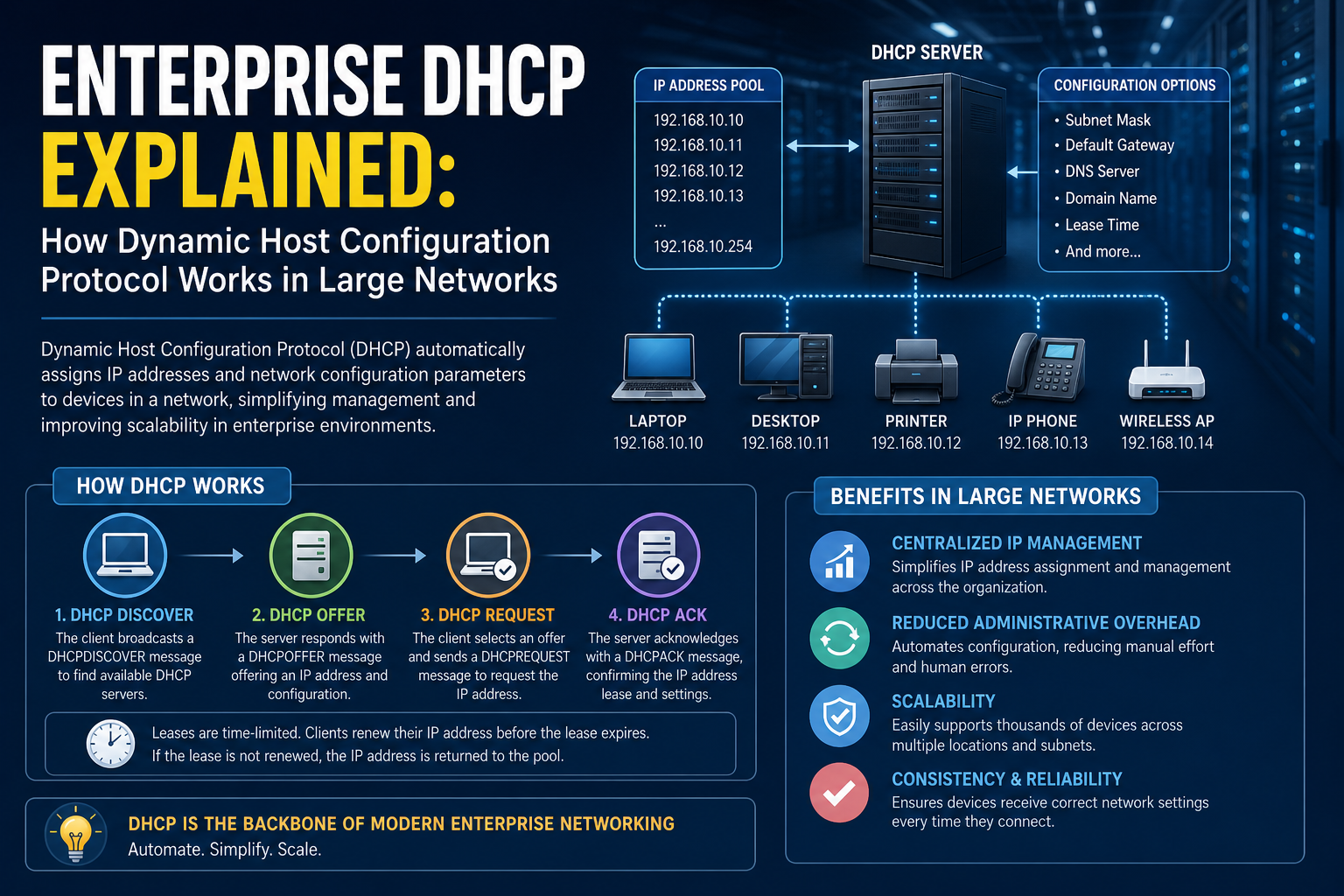
The process of how a device obtains an IP address using DHCP follows a structured sequence commonly referred to as the DORA process, which stands for Discover, Offer, Request, and Acknowledge.
When a device first connects to a network, it does not yet have an IP address. Without an IP address, it cannot communicate directly with specific devices, so it begins by broadcasting a message to the entire network. This initial message is known as a DHCP Discover packet.
Because the device does not know the location of the DHCP server, it sends this message as a broadcast. Network switches forward this broadcast to all devices within the same broadcast domain. If a DHCP server is present in that network segment or reachable via a relay agent, it receives the request.
Once the DHCP server receives the Discover message, it responds with a DHCP Offer. This offer includes an available IP address from its configured pool, along with other configuration details such as subnet mask, default gateway, and DNS server information. At this stage, the IP address is not yet assigned; it is simply being proposed to the client.
If the client accepts the offer, it responds with a DHCP Request message. This message indicates that the client has chosen the offered IP address and wishes to use it. This step also informs other DHCP servers (if multiple exist) that their offers were not selected.
Finally, the DHCP server responds with a DHCP Acknowledge message. This confirms that the IP address has been officially assigned to the device for a specific duration known as a lease period. At this point, the device configures itself with the provided settings and becomes fully operational on the network.
This entire process happens in seconds and is usually invisible to the user.
Understanding DHCP Message Types and Communication Flow
DHCP communication relies on a small set of message types that coordinate the entire IP assignment process. Each message has a specific role in ensuring reliable and conflict-free configuration.
The Discover message initiates communication from the client side. It is a broadcast message because the client does not yet know where the DHCP server is located. This is especially important in enterprise environments where multiple network segments exist.
The Offer message is sent by the server and contains the proposed IP configuration. In environments with multiple DHCP servers, a client may receive multiple offers and select one based on priority or response time.
The Request message is also broadcast in many cases. It confirms the client’s intention to use a specific IP address. This step ensures that all DHCP servers are aware of the client’s selection.
The Acknowledge message finalizes the process and commits the assignment.
In addition to these core messages, there are other DHCP message types used for tasks such as releasing an IP address back to the pool, declining an offer if it is invalid, or renewing a lease before it expires. These messages help maintain the dynamic and flexible nature of DHCP in enterprise environments.
Role of DHCP Relay Agents in Large Networks
Enterprise networks are typically divided into multiple subnets for performance, security, and organizational reasons. However, DHCP was originally designed to operate within a single broadcast domain. This creates a challenge in large environments where DHCP servers are not present in every subnet.
DHCP relay agents solve this problem by acting as intermediaries between clients and servers. When a client sends a broadcast DHCP Discover message, the relay agent intercepts it and forwards it as a unicast message to a DHCP server located in a different network segment.
The relay agent also ensures that responses from the DHCP server are correctly delivered back to the client. Without relay agents, organizations would need to deploy a DHCP server in every subnet, which would significantly increase complexity and maintenance overhead.
In enterprise environments, relay agents are often configured on routers or Layer 3 switches. These devices are already responsible for routing traffic between subnets, making them ideal locations for DHCP relay functionality.
DHCP Scopes, Address Pools, and Allocation Strategy
At the heart of DHCP configuration is the concept of a scope. A scope defines a range of IP addresses that can be assigned to devices within a specific network segment. Each scope is carefully designed to align with subnet architecture and network planning.
Within a scope, the DHCP server maintains an address pool. This pool represents all available IP addresses that can be dynamically assigned to clients. When a device requests an IP address, the DHCP server selects an address from this pool and temporarily assigns it for use.
Scopes also include exclusions, which are IP addresses that should not be assigned dynamically. These are typically reserved for network infrastructure devices such as routers, servers, or printers that require static IP addresses.
Another important feature is reservation. A reservation allows a specific device to always receive the same IP address based on its MAC address. This provides a hybrid approach between static and dynamic addressing, ensuring consistency for critical devices while still benefiting from centralized management.
The careful design of scopes is essential in enterprise environments to avoid address conflicts, optimize utilization, and ensure predictable network behavior.
Lease Lifecycle and IP Address Reuse
When a DHCP server assigns an IP address to a device, it does not permanently own that address. Instead, the assignment is temporary and governed by a lease period. This lease defines how long a device can use a specific IP address before it must be renewed or released.
The lease lifecycle begins when the address is assigned. As time progresses, the client periodically attempts to renew the lease by contacting the DHCP server. If the server approves the renewal, the lease is extended without changing the IP address.
If the lease expires without renewal, the IP address is returned to the pool and becomes available for other devices. This mechanism ensures efficient reuse of IP addresses, especially in environments where devices frequently connect and disconnect.
Lease durations can vary depending on network design. In stable environments, longer leases reduce network traffic and administrative overhead. In highly dynamic environments, shorter leases ensure faster reuse of addresses.
DHCP Options and Network Configuration Delivery
Beyond assigning IP addresses, DHCP also provides additional configuration details that are essential for network communication. These are known as DHCP options.
One of the most important options is the default gateway. This tells the device where to send traffic that is destined for outside its local network. Without this information, the device would only be able to communicate within its own subnet.
Another critical option is the DNS server configuration. DNS allows devices to translate human-readable domain names into IP addresses. Without DNS settings provided by DHCP, users would not be able to access websites or internal services using names.
Other options may include time servers, domain names, and custom configuration parameters used by specific applications or network services. In enterprise environments, DHCP becomes a central point for distributing consistent network settings across all devices.
VLANs and DHCP Behavior in Segmented Networks
Enterprise networks often use VLANs to logically separate traffic while sharing physical infrastructure. Each VLAN typically corresponds to a different subnet, and each subnet requires its own DHCP scope.
Because DHCP relies on broadcast communication, VLAN separation prevents direct communication between clients and DHCP servers located in different VLANs. This is where DHCP relay agents become essential once again, ensuring that requests are properly forwarded across VLAN boundaries.
Proper coordination between VLAN design and DHCP scope configuration is critical. Misalignment between the two can lead to address assignment failures or network connectivity issues.
Reliability and Redundancy in Enterprise DHCP Systems
Given the critical role DHCP plays in network connectivity, enterprises often design DHCP systems with redundancy in mind. If a DHCP server becomes unavailable, new devices may not be able to obtain IP addresses, effectively disrupting network access.
To prevent this, organizations implement multiple DHCP servers or failover configurations. These systems ensure that if one server becomes unavailable, another can continue handling requests without interruption.
Redundancy also extends to scope management, ensuring that multiple servers do not assign overlapping addresses. Coordination mechanisms are used to divide responsibility and maintain consistency across the network.
Security Considerations in DHCP Environments
While DHCP is essential for network operation, it also introduces potential security risks if not properly controlled. One common threat is the presence of rogue DHCP servers. These unauthorized servers can assign incorrect network configurations, potentially redirecting traffic or causing connectivity failures.
To mitigate this risk, enterprise networks often implement controls at the switch level to restrict which devices are allowed to act as DHCP servers. Network segmentation and monitoring also play an important role in detecting unusual DHCP activity.
Another consideration is ensuring that DHCP traffic is properly authenticated and monitored within the network infrastructure.
Designing DHCP Architecture for Large Enterprise Environments
When DHCP is deployed in small networks, the setup is usually straightforward: a single server, one scope, and a limited number of devices. However, enterprise environments introduce complexity that changes how DHCP must be designed, deployed, and maintained. Instead of a single point of service, DHCP becomes a distributed system that must support multiple sites, thousands of endpoints, and varying network conditions.
At this scale, DHCP design is no longer just about assigning IP addresses. It becomes about ensuring availability, minimizing latency, maintaining consistency across locations, and preventing configuration drift. Enterprises often operate across campuses, branch offices, data centers, and cloud environments, each requiring coordinated DHCP behavior.
A well-structured DHCP architecture typically separates responsibilities across multiple servers or services. These may be distributed geographically or logically segmented by network function. Each DHCP instance is carefully configured to serve a specific portion of the network while maintaining synchronization with other DHCP services where needed.
One of the most important design considerations is fault tolerance. Since DHCP is essential for device connectivity, any interruption can lead to widespread network access issues. To mitigate this, enterprise DHCP systems are designed with redundancy so that if one service fails, another can immediately take over without impacting end users.
High Availability Strategies in DHCP Systems
High availability in DHCP environments ensures continuous service even during hardware failures, software issues, or network disruptions. Unlike some network services that can tolerate brief downtime, DHCP must remain highly responsive because devices constantly join and rejoin networks.
One common strategy is DHCP failover. In this model, two DHCP servers share responsibility for the same scope. They communicate regularly to synchronize lease information and ensure consistency. If one server becomes unavailable, the other continues leasing IP addresses without interruption.
There are different modes of failover operation, typically including load balancing and hot standby configurations. In load-balanced setups, both servers actively distribute IP addresses, sharing the workload. In hot standby setups, one server remains primary while the other remains in a passive role until needed.
The synchronization between failover partners is critical. Lease information, reservations, and scope configurations must remain consistent to avoid conflicts. This coordination ensures that devices always receive valid IP assignments regardless of which server responds.
Another approach to high availability involves clustering. In this design, multiple DHCP servers operate as a single logical system. If one node fails, others within the cluster continue servicing requests without interruption. This approach is often used in environments where tight integration with infrastructure systems is required.
Scaling DHCP Across Multiple Sites and Branch Networks
Enterprises rarely operate within a single location. Instead, they are distributed across multiple offices, data centers, and remote sites. Each location may have its own subnet structure, network policies, and connectivity constraints. DHCP must be adapted to function efficiently in this distributed environment.
One approach is centralized DHCP management with relay agents deployed at each site. In this model, DHCP servers are located in a central data center, while remote sites use relay agents to forward requests. This simplifies administration but introduces dependency on network connectivity between sites.
Alternatively, organizations may deploy local DHCP servers at each site. This reduces latency and ensures local autonomy, especially in cases where WAN connectivity is unreliable. However, it increases administrative overhead since multiple servers must be maintained and synchronized.
Hybrid models are also common, where critical sites have local DHCP services while smaller locations rely on centralized infrastructure. This balance allows enterprises to optimize performance while maintaining control.
When designing multi-site DHCP systems, consistency becomes essential. IP ranges must be carefully planned to avoid overlap, especially when merging networks or introducing new locations. Address planning becomes a strategic task rather than a simple configuration step.
Integrating DHCP with IP Address Management Systems
As networks grow, manually tracking IP addresses becomes impractical. This is where IP Address Management systems play an important role. These systems provide centralized visibility into IP allocation, DHCP scopes, DNS records, and network utilization.
When integrated with DHCP, IPAM tools allow administrators to monitor address usage in real time. They provide insights into which addresses are active, which are reserved, and which are available. This improves planning and reduces the risk of address exhaustion.
IPAM integration also enhances troubleshooting. When connectivity issues arise, administrators can quickly identify whether a device has received a valid DHCP assignment and whether it matches expected configuration parameters.
In enterprise environments, DHCP and IPAM often work together to create a unified network management framework. Changes made in IPAM systems can automatically propagate to DHCP servers, reducing manual configuration errors.
Troubleshooting DHCP Issues in Complex Networks
Despite its automation, DHCP can still encounter issues that affect network connectivity. Troubleshooting these problems in enterprise environments requires a structured approach because the source of the issue may not always be obvious.
One of the most common problems is IP address exhaustion. This occurs when the DHCP scope runs out of available addresses. When this happens, new devices are unable to obtain an IP address, leading to connectivity failures. Address exhaustion is often caused by inefficient scope planning or long lease durations that prevent address reuse.
Another common issue is misconfigured relay agents. If a relay agent is not properly forwarding DHCP requests, devices in certain network segments may fail to receive IP addresses even though the DHCP server is functioning correctly.
Conflicts can also occur when static IP addresses overlap with DHCP pools. If a device manually configured with a static IP uses an address within the DHCP range, it may create network collisions.
Troubleshooting DHCP often involves analyzing logs, monitoring network traffic, and verifying scope configurations. Because DHCP operates at the foundation of network connectivity, even small issues can have widespread effects.
Understanding DHCP Snooping and Layer 2 Security Controls
Security in DHCP environments extends beyond server configuration. At the network layer, switches play an important role in controlling DHCP behavior through features such as DHCP snooping.
DHCP snooping is a security mechanism that prevents unauthorized DHCP servers from operating within the network. It works by defining trusted and untrusted ports on network switches. DHCP responses are only allowed from trusted ports, while untrusted ports are restricted from sending DHCP offers.
This helps prevent rogue DHCP servers from distributing incorrect IP configurations, which could otherwise lead to traffic interception or denial of service conditions.
In addition to preventing rogue servers, DHCP snooping also builds a binding table that maps MAC addresses to IP addresses. This information can be used by other security features such as dynamic ARP inspection to further protect the network from spoofing attacks.
By integrating DHCP with Layer 2 security mechanisms, enterprises can significantly reduce the risk of internal network attacks.
DHCP in Wireless and Mobile Enterprise Networks
Wireless networks introduce additional complexity to DHCP operations. Unlike wired networks where devices remain relatively stable, wireless clients frequently move between access points, causing constant IP address reassignment or renewal.
In enterprise Wi-Fi environments, DHCP must support high mobility while maintaining performance. Large numbers of devices may connect simultaneously, especially in environments such as offices, universities, or public venues.
Wireless controllers often coordinate with DHCP servers to optimize IP allocation. When a device moves between access points, it may retain its existing IP address if it remains within the same subnet, reducing disruption.
Roaming behavior is an important consideration in wireless DHCP design. Efficient IP reuse and short lease renewal cycles help ensure that addresses are not unnecessarily tied up by inactive devices.
DHCP Behavior in Virtualized and Cloud Environments
Modern enterprise infrastructure increasingly relies on virtualization and cloud platforms. In these environments, DHCP plays a slightly different role compared to traditional physical networks.
Virtual machines often receive IP addresses dynamically during provisioning. When a virtual machine is created, it immediately sends a DHCP request to obtain network configuration. This allows rapid deployment of new services without manual configuration.
In cloud environments, DHCP functionality is often integrated into virtual networking systems. These systems automatically manage IP assignment across virtual networks, subnets, and containers.
One of the key differences in cloud environments is the speed and scale of provisioning. Thousands of virtual instances may be created and destroyed within short timeframes, requiring highly efficient DHCP systems capable of handling rapid changes.
Despite the abstraction of cloud infrastructure, the underlying principles of DHCP remain the same: devices request configuration, servers respond with offers, and leases are managed dynamically.
DHCPv6 and the Transition to IPv6 Networks
As IPv4 addresses become increasingly scarce, enterprises are gradually transitioning to IPv6. DHCP plays a role in this transition through DHCPv6, which is designed specifically for IPv6 networks.
Unlike IPv4 DHCP, IPv6 networks can also use stateless address autoconfiguration, where devices generate their own IP addresses. However, DHCPv6 is still widely used for distributing additional configuration parameters such as DNS settings and domain information.
DHCPv6 introduces some differences in behavior, including modified message types and improved support for large-scale addressing. It is designed to work seamlessly with IPv6’s vastly larger address space, reducing concerns about address exhaustion.
In enterprise environments, DHCPv6 is often deployed alongside traditional DHCP to support dual-stack networks where both IPv4 and IPv6 operate simultaneously.
Managing Reservations and Static Assignments in Dynamic Networks
While DHCP is primarily dynamic, there are many cases where specific devices require consistent IP addresses. This is where DHCP reservations come into play.
Reservations allow administrators to assign a permanent IP address to a device based on its unique hardware identifier. This ensures that even though the device is managed through DHCP, it always receives the same address.
This approach is commonly used for printers, servers, network appliances, and other infrastructure components that require predictable addressing.
Reservations provide a balance between flexibility and stability. Devices remain centrally managed while still maintaining consistent network identity.
Monitoring DHCP Performance and Network Health
In large enterprise environments, monitoring DHCP performance is essential for maintaining network reliability. Without proper monitoring, issues such as scope exhaustion, server downtime, or misconfigurations may go unnoticed until they impact users.
Monitoring tools track metrics such as lease utilization, request rates, response times, and failure rates. These indicators help administrators identify trends and anticipate potential problems before they escalate.
For example, a steadily increasing lease utilization rate may indicate that a scope is nearing exhaustion. Similarly, a spike in failed DHCP requests could indicate network segmentation issues or relay misconfigurations.
Proactive monitoring allows organizations to adjust configurations, expand scopes, or redistribute address pools before service disruptions occur.
DHCP in Security Incident Response Scenarios
When security incidents occur in enterprise networks, DHCP data often becomes a valuable source of information. Since DHCP logs record which device received which IP address and when, they can be used to trace activity across the network.
In incident response scenarios, DHCP logs help identify device behavior, track movement across subnets, and correlate network activity with user accounts or hardware identifiers.
This makes DHCP an important component not only for network configuration but also for forensic analysis and security investigations.
Migration and Upgrade Challenges in DHCP Infrastructure
As enterprise networks evolve, DHCP infrastructure often needs to be migrated or upgraded. This may involve moving from legacy systems to modern platforms, consolidating multiple DHCP servers, or integrating with new network architectures.
Migration requires careful planning to avoid disruption. Lease data, reservations, and scope configurations must be preserved and transferred accurately. Even small inconsistencies can lead to address conflicts or connectivity issues.
In many cases, migration is performed gradually, with both old and new DHCP systems operating in parallel until the transition is complete.
DHCP in Hybrid Enterprise Environments
Modern enterprises often operate in hybrid environments that combine on-premises infrastructure with cloud-based services. DHCP must function seamlessly across these environments to ensure consistent network behavior.
In hybrid setups, on-premises DHCP servers may handle internal networks, while cloud platforms manage virtual network segments. Coordination between these systems is essential to maintain consistent addressing policies.
Hybrid environments also introduce challenges related to network visibility and control, making centralized management and monitoring even more important.
Advanced DHCP Operations in Modern Enterprise Networks
As enterprise networks continue to expand in scale and complexity, DHCP has evolved far beyond its original role of simply assigning IP addresses. In modern environments, DHCP functions as a foundational service that interacts with security systems, virtualization platforms, cloud infrastructure, and automation frameworks. Understanding its advanced behavior requires looking at how DHCP integrates into the broader ecosystem of enterprise IT operations.
In large organizations, DHCP is not an isolated service. It is tightly connected to routing systems, authentication services, network segmentation strategies, and device lifecycle management. Every device that joins the network passes through DHCP at some stage, making it a critical control point for both connectivity and visibility.
Modern DHCP implementations are designed to operate at high scale, often supporting tens of thousands or even hundreds of thousands of devices. This requires not only efficient IP allocation but also intelligent coordination with other infrastructure components. DHCP is no longer just reactive; in advanced environments, it plays a role in automation, orchestration, and policy enforcement.
DHCP Interaction with Network Automation Systems
One of the most significant changes in enterprise networking is the rise of automation. Instead of manually configuring network devices, administrators now rely on automation platforms that dynamically provision, configure, and manage infrastructure.
DHCP plays a key role in this ecosystem by providing the initial network identity for devices. When a new server, virtual machine, or container comes online, DHCP is often the first service it interacts with. The IP address assigned during this stage determines how the system will be accessed, configured, and integrated into the broader network.
In automated environments, DHCP is often integrated with configuration management tools. These systems use DHCP lease information to trigger post-configuration scripts, assign roles to devices, or register them in inventory databases.
For example, when a new virtual machine receives an IP address, automation systems may detect the assignment and automatically enroll the device into monitoring platforms, security systems, and application deployment pipelines. DHCP becomes the starting point for a fully automated lifecycle.
This integration transforms DHCP from a passive service into an active participant in infrastructure orchestration.
DHCP and Zero-Touch Provisioning in Enterprise Systems
Zero-touch provisioning is a modern approach to device deployment where hardware is shipped, connected to the network, and automatically configured without manual intervention. DHCP is one of the first steps in this process.
When a new device is powered on, it immediately sends a DHCP request to obtain network configuration. In advanced environments, the DHCP response may include additional parameters that guide the device through its initial setup process.
These parameters can instruct the device where to download configuration files, which management server to contact, or how to authenticate itself within the network. This allows devices to self-configure based on predefined policies.
Zero-touch provisioning is particularly valuable in large-scale enterprises with distributed locations. Instead of requiring IT staff to manually configure each device, organizations can deploy systems that automatically integrate new hardware into the network using DHCP as the entry point.
This reduces deployment time, minimizes human error, and ensures consistent configuration across all devices.
DHCP Integration with Identity and Access Systems
In modern enterprise security architectures, network access is closely tied to identity. Devices are not simply allowed onto the network; they must be recognized, authenticated, and authorized.
DHCP plays an indirect but important role in this process. While DHCP itself does not authenticate users or devices, the information it provides is often used by identity systems to make access decisions.
For example, when a device receives an IP address, network access control systems can use that information along with MAC addresses and other identifiers to determine whether the device should be granted full access, limited access, or denied access entirely.
In some environments, DHCP lease information is correlated with user identity systems. This allows organizations to track which user was associated with a specific IP address at a given time, which is essential for auditing and security investigations.
By integrating DHCP with identity systems, enterprises gain greater visibility into network activity and improve their ability to enforce security policies.
DHCP and Network Segmentation Strategies
Enterprise networks are rarely flat. Instead, they are divided into multiple segments for performance, security, and organizational purposes. These segments are often implemented using VLANs, subnets, and routing policies.
DHCP must be carefully aligned with these segmentation strategies. Each network segment typically has its own DHCP scope, ensuring that devices receive IP addresses appropriate for their location and role.
In highly segmented environments, DHCP becomes a tool for enforcing network boundaries. For example, devices in a guest network may receive IP addresses from a completely different range than devices in an internal corporate network.
This separation ensures that even if devices are physically connected to the same infrastructure, they remain logically isolated based on their DHCP configuration.
Segmentation also improves security by limiting broadcast domains and reducing the potential impact of network issues. DHCP scopes are designed with these boundaries in mind to ensure consistent behavior across the entire infrastructure.
Performance Optimization in High-Scale DHCP Systems
In enterprise environments with large numbers of devices, DHCP performance becomes a critical consideration. A poorly performing DHCP system can lead to delayed connectivity, failed network joins, and degraded user experience.
One aspect of performance optimization involves tuning lease durations. Shorter leases allow addresses to be reused more quickly, which is useful in highly dynamic environments. However, excessively short leases can increase DHCP traffic, placing unnecessary load on servers.
Longer leases reduce network overhead but may lead to inefficient IP utilization if devices frequently disconnect. Finding the right balance depends on the specific behavior of the network.
Another optimization strategy involves distributing DHCP load across multiple servers. This prevents any single server from becoming a bottleneck and ensures consistent response times even during peak usage periods.
Network administrators also optimize broadcast traffic by carefully designing subnet sizes and minimizing unnecessary DHCP relay hops. The goal is to reduce latency between clients and DHCP servers while maintaining centralized control.
DHCP in Multi-Tenant Enterprise Environments
In some enterprise scenarios, networks are shared across multiple departments, business units, or even external organizations. These are known as multi-tenant environments.
In such setups, DHCP must ensure strict separation between tenants while still operating within shared infrastructure. This is typically achieved through carefully designed scopes, VLAN segmentation, and access control policies.
Each tenant may have its own DHCP scope, ensuring that IP address assignments do not overlap or interfere with one another. In addition, lease policies and configuration options may vary between tenants depending on their requirements.
Multi-tenant DHCP environments require strong governance to prevent configuration conflicts and ensure fair resource allocation. Centralized management systems are often used to maintain consistency across all tenants.
DHCP and Edge Computing Environments
Edge computing introduces new challenges for DHCP because devices are deployed closer to data sources and often operate in distributed, low-latency environments. These edge locations may have limited connectivity to central data centers, making local DHCP services more important.
In edge environments, DHCP must operate independently while still maintaining alignment with central policies. This often involves localized DHCP servers or distributed DHCP instances that can function even when disconnected from the core network.
Edge devices such as sensors, cameras, and IoT systems rely heavily on DHCP for initial configuration. Since these devices are often deployed in large numbers, DHCP must be capable of handling rapid bursts of requests during deployment phases.
Once operational, edge devices may maintain long lease durations to reduce network overhead and improve stability.
DHCP and IoT Device Management
The rise of IoT devices has significantly increased the importance of DHCP in enterprise networks. IoT devices are often numerous, lightweight, and dynamically connected, making manual configuration impractical.
DHCP provides a scalable way to assign network identities to these devices. However, IoT environments also introduce unique challenges, such as limited device intelligence, inconsistent network behavior, and security vulnerabilities.
To address these challenges, DHCP configurations in IoT environments are often tightly controlled. Address pools may be isolated, and specific DHCP options may be used to direct devices to management platforms or update servers.
In some cases, IoT devices are assigned reserved addresses to ensure consistent communication with monitoring systems.
DHCP Logging and Network Analytics
DHCP logs are a valuable source of information for understanding network behavior. These logs record every lease assignment, renewal, and release, providing a detailed history of device activity.
In enterprise environments, DHCP logs are often integrated into centralized logging and analytics platforms. This allows administrators to analyze patterns such as peak usage times, device mobility, and address utilization trends.
By analyzing DHCP data, organizations can identify inefficiencies in IP allocation, detect unusual activity, and improve network planning.
For example, a sudden increase in DHCP requests may indicate a large number of new devices joining the network, while repeated lease failures may indicate configuration issues or network segmentation problems.
DHCP in Disaster Recovery Scenarios
In disaster recovery situations, DHCP plays a critical role in restoring network connectivity. When infrastructure is rebuilt or shifted to backup sites, DHCP services must be quickly restored to ensure devices can reconnect to the network.
Disaster recovery planning often includes redundant DHCP configurations in secondary locations. These systems are preconfigured and synchronized with primary DHCP servers so they can take over immediately if needed.
During recovery operations, DHCP ensures that devices can rejoin the network without manual reconfiguration, significantly reducing downtime and operational complexity.
Conclusion
Dynamic Host Configuration Protocol (DHCP) remains one of the most essential building blocks of modern enterprise networking. While it often operates quietly in the background, its role is fundamental to how devices connect, communicate, and function within large-scale environments. Without DHCP, enterprise networks would quickly become unmanageable, requiring extensive manual configuration for every device that joins or moves within the infrastructure.
Across enterprise systems, DHCP provides far more than simple IP address assignment. It delivers critical network configuration details such as gateways, DNS settings, and domain information, ensuring that devices are fully prepared to communicate both within internal networks and across the internet. This automated configuration reduces human error, improves consistency, and allows organizations to scale their networks without proportional increases in administrative workload.
As enterprise environments grow more complex, DHCP continues to evolve alongside them. It now operates within highly segmented networks, supports distributed and multi-site architectures, and integrates with virtualization, cloud platforms, and automation systems. Its interaction with relay agents, redundancy mechanisms, and high-availability designs ensures that connectivity remains stable even in large and geographically dispersed infrastructures.
Security has also become an important aspect of DHCP’s role. With features like DHCP snooping and integration with network access control systems, it contributes to protecting enterprise networks from unauthorized access and misconfiguration. At the same time, its logging capabilities provide valuable insights for troubleshooting, auditing, and forensic analysis.
In modern IT ecosystems, DHCP is no longer just a network utility—it is a foundational service that supports automation, mobility, scalability, and security. Whether in traditional data centers, cloud environments, or edge computing systems, DHCP continues to ensure that devices can seamlessly join networks and operate efficiently. Its simplicity on the surface hides a powerful and highly coordinated system that enables the complexity of today’s digital infrastructure to function smoothly.