When most people format a storage device, they tend to focus on the outcome rather than the process. A USB drive starts working, a memory card becomes usable in a camera, or a disk is prepared for file transfers. Behind these simple actions, however, lies a structured system that determines how data is written, stored, and retrieved. This system is known as a file system, and it plays a far more important role in computing than it is often given credit for.
A file system can be thought of as the organizational framework of a storage device. It defines how information is arranged into manageable sections, how the operating system tracks those sections, and how files are located when needed. Without a file system, data would exist as an unstructured stream, making it nearly impossible for computers to manage files efficiently. Every time a file is saved, copied, or deleted, the file system is actively working in the background to ensure those operations are completed correctly.
Among the earliest widely adopted file systems still in use today is FAT32. It belongs to a family of systems originally designed to be simple, lightweight, and highly compatible across devices. While technology has evolved significantly since its introduction, FAT32 remains relevant because of its broad support and straightforward design. To understand why it is still in use, it helps to explore how it actually works at a structural level.
FAT32 organizes data using a mechanism known as the File Allocation Table. At its core, storage is divided into small units called clusters. Each file written to a drive is broken into pieces that fit into these clusters. The file system then records where each piece is stored in a central index, the allocation table. This table acts like a roadmap that tells the operating system where to find each part of a file and in what order to assemble them.
One of the simplest ways to imagine this system is to think of a long row of numbered containers. Each container represents a cluster. When a file is saved, its contents are distributed across several available containers. The system records the number of the next container for each segment, forming a chain. This continues until the final container, which is marked as the end of the file. When a user opens that file, the system follows the chain from beginning to end, collecting each segment in sequence.
This structure makes FAT32 relatively easy to implement and understand, which is one reason it became so widely adopted. However, its simplicity also introduces limitations. Because the system relies on a central table to track all file locations, performance can degrade as storage becomes fragmented. Fragmentation occurs when file pieces are scattered across different parts of a disk rather than stored sequentially. Over time, as files are added and removed, free space becomes unevenly distributed, increasing the time required to retrieve complete files.
This issue is especially noticeable in traditional hard drives, where mechanical movement is required to access different areas of the disk. The read and write head must physically move to each cluster location, which slows down performance when files are heavily fragmented. Even though modern systems attempt to reduce this impact through optimization tools, the underlying structure of FAT32 remains sensitive to fragmentation.
Despite this limitation, FAT32 continues to be widely used in environments where compatibility is more important than performance. Many portable storage devices rely on it because it is recognized by nearly all operating systems and digital devices. Cameras, media players, and older hardware often depend on FAT32 to ensure seamless file exchange. Its design prioritizes universal accessibility over advanced features, making it a reliable choice for simple storage tasks.
Another defining characteristic of FAT32 is its limitation on individual file size. The system cannot handle files larger than four gigabytes. This restriction is not related to storage capacity as a whole, but rather to the way file size information is recorded. While this may not be an issue for small documents or images, it becomes restrictive when dealing with modern high-definition video files or large software packages. As digital content has grown in size and complexity, this limitation has become increasingly noticeable.
Even with these constraints, FAT32 remains valuable because of its predictability. Its structure does not involve complex security layers or advanced logging mechanisms. This simplicity reduces overhead and ensures that the system can function on devices with limited processing power. Embedded systems, older electronics, and portable devices often benefit from this lightweight design.
The way FAT32 handles data also reflects its design philosophy. Rather than focusing on advanced features such as permissions or encryption, it prioritizes straightforward file management. Each file entry includes basic information such as name, location, and size. This minimal approach allows it to operate efficiently across a wide range of devices without requiring specialized support.
However, this simplicity also means that FAT32 lacks built-in security features. It does not support user-level permissions or detailed access controls. Any system that can read the storage device can generally access its contents without restriction. While this may not be an issue for personal or temporary storage, it becomes a limitation in environments where data protection is important.
From a performance perspective, FAT32 behaves best when storage devices are relatively empty or lightly used. In such conditions, files can be written sequentially, minimizing fragmentation. As usage increases and files are frequently modified, performance gradually declines. This pattern is one of the key reasons newer file systems were developed, offering more advanced methods of organizing and tracking data.
Despite its age, FAT32 still plays a significant role in modern computing. Its compatibility ensures that it continues to function as a universal bridge between different systems. Whether transferring files between devices or using external storage on multiple platforms, FAT32 provides a dependable and widely recognized structure for basic file management.
Understanding FAT32 is not just about learning a technical format; it also provides insight into how early computing systems balanced simplicity with functionality. It represents a foundational stage in file system development, where the primary goal was ensuring that data could be stored and retrieved reliably across diverse hardware. While newer systems have expanded on these ideas with additional features and performance improvements, FAT32 remains a reference point for understanding how digital storage evolved in the first place.
NTFS and the Shift Toward Structured, Secure, and Scalable Storage Systems
As computing environments grew more complex, the limitations of early file systems became increasingly apparent. Larger storage devices, more demanding applications, and the rise of networked computing created new expectations for how data should be managed. These developments led to the creation of more advanced file systems designed to go beyond basic storage and retrieval. Among these, NTFS stands as one of the most significant advancements in file system architecture.
NTFS, or New Technology File System, was designed with a fundamentally different approach compared to earlier systems like FAT32. Instead of focusing solely on compatibility and simplicity, it introduced structured data management, improved reliability, and built-in security features. It represents a shift from basic file organization toward a more controlled and intelligent storage system.
At the heart of NTFS is a sophisticated database-like structure known as the Master File Table. This table serves as the central index for all files stored on a disk. Unlike simpler systems where file locations are tracked in a basic chain, NTFS stores detailed records for every file, including metadata such as creation time, modification history, permissions, and physical location on the disk.
This metadata-driven approach allows the system to manage files more intelligently. Instead of relying on a simple map of clusters, NTFS maintains a structured record for each file entry. This record acts as a comprehensive profile, enabling faster access, better organization, and improved resilience against data corruption.
One of the most important advancements introduced by NTFS is its support for file permissions. In modern computing environments, especially those involving multiple users or networked systems, controlling access to data is essential. NTFS allows administrators to define who can read, modify, or execute specific files. These permissions are not just superficial labels; they are deeply integrated into the file system itself, enforced at the operating system level.
This capability transforms how data is managed in shared environments. Instead of all users having equal access, NTFS enables granular control, ensuring that sensitive files remain protected. This structure is particularly important in organizational settings, where data security and accountability are critical.
Another major feature of NTFS is its journaling system. In traditional file systems, unexpected interruptions such as power loss can lead to data corruption because changes are not always fully recorded. NTFS addresses this problem by maintaining a log of ongoing operations. Before changes are permanently applied, they are recorded in a journal. If a system failure occurs, the journal can be used to restore the file system to a consistent state.
This mechanism significantly improves reliability. It reduces the risk of file corruption and ensures that storage remains stable even in the event of sudden interruptions. This feature alone marks a major step forward in storage design, particularly for systems that require high levels of data integrity.
NTFS also introduces support for larger file sizes and storage volumes. Unlike older systems that impose strict limits, NTFS is designed to handle modern storage requirements. This scalability makes it suitable for everything from personal computers to large enterprise servers. As data needs continue to grow, this flexibility ensures that the file system remains relevant across different computing environments.
Performance is another area where NTFS shows clear improvements. By organizing data using structured indexing and optimized allocation strategies, it reduces the impact of fragmentation. While fragmentation can still occur, the system is better equipped to manage it efficiently. Additionally, NTFS supports features that allow multiple data streams within a single file, enabling more complex data handling without significant performance loss.
This capability is particularly useful in advanced applications where files may contain multiple layers of information. Instead of treating each component separately, NTFS allows them to coexist within a unified structure. This reduces overhead and improves overall efficiency.
Security, reliability, and scalability combine to make NTFS suitable for environments where data integrity is critical. It is commonly used in operating systems that require robust file management, particularly in desktop and server environments. Its design reflects the needs of modern computing, where storage is not just about saving files but also about managing access, ensuring consistency, and supporting complex operations.
Despite its advantages, NTFS is not universally compatible with all devices. Its advanced features require more processing power and system support compared to simpler file systems. This makes it less suitable for lightweight or highly portable devices, where simplicity and cross-platform compatibility may be more important.
The complexity of NTFS also means that it is more tightly integrated with specific operating systems. While other systems can read NTFS-formatted drives, full support for its advanced features is often limited outside its primary environment. This trade-off highlights the balance between functionality and universality in file system design.
NTFS represents a turning point in how digital storage is managed. It moves beyond the basic concept of storing files and introduces a structured, secure, and highly organized system capable of supporting modern computing demands. Its design reflects a deeper understanding of how data is used, shared, and protected in complex environments.
ExFAT and the Evolution Toward Flexible, High-Capacity Portable Storage
As digital content continued to expand in size and complexity, especially with the rise of high-definition media and large data transfers, the limitations of older file systems became more pronounced. Devices such as cameras, smartphones, and portable storage drives required a system that could handle large files while remaining compatible across multiple platforms. This need led to the development of ExFAT, a file system designed specifically for modern portable storage environments.
ExFAT, or Extended File Allocation Table, can be understood as a bridge between older lightweight systems and more complex modern architectures. It retains the simplicity of earlier FAT-based systems while removing many of their restrictive limitations. At the same time, it avoids the overhead and complexity associated with more advanced systems like NTFS. This balance makes it particularly suited for flash-based storage devices.
One of the key motivations behind ExFAT was the increasing demand for large file support. Traditional FAT32 systems impose a strict limit on file size, which becomes problematic when dealing with high-resolution video recordings or large software files. ExFAT removes this limitation, allowing files that exceed several gigabytes to be stored without issue. This capability aligns it with modern digital workflows, where file sizes can grow rapidly.
The structure of ExFAT is still based on the concept of allocation tables, but it introduces improvements in how data is organized and accessed. It reduces unnecessary overhead and simplifies certain aspects of file tracking. This results in faster write operations, particularly on flash memory devices where efficiency is crucial.
Unlike NTFS, ExFAT does not include advanced features such as journaling or complex permission systems. This omission is intentional. Flash storage devices are often used in environments where speed, portability, and compatibility are more important than detailed security controls. By keeping the system lightweight, ExFAT reduces the strain on device resources and improves overall responsiveness.
This design choice also enhances compatibility across different operating systems and devices. ExFAT was developed with cross-platform usage in mind, making it suitable for devices that need to transfer data between different environments without conversion or reformatting. This is especially important in portable media, where files may be moved frequently between cameras, computers, and external drives.
Performance-wise, ExFAT is optimized for flash memory rather than traditional mechanical drives. Flash storage behaves differently from spinning disks, as it does not rely on physical movement to access data. Instead, it benefits from streamlined file structures that minimize unnecessary write operations. ExFAT takes advantage of this by reducing fragmentation-related overhead and simplifying file allocation processes.
One of its notable strengths is its ability to handle large storage capacities efficiently. As storage devices have grown from gigabytes to terabytes, and even beyond, file systems have had to adapt to manage these volumes without degradation in performance. ExFAT is designed with this scalability in mind, making it suitable for modern high-capacity storage solutions.
Its adoption in portable storage standards reflects its practical strengths. Devices that prioritize media recording and transfer often rely on ExFAT because it allows large files to be stored and moved without compatibility issues. This has made it a common choice for high-capacity memory cards and external drives used in multimedia production.
However, the simplicity of ExFAT also means that it lacks certain protective features found in more advanced systems. It does not include built-in mechanisms for detailed access control or system-level recovery logs. This makes it less suitable for environments where data security and integrity monitoring are critical. Instead, it focuses on speed, flexibility, and broad compatibility.
The design philosophy behind ExFAT reflects a shift in how storage is used. Rather than emphasizing internal system complexity, it prioritizes interoperability and ease of use. This approach acknowledges the growing importance of data mobility, where files are frequently transferred across different devices and platforms.
In practical terms, ExFAT occupies a middle ground in the evolution of file systems. It is more capable than older systems in handling modern file sizes and storage capacities, yet simpler and more efficient than fully featured enterprise systems. This balance allows it to serve a wide range of applications without being tied to a specific computing environment.
As digital storage continues to evolve, ExFAT remains relevant because it addresses a specific need that neither older nor more complex systems fully cover. It supports large-scale data movement while maintaining simplicity and compatibility, making it a practical choice for portable and consumer-level storage devices.
How File Systems Behave in Real Environments, Edge Cases, and Modern Storage Realities
When file systems are discussed in theory, they often appear neat and predictable. FAT32, NTFS, and ExFAT each seem to have clearly defined strengths and weaknesses, and it can feel as though choosing between them is simply a matter of matching features to needs. In real-world usage, however, storage behavior is far less orderly. Devices fail, files grow unpredictably, hardware evolves, and operating systems interpret the same file system in slightly different ways. Understanding how file systems behave under real conditions reveals why these three systems continue to coexist rather than being replaced by a single universal standard.
One of the most important factors influencing file system behavior is the type of storage hardware involved. Traditional hard disk drives and modern solid-state drives interact with file systems in fundamentally different ways. Hard drives rely on spinning platters and mechanical read-write heads, meaning that physical movement plays a role in how quickly data is accessed. Solid-state drives, on the other hand, store data electronically with no moving parts, allowing for near-instant access regardless of physical location.
This difference changes how file systems are experienced by users. On hard drives, fragmentation has a noticeable impact because scattered file segments require the read head to move repeatedly across the disk. On solid-state drives, the penalty for fragmentation is far less severe because data can be accessed almost instantly from any location. However, even in SSD environments, file system design still matters because it influences write patterns, wear distribution, and overall efficiency.
FAT32, for example, was designed in an era when mechanical drives were the norm. Its tendency to allocate the first available free clusters means that files can become fragmented relatively easily over time. While this is manageable on small or lightly used drives, it becomes more problematic as storage fills up. On modern SSDs, this fragmentation does not slow down read performance significantly, but it can still affect write behavior and long-term efficiency.
NTFS behaves differently because it was designed with more structured allocation strategies and metadata management. Instead of simply writing data into the next available space, it tracks file placement more intelligently using its master file index. This reduces unnecessary fragmentation in many cases, especially on heavily used systems. However, NTFS is not immune to fragmentation, and over time, even well-managed systems can develop scattered file structures.
ExFAT occupies a middle ground in this regard. It is designed primarily for flash-based storage, where simplicity and compatibility are more important than complex optimization. Its allocation system is efficient enough for portable devices, but it does not attempt to perform the kind of deep management seen in NTFS. This makes it predictable and fast for sequential operations, such as recording video or transferring large files, but less sophisticated in long-term organizational control.
Beyond hardware interaction, another important real-world factor is file system behavior during unexpected interruptions. Power loss, sudden device removal, or system crashes can all interrupt file operations mid-process. Each file system handles these events differently, and these differences can determine whether data is preserved or corrupted.
NTFS includes a journaling system, which records changes before they are fully committed to disk. This means that if a system fails during a write operation, the file system can consult its journal and determine which operations were completed and which were interrupted. It then attempts to restore consistency by replaying or discarding incomplete changes. This significantly reduces the risk of corruption and is one of the reasons NTFS is widely used in environments where stability is critical.
FAT32 does not have this level of protection. When a write operation is interrupted, the file system has no detailed record of what stage the process was in. As a result, partially written files or corrupted directory entries can occur. In many cases, recovery tools can reconstruct lost data by scanning raw storage, but the process is not guaranteed and often depends on how the data was originally distributed across the disk.
ExFAT improves reliability compared to FAT32 but still does not include full journaling. It uses some mechanisms to reduce corruption risk, but it relies more on safe removal practices and controlled usage environments. This is one reason why ExFAT is often used in devices that encourage proper disconnection procedures, such as cameras and external drives designed for media transfer.
Another often overlooked aspect of file systems is how they handle metadata, which is the information describing files rather than the file contents themselves. Metadata includes file names, timestamps, size information, and structural details. NTFS is particularly rich in metadata support, allowing for detailed tracking of file history and attributes. This enables features such as file permissions, audit logs, and system-level indexing.
FAT32, by contrast, maintains minimal metadata. It focuses primarily on basic file identification and location tracking. This simplicity makes it lightweight and highly compatible, but it also limits its ability to support advanced features. ExFAT expands metadata support slightly compared to FAT32 but does not reach the complexity of NTFS. Its design prioritizes efficiency over detailed tracking, which aligns with its role in portable storage environments.
Real-world usage also highlights how file systems interact with different operating systems. Compatibility is not just about whether a system can read a drive, but how well it can interpret all its features. FAT32 is universally readable, making it ideal for cross-device sharing. Almost any operating system or embedded device can recognize it without special drivers.
NTFS, while widely supported, is more closely associated with certain operating systems. It can be read and written by multiple platforms, but full feature support is often limited outside its native environment. This means that while basic file access is usually possible, advanced features such as permissions or journaling metadata may not be fully utilized in all contexts.
ExFAT was specifically designed to bridge compatibility gaps. It is supported across modern operating systems and is commonly used when large files need to be transferred between different platforms. Its lack of complex internal features makes it easier to implement across systems, which contributes to its broad adoption in portable storage.
Another important consideration in real-world file system behavior is storage scaling. As drives grow larger, file systems must manage increasingly complex allocation maps and metadata structures. FAT32, for instance, becomes inefficient at very large capacities because its design was never intended for modern multi-terabyte drives. Its allocation table can grow large and unwieldy, and performance may degrade as a result.
NTFS handles large storage volumes more effectively due to its structured indexing system. It is designed to scale with modern hardware and can manage large drives without significant degradation in performance. Its ability to index files efficiently allows it to maintain consistent performance even as storage capacity increases.
ExFAT was also designed with large storage in mind, particularly for flash-based devices. It supports extremely large file sizes and drive capacities, making it suitable for modern high-capacity storage cards and external drives. Its lightweight structure ensures that even large volumes do not introduce excessive overhead.
Storage behavior also changes depending on file type and usage patterns. Sequential files, such as video recordings, behave differently from small, frequently modified files such as documents or system logs. File systems that excel at sequential writing may not perform as efficiently with random access patterns.
ExFAT is particularly strong in sequential writing scenarios. This is why it is often used in video recording devices, where large files are written continuously. FAT32 can also handle sequential data but is limited by file size restrictions and fragmentation issues. NTFS, while highly capable in both sequential and random access scenarios, introduces more overhead due to its advanced features.
Data recovery is another area where file system differences become especially visible. When files are deleted, they are not immediately erased from storage. Instead, their references are removed, and the space is marked as available. The ease with which deleted files can be recovered depends on how the file system handles metadata and overwriting.
In FAT32, recovery is often possible if the data has not been overwritten, because file entries are relatively simple and widely understood by recovery tools. NTFS recovery is more complex due to its structured metadata and journaling system, but it also offers more information that can assist in reconstruction. ExFAT falls somewhere in between, offering moderate recoverability depending on how the storage has been used after deletion.
Modern storage trends have also introduced new considerations that influence file system relevance. Solid-state drives use wear leveling, a technique that distributes writes evenly across memory cells to prolong lifespan. File systems can indirectly influence how effectively wear leveling operates by affecting write patterns. Systems that generate fewer unnecessary writes can contribute to longer device life.
NTFS, with its logging and metadata operations, can generate more background write activity compared to simpler systems. ExFAT, being lightweight, tends to produce fewer overhead writes, which can be advantageous for flash storage. FAT32 is also relatively light but lacks optimization for modern workloads.
Another evolving factor is how file systems interact with encryption and security layers. While NTFS includes built-in support for certain encryption features, other systems rely on external encryption tools. In environments where security is managed at the system level rather than the file system level, the role of NTFS becomes more integrated. ExFAT and FAT32 typically depend on external mechanisms for encryption and access control.
Virtualization and containerized computing environments also influence how file systems are used. In these contexts, storage is often abstracted, and file system performance is evaluated in terms of consistency, speed, and compatibility rather than direct hardware interaction. NTFS is frequently used in virtualized systems due to its stability and feature set, while ExFAT may be used for portable data exchange between virtual and physical environments.
Even operating system installation media reflects file system behavior. Bootable drives often rely on FAT32 due to its wide compatibility with system firmware, even when newer systems are installed using more advanced file systems internally. This demonstrates how older standards persist in specific roles where universality matters more than capability.
Across all these scenarios, what becomes clear is that file systems are not static tools but adaptive frameworks that interact with changing hardware, software, and usage patterns. Their behavior is shaped not only by design but also by context. FAT32 continues to exist because of its simplicity and universal support. NTFS remains dominant in structured computing environments because of its robustness and feature set. ExFAT fills a critical gap between portability and modern file handling requirements.
Each system operates best under specific conditions, and their coexistence reflects the diversity of modern computing rather than a single optimal solution.
Deep Internal Mechanics of File Systems — Allocation Logic, Performance Behavior, and Data Integrity in Real Conditions
Modern file systems are often described in terms of features, but their true behavior is defined by internal mechanisms that operate quietly in the background. These mechanisms determine how efficiently storage is used, how quickly data is accessed, and how reliably information survives unexpected events. FAT32, ExFAT, and NTFS all approach these internal challenges differently, and understanding those differences requires looking beyond surface-level concepts into how data is actually managed at the lowest structural level.
One of the most important internal processes in any file system is allocation strategy, which determines how new data is placed onto a storage device. At first glance, allocation may seem simple: find empty space and write data there. In practice, however, allocation strategies significantly influence performance, fragmentation, and long-term efficiency.
FAT32 uses a relatively straightforward allocation method. When a file is written, the system searches for the first available free cluster and begins placing data there. This approach is efficient in terms of simplicity, but it does not prioritize continuity. As a result, files are often broken into scattered segments if contiguous space is unavailable. Over time, especially on heavily used drives, this leads to a fragmented layout where file data is distributed across distant regions of storage. The system must then follow the linked structure of the file allocation table to reconstruct files during access.
NTFS, in contrast, uses a more intelligent allocation strategy that takes into account file size, available space distribution, and system metadata. Instead of simply placing data in the first available location, NTFS attempts to reduce fragmentation by allocating larger contiguous regions when possible. It also maintains detailed records of file placement, which allows it to optimize future writes based on existing disk usage patterns. This reduces the frequency of fragmentation, although it cannot eliminate it entirely, especially on long-running systems with frequent file modifications.
ExFAT follows a simpler model closer to FAT32 but optimized for flash storage. It prioritizes speed and minimal overhead rather than long-term structural optimization. This means it writes data efficiently in sequential operations, but does not heavily invest in reorganizing storage patterns. This approach works well for devices that frequently handle large sequential files, such as media recording devices, where consistency of write speed is more important than perfect storage organization.
Another key internal factor is cluster size, which plays a significant role in determining how efficiently space is used. A cluster is the smallest unit of storage that a file system can allocate. If a file is smaller than a cluster, it still occupies the full cluster, which can lead to wasted space known as slack space.
FAT32 typically uses smaller cluster sizes on smaller drives and larger clusters on larger volumes. While this helps balance efficiency and performance, it can still result in noticeable space waste when storing large numbers of small files. NTFS offers more flexible cluster management, allowing for more efficient use of space across different workloads. ExFAT, designed for modern flash storage, also supports large cluster sizes, which can improve performance for large file operations but may reduce efficiency when handling many small files.
These allocation and clustering decisions directly influence how quickly files can be accessed. When data is stored in contiguous clusters, the system can retrieve it in a single continuous read operation. When data is fragmented, multiple reads are required, increasing access time. On mechanical drives, this effect is amplified due to physical movement of the read/write head. On solid-state drives, the performance impact is reduced but not entirely eliminated, especially during write-heavy operations.
Beyond allocation, file systems must also manage caching behavior. Caching is a performance optimization technique where frequently accessed data is temporarily stored in faster memory to reduce repeated disk access. NTFS integrates deeply with system-level caching, allowing operating systems to anticipate file access patterns and preload data into memory. This significantly improves performance in environments where the same files are accessed repeatedly.
FAT32 and ExFAT rely more heavily on external system caching rather than internal optimization. This means their performance can vary more depending on how the operating system handles memory management. While this keeps their internal structure simple, it also makes their performance more dependent on external factors.
Data integrity mechanisms also play a major role in how file systems behave under stress. NTFS includes built-in journaling, which tracks file system changes before they are fully applied. This allows the system to recover from crashes by replaying or discarding incomplete operations. The journaling process ensures that the file system remains consistent even after unexpected interruptions.
The journal itself is not a backup of data but a log of operations. It records what changes are about to be made, allowing the system to verify whether those changes were completed successfully. This mechanism reduces the likelihood of structural corruption, particularly in environments where sudden shutdowns or power failures are common.
FAT32 lacks any formal journaling system, which means that it cannot reliably track incomplete operations. If a write process is interrupted, the system may leave behind inconsistent metadata or partially written files. Recovery is often possible, but it requires external tools and is not guaranteed to restore all data accurately.
ExFAT introduces some improvements in consistency handling but does not implement full journaling. Instead, it relies on controlled write operations and system-level safeguards to reduce corruption risk. While this improves reliability compared to FAT32, it still does not match the robustness of NTFS in critical environments.
Another often overlooked aspect of file system behavior is metadata organization. Metadata is not just descriptive information; it is a structural map that determines how files are interpreted by the system. NTFS treats metadata as a core component of its architecture, storing detailed records for every file, including attributes such as permissions, timestamps, and system flags.
This rich metadata structure allows NTFS to support advanced features such as file indexing, access control, and system auditing. It also enables faster file searching because the system can reference structured metadata rather than scanning raw storage.
FAT32, by comparison, stores minimal metadata. It focuses primarily on basic file attributes, which keeps the system lightweight but limits functionality. ExFAT expands metadata support slightly, allowing for larger file sizes and improved compatibility, but it still does not reach the complexity of NTFS.
The way file systems handle deletion also reveals important internal differences. When a file is deleted, it is not immediately removed from storage. Instead, the system marks its space as available for reuse. The actual data remains until it is overwritten by new information. However, the metadata handling differs significantly between systems.
In FAT32, deletion simply removes references from the allocation table, making recovery possible if the data has not been overwritten. In NTFS, deletion also involves updating the master file table and associated metadata structures, which can make recovery more complex but also more structured. ExFAT behaves similarly to FAT-based systems but with improved consistency rules.
Wear leveling is another important factor in modern storage environments, particularly with flash memory. Solid-state drives distribute writes evenly across memory cells to prevent premature wear. While wear leveling is handled primarily by hardware, file system behavior can influence how evenly data is distributed. Systems that generate fewer unnecessary write cycles help extend device lifespan.
NTFS, with its journaling and metadata updates, tends to produce more background write activity compared to simpler systems. ExFAT, being lightweight, typically generates fewer overhead writes, which can be beneficial for flash-based storage longevity. FAT32 also produces relatively low overhead but lacks optimization for modern usage patterns.
File system behavior also becomes more complex when considering concurrent access. In multi-user or networked environments, multiple processes may attempt to read or modify files simultaneously. NTFS handles this through locking mechanisms and permission structures that prevent conflicts and ensure data consistency.
FAT32 has no built-in concept of file locking or user-level permissions, which limits its suitability for shared environments. ExFAT offers basic compatibility but does not include advanced concurrency controls. As a result, NTFS remains the preferred choice for systems where multiple users or applications interact with shared data.
Another subtle but important factor is how file systems interact with system indexing and search capabilities. NTFS integrates with operating system indexing services, allowing files to be located quickly based on metadata rather than raw scanning. This significantly improves search performance, especially on large drives with millions of files.
Conclusion
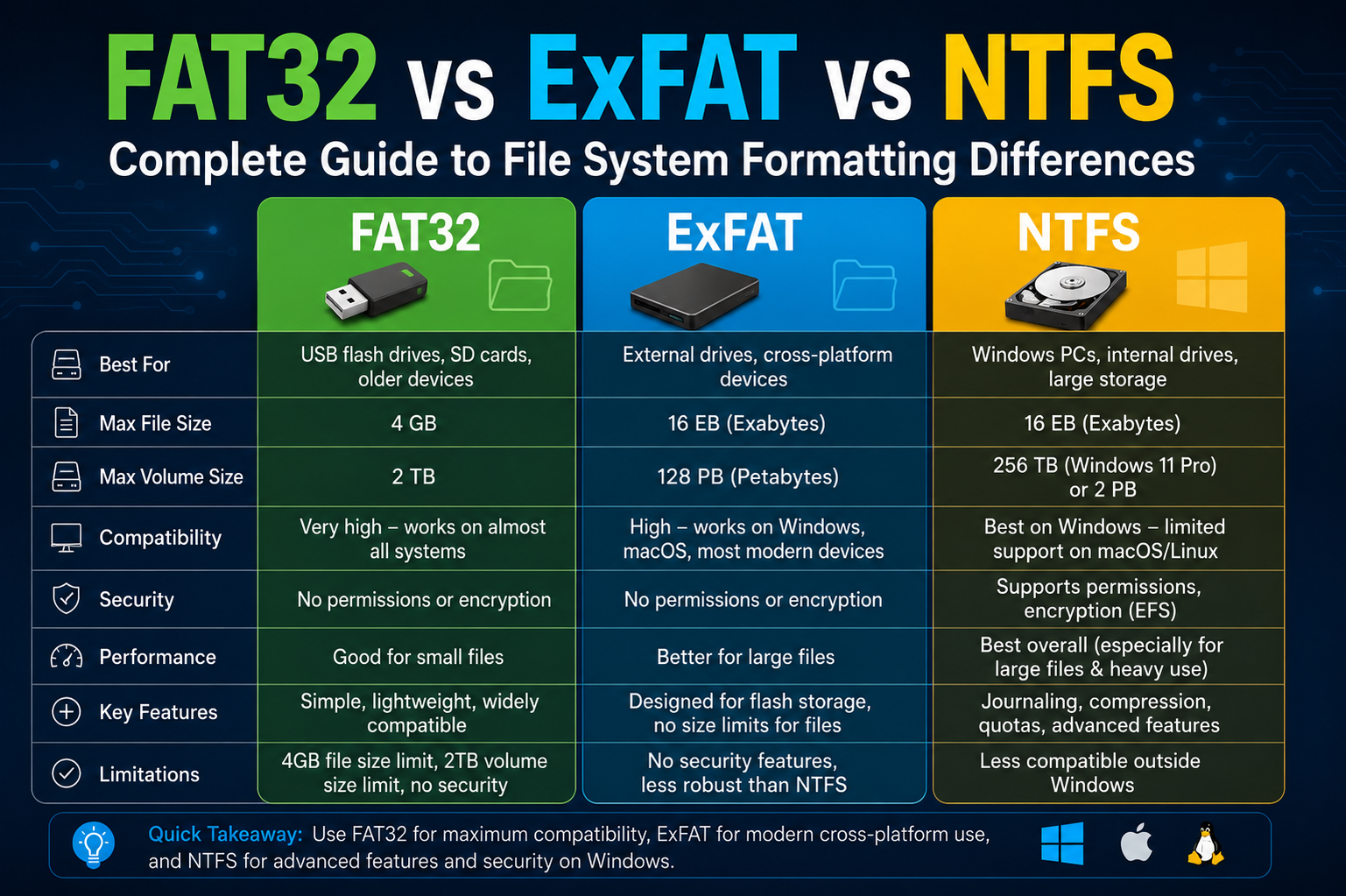
FAT32, ExFAT, and NTFS each represent different stages in the evolution of digital storage, shaped by changing hardware, user needs, and computing environments. FAT32 remains valued for its simplicity and universal compatibility, making it suitable for basic storage devices and cross-platform use. However, its limitations in file size handling, fragmentation, and lack of security features make it less ideal for modern, data-heavy applications.
ExFAT bridges the gap between legacy and modern systems by offering large file support and lightweight performance, especially for flash-based storage. It avoids the complexity of advanced file management features while maintaining strong compatibility across devices, which makes it highly practical for portable drives, cameras, and media transfer workflows.
NTFS stands as the most advanced of the three, offering robust security, journaling, metadata management, and scalability for large storage systems. It is designed for environments where reliability, data integrity, and structured access control are essential, such as personal computers and enterprise systems.
Ultimately, there is no single “best” file system. Each serves a specific purpose depending on the device, workload, and performance requirements. Understanding how they differ allows users to make informed decisions, ensuring storage devices are formatted in a way that best matches their intended use and long-term efficiency.