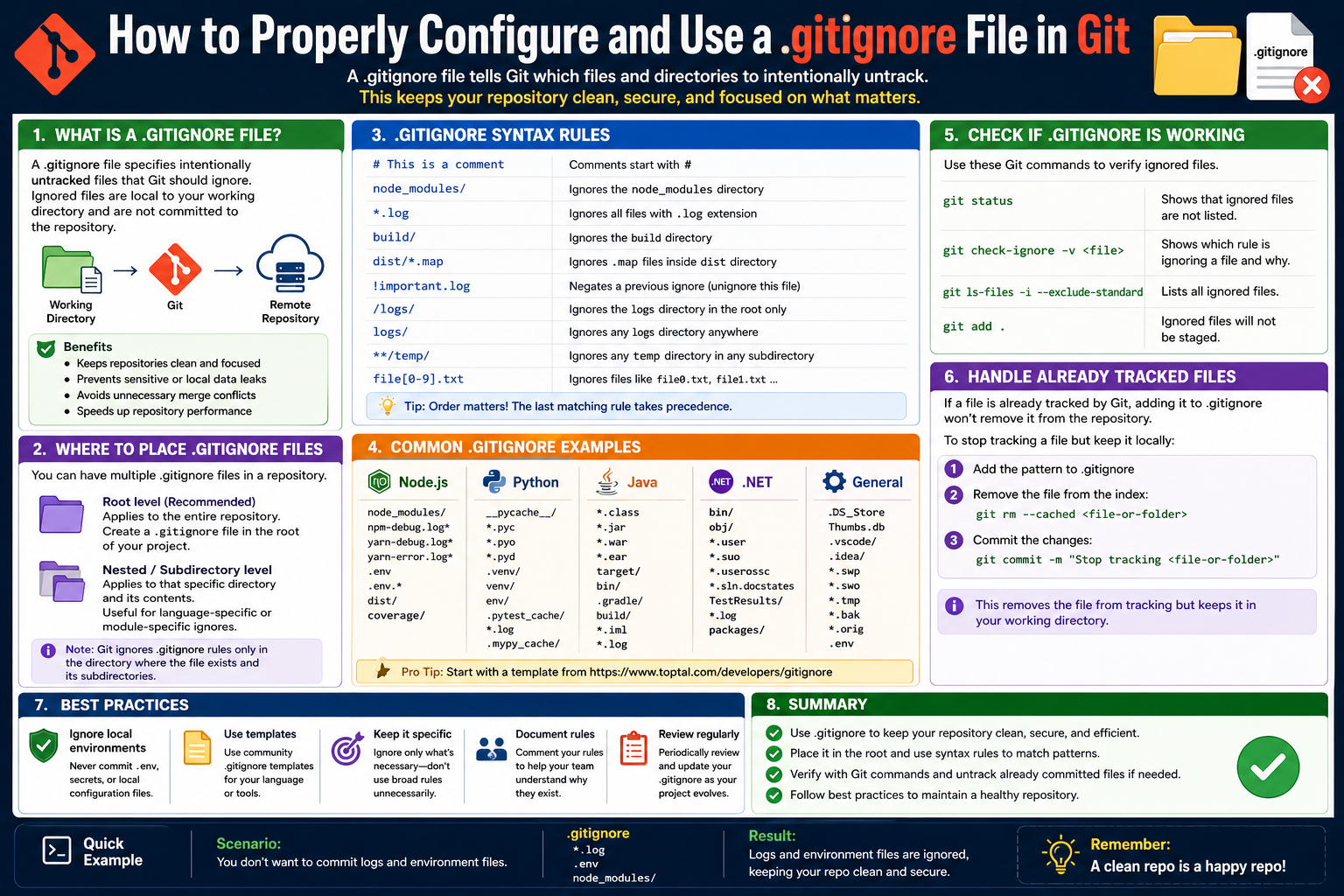
Software development today relies heavily on structured collaboration and controlled change management, especially in projects where multiple contributors work on the same codebase. Version control systems exist to manage these challenges by tracking every modification made to a project over time. This ensures that developers can experiment, improve, and maintain software without losing previous work or creating instability in the main project.
Among these systems, Git has become one of the most widely adopted tools. It enables developers to create isolated environments where changes can be tested independently before being merged into a shared codebase. This approach reduces risks, improves collaboration, and ensures that development work remains organized even as projects grow in size and complexity.
Within this workflow, every file added to a project is tracked in some form. However, not every file created during development is meant to be part of the final shared repository. Temporary files, system-generated artifacts, configuration files specific to individual machines, and sensitive credentials often exist only to support development activities. Managing these differences effectively is essential for maintaining a clean and efficient project structure.
The Role of Git-Based Collaboration Platforms
Modern development workflows frequently involve collaboration platforms that sit on top of Git. These platforms allow developers to share repositories, manage contributions, and coordinate changes across distributed teams. They introduce structured workflows such as branching, pull requests, and code reviews, which help maintain quality and consistency in shared projects.
A typical workflow involves creating a separate branch from the main codebase, making modifications in isolation, and then proposing those changes to be merged back into the primary repository. This structured process ensures that experimental or incomplete work does not interfere with stable versions of the project.
As projects evolve, they accumulate a wide variety of files. Some are central to the application’s functionality, while others are generated automatically by development tools or operating systems. Without a mechanism to control what gets included in the shared repository, projects can become cluttered, harder to manage, and more difficult to maintain over time.
This is where selective file management becomes essential. Developers need a way to define which files should be tracked and which should remain local or temporary. The ability to control this distinction is a key part of maintaining a healthy development workflow.
Understanding File Tracking Behavior in Git
To understand why selective exclusion is important, it is necessary to understand how Git handles files internally. Git categorizes files into different states based on their relationship to the version control system. Some files are actively tracked, meaning Git monitors their changes over time. Others remain untracked until explicitly added. There is also a category for files that are intentionally excluded from tracking.
Tracked files represent the core of a project. These are files that have been committed to the repository and are part of its history. Any changes made to them are recorded, allowing developers to review, revert, or compare versions when needed.
Untracked files exist within a project directory but are not yet part of the version control system. These may include newly created files or temporary working files that have not been staged for inclusion.
The third category, ignored files, represents items that developers explicitly instruct Git to disregard. These files remain in the local environment but are excluded from tracking and do not appear in the version control history. This distinction is critical for maintaining clean and efficient repositories.
Without a system for ignoring unnecessary files, every temporary or system-generated artifact would need to be manually managed. Over time, this would lead to cluttered repositories filled with irrelevant data, making collaboration more difficult and reducing overall efficiency.
Introduction to the Concept of Selective File Exclusion
Selective file exclusion is a fundamental concept in maintaining organized development environments. Not all files created during development are relevant to the shared project. Some exist purely for testing, debugging, or local configuration purposes and should not be distributed to other contributors.
For example, when a developer runs a project locally, the system may generate temporary files to store cache data, logs, or environment-specific settings. These files are useful in the local context but have no value in a shared repository. Including them would introduce unnecessary complexity and could even lead to conflicts across different development environments.
Additionally, different developers may use different tools or operating systems, each generating its own set of auxiliary files. These system-specific artifacts vary widely and are not relevant to the actual source code of the project. Allowing them into the shared repository would create inconsistencies and unnecessary noise.
Selective exclusion provides a structured way to define rules that determine which files should be ignored during version control operations. This ensures that only meaningful and necessary files are included in the shared project environment.
Structure and Placement of Exclusion Rules
The mechanism used to define ignored files is based on a simple text-based configuration approach. This configuration exists within the project structure and applies rules that Git follows when deciding whether to track a file or not.
These rules are typically defined at the root level of a project so that they apply consistently across all directories and subdirectories. Each rule is written on a separate line, allowing developers to specify multiple patterns for exclusion.
The simplicity of this structure makes it highly flexible. Developers can define rules for individual files, entire directories, or groups of files based on patterns such as file extensions. This flexibility ensures that both small and large projects can benefit from consistent file management practices.
The configuration does not automatically exist in every project. It must be created when needed, depending on the requirements of the development workflow. Once in place, it becomes a powerful tool for maintaining control over what is included in the version history of a project.
Pattern-Based File Matching and Rule Behavior
One of the most powerful aspects of selective file exclusion is the ability to define patterns rather than listing each file individually. This allows developers to manage large sets of files efficiently without needing to specify every single file manually.
For instance, it is common for projects to generate files with specific extensions that are not intended for version control. Instead of listing each file individually, a pattern can be used to match all files of a certain type. This makes the system scalable and easier to maintain as projects grow.
Similarly, entire directories can be excluded using simple naming patterns. This is particularly useful for folders that store temporary data, build outputs, or environment-specific configurations. By excluding these directories, developers ensure that only essential project files are shared.
Pattern-based rules also support more complex matching scenarios. This allows developers to fine-tune which files are included or excluded based on naming conventions or file structures. The flexibility of this system makes it suitable for a wide range of development environments and project types.
Handling System-Generated and Environment-Specific Files
Different operating systems and development environments generate their own supporting files during normal operation. These files are not part of the application logic but are created to improve performance, store metadata, or manage system-level behavior.
Examples include thumbnail caches, directory indexes, hidden system files, and temporary storage artifacts. While these files are necessary for the local environment, they do not contribute to the shared codebase and should not be included in version control.
Allowing these files into a shared repository can create unnecessary clutter and may even lead to compatibility issues when different developers use different operating systems. By explicitly excluding these files, developers ensure that the repository remains clean, consistent, and focused on the actual application code.
This separation between system-generated data and project-specific files is a key principle in maintaining professional development standards. It ensures that repositories remain portable and usable across different environments without introducing unnecessary complexity.
Managing Sensitive and Temporary Development Data
During development, it is common for projects to include sensitive information such as credentials, configuration details, or temporary testing data. These files are often essential for local development but should never be shared in a public or collaborative environment.
Including sensitive information in a shared repository can create security risks and compromise the integrity of the application. Therefore, developers must ensure that such files are properly excluded from version control systems.
Temporary files used for testing or debugging also fall into this category. These files are often created during experimentation and are not intended to be part of the final product. Including them in the repository can lead to confusion and unnecessary complexity for other contributors.
By clearly separating sensitive and temporary data from the main project structure, developers maintain a safer and more organized workflow. This separation is a core principle of responsible software development practices.
Interaction Between Local Development Tools and File Exclusion Rules
Modern development environments often include integrated tools that generate auxiliary files to support features such as debugging, project indexing, or workspace configuration. These tools improve developer productivity but also create additional files that are specific to individual setups.
Since these files are tied to local environments, they are not suitable for inclusion in shared repositories. Different developers may use different tools or configurations, resulting in inconsistent file generation across the team.
By applying exclusion rules, developers can ensure that these environment-specific files remain local. This prevents unnecessary conflicts and keeps the shared repository focused solely on the core application code.
This separation between local tooling artifacts and project logic is essential for maintaining consistency across distributed development teams.
Importance of Maintaining Clean Repository Structures
A well-maintained repository is easier to navigate, understand, and contribute to. When unnecessary files are included, the structure becomes cluttered, making it harder for developers to identify relevant components of the project.
Clean repositories also improve performance during version control operations. Fewer tracked files mean faster processing during commits, updates, and synchronization between contributors. This efficiency becomes increasingly important as projects grow in size and complexity.
Maintaining a clean structure also improves collaboration. Developers can focus on meaningful changes without being distracted by irrelevant files or system-generated artifacts. This leads to a more efficient and productive development environment overall.
Understanding How Ignored Rules Are Interpreted in a Repository
When working with file exclusion rules in a development project, one of the most important aspects is understanding how those rules are interpreted. The system processes these instructions in a specific order, and that order determines which files are ultimately included or excluded from tracking.
Each rule is evaluated based on its position and specificity. More specific rules tend to take priority over general patterns, allowing developers to fine-tune behavior when needed. This layered interpretation makes the system flexible enough to handle both simple and highly complex project structures.
The interpretation process is not random. Instead, it follows a predictable logic where each file is checked against the defined patterns. If a match is found, the file is marked accordingly. If multiple rules apply to the same file, the system evaluates them in sequence to determine the outcome.
This structured evaluation ensures that developers can build both broad and precise exclusion strategies without conflict, as long as they understand how rule precedence works within the system.
Advanced Pattern Behavior and Matching Logic
Pattern matching plays a central role in defining how files are selected for exclusion. Instead of relying on strict file names, patterns allow developers to describe groups of files using flexible matching rules. This approach makes it possible to manage large and complex projects efficiently.
Patterns can match based on file extensions, naming structures, or directory paths. This flexibility allows developers to design rules that apply broadly across a project while still maintaining control over specific exceptions when needed.
The matching process evaluates file paths in relation to the root of the project. This means that the same pattern may behave differently depending on where a file is located within the directory structure. As a result, understanding how paths are evaluated is essential for creating accurate rules.
Complex patterns can also combine multiple conditions, allowing for more refined control. This becomes especially useful in large projects where different sections of the codebase may follow different organizational structures.
Directory-Level Control and File Scope Management
In many development projects, entire directories are dedicated to specific types of files such as temporary outputs, build artifacts, or environment-specific configurations. Managing these directories effectively is essential for maintaining a clean project structure.
When a directory is excluded, all files within it are automatically included in the exclusion scope. This hierarchical behavior simplifies rule creation and reduces the need to list individual files manually.
However, directory-level exclusion must be used carefully. In some cases, a directory may contain both necessary and unnecessary files. In such situations, broader exclusion rules may need to be combined with more specific overrides to ensure that important files are not unintentionally excluded.
Understanding the relationship between directories and individual files helps developers create balanced configurations that support both flexibility and precision.
Exception Handling Through Rule Overrides
While general exclusion rules are useful for managing large groups of files, there are often situations where exceptions are required. Certain files may need to be included even if they match a broader exclusion pattern.
To accommodate this, the system allows for rule overrides that re-include specific files or paths. These exceptions ensure that important files are not accidentally excluded due to overly broad patterns.
The interaction between exclusion rules and overrides requires careful planning. Since multiple rules may apply to the same file, the order and specificity of each rule determine the outcome.
This layered approach provides both power and flexibility, but it also requires developers to think carefully about how rules interact with one another across the entire project structure.
Debugging Excluded File Behavior in Development Projects
At times, developers may encounter situations where files behave unexpectedly in relation to exclusion rules. A file that was expected to be included may appear missing, or a file that should be ignored may still be tracked.
Debugging this behavior involves analyzing how rules are applied to the file in question. Since multiple patterns may affect a single file, identifying which rule is responsible requires a step-by-step evaluation of the configuration.
One common issue arises when overlapping patterns create conflicting instructions. In such cases, understanding rule precedence becomes essential for identifying why a particular file is behaving differently than expected.
Another important factor is the file’s location within the project structure. Since rules often depend on relative paths, even small differences in directory placement can affect whether a file is included or excluded.
Ensuring Consistency Across Multiple Developers
In collaborative environments, multiple developers work on the same repository from different systems and configurations. This introduces challenges in maintaining consistent exclusion behavior across all contributors.
Since exclusion rules are shared as part of the project, they must be carefully designed to work uniformly across all environments. A poorly structured rule set may behave differently depending on the operating system or development setup being used.
Consistency is especially important in team environments where developers rely on predictable project behavior. If exclusion rules vary between environments, it can lead to confusion, missing files, or unintended inclusion of irrelevant data.
To avoid these issues, teams must adopt standardized rule structures that apply consistently regardless of local differences in tools or operating systems.
Cross-Platform Behavior and Environment Differences
Development projects often span multiple operating systems, each with its own file system conventions and generated metadata. These differences can influence how files are created, named, and stored.
As a result, exclusion rules must account for variations in file naming conventions and system-generated artifacts. A file that appears in one environment may not exist in another, even though both systems are part of the same project.
This variability requires developers to think broadly when defining exclusion rules. Instead of focusing on a single environment, rules must be designed to accommodate multiple platforms simultaneously.
Understanding cross-platform behavior helps prevent inconsistencies that may arise when different contributors interact with the same repository from different systems.
Large-Scale Project Considerations and Repository Growth
As projects grow, the number of files within a repository can increase significantly. This growth makes efficient file management even more important, especially when dealing with large-scale applications or systems with multiple components.
Without proper exclusion rules, repositories can quickly become overloaded with unnecessary files, slowing down operations and making collaboration more difficult. Large repositories require careful structuring to ensure that only relevant files are tracked.
In large systems, exclusion rules often become more complex due to the diversity of file types and project modules. Different sections of the project may require different exclusion strategies depending on their purpose and function.
Managing this complexity requires a disciplined approach to rule design, ensuring that the repository remains organized even as it continues to grow over time.
Build Processes and Generated Output Management
Many development projects include automated build processes that generate output files during compilation or packaging. These files are often essential for running the application but are not part of the source code itself.
Generated outputs can include compiled binaries, intermediate build artifacts, and deployment packages. While necessary for execution, these files are typically recreated each time the build process runs and do not need to be stored in version control.
Excluding these files helps maintain a clean separation between source code and generated output. It also prevents unnecessary duplication and reduces repository size.
However, managing build-generated files requires careful attention, as some outputs may need to be preserved under certain conditions while others should always be excluded.
Continuous Integration and Automated Workflow Implications
Modern development workflows often include automated systems that build, test, and deploy applications. These systems rely on consistent and predictable repository structures to function correctly.
If exclusion rules are not properly defined, automated systems may behave unexpectedly. For example, missing configuration files or incorrectly excluded resources can cause build failures or incomplete deployments.
Ensuring that automated workflows align with exclusion rules is an important part of maintaining a stable development pipeline. The relationship between version control and automation must be carefully balanced to avoid disruptions.
This alignment ensures that automated systems always operate on the correct set of files, improving reliability and reducing the risk of errors during deployment.
Security Implications of File Exclusion Strategies
Security is a critical consideration when managing file inclusion and exclusion in development projects. Sensitive information such as credentials, tokens, and configuration secrets must never be exposed in shared repositories.
Improper handling of sensitive files can lead to serious security risks, including unauthorized access to systems or data breaches. Therefore, exclusion rules play an important role in protecting sensitive information.
However, relying solely on exclusion rules is not enough. Developers must also ensure that sensitive files are never unintentionally created or committed during development.
A strong security approach involves combining exclusion strategies with careful development practices that prevent sensitive data from entering the repository in the first place.
Monorepo Structures and Complex Project Architectures
In some development environments, multiple projects are stored within a single repository structure. This approach introduces additional complexity when managing file exclusion rules.
Different projects within a shared repository may have different requirements for file tracking and exclusion. As a result, rules must be carefully designed to apply correctly across multiple sub-projects.
This complexity increases the importance of clear structure and organization within the repository. Without careful planning, exclusion rules can become difficult to manage and may unintentionally affect unrelated parts of the project.
Understanding how exclusion rules interact within large, multi-project environments is essential for maintaining stability and consistency across the entire codebase.
Integration with Development Tools and Editing Environments
Modern development tools often interact directly with version control systems, providing visual indicators of tracked, untracked, and excluded files. These tools help developers understand the state of their project at a glance.
However, tool behavior can sometimes differ depending on configuration or environment. Some tools may cache file states or interpret exclusion rules differently, leading to temporary inconsistencies in how files are displayed.
Despite these differences, the underlying rules remain consistent. Understanding how development tools interpret exclusion behavior helps developers avoid confusion when working across different environments.
This integration between tools and version control systems enhances productivity but also requires awareness of how different systems interpret the same underlying rules.
Maintaining Long-Term Stability in File Management Practices
As projects evolve, exclusion rules may need to be updated to reflect changes in structure, tooling, or development practices. Maintaining long-term stability requires periodic review and refinement of these rules.
Without regular maintenance, exclusion rules can become outdated or overly complex, leading to confusion or unintended behavior. Keeping rules aligned with current project needs ensures continued efficiency and clarity.
Stable file management practices contribute to the overall health of a development project by reducing clutter, improving performance, and supporting consistent collaboration across all contributors.
Evolving Role of Ignore Rules in Professional Development Workflows
As software projects mature, their structure becomes increasingly complex, and the way files are managed begins to play a more strategic role in overall development efficiency. What starts as a simple mechanism for excluding unnecessary files gradually becomes an essential part of workflow design, influencing how teams collaborate, deploy applications, and maintain long-term stability.
In professional environments, exclusion rules are not treated as an afterthought. Instead, they are integrated into the foundational structure of a project. This ensures that every contributor works within the same expectations regarding what should and should not be included in shared repositories.
Over time, these rules evolve alongside the project itself. As new tools are introduced, dependencies change, and development practices shift, the exclusion strategy must be updated to reflect the current state of the system. This evolution is a continuous process rather than a one-time configuration.
Coordination Challenges in Multi-Developer Environments
When multiple developers work on the same repository, maintaining consistency becomes a critical challenge. Each developer may have different tools, workflows, and local environments, which can lead to variations in how files are generated and used.
Without a shared understanding of exclusion rules, inconsistencies can quickly arise. One developer may unintentionally include files that another developer has excluded, leading to confusion during code reviews or integration processes. These mismatches can slow down development and create unnecessary friction within teams.
To avoid such issues, teams often adopt standardized exclusion strategies that apply universally across all contributors. This ensures that, regardless of individual setup differences, the repository behaves consistently for everyone involved.
This coordination becomes even more important in large teams where multiple features are being developed simultaneously. A well-defined exclusion structure helps prevent accidental inclusion of irrelevant or conflicting files during merges and updates.
Impact of Ignore Rules on Code Review Processes
Code review is a critical stage in modern development workflows, allowing teams to evaluate changes before they are integrated into the main codebase. During this process, clarity and focus are essential.
When unnecessary files are included in review submissions, they can distract reviewers and obscure meaningful changes. This reduces the effectiveness of the review process and increases the time required to evaluate contributions.
Properly configured exclusion rules help ensure that only relevant files are included in review cycles. This allows reviewers to focus on actual logic changes rather than unrelated system artifacts or temporary files.
By reducing noise in the review process, exclusion strategies improve both efficiency and accuracy in evaluating code contributions.
Long-Term Maintenance of Project Cleanliness
As a project evolves over months or years, maintaining cleanliness becomes increasingly important. Without proper control, repositories tend to accumulate unnecessary files that no longer serve a purpose.
These files may originate from outdated development tools, legacy configurations, or temporary testing activities that were never cleaned up. Over time, this accumulation can make the repository harder to navigate and understand.
A well-maintained exclusion strategy helps prevent this buildup by ensuring that unnecessary files are never committed in the first place. This proactive approach reduces the need for manual cleanup later in the project lifecycle.
Maintaining cleanliness is not just about organization. It also contributes to long-term maintainability, making it easier for new developers to understand and contribute to the project.
Handling Legacy Files in Expanding Codebases
In long-running projects, legacy files often remain within the repository even after they are no longer actively used. These files may have been relevant at one point in the project’s history, but are now obsolete.
Managing these files requires careful consideration. While they may still exist in version history, they do not need to be actively tracked or included in ongoing development workflows.
Exclusion rules help prevent new, unnecessary files from joining these legacy artifacts. However, they do not remove existing files from history. This distinction is important when managing evolving codebases.
Over time, teams may choose to refactor or restructure repositories to better align with current development needs. During these transitions, exclusion strategies play a key role in maintaining clarity and preventing further clutter.
Influence of Development Tooling on File Generation
Modern development environments are highly automated and often generate a wide range of supporting files without direct user input. These files are designed to improve productivity, but they also introduce complexity into project structures.
Integrated development environments may create configuration files, cache data, or workspace-specific metadata. While useful locally, these files are rarely relevant to other contributors.
As tooling continues to evolve, the number of automatically generated files has increased significantly. This makes exclusion management more important than ever before.
Developers must continuously adapt their exclusion strategies to account for new tooling behaviors, ensuring that only meaningful project files are tracked and shared.
Balancing Flexibility and Strict Control in File Management
One of the key challenges in designing exclusion strategies is finding the right balance between flexibility and strict control. If rules are too broad, they may exclude important files unintentionally. If they are too narrow, unnecessary files may still enter the repository.
Achieving this balance requires a deep understanding of project structure and development workflows. Developers must consider not only current needs but also how the project may evolve.
Flexible exclusion strategies allow for adaptability, but they must still maintain enough structure to prevent inconsistency. This balance is especially important in dynamic environments where project requirements change frequently.
Risk of Over-Exclusion and Hidden Dependencies
While exclusion rules are designed to simplify project management, excessive or poorly designed rules can introduce new problems. One of the most significant risks is over-exclusion, where important files are unintentionally ignored.
When critical files are excluded, they may not be available to other developers or automated systems. This can lead to broken builds, missing functionality, or unexpected behavior during execution.
Another challenge arises when dependencies between files are not fully understood. A file that appears unimportant may actually be required by another part of the system.
For this reason, exclusion strategies must be designed with a clear understanding of file relationships within the project. Careful planning helps avoid situations where essential components are accidentally omitted.
Role of Exclusion Rules in Deployment Pipelines
Deployment pipelines rely on consistent and predictable project structures. When applications are built and deployed, the system expects a specific set of files to be present.
If exclusion rules are misconfigured, important files may be missing during deployment, leading to incomplete or failed releases. This makes it essential for exclusion strategies to align closely with deployment requirements.
At the same time, unnecessary files should not be included in deployment packages, as they can increase build size and slow down delivery processes. Proper exclusion ensures that only essential components are included in final builds.
This alignment between version control and deployment systems is critical for maintaining reliable and efficient release cycles.
Interaction Between Local Development and Shared Repositories
Local development environments often differ significantly from shared repository environments. Developers may experiment with configurations, test features, or generate temporary files that are never intended for sharing.
Exclusion rules act as a bridge between these two environments, ensuring that local experimentation does not interfere with shared project integrity. This separation allows developers to work freely without risking contamination of the main codebase.
By isolating local changes from shared structures, exclusion strategies support both individual productivity and collective consistency.
Preventing Accidental Commit of Irrelevant Data
One of the most common issues in development workflows is the accidental inclusion of irrelevant or temporary files in version control. These mistakes often occur when developers are unaware of newly generated files or changes in their environment.
Exclusion rules serve as a safeguard against these accidental commits by automatically filtering out unwanted files. This reduces the risk of cluttering the repository with unnecessary data.
However, reliance on exclusion alone is not sufficient. Developers must also remain aware of the files they are working with and ensure that only relevant changes are committed.
The combination of automated exclusion and mindful development practices provides the most reliable protection against accidental data inclusion.
Scalability Considerations for Large Systems
As systems scale, the number of files and directories within a project increases significantly. Managing this growth requires careful structuring of exclusion rules to ensure continued efficiency.
Large-scale systems often involve multiple layers of components, each with its own file generation patterns and requirements. This complexity makes it essential to design exclusion strategies that are both modular and scalable.
Scalability also involves anticipating future growth. As new features and modules are added, exclusion rules must be flexible enough to accommodate these changes without requiring constant restructuring.
Well-designed exclusion strategies reduce maintenance overhead and support long-term scalability of the project.
Avoiding Conflicts Between Automation and Manual Changes
In modern development workflows, automation plays a significant role in building, testing, and deploying applications. These automated systems often interact directly with version-controlled repositories.
Conflicts can arise when automated processes generate files that overlap with manually created exclusion rules. If not properly managed, these conflicts can lead to inconsistent behavior across environments.
Ensuring compatibility between automated workflows and manual exclusion strategies is essential for maintaining stable development pipelines. This requires careful coordination between tooling configurations and repository structure.
When properly aligned, automation and manual processes work together seamlessly, improving efficiency without introducing inconsistencies.
Security Reinforcement Through Controlled File Visibility
Security remains one of the most important aspects of software development, and file management plays a direct role in protecting sensitive information. Exclusion rules help reduce the risk of exposing confidential data by ensuring that sensitive files remain outside shared repositories.
However, exclusion alone cannot guarantee security. Developers must also ensure that sensitive information is never stored in inappropriate locations during development.
A strong security posture involves combining exclusion strategies with disciplined development practices that prevent sensitive data from being created or stored in version-controlled environments.
This layered approach strengthens overall project security and reduces the likelihood of accidental exposure.
Evolving Best Practices in Modern Development Ecosystems
As development practices continue to evolve, so too do the strategies used for managing file inclusion and exclusion. Modern workflows emphasize automation, scalability, and collaboration, all of which influence how exclusion rules are designed.
Best practices now focus on creating structured, predictable, and maintainable exclusion systems that adapt to changing project needs. These practices prioritize clarity, consistency, and long-term sustainability over short-term convenience.
Developers are increasingly encouraged to think of exclusion strategies as part of overall system architecture rather than isolated configuration files. This shift in perspective leads to more robust and reliable development environments.
Managing Complexity Without Losing Control
As projects grow in size and complexity, maintaining control over file management becomes more challenging. Without proper structure, exclusion rules can become difficult to understand and maintain.
The key to managing this complexity lies in simplicity and consistency. Clear patterns, logical organization, and predictable behavior help ensure that exclusion strategies remain manageable even in large systems.
By focusing on clarity and structure, developers can prevent complexity from overwhelming the project and maintain a stable, efficient workflow across all stages of development.
Conclusion
In modern software development, managing files effectively is just as important as writing clean and efficient code. As projects grow in size and complexity, developers are constantly interacting with a wide range of files that serve different purposes. Some files are essential to the application’s functionality, while others exist only to support development environments, testing processes, or local system configurations. Without a structured approach to managing these differences, repositories can quickly become cluttered, inconsistent, and difficult to maintain.
The concept of selectively excluding files from version control plays a central role in solving this challenge. By allowing developers to define clear rules for which files should be ignored, projects remain focused on meaningful source code rather than unnecessary or temporary data. This not only improves organization but also enhances collaboration across teams working on the same codebase.
One of the most important outcomes of effective file exclusion is improved clarity. When irrelevant files are removed from the tracking process, developers can concentrate on the actual structure and logic of the application. This makes it easier to understand how different parts of the system interact and reduces the cognitive load involved in navigating large repositories. Clean project structures are especially valuable in team environments, where multiple contributors need to quickly understand and work with shared code.
Another key benefit is improved efficiency. Version control systems perform better when they are not burdened with unnecessary files. Operations such as committing changes, switching branches, and synchronizing updates become faster and more reliable. In large-scale projects, even small efficiency improvements can have a significant impact on overall development speed and productivity.
Security is also an important consideration in file management. Development projects often involve sensitive information such as credentials, configuration details, and environment-specific settings. Ensuring that these files are not accidentally included in shared repositories helps protect systems from exposure and reduces the risk of security vulnerabilities. A well-structured exclusion strategy acts as a safeguard, preventing sensitive data from becoming part of the public or collaborative codebase.
Consistency across environments is another major advantage. Developers often work on different operating systems and use different tools, each of which may generate its own supporting files. Without proper exclusion rules, these differences can lead to inconsistencies within the repository. By standardizing which files are ignored, teams ensure that every contributor works within the same structural expectations, regardless of their local setup.
As projects evolve, the importance of maintaining and updating exclusion rules becomes even more apparent. New tools, frameworks, and dependencies are introduced regularly, and each of these can generate additional files that do not belong in version control. Keeping exclusion strategies aligned with current development practices ensures that repositories remain clean and manageable over time. This ongoing maintenance is a critical part of sustainable software development.
In larger systems, where multiple modules or services exist within a single repository, file management becomes even more complex. Different components may have different requirements, and exclusion rules must be carefully designed to accommodate this diversity. A well-thought-out structure helps prevent conflicts and ensures that each part of the system remains properly organized.
It is also important to recognize that exclusion rules are not just technical configurations; they reflect broader development habits and team discipline. A carefully maintained exclusion strategy indicates a thoughtful approach to project organization and long-term maintainability. On the other hand, poorly managed rules can lead to confusion, missing files, or unintended behavior during development and deployment.
Ultimately, effective file exclusion is about balance. It requires enough flexibility to support diverse development needs while maintaining enough structure to ensure consistency and control. Developers must understand how different files interact within their projects and make informed decisions about what should and should not be included in version control.
When applied correctly, exclusion strategies contribute significantly to the overall health of a software project. They reduce clutter, improve performance, enhance security, and support smoother collaboration among developers. More importantly, they help maintain a clear separation between essential application logic and temporary or environment-specific data.
As software development continues to evolve, the importance of disciplined file management will only increase. Projects are becoming larger, tools are becoming more automated, and collaboration is becoming more distributed. In this environment, maintaining clean and well-structured repositories is essential for long-term success.
By understanding and applying effective file exclusion practices, developers ensure that their projects remain scalable, maintainable, and efficient. This foundational skill supports better development workflows and contributes to higher-quality software across all stages of the development lifecycle.