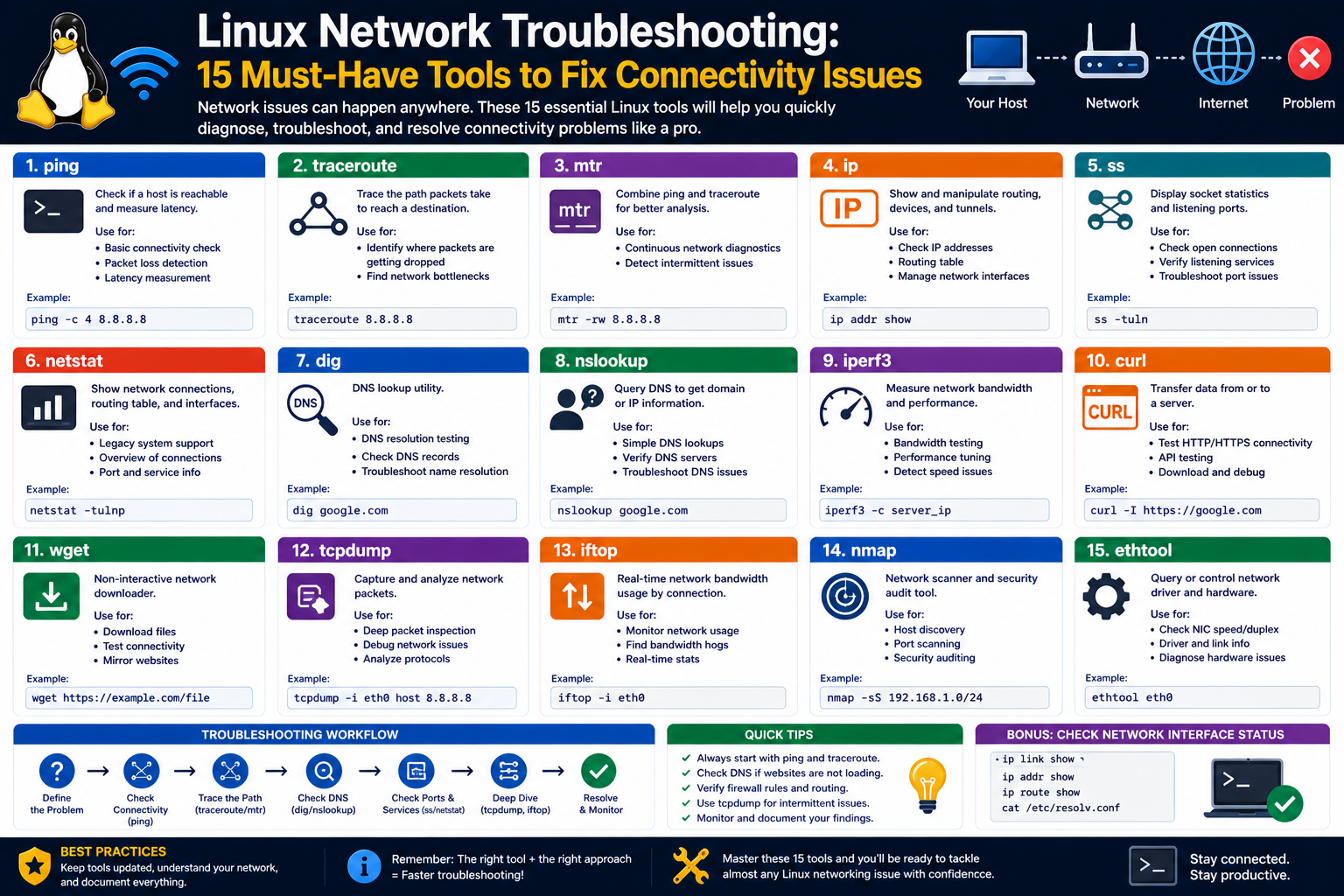
Networking in Linux is not just a technical feature but a core pillar of how the operating system operates in real-world environments. In professional settings, especially in systems administration and cybersecurity roles, Linux networking knowledge becomes essential for maintaining communication between machines, services, and users. Within the scope of certification programs such as Linux+, networking forms a significant portion because it tests not only theoretical understanding but also practical ability to configure, diagnose, and maintain network functionality.
At its foundation, Linux networking involves the ability of a system to send and receive data across local and wide-area networks. This includes everything from basic internet connectivity to complex enterprise routing structures. Unlike simpler operating systems that hide most networking complexity behind automated interfaces, Linux exposes much of its networking architecture directly to the user. This transparency is both a strength and a challenge. It allows for deep customization and control, but it also requires a solid understanding of how different components interact.
In certification environments, candidates are expected to demonstrate familiarity with both graphical and command-line-based networking approaches. This dual requirement reflects real-world usage where administrators might rely on graphical tools for quick configuration but depend heavily on terminal-based control for automation, remote access, and troubleshooting.
The networking portion of Linux+ is designed to ensure that candidates can confidently work in environments where network misconfigurations can lead to service disruptions. This includes understanding how devices identify themselves on a network, how they communicate with external systems, and how system-level configurations influence connectivity behavior.
A strong grasp of Linux networking begins with recognizing that the operating system treats networking as a layered structure. Each layer has its own responsibilities, from hardware interaction at the lowest level to application-level communication at the highest. Understanding this layered approach is essential because it helps in diagnosing issues when they arise. Instead of guessing, administrators can systematically identify where a breakdown might be occurring.
Core Networking Concepts in Linux Environment
Before diving into configuration, it is important to understand the fundamental networking concepts that Linux relies on. Every Linux system connected to a network participates in a structured communication model where data is broken into packets, transmitted across interfaces, and reassembled at the destination.
One of the most important concepts is the idea of an IP address. In Linux environments, an IP address acts as a unique identifier for a device on a network. Without a properly assigned IP address, a system cannot communicate beyond its local environment. IP addressing can be assigned dynamically through network services or configured manually depending on system requirements.
Another key concept is subnetting, which defines how networks are divided into smaller logical segments. Subnetting plays an important role in controlling traffic flow and improving network efficiency. In Linux systems, subnet information is tightly linked with network interface configuration, ensuring that the system understands what range of devices it can directly communicate with.
Gateway configuration is also critical. A gateway acts as a bridge between local networks and external networks. Without a properly defined gateway, a Linux system may be able to communicate locally but fail to access external resources such as the internet or remote servers. Understanding how gateways function helps administrators ensure that traffic flows correctly beyond the local network boundary.
DNS, or domain name resolution, is another essential concept. Instead of relying on numerical IP addresses, users typically access systems using human-readable names. Linux systems rely on DNS services to translate these names into usable IP addresses. Misconfigured DNS settings are one of the most common causes of connectivity issues, making it a key focus area in troubleshooting scenarios.
Beyond these foundational concepts, Linux networking also involves understanding protocols. Protocols define how data is structured and transmitted between systems. While users may not directly interact with protocol definitions, they heavily influence how networking tools behave and how systems interpret incoming or outgoing traffic.
How Linux Manages Network Interfaces
At the heart of Linux networking lies the concept of network interfaces. A network interface is a point of connection between the operating system and a network. This could be a physical Ethernet card, a wireless adapter, or even a virtual interface created for internal communication.
Linux assigns names to these interfaces based on system rules and hardware detection methods. These interfaces serve as the primary point of configuration for network settings such as IP address, subnet mask, and routing information. When a system boots, it reads configuration data associated with each interface and applies the appropriate settings to establish connectivity.
Each interface operates independently, meaning a single system can have multiple active network connections simultaneously. For example, a server might use one interface for internal communication within a data center and another for external internet access. Proper configuration ensures that traffic is routed correctly through the appropriate interface.
Interfaces can be configured manually or automatically. In manual configuration, system administrators define all parameters directly, ensuring complete control over network behavior. In automatic configuration, services assign network settings dynamically based on available network infrastructure. Both approaches have advantages depending on the environment and use case.
One of the critical responsibilities of Linux networking is maintaining interface states. Interfaces can be active, inactive, or in transitional states depending on system conditions. Monitoring and managing these states is essential for ensuring stable network performance.
Understanding how interfaces interact with system services is also important. When changes are made to interface configurations, these changes often need to be applied through system processes that reload or restart networking services. This ensures that new settings are properly integrated into the operating system’s active configuration.
Role of Graphical and Terminal-Based Configuration
Linux provides multiple ways to configure network settings, and this flexibility is one of its defining features. The two primary methods are graphical interfaces and terminal-based configuration.
Graphical interfaces are designed for ease of use. They present network settings in a visual format, allowing users to modify configurations without needing to understand underlying command structures. These interfaces are particularly useful for beginners or for quick adjustments in desktop environments. They typically include options for selecting networks, entering credentials, and adjusting basic settings such as IP configuration.
However, graphical tools often abstract away complex details, which can limit advanced configuration capabilities. This is where terminal-based configuration becomes essential. The terminal provides direct access to system-level networking controls, allowing precise modifications that are not always available through graphical tools.
In professional environments, terminal-based configuration is preferred because it supports automation, scripting, and remote administration. Administrators can apply consistent configurations across multiple systems efficiently, which is crucial in large-scale deployments.
Terminal-based networking also plays a major role in troubleshooting. When network issues arise, graphical tools may not provide enough detail to identify the root cause. Terminal-based diagnostics allow deeper inspection of system behavior, including interface status, routing paths, and name resolution processes.
The ability to switch between graphical and terminal-based tools is an important skill for Linux professionals. It ensures flexibility and adaptability in different environments, from desktop systems to headless servers.
Introduction to System Configuration Files
Linux networking relies heavily on configuration files that define how the system behaves during startup and operation. These files store persistent settings that determine how network interfaces are initialized, how DNS resolution is handled, and how routing rules are applied.
One of the most important aspects of these configuration files is that they allow settings to persist across system reboots. Unlike temporary configurations made during runtime, changes in configuration files remain active until they are modified again. This ensures consistency in network behavior.
Different Linux distributions may use different file structures or directories for network configuration, but the underlying principle remains the same. Configuration files serve as the source of truth for network behavior.
Some files control system-wide network settings, such as whether networking is enabled and what hostname the system should use. Others define how individual interfaces behave, including addressing information and routing preferences.
There are also configuration files dedicated to name resolution, which determine how the system translates domain names into IP addresses. These files are essential for ensuring that applications can connect to external services using readable domain names instead of numerical addresses.
In more advanced setups, configuration files may also control kernel-level networking behavior. This includes settings that influence how the system handles traffic routing, packet filtering, and performance optimization.
Understanding how these files interact is crucial for troubleshooting. A misconfiguration in one file can affect multiple aspects of network performance. Therefore, administrators must be able to identify which file is responsible for a particular behavior.
Network Addressing and Connectivity Foundations
Network addressing forms the backbone of communication in Linux systems. Every device must have a unique identifier within a network to send and receive data correctly. This identifier is typically represented as an IP address.
In Linux environments, IP addressing can be static or dynamic. Static addressing involves manually assigning a fixed address to a system, ensuring it remains consistent over time. Dynamic addressing allows a network service to automatically assign addresses based on availability.
Both approaches have their use cases. Static addressing is often used in servers and infrastructure devices where consistent identification is critical. Dynamic addressing is more common in client systems where flexibility is preferred.
Subnet configuration determines how a network is divided and how systems determine whether a destination is local or remote. Proper subnet configuration ensures efficient traffic flow and reduces unnecessary routing overhead.
Another important aspect of connectivity is routing. Routing defines the path that data takes from one system to another. In Linux, routing tables store this information and determine how packets are forwarded across networks.
Connectivity also depends on interface prioritization. When multiple network interfaces are active, the system must decide which one to use for outgoing traffic. This decision is based on routing rules and system configuration.
Understanding these foundational elements helps in diagnosing connectivity issues. For example, if a system cannot reach external services, the issue may lie in incorrect addressing, missing gateway information, or improper routing configuration.
Understanding Name Resolution in Linux
Name resolution is the process of translating human-readable domain names into numerical IP addresses. This process is essential for enabling user-friendly communication with remote systems.
Linux systems rely on multiple mechanisms to perform name resolution. These mechanisms define where and how the system should look for domain information. The order in which these mechanisms are checked can influence resolution behavior.
One common source of name resolution is local configuration, where static mappings between names and IP addresses are defined. This approach is useful in environments without centralized DNS services.
Another major source is DNS servers, which maintain large databases of domain name mappings. When a Linux system receives a request to access a domain, it queries DNS servers to retrieve the corresponding IP address.
Misconfiguration of name resolution settings is a frequent cause of network issues. If the system cannot resolve domain names, it may still have network connectivity but will be unable to access external services using standard domain-based addressing.
Observing Network Behavior and Diagnostics Tools
Monitoring network behavior is an essential part of managing Linux systems. Various diagnostic tools allow administrators to observe how data flows through the system, identify active connections, and detect potential issues.
Some tools provide real-time information about network connections, showing which services are communicating and which ports are being used. Others focus on testing connectivity between systems, helping to determine whether a network path is functioning correctly.
There are also tools designed to analyze domain name resolution behavior. These tools help verify whether DNS settings are functioning as expected and whether domain queries are being resolved properly.
In addition to these, Linux provides utilities that allow inspection of routing behavior and interface statistics. These tools help administrators understand how traffic is being processed and where potential bottlenecks may exist.
By combining multiple diagnostic approaches, it becomes possible to build a complete picture of network behavior. This is particularly important in complex environments where multiple systems and services interact simultaneously.
Building Foundational Skills for Troubleshooting
Developing strong troubleshooting skills in Linux networking requires more than memorizing tools or commands. It involves understanding how different components of the system interact and how changes in one area can affect overall network performance.
Effective troubleshooting begins with observation. Administrators must first identify symptoms before attempting to diagnose causes. These symptoms may include slow connectivity, inability to reach external services, or inconsistent network behavior.
Once symptoms are identified, the next step is to isolate the problem. This involves systematically checking different layers of the networking stack, from physical interface status to application-level communication.
Understanding configuration files, interface behavior, routing logic, and name resolution all contribute to effective troubleshooting. Each component provides clues that help narrow down the root cause of an issue.
Over time, experience with Linux networking builds intuition. Administrators begin to recognize patterns in system behavior and can quickly identify likely causes of problems. This skill is particularly valuable in professional environments where rapid resolution is often required.
Linux networking is a deeply integrated system where multiple components work together to maintain communication. Mastering these foundations is essential for anyone preparing for advanced system administration roles or certification exams focused on Linux environments.
Working With Linux Network Commands in Real Environments
Linux networking becomes significantly more powerful when you move from conceptual understanding to practical command usage. In real system administration scenarios, commands are the primary interface through which professionals inspect, verify, and repair network behavior. These commands are not isolated utilities; instead, they interact with kernel-level networking components and system services to provide live information about how a machine communicates with the outside world.
Unlike graphical tools that present a simplified view, command-based networking tools expose raw system data. This allows administrators to detect subtle issues such as packet loss, incorrect routing decisions, misconfigured interfaces, or DNS resolution delays. In certification contexts, especially at the Linux+ level, candidates are expected to recognize not only what these tools do but also when and why to use them.
A key aspect of working with Linux network commands is understanding that most of them do not modify system configuration permanently. Instead, they provide snapshots of system behavior at a specific moment. This makes repeated observation essential when diagnosing intermittent issues, as network problems often do not remain constant.
Another important concept is that many networking commands interact with the Linux kernel’s networking stack directly. This means they reflect real-time system behavior rather than cached or estimated values. Because of this, outputs may change rapidly depending on network conditions, background services, or interface activity.
Deep Dive Into Interface Inspection and System Awareness
Network interfaces remain one of the most important components in Linux networking, and command-line tools provide detailed visibility into their state. These tools allow administrators to examine whether interfaces are active, what addresses are assigned, and how data is being transmitted.
One of the most important aspects of interface inspection is understanding how the system distinguishes between physical, virtual, and loopback interfaces. Physical interfaces correspond to actual hardware devices such as Ethernet cards or wireless adapters. Virtual interfaces are created by the system for specialized purposes such as container networking or bridging. The loopback interface, on the other hand, is a special internal communication channel used for local system processes.
Each interface carries multiple attributes that influence network behavior. These include link status, speed, MTU size, and assigned IP configuration. Misalignment in any of these attributes can lead to performance issues or complete connectivity failure.
Administrators often rely on interface inspection tools to verify whether a system has successfully negotiated a connection with a network. For example, a physical interface may appear active but still fail to transmit data if there is a mismatch in duplex settings or a broken physical link.
Another important consideration is interface prioritization. When multiple interfaces are active, Linux must determine which interface should handle outbound traffic. This decision is influenced by routing rules and metric values assigned to each interface. Understanding this hierarchy is essential for diagnosing unexpected routing behavior.
Understanding Routing Behavior and Packet Movement
Routing is one of the most critical functions in Linux networking because it determines how data travels between networks. Every time a system sends data to a destination outside its local subnet, it relies on routing rules to determine the correct path.
Linux maintains a routing table that acts as a decision-making system for packet forwarding. Each entry in the routing table defines a destination network, a gateway, and an associated interface. When a packet is sent, the system checks this table to determine the most appropriate route.
Routing can be static or dynamic. Static routing involves manually defining paths, while dynamic routing allows systems to adapt based on network conditions or external routing protocols. In most Linux environments, static routing is used for simplicity, especially in small or controlled networks.
One of the key challenges in routing is ensuring that the default route is correctly configured. The default route acts as a fallback path for any traffic that does not match a more specific route. If this is missing or incorrect, systems may lose external connectivity even if local communication still works.
Routing issues often manifest in subtle ways. A system may be able to reach some external services but fail to reach others, depending on how routing rules are structured. This makes routing analysis a critical skill for network troubleshooting.
Another important concept is route precedence. When multiple routes exist for the same destination, Linux must decide which one to use. This decision is based on metrics, which define the preference level of each route. Lower metric values typically indicate higher priority.
DNS Resolution and Name Translation Mechanics
DNS resolution is one of the most frequently used networking processes in Linux systems, even though it often goes unnoticed. Every time a user accesses a website or connects to a remote service using a domain name, DNS is responsible for translating that name into an IP address.
Linux systems use a structured approach to name resolution. When a request is made, the system follows a predefined order of lookup sources. This may include local configuration files, caching services, and external DNS servers.
One important aspect of DNS resolution is caching. To improve performance, Linux systems often store recently resolved domain names temporarily. This reduces the need for repeated queries to external servers and improves response times. However, caching can also introduce issues when outdated information is stored.
DNS misconfiguration is one of the most common causes of network-related problems. If DNS servers are unreachable or incorrectly defined, systems may still have internet connectivity but will be unable to access services using domain names. This creates a situation where IP-based communication works, but user-facing applications fail.
Another important aspect of DNS is record types. Different DNS records serve different purposes. For example, some records map domain names to IP addresses, while others define mail servers or alias relationships. Understanding these distinctions helps in diagnosing domain resolution issues.
DNS resolution also depends heavily on network reliability. If DNS queries experience delays or packet loss, users may perceive this as slow internet performance, even if the underlying network is functioning correctly.
Exploring Network Configuration Services in Linux
Modern Linux systems rely on multiple services to manage network configuration. These services automate many aspects of networking, reducing the need for manual intervention while still allowing advanced customization.
One of the most widely used systems is NetworkManager. This service is designed to handle dynamic network environments, particularly on desktop and mobile systems. It manages connections, switches between networks, and stores configuration profiles for different interfaces.
NetworkManager provides both graphical and command-line interfaces, allowing flexibility in how configurations are applied. It is especially useful in environments where systems frequently change networks, such as laptops or virtual machines.
Another important system is systemd-networkd, which is commonly used in server environments. Unlike NetworkManager, it is designed for stability and minimal intervention. It reads configuration files at boot time and applies settings consistently without frequent changes.
These services interact closely with system configuration files. When a network service starts, it reads configuration data from predefined locations and applies settings to interfaces. Any inconsistencies between service configuration and system files can lead to unexpected behavior.
Understanding how these services operate is essential for troubleshooting. For example, a network interface may appear correctly configured in one tool but show incorrect behavior if another service overrides its settings.
Advanced Configuration File Behavior and System Control
Configuration files in Linux networking are more than static text files. They act as control mechanisms that define how the system behaves during boot and runtime. These files influence everything from interface configuration to DNS resolution and kernel networking behavior.
One important category of configuration files deals with system-wide networking behavior. These files define whether networking is enabled at startup, what hostname the system uses, and how routing is initialized. Changes to these files often require service restarts or system reboots to take effect.
Another category focuses on interface-level configuration. These files define how individual network interfaces behave, including addressing information, gateway settings, and subnet definitions. Incorrect entries in these files can prevent interfaces from initializing correctly.
There are also configuration files that control name resolution behavior. These files determine how the system resolves domain names and in what order different resolution methods are used. Misconfiguration here can lead to inconsistent or failed DNS lookups.
Kernel-level configuration files provide even deeper control over networking behavior. These files allow administrators to modify how the kernel handles packet forwarding, traffic filtering, and network performance optimization. While powerful, these settings must be managed carefully, as incorrect values can affect system stability.
Understanding how configuration files interact is critical. A change in one file may be overridden by another service or configuration layer. This layered structure is one of the reasons Linux networking is both flexible and complex.
Diagnostic Thinking in Linux Network Troubleshooting
Effective troubleshooting in Linux networking is less about memorizing commands and more about developing a structured way of thinking. Network issues rarely occur in isolation, and symptoms often appear in different parts of the system.
A common diagnostic approach begins with connectivity verification. Administrators first determine whether the system can reach local and external networks. This helps narrow down whether the issue is local to the machine or related to external infrastructure.
Once connectivity is established or ruled out, the next step involves checking the interface status. This includes verifying whether interfaces are active, correctly configured, and receiving traffic. Interface-level issues often indicate hardware problems or misconfiguration.
If interfaces appear correct, attention shifts to routing behavior. Incorrect routing is a frequent cause of partial connectivity issues, where some destinations are reachable while others are not. Examining routing decisions helps identify whether traffic is being directed properly.
DNS analysis comes next in many troubleshooting workflows. Since DNS is essential for domain-based communication, resolving name-related issues is often a critical step. If DNS fails, systems may appear to be offline even when basic connectivity exists.
Finally, application-level diagnostics may be required. Some issues only appear within specific services or applications, even when the underlying network is functioning correctly. In such cases, a deeper inspection of the service configuration and logs is necessary.
Understanding Network Interfaces at the System Level
At a deeper level, network interfaces are managed by the Linux kernel, which treats them as communication endpoints for data transmission. Each interface has a set of attributes that define how it interacts with the network stack.
One important attribute is the MAC address, which uniquely identifies a hardware interface. This address is used at the data link layer to facilitate communication within local networks.
Another important attribute is the MTU size, which defines the maximum size of data packets that can be transmitted. Incorrect MTU settings can lead to fragmentation issues or reduced network performance.
Interface speed and duplex settings also play a role in performance. These settings determine how data is transmitted and received over physical connections. Mismatches in these settings can cause packet loss or unstable connections.
Virtual interfaces introduce additional complexity. These interfaces do not correspond to physical hardware but are created by the system for specific purposes such as bridging, tunneling, or container networking. Understanding their role is essential in modern Linux environments.
Interaction Between Kernel and Networking Subsystem
The Linux kernel plays a central role in managing all networking operations. It is responsible for handling packet transmission, routing decisions, and interface communication. User-level tools interact with the kernel to retrieve or modify networking information.
When a packet is sent from a Linux system, it passes through multiple layers of the kernel networking stack. Each layer performs a specific function, such as addressing, routing, or filtering. This layered structure ensures that data is processed efficiently and securely.
The kernel also manages network buffers, which temporarily store data during transmission. If buffers become overloaded, performance degradation or packet loss may occur. Monitoring these conditions is important in high-traffic environments.
Another key function of the kernel is managing socket communication. Sockets represent endpoints for network communication between processes. They allow applications to send and receive data without needing to manage low-level networking details directly.
Understanding kernel-level networking behavior provides deeper insight into system performance and reliability. It also helps administrators identify issues that are not visible through standard user-level tools.
Behavioral Patterns in Linux Network Systems
Linux networking behavior often follows predictable patterns that can help in diagnosing issues. For example, network initialization typically occurs in a specific sequence during system startup. Interfaces are activated, configuration files are loaded, routing tables are established, and DNS settings are applied.
If any step in this sequence fails, it can affect overall connectivity. Understanding this sequence allows administrators to identify where failures occur.
Another pattern involves traffic flow behavior. Outbound traffic typically follows routing rules, while inbound traffic depends on interface readiness and firewall configuration. Disruptions in either direction can indicate different types of issues.
Over time, network systems also adapt to changing conditions. For example, dynamic configurations may adjust routing or interface priorities based on network availability. This adaptability makes Linux suitable for both stable and dynamic environments.
These behavioral patterns are essential for developing intuition in network troubleshooting. Instead of reacting to individual symptoms, administrators learn to recognize system-wide behavior and identify underlying causes more efficiently.
Advanced Linux Networking Commands in Real-World Administration
In advanced Linux environments, networking is not just about connectivity—it becomes a structured system of control, monitoring, and continuous verification. At this stage of understanding, administrators are expected to move beyond basic commands and start thinking in terms of how systems behave under load, how services interact with each other, and how network layers influence application performance.
Linux networking tools are designed to give precise visibility into system behavior. Each command serves a different purpose, but together they form a complete diagnostic toolkit. In professional environments, these tools are used not only to fix problems but also to prevent them through continuous monitoring and validation.
One of the key principles in advanced networking is that no single tool provides a full picture. Instead, multiple tools must be used together to understand what is happening at different layers of the network stack. For example, one tool might show that a system is connected, while another reveals that DNS resolution is failing, and yet another shows routing inconsistencies. Only by combining these perspectives can a complete diagnosis be achieved.
Another important concept is that Linux networking commands often reflect real-time system state. This means outputs can change rapidly depending on network conditions. As a result, administrators must learn to interpret patterns rather than isolated outputs.
Advanced networking also involves understanding how system services interact with kernel-level networking. Many modern Linux distributions rely on service managers that dynamically configure interfaces, routing rules, and DNS settings. These services continuously update the system state, which means network configurations are no longer static but adaptive.
Deep Network Inspection and System Visibility
System visibility is one of the most important aspects of Linux networking. Without proper visibility, troubleshooting becomes guesswork rather than structured analysis. Linux provides several tools that allow administrators to inspect different layers of network communication, from interface status to active connections and routing paths.
At a high level, visibility tools allow administrators to answer critical questions such as which services are communicating, which ports are open, and how data is flowing through the system. This information is essential for both troubleshooting and security auditing.
One of the key areas of visibility is socket-level communication. Sockets represent endpoints for data exchange between processes and networks. By inspecting active sockets, administrators can determine which applications are communicating over the network and what protocols they are using.
Another important aspect is connection state analysis. Network connections can exist in different states, such as established, listening, or closed. Understanding these states helps identify whether a service is functioning correctly or whether it is waiting for external communication.
Packet-level visibility is also important in advanced environments. Although not always required for basic administration, packet analysis provides deep insight into how data moves across networks. This level of inspection is particularly useful when diagnosing performance issues or security incidents.
Advanced Routing Analysis and Traffic Control
Routing in Linux is a dynamic and flexible system that determines how network traffic flows between destinations. In advanced environments, routing is not just about reaching a destination but about optimizing performance, ensuring redundancy, and controlling traffic behavior.
Routing tables in Linux can contain multiple entries for different network paths. Each entry defines how traffic should be handled based on destination, gateway, and interface. These entries are evaluated in order of priority, which allows administrators to control traffic flow precisely.
One of the most important aspects of routing analysis is understanding how default routes behave. The default route acts as a fallback path for all traffic that does not match specific rules. If multiple default routes exist, Linux uses metrics to decide which one to prioritize.
Advanced routing also involves policy-based routing, where traffic is directed based on criteria other than destination alone. This can include source IP address, service type, or even application-specific rules. This level of control is essential in enterprise environments where different types of traffic must be separated or prioritized.
Traffic control mechanisms also play a role in advanced networking. These mechanisms allow administrators to shape bandwidth usage, prioritize critical services, and limit resource consumption. While not always visible at the application level, these controls significantly influence network performance.
Understanding routing behavior is essential for diagnosing complex issues where connectivity appears inconsistent or selective. In such cases, the problem is often not a complete failure but a misdirection of traffic due to routing rules.
DNS Troubleshooting at an Advanced Level
DNS is often one of the most misunderstood components of Linux networking, yet it plays a central role in nearly every network interaction. In advanced environments, DNS issues can manifest in subtle ways that are difficult to diagnose without structured analysis.
One of the most important aspects of DNS troubleshooting is understanding resolution order. Linux systems follow a specific sequence when resolving domain names, and each step in this sequence can introduce potential points of failure.
Caching also plays a significant role in DNS behavior. While caching improves performance, it can also lead to outdated or incorrect resolution results. This becomes particularly important when network changes occur frequently, such as during migrations or service updates.
Another critical factor is DNS propagation delay. When changes are made to DNS records, those changes may not immediately reflect across all systems due to caching at different levels. This can create temporary inconsistencies in network behavior.
Advanced DNS troubleshooting also involves analyzing record types and delegation structures. Different DNS records serve different purposes, and incorrect configuration can lead to partial or complete resolution failure. Understanding how these records interact is essential for diagnosing domain-related issues.
In complex environments, multiple DNS servers may be used simultaneously. This introduces redundancy but also increases the potential for inconsistencies. If one DNS server is misconfigured, it can cause unpredictable resolution behavior depending on which server responds to a query.
Network Interface Management in Complex Systems
In advanced Linux environments, network interfaces are no longer simple physical connections. They become part of a layered system that includes virtual interfaces, bonded connections, and container-based networking structures.
Interface bonding is one technique used to combine multiple physical interfaces into a single logical interface. This improves redundancy and performance by distributing traffic across multiple connections. However, it also introduces complexity in configuration and troubleshooting.
Bridging is another important concept where multiple interfaces are connected at the data link layer to act as a single network segment. This is commonly used in virtualization environments where virtual machines need to communicate as if they were on the same physical network.
Virtual interfaces are widely used in containerized environments. These interfaces allow isolated network namespaces while still enabling controlled communication between containers and external networks. Understanding how these interfaces are created and managed is essential in modern Linux systems.
Interface state management becomes more complex in these environments because multiple layers of abstraction exist. A physical interface may appear active, but virtual interfaces dependent on it may still be misconfigured or inactive.
Monitoring interface behavior in such environments requires a combination of tools and techniques. Administrators must track not only the physical interface but also all associated virtual components.
System-Level Network Configuration and Kernel Interaction
At the system level, Linux networking is tightly integrated with the kernel. The kernel acts as the central controller for all network operations, including packet processing, routing decisions, and interface management.
Kernel parameters influence how the system behaves under different network conditions. These parameters can be adjusted to optimize performance, enhance security, or modify default behavior. However, incorrect changes can lead to instability, making careful configuration essential.
One important area of kernel networking is packet forwarding. This determines whether the system can route traffic between different interfaces. In server environments, packet forwarding is often enabled to allow routing between networks.
Another important kernel function is traffic filtering. The kernel can apply rules to allow or block network traffic based on defined conditions. These rules operate at a low level and can significantly impact connectivity.
Kernel buffers also play a role in network performance. These buffers temporarily store data during transmission, helping manage traffic flow. If buffers become overloaded, packet loss or latency issues may occur.
Understanding kernel interaction is essential for advanced troubleshooting because many network issues originate at this level rather than at the application or interface level.
Conclusion
Linux networking forms one of the most important foundations for anyone working in system administration, cybersecurity, or infrastructure management. Across modern environments, from small personal systems to large enterprise networks, Linux plays a central role in enabling communication, managing services, and maintaining system reliability. Understanding how networking works within Linux is not just about passing a certification like Linux+, but about building practical skills that apply directly to real-world environments.
Throughout the exploration of Linux networking, one consistent theme becomes clear: everything is interconnected. Network interfaces depend on kernel behavior, routing depends on interface configuration, DNS depends on external services and local settings, and applications depend on all of these layers working together correctly. A small misconfiguration in one area can create a chain reaction of issues across the system. This is why Linux networking requires both attention to detail and a structured approach to problem-solving.
Another key takeaway is the importance of the command line. While graphical tools can simplify basic configuration, true control and deeper understanding come from working with terminal-based tools and configuration files. These tools expose the underlying structure of the operating system, allowing administrators to diagnose issues accurately and make precise adjustments when needed. This skill becomes especially valuable in server environments where graphical interfaces are often unavailable.
Equally important is the ability to think systematically during troubleshooting. Instead of guessing, effective administrators isolate problems layer by layer—starting from physical connectivity and moving up through interfaces, routing, DNS, and applications. This layered approach reduces confusion and leads to faster, more reliable solutions.
As Linux continues to evolve in modern IT environments, networking remains at its core. Whether working with traditional servers, virtual machines, containers, or cloud systems, the same fundamental principles apply. Mastering Linux networking, therefore, provides not only certification readiness but also long-term professional capability in managing complex systems with confidence and precision.