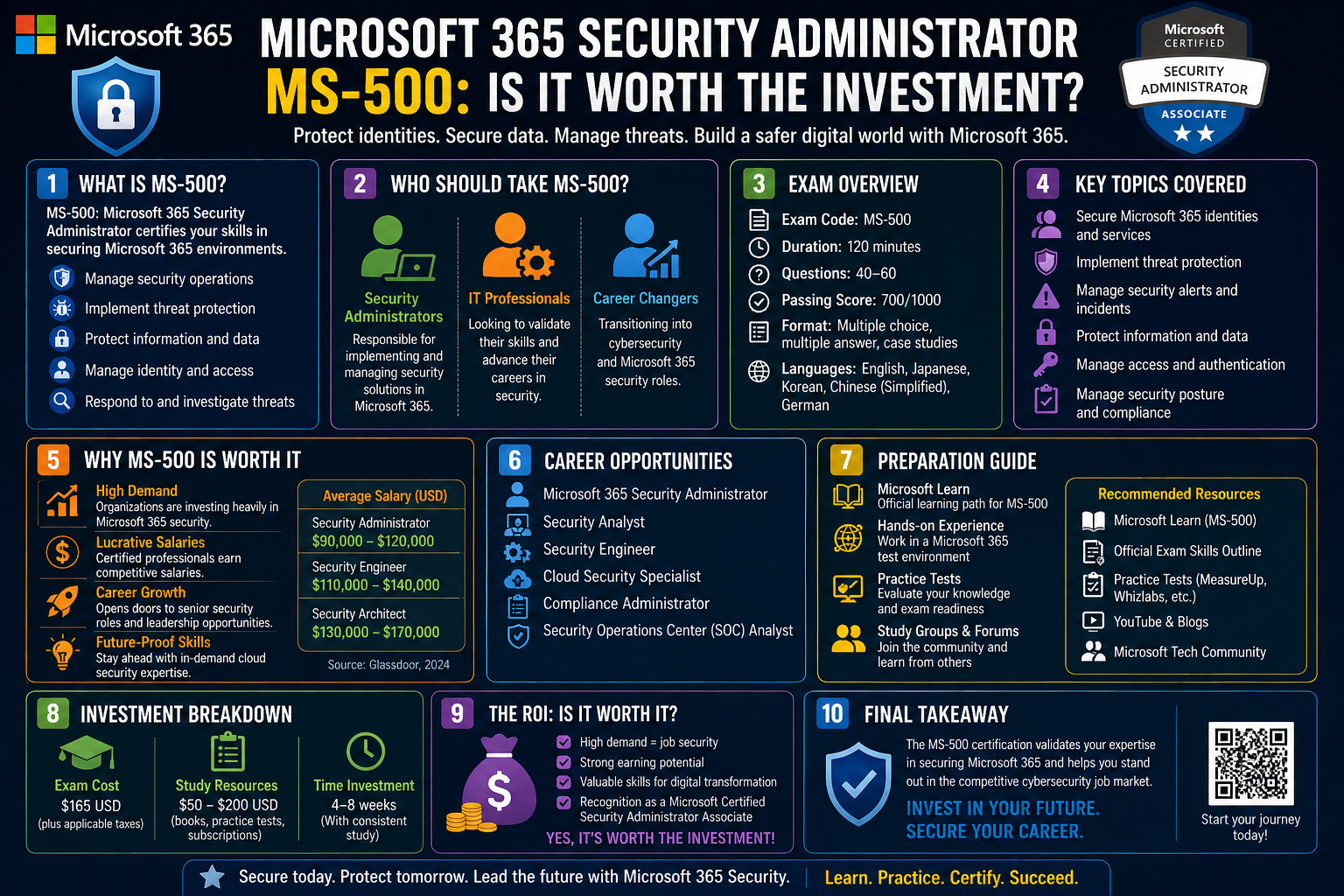
Microsoft 365 has become a central platform for modern organizations that rely on cloud services, hybrid infrastructure, and distributed work environments. It is no longer just a collection of productivity applications. Instead, it has evolved into a unified ecosystem where communication, data storage, identity management, and security operations are tightly integrated. This shift has fundamentally changed how organizations think about protecting their digital environments.
In traditional IT setups, security was often handled through separate systems. One tool managed user authentication, another handled antivirus protection, and yet another was responsible for monitoring network traffic. With Microsoft 365, many of these functions are consolidated into a single ecosystem, which makes administration more efficient but also increases the level of responsibility placed on security professionals.
A Microsoft 365 security administrator operates within this integrated environment and is responsible for maintaining the security posture of an organization’s users, devices, and data. This role is not limited to responding to threats after they occur. Instead, it focuses heavily on prevention, configuration, and continuous monitoring. The administrator ensures that users can access the resources they need while preventing unauthorized access and data exposure.
The increasing reliance on cloud-based systems has also expanded the attack surface that organizations must defend. Employees now access corporate resources from multiple locations and devices, including personal laptops, mobile phones, and remote office setups. This flexibility improves productivity but also introduces new security risks. A security administrator must account for these risks and implement controls that adapt to modern working conditions.
Microsoft 365 provides a wide range of built-in security tools designed to address these challenges. These tools cover identity protection, threat detection, information governance, and compliance enforcement. However, having access to these tools is not enough. They must be properly configured and continuously managed to ensure effectiveness. This is where the expertise of a security administrator becomes essential.
Within this environment, the MS-500 certification represents a structured validation of the skills required to manage Microsoft 365 security tools effectively. It aligns with the practical responsibilities of administrators who work with identity systems, threat protection mechanisms, and compliance frameworks. Rather than focusing on theoretical cybersecurity principles, it emphasizes applied knowledge within Microsoft’s ecosystem.
Understanding the broader landscape of Microsoft 365 security is essential before exploring the certification itself. The platform is built on the concept of shared responsibility. Microsoft provides the infrastructure and foundational security features, but organizations are responsible for configuring and maintaining those features according to their specific needs. This division of responsibility means that misconfigurations or neglected settings can lead to significant vulnerabilities, even when using a secure platform.
Security administrators are therefore positioned at a critical intersection between technology and organizational policy. They must understand not only how tools work but also how business requirements influence security decisions. For example, enabling strict access controls might improve security but could also reduce user productivity if not implemented thoughtfully. Balancing these factors is a core part of the role.
As organizations continue to adopt cloud-first strategies, the demand for professionals who can manage Microsoft 365 security environments continues to grow. This has made the role of a security administrator increasingly relevant across industries, from small businesses to large multinational corporations.
Understanding the Purpose and Structure of the MS-500 Certification
The MS-500 certification is designed to validate the practical ability to manage security within Microsoft 365 environments. It is not focused on abstract cybersecurity theory but instead emphasizes hands-on knowledge of Microsoft’s security tools and administrative processes. This makes it particularly relevant for professionals who work directly with Microsoft 365 services in real-world scenarios.
At its core, the certification evaluates how well a candidate understands and applies security configurations across four major domains: identity and access management, threat protection, information protection, and governance and compliance. Each of these areas represents a fundamental pillar of enterprise security within Microsoft 365.
The purpose of the certification is to ensure that security administrators can perform essential tasks such as configuring secure user authentication methods, monitoring potential threats, protecting sensitive information, and enforcing organizational policies. These responsibilities reflect the daily operations of IT security teams in modern workplaces.
Unlike more advanced certifications that may require deep architectural design knowledge or extensive experience in cybersecurity engineering, the MS-500 is positioned at an associate level. This means it is intended for professionals who are building foundational expertise in Microsoft 365 security administration. However, this does not reduce its importance. Instead, it makes it a practical stepping stone for those entering or transitioning into security-focused roles.
One of the key characteristics of the MS-500 certification is its emphasis on Microsoft-specific technologies. While general cybersecurity knowledge is helpful, the certification focuses on how security is implemented within Microsoft 365 tools and services. This includes understanding how identity systems are managed through Microsoft Entra ID, how threat protection is configured using Microsoft Defender technologies, and how compliance is enforced through Microsoft Purview features.
The structure of the certification reflects real-world administrative workflows. Security administrators are expected to manage user identities, configure access policies, monitor system alerts, and ensure compliance with organizational and regulatory requirements. These responsibilities are interconnected, meaning that decisions in one area often affect outcomes in another.
For example, adjusting identity and access policies can directly influence threat protection effectiveness. Similarly, implementing information protection controls can impact compliance reporting and data governance strategies. The MS-500 certification encourages a holistic understanding of these relationships rather than treating each domain in isolation.
Another important aspect of the certification is its alignment with cloud-based environments. Traditional on-premises security concepts are still relevant, but Microsoft 365 operates primarily in the cloud. This introduces new considerations such as conditional access policies, identity federation, and cloud-based threat intelligence. Candidates are expected to understand how these concepts work together within a modern IT infrastructure.
The certification also reflects the increasing importance of automation and centralized management. Many security tasks in Microsoft 365 can be automated or managed through unified dashboards. This allows administrators to respond more quickly to threats and enforce policies consistently across large user bases. Understanding how to leverage these capabilities is an important part of the MS-500 skill set.
Ultimately, the certification serves as both a validation of existing skills and a framework for developing new ones. It provides a structured way to understand the responsibilities of a Microsoft 365 security administrator while also preparing individuals for more advanced roles in cybersecurity and IT management.
Identity and Access Management in Microsoft 365 Environments
Identity and access management form the foundation of security in Microsoft 365. Every interaction within the system begins with identity verification, making it one of the most critical areas of responsibility for a security administrator. Without proper identity controls, even the most advanced security tools become ineffective.
In a Microsoft 365 environment, identities are typically managed through a centralized directory system that controls user authentication and authorization. This system ensures that only verified users can access specific resources and that their permissions are aligned with their roles within the organization.
A key concept in this area is the principle of least privilege. This principle ensures that users are granted only the minimum level of access necessary to perform their job functions. By limiting access rights, organizations reduce the risk of accidental or malicious data exposure. Security administrators are responsible for designing and enforcing these access policies across the entire organization.
Authentication methods also play a significant role in identity management. Modern Microsoft 365 environments rely heavily on multi-factor authentication, which adds layer of security beyond traditional passwords. This may include verification through mobile devices, authentication applications, or biometric systems. These methods significantly reduce the risk of unauthorized access due to compromised credentials.
Another important aspect of identity management is conditional access. This allows organizations to define rules that determine how and when users can access resources based on specific conditions. These conditions may include user location, device compliance status, or risk level associated with the login attempt. Conditional access policies provide a flexible way to enforce security without unnecessarily restricting legitimate users.
Security administrators must also manage identity lifecycle processes. This includes creating new user accounts, updating permissions when roles change, and removing access when employees leave the organization. Proper lifecycle management ensures that outdated or unused accounts do not become security vulnerabilities.
In hybrid environments, identity management becomes even more complex. Many organizations maintain a combination of on-premises and cloud-based systems. Synchronization between these environments is essential to ensure consistency in user access and security policies. Security administrators must ensure that identity data remains accurate and up to date across all platforms.
Privileged access management is another critical component of identity security. Administrative accounts have elevated permissions and, therefore, represent high-value targets for attackers. Implementing controls such as time-limited access and approval-based activation helps reduce the risk associated with these accounts.
Monitoring and auditing identity activity is also essential. Security administrators must be able to detect unusual login patterns, unauthorized access attempts, and suspicious changes to user accounts. These monitoring capabilities help organizations respond quickly to potential threats and maintain a strong security posture.
Identity and access management is not a static process. It requires continuous evaluation and adjustment as organizational needs evolve and new threats emerge. Security administrators must remain vigilant and proactive in maintaining secure identity systems within Microsoft 365 environments.
Threat Protection and Security Monitoring in Microsoft 365
Threat protection in Microsoft 365 focuses on identifying, preventing, and responding to security risks across users, devices, and applications. As cyber threats become more sophisticated, organizations must rely on integrated security systems that can detect anomalies and respond in real time.
Microsoft 365 provides a layered approach to threat protection, combining multiple tools and services that work together to defend against attacks. These tools analyze user behavior, monitor system activity, and assess risk levels based on known threat intelligence. Security administrators play a central role in configuring and managing these protections.
One of the key elements of threat protection is endpoint security. Devices that access Microsoft 365 services must be monitored to ensure they are not compromised. Security administrators configure policies that assess device health, enforce compliance standards, and restrict access from untrusted devices.
Email and collaboration security is another critical area. Many cyberattacks originate through phishing emails or malicious attachments. Microsoft 365 includes tools that scan incoming messages, detect suspicious content, and automatically block or quarantine potential threats. Administrators are responsible for fine-tuning these protections to balance security and usability.
Threat detection systems continuously analyze activity across the organization. These systems look for unusual behavior such as multiple failed login attempts, access from unfamiliar locations, or sudden changes in data usage patterns. When suspicious activity is detected, alerts are generated for further investigation.
Security administrators must respond to these alerts by analyzing logs, identifying the source of the threat, and taking corrective action. This may involve blocking user accounts, revoking access tokens, or isolating affected devices. Rapid response is essential to minimize potential damage.
Another important aspect of threat protection is automation. Microsoft 365 includes automated response capabilities that can take immediate action when certain conditions are met. This reduces the time between detection and response, helping to contain threats more effectively.
Security monitoring also involves continuous analysis of system logs and reports. These logs provide detailed information about user activity, system changes, and security events. Administrators use this data to identify trends, investigate incidents, and improve overall security strategies.
Threat intelligence plays a key role in enhancing protection. Microsoft continuously collects and analyzes global security data to identify emerging threats. This intelligence is used to update protection systems and improve detection accuracy. Security administrators benefit from this intelligence by staying informed about new attack patterns and vulnerabilities.
The effectiveness of threat protection depends not only on the tools themselves but also on how they are configured and maintained. Security administrators must ensure that protection policies are properly aligned with organizational needs and continuously updated to reflect evolving threats.
Information Protection Strategies Across Microsoft 365
Information protection in Microsoft 365 is centered around ensuring that data remains secure regardless of where it is stored, shared, or accessed. In modern organizations, data no longer stays confined within a single device or local server. It moves constantly between cloud services, user endpoints, collaboration platforms, and external partners. This fluidity requires a security model that can follow the data itself rather than relying solely on perimeter-based defenses.
Microsoft 365 addresses this challenge by embedding protection mechanisms directly into the data layer. Instead of treating files, emails, and documents as static objects, the platform applies dynamic security controls that travel with the content. This approach allows organizations to maintain control over sensitive information even after it leaves their immediate infrastructure.
Security administrators are responsible for configuring and managing these protections. Their role involves defining how data should be classified, how it should be handled, and what restrictions should apply based on its sensitivity. This requires a detailed understanding of organizational data flows and business requirements.
A key aspect of information protection is ensuring that sensitive data does not unintentionally leak outside the organization. This can happen through email forwarding, unauthorized file sharing, or accidental uploads to external services. Microsoft 365 provides mechanisms that help mitigate these risks by applying rules that detect and restrict risky behavior.
These protections are not limited to intentional threats. Human error is one of the most common causes of data exposure. Employees may mistakenly share confidential documents with the wrong recipient or store sensitive information in unsecured locations. Information protection strategies aim to reduce the impact of such mistakes by enforcing automated safeguards.
Another important dimension is encryption. Data may be encrypted both at rest and in transit, ensuring that even if unauthorized access occurs, the information remains unreadable. Security administrators must understand how encryption policies are applied across different Microsoft 365 services and how they interact with user access controls.
Protection strategies also extend to collaboration environments where multiple users work on shared documents. In such scenarios, maintaining control over editing permissions, sharing capabilities, and external access becomes critical. Administrators must carefully balance collaboration efficiency with security requirements.
The effectiveness of information protection depends heavily on proper configuration. Misconfigured policies can either expose sensitive data or unnecessarily restrict legitimate business operations. This makes it essential for administrators to have a clear understanding of organizational priorities and data classification standards.
Data Classification and Sensitivity Labeling in Practice
Data classification is a foundational concept in Microsoft 365 information protection. It involves categorizing data based on its level of sensitivity and business importance. Once classified, data can be protected using specific rules that determine how it can be accessed, shared, and stored.
In practical terms, classification allows organizations to differentiate between general business information and highly confidential material. For example, internal communications may have lower sensitivity compared to financial records or personal employee data. By assigning classifications, organizations create a structured framework for applying security controls consistently.
Sensitivity labeling is the mechanism used to implement classification in Microsoft 365. Labels are applied to files, emails, and other content types to indicate their level of sensitivity. These labels are not merely descriptive; they actively enforce security policies.
When a sensitivity label is applied, it can trigger a range of protective actions. These may include restricting external sharing, applying encryption, or preventing content from being copied or printed. The exact behavior depends on how the label is configured by the security administrator.
One of the strengths of sensitivity labeling is its persistence. Once applied, labels remain attached to the content even if it is moved outside the original environment. This ensures that protection follows the data wherever it goes, maintaining security across devices and platforms.
Security administrators must design labeling strategies that align with organizational workflows. This involves understanding how employees create, share, and store information daily. Poorly designed labeling systems can lead to confusion or inconsistent usage, reducing the effectiveness of protection measures.
Automation plays an important role in data classification. Instead of relying solely on users to apply labels manually, Microsoft 365 can automatically detect sensitive content and assign appropriate classifications. This reduces human error and ensures more consistent enforcement of policies.
However, automated classification is not always perfect. It requires careful tuning to avoid false positives or missed detections. Security administrators must regularly review and adjust classification rules to ensure accuracy and relevance.
Another important aspect of labeling is user education. While systems can automate many processes, users still play a role in handling sensitive information. Understanding how and when labels are applied helps reduce mistakes and improve overall security hygiene.
Sensitivity labeling also integrates with external sharing controls. When data is shared outside the organization, labels can enforce restrictions that limit what external users can do with the content. This ensures that sensitive information remains protected even in collaborative scenarios involving third parties.
Over time, classification systems evolve as organizations grow and their data environments become more complex. Security administrators must continuously refine labeling strategies to reflect changes in business operations, regulatory requirements, and risk exposure.
Compliance Frameworks and Regulatory Alignment in Microsoft 365
Compliance in Microsoft 365 is concerned with ensuring that organizational data practices align with legal, regulatory, and industry standards. Different organizations are subject to different compliance requirements depending on their sector, geographic location, and operational scope.
Security administrators play a critical role in implementing and maintaining compliance frameworks. This involves configuring policies that govern how data is stored, accessed, retained, and deleted. These policies must be aligned with both internal governance standards and external regulations.
One of the key challenges in compliance management is the diversity of regulatory requirements. Some regulations focus on data privacy, while others emphasize retention periods or auditability. Microsoft 365 provides tools that help organizations address these varied requirements through centralized policy management.
Retention policies are a core component of compliance. They define how long data should be preserved and when it should be deleted. Proper retention management ensures that organizations retain necessary records for legal or operational purposes while avoiding unnecessary data accumulation.
Auditability is another important compliance requirement. Organizations must be able to demonstrate how data has been accessed and modified over time. Microsoft 365 provides detailed logging capabilities that track user activity and system changes. Security administrators must ensure that these logs are properly configured and retained.
Compliance frameworks also address data residency and sovereignty concerns. Some regulations require that data remain within specific geographic boundaries. Microsoft 365 allows administrators to configure data storage locations to meet these requirements.
Risk management is closely tied to compliance. Identifying potential compliance risks helps organizations proactively address vulnerabilities before they lead to violations. Security administrators often work with compliance teams to assess risks and implement mitigating controls.
Another important aspect is policy enforcement. Compliance rules must not only be defined but also actively enforced across all relevant systems. Microsoft 365 provides automated enforcement mechanisms that help ensure consistent application of policies.
Regular compliance assessments are necessary to ensure ongoing adherence to regulations. These assessments involve reviewing system configurations, auditing user activity, and evaluating policy effectiveness. Security administrators are responsible for supporting these assessments and implementing recommended changes.
As regulations evolve, compliance frameworks must also adapt. This requires continuous monitoring of regulatory changes and updating internal policies accordingly. Security administrators must remain aware of these changes to ensure ongoing compliance.
Governance Controls and Lifecycle Management of Data
Governance in Microsoft 365 focuses on managing the lifecycle of data from creation to deletion. It ensures that information is properly organized, retained, and disposed of according to organizational policies and regulatory requirements.
Data lifecycle management begins at the point of creation. When new information is generated, it must be classified, stored appropriately, and governed by relevant policies. Security administrators define these rules to ensure consistency across the organization.
As data is used over time, its relevance may change. Some information becomes obsolete, while other data remains important for long-term reference or legal purposes. Governance controls help manage these transitions by applying retention and archival policies.
Retention management ensures that data is preserved for the required periods. This is particularly important for organizations subject to regulatory oversight. At the same time, retention policies must avoid unnecessary data accumulation, which can increase storage costs and security risks.
Deletion policies are equally important. When data is no longer needed, it should be securely removed from the system. However, deletion must be carefully controlled to avoid accidental loss of important information. Governance systems help balance these requirements.
Access governance is another key component. It defines who can access specific types of data and under what conditions. Over time, user roles may change, requiring updates to access permissions. Security administrators must ensure that access rights remain aligned with current responsibilities.
Lifecycle management also includes monitoring data usage patterns. Understanding how data is accessed and shared helps organizations optimize storage and improve security controls. It also provides insights into potential misuse or inefficiencies.
Archiving is often used for long-term data storage. Archived data is typically less frequently accessed but must still be protected and retrievable when needed. Governance policies define when data should be moved to archival storage.
Effective governance requires coordination between technical systems and organizational policies. Security administrators must ensure that governance rules are consistently applied across all Microsoft 365 services.
Security Monitoring, Logging, and Signal Correlation
Security monitoring in Microsoft 365 involves continuous observation of system activity to detect potential threats and anomalies. This process relies heavily on logging mechanisms that capture detailed information about user behavior, system events, and security alerts.
Logs serve as the foundation for security analysis. They provide a chronological record of activities that can be used to investigate incidents or identify suspicious behavior. Security administrators must ensure that logging is properly configured and that relevant data is retained for analysis.
Monitoring systems generate alerts when unusual activity is detected. These alerts are based on predefined rules or behavioral analysis models. Administrators must review alerts to determine whether they represent genuine threats or false positives.
Signal correlation is an advanced aspect of monitoring that involves combining data from multiple sources to identify patterns. For example, a single login attempt may not appear suspicious on its own, but when combined with other events such as data downloads or location changes, it may indicate a security incident.
Microsoft 365 integrates multiple security signals across its services. This allows administrators to gain a comprehensive view of system activity and identify complex attack patterns that might otherwise go unnoticed.
Effective monitoring requires prioritization. Not all alerts are equally important, and security teams must focus on high-risk events. This requires understanding the context of each alert and its potential impact on the organization.
Incident investigation relies heavily on log analysis. Security administrators must be able to trace events back to their source, identify affected systems, and determine the scope of potential damage.
Monitoring is not a passive activity. It requires continuous tuning of detection rules and alert thresholds to ensure accuracy. Overly sensitive systems may generate excessive alerts, while overly relaxed systems may miss critical threats.
Real-World Security Operations in Hybrid Microsoft Environments
Modern organizations often operate in hybrid environments that combine on-premises infrastructure with cloud-based Microsoft 365 services. This creates additional complexity for security administration, as data and identities must be managed across multiple systems.
In hybrid setups, identity synchronization is essential. User accounts must remain consistent across both environments to ensure seamless access and security enforcement. Security administrators must manage synchronization processes carefully to avoid inconsistencies.
Security policies must also be aligned across environments. Differences between cloud and on-premises configurations can create vulnerabilities if not properly managed. Administrators must ensure that security standards are consistently applied.
Threat detection in hybrid environments requires integration between different monitoring systems. Events occurring in on-premises infrastructure must be correlated with cloud-based activity to provide a complete security picture.
Data movement between environments introduces additional risks. Information may be transferred between local systems and cloud services, requiring consistent protection measures across all locations.
Operational workflows in hybrid environments often involve multiple administrative tools and interfaces. Security administrators must coordinate across these systems to maintain effective control over security operations.
Incident response in hybrid environments is more complex due to the distributed nature of systems. Identifying the source of a threat may require analysis across multiple platforms and data sources.
Hybrid security operations also require careful planning for scalability. As organizations grow, their infrastructure may expand further into cloud services, increasing the importance of centralized security management strategies.
Advanced Threat Detection and Response in Microsoft 365 Environments
Advanced threat detection in Microsoft 365 is built around the idea that modern cyberattacks rarely follow simple, predictable patterns. Instead, attackers use multi-stage techniques that combine identity compromise, lateral movement, privilege escalation, and data exfiltration. Because of this complexity, Microsoft 365 security systems are designed to observe behavior over time rather than relying only on static rules.
Security administrators play a critical role in interpreting these signals. The system generates alerts, but it is the administrator who determines whether those alerts represent real threats or normal activity. This requires not just technical knowledge, but also an understanding of organizational behavior patterns and baseline user activity.
Threat detection systems in Microsoft 365 continuously analyze activity across identities, endpoints, applications, and data flows. These systems rely on behavioral analytics to identify deviations from normal patterns. For example, a login from an unusual location combined with large file downloads may indicate compromised credentials. However, context is essential because legitimate business travel or project work can sometimes trigger similar signals.
One of the most important aspects of advanced threat detection is correlation. A single event may not appear suspicious on its own, but when combined with other signals, it can reveal a coordinated attack. Microsoft 365 integrates signals across its security ecosystem to build a unified view of potential threats.
Security administrators must be able to interpret these correlated signals and prioritize response actions. Not all alerts require immediate intervention, but high-confidence threats must be addressed quickly to minimize damage.
Response actions in Microsoft 365 are often automated to reduce reaction time. When a threat is confirmed, the system can automatically isolate devices, disable user accounts, or revoke access tokens. However, administrators still oversee these actions and may adjust or override automated responses when necessary.
Incident investigation is a key responsibility in threat response. Administrators must reconstruct attack timelines, identify entry points, and determine the scope of impact. This process involves analyzing logs, reviewing alerts, and tracing user activity across multiple systems.
The goal of threat response is not only to contain immediate damage but also to prevent future incidents. After an attack, administrators often adjust security policies, strengthen access controls, and refine detection rules to improve resilience.
Microsoft Defender Ecosystem and Security Integration
The Microsoft Defender ecosystem is a central component of Microsoft 365 security operations. It provides integrated protection across endpoints, email, identities, applications, and cloud services. Rather than functioning as separate tools, these Defender services work together to provide a unified security framework.
Endpoint protection focuses on securing devices that connect to Microsoft 365 services. These devices may include laptops, desktops, and mobile devices. Security administrators ensure that endpoints meet compliance standards and are protected against malware, ransomware, and other threats.
Email security is another critical area. Many attacks begin with phishing emails designed to trick users into revealing credentials or downloading malicious attachments. Defender systems analyze email content, sender reputation, and behavioral patterns to detect and block such threats.
Identity protection focuses on detecting compromised accounts and suspicious authentication activity. This includes monitoring login attempts, detecting unusual access patterns, and assessing risk levels associated with user behavior.
Cloud application security provides visibility into how cloud services are used within the organization. It helps detect unauthorized applications, risky file sharing, and unusual data transfers. Security administrators use this information to enforce policies and reduce shadow IT risks.
The integration of these Defender components is one of the key strengths of Microsoft 365 security. Instead of isolated alerts, administrators receive a connected view of threats across the entire environment.
This integration allows for more accurate threat detection. For example, a suspicious login combined with unusual email activity and abnormal file access can be correlated into a single high-priority incident. Without integration, these signals might be treated separately and overlooked.
Security administrators are responsible for configuring Defender policies, reviewing alerts, and ensuring that protection levels are aligned with organizational risk tolerance. They also play a role in tuning detection sensitivity to reduce false positives while maintaining strong security coverage.
Identity Protection and Risk-Based Access Controls
Identity protection in Microsoft 365 goes beyond simple authentication. It involves continuously evaluating the risk associated with user behavior and adjusting access accordingly. This is known as risk-based access control.
Instead of treating all login attempts equally, Microsoft 365 assigns risk levels based on various factors such as location, device status, and behavioral anomalies. For example, a login from a known device in a usual location may be considered low risk, while a login from an unfamiliar region may be flagged as high risk.
Security administrators define how the system should respond to different risk levels. Responses may include requiring additional authentication, blocking access, or forcing password resets.
One of the key advantages of risk-based access control is its adaptability. Traditional security systems rely on static rules, but risk-based systems adjust dynamically based on real-time conditions. This improves security while maintaining user convenience.
Identity protection also involves monitoring for credential compromise. Attackers often attempt to reuse stolen passwords across multiple services. Microsoft 365 detects these attempts and flags them as suspicious when patterns match known attack behavior.
Another important concept is continuous access evaluation. Instead of verifying identity only at login, Microsoft 365 continuously evaluates user sessions. If risk levels change during a session, access can be adjusted or revoked in real time.
Security administrators must carefully configure identity protection policies to balance security and usability. Overly strict policies may disrupt legitimate work, while overly relaxed policies may expose the organization to risk.
Identity protection also extends to privileged accounts. Administrative accounts require stronger controls because they have elevated access to sensitive systems. These accounts are often subject to stricter authentication requirements and monitoring rules.
Information Governance and Data Lifecycle Enforcement
Information governance in Microsoft 365 focuses on managing how data is created, stored, used, and eventually removed. It ensures that data remains useful, secure, and compliant throughout its lifecycle.
Data lifecycle management begins with creation. When new data is generated, it must be classified and assigned appropriate governance policies. These policies determine how long the data will be retained and who can access it.
As data ages, its relevance may change. Some information remains critical for long-term reference, while other data becomes obsolete. Governance policies help manage this transition by applying retention rules that determine when data should be archived or deleted.
Retention policies are essential for compliance and operational efficiency. They ensure that important records are preserved for required durations while preventing unnecessary data accumulation. Security administrators configure these policies based on organizational and regulatory requirements.
Archiving is used for long-term storage of inactive data. Archived data is typically not accessed frequently but must remain secure and retrievable. Governance policies define when data should be moved to archive storage and how it should be managed.
Deletion policies ensure that outdated or unnecessary data is securely removed. This reduces storage costs and minimizes security risks associated with unused data. However, deletion must be carefully controlled to avoid accidental loss of important information.
Access governance ensures that only authorized users can access specific types of data. As employees change roles or leave the organization, their access rights must be updated accordingly. Security administrators manage these changes to maintain data security.
Data usage monitoring provides insights into how information is accessed and shared. This helps organizations identify inefficiencies, detect misuse, and optimize governance strategies.
Information governance is not a one-time setup. It requires continuous adjustment as organizational needs evolve. Security administrators must regularly review policies and update them to reflect changes in business operations and compliance requirements.
Compliance Monitoring and Regulatory Enforcement
Compliance monitoring in Microsoft 365 ensures that organizational practices align with legal and regulatory standards. These standards vary depending on industry, geography, and organizational structure.
Security administrators are responsible for implementing compliance policies that enforce these standards. This includes configuring data retention rules, access controls, and auditing mechanisms.
Auditing is a key component of compliance monitoring. It provides a detailed record of user activity and system changes. These records are essential for demonstrating compliance during audits or investigations.
Microsoft 365 provides tools that allow administrators to track and review audit logs. These logs capture events such as file access, configuration changes, and administrative actions.
Compliance enforcement also involves ensuring that data is stored and processed in accordance with regulatory requirements. Some regulations require data to remain within specific geographic regions, while others impose strict privacy controls.
Security administrators must configure systems to meet these requirements while maintaining operational efficiency. This often involves balancing security controls with user accessibility.
Risk assessments are another important part of compliance monitoring. Organizations must regularly evaluate their exposure to compliance risks and implement measures to reduce those risks.
Policy enforcement ensures that compliance rules are consistently applied across all systems. Microsoft 365 automates many of these enforcement actions, reducing the likelihood of human error.
Regulatory requirements evolve, and compliance systems must adapt accordingly. Security administrators must stay informed about changes in regulations and update policies to ensure ongoing compliance.
Security Operations, Incident Handling, and Continuous Improvement
Security operations in Microsoft 365 involve continuous monitoring, detection, response, and improvement of security systems. This is not a static process but an ongoing cycle that evolves with new threats and organizational changes.
Incident handling begins with detection. When a potential security event is identified, it must be investigated to determine its severity and scope. Security administrators analyze logs, review alerts, and assess affected systems.
Once an incident is confirmed, containment actions are taken to prevent further damage. This may involve isolating devices, disabling accounts, or restricting network access.
After containment, recovery processes begin. Affected systems are restored, and normal operations are resumed. However, recovery also includes ensuring that vulnerabilities have been addressed to prevent recurrence.
Post-incident analysis is a critical step in improving security posture. It involves reviewing what happened, why it happened, and how similar incidents can be prevented in the future.
Continuous improvement is a core principle of security operations. As new threats emerge, security systems must evolve to address them. This includes updating detection rules, refining policies, and improving response strategies.
Security administrators contribute to this improvement cycle by analyzing trends, identifying weaknesses, and implementing enhancements to security configurations.
Training and awareness also play an important role in security operations. Users are often the first line of defense against threats, and their behavior can significantly impact overall security effectiveness.
Security operations in Microsoft 365 are deeply integrated with automation. Automated tools assist in detection, response, and reporting, allowing administrators to focus on more complex analysis and decision-making tasks.
Over time, security operations mature into a structured process that combines technology, policy, and human expertise. This integrated approach ensures that Microsoft 365 environments remain resilient against evolving cyber threats.
Conclusion
The MS-500 certification sits at an important intersection between practical IT administration and modern cybersecurity demands within Microsoft 365 environments. It reflects the growing need for professionals who can manage identity systems, protect organizational data, and respond effectively to evolving security threats in cloud-based infrastructures. Rather than focusing on abstract theory, it emphasizes real-world application of Microsoft security tools, making it especially relevant for professionals working directly with enterprise environments.
Across Microsoft 365 ecosystems, security is no longer a separate function but a continuous process embedded into identity management, data protection, compliance, and threat monitoring. This makes the role of a security administrator increasingly central to organizational resilience. The MS-500 validates the ability to operate within this ecosystem, ensuring that individuals can configure protections, enforce policies, and respond to incidents with confidence.
For those entering the IT field, it provides a structured foundation for understanding enterprise security systems. For experienced professionals, it reinforces and formalizes practical knowledge that is already in use. In both cases, it supports career growth by aligning skills with widely adopted Microsoft technologies.
As organizations continue to expand their reliance on cloud services, the importance of skilled Microsoft 365 security administrators will only continue to grow.