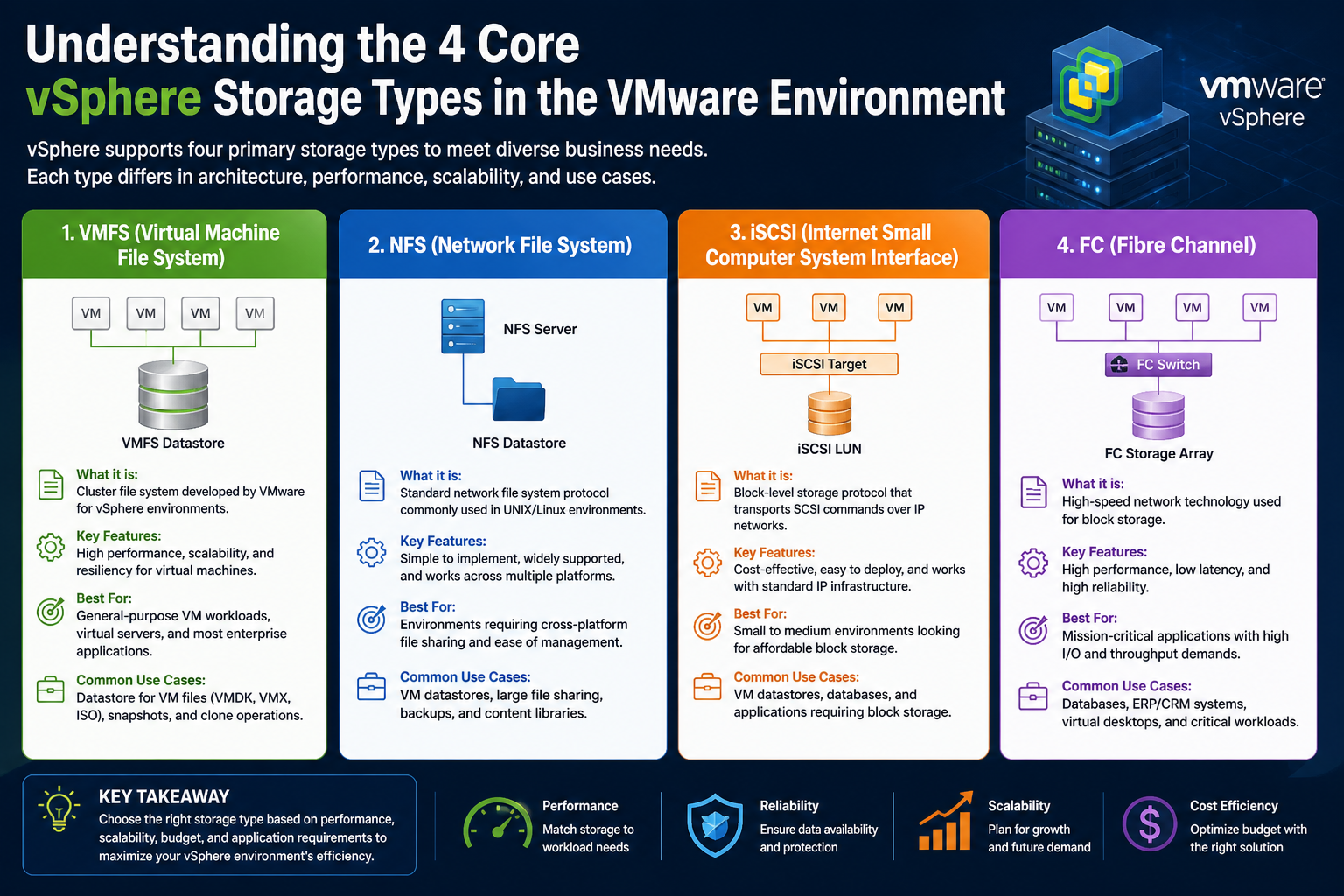
In any virtualized infrastructure, storage is not just a supporting component—it is a foundational element that directly influences performance, reliability, and scalability. Within VMware vSphere, storage plays a central role in ensuring that virtual machines can operate consistently, retain their state, and deliver expected workloads without disruption. Unlike stateless systems that can be recreated on demand, virtual machines are inherently stateful, meaning they depend heavily on persistent storage to maintain operating system data, applications, configurations, and user information.
Understanding how storage integrates into vSphere is critical for anyone managing or designing a virtual environment. It is not enough to simply attach disks and expect optimal results. Storage decisions affect everything from boot times and application responsiveness to backup efficiency and disaster recovery strategies. As environments grow in complexity, the need for thoughtful storage planning becomes even more important.
At its core, vSphere abstracts physical hardware resources, including CPU, memory, networking, and storage, and presents them to virtual machines in a flexible, software-defined manner. While compute and memory virtualization are often straightforward concepts, storage virtualization introduces additional layers of complexity. These include file systems, protocols, access methods, and management policies, all of which must work together seamlessly.
Understanding Stateful Virtual Machines
A virtual machine behaves much like a physical computer, but instead of relying on dedicated hardware, it uses virtualized components. One of the defining characteristics of a virtual machine is that it maintains its state across reboots, migrations, and even failures. This state includes the operating system, installed applications, user data, and system configurations.
Without reliable storage, this state would be lost every time a VM is powered off or moved. Storage ensures persistence, allowing VMs to resume operations exactly where they left off. This persistence is essential for business-critical applications such as databases, enterprise resource planning systems, and web services.
In vSphere, the primary storage component for a VM is the virtual disk file, commonly known as a VMDK. These files act as virtual hard drives, storing all the data that the VM generates or consumes. Each VMDK is associated with a datastore, which is a logical container that aggregates storage resources and makes them available to the hypervisor.
Beyond VMDKs, several other files contribute to the VM’s state. Configuration files define how the VM is set up, including CPU count, memory allocation, and device settings. Log files track events and activities, providing valuable insights for troubleshooting. Snapshot files capture the state of a VM at a specific point in time, enabling rollback capabilities and facilitating backup operations.
How vSphere Consumes Storage Resources
Storage consumption in vSphere extends far beyond simply storing virtual disks. The platform uses storage in multiple ways, each serving a specific purpose. Understanding these different uses helps administrators make informed decisions about capacity planning, performance optimization, and storage architecture.
One of the most significant uses of storage is for virtual disk files. Every VM has at least one VMDK, and often multiple disks are attached to support different workloads. These disks can vary in size, performance requirements, and provisioning type. For example, a database server may require high-performance storage with low latency, while a file server might prioritize capacity over speed.
Another important use of storage is for metadata and configuration files. Each VM has a configuration file that defines its hardware settings. This file is crucial because it tells the hypervisor how to allocate resources and interact with the VM. If this file becomes corrupted or inaccessible, the VM may fail to start.
Snapshots are another storage-intensive feature. When a snapshot is taken, vSphere creates delta files that record changes made after the snapshot point. While snapshots are useful for backups and testing, they can consume significant storage space if not managed properly. Over time, multiple snapshots can degrade performance and complicate storage management.
Changed Block Tracking, often referred to as CBT, is a feature that enhances backup efficiency by identifying which blocks of data have changed since the last backup. This allows backup solutions to transfer only the modified data rather than the entire disk, reducing backup times and network usage. However, CBT relies on storage mechanisms to track and store these changes.
Logging is an often-overlooked aspect of storage usage. Both the hypervisor and individual VMs generate log files that record system events, errors, and operational details. These logs are essential for diagnosing issues, but they also consume storage space. In large environments, log management becomes an important consideration to prevent unnecessary storage consumption.
The Importance of File Locking Mechanisms
One of the unique challenges in virtualized environments is ensuring that multiple hosts do not simultaneously access the same storage resources in conflicting ways. This is where file locking comes into play. File locking mechanisms prevent data corruption by ensuring that only one host or process can write to a specific file at a time, unless explicitly designed for shared access.
In vSphere, file locking is particularly important for VMDK files. If two hosts were to write to the same virtual disk without coordination, the data could become inconsistent or corrupted. To prevent this, vSphere implements locking mechanisms that control access to storage files.
The exact implementation of file locking depends on the storage type being used. Block-based storage systems typically rely on the VMFS file system to manage locks, while file-based systems use native file locking methods. Regardless of the approach, the goal is the same: to maintain data integrity and ensure reliable operation.
File locking also plays a role in high availability and clustering scenarios. When a host fails, another host may need to take over the VM. The locking mechanism ensures that the new host can safely access the VM’s files without conflict. This process must be seamless to minimize downtime and maintain service continuity.
Storage and Performance Considerations
Performance is one of the most critical factors in storage design. The speed at which data can be read from and written to storage directly impacts application performance and user experience. In virtualized environments, multiple VMs share the same storage resources, making performance optimization even more challenging.
Latency, throughput, and input/output operations per second (IOPS) are key metrics used to evaluate storage performance. Latency refers to the time it takes to complete a single I/O operation, while throughput measures the amount of data transferred over a period of time. IOPS indicates how many read and write operations can be performed per second.
Different workloads have different performance requirements. For example, a transactional database requires low latency and high IOPS, while a backup repository may prioritize throughput. Understanding these requirements is essential for selecting the appropriate storage type and configuration.
Storage contention can occur when multiple VMs compete for the same resources. This can lead to performance degradation and unpredictable behavior. To mitigate this, administrators can use techniques such as resource allocation, storage tiering, and load balancing.
Caching is another important aspect of storage performance. By storing frequently accessed data in faster storage media, caching can significantly improve response times. Some storage systems include built-in caching mechanisms, while others rely on software-based solutions.
The Evolution of Storage in Virtual Environments
Storage technologies have evolved significantly over the years, driven by the increasing demands of modern applications and workloads. Early virtualization environments relied heavily on local storage, which limited scalability and flexibility. As organizations grew, the need for shared storage became apparent.
Shared storage enables features such as live migration, high availability, and centralized management. It allows multiple hosts to access the same storage resources, making it possible to move VMs between hosts without downtime. This capability is essential for maintaining uptime and optimizing resource utilization.
Advancements in networking have also played a role in storage evolution. High-speed networks have made it possible to transmit storage data efficiently, enabling the use of network-based storage solutions. These solutions offer greater flexibility and scalability compared to traditional local storage.
The introduction of software-defined storage has further transformed the landscape. By abstracting storage resources and managing them through software, organizations can achieve greater agility and efficiency. This approach allows for dynamic allocation of storage based on workload requirements.
Matching Storage Types to Workload Needs
Choosing the right storage type is not a one-size-fits-all decision. Different workloads have unique requirements, and the storage solution must align with these needs. Factors such as performance, capacity, cost, and scalability all play a role in the decision-making process.
For example, a development environment may prioritize cost and flexibility, making local storage a viable option. In contrast, a production environment with critical applications may require high-performance shared storage to ensure reliability and uptime.
Understanding workload characteristics is key to making informed decisions. This includes analyzing data access patterns, performance requirements, and growth projections. By aligning storage choices with these factors, administrators can create a balanced and efficient infrastructure.
The Interplay Between Storage and Other Resources
Storage does not operate in isolation. It is closely interconnected with other components of the virtual environment, including compute and networking resources. The performance and availability of storage can impact the entire system.
For instance, a high-performance CPU and ample memory will not deliver optimal results if storage is slow or unreliable. Similarly, network bottlenecks can affect storage access in network-based solutions. This interdependence highlights the importance of a holistic approach to infrastructure design.
Resource management tools within vSphere help administrators monitor and optimize these interactions. By analyzing metrics and identifying bottlenecks, they can make adjustments to improve overall performance.
Building a Strong Foundation for Storage Strategy
A well-designed storage strategy is essential for the success of any virtual environment. It involves careful planning, continuous monitoring, and ongoing optimization. By understanding how vSphere uses storage and the different types available, administrators can make informed decisions that support their organization’s goals.
Storage is not just about capacity—it is about enabling performance, ensuring reliability, and supporting growth. As technology continues to evolve, the role of storage will only become more important, making it a critical area of focus for anyone working with virtualization.
Exploring Local and Fibre Channel Storage in vSphere Environments
When designing a virtual infrastructure using VMware vSphere, understanding how different storage types behave in real-world scenarios is essential. While all storage ultimately serves the purpose of persisting data, the way it is implemented can significantly influence performance, availability, scalability, and operational complexity. Two foundational storage approaches—local storage and Fibre Channel storage—represent opposite ends of the spectrum in terms of simplicity and enterprise capability. Examining these two in depth helps build a clearer understanding of how storage decisions shape the behavior of a virtual environment.
The Nature of Local Storage in Virtualized Systems
Local storage is often the starting point for many virtualization deployments. It refers to storage devices physically attached to a host system, such as internal hard drives, solid-state drives, or RAID arrays managed by a local controller. Because it resides within the server itself, local storage is directly accessible without relying on external networks or shared infrastructure.
In vSphere environments, local storage is typically formatted using VMFS, the clustered file system designed specifically for virtualization. However, despite VMFS supporting advanced features, when it is used on local disks, its capabilities are inherently limited by the fact that the storage is not shared across multiple hosts. This distinction is crucial because many of vSphere’s most powerful features rely on shared storage access.
The simplicity of local storage is one of its greatest advantages. There is minimal configuration required, and it does not demand specialized networking or additional hardware beyond what is already present in the server. This makes it particularly appealing for smaller environments, testing setups, and scenarios where cost constraints are a primary concern.
Because local storage is directly attached, it can offer very low latency and high throughput, especially when using modern SSDs or NVMe drives. Applications that require fast disk access can benefit from this proximity, as there are fewer layers between the virtual machine and the physical storage medium.
However, this performance advantage comes with trade-offs. The most significant limitation is the lack of shared access. Since local storage is tied to a single host, virtual machines stored on it cannot be easily moved to another host without manual intervention. This restricts the use of features such as live migration and automated load balancing.
Practical Deployment Scenarios for Local Storage
Local storage is often used for installing the hypervisor itself. Many administrators choose to deploy the hypervisor on small, dedicated storage devices such as USB drives or SD cards. This approach frees up the main storage devices for hosting virtual machines and simplifies the installation process.
In smaller environments, local storage may also be used to host virtual machines directly. For example, a small business with a limited number of servers might deploy vSphere on a single host and store all VMs locally. This setup can be cost-effective and straightforward to manage, but it lacks redundancy and scalability.
Development and testing environments are another common use case. Developers often need isolated environments where they can experiment without affecting production systems. Local storage provides a simple and efficient way to create such environments without the overhead of shared storage infrastructure.
Edge computing scenarios also benefit from local storage. In remote locations where network connectivity is limited or unreliable, relying on centralized storage is not practical. Local storage allows systems to operate independently while still leveraging virtualization benefits.
Despite these use cases, administrators must carefully consider the risks. If a host fails, the virtual machines stored on its local disks become inaccessible until the hardware is repaired or replaced. This lack of resilience makes local storage less suitable for mission-critical workloads.
Limitations and Operational Challenges
While local storage offers simplicity, it introduces several operational challenges that become more apparent as environments grow. One of the most significant challenges is managing data across multiple hosts. Without shared storage, each host operates in isolation, making it difficult to balance workloads or perform maintenance without downtime.
Backup and recovery processes can also be more complex. Since data is distributed across individual hosts, backup solutions must account for each host separately. This can increase administrative overhead and complicate disaster recovery planning.
Another limitation is scalability. Adding more storage capacity typically requires adding more disks to each host, which can be inefficient and costly. In contrast, shared storage solutions allow capacity to be expanded centrally, benefiting all connected hosts.
Maintenance activities, such as hardware upgrades or firmware updates, often require shutting down virtual machines when using local storage. This can lead to service interruptions and reduced availability, which may not be acceptable in production environments.
Transitioning Toward Shared Storage Models
As organizations grow and their requirements become more complex, many transition from local storage to shared storage solutions. Shared storage enables multiple hosts to access the same data, unlocking advanced features such as high availability, distributed resource scheduling, and live migration.
This transition is often driven by the need for greater flexibility and resilience. With shared storage, virtual machines can be moved between hosts without downtime, allowing administrators to perform maintenance or respond to changing workloads dynamically.
While local storage can still play a role in certain scenarios, it is often supplemented or replaced by more advanced storage technologies as environments mature.
Understanding Fibre Channel Storage
Fibre Channel storage represents a more advanced and enterprise-oriented approach to storage in virtual environments. It is a high-speed network technology specifically designed for transmitting storage data. Unlike traditional Ethernet networks, Fibre Channel operates on its own dedicated infrastructure, providing predictable performance and low latency.
In a Fibre Channel setup, hosts connect to storage arrays through specialized hardware known as host bus adapters. These adapters communicate with Fibre Channel switches, which in turn connect to storage devices. This architecture creates a storage area network that is separate from the regular data network.
One of the defining characteristics of Fibre Channel is its use of block-level storage access. This means that the storage appears to the host as raw disk volumes, allowing the hypervisor to manage the file system and allocate space to virtual machines.
The performance of Fibre Channel is one of its most compelling advantages. It is designed to handle high volumes of data with minimal delay, making it ideal for workloads that require consistent and reliable performance. Applications such as databases, financial systems, and large-scale enterprise software often benefit from this level of performance.
The Architecture of Fibre Channel Environments
A typical Fibre Channel environment consists of several key components. Storage arrays provide the physical disks and manage data storage. Fibre Channel switches facilitate communication between hosts and storage devices. Host bus adapters enable servers to connect to the network.
Zoning is an important concept in Fibre Channel networks. It involves dividing the network into segments to control which devices can communicate with each other. This enhances security and ensures efficient use of resources.
Multipathing is another critical feature. It allows multiple physical paths between a host and a storage device, providing redundancy and load balancing. If one path fails, traffic can be rerouted through another path without interrupting operations.
These architectural elements contribute to the reliability and performance of Fibre Channel storage, making it a preferred choice for large-scale deployments.
Use Cases for Fibre Channel Storage
Fibre Channel is commonly used in enterprise environments where performance and reliability are top priorities. Large data centers often rely on Fibre Channel to support critical applications that cannot tolerate downtime or performance degradation.
It is also widely used in environments with high transaction volumes. For example, financial institutions and e-commerce platforms require storage systems that can handle large numbers of simultaneous operations without latency issues.
Blade server environments frequently utilize Fibre Channel for booting hosts from centralized storage. This approach simplifies hardware management and allows for rapid provisioning of new servers.
In addition, organizations with existing Fibre Channel infrastructure often continue to use it when adopting virtualization. Leveraging existing investments can reduce costs and simplify integration.
Challenges and Considerations
Despite its advantages, Fibre Channel is not without challenges. One of the primary concerns is cost. The specialized hardware required for Fibre Channel networks can be expensive, including switches, cables, and host bus adapters.
Management complexity is another factor. Configuring and maintaining a Fibre Channel network requires specialized knowledge, particularly when it comes to zoning and multipathing. Organizations may need dedicated storage administrators to manage the environment effectively.
Scalability, while strong, requires careful planning. Expanding a Fibre Channel network involves adding new hardware and ensuring compatibility with existing components.
Additionally, because Fibre Channel operates separately from standard networking, it requires its own infrastructure. This can increase operational overhead and limit flexibility compared to solutions that use existing Ethernet networks.
Comparing Local and Fibre Channel Approaches
Local storage and Fibre Channel storage represent two very different approaches to meeting storage needs. Local storage emphasizes simplicity and cost-effectiveness, while Fibre Channel focuses on performance, reliability, and scalability.
The choice between these approaches depends on the specific requirements of the environment. Smaller deployments with limited budgets may find local storage sufficient, while larger organizations with critical workloads are more likely to invest in Fibre Channel.
Understanding these differences is essential for making informed decisions. Each approach has its strengths and limitations, and the optimal solution often involves balancing these factors based on business needs.
The Role of Storage in Enabling Advanced Features
Many of the advanced features in vSphere rely on shared storage access. Fibre Channel plays a key role in enabling these features by providing a reliable and high-performance storage backbone.
Features such as live migration allow virtual machines to move between hosts without downtime. This capability depends on all hosts having access to the same storage. Similarly, high availability mechanisms rely on shared storage to restart VMs on different hosts in the event of a failure.
Distributed resource scheduling uses shared storage to balance workloads across hosts, optimizing performance and resource utilization. Without shared storage, these features would not be possible.
Local storage, while limited in this regard, can still contribute to certain features when combined with technologies that aggregate local disks into shared pools. However, these solutions introduce additional layers of complexity.
Evolving Storage Strategies in Modern Environments
As technology continues to evolve, storage strategies are becoming more dynamic and adaptable. Organizations are increasingly adopting hybrid approaches that combine multiple storage types to meet diverse requirements.
For example, local storage may be used for high-performance workloads that benefit from low latency, while Fibre Channel provides shared storage for critical applications. This combination allows organizations to leverage the strengths of each approach.
Automation and software-defined storage are also playing a growing role. These technologies enable more efficient management of storage resources and allow for greater flexibility in allocating capacity.
In this evolving landscape, understanding the characteristics of different storage types remains essential. By building a strong foundation in these concepts, administrators can design environments that are both efficient and resilient.
Operational Best Practices for Storage Management
Effective storage management requires more than just selecting the right technology. It involves ongoing monitoring, optimization, and maintenance to ensure that storage resources continue to meet the needs of the environment.
Capacity planning is a key aspect. Administrators must anticipate future growth and ensure that sufficient storage is available. This includes monitoring usage trends and planning for expansion.
Performance monitoring is equally important. Identifying bottlenecks and addressing them proactively can prevent issues before they impact users. Tools within vSphere provide valuable insights into storage performance and usage.
Regular maintenance, such as firmware updates and hardware checks, helps ensure reliability. In Fibre Channel environments, this includes managing switches and ensuring proper configuration.
By following best practices and staying informed about emerging technologies, administrators can create storage environments that support both current and future needs.
iSCSI and NFS Storage in vSphere: Flexibility, Accessibility, and Modern Use Cases
As virtual infrastructures continue to evolve, the demand for storage solutions that balance cost, performance, and simplicity has grown significantly. While enterprise environments have traditionally relied on specialized technologies, modern deployments increasingly favor flexible options that integrate with existing networking infrastructure. Within VMware vSphere, two storage types stand out for their adaptability and widespread use: iSCSI and NFS. These approaches offer distinct advantages and trade-offs, shaping how administrators design and manage their environments.
Understanding these storage types requires more than just knowing how they work. It involves examining how they behave under different workloads, how they integrate with virtualization features, and how they influence operational efficiency. By exploring iSCSI and NFS in depth, it becomes easier to see how they fit into modern virtualization strategies.
The Rise of Network-Based Storage Solutions
The shift toward network-based storage has been driven by the need for scalability and flexibility. Unlike local storage, which is tied to a specific host, network-based solutions allow multiple hosts to access shared storage resources. This shared access is essential for enabling advanced virtualization features and improving resource utilization.
Ethernet networks have become faster and more reliable over time, making them suitable for carrying storage traffic. This has paved the way for storage protocols that operate over standard networking infrastructure. Instead of requiring dedicated hardware, these solutions can often leverage existing switches and cabling, reducing costs and simplifying deployment.
Both iSCSI and NFS take advantage of this evolution. They allow storage to be accessed over IP networks, making them more accessible to a wide range of environments. While they differ in how they present storage to the hypervisor, they share the common goal of providing efficient and scalable storage access.
Understanding iSCSI Storage in vSphere
iSCSI, or Internet Small Computer System Interface, is a protocol that enables block-level storage access over IP networks. It encapsulates SCSI commands within network packets, allowing servers to communicate with storage devices as if they were directly attached.
In a vSphere environment, iSCSI storage appears as raw disk volumes. The hypervisor formats these volumes using VMFS, creating datastores that can host virtual machines. Because iSCSI operates at the block level, it provides a high degree of control over how storage is allocated and managed.
One of the key advantages of iSCSI is its ability to use standard networking equipment. This eliminates the need for specialized hardware, making it a cost-effective alternative to more traditional storage solutions. Organizations can build storage networks using familiar tools and technologies, reducing the learning curve for administrators.
iSCSI can be implemented using either software initiators or hardware adapters. A software initiator runs within the hypervisor and uses the host’s network interface cards to communicate with storage. A hardware initiator, on the other hand, offloads processing to a dedicated adapter, which can improve performance and reduce CPU overhead.
Performance Characteristics and Optimization
Performance in iSCSI environments depends on several factors, including network speed, configuration, and workload characteristics. Modern networks with high bandwidth can support demanding applications, but proper configuration is essential to achieve optimal results.
Multipathing is a critical feature in iSCSI deployments. It allows multiple network paths between the host and storage device, providing redundancy and load balancing. If one path becomes unavailable, traffic can continue through another path without interruption.
Network segmentation is another important consideration. By separating storage traffic from regular data traffic, administrators can reduce congestion and improve performance. This is often achieved using dedicated network interfaces or VLANs.
Latency and throughput must be carefully managed, especially in environments with high I/O demands. Tuning parameters such as queue depth and timeout settings can help optimize performance. Storage vendors often provide guidelines and tools to assist with this process.
Use Cases for iSCSI Storage
iSCSI is well-suited for environments that require shared storage but must operate within budget constraints. Small to medium-sized businesses often choose iSCSI because it offers enterprise-like capabilities without the high cost of specialized infrastructure.
It is also commonly used in environments that already have robust Ethernet networks. Leveraging existing infrastructure reduces deployment time and simplifies management. This makes iSCSI an attractive option for organizations transitioning to virtualization.
In addition, iSCSI supports a wide range of workloads, from general-purpose applications to more demanding systems. With proper configuration, it can deliver reliable performance for databases, application servers, and virtual desktops.
Disaster recovery scenarios often benefit from iSCSI as well. Because it operates over IP networks, it can be extended across long distances, enabling replication and backup solutions that span multiple locations.
Challenges and Considerations for iSCSI
While iSCSI offers many advantages, it also presents certain challenges. Network dependency is one of the most significant factors. Since storage traffic shares the network with other data, congestion can impact performance if not properly managed.
Security is another consideration. Because iSCSI operates over IP networks, it is susceptible to the same risks as other network traffic. Implementing authentication and encryption mechanisms can help protect data, but these measures may introduce additional overhead.
Configuration complexity can vary depending on the environment. While basic setups are straightforward, optimizing performance and ensuring reliability requires careful planning and expertise.
Despite these challenges, iSCSI remains a popular choice due to its flexibility and cost-effectiveness.
Exploring Network File System Storage
Network File System, commonly known as NFS, takes a different approach to storage. Instead of presenting raw disk volumes, it provides file-level access over the network. This means that the hypervisor interacts with files directly rather than managing a block-based file system.
In a vSphere environment, NFS datastores are mounted as shared directories. Virtual machine files, including virtual disks and configuration files, are stored within these directories. This approach simplifies storage management by allowing administrators to work with familiar file structures.
One of the defining characteristics of NFS is its simplicity. Setting up an NFS datastore typically involves configuring the storage server and mounting it on the hypervisor. There is no need to format the storage with VMFS, as the file system is managed by the NFS server.
This simplicity extends to troubleshooting and maintenance. Administrators can easily access NFS shares to inspect files, manage storage, and resolve issues. This level of visibility can be particularly valuable in environments where quick problem resolution is essential.
Performance and Behavior of NFS Storage
Performance in NFS environments depends on the capabilities of the storage server and the underlying network. While NFS may not always match the raw performance of block-based solutions, it can deliver consistent and reliable results for many workloads.
Because NFS operates at the file level, it handles certain tasks differently. For example, file locking is managed through lock files rather than a clustered file system. This approach can simplify some aspects of management but may introduce limitations in specific scenarios.
Caching plays an important role in NFS performance. Both the client and server can cache data to reduce latency and improve responsiveness. Proper tuning of cache settings can have a significant impact on overall performance.
NFS also supports features such as thin provisioning and deduplication at the storage server level. These capabilities can help optimize storage utilization and reduce costs.
Use Cases for NFS Storage
NFS is often used in environments where simplicity and flexibility are priorities. It is particularly well-suited for proof-of-concept deployments and testing environments, where quick setup and ease of management are important.
In production environments, NFS can support a wide range of workloads, especially when backed by high-performance storage systems. It is commonly used for virtual desktop infrastructure, file services, and application hosting.
Organizations that already use NFS for other purposes may find it convenient to extend its use to virtualization. This allows them to leverage existing expertise and infrastructure.
NFS is also a good option for environments that require straightforward access to storage files. The ability to browse and manage files directly can simplify operations and reduce administrative overhead.
Limitations and Trade-Offs
Despite its advantages, NFS has certain limitations that must be considered. One of the most notable is the lack of support for certain advanced features, such as raw device mapping and shared disk clustering. These limitations can restrict its use in specific scenarios.
Performance can also be affected by network conditions and server capabilities. Ensuring adequate bandwidth and low latency is essential for maintaining consistent performance.
Scalability depends on the design of the storage server. While NFS can scale effectively, it requires careful planning to avoid bottlenecks and ensure balanced resource utilization.
Understanding these trade-offs is key to determining whether NFS is the right choice for a given environment.
Comparing iSCSI and NFS Approaches
iSCSI and NFS represent two different philosophies in storage design. iSCSI provides block-level access, giving the hypervisor more control over storage management. NFS, on the other hand, offers file-level access, simplifying administration and providing greater visibility.
The choice between these approaches depends on factors such as workload requirements, existing infrastructure, and administrative expertise. Environments that require granular control and compatibility with block-based features may favor iSCSI, while those prioritizing simplicity and ease of use may lean toward NFS.
Performance considerations also play a role. While both can deliver strong performance, the specific characteristics of each protocol may make one more suitable for certain workloads.
Integrating Multiple Storage Types
Modern vSphere environments often use a combination of storage types to meet diverse requirements. For example, iSCSI may be used for general-purpose workloads, while NFS supports development and testing environments.
This hybrid approach allows organizations to leverage the strengths of each storage type. By aligning storage choices with workload needs, administrators can create a balanced and efficient infrastructure.
Automation and policy-based management further enhance this flexibility. Storage policies can be defined to ensure that virtual machines are placed on appropriate storage resources based on their requirements.
Storage Management and Operational Efficiency
Effective storage management is essential for maintaining performance and reliability. Monitoring tools within vSphere provide insights into usage patterns, performance metrics, and potential issues.
Capacity planning helps ensure that sufficient storage is available to support growth. Regular analysis of usage trends can inform decisions about expansion and optimization.
Maintenance tasks, such as updating firmware and managing configurations, play a crucial role in ensuring stability. In network-based storage environments, this includes managing switches, network interfaces, and storage servers.
By adopting best practices and staying proactive, administrators can minimize disruptions and maintain a high level of service.
The Ongoing Evolution of Storage in Virtualization
The storage landscape continues to evolve as new technologies emerge. Advances in networking, hardware, and software are driving improvements in performance, scalability, and efficiency.
Software-defined storage is becoming increasingly prevalent, allowing organizations to abstract and manage storage resources through software. This approach enhances flexibility and enables more dynamic allocation of resources.
Cloud integration is another trend shaping storage strategies. Hybrid environments that combine on-premises and cloud-based storage are becoming more common, offering new opportunities for scalability and resilience.
In this dynamic environment, understanding the fundamentals of storage types such as iSCSI and NFS remains essential. These technologies continue to play a vital role in supporting modern virtual infrastructures, providing the flexibility and functionality needed to meet evolving demands.
Conclusion
Storage in VMware vSphere is far more than just a place to keep data—it is the backbone that supports every virtual machine, every workload, and every operational process within a virtual environment. From the moment a virtual machine is created to the time it is migrated, backed up, or decommissioned, storage remains a constant and critical factor influencing performance, availability, and reliability.
Throughout the discussion of different storage types, a clear theme emerges: there is no single “best” storage solution. Instead, each option—local storage, Fibre Channel, iSCSI, and NFS—serves a specific purpose and aligns with particular operational needs. The effectiveness of any storage strategy depends on how well it matches the requirements of the environment it supports.
Local storage stands out for its simplicity and accessibility. It offers a straightforward way to get started with virtualization and works well in smaller or isolated deployments. However, its limitations in scalability and shared access make it less suitable for environments that require high availability or advanced features. It represents a foundational step, often used in early stages or specialized scenarios such as edge deployments and testing environments.
Fibre Channel, on the other hand, represents the enterprise end of the spectrum. It delivers high performance, low latency, and strong reliability, making it ideal for mission-critical workloads. Its dedicated infrastructure ensures predictable behavior, but this comes at the cost of increased complexity and investment. Organizations that rely on Fibre Channel typically prioritize performance and stability above all else, and they are prepared to manage the associated infrastructure.
Between these two extremes lies iSCSI, offering a balanced approach that combines many of the benefits of shared storage with the affordability and flexibility of standard networking. It enables organizations to build scalable and capable storage environments without requiring specialized hardware. For many businesses, iSCSI provides the ideal middle ground, delivering sufficient performance and functionality while remaining cost-effective.
NFS introduces a different perspective by simplifying storage management through file-based access. Its ease of use and visibility make it particularly attractive for environments where operational simplicity is important. While it may not support every advanced feature, it excels in scenarios where flexibility and straightforward administration are priorities.
What becomes evident when considering all these options is that storage design is not just a technical decision—it is a strategic one. It requires a deep understanding of workloads, growth expectations, and operational priorities. A database server, for example, has very different needs compared to a development environment or a file-sharing system. Aligning storage choices with these needs ensures that resources are used efficiently and that performance remains consistent.
Another important realization is that modern environments rarely rely on a single storage type. Instead, they often combine multiple approaches to create a hybrid solution that leverages the strengths of each. Local storage might be used for high-speed caching or temporary workloads, while shared storage solutions like iSCSI or Fibre Channel handle critical applications. NFS might support development or backup operations. This layered approach allows organizations to remain flexible and adapt to changing requirements.
Equally important is the role of ongoing management. Selecting the right storage type is only the beginning. Continuous monitoring, performance tuning, and capacity planning are essential to maintaining a healthy environment. Storage demands evolve, and administrators must be prepared to adjust their strategies accordingly.
Ultimately, the key to effective storage in vSphere lies in understanding the trade-offs. Performance, cost, complexity, and scalability are all interconnected, and improving one aspect often impacts another. By carefully evaluating these factors and aligning them with business goals, it becomes possible to design a storage architecture that not only meets current needs but also supports future growth.