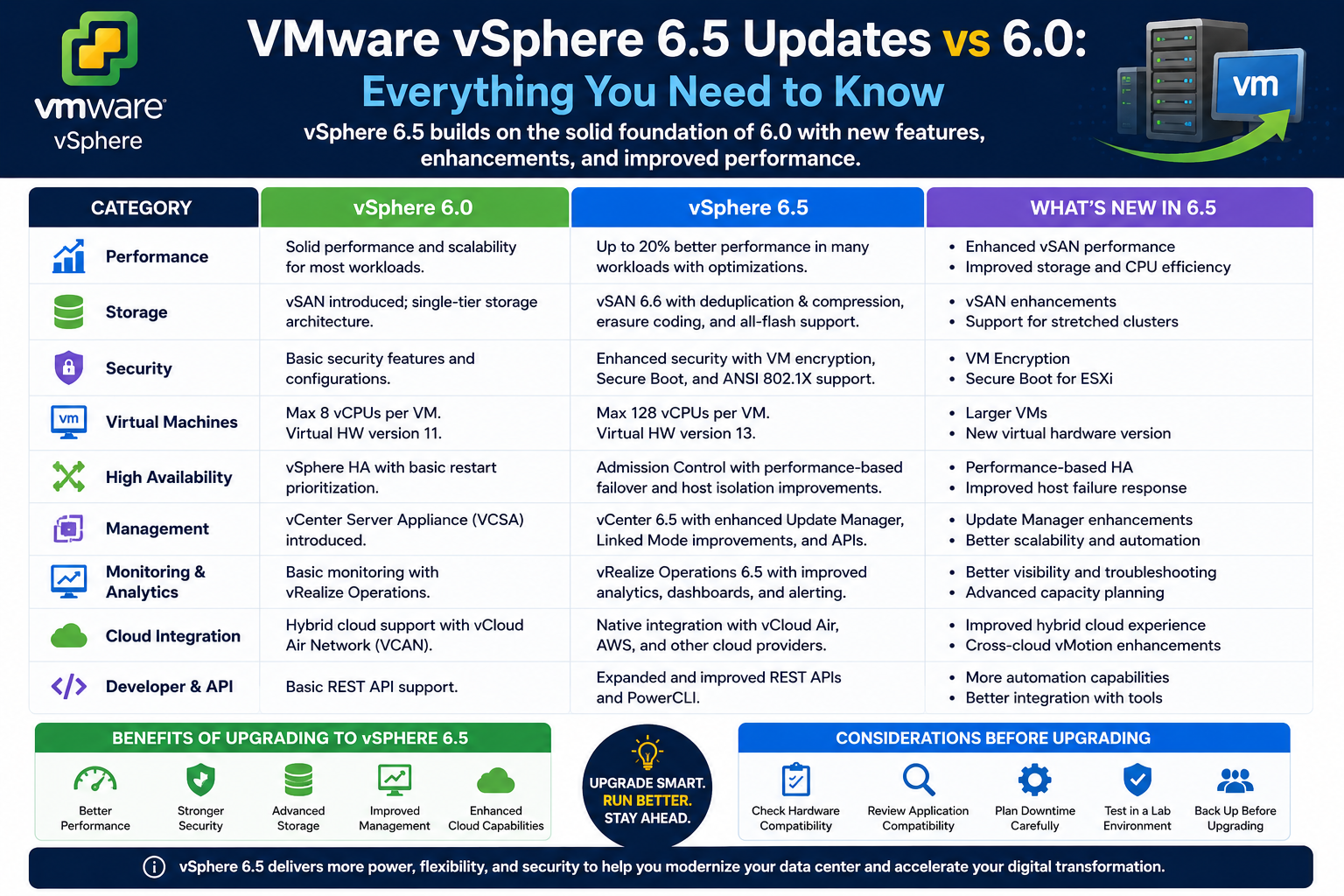
Virtualization has become the backbone of modern IT infrastructure, allowing organizations to run multiple virtual machines on a single physical server while improving efficiency, flexibility, and scalability. VMware’s vSphere platform has long been one of the most widely adopted solutions in this space, serving as the foundation for enterprise datacenters and cloud environments.
When VMware introduced vSphere 6.5, it was more than a routine update. It represented a shift toward simplified management, stronger built-in security, and broader support for modern application architectures. For professionals familiar with vSphere 6.0, the differences were significant enough to influence daily administration practices, infrastructure design decisions, and certification paths.
This article explores the evolution from vSphere 6.0 to 6.5, highlighting architectural improvements, feature enhancements, and operational changes that shaped the platform’s direction.
Understanding the Core Structure of vSphere
At its core, vSphere is a virtualization suite designed to abstract physical hardware and create a unified environment for running workloads. It consists of two primary components that define its architecture and functionality.
The first is ESXi, a type-1 hypervisor installed directly on physical hardware. ESXi is responsible for running virtual machines, allocating resources such as CPU, memory, and storage, and ensuring isolation between workloads. Because it operates directly on hardware without an underlying operating system, it delivers strong performance and efficiency.
The second key component is vCenter Server, which acts as the centralized management platform. It provides administrators with a single interface to manage multiple ESXi hosts and their virtual machines. Through vCenter, organizations can perform tasks such as provisioning VMs, managing clusters, configuring networking, and monitoring system performance.
In addition to these core elements, vSphere integrates a range of supporting technologies. These include distributed file systems for shared storage, live migration capabilities that allow virtual machines to move between hosts without downtime, and storage migration tools that enable disk relocation while workloads continue running. Together, these components form a highly interconnected ecosystem designed for enterprise-scale operations.
Architectural Evolution in vSphere 6.5
One of the most important shifts in vSphere 6.5 compared to 6.0 was the refinement of its architecture to reduce complexity and improve resilience. VMware placed strong emphasis on simplifying deployment models and eliminating unnecessary dependencies that previously added operational overhead.
A major change was the enhanced role of the vCenter Server Appliance. While earlier versions supported both Windows-based and appliance-based deployments, vSphere 6.5 positioned the appliance as the primary and preferred model. This move reduced reliance on external operating systems and simplified lifecycle management.
The architecture was also improved to support higher availability of management services. In earlier versions, vCenter Server represented a potential single point of failure. With 6.5, built-in mechanisms allowed for improved redundancy and failover capabilities, ensuring that management functions could remain accessible even in the event of system issues.
Another architectural enhancement was native backup and restore functionality. Instead of relying on external tools or complex configurations, administrators could now back up and restore the vCenter environment more efficiently, improving disaster recovery readiness.
These changes collectively reduced operational complexity and made infrastructure management more predictable and resilient.
Security Enhancements and Data Protection Improvements
Security became a central focus in vSphere 6.5, reflecting the growing importance of protecting virtualized environments from both internal and external threats. VMware introduced several new capabilities aimed at strengthening data protection across multiple layers of the infrastructure.
One of the most significant additions was VM-level encryption. This feature allowed virtual machines to be encrypted directly at the hypervisor level, ensuring that data stored on disk remained protected regardless of the underlying storage system. This approach provided stronger security without requiring changes to applications running inside the virtual machines.
Another key improvement was encrypted vMotion. In previous versions, live migration of virtual machines between hosts transmitted data across the network, which introduced potential exposure risks. With vSphere 6.5, migration traffic could be encrypted, ensuring that data remained secure during movement.
Secure boot mechanisms were also introduced and enhanced. These ensured that ESXi hosts and virtual machines only loaded trusted, digitally signed components during startup. This created a chain of trust from hardware initialization through to the running workload, reducing the risk of tampering or unauthorized modifications.
Additionally, logging and audit capabilities were improved to provide better visibility into system activities. This helped organizations meet compliance requirements while maintaining stronger oversight of infrastructure behavior.
User Experience Transformation and Management Interface Changes
vSphere 6.5 marked a significant shift in how administrators interacted with the platform. One of the most visible changes was the transition from legacy Flash-based interfaces to a modern HTML5-based client.
The previous interface required browser plugins and often suffered from performance and compatibility issues. The new HTML5 client eliminated these limitations by offering a faster, more responsive, and more accessible management experience. It also reduced dependency on outdated technologies, aligning the platform with modern web standards.
The redesigned interface focused on simplifying navigation and improving usability. Common administrative tasks were reorganized into more intuitive workflows, reducing the need for command-line intervention in routine operations.
At the same time, VMware expanded its support for REST-based APIs. These APIs allowed administrators and developers to interact programmatically with vCenter Server and virtual machines. This shift enabled greater automation, integration with external tools, and support for infrastructure-as-code practices.
Together, these changes represented a move toward more modern, API-driven infrastructure management, reducing manual effort and improving operational efficiency.
Storage, Networking, and Performance Enhancements
While much of the attention around vSphere 6.5 focused on management and security, important improvements were also made to storage and networking capabilities.
Storage enhancements included better integration with distributed file systems and improved handling of storage policies. These updates allowed organizations to manage storage resources more efficiently and ensure consistent performance across virtual machines. Live migration of storage resources also became more seamless, reducing downtime and operational disruption.
On the networking side, vSphere 6.5 introduced refinements that improved scalability and control. Enhanced network virtualization features allowed administrators to manage traffic more effectively within large and complex environments. These improvements contributed to better workload balancing and more predictable network performance.
Performance optimizations were also introduced across the platform. ESXi hosts benefited from improved resource scheduling, enabling more efficient utilization of CPU and memory resources. These changes were particularly important in environments with high-density virtual machine deployments, where resource contention could previously impact performance.
Emerging Support for Containers and Modern Applications
One of the most forward-looking changes in vSphere 6.5 was its early support for containerized workloads. As application development trends shifted toward microservices and container-based architectures, VMware began integrating tools to support this new model within its virtualization platform.
This included a container engine compatible with Docker environments, allowing containers to run alongside traditional virtual machines. VMware also introduced management components designed to help organizations deploy and monitor containerized applications within existing infrastructure.
In addition, registry and management tools were added to simplify the handling of container images and application deployment workflows. This integration helped bridge the gap between traditional virtualization and modern application platforms, allowing organizations to gradually adopt container technologies without abandoning existing investments.
Although still evolving at the time, this direction signaled VMware’s commitment to supporting hybrid application environments where virtual machines and containers coexist.
Operational Impact and Migration Considerations
For organizations transitioning from vSphere 6.0 to 6.5, the changes had both technical and operational implications. While the upgrade introduced new features and improvements, it also required careful planning to ensure compatibility and stability.
One of the most important considerations was the migration of vCenter Server environments. Moving to the appliance-based model often required rethinking existing deployment strategies. However, this transition simplified long-term maintenance and reduced infrastructure complexity.
Administrators also needed to adapt to the new HTML5-based interface and updated API structures. While these changes improved usability and automation potential, they also required adjustment in daily workflows.
Security enhancements introduced additional configuration responsibilities, particularly around encryption and certificate management. Organizations had to ensure proper key handling and policy alignment to fully benefit from these features.
Despite these adjustments, the overall transition delivered long-term operational advantages. Reduced dependency on external components, improved system resilience, and enhanced automation capabilities contributed to more efficient infrastructure management.
Conclusion
The transition from vSphere 6.0 to 6.5 represented a meaningful evolution in VMware’s virtualization platform. Rather than focusing solely on incremental improvements, VMware introduced architectural refinements, stronger security foundations, and a more modern management experience.
The platform shifted toward simplification, reducing reliance on legacy components while improving reliability through built-in redundancy and backup capabilities. Security became deeply integrated into the hypervisor layer, offering encryption and secure boot features that strengthened protection across the entire infrastructure.
At the same time, the user experience was modernized through an HTML5-based interface and expanded API support, enabling greater automation and flexibility. Emerging support for containerized applications further demonstrated VMware’s intent to align with evolving industry trends.
For IT professionals, these changes required adaptation but also offered clear benefits in terms of efficiency, security, and scalability. vSphere 6.5 ultimately positioned itself as a more future-ready platform, capable of supporting both traditional virtualized workloads and modern application architectures in a unified environment.