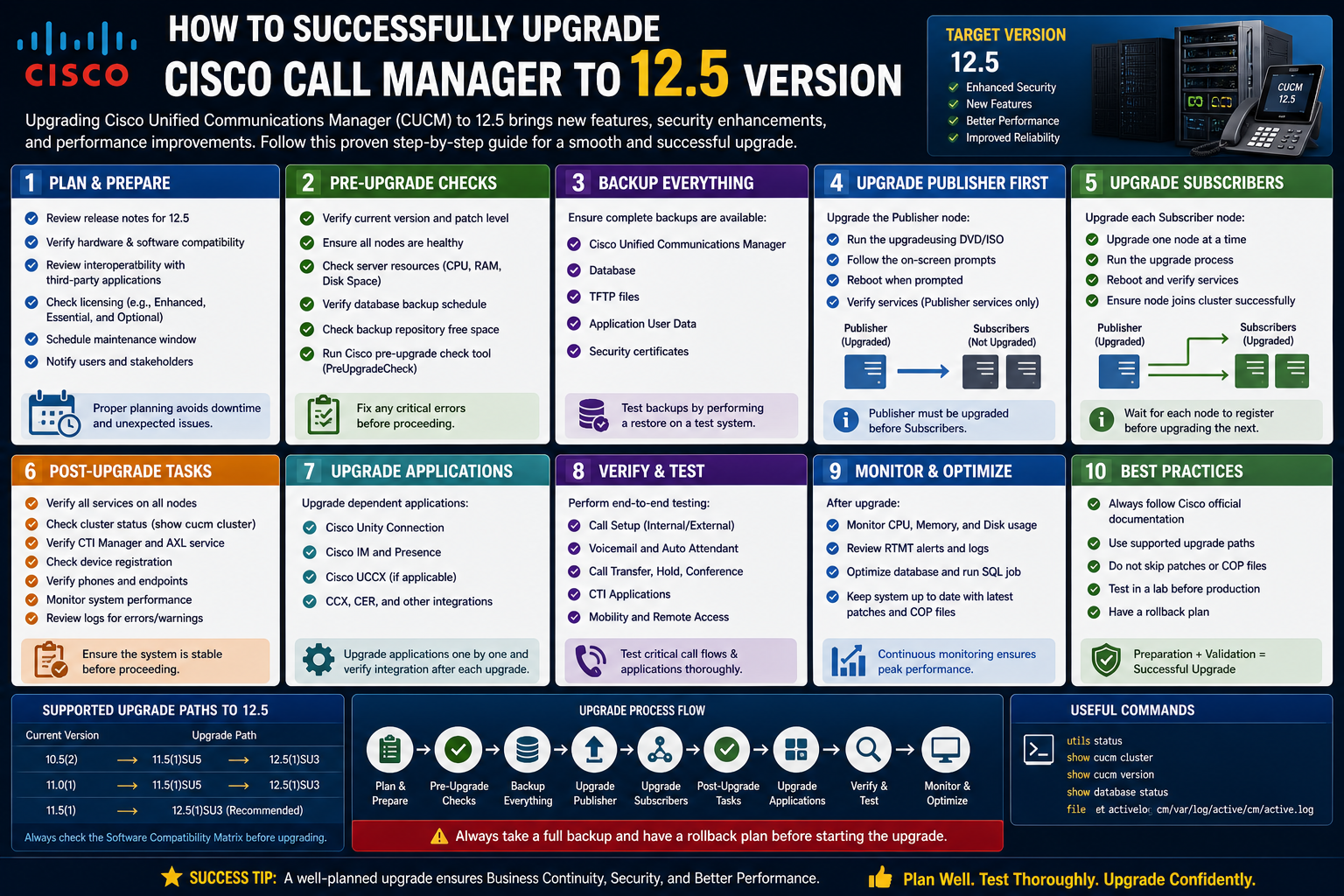
Upgrading Cisco Unified Communications Manager is not simply a software update; it is a carefully coordinated transformation of a business-critical communication system. The process touches voice services, collaboration tools, voicemail systems, contact centers, and the underlying virtualization environment. Because of this, the first stage of the upgrade is less about execution and more about preparation, validation, and ensuring every dependency is understood before any change begins. Part 1 focuses entirely on laying the groundwork that determines whether the upgrade proceeds smoothly or becomes a prolonged troubleshooting exercise.
Understanding the Scope and Impact of the Upgrade
Before any technical steps are taken, it is important to fully understand what an upgrade to version 12.5 represents in a production environment. CUCM is often the backbone of enterprise communication, meaning even small misconfigurations can impact call routing, voicemail delivery, or contact center operations. The upgrade is not just a version change; it often includes architectural improvements, security enhancements, updated virtualization requirements, and changes in licensing models.
A major shift with newer versions is alignment with modern virtualization standards and licensing frameworks. This means administrators must think beyond CUCM itself and evaluate surrounding systems, including Unity Connection, IM and Presence services, and contact center components. Each of these applications interacts closely with CUCM, and all must remain compatible throughout the upgrade lifecycle.
Another key factor is downtime planning. Even with a carefully executed upgrade, service interruption is unavoidable. Understanding how long each node will remain offline helps organizations prepare operationally. Publishers typically require more time because they handle database replication and system-wide configuration changes, while subscribers focus on call handling and endpoint registration.
Licensing Validation and Smart Licensing Transition
One of the first critical considerations before beginning the upgrade is licensing. Modern deployments rely heavily on Smart Licensing, and organizations must ensure their existing licensing model aligns with current requirements.
Many environments still operate with traditional CUWL or perpetual licensing structures. Before upgrading, these must be converted to Smart Licensing or FLEX-based models. This transition ensures that licenses are centrally managed and properly recognized after the system upgrade. Without this alignment, CUCM may boot successfully after the upgrade but fail to properly register licensing consumption, resulting in compliance issues or feature restrictions.
Smart Licensing introduces a centralized cloud-based approach where licenses are tracked and managed through Cisco’s licensing portal. Administrators must confirm that the organization’s account is active, tokens are generated, and the CUCM system is ready to register once the upgrade is complete.
This step is often underestimated, but it is one of the most important preparation tasks. A successful upgrade without valid licensing integration can still lead to operational limitations, making it essential to address this early in the planning stage.
Assessing Hardware and Virtualization Compatibility
Another critical component of preparation involves verifying that the underlying infrastructure supports version 12.5. CUCM runs in virtualized environments, most commonly on VMware ESXi, and each version of CUCM has strict requirements for CPU, memory, disk configuration, and virtualization version compatibility.
For CUCM 12.5, environments typically require ESXi 6.5 or higher. However, compatibility is not limited to the hypervisor version alone. The virtual machine must match Cisco’s published OVA specifications, which define exact hardware allocations such as virtual CPU count, memory size, disk layout, and network adapter type.
If the existing virtual machine deviates from these specifications, the upgrade may fail during the final validation phase. This is because CUCM performs a strict check during the switch-version process, verifying that the virtual environment meets expected standards before activating the new software partition.
Administrators often overlook subtle mismatches, such as incorrect virtual disk provisioning or outdated VM hardware versions. These inconsistencies can lead to upgrade rollback or system boot failure. As a result, verifying alignment with OVA templates is a mandatory step rather than a recommendation.
Evaluating System Readiness Through Pre-Upgrade COP Files
Cisco provides specialized COP (Cisco Option Package) files designed to evaluate system readiness before performing an upgrade. These tools are essential in identifying hidden issues that could disrupt the process.
The pre-upgrade COP file performs a comprehensive system scan that checks disk space availability, network connectivity, DNS resolution, NTP synchronization, and database health. It also validates cluster readiness and ensures all nodes are properly synchronized.
One of the most common issues detected during this process is insufficient disk space. CUCM upgrades require additional temporary storage for extracting and staging files. In environments where disk allocation is already tight, this becomes a critical blocker.
When disk space issues are identified, administrators may need to install additional COP files designed to clean up unnecessary system files, logs, or unused firmware packages. In some cases, older phone firmware or inactive device packs can be safely removed to free up space.
The pre-upgrade validation stage is not optional; it acts as an early warning system that helps prevent mid-upgrade failures, which are significantly more complex to resolve than pre-upgrade issues.
Cleaning and Optimizing Disk Space Before Upgrade
Storage optimization is often one of the most time-consuming but necessary steps in preparation. CUCM systems accumulate logs, traces, firmware files, and unused packages over time. While individually small, these files collectively consume significant disk space.
During an upgrade, CUCM requires additional space for temporary extraction and database operations. If the system does not have enough free space, the upgrade process may fail during the file unpacking or validation stage.
Administrators typically begin by reviewing system logs and identifying large or obsolete files. Phone firmware packages that are no longer in use can also be removed safely, provided they are not required for registered endpoints.
Cisco also provides cleanup utilities designed to safely remove common unnecessary files. These tools should be used carefully, as improper deletion of system files can affect system stability. The goal is not just to free space, but to ensure that only redundant or unused data is removed while preserving system integrity.
Verifying Network Stability and Time Synchronization
Network stability plays a critical role in CUCM upgrade success. Since CUCM relies heavily on distributed architecture, even minor network disruptions can impact database replication or node synchronization.
All nodes must maintain stable communication throughout the upgrade process. Packet loss, high latency, or intermittent connectivity issues can lead to incomplete upgrades or replication failures.
Equally important is time synchronization. CUCM systems depend on accurate time settings across all nodes. NTP servers must be properly configured and reachable. If time drift occurs between nodes, it can cause authentication issues, certificate validation failures, and database inconsistencies.
Before proceeding, administrators must ensure that all servers are synchronized to the same reliable time source and that no drift exists between publishers and subscribers.
Reviewing Cluster Health and Replication Status
A CUCM cluster operates as a synchronized system, and any inconsistency within replication can create major problems during upgrade execution. Before starting the upgrade, administrators must verify that all nodes are fully synchronized and that database replication is functioning correctly.
If replication issues exist prior to the upgrade, they must be resolved first. Attempting an upgrade on a partially synchronized cluster significantly increases the risk of failure or data inconsistency.
Health checks typically include verifying publisher-to-subscriber communication, database replication status, and service activation consistency. Each node must report a healthy state before proceeding further.
Planning Upgrade Order and Strategy
One of the most important decisions in the preparation phase is determining the upgrade sequence. CUCM environments typically include multiple components such as publishers, subscribers, Unity Connection servers, IM and Presence nodes, and contact center applications.
The general principle is to upgrade publishers first, followed by subscribers. However, the exact order may vary depending on system architecture and dependencies.
Publisher nodes handle configuration data and act as the central database authority. Upgrading them first ensures that subsequent subscriber upgrades align with the updated system structure.
Other systems like IM and Presence often depend on CUCM publishers and therefore must be upgraded after CUCM publishers are completed. Contact center components may have their own upgrade dependencies and must be carefully scheduled to avoid service disruption.
Planning the upgrade order is not just a technical decision; it is an operational strategy that directly affects downtime and user impact.
Preparing Backups and Rollback Considerations
Although not always emphasized, backup preparation is an essential part of the pre-upgrade stage. A full system backup ensures that the environment can be restored in case of failure.
Backups typically include configuration data, voicemail data, call routing information, and system settings. These backups must be stored securely and verified before proceeding.
Rollback planning is equally important. While CUCM upgrades are designed to be reversible in some cases through switch-version mechanisms, not all failures can be recovered automatically. Having a verified backup ensures that recovery is possible even in worst-case scenarios.
Validating Virtual Machine Configuration Against OVA Standards
The virtual machine hosting CUCM must strictly match Cisco’s defined OVA templates. These templates define the exact resource allocation required for stable operation.
Any deviation, such as incorrect CPU allocation, mismatched memory size, or unsupported virtual hardware version, can cause upgrade validation failure.
In many cases, adjustments require powering down the virtual machine, modifying settings in the hypervisor, and then restarting the system. This step must be carefully planned because it temporarily impacts system availability even before the upgrade begins.
Ensuring OVA compliance is one of the final checkpoints before moving into the execution phase of the upgrade lifecycle.
Establishing Operational Readiness Before Execution
Once all technical validations are complete, attention shifts toward operational readiness. This includes ensuring that support teams are available, monitoring tools are active, and communication plans are in place.
Even though the actual upgrade has not yet begun, this phase ensures that when execution starts, there are no external blockers or uncertainties. Every dependency has been reviewed, every system validated, and every risk identified.
The system is now positioned for the next stage of the upgrade process, where execution and installation begin across CUCM nodes and associated services.
Once the environment has been fully validated, dependencies checked, and infrastructure confirmed ready, the upgrade process transitions from preparation into execution. This stage represents the most sensitive part of the entire lifecycle because it involves live systems, active users, and real-time communication services. Every decision made during execution directly affects system availability and stability. In this phase, the focus shifts from planning to controlled implementation across clustered nodes, ensuring that each component of the communication infrastructure transitions safely into version 12.5.
Initiating the Upgrade Process and Understanding Execution Paths
Upgrading Cisco Unified Communications Manager can be performed through multiple execution paths, each designed for different operational preferences and environmental constraints. The three most commonly used methods include Prime Collaboration Deployment, graphical installation via OS Administration, and command-line installation through the server console.
Each method achieves the same outcome but differs significantly in terms of automation, visibility, and control. The choice of method depends on the complexity of the environment, administrative experience, and tolerance for manual intervention.
In large-scale deployments, automation tools are often preferred because they reduce human error and allow sequential upgrades across clusters. However, in environments where precision monitoring is required, administrators often choose command-line execution to maintain full control over each stage of the process.
Regardless of the method chosen, the upgrade always follows a structured internal process: file validation, system preparation, partition extraction, installation on inactive partitions, and finally activation through switch-version.
Understanding Node Roles During Upgrade Execution
Before initiating the upgrade, it is essential to clearly understand the roles of different nodes within the cluster. CUCM architecture is built around a publisher-subscriber model, where the publisher acts as the central configuration database while subscribers handle call processing and endpoint registration.
The publisher node must always be upgraded first because it holds the master database and controls system-wide configuration changes. Once the publisher is upgraded successfully, subscribers follow in a controlled sequence to ensure continuity of service.
Other associated systems such as IM and Presence nodes, voicemail systems, and contact center components rely on CUCM for configuration synchronization. Their upgrade timing is dependent on CUCM publisher completion.
This dependency chain ensures that configuration consistency is maintained throughout the upgrade lifecycle, preventing mismatches between system versions and database schemas.
Starting with the Publisher Node Upgrade
The upgrade process begins with the CUCM publisher. This node is the most critical component in the entire system, and its upgrade sets the foundation for all subsequent steps.
During this phase, the installation package is loaded onto the inactive partition of the publisher node. The system validates file integrity, checks hardware compatibility, and verifies disk availability before proceeding.
Once validation is complete, the system begins extracting installation files. This process is resource-intensive and can temporarily impact system performance. However, since this occurs on the inactive partition, live services remain unaffected during initial stages.
After extraction, the system prepares the new version environment while maintaining the current active system on the alternate partition. This dual-partition structure allows CUCM to maintain operational continuity while preparing the upgrade.
Once installation completes, the system enters a pending activation state, awaiting switch-version confirmation.
Subscriber Node Upgrade Sequence and Call Continuity
After the publisher upgrade is completed and stabilized, subscriber nodes are upgraded. These nodes handle call routing, device registration, and service distribution, making their upgrade sequencing critical for minimizing downtime.
Subscribers are typically upgraded one at a time or in controlled batches depending on system size and redundancy design. In highly redundant environments, administrators may upgrade multiple subscribers simultaneously, provided that sufficient failover capacity exists.
During subscriber upgrades, active calls are automatically rerouted to remaining operational nodes if redundancy is properly configured. This ensures that users experience minimal disruption.
However, administrators must carefully monitor call distribution and endpoint registration status throughout this phase to ensure that no subscriber becomes overloaded.
Each subscriber follows the same internal process: validation, file extraction, installation on inactive partition, and readiness for switch-version activation.
Role of IM and Presence Services During Upgrade
The IM and Presence component operates as a dependent system within the CUCM ecosystem. Because it relies on CUCM for user configuration and authentication, its upgrade must follow successful completion of the publisher node.
IM and Presence nodes typically cannot be upgraded independently before CUCM publisher completion because they require updated schema and configuration data.
Once CUCM publisher is upgraded, IM and Presence nodes can proceed with their own upgrade cycle. These nodes are often upgraded after CUCM subscribers to ensure system consistency.
During this stage, users may experience temporary loss of presence status updates or instant messaging functionality, but voice services remain unaffected.
Unity Connection Upgrade Integration and Timing
Voicemail services managed through Unity Connection also form a critical part of the communication ecosystem. The upgrade process for Unity Connection follows a similar dual-partition model but operates independently of CUCM execution timing.
In many cases, Unity Connection can be upgraded in parallel with CUCM publisher nodes to optimize overall downtime. However, administrators must ensure version compatibility alignment before executing parallel upgrades.
Once upgraded, Unity Connection automatically transitions to the new version without requiring manual switch-version in some configurations. This behavior differs from CUCM, where switch-version may require explicit administrative action.
During upgrade, voicemail services may temporarily be unavailable, and message delivery could be delayed. However, once the system returns online, message synchronization resumes automatically.
Contact Center Components and Upgrade Coordination
Contact center systems such as Cisco Unified Contact Center Express introduce additional complexity into the upgrade process. These systems depend heavily on CUCM for call routing, agent registration, and queue management.
Because of this dependency, contact center components are typically upgraded after CUCM publisher and subscriber nodes are fully operational on the new version.
During upgrade, agent desktops may temporarily disconnect, and call distribution services may pause. However, properly staged upgrades minimize operational impact by ensuring that fallback mechanisms are active.
Once upgraded, contact center systems must undergo validation to ensure that routing scripts, agent states, and queue configurations remain intact.
Using Command-Line Interface for Controlled Upgrade Execution
Many administrators prefer executing upgrades through the command-line interface because it provides greater visibility and control over each stage of the process.
Using CLI allows direct monitoring of installation logs, real-time validation messages, and system responses during installation.
The upgrade initiation process begins by mounting the installation image, verifying compatibility, and initiating system upgrade commands through the console.
Once initiated, the system prompts for installation source selection, typically choosing between SFTP server or locally mounted media. Local installation is often preferred because it reduces network dependency and improves reliability.
After confirmation, the system begins installation automatically and logs each step in real time, allowing administrators to monitor progress and detect potential issues early.
Graphical Interface Upgrade and Its Limitations
The graphical interface within OS Administration provides a simplified method for initiating upgrades. However, it has significant limitations in large-scale environments.
While it allows easy selection of upgrade files and basic progress monitoring, it cannot maintain session continuity after system reboot. Once the server restarts, the GUI session disconnects, requiring administrators to switch to CLI for monitoring.
This limitation makes GUI-based upgrades less suitable for complex environments where continuous monitoring is required.
Despite this, GUI methods are still useful for smaller deployments or controlled lab environments where manual intervention is minimal.
Prime Collaboration Deployment and Automated Cluster Upgrade
Automated cluster upgrade tools provide an alternative approach by orchestrating upgrades across multiple nodes in a predefined sequence.
This method reduces manual effort and ensures consistent execution across all cluster nodes. It is particularly useful in large enterprise environments where multiple CUCM nodes, Unity Connection servers, and IM and Presence systems must be upgraded in a coordinated manner.
The system handles node sequencing, file distribution, and upgrade initiation automatically. However, administrators must still monitor execution closely because automation does not eliminate the possibility of environmental issues.
In some cases, automated tools may pause execution if inconsistencies or errors are detected, requiring manual intervention to proceed.
Switch-Version Activation and System Partition Transition
After installation is complete on all nodes, the system remains on the inactive partition until switch-version is executed.
Switch-version is the process that activates the newly installed version and makes it the running system. This step is critical because it determines when the upgraded system becomes active for users.
During switch-version, the system reboots and transitions database control, configuration services, and call processing to the new partition.
This process involves copying system data from the previous active partition to the new active environment, ensuring consistency and continuity.
Once completed, the system boots into the new version and resumes normal operations.
Monitoring System Behavior During Transition Phases
Throughout execution, continuous monitoring is essential. Administrators must track system logs, service states, and replication status across all nodes.
Any deviation in expected behavior must be addressed immediately to prevent cascading failures across the cluster.
Key indicators include service activation status, database replication consistency, endpoint registration stability, and call processing functionality.
Monitoring tools and CLI logs provide real-time insight into system behavior during each stage of the upgrade.
Handling Intermediate Failures and Recovery Scenarios
Despite careful preparation, upgrade processes may encounter unexpected issues such as file corruption, disk space exhaustion, or service initialization failures.
When such issues occur, the system may halt installation or rollback to the previous version depending on failure stage.
In cases where rollback is not automatic, administrators must manually restore system state using backups or switch-version recovery procedures.
Recovery strategies depend on failure type and timing within the upgrade lifecycle.
Early-stage failures are typically easier to recover from, while post-switch-version failures require more complex intervention.
Ensuring Service Stability During Incremental Node Upgrades
During subscriber upgrades, maintaining service stability is essential. This is achieved through careful load distribution across remaining active nodes.
Redundancy ensures that when one node goes offline, others take over call processing responsibilities.
However, administrators must monitor system load closely to prevent overutilization of remaining nodes.
Proper planning ensures that no single node becomes a bottleneck during staggered upgrade execution.
Once all nodes have been upgraded and activated through switch-version, the system enters a stabilized post-installation state.
At this point, the environment is running the new version across all components, but full validation and functional testing are still pending.
The system is operational but not yet fully verified, marking the transition into the final phase of the upgrade lifecycle where functionality, licensing, and integration consistency will be evaluated across all services.
After the upgrade execution phase is completed and all nodes have transitioned to version 12.5, the environment enters a critical stabilization period. Although the system may appear fully operational, this stage determines whether the upgrade is truly successful in real-world conditions. Post-upgrade activities focus on validation, service restoration, licensing synchronization, performance verification, and ensuring that all integrated communication components are functioning correctly.
At this point, Cisco Unified Communications Manager is running on its new version across all nodes, but full confidence in system readiness can only be achieved through structured verification and controlled testing.
Verifying Cluster Health After Upgrade Completion
The first step in post-upgrade activities is confirming that the entire cluster is healthy and fully synchronized. CUCM operates as a distributed system, meaning consistency across all nodes is essential for stable communication services.
Administrators must verify that all subscribers are successfully connected to the publisher and that database replication is functioning without errors. Any mismatch in replication status can lead to configuration inconsistencies, which may not immediately appear but can cause issues later in call routing or device registration.
Service status checks are also essential. Core services such as call processing, database replication, and feature services must be active and stable. If any service remains in a partial or inactive state, it must be restarted or investigated immediately.
Cluster health validation ensures that the upgrade has not introduced hidden inconsistencies that could affect long-term stability.
Switch-Version Confirmation and Partition Stability
In CUCM architecture, upgrades are performed using a dual-partition model, where the new version is installed on the inactive partition before being activated. After switch-version, the system boots into the new partition.
Post-upgrade validation includes confirming that the system is correctly running on the intended active partition. This ensures that the upgrade process completed successfully and that the system is no longer relying on the previous version.
Administrators also verify that both partitions are healthy and accessible. The inactive partition serves as a fallback option in case rollback is required. Ensuring its integrity is an important part of post-upgrade stability.
Device Registration and Endpoint Recovery
One of the most visible indicators of a successful upgrade is the registration status of endpoints. IP phones, soft clients, and video devices must all reconnect to CUCM after the upgrade.
During system restart phases, endpoints temporarily lose connectivity. Once CUCM services stabilize, devices begin registering automatically.
Administrators must monitor registration patterns to ensure that all endpoints reconnect successfully. Any devices failing to register may indicate configuration mismatches, network issues, or firmware incompatibilities.
Special attention is required for remote or branch devices, as they may take longer to reconnect due to network traversal delays.
Call Processing Validation and Real-Time Communication Testing
After endpoint registration stabilizes, the next critical step is validating call processing functionality. This ensures that the core purpose of the communication system is fully operational.
Testing includes inbound and outbound calls, internal extension dialing, call transfers, conferencing, and call hold/resume functionality. Each of these call scenarios verifies a different part of the CUCM routing engine.
Call routing logic must also be tested across different sites or partitions if the system supports multi-site deployments. This ensures that dial plans, route patterns, and translation rules remain intact after the upgrade.
Any failure in call processing typically indicates configuration inconsistencies or incomplete service activation and must be addressed immediately.
Unity Connection Integration and Voicemail Validation
Voicemail services managed by Unity Connection must be fully validated after CUCM upgrade completion. Integration between CUCM and voicemail systems is essential for message delivery and call handling.
Users must be able to access voicemail, leave messages, and receive notifications without interruption. Call handlers, greetings, and routing rules must function exactly as they did before the upgrade.
Synchronization between CUCM and Unity Connection ensures that user extensions, mailbox associations, and directory information remain consistent.
Any delay or mismatch in voicemail delivery indicates integration issues that must be resolved through service restart or configuration synchronization.
IM and Presence Service Verification
Presence and messaging services provided through IM and Presence components require careful validation after upgrade. These services depend heavily on CUCM for user authentication and configuration data.
After upgrade, users must be able to log in, view presence status, and exchange messages without interruption.
Any inconsistency in presence updates or login failures may indicate synchronization delays or certificate mismatches between systems.
Because presence services rely on real-time communication, even minor delays can affect user experience, making this validation step essential.
Contact Center System Validation and Agent Functionality
Contact center systems such as Cisco Unified Contact Center Express require extensive testing after CUCM upgrade completion.
Agents must be able to log in, receive calls, and transition between states such as available, busy, or wrap-up. Call queues must function correctly, and routing scripts must execute without errors.
Supervisor dashboards and reporting tools must also be validated to ensure that real-time and historical data are being processed correctly.
Since contact center systems often operate under high call volumes, stability testing under load conditions is recommended to confirm system readiness.
License Synchronization and Smart Licensing Activation
One of the most important post-upgrade tasks is verifying licensing compliance and activation status.
Modern deployments rely on Smart Licensing frameworks managed through centralized systems. After upgrade, CUCM must successfully communicate with licensing services to validate entitlement and consumption.
Organizations using FLEX licensing models must ensure that licenses are correctly registered and consumed within expected limits.
The system must also be registered with the appropriate Smart Licensing account to ensure ongoing compliance tracking.
Failure to properly register licensing can result in feature restrictions or system warnings, even if the upgrade itself was successful.
Hardware and Virtual Machine Optimization
After system stabilization, attention shifts to virtual machine optimization. CUCM runs on virtual infrastructure, and post-upgrade is an ideal time to ensure that hardware configurations are aligned with recommended standards.
Virtual machine tools should be updated to ensure proper communication between the hypervisor and CUCM system. This improves performance monitoring, resource allocation, and system reporting accuracy.
Administrators may also upgrade virtual hardware versions to align with updated platform requirements. This must be done carefully, typically requiring controlled shutdown and restart of virtual machines.
Ensuring alignment with virtualization standards helps maintain long-term stability and performance efficiency.
Performance Monitoring and System Resource Analysis
Once the system is stable, performance monitoring becomes essential to ensure that CUCM is operating efficiently under production load.
Key performance indicators include CPU utilization, memory consumption, disk I/O performance, and network latency between nodes.
Monitoring tools help identify potential bottlenecks or resource constraints that may not have been visible during upgrade execution.
High resource utilization may indicate misconfiguration, insufficient allocation, or unexpected system load. These issues must be addressed to maintain optimal performance.
Log Analysis and Error Resolution
System logs provide valuable insight into post-upgrade behavior. Administrators must review logs from all nodes to identify warnings, errors, or unexpected system behavior.
Logs may reveal issues related to service initialization, database replication delays, or device registration failures.
Careful log analysis helps identify hidden problems that may not be visible through standard monitoring dashboards.
Any recurring error patterns must be investigated and resolved to prevent long-term system instability.
Security Validation and Certificate Verification
Security validation is a critical part of post-upgrade procedures. CUCM systems rely heavily on certificates for secure communication between nodes and endpoints.
After upgrade, certificates must be verified to ensure they are valid, correctly installed, and properly trusted across the cluster.
Expired or mismatched certificates can cause registration failures or service disruptions.
If certificate issues are identified, they must be regenerated or re-signed according to system requirements.
Security validation ensures that communication remains encrypted and trusted across all system components.
User Experience Validation and Operational Testing
Beyond technical validation, user experience testing ensures that the system performs as expected in real-world scenarios.
This includes verifying that users can make and receive calls, access voicemail, use collaboration tools, and interact with contact center services.
Testing should simulate normal business operations to ensure that all workflows function correctly.
Any deviations in user experience must be addressed before declaring the system fully stable.
Fine-Tuning System Configuration After Upgrade
After stabilization, minor configuration adjustments may be required to optimize system performance or correct behavior changes introduced during the upgrade.
This may include adjusting call routing rules, refining device pools, or updating service parameters.
These adjustments ensure that the system aligns with organizational requirements and operational expectations.
Fine-tuning is an iterative process and may continue for several days after the upgrade is complete.
Ensuring Long-Term Stability and Monitoring Strategy
Once all validation steps are complete, the system enters a long-term operational phase. Continuous monitoring remains essential to ensure stability.
Administrators must establish monitoring routines that track system performance, service health, and user experience over time.
Proactive monitoring helps detect early signs of degradation or configuration drift.
This ensures that the system remains stable well beyond the immediate post-upgrade period.
At the end of the post-upgrade phase, the communication system reaches full operational readiness. All services are active, all nodes are synchronized, and all integrations are validated.
The environment is now fully running on the upgraded version, with stable performance, verified licensing, and confirmed functionality across all communication services.
Extended Addendum to Part 3: Deep Stability Checks, Edge Case Handling, and Long-Term Operational Hardening in CUCM 12.5
After the initial post-upgrade validation phase is complete, real-world environments often require additional layers of verification that go beyond standard health checks. These deeper validations focus on edge conditions, intermittent issues, and long-term operational stability that may not appear during initial testing. In large enterprise deployments of Cisco Unified Communications Manager, these extended checks are what separate a “successful upgrade” from a “production-stable upgrade.”
Advanced Database Replication Verification and Latency Monitoring
Even when basic cluster health shows as normal, deeper replication analysis is necessary to confirm true system stability. CUCM relies heavily on database synchronization between publisher and subscriber nodes, and minor replication delays can sometimes go unnoticed during early validation.
At this stage, administrators perform extended observation of replication queues, ensuring that no hidden backlog exists between nodes. Even small delays in replication can affect configuration consistency, especially in environments where frequent changes are made to dial plans, route patterns, or device configurations.
It is also important to observe replication behavior under load. During peak hours, replication traffic may increase, and any instability in network performance can surface as delayed updates. This type of issue is often not visible immediately after upgrade but may appear hours or days later if not properly validated.
Long-Duration Call Stability Testing
While basic call testing confirms that calls can be placed and received, extended stability testing ensures that long-duration calls remain stable without degradation.
This involves maintaining active calls for extended periods while monitoring for issues such as audio drift, call drops, or mid-call re-routing failures. These scenarios are particularly important in environments where calls are critical, such as support centers or financial institutions.
Extended testing also validates codec stability and media path reliability. Since CUCM interacts with multiple endpoints and potentially different network segments, ensuring that media streams remain consistent over time is essential.
Failover and Redundancy Simulation Testing
One of the most important aspects of post-upgrade hardening is validating redundancy behavior. CUCM is typically deployed in a clustered architecture, meaning that failure of one node should not impact system availability.
At this stage, controlled failover simulations are performed. Individual subscriber nodes may be temporarily taken offline to observe how the system redistributes call processing load. The goal is to ensure that endpoints seamlessly reconnect to alternate nodes without noticeable disruption.
Publisher failover scenarios are also analyzed in controlled environments where possible, although publisher downtime has more significant implications. These tests confirm that system resilience mechanisms are functioning correctly after the upgrade.
Cross-Application Integration Stability
Modern communication environments are rarely isolated. CUCM integrates with voicemail systems, presence services, contact centers, and external authentication systems. After upgrade, it is essential to validate that these integrations remain stable under continuous operation.
In particular, authentication flows between CUCM and directory services must be monitored over time. Even if initial login tests succeed, intermittent synchronization issues can appear later due to certificate renewal mismatches or service timing delays.
Integration stability also includes verifying that third-party applications consuming CUCM APIs continue to function correctly. Any disruption in API behavior can impact external reporting, monitoring, or automation tools.
Network Path Optimization and Latency Reassessment
After upgrade completion, network behavior should be reassessed because system performance can change slightly due to updated software processing patterns.
Latency between CUCM nodes, especially across geographically distributed environments, must be monitored closely. Even minor increases in response time can affect call setup times or database replication efficiency.
Network path optimization may be required if unexpected bottlenecks are detected. This ensures that CUCM traffic flows efficiently between nodes and endpoints without unnecessary delays.
Memory Leak Detection and Resource Behavior Tracking
Extended runtime monitoring is essential for identifying potential memory leaks or abnormal resource consumption patterns introduced during the upgrade.
Even if CPU and memory usage appear stable immediately after upgrade, long-term observation may reveal gradual increases in resource consumption.
This type of behavior is often subtle and requires continuous monitoring over several days. Identifying it early helps prevent future system instability or performance degradation.
Security Posture Revalidation and Access Control Review
After system stabilization, security posture must be re-evaluated to ensure that no configuration drift or vulnerability was introduced during upgrade.
Access control lists, administrative permissions, and service account roles must be reviewed to confirm they remain aligned with organizational security policies.
Certificate trust chains should also be validated again after full system operation, as some issues only become visible once services are fully active.
Ensuring secure communication between nodes, endpoints, and external systems is a critical part of long-term operational readiness.
Firmware and Device Compatibility Reassessment
After upgrade, endpoint devices may require firmware reassessment. Even if devices successfully register, firmware mismatches can lead to subtle issues such as missing features, inconsistent behavior, or reduced performance.
Administrators should verify that all endpoint types are running supported firmware versions compatible with CUCM 12.5. In some cases, firmware upgrades may need to be scheduled separately after system stabilization.
This ensures that endpoints fully leverage the capabilities of the upgraded system without compatibility limitations.
Operational Behavior Under Real Traffic Conditions
While test calls provide initial validation, real production traffic reveals deeper system behavior.
During normal business hours, administrators should observe how the system behaves under realistic load conditions. This includes call volume fluctuations, peak-hour performance, and system responsiveness.
Observing CUCM under real operational stress ensures that performance tuning is accurate and that no hidden bottlenecks exist.
Long-Term Monitoring Strategy Activation
Once all validations are complete, the system transitions into long-term monitoring mode. This involves continuous observation of system health, performance metrics, and service availability.
Monitoring strategies should include alerts for replication issues, service failures, high resource utilization, and abnormal call behavior.
The goal is to ensure that any deviation from expected performance is detected early before it impacts users.
At this stage, the environment is no longer just upgraded—it is stabilized, validated, and hardened for long-term production use.
All services are operational, all integrations are verified, and all redundancy mechanisms have been tested under controlled and real-world conditions.
The system now operates with full confidence in its upgraded state, having passed both technical validation and operational stress testing across all layers of communication infrastructure.
Conclusion
Upgrading Cisco Unified Communications Manager to version 12.5 is a complex but highly structured process that depends heavily on careful planning, disciplined execution, and thorough post-upgrade validation. Across all phases, from initial readiness checks to final system stabilization, the upgrade demands attention to detail and a clear understanding of system dependencies.
A successful upgrade is not defined only by installation completion, but by how well the environment performs afterward under real operational conditions. Licensing alignment, virtualization compatibility, database replication stability, and endpoint registration all play essential roles in ensuring long-term success. Equally important is validating integrations with voicemail systems, presence services, and contact center platforms, as these components determine overall communication reliability.
Post-upgrade monitoring and optimization further ensure that the system remains stable beyond initial deployment. Continuous observation of performance metrics, network behavior, and service health helps detect issues early and maintain consistent service quality.
Ultimately, a well-executed CUCM 12.5 upgrade results in a more secure, efficient, and scalable communication infrastructure. With proper preparation and structured execution, organizations can transition smoothly while minimizing downtime and operational risk, ensuring that communication services remain reliable and fully optimized for business needs.