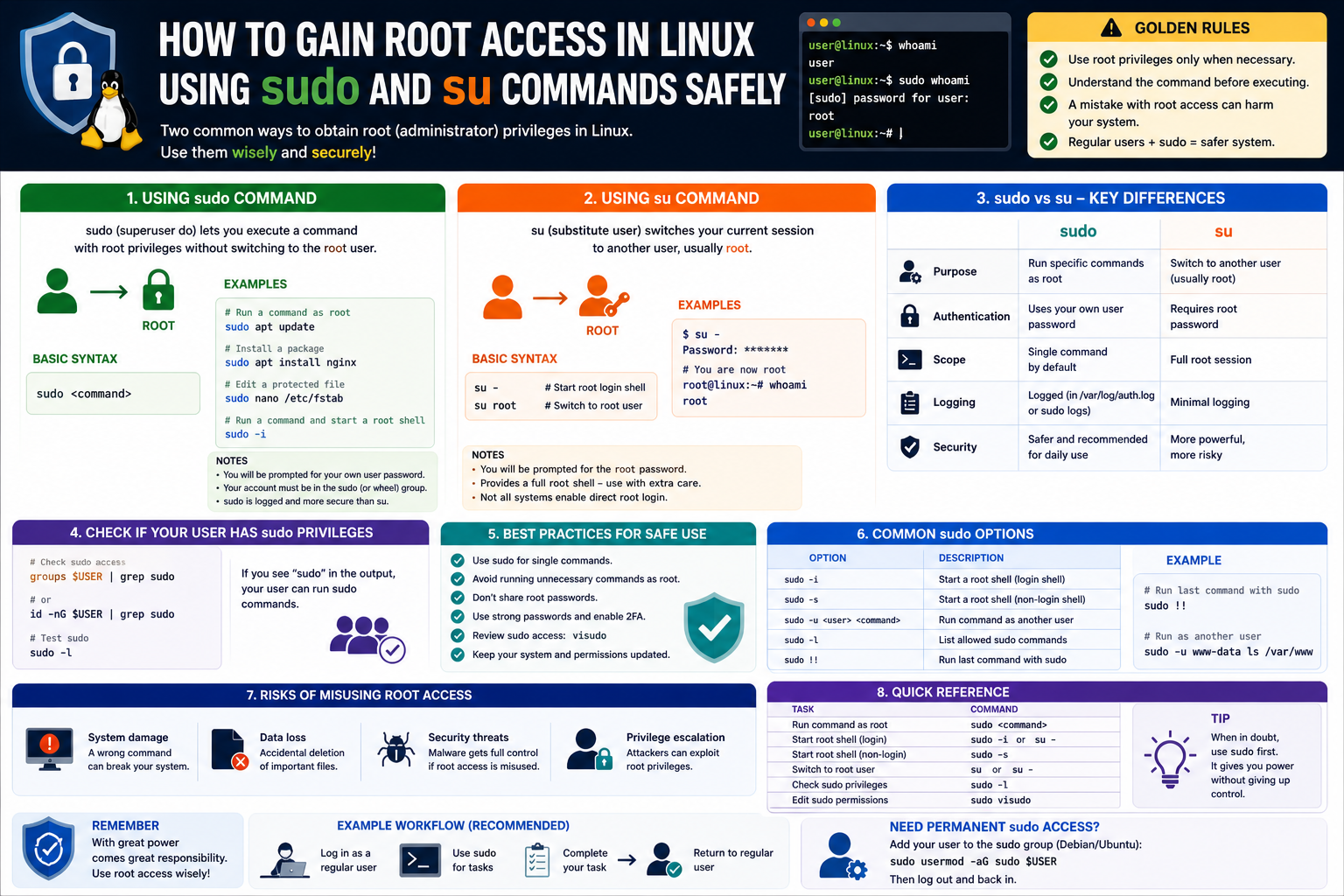
Linux systems are built around a strong security model that assumes users should only have access to what they genuinely need. Unlike some environments where administrative access is loosely granted, Linux takes a stricter approach. Every file, process, and system action is governed by permissions that define who can read, write, or execute it.
At the core of this design is the idea of controlled limitation. A normal user should be able to perform everyday tasks such as browsing files, running applications, and managing personal data without risking the stability of the entire system. On the other hand, system-level changes—such as modifying network settings, installing software, or altering system configuration—are intentionally restricted.
This separation is not about inconvenience. It is about protection. By limiting access, Linux reduces the chances of accidental system damage and minimizes the impact of malicious software. Even if a program is compromised under a standard user account, it cannot easily alter critical system files or settings without additional authorization.
This philosophy is one of the main reasons Linux is widely used in servers, cloud systems, and enterprise environments where stability and security are essential.
Why Privilege Levels Exist in the First Place
Every modern operating system must solve a fundamental problem: how to allow users to perform tasks without giving them unlimited control over the machine. If every user had full administrative power at all times, even a small mistake could cause widespread system failure.
Privilege levels are the solution to this problem. They create boundaries between what is safe for general use and what is sensitive enough to require special permission.
For example, changing a document in a home directory is harmless. However, modifying system libraries or altering boot configurations can make a machine unstable or completely unusable. Without privilege separation, there would be no safeguard between these two types of actions.
Linux enforces this separation very strictly. Instead of assuming trust, it requires explicit permission escalation whenever a sensitive operation is attempted. This ensures that administrative actions are intentional rather than accidental.
The Concept of the Root User
At the heart of Linux privilege control is a special user known as the root user. This account has unrestricted access to the entire system. It can modify any file, change any setting, manage all users, and control every process running on the machine.
Because of this level of control, the root user is sometimes described as the “superuser.” It is not just another account with extra permissions; it is the highest authority within the operating system.
However, operating as the root user all the time is considered unsafe. If a mistake is made while using this account, there are no safety barriers to prevent system damage. A single incorrect action can affect the entire operating system.
For this reason, Linux encourages users to operate under standard accounts and only elevate privileges when necessary. This design reduces risk while still allowing full administrative control when required.
Standard Users and Restricted Access
Most users in a Linux system operate under standard accounts. These accounts are intentionally limited. They can access personal files, run applications, and perform everyday computing tasks, but they cannot modify system-wide settings.
This restriction is not a flaw—it is a protective mechanism. It ensures that even if a user is inexperienced or a program behaves unexpectedly, the system itself remains stable.
Standard users cannot install system-wide software, change network configurations, or edit critical system files without explicitly requesting elevated privileges. This is where privilege escalation becomes necessary.
The system does not assume trust. Instead, it requires confirmation and authentication before allowing sensitive operations.
Why Linux Requires Explicit Privilege Escalation
Unlike some operating systems where administrative access is constantly enabled behind the scenes, Linux requires deliberate action to gain elevated permissions.
This design is intentional. It ensures that administrative tasks are always conscious decisions rather than background assumptions. When a user attempts to perform a restricted action, the system does not automatically grant permission. Instead, it requests verification.
This verification step serves two important purposes. First, it prevents accidental system changes. Second, it provides a security barrier against unauthorized access attempts.
Even if malware or an untrusted script tries to execute system-level changes, it will be blocked unless proper authorization is provided. This makes Linux significantly more resistant to automated system manipulation.
Understanding Privilege Escalation in Practice
Privilege escalation in Linux refers to the process of temporarily or permanently gaining higher-level permissions to perform administrative tasks.
This does not mean becoming a different user in a traditional sense. Instead, it means executing commands with elevated authority while still maintaining control over when and how that elevation occurs.
There are two primary methods used for this purpose: switching user identity entirely or executing individual commands with elevated rights. These methods are central to Linux administration and are used in different scenarios depending on the system configuration.
Before exploring these mechanisms in detail, it is important to understand why Linux separates these approaches instead of relying on a single universal method.
The Difference in Administrative Philosophy Between Linux and Windows
In many traditional desktop environments, administrative access is often handled in a more automatic or continuous manner. Users may operate under accounts that already have elevated privileges, and the system may only occasionally prompt for confirmation.
Linux takes a different approach. It enforces separation more strictly and requires explicit elevation whenever administrative action is needed.
This difference often surprises users transitioning from other operating systems. In Linux, even users who have administrative rights must consciously activate those rights when performing sensitive tasks.
This design encourages awareness. Instead of assuming that an action is safe, Linux forces the user to acknowledge that they are about to perform a system-level change.
Groups and Permission Structure in Linux
Linux does not rely solely on individual user accounts to manage permissions. Instead, it uses a combination of users and groups to define access control.
A group is a collection of users who share similar permissions. This allows administrators to manage access more efficiently by assigning permissions to groups rather than configuring each user individually.
For example, a group may be allowed to install software or modify system configurations. Any user who belongs to that group inherits those permissions automatically.
This structure makes Linux highly scalable, especially in environments where multiple administrators or system users need controlled access to system resources.
However, even within these groups, certain actions still require privilege escalation. Being part of a privileged group does not always mean unrestricted access. Instead, it often means the user is allowed to request elevated privileges when necessary.
Introducing the Two Core Elevation Mechanisms
Linux primarily relies on two mechanisms for privilege escalation. These mechanisms are not just tools but represent two different philosophies of how elevated access should be handled.
The first mechanism allows a user to temporarily switch into another user identity with full privileges. This approach creates a continuous elevated session where all actions are performed as that higher-level user until the session is ended.
The second mechanism allows a user to execute individual commands with elevated privileges without fully switching identities. This method is more controlled and granular, requiring authorization for each action separately.
Both methods serve important roles in system administration. One provides convenience for extended administrative tasks, while the other enhances security by limiting exposure.
Why Controlled Elevation Is Safer
Allowing unrestricted administrative access at all times would make systems easier to manage but significantly less secure. Any accidental command or malicious process could affect the entire system instantly.
Controlled privilege escalation reduces this risk by ensuring that elevated access is only granted when explicitly requested. This minimizes the window during which the system is exposed to potential damage.
It also creates an audit-friendly environment. Since elevated actions must be intentionally triggered, they can be tracked and reviewed more effectively.
In modern computing environments, especially servers and cloud systems, this level of control is essential for maintaining reliability and security.
The Role of Authentication in Privilege Changes
Whenever a user attempts to escalate privileges, authentication is required. This ensures that the person requesting elevated access is indeed authorized to perform such actions.
Authentication acts as a checkpoint. Even if a user is already logged into the system, they must confirm their identity before gaining additional permissions.
This step is critical because it prevents unauthorized escalation in situations where a session may be compromised or left unattended.
Linux treats privilege elevation as a sensitive operation, and authentication is the mechanism that enforces this sensitivity.
The Importance of Awareness in System Administration
One of the most important aspects of working with Linux systems is understanding the impact of elevated actions. Unlike everyday computing tasks, administrative operations can affect system stability, security, and availability.
Because of this, Linux encourages a mindset of deliberate action. Users are expected to think carefully before escalating privileges and to limit elevated sessions to only what is necessary.
This approach reduces risk and improves system reliability over time. It also helps administrators develop stronger operational discipline, which is essential in professional environments.
Privilege escalation is not just a technical process—it is a responsibility.
Understanding User Identity Changes in Linux
In Linux, every action is tied to a specific user identity. The system does not just track what is being done, but also who is doing it. This identity-based structure is one of the key reasons Linux is considered secure and stable.
Instead of automatically granting full access to system functions, Linux requires users to operate within the limits of their assigned identity. When those limits are not sufficient for a task, the system provides a way to temporarily change identity.
This process allows a user to act as another account for a period of time. It is especially important for system-level operations that cannot be performed under a normal user profile.
By separating identities clearly, Linux ensures that everyday work and system management remain distinct activities.
The Concept of a Superuser Account
Every Linux system includes a special account that has unrestricted control over the entire operating system. This account can access all files, modify configurations, manage users, and control system services without restriction.
Because of its power, this account is treated differently from regular user accounts. It is not intended for daily use, but rather for administrative tasks that require full system access.
Working directly under this account removes many of the safety barriers that normally protect the system. For this reason, users are encouraged to use it only when absolutely necessary.
This account represents the highest level of authority within the system, and with that authority comes significant responsibility.
Changing Identity for Administrative Tasks
Instead of constantly using the highest-privilege account, Linux provides a way to temporarily assume its identity. This allows a user to perform necessary system changes without permanently operating in a high-risk mode.
When a user switches identity, the system replaces the current session context with that of another account. From that point onward, all actions are executed as if they were performed by the new identity.
This change is not limited to a single command. It affects the entire session until the user decides to return to their original identity.
This approach is useful for situations where multiple system-level changes need to be made in sequence.
Authentication and Access Control
To switch into a more powerful account, the system requires proof of authorization. This is typically done by entering a password associated with the target identity.
This step ensures that only users who are allowed to assume that identity can do so. Without the correct credentials, the transition is denied.
This mechanism acts as a protective barrier between standard users and higher-level system access. It prevents unauthorized users from gaining control over sensitive parts of the system.
Even if someone has access to a user account, they cannot escalate their privileges without proper authentication.
What Happens After Identity Switching
Once the transition is successful, the system environment changes to reflect the new identity. The command interface often updates to show the current user context, indicating that the session is now operating under different permissions.
From that point forward, every action performed in the terminal is treated as if it was initiated by the new account. This includes file operations, system configuration changes, and service management.
There is no need to repeatedly confirm each action because the system assumes that all commands are being executed under the new identity.
This continuous access remains active until the session is manually ended.
Working Continuously with Elevated Access
One of the key features of identity switching is that it allows uninterrupted administrative work. Instead of requesting permission for every action, the user can perform multiple tasks within a single session.
This can be useful when making configuration changes or managing system services that require several steps.
However, this convenience also comes with risk. Because the system no longer distinguishes between normal and sensitive commands during the session, mistakes can have widespread effects.
A single incorrect command executed in this mode can alter system behavior significantly.
Returning to Normal User Mode
After completing administrative tasks, it is important to return to the original user state. This ends the elevated session and restores normal system restrictions.
Once the session is closed, all subsequent commands are executed under standard permissions again. This reduces the risk of accidental system changes.
Exiting the elevated session is a critical step in maintaining system safety. It ensures that higher-level access is not left active longer than necessary.
Failing to return to normal mode can leave the system exposed to unintended modifications.
Direct System Access Considerations
Some systems allow direct login into the highest-privilege account. However, this practice is generally discouraged because it bypasses important safety controls.
When a user logs in directly with full system authority, there is no intermediate verification step before executing sensitive actions. This increases the likelihood of errors or misuse.
For this reason, many modern systems limit or disable direct access to this account entirely.
Instead, users are expected to log in with a standard identity and only switch to higher privileges when required.
Differences in System Configurations
Not all Linux-based systems behave the same way when it comes to identity switching. Some allow direct transitions without restrictions, while others impose limitations or require additional configuration.
These differences depend on how the system is set up by default or by the administrator. Some environments prioritize strict control, while others focus on flexibility.
Regardless of configuration, the underlying principle remains the same: elevated access should be used intentionally and carefully.
Understanding how a specific system is configured is important for anyone responsible for managing it.
Risks of Continuous Elevated Sessions
Operating continuously under a high-privilege identity introduces several risks. Since there are no restrictions in place during such sessions, every action is executed without safeguards.
This means that accidental commands can lead to system-wide changes or data loss. Even simple mistakes, such as modifying the wrong file, can have serious consequences.
Additionally, if malicious software is executed during such a session, it gains unrestricted access to the entire system.
For these reasons, continuous elevated sessions are typically avoided unless absolutely necessary.
Behavioral Changes in High-Privilege Mode
When operating with full system authority, users often become less cautious with their actions. This is because the system no longer blocks potentially dangerous commands.
Without restrictions, it becomes easier to overlook the impact of certain operations. This can lead to unintended consequences if commands are executed incorrectly.
Experienced administrators are aware of this behavioral shift and take extra care when operating in such environments.
They often treat elevated sessions with greater caution and limit their duration as much as possible.
Security Implications of Identity Switching
From a security perspective, identity switching introduces both benefits and challenges. On one hand, it provides necessary access for system management. On the other hand, it increases the potential impact of misuse.
If the credentials required for switching identities are compromised, the entire system can be exposed to risk.
This makes credential protection extremely important. Secure handling of authentication information is essential to maintaining system integrity.
Modern systems often implement additional safeguards to reduce these risks.
Appropriate Use of Elevated Sessions
There are specific situations where switching to a higher-privilege identity is appropriate. These include system configuration changes, software installation, and service management.
In such cases, using a continuous elevated session can be efficient, especially when multiple related tasks need to be performed.
However, it is important that these sessions are used only for necessary tasks and are ended immediately afterward.
Limiting the duration of elevated access reduces the overall exposure of the system.
The Importance of Controlled Access Practices
Effective system administration relies on controlled access practices. Instead of granting unrestricted permissions, access is carefully managed and limited based on need.
This ensures that users can perform their required tasks without compromising system stability.
Controlled access also helps prevent accidental damage and reduces the impact of security threats.
By maintaining clear boundaries between user roles, Linux systems achieve a balance between usability and protection.
Evolving Approaches to System Management
Over time, system management practices have evolved to emphasize safer methods of handling elevated access. Instead of relying heavily on full identity switching, modern approaches encourage more selective permission use.
This shift reflects a broader focus on minimizing risk while maintaining flexibility.
Even though traditional identity switching methods are still widely used, they are often combined with more controlled techniques to improve overall system security.
This evolution highlights the ongoing effort to make system administration both powerful and safe.
Moving Toward Controlled System Access
As Linux environments became more widely used in servers, enterprises, and cloud systems, administrators needed a safer way to perform system-level tasks without constantly operating under full system authority. Relying on continuous high-level access was powerful, but it also increased the risk of accidental damage and security exposure.
To address this, Linux introduced a more controlled method of executing administrative actions. Instead of switching into a different user environment, the system allows specific commands to run with elevated authority while the user remains in their normal session.
This approach fundamentally changed how system administration is performed. It shifted the focus from identity replacement to controlled action execution. The user remains who they are, but certain commands are temporarily granted higher permissions.
This model is now one of the most widely used methods for managing systems safely and efficiently.
The Idea of Temporary Permission Elevation
In this model, elevation is not permanent and not session-wide. Instead, it applies only to a single command at a time. Once that command finishes executing, the system immediately returns control to the normal user environment.
This means there is no long-term change in identity. The user does not become another account; they simply borrow higher-level access for a specific operation.
This design reduces risk significantly because elevated privileges exist only for a very short time and only for a clearly defined action.
It also ensures that system administrators remain aware of when they are performing sensitive operations, as each action must be intentionally approved.
Authentication Based on User Identity
Unlike traditional approaches where a shared administrative password might be required, modern systems typically rely on the user’s own credentials for authorization.
When a user attempts to execute a restricted command, the system checks whether that user has permission to perform such actions. If they do, they are prompted to confirm their identity using their own password.
This method removes the need to distribute or share a single high-level password across multiple administrators. Instead, each user is individually accountable for their actions.
This improves both security and traceability within the system.
Time-Limited Authorization Sessions
To improve usability, systems often allow temporary authorization sessions. After a user successfully confirms their identity, they do not need to re-enter credentials for every command within a short time period.
This temporary window allows multiple administrative tasks to be performed efficiently without repeated interruptions.
However, this access is not permanent. After a period of inactivity, the system automatically requires re-authentication.
This balance ensures that convenience does not come at the cost of long-term exposure.
Fine-Grained Permission Assignment
One of the most powerful aspects of modern privilege control is the ability to assign permissions at a very detailed level. Instead of granting full system authority, administrators can define exactly what actions a user is allowed to perform.
For example, one user might be allowed to manage system services, while another might only be allowed to install software updates.
This level of control helps organizations enforce strict security policies while still allowing users to perform their necessary tasks.
It also reduces the impact of potential security breaches, since compromised accounts are limited in what they can do.
Group-Based Access Management
To simplify administration, permissions are often assigned to groups rather than individual users. A group is a collection of users who share the same access rights.
When a permission is assigned to a group, every user in that group automatically inherits those permissions. This eliminates the need to configure each user individually.
Group-based management is especially useful in large environments where many users perform similar roles.
It also ensures consistency, since all members of a group have the same level of access.
Centralized Permission Configuration
System administrators manage privilege rules through a centralized configuration system. This system defines which users or groups are allowed to perform elevated actions and under what conditions.
Instead of scattering permission rules across different parts of the system, everything is managed in a single controlled configuration area.
This centralization improves clarity and reduces the likelihood of conflicting or inconsistent permission settings.
It also makes it easier to audit and review access policies.
Safety Mechanisms in Configuration Editing
Because permission settings are critical to system security, they must be handled with care. To prevent accidental misconfiguration, Linux provides a protected editing environment for these settings.
This environment checks changes before they are applied, ensuring that syntax errors or invalid configurations do not break system access control.
Without this safety layer, a small mistake could lock administrators out of the system entirely.
By validating changes before saving them, the system helps maintain stability and prevents configuration-related failures.
The Principle of Minimal Access
A core concept in modern system administration is the principle of minimal access. This principle states that users should only be given the permissions they absolutely need to perform their tasks.
By limiting access in this way, systems reduce the potential damage that can occur from mistakes or unauthorized actions.
Even if an account is compromised, the attacker’s ability to cause harm is restricted by the limited permissions assigned to that account.
This principle is widely regarded as one of the most important security practices in system design.
Command-Level Permission Control
Instead of granting broad access, modern systems allow administrators to define permissions at the command level. This means that a user may be allowed to execute certain system commands but not others.
For example, a user might be permitted to restart services but not modify system configuration files.
This level of precision allows for highly customized access control policies that match organizational needs.
It also ensures that users only interact with the parts of the system relevant to their responsibilities.
Logging and Activity Tracking
Every time a user executes a command with elevated permissions, the system records the action. These records include details such as which user performed the action, what command was executed, and when it occurred.
This logging system provides full visibility into administrative activity.
It is essential for auditing purposes, as it allows system administrators to review past actions and identify the source of system changes.
It also improves accountability, since every action can be traced back to an individual user.
Monitoring System Changes
In addition to logging commands, systems often monitor changes made to critical components. This includes modifications to configuration files, system services, and installed software.
By tracking these changes, administrators can quickly identify when and how system behavior was altered.
This is particularly useful in troubleshooting scenarios or when investigating unexpected system behavior.
Monitoring also helps detect unauthorized or suspicious activity.
Reduced Risk Through Short-Lived Access
One of the key advantages of controlled command execution is that elevated access exists only for a short duration. This significantly reduces the risk of misuse.
Unlike continuous high-level sessions, there is no prolonged exposure to unrestricted system control.
Each elevated action is isolated, meaning that even if something goes wrong, the impact is limited to a single operation.
This containment model improves overall system safety.
Automation and Controlled Execution
Modern systems often rely heavily on automated processes. These processes perform tasks such as backups, updates, and system maintenance without human intervention.
Controlled privilege execution plays an important role in enabling automation safely.
Automated tasks can be configured to run specific commands with elevated permissions without requiring continuous human input.
However, these automated permissions must be carefully restricted to prevent unintended actions.
Proper configuration ensures that automation remains safe and predictable.
Security Benefits of Separation of Context
By separating normal user activity from elevated actions, Linux creates a clear distinction between everyday operations and system-level changes.
This separation helps reduce mistakes and improves system stability.
It also makes it easier to identify when critical changes occur, since they are always associated with a deliberate elevation event.
This structure is one of the reasons Linux is widely used in environments where reliability is essential.
Managing Risk in Administrative Workflows
System administrators must constantly balance efficiency with safety. While elevated access is necessary for many tasks, it must be used responsibly.
Controlled execution helps achieve this balance by ensuring that privileges are only granted when needed and only for specific actions.
By limiting exposure, the system reduces the chances of accidental damage or security breaches.
This approach encourages careful planning and thoughtful execution of administrative tasks.
Evolution of System Security Practices
Over time, Linux administration practices have shifted toward more controlled and transparent models of privilege management.
Early systems relied heavily on full identity switching, but modern systems increasingly favor limited and temporary elevation methods.
This evolution reflects a broader understanding of security risks and the importance of minimizing unnecessary access.
Despite these changes, all methods still serve important roles depending on the context and system requirements.
Importance of Discipline in System Management
Effective system administration requires discipline and awareness. Even with safety mechanisms in place, careless actions can still lead to system issues.
Administrators are expected to understand the impact of their actions and use elevated access only when required.
This discipline helps maintain system integrity and ensures that systems remain stable and secure over time.
Controlled privilege systems support this discipline by making elevated actions intentional rather than automatic.
The Importance of Context Awareness in System Actions
One of the most overlooked aspects of working with elevated system access is understanding context. Every command executed on a Linux system does not exist in isolation. It operates within an environment that includes running services, active users, system configurations, and hardware resources.
When a user performs an action with higher-level authority, the system does not treat it as a simple isolated event. It becomes part of the overall system state. This means even small changes can have cascading effects depending on the context in which they are made.
For example, restarting a service might seem like a minor operation. However, if that service is responsible for network connectivity or authentication, the impact can be system-wide. This is why awareness of system context is essential when performing elevated operations.
The Role of System Boundaries in Preventing Errors
Linux enforces boundaries between user-level activity and system-level modifications. These boundaries are not just technical restrictions but structural safeguards that protect system integrity.
When a user operates under normal conditions, they are confined to a limited environment. This environment prevents accidental changes to critical system components. Once elevation is granted for a specific action, these boundaries are temporarily relaxed.
However, the boundaries are immediately restored once the action is completed. This temporary relaxation ensures that system-level access is never left open longer than necessary.
These boundaries act as a form of containment. They limit the scope of potential damage and ensure that errors do not spread beyond their intended area.
Predictability as a Security Feature
One of the strengths of Linux system design is predictability. When privilege elevation is required, the process always follows a defined and consistent pattern. There are no hidden transitions or automatic escalations.
This predictability is a security feature in itself. It ensures that every elevated action is visible, intentional, and traceable.
Users always know when they are operating under enhanced permissions. The system does not silently grant higher-level access in the background.
This transparency reduces confusion and helps prevent accidental misuse of system capabilities.
Human Responsibility in Elevated Operations
Even with strong system safeguards, the effectiveness of privilege control ultimately depends on human behavior. The system can enforce rules, but it cannot prevent poor decision-making.
When operating with elevated access, users must take responsibility for the consequences of their actions. This includes understanding what a command does before executing it and recognizing the potential impact of system-level changes.
Mistakes made with elevated access are not easily reversible. Unlike standard operations, system-level modifications can affect multiple components at once.
This is why careful consideration is essential before executing any action that modifies system behavior.
The Relationship Between Efficiency and Safety
System administration often involves balancing speed and caution. On one hand, administrators need to perform tasks efficiently, especially in environments where uptime and performance are critical. On the other hand, excessive speed without consideration can lead to errors.
Controlled privilege systems are designed to support both needs. They allow quick execution of necessary tasks while still requiring deliberate action for sensitive operations.
This balance ensures that administrators can work effectively without compromising system stability.
It also encourages a workflow where important actions are clearly separated from routine tasks.
Impact of Misconfiguration on System Stability
Incorrect system configuration is one of the most common causes of Linux system issues. Even small errors in configuration files or service settings can lead to unexpected behavior.
When such changes are made with elevated access, the impact can be immediate and widespread.
For example, a misconfigured service might fail to start, disrupting dependent applications. A wrongly edited network setting might disconnect the system from communication channels.
Because of this, careful validation of changes is critical. Administrators must always ensure that they understand the implications of modifications before applying them.
Recovery and System Resilience
Despite the risks associated with elevated operations, Linux systems are designed with resilience in mind. In many cases, it is possible to recover from misconfigurations or errors through alternative access methods or recovery environments.
However, recovery is not always immediate or simple. It often requires additional system knowledge and manual intervention.
This reinforces the importance of preventing errors rather than relying on recovery mechanisms.
A well-managed system minimizes the need for recovery by ensuring that changes are made carefully and intentionally.
The Importance of Audit Trails
Audit trails play a critical role in understanding system behavior over time. Every elevated action leaves a trace that can be reviewed later.
These records allow administrators to reconstruct events leading up to system changes. This is especially useful when diagnosing problems or investigating unexpected behavior.
Audit trails also support accountability. They ensure that every system-level action can be linked to a specific user and time.
This level of transparency is essential in environments where multiple administrators share responsibility for system management.
Security Through Visibility
One of the key principles of Linux security is visibility. The system is designed to make actions visible rather than hidden.
Whenever elevated access is used, it is recorded, logged, and associated with a user identity.
This visibility discourages misuse and encourages responsible behavior.
It also allows organizations to maintain strict oversight over system activity without interfering with normal operations.
Long-Term Effects of Elevated Actions
Not all system changes have immediate effects. Some modifications may only become visible after a system restart or after specific conditions are met.
This delayed impact can make troubleshooting more complex, as the connection between action and result is not always immediate.
Understanding this delayed relationship is important for system administrators. It helps them anticipate potential issues and plan changes carefully.
It also highlights the importance of documenting system modifications for future reference.
Interaction Between Multiple Administrative Actions
In complex systems, multiple administrative actions may occur simultaneously or in close sequence. These actions can interact with each other in unexpected ways.
For example, changing a service configuration while another related service is running may produce conflicts or inconsistencies.
Because of this, coordination between changes is important. Administrators often plan modifications carefully to avoid overlapping effects.
This ensures that system stability is maintained even during periods of active configuration changes.
Psychological Impact of System Control
Working with full system authority can influence decision-making behavior. Users may become more confident or less cautious when they know there are no restrictions preventing their actions.
This psychological effect can lead to increased risk-taking or reduced attention to detail.
Experienced administrators are aware of this effect and often take steps to counter it by maintaining strict personal discipline.
They treat elevated access as a temporary responsibility rather than a default operating mode.
Designing Safer Administrative Workflows
Modern system administration emphasizes designing workflows that minimize the need for constant elevated access.
Instead of performing all actions manually, tasks are often structured in a way that reduces repeated privilege elevation.
This may involve grouping related operations, automating routine tasks, or delegating specific responsibilities to different user roles.
These workflows improve both efficiency and safety by reducing unnecessary exposure to system-level access.
The Balance Between Control and Flexibility
A well-designed system must balance control and flexibility. Too much restriction can make administration difficult, while too much freedom can compromise security.
Linux achieves this balance by allowing controlled elevation when needed while maintaining strict default restrictions.
This ensures that users can perform necessary tasks without exposing the system to unnecessary risk.
It also allows administrators to adapt the system to different operational requirements.
Conclusion
Linux handles system control in a way that prioritizes safety, clarity, and intentional action. Instead of allowing unrestricted access by default, it enforces a structure where users operate within defined limits and only gain higher-level permissions when necessary. This approach reduces accidental system changes and helps maintain stability, especially in environments where reliability is critical.
The use of identity switching allows administrators to temporarily operate under a different account with full system authority. This is useful when multiple system-level tasks need to be performed in a continuous workflow. However, it also requires caution, since any action taken in this mode affects the system without restriction until the session ends.
On the other hand, controlled command execution introduces a more precise way of handling administrative tasks. By applying elevated permissions only to specific actions rather than an entire session, it reduces exposure and limits the potential impact of mistakes. This method also improves accountability, since every action is clearly tied to a specific user and moment in time.
Both approaches serve important roles in system management. One offers convenience for extended administrative work, while the other focuses on precision and reduced risk. Understanding when to use each method is an essential part of effective system administration.
Ultimately, Linux privilege management is built on the idea of responsibility. It ensures that powerful system capabilities are not used casually, but only when required and with clear intent. This balance between control and flexibility is one of the reasons Linux remains a trusted platform for servers, enterprise systems, and critical infrastructure worldwide. It also encourages administrators to develop a disciplined mindset where every elevated action is considered carefully before execution. By enforcing clear boundaries and requiring deliberate authorization for sensitive tasks, the system reduces the likelihood of accidental damage and improves overall operational stability. Over time, this structured approach helps build safer workflows, stronger security practices, and more reliable system administration habits across both small-scale and large-scale environments.