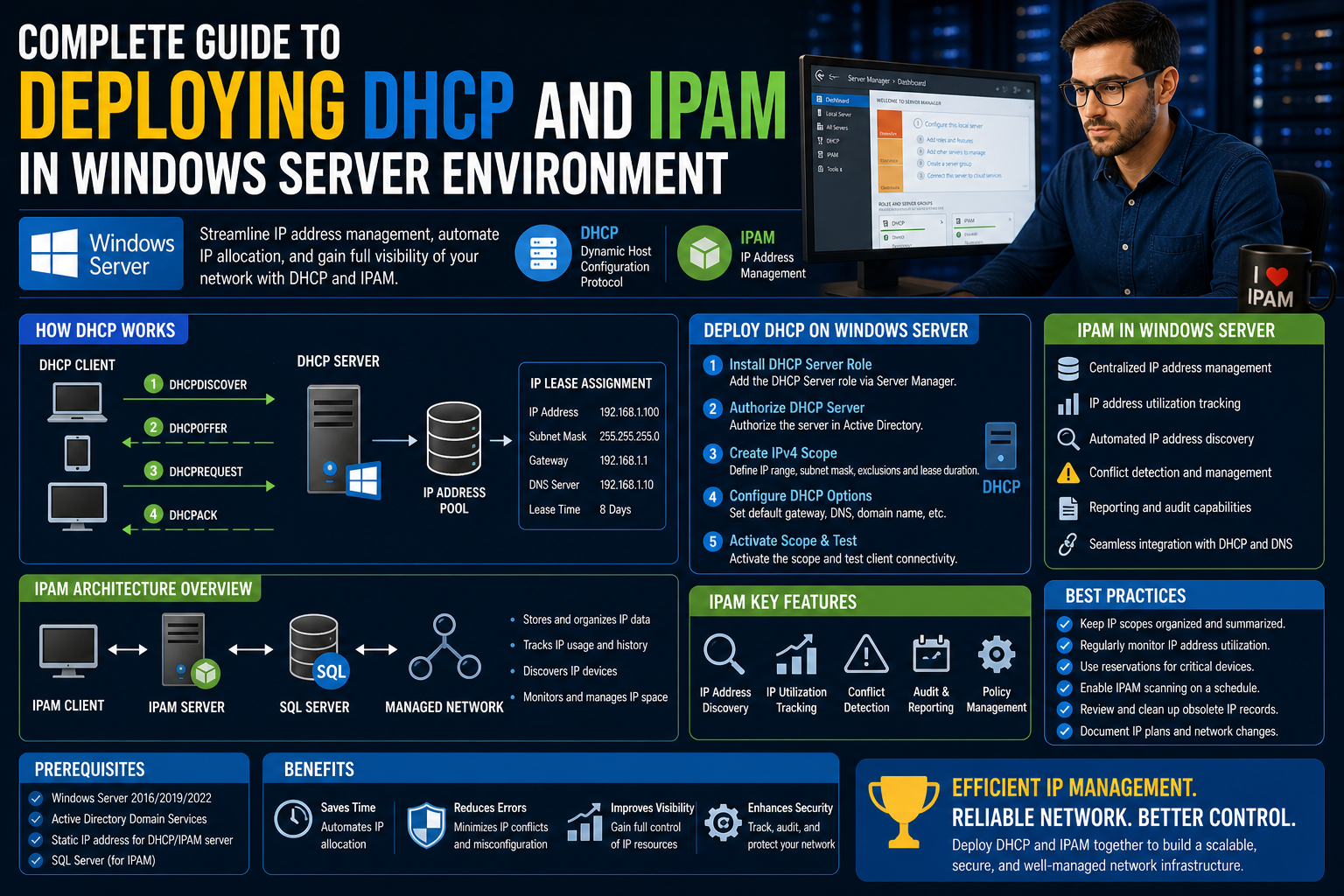
In today’s enterprise networking environments, the way devices are identified and communicate over a network depends heavily on structured and well-managed IP addressing. Without a controlled system, networks quickly become disorganized, leading to conflicts, connectivity failures, and administrative overhead that grows exponentially with scale. Windows Server provides a built-in framework that addresses this challenge through automated assignment, tracking, and governance of IP addresses.
At the core of this system lies a combination of two essential technologies: Dynamic Host Configuration Protocol (DHCP) and IP Address Management (IPAM). Together, they form a structured approach to assigning, monitoring, and maintaining IP infrastructure across both small and large-scale networks. Understanding how these components function individually is the first step toward building a stable and efficient network environment.
DHCP is responsible for automatically assigning IP addresses to devices when they join a network. This removes the need for manual configuration on each device and significantly reduces configuration errors. IPAM, on the other hand, provides visibility and centralized control over how those IP addresses are allocated, used, and managed across the entire infrastructure.
Before exploring their integration, it is important to understand how IP addressing works at a foundational level and why automation has become essential in modern network environments.
The Role of IP Addressing in Network Communication
Every device connected to a network requires a unique identifier to communicate with other devices. This identifier is known as an IP address. Without it, data packets would not know where to travel, making communication impossible.
IP addresses are generally categorized into two types: IPv4 and IPv6. IPv4 is the most widely used format and consists of a 32-bit address space, which allows for a limited number of unique addresses. As networks expanded globally, the shortage of IPv4 addresses became a major concern, leading to the development of IPv6, which uses a 128-bit structure and provides a vastly larger address pool.
Despite the introduction of IPv6, IPv4 is still widely used in most organizational networks. This creates the need for efficient management of both address types, ensuring that devices can connect seamlessly regardless of the addressing scheme in use.
In traditional setups, administrators manually assign IP addresses to devices. While this approach may work in very small environments, it becomes impractical in larger networks where devices frequently join and leave. Manual tracking also increases the risk of duplication, misconfiguration, and lack of documentation.
This is where automated IP assignment through DHCP becomes essential.
Introduction to Dynamic Host Configuration Protocol (DHCP)
DHCP is a network management protocol that automatically assigns IP addresses and other network configuration parameters to devices on a network. Instead of manually configuring each device, DHCP centralizes the process and distributes configurations dynamically.
When a device connects to a network, it sends a request for network configuration. The DHCP server responds by offering an available IP address along with additional configuration details such as subnet mask, default gateway, and DNS settings. The device then accepts this configuration and begins communicating on the network.
This process happens quickly and transparently, allowing users to connect devices without any manual setup. From an administrative perspective, DHCP reduces workload while increasing accuracy and consistency across the network.
DHCP operates based on a lease system. When an IP address is assigned to a device, it is not permanently reserved. Instead, it is leased for a specific period. Once the lease expires, the device must renew it or request a new one. This ensures that IP addresses are reused efficiently when devices disconnect from the network.
DHCP Architecture and Core Components
To understand how DHCP functions within Windows Server, it is important to break down its key components and how they interact within the network environment.
A DHCP server is the central system responsible for managing IP address distribution. It maintains a pool of available IP addresses and assigns them based on defined rules and configurations.
A DHCP client is any device that requests an IP address from the server. This can include computers, printers, mobile devices, or any network-enabled hardware.
A DHCP scope defines the range of IP addresses that the server can assign to clients. Each scope is configured for a specific subnet and includes important parameters such as lease duration and excluded addresses.
Exclusions are specific IP addresses within a scope that are reserved and not assigned dynamically. These are typically used for devices that require fixed addresses, such as servers or network printers.
Reservations are another important feature that allows administrators to assign a permanent IP address to a specific device based on its MAC address. Unlike dynamic assignments, reserved addresses ensure that a device always receives the same IP address while still being managed through DHCP.
The DHCP Lease Process Explained
The DHCP lease process follows a structured sequence that ensures efficient allocation of IP addresses without conflicts. When a device connects to the network, it initiates a four-step communication process.
First, the device broadcasts a discovery message to identify available DHCP servers. This message is sent to all devices on the network because the client does not yet have an IP address.
Next, one or more DHCP servers respond with an offer. This offer includes an available IP address and configuration details.
The client then selects one of the offers and sends a request back to the chosen server, indicating acceptance.
Finally, the server acknowledges the request and formally assigns the IP address to the client for a specified lease duration.
This entire process is designed to be fast and efficient, ensuring that devices can join the network with minimal delay.
Understanding DHCP Scopes and Address Allocation Strategy
A DHCP scope is one of the most important elements in managing IP address distribution. It defines the range of IP addresses that can be assigned to devices within a specific network segment.
Each scope must be carefully designed based on network requirements. Factors such as the number of devices, subnet size, and growth expectations all play a role in determining scope configuration.
Within a scope, administrators can define start and end IP addresses, ensuring that only a controlled range is used. This prevents address conflicts and allows better organization of network resources.
In larger environments, multiple scopes may be used to support different departments, physical locations, or VLANs. This segmentation helps maintain order and improves troubleshooting efficiency when network issues arise.
DHCP also supports advanced scope configurations such as superscopes and multicast scopes. Superscopes allow multiple scopes to be grouped together and managed as a single entity, while multicast scopes are used for specialized communication scenarios where data is sent to multiple recipients simultaneously.
DHCP Options and Network Configuration Delivery
Beyond assigning IP addresses, DHCP also delivers additional configuration parameters known as DHCP options. These options define how devices interact with the network after receiving an IP address.
Common DHCP options include the default gateway, which directs traffic outside the local network, and DNS server addresses, which enable domain name resolution. Without these settings, devices would not be able to communicate effectively beyond their local subnet or resolve domain names into IP addresses.
DHCP options can be applied at different levels, including server-wide, scope-specific, or reservation-based configurations. This flexibility allows administrators to tailor network settings based on organizational needs.
For example, a specific department may require different DNS settings or routing configurations compared to another department. DHCP options make it possible to implement such variations without manually configuring each device.
DHCP Relay Agents and Multi-Network Environments
In larger networks, it is common for DHCP clients and servers to exist on different subnets. Since DHCP relies on broadcast messages, these requests do not naturally cross network boundaries.
To solve this problem, DHCP relay agents are used. A relay agent is a network device or service that forwards DHCP requests from clients on one subnet to a DHCP server on another subnet.
When a client sends a discovery message, the relay agent intercepts it and forwards it to the appropriate DHCP server. The server then responds through the relay agent, which delivers the response back to the client.
This mechanism allows centralized DHCP management across multiple network segments without requiring a separate DHCP server on every subnet.
Proper configuration of relay agents is essential in complex network architectures, especially in enterprise environments where multiple VLANs and routed networks are involved.
Introduction to IP Address Management (IPAM)
While DHCP focuses on assigning IP addresses, IPAM provides a broader perspective by offering centralized visibility and control over the entire IP address infrastructure.
IPAM is a management framework built into Windows Server that allows administrators to monitor, analyze, and manage IP address usage across the network. It integrates with DHCP and DNS services to provide a unified view of network resources.
One of the key challenges in large networks is maintaining accurate records of which IP addresses are in use, which are available, and which are reserved. Without proper tracking, networks can quickly become inconsistent and difficult to manage.
IPAM addresses this issue by automatically discovering IP address usage across DHCP scopes and DNS records. It consolidates this information into a single management interface, making it easier to track allocation and detect conflicts.
Relationship Between DHCP and IPAM in Network Control
DHCP and IPAM are closely interconnected. DHCP handles the actual assignment of IP addresses, while IPAM monitors and manages those assignments at a higher level.
When integrated, IPAM can retrieve data from DHCP servers to provide a complete view of IP address distribution. This includes active leases, available addresses, and historical usage patterns.
This integration also improves governance by allowing administrators to enforce policies on how IP addresses are allocated. It helps ensure that address usage remains within defined boundaries and prevents unauthorized or inefficient allocation.
Additionally, IPAM can assist in identifying underutilized address ranges, helping organizations optimize their IP space and plan for future expansion.
Importance of Structured IP Management in Enterprise Networks
As organizations grow, their network infrastructure becomes more complex. Multiple devices, departments, and services depend on stable connectivity. Without structured IP management, maintaining this environment becomes increasingly difficult.
DHCP ensures that devices can connect without manual configuration, while IPAM ensures that the underlying address structure remains organized and traceable. Together, they form a foundation for scalable network administration.
In environments where uptime and reliability are critical, such as data centers or corporate networks, proper IP management is not just a convenience but a necessity. It reduces downtime, simplifies troubleshooting, and improves overall network performance.
The combination of DHCP and IPAM represents a shift from manual configuration toward automated infrastructure management, enabling administrators to focus on higher-level network planning rather than routine address assignments.
Installing and Preparing DHCP Role in Windows Server
Before any network can benefit from automated IP address assignment, the DHCP role must be properly installed and configured within Windows Server. This process forms the foundation of dynamic address management and ensures that the server is capable of handling client requests efficiently.
Windows Server includes DHCP as a built-in role, which means it does not require external software. Instead, it is enabled through the Server Manager interface or through system role configuration. Once installed, the server becomes responsible for responding to client requests and distributing IP configurations based on predefined rules.
The installation process begins with selecting the appropriate server instance that will act as the DHCP host. In enterprise environments, this is typically a dedicated server or a highly available cluster to ensure reliability. After selecting the server, the DHCP role is added, which installs the necessary services and management tools required for configuration.
Once installed, DHCP does not function immediately. It must be authorized within the Active Directory environment. This authorization step is crucial because it prevents unauthorized DHCP servers from operating on the network. Without authorization, a DHCP server will not respond to client requests, ensuring that only trusted systems can distribute IP addresses.
After authorization, administrators can begin configuring scopes, options, and lease policies. At this stage, the server transitions from a passive role installation to an active network service capable of managing address distribution.
Configuring DHCP Scopes for Structured Address Allocation
A properly designed DHCP scope is essential for ensuring that IP addresses are distributed in an organized and conflict-free manner. A scope defines the range of IP addresses that a DHCP server can assign to devices within a specific subnet.
When configuring a scope, administrators must carefully consider the network size, device density, and future expansion requirements. A poorly planned scope can lead to exhaustion of available addresses or inefficient use of the IP range.
Each scope begins with a defined start and end IP address range. This range determines the pool of available addresses that the server can assign dynamically. Within this range, certain addresses may be excluded to reserve them for static assignment, such as servers, routers, or network infrastructure devices.
In addition to defining the address pool, each scope includes subnet information that ensures proper routing and segmentation. This allows devices within the same scope to communicate efficiently while maintaining separation from other network segments.
Lease duration is another critical element of scope configuration. It defines how long a device can retain an assigned IP address before it must renew it. In environments with frequently changing devices, shorter lease durations may be preferred. In more stable environments, longer leases reduce network traffic associated with renewal requests.
Advanced DHCP Scope Configuration Strategies
Beyond basic scope setup, Windows Server allows administrators to implement advanced configuration strategies to improve efficiency and scalability. These strategies are particularly important in large or complex network environments.
One such strategy is the use of exclusions. Exclusions allow specific IP addresses within a scope to be reserved and never assigned dynamically. This ensures that critical infrastructure devices maintain consistent addressing while still operating within a DHCP-managed range.
Another important feature is reservation-based assignment. Unlike exclusions, reservations explicitly bind an IP address to a specific device using its MAC address. This ensures that the device always receives the same IP address while still benefiting from centralized DHCP management.
Superscopes are also used in environments where multiple logical subnets need to be managed together. A superscope groups multiple scopes into a single administrative unit, allowing for better organization and control over related address ranges.
Multicast scopes serve a different purpose. Instead of assigning addresses to individual devices, they are used for group communication scenarios where data must be delivered to multiple recipients simultaneously. This is commonly used in streaming or broadcast-based network services.
DHCP Policies and Conditional Address Assignment
DHCP policies introduce a powerful level of control over how IP addresses are assigned to devices. Instead of assigning addresses purely based on availability, policies allow administrators to define conditions that influence assignment behavior.
These conditions can be based on factors such as MAC address, vendor class, user class, or client identifier. By using these attributes, DHCP can differentiate between device types and apply customized configurations.
For example, a policy can be created to assign specific IP ranges to printers while assigning a different range to user workstations. This separation improves network organization and simplifies troubleshooting.
Policies can also be used to prioritize certain devices or restrict access to specific network segments. This adds an additional layer of security and control within the DHCP infrastructure.
In large enterprise environments, DHCP policies are often used to enforce network segmentation rules without requiring manual configuration on each device.
DHCP Options and Network Behavior Control
While scopes define which IP addresses are assigned, DHCP options define how devices behave once they receive those addresses. These options provide critical configuration details that enable network communication.
One of the most important DHCP options is the default gateway setting. This determines how devices communicate outside their local subnet. Without a correctly configured gateway, devices would be isolated within their own network segment.
Another essential option is DNS configuration. DNS servers allow devices to resolve domain names into IP addresses, enabling access to web services, internal applications, and external resources.
Additional options can include domain names, time servers, and routing configurations. These settings ensure that devices receive all necessary network information automatically, without manual configuration.
DHCP options can be applied globally at the server level, or more specifically at the scope or reservation level. This hierarchical structure allows for flexible and precise configuration management.
Managing DHCP in Windows Server Environments
Once DHCP is installed and configured, ongoing management becomes a critical responsibility. Administrators must continuously monitor address usage, lease activity, and system performance to ensure stable network operations.
The DHCP management console provides a centralized interface for viewing active leases, scope statistics, and server status. Through this interface, administrators can quickly identify issues such as address exhaustion or misconfigured scopes.
Active leases display all currently assigned IP addresses along with their associated device information. This allows administrators to track which devices are connected and how long they have been using their assigned addresses.
Lease monitoring is especially important in dynamic environments where devices frequently join and leave the network. Without proper monitoring, address conflicts or shortages can occur unexpectedly.
Administrators must also manage scope activation and deactivation. A scope must be activated before it can begin assigning addresses, and deactivation may be necessary during maintenance or reconfiguration.
Troubleshooting DHCP Communication and Failures
Despite its automated nature, DHCP can encounter issues that disrupt network connectivity. Understanding how to troubleshoot these issues is essential for maintaining a reliable network environment.
One common issue is the failure of a client to obtain an IP address. This may occur if the DHCP server is unreachable, the scope is exhausted, or network connectivity is disrupted.
In such cases, administrators must verify server availability, check scope configuration, and ensure that relay agents are functioning correctly if multiple subnets are involved.
Another common issue is IP address conflicts. Although DHCP is designed to prevent conflicts, they can still occur if static IP addresses are manually configured within the DHCP range.
To resolve this, administrators must ensure that static addresses are properly excluded from DHCP scopes and that reservation settings are correctly applied.
DHCP logs also play a crucial role in troubleshooting. These logs provide detailed information about lease assignments, renewals, and errors, allowing administrators to trace issues back to their source.
Introduction to IP Address Management Deployment
While DHCP handles dynamic assignment, IP Address Management introduces a centralized system for tracking and organizing IP infrastructure across the network. Deploying IPAM in Windows Server requires careful planning and configuration to ensure accurate data collection and integration.
IPAM must first be installed as a server role, similar to DHCP. Once installed, it requires configuration to discover and connect with existing network services such as DHCP and DNS servers.
This discovery process allows IPAM to gather information about current IP address usage and network configuration. It then consolidates this data into a centralized management interface.
Unlike DHCP, which operates in real time, IPAM focuses on analysis, reporting, and governance. It provides administrators with visibility into how IP addresses are being used across the entire infrastructure.
IPAM Server Provisioning and Configuration Workflow
After installation, IPAM must be provisioned before it becomes functional. Provisioning involves configuring access permissions, discovery methods, and data collection settings.
Administrators must define which servers IPAM will manage. This typically includes DHCP servers, DNS servers, and domain controllers. Once defined, IPAM begins collecting configuration data from these systems.
A key part of provisioning is setting up database storage for IP address records. This database stores historical and real-time information about address usage, allowing administrators to track changes over time.
IPAM also requires configuration of data collection intervals. These intervals determine how frequently the system updates its records from managed servers.
Once provisioning is complete, IPAM begins actively monitoring the network and building a comprehensive view of IP address utilization.
IPAM Discovery and Data Collection Process
The discovery process is one of the most important functions of IPAM. It allows the system to automatically locate and connect with network infrastructure components.
During discovery, IPAM identifies DHCP servers, DNS servers, and domain controllers within the environment. It then establishes communication channels with these systems to retrieve configuration data.
This data includes active leases, scope configurations, DNS records, and network policies. By aggregating this information, IPAM creates a centralized view of the entire IP infrastructure.
Data collection occurs continuously, ensuring that IPAM remains up to date with any changes made in DHCP or DNS configurations. This real-time synchronization is essential for maintaining accurate records.
Role-Based Access Control in IP Address Management
Security and access control are critical components of IPAM. Role-based access control (RBAC) allows administrators to define who can view or modify specific parts of the IP infrastructure.
Different users can be assigned different roles based on their responsibilities. For example, a network technician may have permission to view IP address assignments but not modify DHCP scopes.
Administrative users, on the other hand, may have full control over IPAM configuration, including discovery settings and policy management.
This structured access model ensures that sensitive network configurations are protected while still allowing operational flexibility for support teams.
RBAC also helps prevent accidental misconfiguration by limiting the scope of changes that individual users can make within the system.
Integrating IPAM with DHCP and DNS Services
The true strength of IPAM lies in its integration with DHCP and DNS services. By connecting these systems, IPAM provides a unified view of network infrastructure.
Through DHCP integration, IPAM can track which IP addresses are currently leased, which are available, and which are reserved. This information helps administrators avoid conflicts and optimize address usage.
DNS integration allows IPAM to correlate IP addresses with hostnames, making it easier to identify devices and troubleshoot connectivity issues.
This integration also enables auditing capabilities, allowing administrators to track changes made to DHCP scopes and DNS records over time.
By combining data from multiple sources, IPAM creates a comprehensive network inventory that improves visibility and control.
Managing DHCP Relay, Multi-Site Networks, and Enterprise IP Delivery
In large-scale Windows Server environments, DHCP does not operate in a simple single-network structure. Instead, it must function across multiple subnets, VLANs, and sometimes geographically distributed sites. Since DHCP relies on broadcast-based communication, it cannot naturally cross routed boundaries. This limitation makes DHCP relay configuration a critical part of enterprise network design.
A DHCP relay agent acts as an intermediary between DHCP clients and DHCP servers. When a client sends a broadcast request for an IP address, the relay agent intercepts it and forwards it as a unicast message to a designated DHCP server. The server then responds through the relay agent, which delivers the response back to the client.
Without relay agents, every subnet would require its own DHCP server. This would significantly increase infrastructure complexity and administrative overhead. Relay agents solve this problem by allowing centralized DHCP management across distributed networks.
In Windows Server environments, relay functionality is often implemented through routers or dedicated network devices. Proper configuration ensures that DHCP traffic flows efficiently between clients and servers without delay or packet loss.
Relay configuration must also consider network security. Since DHCP requests are forwarded across segments, administrators must ensure that only authorized relay agents are allowed to communicate with DHCP servers. This prevents rogue devices from intercepting or manipulating address assignment traffic.
Designing DHCP for Multi-Site Enterprise Environments
In enterprise networks with multiple physical locations, DHCP design becomes more complex. Each site may have different network requirements, bandwidth limitations, and device densities. A centralized DHCP strategy must account for these differences while maintaining consistent address management.
One common approach is centralized DHCP with distributed relay agents. In this model, a single or small number of DHCP servers handle all address assignments, while relay agents at each site forward client requests. This simplifies management but requires reliable connectivity between sites.
Another approach is distributed DHCP, where each site has its own local DHCP server. This reduces dependency on WAN connectivity but increases administrative overhead. Each server must be independently managed, and configuration consistency must be maintained manually or through automation.
A hybrid approach is often used in large organizations, combining centralized control with local redundancy. In this setup, primary DHCP services are centralized, while secondary servers provide failover support at remote sites.
When designing DHCP for multi-site environments, administrators must carefully plan scope allocation. Each site should have its own defined IP range to avoid overlap and conflicts. Subnetting plays a critical role in ensuring that address spaces remain organized and scalable.
DHCP Failover and High Availability Strategies
Network reliability is a key requirement in modern enterprise systems. DHCP is a critical service, and any downtime can prevent devices from joining the network. To address this, Windows Server supports DHCP failover configurations that provide redundancy and high availability.
DHCP failover allows two servers to share responsibility for a scope. In this configuration, both servers maintain synchronized lease information. If one server becomes unavailable, the other continues to provide IP addresses without interruption.
There are two primary failover modes: load sharing and hot standby. In load sharing mode, both servers actively distribute IP addresses, balancing the workload between them. In hot standby mode, one server remains passive while the other handles all requests until a failure occurs.
Lease synchronization between failover partners ensures consistency in address allocation. This prevents conflicts and ensures that clients receive the same IP address even if they switch between servers.
Failover configuration requires careful planning of communication intervals, state transitions, and replication timing. Improper configuration can lead to inconsistencies or delayed failover responses.
High availability is especially important in environments where continuous connectivity is required, such as data centers, financial systems, and large corporate networks.
Securing DHCP Infrastructure in Windows Server
Security is a critical aspect of DHCP management. Since DHCP controls IP assignment across the entire network, unauthorized access can lead to serious disruptions, including IP conflicts, traffic interception, and network downtime.
One of the primary security mechanisms is DHCP authorization in Active Directory. Only authorized DHCP servers are allowed to operate within a domain environment. This prevents rogue DHCP servers from distributing incorrect or malicious network configurations.
Another important security feature is DHCP snooping, which is typically implemented at the network switch level. DHCP snooping filters unauthorized DHCP messages and ensures that only trusted servers can respond to client requests.
Access control within Windows Server also plays a significant role. Administrative permissions should be strictly controlled using role-based access control. Only authorized personnel should be able to modify scopes, reservations, or DHCP options.
Logging and auditing are also essential for security monitoring. DHCP logs provide detailed records of IP address assignments, renewals, and releases. These logs can be used to investigate suspicious activity or diagnose network issues.
In addition to internal security, external threats must also be considered. DHCP starvation attacks, for example, attempt to exhaust the available IP address pool by sending大量 fake requests. Rate limiting and monitoring mechanisms help mitigate such threats.
Monitoring DHCP Performance and Network Health
Continuous monitoring is essential for maintaining a healthy DHCP environment. Without proper monitoring, issues such as address exhaustion, scope misconfiguration, or service failure may go unnoticed until they cause significant disruption.
Windows Server provides built-in tools for monitoring DHCP performance. These tools display real-time statistics about active leases, available addresses, and request rates.
Administrators must regularly review scope utilization to ensure that address pools are not approaching exhaustion. If a scope becomes full, new devices will be unable to obtain IP addresses, resulting in connectivity failures.
Performance monitoring also includes tracking request latency and response times. Delays in DHCP responses can indicate network congestion or server performance issues.
Event logs are another important source of diagnostic information. These logs record DHCP service events, including errors, warnings, and informational messages. By analyzing these logs, administrators can identify patterns and proactively address issues before they escalate.
In larger environments, centralized monitoring systems are often used to aggregate DHCP data from multiple servers. This provides a unified view of network health across the entire infrastructure.
Maintaining IP Address Integrity with IPAM Governance
IP Address Management introduces a governance layer that ensures IP infrastructure remains structured, consistent, and compliant with organizational policies. Unlike DHCP, which focuses on real-time assignment, IPAM focuses on long-term control and visibility.
One of the key governance functions of IPAM is tracking IP address utilization. It provides detailed reports on which addresses are in use, which are available, and which are reserved. This helps administrators optimize address allocation and prevent waste.
IPAM also enforces compliance by detecting unauthorized or out-of-policy IP configurations. For example, if a device is manually assigned an address outside the authorized range, IPAM can flag it as non-compliant.
Another important governance feature is historical tracking. IPAM maintains records of address assignments over time, allowing administrators to trace changes and identify patterns in network usage.
This historical data is particularly useful for troubleshooting and capacity planning. It helps organizations understand how their network is evolving and when expansion may be required.
IPAM Integration with Active Directory and DNS Infrastructure
IPAM does not operate in isolation. It integrates deeply with Active Directory and DNS systems to provide a complete view of network identity and configuration.
Through Active Directory integration, IPAM can identify which users and devices are associated with specific IP addresses. This enhances accountability and simplifies troubleshooting in environments with large numbers of devices.
DNS integration allows IPAM to map IP addresses to hostnames. This makes it easier to identify devices and understand network communication patterns. Instead of relying solely on numerical IP addresses, administrators can work with meaningful hostnames.
This integration also improves change tracking. When DNS records are updated, IPAM records the changes and links them to corresponding IP address updates.
Together, these integrations create a unified network intelligence system that combines addressing, naming, and identity into a single framework.
Role-Based Administration and Delegated IPAM Control
In large organizations, it is not practical for a single administrator to manage all IP-related tasks. IPAM supports delegated administration through role-based access control, allowing responsibilities to be distributed across teams.
Different roles can be assigned based on operational needs. For example, helpdesk staff may be granted read-only access to view IP assignments, while network engineers may have permissions to modify scopes and reservations.
Security administrators may have access to audit logs and compliance reports but not to configuration settings. This separation of duties helps maintain security while enabling operational efficiency.
Delegated control also reduces the risk of accidental misconfiguration. By limiting access to specific functions, organizations can ensure that only qualified personnel make critical changes.
Role-based administration is particularly important in regulated industries where network changes must be carefully controlled and audited.
Address Optimization and Long-Term IP Planning Strategies
Effective IP management is not only about current operations but also about long-term planning. As organizations grow, their IP infrastructure must scale accordingly.
Address optimization involves analyzing current usage patterns and identifying inefficiencies. IPAM provides insights into underutilized ranges, overallocated subnets, and fragmented address spaces.
By consolidating or reorganizing these ranges, administrators can improve efficiency and extend the lifespan of existing IP infrastructure.
Long-term planning also involves preparing for IPv6 adoption. While IPv4 remains dominant, IPv6 is increasingly important for modern network architectures. IPAM helps organizations manage both addressing schemes simultaneously.
Planning also includes forecasting future growth. By analyzing historical usage trends, administrators can predict when additional address space will be required and plan accordingly.
Troubleshooting Integrated DHCP and IPAM Environments
When DHCP and IPAM are integrated, troubleshooting becomes both more powerful and more complex. Issues may originate in DHCP configuration, IPAM synchronization, or network communication between services.
One common issue is data mismatch between DHCP and IPAM. This occurs when IPAM fails to synchronize with DHCP servers, resulting in outdated or incorrect address information.
To resolve this, administrators must verify service connectivity, check synchronization schedules, and ensure that credentials are properly configured.
Another issue is incomplete discovery. If IPAM fails to detect certain DHCP or DNS servers, it may indicate network segmentation issues or permission problems.
In such cases, administrators must verify firewall settings, network routes, and Active Directory permissions.
IP conflicts may also appear in integrated environments. While DHCP helps prevent conflicts, manually configured static addresses can still cause issues. IPAM helps identify these conflicts by comparing DHCP records with actual network usage.
Operational Best Practices for DHCP and IPAM in Windows Server
Maintaining a stable and efficient DHCP and IPAM environment requires consistent operational practices. Regular review of scope utilization ensures that address pools remain sufficient for network demand.
Consistent documentation of IP configurations helps maintain clarity across teams and reduces troubleshooting time. Changes to DHCP scopes or IPAM settings should always be recorded and reviewed.
Regular auditing ensures that unauthorized changes are detected early. This is especially important in environments with multiple administrators or delegated access.
Backup and recovery procedures must also be in place. DHCP and IPAM configurations should be backed up regularly to prevent data loss in case of system failure.
Finally, continuous training and awareness ensure that network administrators remain familiar with best practices and emerging technologies in IP management.
Conclusion
The implementation of DHCP and IP Address Management (IPAM) in Windows Server represents a major shift in how modern networks are designed, operated, and maintained. Instead of relying on manual configuration and fragmented documentation, organizations gain a centralized, automated, and highly structured approach to managing one of the most critical aspects of networking: IP address allocation and control.
Across all three parts of this discussion, a clear pattern emerges. DHCP provides the operational engine that assigns and renews IP addresses dynamically, ensuring that devices can connect to the network with minimal effort and zero manual configuration. IPAM complements this by offering visibility, governance, and control over the entire IP infrastructure, allowing administrators to understand not just what is assigned, but how, where, and why those assignments exist.
In real-world environments, the value of this combination becomes even more significant. Networks today are no longer static or predictable. Devices frequently join and leave, remote sites connect through distributed architectures, and cloud-based systems continuously expand the boundaries of traditional infrastructure. In such dynamic conditions, manual IP management quickly becomes unmanageable and error-prone.
DHCP addresses this challenge by automating the assignment process through structured scopes, lease management, reservations, and policies. It ensures consistency while reducing the likelihood of conflicts and configuration errors. At the same time, features such as relay agents and failover configurations extend DHCP’s capabilities across complex multi-site environments, ensuring reliability even in distributed networks.
IPAM strengthens this foundation by bringing intelligence and oversight into the system. It transforms raw configuration data into meaningful insights, allowing administrators to track utilization, detect inefficiencies, and enforce organizational policies. Through integration with Active Directory, DNS, and DHCP, IPAM creates a unified view of the entire addressing ecosystem, connecting devices, users, and services under a single management framework.
Security and governance are also deeply embedded in this architecture. With role-based access control, auditing capabilities, and authorization requirements, Windows Server ensures that only trusted systems and administrators can influence IP behavior. This reduces risks associated with unauthorized DHCP servers, misconfigurations, or malicious network activity.
Equally important is the role of monitoring and troubleshooting. In complex environments, visibility is essential. DHCP logs, IPAM reports, and real-time statistics provide the data needed to identify issues quickly and maintain network stability. Whether dealing with address exhaustion, lease conflicts, or synchronization failures, administrators have the tools required to respond effectively.
Ultimately, DHCP and IPAM are not just technical features within Windows Server; they represent a structured philosophy of network management. They shift the responsibility from reactive troubleshooting to proactive design and governance. Instead of constantly fixing IP-related issues, administrators can focus on optimizing infrastructure, planning growth, and ensuring long-term scalability.
As networks continue to evolve with hybrid cloud environments, virtualization, and increasing device density, the importance of structured IP management will only grow. Organizations that adopt and properly implement DHCP and IPAM position themselves for greater efficiency, improved reliability, and stronger control over their network environments, while also enabling scalable growth, reducing configuration errors, and supporting seamless integration across modern enterprise infrastructures.