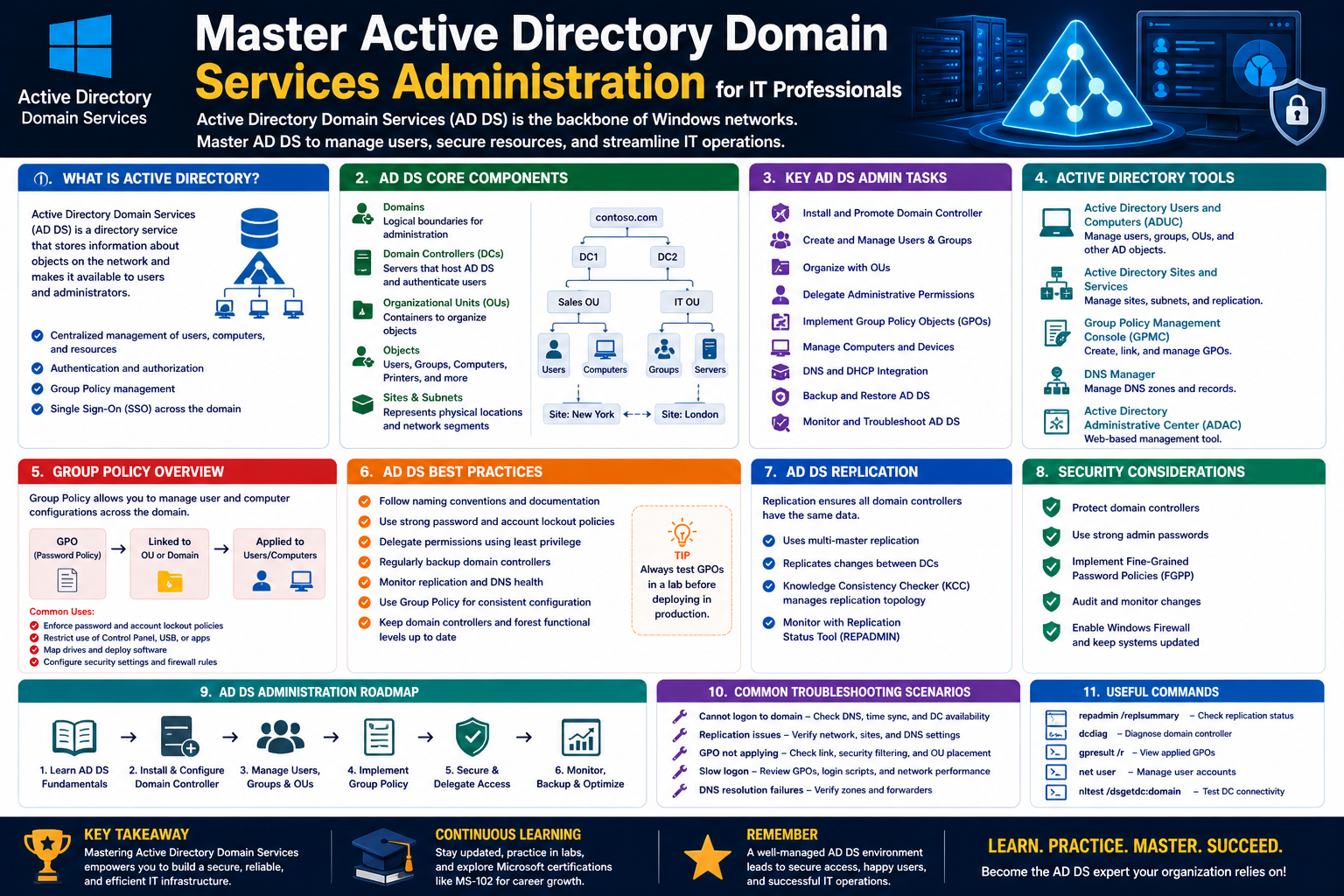
Active Directory Domain Services (AD DS) is one of the foundational technologies used in enterprise Windows environments to manage identity, authentication, and access control. At its core, AD DS acts as a centralized directory service that stores information about users, computers, and resources within a network and makes that information available to authorized systems and administrators.
In practical terms, AD DS replaces the need to manage each computer or user individually across a large organization. Instead of configuring settings separately on every machine, administrators use a centralized structure where policies, permissions, and identities are controlled from a unified system. This makes management more efficient, scalable, and secure.
AD DS is deeply integrated into Windows Server environments and relies on a structured hierarchy of components, including domains, trees, forests, and organizational units. Each of these components plays a specific role in organizing and controlling access to network resources.
A domain represents a logical grouping of objects such as users and computers. A tree is a collection of domains that share a contiguous namespace, while a forest is the highest-level container that can include multiple trees and domains. This layered structure allows organizations to scale from small setups to complex global infrastructures.
Understanding AD DS begins with recognizing that it is not just a tool for authentication. It is a complete identity management system that supports security policies, group management, resource access, and network-wide configuration enforcement.
The Role of Domain Controllers in AD DS Infrastructure
At the heart of Active Directory Domain Services is the domain controller. A domain controller is a server that hosts the AD DS database and handles authentication and authorization requests within a domain. Every time a user logs into a system, accesses a shared folder, or connects to a network resource, the domain controller is responsible for verifying credentials and determining access rights.
Domain controllers store a copy of the Active Directory database, which includes information about every object within the domain. This database is constantly synchronized across multiple domain controllers in environments where redundancy and fault tolerance are required. This replication ensures that if one domain controller fails, another can take over without disrupting network operations.
A key feature of domain controllers is their ability to enforce security policies. These policies include password requirements, account lockout rules, and user restrictions. Instead of configuring these settings individually on each computer, administrators define them once and apply them across the entire domain.
Domain controllers also play a critical role in ensuring consistency across the network. Because they replicate directory data among themselves, any changes made on one controller are propagated to others. This replication process is essential for maintaining data accuracy and system reliability.
In most enterprise environments, multiple domain controllers are deployed to distribute load and improve performance. This also ensures high availability, as users can authenticate against any available controller.
Active Directory Structure: Domains, Trees, and Forests
To understand how Active Directory Domain Services organizes information, it is important to explore its hierarchical structure. At the most basic level is the domain, which serves as a container for users, computers, and other objects. A domain is defined by a unique name and functions as a security boundary.
Within a domain, objects are grouped logically to simplify management. For example, users in a specific department or location may belong to the same domain, allowing administrators to apply policies efficiently.
A tree is formed when multiple domains share a contiguous namespace. This means that the domain names are related and follow a logical hierarchy. Trees help organizations expand their AD DS infrastructure while maintaining a structured naming system.
At the top level is the forest, which represents the complete Active Directory environment. A forest can contain multiple trees, each with its own domain structure. The forest acts as a security boundary and defines the overall schema, configuration, and global catalog for all included domains.
One of the key advantages of this structure is scalability. Organizations can start with a single domain and expand into multiple domains and forests as their needs grow. This flexibility allows AD DS to support everything from small businesses to multinational enterprises.
The Importance of DNS in Active Directory Domain Services
Active Directory Domain Services is heavily dependent on the Domain Name System (DNS). DNS is responsible for translating human-readable domain names into IP addresses that computers use to communicate.
In an AD DS environment, DNS is not just an auxiliary service—it is a critical component. Without properly configured DNS, domain controllers and client machines would not be able to locate each other, and authentication would fail.
When a client device attempts to join a domain or authenticate with a domain controller, it uses DNS to locate the appropriate server. This process involves querying DNS records that point to services such as LDAP and Kerberos, which are essential for AD DS functionality.
Active Directory also integrates tightly with DNS by automatically creating and managing service records. These records ensure that clients can always find domain controllers and other essential services within the network.
A properly designed DNS infrastructure improves performance, reduces authentication delays, and ensures reliability across the entire AD DS environment. Misconfigured DNS, on the other hand, is one of the most common causes of Active Directory issues.
Core Functions of Active Directory Domain Services
AD DS performs several essential functions that support enterprise network operations. One of its primary roles is authentication, which verifies the identity of users and devices attempting to access the network.
Another key function is authorization, which determines what resources an authenticated user is allowed to access. This includes files, applications, printers, and other network services.
AD DS also serves as a centralized directory for storing object information. This includes user accounts, computer accounts, security groups, and configuration data. Having this information centralized allows administrators to manage resources efficiently and consistently.
In addition to identity management, AD DS supports policy enforcement through Group Policy Objects (GPOs). These policies allow administrators to configure security settings, software installations, and system behavior across multiple machines.
Another important function is replication. Changes made in one part of the directory are synchronized across all domain controllers. This ensures consistency and reliability in distributed environments.
Installing Active Directory Domain Services: Conceptual Overview
Before AD DS can be used, it must be installed on a Windows Server system. This process involves promoting a server to a domain controller role, which enables it to host the Active Directory database and provide authentication services.
The installation process begins with selecting the appropriate server configuration. Administrators must ensure that the server has a stable operating system, sufficient hardware resources, and a properly configured network environment.
Once AD DS is installed, the server becomes part of a domain or forms a new domain if one does not already exist. This step is critical because it defines the structure of the Active Directory environment.
During installation, DNS integration is typically configured automatically. This ensures that the new domain controller can register itself within the DNS system and become discoverable by clients.
After installation, the domain controller begins participating in replication with other controllers, if they exist. This ensures that directory data is synchronized across the network.
Authentication Mechanisms in Active Directory
Authentication in Active Directory Domain Services is primarily handled through secure protocols that verify user identity. When a user logs in, their credentials are checked against the AD DS database stored on a domain controller.
If the credentials are valid, the system issues a security token that allows the user to access authorized resources. This token-based system ensures that users do not need to repeatedly enter credentials during a session.
One of the key authentication protocols used in AD DS is Kerberos. Kerberos provides secure authentication through ticket-based validation, reducing the risk of credential interception.
Another method used in certain scenarios is NTLM, which is an older authentication protocol. While still supported for compatibility reasons, it is generally less secure than Kerberos.
Authentication is tightly integrated with directory services, ensuring that user identity is verified before any access is granted. This makes AD DS a critical component in enterprise security architecture.
Introduction to Directory Objects and Their Role
Active Directory Domain Services organizes all network resources as objects. These objects represent real-world entities such as users, computers, printers, and security groups.
Each object contains attributes that define its properties. For example, a user object may include a username, password hash, email address, and group memberships.
Objects are stored within containers such as organizational units, which help structure the directory in a logical and manageable way.
This object-based design allows administrators to manage resources consistently across the network. Instead of configuring individual settings on each device, administrators manage objects centrally within AD DS.
Understanding Replication in Active Directory Environments
Replication is a critical mechanism in Active Directory Domain Services that ensures data consistency across multiple domain controllers. When changes are made to the directory, such as updating a user account or modifying group membership, these changes are automatically replicated to other controllers.
Replication occurs in a multi-master model, meaning that changes can be made on any domain controller and still propagate across the network. This design improves flexibility and reduces dependency on a single server.
The replication process is optimized to minimize network traffic while maintaining consistency. Only changes are transmitted, rather than entire databases, which improves efficiency.
In larger environments, replication topology is carefully designed to balance performance and reliability. This includes defining replication schedules and controlling data flow between sites.
Planning an Active Directory Domain Services Deployment
Before implementing AD DS in a real environment, careful planning is required. This includes determining the number of domains, domain controllers, and the overall structure of the directory.
Network design plays a crucial role in this planning phase. Factors such as geographic distribution, network speed, and organizational structure must be considered.
Naming conventions are also important, as they define how domains and objects are identified within the system. A well-planned naming strategy helps avoid conflicts and improves manageability.
Security considerations must also be addressed during planning. This includes defining administrative roles, access control policies, and backup strategies.
Proper planning ensures that the Active Directory environment is scalable, secure, and efficient from the beginning.
The Relationship Between AD DS and Network Security
Active Directory Domain Services plays a central role in network security by controlling access to resources and enforcing authentication policies. Every access request within the domain is validated against AD DS, making it the primary gatekeeper for enterprise networks.
Security policies defined in AD DS help protect against unauthorized access and ensure compliance with organizational standards. These policies can include password complexity rules, account lockout thresholds, and login restrictions.
By centralizing identity management, AD DS reduces the risk of inconsistent security configurations across systems. This consistency is essential for maintaining a secure and controlled network environment.
AD DS also supports auditing and monitoring, allowing administrators to track changes and detect potential security issues.
Foundational Concepts Before Advanced Administration
Before moving into advanced administrative tasks, it is essential to understand the foundational concepts of Active Directory Domain Services. These include directory structure, domain controllers, DNS integration, authentication processes, and replication mechanisms.
A strong understanding of these fundamentals provides the necessary groundwork for managing users, groups, permissions, and organizational structures effectively in later stages of Active Directory administration.
Installing and Promoting Domain Controllers in Practice
In a real Active Directory environment, the process of introducing a new domain controller is one of the most important operational tasks an administrator performs. While the concept of a domain controller has already been introduced as a central authority for authentication and directory services, the practical implementation involves several careful decisions that affect performance, security, and reliability.
When a server is prepared to become a domain controller, it must first meet specific prerequisites. These include a stable Windows Server installation, a correctly configured static IP address, and proper connectivity to DNS services. Without these foundational requirements, the promotion process can fail or lead to unstable directory behavior later on.
The promotion of a server to a domain controller involves integrating it into an existing domain or creating a new one. In environments where the infrastructure is already established, additional domain controllers are added primarily to improve redundancy and load distribution. Each new controller becomes a replica of the directory database, participating in replication with existing systems.
A critical aspect of this process is ensuring that the server is properly registered within DNS. Since Active Directory relies heavily on DNS for locating services, any mismatch or misconfiguration can prevent the new domain controller from communicating with the rest of the environment. This is why DNS validation is often one of the first checks performed during setup.
Once the server is promoted, it immediately begins participating in authentication and directory replication. This means it can handle login requests, process authentication tickets, and respond to queries about users, groups, and resources. Over time, it synchronizes fully with other domain controllers, ensuring consistency across the environment.
The placement of domain controllers is also a strategic decision. In larger organizations, they are often distributed across geographic locations to reduce latency and improve user experience. This distribution requires careful planning of replication paths to ensure efficiency without overwhelming network bandwidth.
Configuring Domain Controller Roles and Services
After a server becomes a domain controller, it is not simply left in its default state. Instead, administrators configure additional roles and services that enhance its functionality and align it with organizational needs.
One of the key considerations is whether the domain controller will also serve additional roles, such as DNS or Global Catalog services. DNS integration is almost always enabled because of its essential role in Active Directory communication. The Global Catalog, on the other hand, stores partial information about all objects in the forest, making searches and authentication more efficient across domains.
Configuring these services properly ensures that users can log in quickly and that directory queries are resolved without unnecessary delays. However, enabling too many roles on a single domain controller can create performance bottlenecks, which is why larger environments distribute responsibilities across multiple servers.
Security configuration is another critical aspect. Domain controllers are highly sensitive systems, so access must be tightly restricted. Administrative access is typically limited to a small group of trusted administrators, and security policies are enforced to protect against unauthorized changes.
Time synchronization is also important in domain controller configuration. Because authentication protocols such as Kerberos rely on accurate time stamps, even small time discrepancies can cause authentication failures. Domain controllers are often configured to synchronize time from a reliable external source or designated time hierarchy within the domain.
Monitoring services are frequently enabled to track performance, replication status, and system health. These tools allow administrators to detect issues early and ensure that the domain controller continues to operate efficiently.
Managing User Accounts in Enterprise Directory Environments
User accounts are among the most fundamental objects in Active Directory Domain Services. They represent individuals who need access to network resources, and they form the basis of authentication and authorization processes.
Creating and managing user accounts involves more than simply assigning a username and password. Each account includes a set of attributes that define how the user interacts with the network. These attributes may include department, contact information, login restrictions, and group memberships.
In enterprise environments, user account management is typically structured and standardized. This ensures consistency and simplifies administration. For example, naming conventions are often used to make accounts easily identifiable, while default settings ensure that security policies are applied uniformly.
User accounts are also tied to lifecycle management processes. Employees may join, change roles, or leave an organization, and their accounts must be updated accordingly. Proper management ensures that access is always aligned with current responsibilities and that unused accounts are disabled or removed.
Another important aspect is account security. Password policies, account lockout settings, and multi-factor authentication mechanisms help protect user accounts from unauthorized access. These policies are enforced centrally through Active Directory, ensuring consistency across the organization.
User accounts rarely exist in isolation. They are typically assigned to groups, which simplifies permission management. Instead of assigning access rights directly to individual users, administrators assign them to groups, making management more scalable and efficient.
Group Types, Scopes, and Strategic Design
Groups in Active Directory Domain Services are essential for managing access and simplifying administrative tasks. They allow administrators to organize users and computers into logical collections that can be assigned permissions collectively.
There are different types of groups, each serving a specific purpose. Security groups are used to assign permissions to resources, while distribution groups are primarily used for email distribution in messaging systems. Although both types organize users, only security groups directly influence access control.
Group scope defines how groups can be used within the domain or forest. Domain local groups are typically used to assign permissions to resources within a single domain. Global groups contain users from the same domain and are used to organize accounts based on roles or departments. Universal groups span multiple domains and are used in larger, multi-domain environments.
Strategic group design is essential for maintaining a clean and scalable Active Directory structure. Poorly designed groups can lead to confusion, security risks, and administrative overhead. A well-structured approach ensures that permissions are easy to manage and understand.
Groups also support nesting, which allows one group to be a member of another. This feature is useful for implementing hierarchical access structures, but must be used carefully to avoid complexity.
In enterprise environments, group management is closely tied to access control models. By organizing users into well-defined groups, administrators can simplify permission assignments and reduce the likelihood of errors.
Organizing Infrastructure with Organizational Units
Organizational Units (OUs) provide a way to structure objects within a domain in a logical and manageable hierarchy. They act as containers that group users, computers, and other objects based on administrative or organizational requirements.
One of the primary benefits of OUs is that they allow administrators to delegate control. Instead of granting full domain-level permissions, control can be assigned at the OU level, enabling more granular administrative authority.
OUs also play a key role in applying Group Policy Objects. Policies can be linked to specific OUs, allowing different parts of an organization to have customized configurations. For example, different departments may require different security settings or software deployments.
The structure of OUs often mirrors the organizational structure of a company. Departments such as finance, human resources, and IT may each have their own OU, making it easier to manage resources and apply policies consistently.
However, designing OU structures requires careful planning. Overly complex hierarchies can make management difficult, while overly simplistic structures may not provide enough flexibility. A balanced approach ensures both usability and scalability.
OUs do not affect security boundaries in the same way domains do. Instead, they are administrative containers that help organize and manage objects within a domain more effectively.
Delegation of Administrative Control
Delegation is a powerful feature in Active Directory Domain Services that allows administrators to distribute management responsibilities without compromising overall security. Instead of granting full administrative rights, specific permissions can be assigned to users or groups for particular tasks or areas.
This approach is especially useful in large organizations where centralized administration would otherwise become overwhelming. By delegating control, IT teams can distribute workload while maintaining oversight.
Delegation is typically applied at the Organizational Unit level. For example, a help desk team might be granted permission to reset passwords within a specific OU without having access to other parts of the domain.
The delegation process involves carefully defining what actions are permitted. These may include creating objects, modifying attributes, or managing group memberships. By limiting permissions to only what is necessary, organizations reduce the risk of accidental or malicious changes.
Proper delegation also improves operational efficiency. Tasks can be handled more quickly by localized administrators who are closer to the users they support.
However, delegation must be carefully documented and monitored. Poorly managed delegation can lead to privilege creep, where users accumulate excessive permissions over time.
Designing Access Control with Permissions and Security Principles
Access control in Active Directory Domain Services is based on a combination of permissions, security groups, and inheritance. Permissions define what actions can be performed on resources, such as reading, writing, or modifying data.
Security principles emphasize the importance of granting only the minimum level of access required for a task. This concept helps reduce security risks and limits potential damage from compromised accounts.
Permissions can be assigned directly to users or, more commonly, to groups. Assigning permissions to groups simplifies management and ensures consistency across multiple users.
Inheritance plays a key role in access control. Permissions assigned at higher levels in the directory structure are passed down to lower levels unless explicitly overridden. This reduces administrative effort but requires careful planning to avoid unintended access.
Active Directory also supports fine-grained access control, allowing administrators to define detailed permission sets for specific objects. This level of control is essential in complex environments where different users require different levels of access to the same resources.
Implementing AGDLP and AGUDLP in Real Environments
One of the most important design principles in Active Directory permission management is the AGDLP model. This approach structures access control using a layered group strategy.
AGDLP stands for Accounts, Global Groups, Domain Local Groups, and Permissions. In this model, user accounts are placed into global groups that represent roles or departments. These global groups are then added to domain local groups, which are assigned permissions to resources.
This structure simplifies administration by separating user management from resource management. Instead of assigning permissions directly to users, administrators manage group memberships.
In larger environments, AGUDLP extends this model by introducing Universal Groups. These are used in multi-domain forests to simplify cross-domain access management.
The advantage of these models is that they create a clear separation between identity and access. This reduces complexity and improves scalability.
However, implementing these models requires careful planning. Group structures must be designed consistently, and administrators must follow strict guidelines to avoid confusion or misconfiguration.
Day-to-Day Active Directory Administration Tasks
Active Directory administration involves a wide range of daily tasks that ensure the system remains functional and secure. These tasks include managing user accounts, updating group memberships, monitoring replication, and maintaining domain controller health.
Administrators regularly create and disable user accounts based on organizational changes. They also adjust group memberships to reflect role changes within the company.
Monitoring system performance is another important responsibility. This includes checking event logs, reviewing replication status, and ensuring that domain controllers are operating correctly.
Backup and recovery tasks are also part of daily administration. Regular backups ensure that directory data can be restored in the event of system failure or corruption.
Security monitoring is an ongoing task as well. Administrators must watch for unusual login patterns, unauthorized access attempts, and policy violations.
Monitoring, Maintenance, and Directory Health Management
Maintaining the health of an Active Directory environment requires continuous monitoring and proactive management. Domain controllers must be regularly checked for performance issues, replication errors, and service disruptions.
Health monitoring tools provide insights into system status and help identify potential problems before they impact users. These tools track metrics such as authentication response time, replication latency, and system resource usage.
Maintenance tasks include updating servers, applying security patches, and optimizing directory performance. These activities help ensure long-term stability and security.
Replication monitoring is particularly important in multi-domain controller environments. Delays or failures in replication can lead to inconsistent directory data, which may affect authentication and access control.
Regular audits are also conducted to ensure that security policies are being followed and that directory structures remain efficient and organized.
Common Administrative Challenges and Stability Considerations
Managing Active Directory Domain Services in real-world environments often presents challenges that require careful attention. One common issue is misconfiguration of DNS, which can lead to authentication failures and service disruptions.
Another challenge is managing complex group structures. Poorly designed groups can make permission management difficult and increase the risk of security issues.
Replication problems can also arise, especially in large or geographically distributed environments. These issues must be addressed quickly to prevent data inconsistencies.
Security management is an ongoing challenge as well. Ensuring that only authorized users have access to sensitive resources requires constant monitoring and adjustment of permissions.
Finally, scalability must always be considered. As organizations grow, their Active Directory infrastructure must evolve to accommodate new users, systems, and locations without compromising performance or security.
Advanced Organizational Design in Active Directory Environments
As Active Directory Domain Services environments grow in size and complexity, the need for structured organizational design becomes increasingly important. Without a clear design strategy, even a technically functional directory can become difficult to manage, insecure, and inefficient over time. Advanced administration is less about adding new features and more about refining structure so that identity, access, and control remain predictable.
A well-designed Active Directory environment reflects both technical requirements and organizational reality. This means aligning the directory structure with how people actually work, while still maintaining administrative efficiency. For example, departments, geographic locations, and business functions often influence how objects are grouped within domains and organizational units.
One of the key challenges in advanced design is avoiding unnecessary complexity. While Active Directory supports deep hierarchies and multiple domains, not every organization needs them. In fact, excessive segmentation can create administrative overhead, increase replication complexity, and make troubleshooting more difficult.
Instead, experienced administrators aim for a balance between simplicity and scalability. The structure should be detailed enough to support delegation and policy enforcement, but not so fragmented that it becomes difficult to understand.
Organizational Units play a major role in this design process. They are used to reflect administrative boundaries rather than strict technical requirements. This distinction is important because OUs are not security boundaries; they are management containers. Misunderstanding this can lead to poor design decisions where unnecessary domains are created instead of properly structured OUs.
Advanced design also considers how Group Policy Objects will be applied. Since policies are often linked to OUs, the structure must support logical policy inheritance without unintended overlaps. Poor planning can result in conflicting policies or inconsistent user experiences across the network.
Fine-Grained Access Control and Security Refinement
As Active Directory environments mature, access control becomes more refined and detailed. Early implementations may rely on broad group assignments, but advanced environments require more precise control over who can access specific resources and under what conditions.
Fine-grained access control allows administrators to define permissions at a very specific level. Instead of granting broad access to entire file systems or applications, permissions can be tailored to individual objects or attributes. This level of control is especially important in organizations that handle sensitive or regulated data.
Security refinement also involves reviewing and adjusting existing permissions. Over time, permissions tend to accumulate as users change roles or new requirements emerge. Without regular cleanup, this can lead to excessive access rights, which increases security risk.
A key principle in advanced access control is minimizing privilege. Users should only have access to what they need to perform their current job functions. This principle reduces the potential impact of compromised accounts and limits accidental misconfiguration.
Another important aspect is auditing. Active Directory supports detailed logging of access events, allowing administrators to track who accessed what and when. This information is essential for compliance, troubleshooting, and security investigations.
Security refinement is not a one-time task. It is an ongoing process that requires continuous review and adjustment as the organization evolves.
Managing Multi-Domain and Multi-Forest Architectures
In large enterprises, a single domain is often not sufficient to meet organizational requirements. This leads to the creation of multiple domains and, in some cases, multiple forests. While this adds complexity, it also provides greater flexibility and administrative separation.
Multi-domain environments are typically used when different parts of an organization require separate administrative control but still need to share resources. Domains within a forest share a common schema and global catalog, which allows for controlled interaction between them.
Forests represent the highest level of Active Directory structure and act as security boundaries. Objects from one forest are not automatically trusted by another, which provides strong isolation between environments. This is useful in scenarios such as mergers, acquisitions, or the separation of business units.
Managing multi-domain and multi-forest environments requires careful planning of trust relationships. Trusts define how authentication requests are handled between domains or forests. These relationships can be one-way or two-way, and they determine the level of access users in one domain have to resources in another.
Replication also becomes more complex in multi-domain environments. While domains within a forest share a global catalog, data must still be synchronized efficiently across domain controllers. Poorly designed replication strategies can lead to delays and inconsistencies.
Another challenge is maintaining consistent policies across multiple domains. While each domain can have its own Group Policy Objects, organizations often need standardized security configurations. This requires careful coordination to avoid conflicts or duplication.
Group Policy Optimization and Enterprise Configuration Control
Group Policy is one of the most powerful features in Active Directory Domain Services, allowing administrators to control system behavior across large numbers of computers. However, as environments grow, Group Policy management can become complex and difficult to maintain.
Optimization begins with careful planning of policy scope. Policies should be targeted as precisely as possible to avoid unintended effects. Linking policies to well-structured Organizational Units helps ensure that they are applied only where needed.
Another important consideration is minimizing policy overlap. When multiple policies apply to the same objects, conflicts can occur, leading to unpredictable behavior. Understanding policy precedence is essential for resolving these issues.
Performance is also affected by Group Policy design. Excessive or inefficient policies can slow down login times and system startup processes. This is particularly noticeable in environments with large numbers of users or computers.
Advanced administrators often consolidate policies where possible to reduce complexity. Instead of creating many small policies, they may design fewer, more comprehensive ones that are easier to manage.
Policy testing is another critical step in optimization. Before deploying changes broadly, policies are often tested in controlled environments to ensure they behave as expected.
Active Directory Replication Tuning and Performance Management
Replication is a core function of Active Directory Domain Services, ensuring that all domain controllers maintain consistent directory data. However, in large environments, replication must be carefully tuned to balance performance and efficiency.
By default, Active Directory uses a multi-master replication model. This means that changes can be made on any domain controller and then propagated to others. While this provides flexibility, it also requires careful coordination to avoid conflicts.
Replication traffic can consume significant network bandwidth, especially in geographically distributed environments. To manage this, administrators configure replication schedules and define site boundaries. These settings control when and how data is transferred between locations.
Site topology plays a critical role in replication performance. Sites are logical representations of network locations, and they help optimize communication between domain controllers. By grouping servers into sites, replication can be restricted to efficient network paths.
Another important aspect of replication tuning is latency management. Delays in replication can result in inconsistent data across domain controllers, which may affect authentication and access control.
Monitoring replication health is essential for maintaining system stability. Administrators regularly review replication logs and use diagnostic tools to identify and resolve issues.
Security Hardening of Domain Controllers
Domain controllers are among the most critical systems in any Active Directory environment, making them high-value targets for attackers. As a result, security hardening is a key part of advanced administration.
Hardening begins with limiting access to domain controllers. Only authorized administrators should have direct access, and even then, access should be restricted based on role requirements.
Operating system security is also important. This includes applying security updates promptly, disabling unnecessary services, and configuring secure baseline settings.
Network security plays a major role as well. Domain controllers should be placed in secure network segments with restricted inbound and outbound traffic. Firewalls are often used to limit access to only essential services.
Authentication security is another critical area. Strong password policies, account lockout settings, and multi-factor authentication help protect administrative accounts.
Monitoring and auditing are also essential components of security hardening. Continuous monitoring helps detect suspicious activity, while auditing provides a record of changes and access events.
Backup, Recovery, and Disaster Resilience Strategies
Active Directory Domain Services is a critical infrastructure component, which means that downtime or data loss can have severe consequences. For this reason, backup and recovery strategies are essential.
Backups of domain controllers include not only the operating system but also the Active Directory database itself. These backups allow administrators to restore directory services in the event of corruption or failure.
Recovery planning involves understanding different failure scenarios. For example, restoring a single domain controller is different from recovering an entire domain or forest.
In some cases, authoritative restoration is required, where specific directory data is restored and marked as the source of truth for replication. This is typically used when critical objects are accidentally deleted or modified.
Disaster recovery planning also includes ensuring that backup systems are stored securely and tested regularly. A backup is only useful if it can be restored successfully when needed.
Redundancy plays a key role in resilience. By deploying multiple domain controllers across different locations, organizations can ensure that directory services remain available even if one or more systems fail.
Monitoring Identity Infrastructure at Scale
As Active Directory environments grow, monitoring becomes increasingly important. Administrators must track system performance, security events, replication status, and authentication activity across multiple systems.
Monitoring tools provide real-time insights into system health. These tools can detect issues such as failed logins, replication delays, and service interruptions.
Event logs are a key source of information for troubleshooting and analysis. They record detailed information about system activity, including authentication attempts and configuration changes.
Performance monitoring focuses on system resources such as CPU usage, memory consumption, and disk performance. Domain controllers must maintain consistent performance to handle authentication requests efficiently.
Security monitoring is equally important. Unusual login patterns or repeated authentication failures may indicate attempted attacks or misconfigurations.
Effective monitoring allows administrators to respond quickly to issues before they impact users or system stability.
Evolving Active Directory in Modern Hybrid Environments
Modern IT environments increasingly combine on-premises infrastructure with cloud-based services. This hybrid approach introduces new challenges and opportunities for Active Directory Domain Services.
In hybrid environments, identity synchronization becomes a key concern. User accounts and authentication data must remain consistent across both on-premises and cloud systems.
Integration requires careful planning to ensure that identity sources are properly aligned. This often involves synchronization tools that connect Active Directory with external identity platforms.
Security considerations become even more important in hybrid setups. Data flows between environments must be protected, and authentication processes must remain secure across both systems.
Hybrid environments also require careful management of trust relationships and access control policies. Ensuring consistent identity behavior across platforms is essential for maintaining user experience and security.
As organizations continue to evolve, Active Directory remains a central component of identity management, adapting to new technologies while maintaining its core role in authentication and access control.
Conclusion
Active Directory Domain Services remains a central pillar of modern Windows-based enterprise infrastructure, providing the foundation for identity management, authentication, and access control across organizational networks. Throughout its architecture, from domain controllers to forests and organizational units, AD DS is designed to bring structure and consistency to environments that would otherwise become fragmented and difficult to manage.
The strength of AD DS lies in its ability to centralize control while still supporting scalability. Whether managing a small business network or a global enterprise environment, the same core principles apply: organize objects logically, enforce security through structured policies, and ensure reliable authentication through domain controllers and replication.
Key practices such as proper group design, careful implementation of organizational units, and adherence to models like AGDLP help simplify permission management while reducing security risks. At the same time, DNS integration, replication tuning, and monitoring ensure that the system remains responsive and stable under varying workloads.
As environments grow more complex, administrators must also consider advanced challenges such as multi-domain architectures, hybrid cloud integration, and fine-grained access control. These require thoughtful planning, consistent maintenance, and ongoing optimization to maintain both performance and security.
Ultimately, effective Active Directory administration is not just about technical configuration—it is about designing a structured, secure, and scalable identity ecosystem. When properly implemented, AD DS enables organizations to operate efficiently, enforce strong security practices, and adapt to evolving technological demands without losing control over their core identity infrastructure.