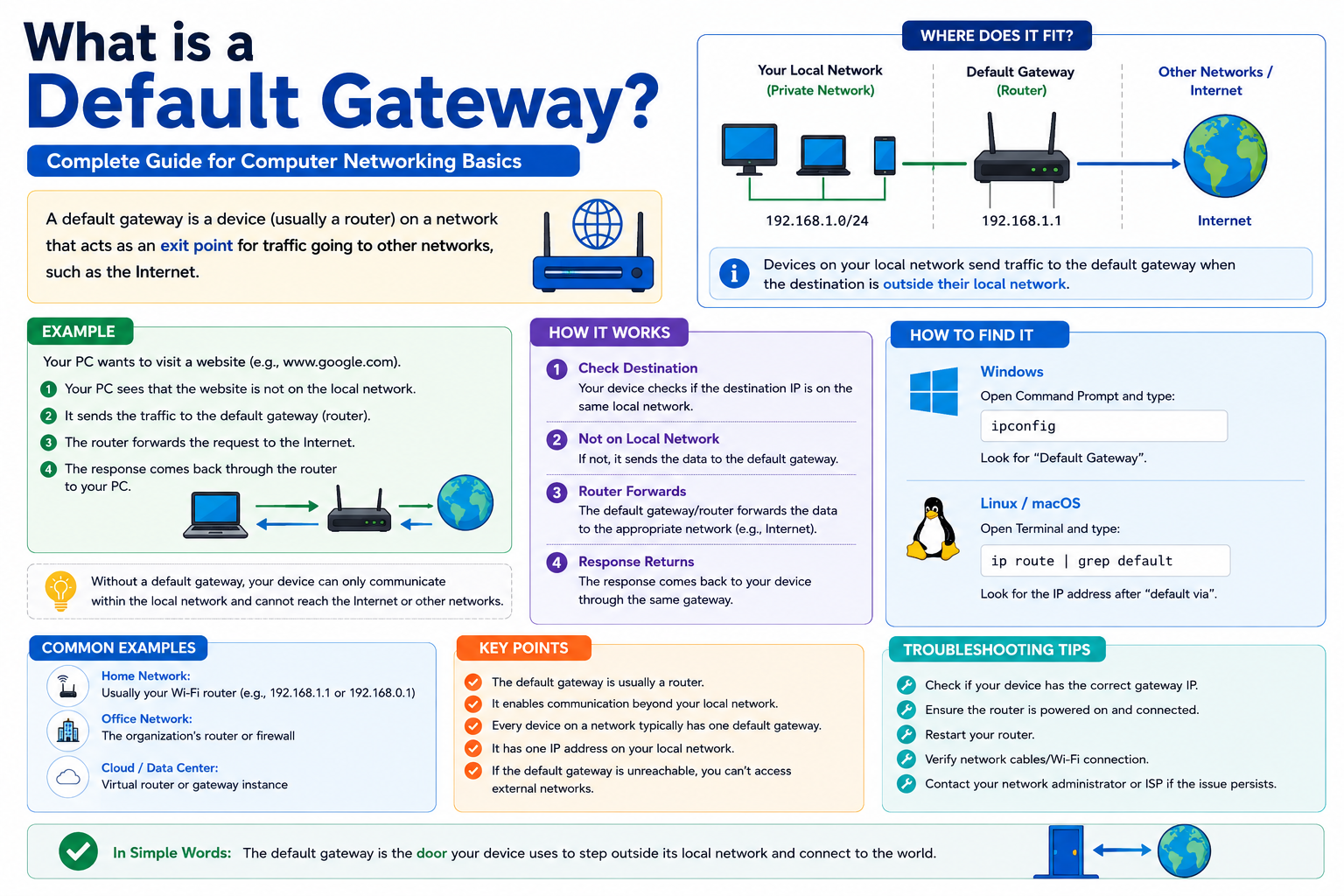
A default gateway is one of the most important components in any computer network, even though most users never directly interact with it. In simple terms, it is the device that allows your computer or smartphone to communicate with networks outside its own local environment. Without it, devices would only be able to talk to others within the same local network, making internet access and external communication impossible.
In most cases, the default gateway is a router or a network device that sits between a local network and other networks, including the internet. When a device does not know where to send data intended for an external destination, it forwards that data to the default gateway. The gateway then takes responsibility for directing the traffic toward its final destination through a process called routing.
This concept is essential for understanding how modern communication systems work. Every time you open a website, stream a video, send an email, or access cloud services, your device relies on a default gateway to move data beyond your local network boundaries. It acts as a central exit point, ensuring that data packets leave your network correctly and reach the right destination across complex interconnected systems.
The Role of Routing in Network Communication
To fully understand the importance of a default gateway, it is necessary to understand the concept of routing. Routing is the process of directing data packets from one network to another until they reach their intended destination. Networks are structured like interconnected paths, and routers act as decision-makers that determine the best route for data to travel.
When a device sends data, it does not simply broadcast it everywhere. Instead, it checks its internal routing table, which contains information about known destinations. If the destination is within the same local network, the data is sent directly. However, if the destination is outside the local network and no specific route is available, the device forwards the packet to the default gateway.
This is where the default gateway becomes essential. It acts as the first hop for any unknown or external destination. Once the gateway receives the data, it examines the destination IP address and determines the next best path. This process continues across multiple routers until the data reaches its final endpoint.
In this way, routing ensures that information does not get lost or stuck within a network. Instead, it flows efficiently across multiple interconnected systems, much like vehicles traveling through highways and intersections guided by road signs and traffic controllers.
Local Networks vs External Networks and the Gateway’s Position
Every device connected to a local network, such as a home Wi-Fi or office LAN, is assigned a unique IP address. This address allows devices within the same network to communicate directly with each other. For example, a printer and a computer in the same office can exchange data without needing to go outside the local network.
However, when communication is required outside this local environment—such as accessing a website hosted on a remote server—the process changes. The device must send the data to a system capable of handling external routing. This is the role of the default gateway.
The default gateway typically holds an IP address within the same local network range but serves a completely different purpose. While a device’s IP identifies it individually on the network, the gateway’s IP represents the exit point to other networks. It is essentially the boundary between the local network and the broader internet or wide area networks.
This separation is critical for organizing network traffic. Without it, devices would have no structured way of knowing where to send external data. The gateway ensures that internal communication stays local while external communication is properly directed through routing systems.
How a Default Gateway Works Step by Step
When a device attempts to send data, it follows a structured process that involves checking its routing table and deciding whether to send the packet locally or externally. If the destination is not recognized within the local network, the device forwards the packet to the default gateway.
Once the gateway receives the packet, it performs several tasks. First, it reads the destination IP address. Then, it consults its own routing table, which contains more advanced routing information than a typical end-user device. Based on this information, the gateway determines the next hop for the packet.
The packet may pass through multiple routers before reaching its destination. Each router repeats the same process, analyzing the destination IP and forwarding the packet accordingly. This chain of decisions continues until the data arrives at the correct server or external device.
On the return journey, the response data follows a similar path back to the original device, often using the same or optimized routes. This bidirectional communication ensures that requests and responses flow smoothly between different networks.
The default gateway is therefore not just an exit point but also an entry point for incoming responses. It plays a continuous role in managing traffic flow, making it a central component in network communication systems.
Configuration and Assignment of Default Gateways
Devices do not automatically determine their default gateway without configuration. Instead, this information is assigned either manually or automatically depending on the network setup.
In manual configuration, a network administrator or user specifies the IP address of the default gateway in the device’s network settings. This approach is often used in smaller or controlled environments where network settings are stable and do not change frequently. It allows precise control over how devices communicate with external networks.
In larger or more dynamic environments, automatic configuration is preferred. This is typically handled by a system that assigns network settings to devices when they connect. In such cases, the default gateway is provided automatically along with other essential network information such as IP address, subnet mask, and DNS settings.
Automatic assignment reduces configuration errors and simplifies network management, especially in environments with many devices. It ensures that all connected devices receive consistent settings without requiring manual intervention.
Regardless of the method used, the correct configuration of the default gateway is essential for ensuring proper network connectivity. Even a small error in its setup can result in a complete loss of access to external networks.
Troubleshooting and Network Connectivity Issues
When network problems occur, the default gateway is often one of the first components to check. If a device cannot communicate with the gateway, it will usually lose access to external networks, including the internet.
One common issue is incorrect gateway configuration. If the gateway IP address is entered incorrectly, the device will not be able to route traffic outside the local network. Another common problem is physical connectivity issues, such as disconnected cables or malfunctioning network hardware.
Network administrators often test connectivity by checking whether the gateway responds to network requests. If the gateway is unreachable, the issue may lie in the router itself or in the connection between the device and the network infrastructure.
In more complex environments, subnet misconfiguration can also cause communication failures. If a device and its gateway are not on the same network segment, data may not be routed correctly. This highlights the importance of consistent and accurate network configuration.
Troubleshooting typically follows a structured approach: verifying IP settings, testing connectivity to the gateway, and then checking external network access. This step-by-step method helps isolate the source of the issue efficiently.
Security and Performance Considerations in Gateway Design
The default gateway is not only responsible for routing traffic but also plays a key role in network security and performance. Since all external communication passes through it, it often becomes a critical point for implementing security measures.
Firewalls are commonly integrated into gateway devices to monitor and control incoming and outgoing traffic. This helps prevent unauthorized access and protects internal networks from external threats. Additionally, gateways may include filtering systems that block malicious traffic or restrict access to certain services.
Conclusion
The default gateway is a fundamental component that enables communication between local networks and external systems. Without it, devices would be limited to interacting only within their immediate network, preventing access to the internet, cloud services, and remote resources. It acts as a bridge between internal devices and the wider digital world, ensuring that data packets are properly routed beyond local boundaries.
By handling traffic that has no specific local route, the default gateway simplifies network communication and allows devices to focus only on local interactions. It takes responsibility for forwarding data to other networks, making complex routing decisions in the background. This process ensures that information travels efficiently across multiple interconnected systems without requiring manual intervention from users.
Understanding how default gateways work also helps in diagnosing network issues, configuring systems correctly, and improving overall connectivity. Whether in a home environment or a large enterprise network, the gateway remains a critical point of control for both traffic flow and security. It not only directs data but also supports protection mechanisms and performance optimization.
In modern networking, the default gateway is more than just a technical setting—it is the foundation that enables seamless communication across the global network infrastructure.