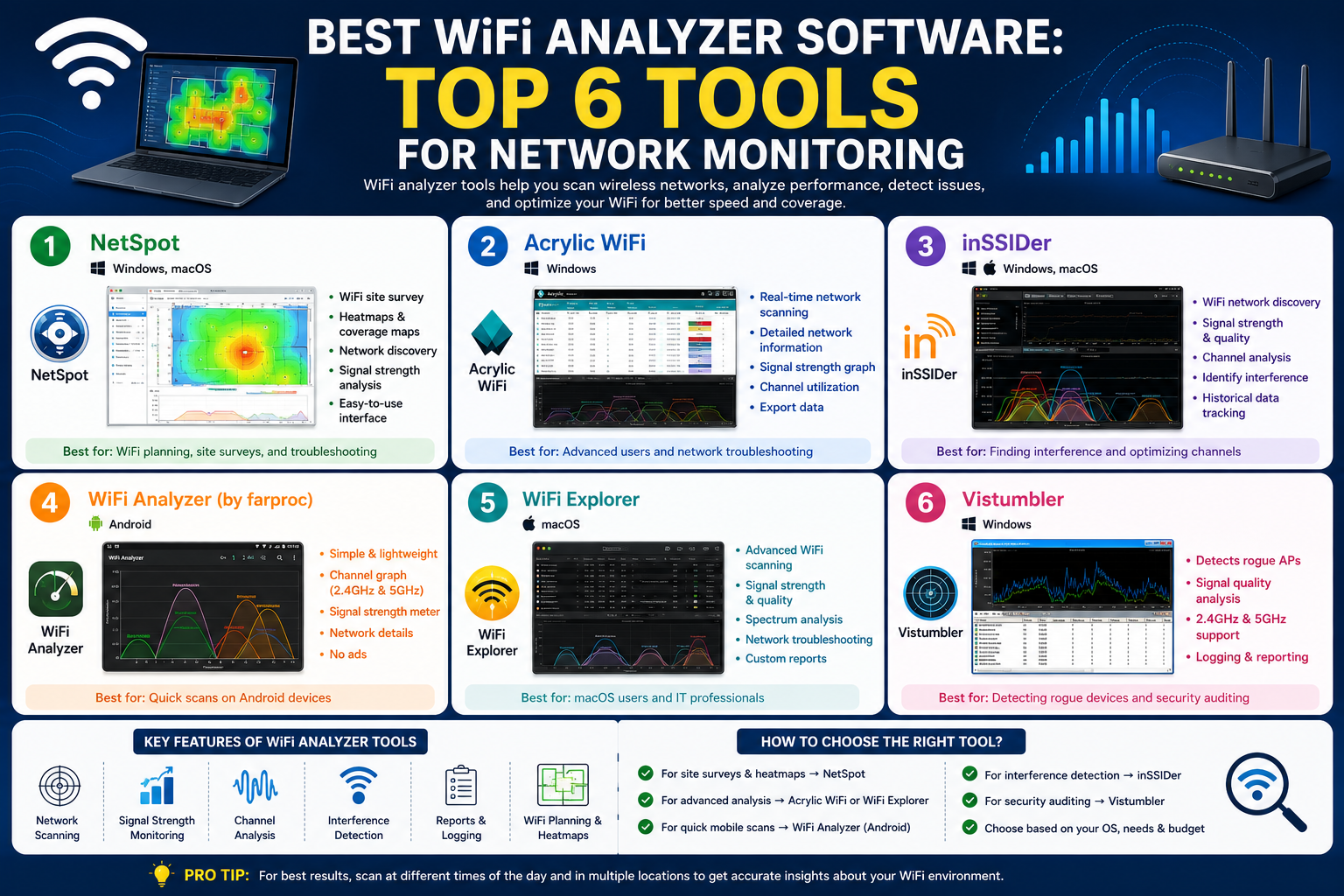
Wireless networks have become an essential part of everyday digital life, supporting everything from personal communication to enterprise-level operations. As homes and workplaces become increasingly dependent on connected devices, maintaining stable and high-performing Wi-Fi has turned into a priority rather than a luxury. However, the complexity of modern wireless environments has also increased significantly. Multiple devices, overlapping signals, and interference from surrounding electronics all contribute to performance issues that are often difficult to diagnose without the right tools.
Wireless analyzer tools play a crucial role in making sense of this complexity. They allow users to observe what is happening behind the scenes of a Wi-Fi network, revealing hidden problems such as channel congestion, weak coverage zones, unauthorized devices, and signal interference. Instead of guessing why a network is slow or unstable, these tools provide real data that helps identify the root cause of issues.
In 2026, wireless analysis has become more advanced, offering everything from simple signal scanning utilities to highly sophisticated spectrum analysis platforms. Some tools focus on packet-level inspection, while others are designed for visualizing coverage across physical spaces. Together, they form a complete toolkit for anyone who wants to understand, optimize, or troubleshoot wireless networks effectively.
Why Wireless Analysis Matters More Than Ever
Modern Wi-Fi networks are no longer simple point-to-point connections. A single home network may now support smartphones, smart TVs, laptops, IoT devices, security cameras, and home automation systems simultaneously. In enterprise environments, the number of connected devices can reach into the thousands. This density creates congestion, where multiple devices compete for limited wireless resources.
One of the most common issues is channel interference. Wi-Fi operates on shared frequency bands, meaning neighboring networks can overlap and degrade performance. Without proper analysis, users may experience slow speeds, frequent disconnections, or inconsistent coverage without understanding the cause.
Wireless analysis also helps identify dead zones within a physical environment. These are areas where signal strength drops significantly due to distance, walls, or structural barriers. In business settings, this can impact productivity, while in homes it leads to frustrating user experiences.
Another important aspect is security. Unauthorized devices or hidden networks can sometimes operate within range, consuming bandwidth or posing security risks. Wireless analysis tools help detect such anomalies, allowing network administrators to take corrective action.
Ultimately, wireless analysis is not just about fixing problems—it is about optimizing performance. By understanding how signals behave in real environments, users can make informed decisions about router placement, channel selection, and network configuration.
Wireshark: Deep Packet-Level Network Insight
Wireshark is one of the most widely recognized tools for network analysis, known for its ability to capture and inspect data packets traveling across a network. It provides an extremely detailed view of network activity, making it especially useful for diagnosing complex issues at the protocol level.
Unlike basic Wi-Fi scanning tools, Wireshark does not focus on signal strength or coverage. Instead, it breaks down network traffic into individual packets, allowing users to examine headers, protocols, and data exchanges between devices. This makes it invaluable for identifying problems such as misconfigured devices, failed connections, or unusual traffic patterns.
However, Wireshark requires a strong understanding of networking concepts. Users must be familiar with protocols like TCP, UDP, DHCP, and ARP to interpret the captured data effectively. Without this knowledge, the raw information can be overwhelming.
One limitation of Wireshark in wireless environments is that its performance depends heavily on the wireless network adapter and operating system. Some systems may not support full packet capture, especially in monitor mode, which is required for capturing all wireless traffic. Despite this, Wireshark remains one of the most powerful tools for deep diagnostic work when used correctly.
It is best suited for advanced users, network engineers, and IT professionals who need detailed insight into how data moves across a wireless network rather than just surface-level performance metrics.
Kismet: Advanced Wireless Discovery and Monitoring
Kismet is a specialized wireless network analysis tool designed primarily for detecting and monitoring Wi-Fi networks. Unlike Wireshark, which focuses on packet inspection, Kismet emphasizes wireless discovery and real-time monitoring of nearby networks and devices.
One of its key strengths is its ability to detect hidden or non-broadcasting networks. These are networks that do not openly advertise their presence but can still be detected through passive monitoring techniques. This makes Kismet particularly useful in environments where network visibility and security are important.
Kismet operates in passive mode, meaning it does not actively transmit signals. Instead, it listens to wireless traffic in the surrounding environment, making it difficult to detect while it collects data. This is useful for security assessments and network audits.
It also supports multiple wireless technologies beyond Wi-Fi, including Bluetooth and other radio frequency signals. This broad detection capability gives it an advantage in complex environments where multiple wireless systems operate simultaneously.
Kismet is often used in Linux-based systems due to better support for wireless monitoring features. It can also be deployed in distributed configurations, where multiple devices collect data and send it to a central system for analysis. This makes it scalable for large environments.
Overall, Kismet is a powerful tool for identifying nearby networks, monitoring wireless activity, and enhancing network visibility in real time.
Acrylic Wi-Fi Heatmaps: Visual Network Planning and Coverage Analysis
Acrylic Wi-Fi Heatmaps focuses on visualizing wireless coverage across physical spaces. Instead of analyzing packets or raw traffic, it helps users understand how Wi-Fi signals behave in real-world environments such as buildings, offices, or large facilities.
The tool works by mapping signal strength onto floor plans. Users can walk through a physical space while collecting signal data, which is then converted into a visual heatmap. These heatmaps show strong and weak signal areas using color gradients, making it easy to identify coverage gaps.
This approach is especially useful for planning new network installations or improving existing ones. By analyzing heatmaps, users can determine optimal router placement and reduce dead zones. It also helps in identifying interference patterns caused by physical structures such as walls, furniture, or electronic equipment.
In addition to coverage mapping, Acrylic Wi-Fi Heatmaps provides network inventory features. This allows users to track access points, monitor hardware distribution, and analyze overall network structure. It is widely used in environments where precise planning and optimization are required.
Its strength lies in its visual approach, making complex wireless data easy to understand even for users without deep technical knowledge.
Acrylic Wi-Fi Analyzer: Real-Time Channel and Interference Detection
The Acrylic Wi-Fi Analyzer complements the heatmap tool by focusing on real-time network monitoring. It provides immediate insights into nearby Wi-Fi networks, including signal strength, channel usage, and security configurations.
One of its most important features is channel analysis. Wi-Fi networks operate on different channels, and when multiple networks use overlapping channels, interference occurs. This tool helps identify which channels are crowded and suggests less congested alternatives.
By switching to a clearer channel, users can significantly improve network performance without changing hardware. This makes it a practical solution for everyday troubleshooting.
It also displays detailed information about nearby networks, helping users understand the wireless environment around them. This includes identifying competing networks that may be affecting performance.
The tool is lightweight and designed for quick diagnostics, making it suitable for both home users and IT professionals who need fast insights into Wi-Fi behavior.
Channelizer 6: Professional Spectrum and Interference Analysis
Channelizer 6 is a high-end wireless analysis tool designed for advanced spectrum monitoring. Unlike traditional Wi-Fi analyzers, it focuses on radio frequency behavior, allowing users to detect interference that does not originate from Wi-Fi networks.
This includes devices such as microwaves, cordless phones, and other electronic equipment that can disrupt wireless signals. By visualizing the entire frequency spectrum, Channelizer 6 helps users identify hidden sources of interference that are otherwise difficult to detect.
It provides detailed graphical representations of channel activity, signal overlap, and RF noise levels. This makes it particularly useful in enterprise environments where network stability is critical.
The tool also supports reporting features, allowing professionals to document findings and present them in structured formats. This is valuable for network audits, troubleshooting reports, and infrastructure planning.
Although highly powerful, it is designed for experienced users due to its complexity and reliance on specialized hardware for full functionality.
Conclusion
Wireless analyzer tools have become essential for maintaining reliable and high-performing Wi-Fi networks in 2026. As wireless environments grow more complex, simple troubleshooting is no longer enough to ensure stable connectivity. Each tool offers a different perspective on network behavior, from packet-level inspection and real-time monitoring to visual heatmaps and spectrum analysis.
Tools like Wireshark provide deep technical insight, while Kismet expands visibility into surrounding networks and hidden devices. Acrylic solutions and NetSpot focus on simplifying network optimization through visual mapping, making them accessible to a broader audience. Meanwhile, Channelizer 6 delivers advanced spectrum analysis for detecting interference beyond traditional Wi-Fi sources.
Choosing the right tool depends on the environment and the level of detail required. Whether managing a home network or a large enterprise system, wireless analysis ensures better performance, improved coverage, and more stable connectivity. In a world increasingly dependent on wireless communication, these tools are no longer optional—they are a fundamental part of modern network management.