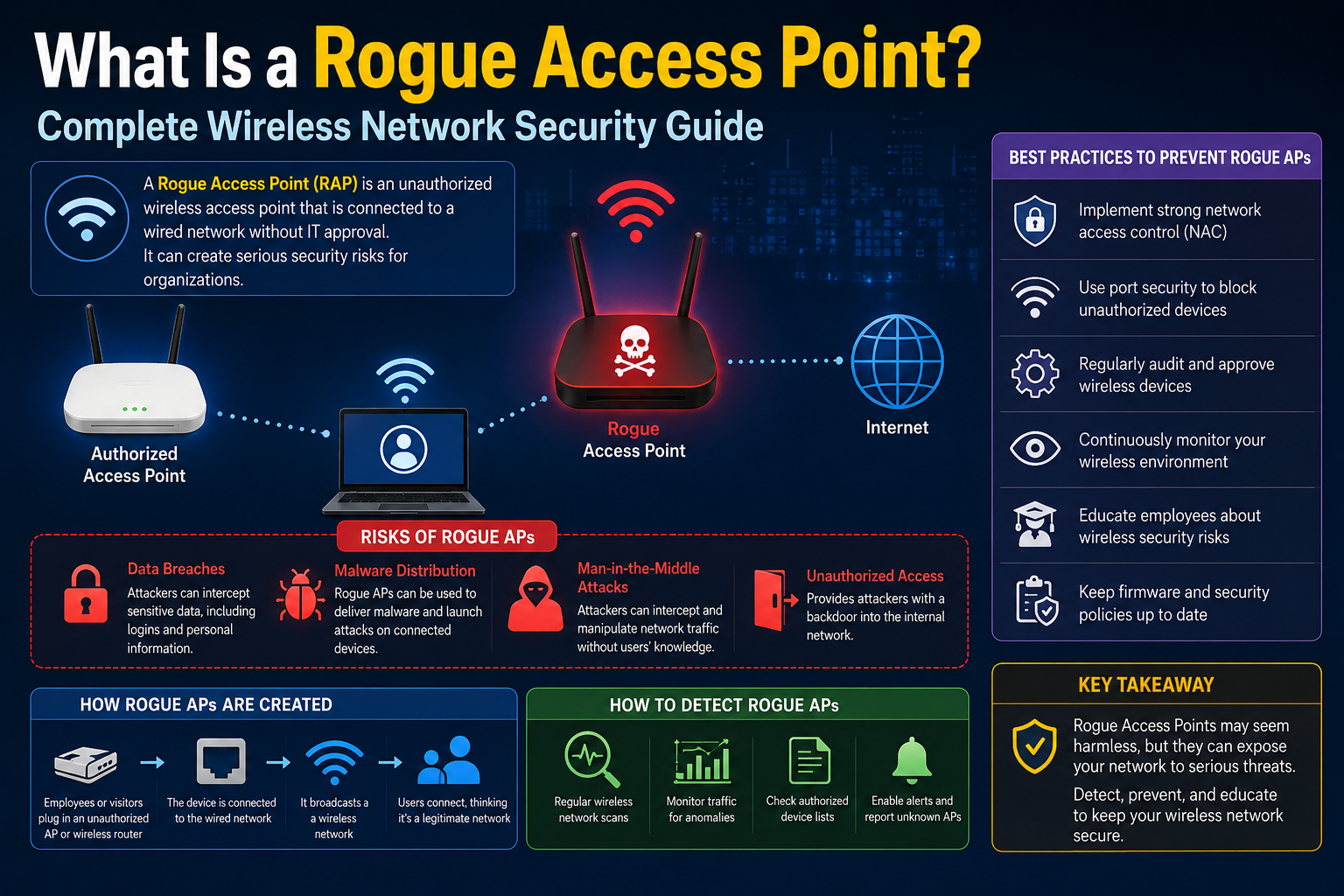
Wireless networking has become a normal part of everyday life. Homes, offices, schools, airports, cafés, shopping centers, and public transportation systems all rely heavily on Wi-Fi connectivity. People expect fast internet access everywhere they go, often connecting to wireless networks without giving much thought to security. While wireless technology provides convenience and flexibility, it also introduces serious security concerns that many people fail to recognize until damage has already been done.
One of the most dangerous wireless security threats is the rogue access point. Despite sounding highly technical, the concept is surprisingly simple. A rogue access point is an unauthorized wireless access point connected to a network or operating near users with the intention of attracting wireless devices. Sometimes these devices are installed accidentally by employees or individuals trying to improve connectivity. In other situations, they are deliberately created by attackers seeking to steal information, monitor traffic, or gain unauthorized access to systems.
Rogue access points are dangerous because they exploit trust. Most users assume that a wireless network with a familiar name is legitimate. They connect automatically, enter passwords, browse websites, log into accounts, and sometimes even perform sensitive financial activities without realizing their traffic may be exposed to someone else. A rogue access point takes advantage of this behavior.
The rise of mobile devices has made the problem even worse. Smartphones, tablets, laptops, smartwatches, and other connected devices constantly search for available wireless networks. Many devices are configured to reconnect automatically to networks they have joined before. Attackers understand this behavior and use it to trick devices into connecting to fake wireless networks without requiring much user interaction.
To understand why rogue access points are such a major problem, it helps to first understand how normal wireless access points function. A standard wireless access point acts as a bridge between wireless devices and a wired network. It allows devices to communicate with local resources and access the internet without requiring physical cables. Businesses often deploy multiple access points throughout buildings to provide strong wireless coverage for employees and visitors.
In secure environments, wireless access points are carefully managed by information technology teams. They are configured with approved security settings, encryption standards, authentication methods, and monitoring systems. Rogue access points bypass this control. They introduce unknown hardware, unverified settings, and untrusted communication paths into the environment.
In some cases, rogue access points are created unintentionally. An employee may bring a personal router from home and connect it to the company network because they believe the official Wi-Fi signal is weak in their office. They may not realize that this unauthorized device creates a security gap. The device may use weak passwords, outdated encryption, or factory-default settings that make it easy for attackers to exploit.
Even though the employee had no malicious intentions, the result is still dangerous. Unauthorized wireless devices can expose internal systems to outsiders, weaken existing security policies, and create hidden entry points into sensitive networks. Organizations often spend large amounts of money securing firewalls, servers, and cloud infrastructure while overlooking a single insecure wireless device plugged into an office wall.
Other rogue access points are intentionally malicious. These are designed specifically to deceive users and intercept communications. Attackers often place these devices in crowded public spaces where people expect free internet access. Coffee shops, hotels, airports, conferences, libraries, and shopping malls are common targets.
An attacker may create a wireless network name that closely resembles a legitimate one. If a café offers a wireless network named “CoffeeHouse_WiFi,” the attacker might create “CoffeeHouse-FreeWiFi” or “CoffeeHouse_Guest.” Many users fail to notice small differences in spelling or formatting. They simply select the network that appears strongest or most convenient.
Once connected, victims may be redirected to fake login pages requesting email addresses, passwords, payment information, or other sensitive data. Some rogue access points are designed solely to collect credentials. Others silently monitor traffic while allowing internet access to continue normally so the victim remains unaware.
This type of attack is often called an evil twin attack. The attacker creates a wireless network that imitates a trusted network so convincingly that users cannot easily distinguish between the legitimate access point and the fake one. In many situations, the attacker positions their rogue device closer to users than the legitimate network, resulting in a stronger signal that devices automatically prefer.
The danger increases when users access websites that do not properly encrypt data. Attackers monitoring unencrypted traffic may capture usernames, passwords, emails, messages, browsing activity, and other private information. Even when websites use encryption, attackers may attempt advanced techniques designed to intercept or manipulate communications.
Many people believe rogue access point attacks only affect large companies or highly technical environments. In reality, anyone using wireless technology can become a target. Students using public Wi-Fi, remote workers connecting from cafés, travelers at airports, and individuals staying in hotels all face potential exposure.
The convenience of wireless networking often encourages risky behavior. Users connect quickly because they need internet access immediately. Few people stop to verify whether a wireless network is authentic. This urgency creates opportunities for attackers.
Rogue access points are also dangerous because they can bypass traditional security tools. Organizations may have strong perimeter defenses, including firewalls and intrusion prevention systems, but a rogue access point inside the network effectively creates a hidden doorway around those protections. Attackers who gain access through unauthorized wireless devices may avoid many of the controls designed to stop external threats.
Another major issue involves visibility. Unlike obvious cyberattacks that disrupt systems or display warning messages, rogue access points often remain hidden. Attackers want victims to continue using the network normally. The longer the rogue access point remains undetected, the more information the attacker may collect.
Modern attackers frequently use small portable devices that are difficult to notice. Some rogue access points are small enough to fit into a backpack, jacket pocket, or briefcase. Others can be disguised as ordinary electronic equipment. An attacker may sit quietly in a public area while nearby devices unknowingly connect to their equipment.
Wireless security has become more complex because modern environments contain so many devices. Offices no longer consist only of desktop computers connected by cables. Today’s workplaces include smartphones, tablets, printers, cameras, conference systems, smart televisions, and Internet of Things devices. Every additional wireless device creates another possible attack surface.
Organizations face significant challenges when attempting to identify rogue access points. Large buildings may contain hundreds of legitimate wireless devices operating simultaneously. Distinguishing approved equipment from unauthorized devices requires constant monitoring and strong network management practices.
Network administrators often use wireless intrusion detection systems to identify suspicious activity. These systems monitor the wireless environment, detect unfamiliar devices, and alert security teams to potential threats. Some advanced solutions can even attempt to block or isolate rogue access points automatically.
Despite these technologies, human behavior remains one of the biggest challenges. Employees may ignore security policies for convenience. Someone frustrated with weak wireless coverage might install an inexpensive consumer router without understanding the consequences. In other cases, staff members may accidentally connect to suspicious networks while traveling or working remotely.
Attackers understand that people often trust familiar names more than they trust technical security indicators. Many users never inspect security certificates, encryption methods, or connection warnings carefully. They assume that if a network appears familiar, it must be safe.
Public environments create particularly favorable conditions for rogue access point attacks. In crowded locations, people expect to see multiple wireless networks available. They may assume that unfamiliar names belong to nearby businesses or guest services. Attackers take advantage of this confusion.
Travelers are especially vulnerable because they frequently connect to temporary networks. Someone arriving at a hotel after a long trip may quickly join a wireless network without verifying its legitimacy. An attacker operating nearby can exploit this moment of distraction.
The financial consequences of rogue access point attacks can be severe. Stolen credentials may lead to unauthorized purchases, banking fraud, identity theft, or compromised business accounts. For organizations, a single successful attack can expose confidential customer data, intellectual property, internal communications, and financial information.
Reputation damage can be equally harmful. Customers expect organizations to protect sensitive information. If a data breach occurs because of weak wireless security practices, trust may be difficult to rebuild. Even small businesses can face legal, operational, and financial challenges after a security incident.
Healthcare organizations, financial institutions, government agencies, and educational institutions face particularly high risks because they manage sensitive information. However, smaller organizations should not assume they are safe simply because they are less visible. Attackers often target smaller businesses because they typically have weaker security controls.
Home users are also exposed to rogue access point threats. Some attackers create fake networks in apartment complexes or neighborhoods where many wireless devices are active. Smart home devices, personal computers, phones, and streaming equipment may all become targets if users connect to unsafe networks.
One reason rogue access points remain effective is that wireless technology itself is invisible. Users cannot physically see where their data travels. With wired networks, connections are more controlled and visible. Wireless communications spread through the air, making interception easier for attackers within range.
Another concern involves automatic device behavior. Many smartphones and laptops automatically reconnect to previously used wireless networks. Attackers can exploit this by creating networks with names matching popular public hotspots. Devices searching for known networks may connect automatically without the user realizing it.
Cybercriminals constantly refine their techniques. Modern rogue access point attacks may involve advanced social engineering tactics designed to increase credibility. Attackers may create fake login portals that closely resemble real websites or use professional-looking branding to convince users the network is legitimate.
Some attacks focus on collecting login credentials for cloud services, email accounts, or corporate systems. Others distribute malware to connected devices. Once malware is installed, attackers may gain long-term access to sensitive information even after the victim disconnects from the rogue network.
Wireless attacks can also support larger cybercrime operations. Stolen credentials collected through rogue access points may later be used in phishing campaigns, ransomware attacks, or account takeover attempts. A seemingly simple fake Wi-Fi network can therefore become the starting point for much more serious incidents.
Awareness is one of the most important defenses against rogue access point threats. Many successful attacks occur because users simply do not realize the danger exists. People are more cautious about suspicious emails or unexpected phone calls today than they were years ago, but wireless threats often receive less attention.
Understanding how rogue access points operate helps users make safer decisions. Being cautious about unfamiliar networks, verifying legitimate wireless names with staff, and avoiding sensitive activities on public Wi-Fi can significantly reduce risk.
Organizations must also build strong security cultures. Employees should understand why unauthorized wireless devices are dangerous and how attackers exploit wireless networks. Security policies are more effective when users understand the reasoning behind them instead of viewing them as inconvenient restrictions.
Technology alone cannot eliminate the threat. Effective protection requires a combination of secure infrastructure, employee education, monitoring systems, and careful user behavior. As wireless technology continues expanding into every aspect of daily life, rogue access points will remain an important cybersecurity concern.
The growing popularity of remote work has introduced additional complications. Employees now connect from homes, shared workspaces, cafés, hotels, and airports far more frequently than in the past. Organizations no longer control the environments where many workers access company systems. This expanded attack surface creates more opportunities for rogue access point attacks.
Remote workers may unknowingly connect to unsafe wireless networks while handling sensitive corporate information. If attackers intercept authentication credentials or session data, they may gain access to company systems without needing to breach the organization directly.
Attackers often rely on patience rather than speed. A rogue access point may operate for hours or days while collecting information from unsuspecting victims. Unlike dramatic cyberattacks that immediately disrupt operations, these attacks are frequently quiet and difficult to detect.
As wireless networking continues evolving, the importance of securing wireless communications will only increase. Businesses, public institutions, and individual users must recognize that convenience should never outweigh security awareness. Rogue access points demonstrate how easily trust can be manipulated when people assume every wireless network is safe.
How Rogue Access Point Attacks Work and Why They Are Difficult to Detect
Rogue access point attacks succeed because they take advantage of ordinary behavior. Most people use wireless networks every day without thinking carefully about the process behind the connection. A user opens a device, sees available Wi-Fi names, selects one, and expects internet access to work immediately. This simple routine creates opportunities for attackers who understand how wireless communication functions.
To fully appreciate the danger of rogue access point attacks, it is important to understand the mechanics behind them. Attackers do not always rely on highly advanced hacking techniques. In many situations, they succeed by exploiting convenience, trust, distraction, and poor security habits.
A wireless access point is designed to broadcast a network name called an SSID, or Service Set Identifier. Devices searching for internet connectivity display these names so users can select the desired network. Legitimate organizations often use recognizable SSIDs that customers and employees trust.
Attackers imitate this process by creating fake access points that advertise similar or identical SSIDs. If users connect to the fake network instead of the real one, the attacker gains control over the connection path between the user and the internet.
One of the simplest rogue access point attacks involves creating an open wireless network with a familiar name. Public locations commonly offer free internet access without passwords, making it easy for attackers to imitate these environments. Many users connect automatically without verifying whether the network is authentic.
In more advanced scenarios, attackers replicate the legitimate network’s security settings, login pages, and appearance. Victims may believe they are connecting normally while all of their activity passes through the attacker’s equipment.
A common attack method involves the use of portable wireless hardware combined with software capable of broadcasting customized network names. The equipment required for these attacks is often inexpensive and widely available. Attackers do not necessarily need sophisticated infrastructure or large financial resources.
Some attackers position themselves physically close to targets in order to provide a stronger wireless signal than the legitimate access point. Wireless devices typically connect to the signal that appears strongest and most stable. If the rogue device broadcasts a stronger signal, nearby devices may prefer it automatically.
This process becomes even more effective in crowded locations where many wireless signals compete for attention. Users may not notice subtle differences in network names or may assume multiple similar names belong to the same organization.
Another attack technique involves forcing devices to disconnect temporarily from legitimate networks. Once disconnected, devices search for available wireless connections and may reconnect to the attacker’s rogue access point instead. This tactic increases the likelihood that users will join the malicious network without realizing anything unusual occurred.
Attackers often create fake captive portals to support these attacks. A captive portal is the login or acceptance page users commonly see when joining public Wi-Fi networks. Legitimate businesses use these portals to display terms of service, request passwords, or collect basic user information.
Rogue access points imitate these pages convincingly. Victims may be asked to enter email addresses, social media credentials, corporate login details, or payment information. Because the page resembles a normal Wi-Fi login screen, many users comply without suspicion.
Some rogue access point attacks focus entirely on credential harvesting. The attacker may not even provide functional internet access after collecting the victim’s information. Other attacks are designed to maintain connectivity so the victim continues using the network normally while surveillance occurs in the background.
Man-in-the-middle attacks are particularly dangerous in wireless environments. In this scenario, the attacker positions themselves between the victim and the intended destination. Instead of communicating directly with a website or service, the victim unknowingly sends information through the attacker’s system first.
This arrangement allows attackers to observe, intercept, and sometimes modify communications. Depending on the security protections in place, attackers may capture usernames, passwords, messages, browsing activity, or session information.
Even encrypted communications can become targets under certain circumstances. Attackers may attempt to downgrade security connections, present fake certificates, or exploit user inattention to browser warnings. Many users click through security alerts without fully understanding their meaning.
Wireless attacks often succeed because modern devices prioritize convenience. Smartphones and laptops are designed to reconnect automatically to previously trusted networks. While convenient, this behavior creates opportunities for attackers to impersonate known wireless environments.
For example, if a user previously connected to a public network named “Airport_Free_WiFi,” their device may automatically search for that network in the future. An attacker broadcasting the same SSID can potentially attract the device without requiring manual approval.
Some attackers use specialized tools to monitor wireless traffic and identify preferred network names stored on nearby devices. Once identified, the attacker creates matching networks to trigger automatic connections.
Corporate environments face unique risks from rogue access points. Businesses often rely on wireless connectivity for internal communications, cloud access, collaboration tools, and operational systems. A rogue access point connected inside the network perimeter may bypass important security layers.
Unauthorized wireless devices installed by employees create particularly challenging situations. These devices may appear harmless because they are not intentionally malicious, yet they still expose the organization to risk. Consumer-grade routers often lack enterprise-level security protections and may use outdated firmware or weak passwords.
Employees sometimes install personal access points because they want stronger wireless coverage or wish to connect personal devices that are blocked by company policies. Unfortunately, these shortcuts can create hidden vulnerabilities that attackers exploit.
Security teams must therefore address both accidental and deliberate rogue access points. This requires continuous monitoring of the wireless environment and careful management of approved devices.
Wireless intrusion detection systems play a critical role in identifying suspicious activity. These systems scan the radio environment for unfamiliar access points, unusual signal patterns, unauthorized devices, and potentially malicious behavior.
When suspicious wireless devices appear, security teams can investigate whether they belong to legitimate operations or represent possible threats. Some advanced systems also support containment features designed to disrupt unauthorized wireless communications.
However, detection is not always easy. Modern environments contain many wireless devices operating simultaneously. Apartment buildings, office towers, conference centers, and campuses may contain hundreds of overlapping wireless signals.
Attackers sometimes configure rogue access points to operate quietly or intermittently in order to avoid detection. Instead of broadcasting continuously, the device may activate only during specific periods or when target devices appear nearby.
Portable rogue access points are especially difficult to track because attackers can move frequently. A malicious actor may spend only a short time in one location before relocating. By the time suspicious activity is identified, the attacker may already be gone.
Attackers also benefit from user assumptions. Many people believe wireless attacks require highly technical expertise or sophisticated criminal organizations. In reality, some rogue access point attacks can be carried out using relatively simple tools and publicly available software.
This accessibility lowers the barrier for cybercriminal activity. Individuals with limited technical knowledge can still launch harmful attacks using online tutorials, automated software, and inexpensive hardware.
The hospitality industry faces ongoing challenges with rogue access points because guests expect convenient wireless access. Hotels often operate multiple wireless networks for guest rooms, conference facilities, restaurants, and business centers. Attackers exploit this complexity by creating fake networks with convincing names.
Travelers are often tired, distracted, or unfamiliar with the environment, making them easier targets. Someone checking into a hotel late at night may quickly connect to the first network that appears related to the property.
Airports represent another common attack location. Large crowds, frequent travelers, and constant demand for connectivity create ideal conditions for rogue access point attacks. Attackers know that people waiting for flights often use public Wi-Fi to access email, banking apps, and work systems.
Educational institutions also face substantial wireless security challenges. Universities and schools support large numbers of students, visitors, faculty, and personal devices. Open environments and decentralized technology usage make it harder to identify unauthorized wireless activity.
Coffee shops and restaurants remain popular targets because customers routinely expect free internet access. Attackers may position themselves nearby and create fake networks designed to blend naturally into the environment.
Some rogue access point attacks focus on malware distribution rather than credential theft. Once victims connect, attackers may redirect them to malicious websites or exploit software vulnerabilities on connected devices.
Outdated devices are especially vulnerable. Older operating systems, unsupported applications, and delayed security updates increase the risk of compromise. Attackers actively search for devices with weak protections.
The Internet of Things has expanded the wireless attack surface dramatically. Smart televisions, security cameras, printers, thermostats, and connected appliances often rely on wireless connectivity but may lack strong security features.
Some IoT devices automatically trust wireless environments or use weak authentication mechanisms. If connected through rogue access points, they may expose sensitive information or provide attackers with additional network access.
Another challenge involves user fatigue. Modern users encounter constant security warnings, notifications, password requests, and permission prompts. Over time, many people begin ignoring these messages automatically.
Attackers exploit this behavior by presenting fake security prompts or misleading connection requests. Victims may approve suspicious activity simply because they are accustomed to clicking quickly through notifications.
Organizations increasingly adopt zero-trust security models to reduce reliance on network trust alone. Instead of assuming devices connected to the internal network are safe, zero-trust approaches continuously verify identities, permissions, and behaviors.
While these strategies improve security, they do not eliminate rogue access point threats entirely. Attackers continue adapting their methods to target human behavior and weak device configurations.
Awareness training remains essential because employees and users serve as the first line of defense. People who understand how rogue access point attacks work are more likely to recognize suspicious networks, verify connections, and avoid risky behavior.
Security professionals often recommend avoiding sensitive activities on public Wi-Fi whenever possible. Banking transactions, confidential business work, and account management activities are safer on trusted private networks.
Using encrypted communication methods significantly reduces exposure. Websites protected with secure encryption protocols help protect transmitted data from interception. Virtual private networks add another layer of protection by encrypting internet traffic between the user and a trusted endpoint.
Still, no single technology provides perfect protection. Effective wireless security requires layered defenses that combine secure infrastructure, user education, device management, monitoring systems, and cautious online behavior.
The difficulty of detecting rogue access point attacks lies partly in their subtlety. Victims often experience normal internet access while attackers quietly collect information in the background. There may be no obvious warning signs.
This invisibility makes prevention especially important. Once sensitive information has been intercepted or stolen, the damage may already be extensive. Account compromise, identity theft, data breaches, and malware infections can all result from a single unsafe wireless connection.
Wireless networking will continue expanding as society becomes increasingly connected. Smart cities, remote work, cloud computing, and mobile technology all depend heavily on wireless communication. As this dependence grows, attackers will continue targeting wireless environments because they offer convenient opportunities for exploitation.
Understanding the methods behind rogue access point attacks helps users recognize that wireless convenience must always be balanced with security awareness. Every wireless connection represents a trust decision, and attackers constantly search for opportunities to exploit careless or uninformed behavior.
Preventing Rogue Access Point Attacks Through Smarter Security Practices and User Awareness
Preventing rogue access point attacks requires more than simply installing security software or changing a few device settings. Effective protection depends on a combination of awareness, planning, monitoring, and disciplined behavior. Since rogue access point attacks target both technology and human trust, defenses must address both areas equally.
Wireless networking has become deeply integrated into modern life. People expect constant connectivity whether they are at work, traveling, shopping, studying, or relaxing at home. This expectation often leads users to prioritize convenience over caution. Attackers understand this mindset and design their strategies around it.
One of the most important steps in preventing rogue access point attacks is learning how to identify suspicious wireless behavior. Many attacks succeed because users fail to recognize warning signs. Small details that seem unimportant can sometimes reveal dangerous networks.
Unexpected duplicate Wi-Fi names are one example. If multiple wireless networks appear with nearly identical names, users should pause before connecting. Attackers frequently imitate legitimate networks by making minor changes to spelling, capitalization, or punctuation.
Signal strength can also provide clues. A suspiciously strong signal in an unusual location may indicate a nearby rogue access point. While strong signals alone do not prove malicious activity, unusual wireless behavior should encourage caution.
Users should verify legitimate network names whenever possible. In public locations such as hotels, cafés, airports, or conference centers, staff members can usually confirm the correct wireless network details. Taking a few extra seconds to verify the information can prevent major security problems later.
Automatic wireless connections represent another major security concern. Many devices are configured to reconnect automatically to previously used networks. Although convenient, this feature can expose users to impersonation attacks.
Disabling automatic connection features for public or unknown networks reduces risk significantly. When devices require manual approval before joining a wireless network, users have more control over their connections.
Device management is equally important. Smartphones, tablets, laptops, and other wireless devices should always receive regular software updates. Security patches help close vulnerabilities that attackers may attempt to exploit through rogue access points.
Outdated operating systems and applications remain common targets because they often contain known weaknesses. Attackers prefer vulnerable devices because they require less effort to compromise.
Strong encryption plays a critical role in protecting wireless communications. Secure websites that use encryption protocols help prevent attackers from reading intercepted traffic. Modern browsers typically display indicators showing whether a connection is encrypted.
Users should pay close attention to browser warnings related to certificates or unsafe connections. Ignoring these alerts increases the likelihood of successful man-in-the-middle attacks.
Virtual private networks provide another valuable layer of defense. A VPN creates an encrypted communication tunnel between the user and a trusted server. Even if someone intercepts the wireless traffic, the encrypted data remains difficult to read.
VPNs are especially useful when using public wireless networks. Travelers, remote workers, and students frequently rely on public internet access while handling sensitive information. Encrypting traffic reduces exposure to interception.
However, VPNs are not magical solutions. Users must still choose trusted VPN providers, maintain updated software, and avoid suspicious networks whenever possible. Security works best when multiple protective measures operate together.
Organizations face additional challenges because they must protect large numbers of users and devices simultaneously. Businesses need clear wireless security policies that define acceptable behavior and explain why unauthorized access points are dangerous.
Employees sometimes create security risks unintentionally because they prioritize convenience or productivity. Someone frustrated by poor wireless coverage may install a personal router without understanding the consequences. Effective training helps employees recognize how seemingly harmless actions can create serious vulnerabilities.
Security awareness programs should explain how rogue access point attacks work in realistic terms rather than relying only on technical language. Employees are more likely to follow policies when they understand the actual risks involved.
Organizations should also maintain accurate inventories of authorized wireless devices. Knowing which access points belong to the organization makes it easier to identify suspicious or unfamiliar equipment.
Regular wireless audits are essential. Security teams should scan for unauthorized access points, monitor wireless traffic patterns, and investigate unusual activity promptly. Rogue devices often remain undetected because organizations assume their existing infrastructure is secure.
Network segmentation provides another valuable defense strategy. Instead of allowing unrestricted communication across the entire network, segmentation divides systems into separate zones with controlled access rules.
If attackers gain access through a rogue access point, segmentation can limit their ability to move throughout the network. Sensitive systems remain isolated from less secure environments.
Strong authentication methods also improve protection. Weak passwords remain one of the most common security problems in wireless environments. Organizations should require complex credentials and avoid default passwords on wireless equipment.
Multi-factor authentication adds another important layer of security. Even if attackers steal usernames and passwords through rogue access point attacks, additional verification steps can help prevent unauthorized account access.
Wireless intrusion detection and prevention systems have become increasingly important in modern environments. These technologies monitor wireless activity continuously and alert security teams to suspicious behavior.
Advanced systems can identify rogue access points, unusual signal activity, unauthorized devices, and attempted impersonation attacks. Some solutions also support automatic containment measures designed to isolate malicious wireless devices.
Despite technological improvements, attackers continue adapting their methods. This ongoing competition between attackers and defenders means organizations cannot rely solely on automated tools.
Physical security also matters more than many people realize. Attackers sometimes place rogue access points directly inside buildings by plugging small devices into unused network ports. Restricting physical access to networking infrastructure helps reduce this risk.
Unused network ports should be disabled whenever possible. Organizations should also monitor conference rooms, public areas, and shared spaces where unauthorized devices might be connected discreetly.
Remote work environments create additional security complications. Employees now access company systems from homes, hotels, airports, cafés, and coworking spaces regularly. Organizations cannot fully control these environments, making user awareness especially important.
Remote workers should avoid conducting sensitive business activities on unfamiliar wireless networks whenever possible. Mobile hotspots and trusted personal networks often provide safer alternatives than public Wi-Fi.
Home wireless security deserves attention as well. Many people assume rogue access point attacks occur only in public spaces or large organizations, but home users remain vulnerable.
Attackers may create fake wireless networks in apartment complexes or residential neighborhoods where many devices search for internet connectivity. Home users should secure their routers properly, change default passwords, and use strong encryption settings.
Modern smart homes introduce additional complexity. Connected cameras, smart speakers, televisions, thermostats, and appliances often rely on wireless communication. Weakly secured IoT devices can become entry points for attackers.
Manufacturers do not always prioritize security equally across consumer products. Users should research device security features carefully and apply updates whenever available.
One of the most effective long-term defenses against rogue access point attacks is cultivating cautious digital habits. Cybersecurity is not just about technology; it is also about decision-making.
Users should become comfortable questioning unexpected connection requests, unfamiliar login pages, and unusual network behavior. Taking a moment to verify information is far safer than assuming every wireless connection is trustworthy.
Attackers often rely on urgency and distraction. Busy environments encourage rushed decisions. Travelers hurrying through airports, professionals joining meetings, and students working in crowded spaces may connect quickly without verifying network legitimacy.
Building awareness helps counteract this pressure. People who understand the risks are more likely to slow down and evaluate wireless connections carefully.
Another important practice involves limiting sensitive activity on public networks. Banking transactions, confidential business work, healthcare information access, and account management tasks are safer on trusted private networks.
If sensitive activity must occur on public Wi-Fi, users should ensure encryption tools are active and avoid saving credentials automatically on shared devices.
Cybercriminals continuously refine social engineering techniques to support rogue access point attacks. Fake login pages, convincing branding, and realistic network names make malicious networks appear legitimate.
This means users cannot rely solely on appearance when evaluating wireless connections. A professional-looking login page does not guarantee safety.
Organizations should prepare incident response plans specifically addressing wireless security threats. If rogue access points are discovered, security teams need clear procedures for investigation, containment, and recovery.
Rapid response helps minimize potential damage. Delayed detection allows attackers more time to collect data or expand access within the environment.
Wireless security standards continue evolving as technology changes. New encryption methods and authentication protocols improve protection, but organizations and individuals must adopt them consistently.
Older wireless security protocols contain weaknesses that attackers may exploit. Upgrading outdated equipment and replacing unsupported devices improves overall security posture.
Education remains one of the strongest defenses against wireless threats. Technology can reduce risk, but informed users are far less likely to become victims.
Schools, businesses, and public institutions should encourage practical cybersecurity awareness rather than relying entirely on technical safeguards. Simple habits such as verifying networks, updating devices, and avoiding risky behavior can prevent many attacks.
Rogue access points demonstrate how cyber threats often succeed by exploiting ordinary routines. People connect to wireless networks so frequently that the process becomes automatic. Attackers take advantage of this familiarity.
As wireless technology continues expanding into every aspect of life, awareness of wireless security threats becomes increasingly important. Smart cities, connected transportation systems, healthcare technologies, and remote work environments all depend heavily on wireless communication.
This dependence means wireless security is no longer a niche technical concern. It affects individuals, businesses, governments, and entire communities.
The future will likely bring even more connected devices and more sophisticated attack techniques. Artificial intelligence, automation, and advanced wireless technologies may improve convenience while also creating new security challenges.
Defending against rogue access point attacks therefore requires ongoing attention rather than one-time solutions. Security practices must evolve alongside technology and attacker behavior.
Ultimately, the strongest defense combines secure technology with informed decision-making. Users who understand the risks associated with wireless networking are better prepared to recognize suspicious activity and avoid dangerous connections.
Wireless technology has transformed the way people communicate, work, shop, study, and access information. From corporate offices and hospitals to airports and cafés, wireless connectivity now supports countless daily activities. Most users rarely stop to think about the security of the wireless networks around them because Wi-Fi has become such a routine part of life. Yet this growing dependence on wireless communication has also created a massive opportunity for cybercriminals.
Rogue access point attacks succeed when trust is misplaced. By approaching wireless connectivity with greater awareness and caution, individuals and organizations can significantly reduce the likelihood of becoming victims while continuing to benefit from the convenience of modern wireless communication.
Conclusion
Rogue access points represent one of the most underestimated threats in modern cybersecurity because they exploit something that has become deeply embedded in everyday life: trust in wireless connectivity. As people increasingly rely on Wi-Fi for communication, work, entertainment, education, and financial transactions, the line between safe and unsafe networks has become harder to distinguish. This makes understanding and awareness essential rather than optional.
The key lesson from examining rogue access points is that security risks are not always visible or disruptive. Unlike traditional cyberattacks that may immediately show warning signs such as system crashes or obvious malware behavior, rogue access point attacks often operate silently in the background. Users may continue browsing, logging in, and sharing information without realizing that their data is being observed or intercepted.
This hidden nature is what makes these attacks particularly dangerous. Attackers do not need to break through complex technical defenses when they can simply position themselves between a user and a legitimate network. By imitating trusted wireless environments or creating stronger signals, they can manipulate devices into connecting automatically, turning everyday convenience into a security vulnerability.
Another important insight is that rogue access point threats do not affect only large organizations or specialized systems. They impact individuals, small businesses, educational institutions, healthcare providers, and government environments alike. Anywhere wireless connectivity exists, there is potential exposure. The widespread use of mobile devices, remote work setups, and public Wi-Fi has expanded this risk even further.
However, despite the seriousness of these threats, effective protection is achievable. Awareness remains one of the strongest defenses. Users who understand how rogue access points operate are far more likely to question unfamiliar networks, verify connection details, and avoid risky behavior. Small actions, such as confirming Wi-Fi names with trusted sources or avoiding sensitive activities on unknown networks, can significantly reduce exposure.
Organizations also play a critical role in reducing risk. Strong wireless security policies, proper network monitoring, employee education, and regular security assessments all contribute to a safer environment. Equally important is ensuring that employees understand why these measures exist, as informed individuals are more likely to follow secure practices consistently.