Remote access technology has transformed the way people interact with computers. In the past, managing a computer required sitting directly in front of it. As networks became more advanced and organizations expanded their digital infrastructure, the need for remote administration and remote support grew rapidly. Businesses needed a reliable way for technicians to access distant machines, troubleshoot problems, transfer information, and manage systems without physically traveling to another location. This demand eventually led to the development of remote desktop technologies, including Virtual Network Computing, commonly known as VNC.
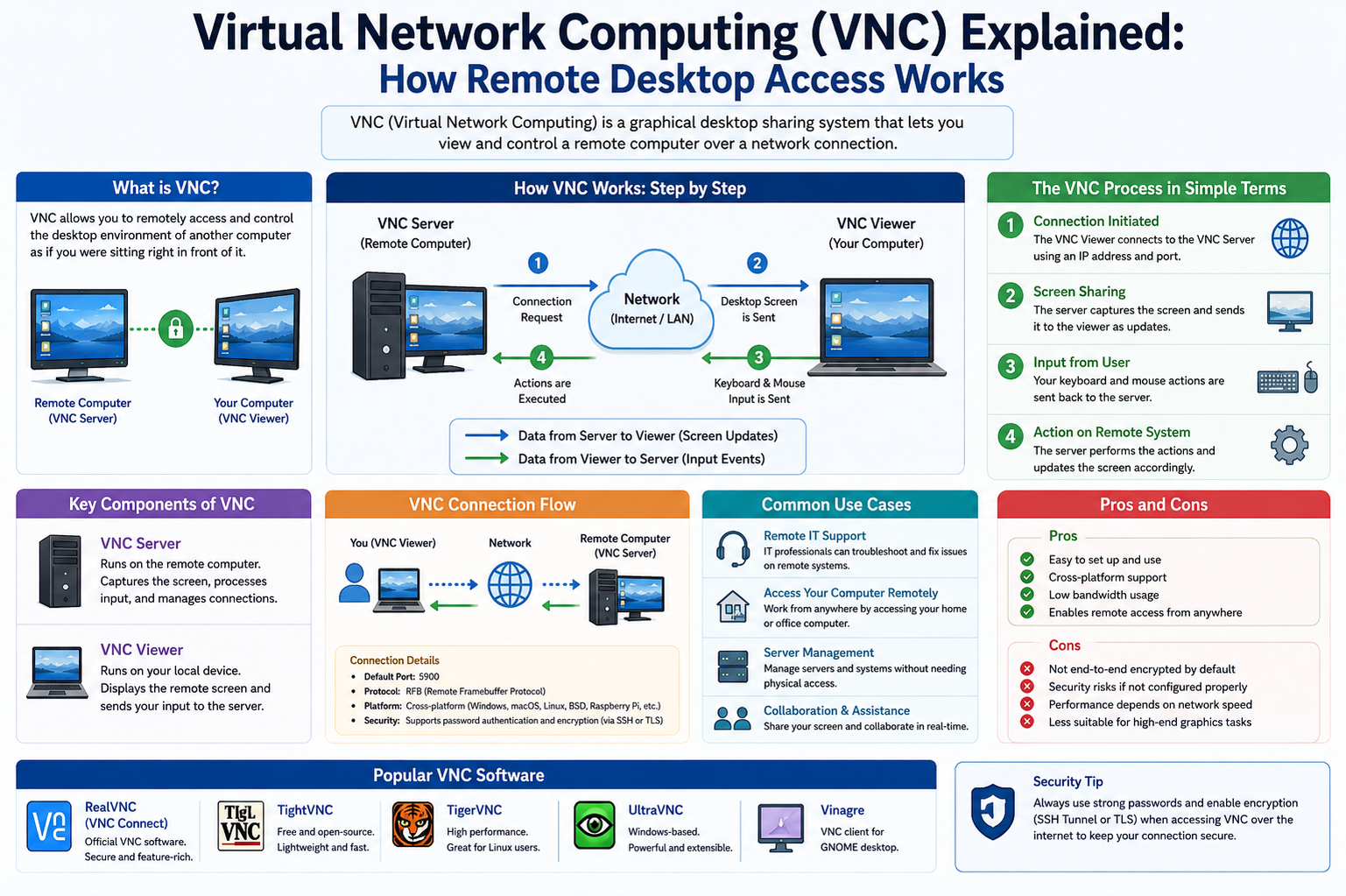
Virtual Network Computing is a graphical desktop-sharing system that allows one computer to remotely control another computer over a network connection. Using VNC, users can view the screen of a remote machine and interact with it as though they were physically present at the device. Mouse movements, keyboard actions, and screen updates are transmitted between systems in real time, creating an interactive remote experience.
One of the most important aspects of VNC is its platform independence. Unlike some remote desktop technologies that are tied to a single operating system, VNC works across multiple platforms. A user on a Linux system can control a Windows computer, while a macOS device can connect to a Linux server. This flexibility made VNC particularly valuable in mixed computing environments where organizations used different operating systems for different purposes.
The origins of VNC date back to research work conducted at the Olivetti and Oracle Research Laboratory in the late 1990s. The developers aimed to create a universal remote desktop solution that could operate across different devices and systems. Instead of building a technology limited to a single platform, they created a protocol-based system built on the Remote Frame Buffer standard, often referred to as RFB.
The RFB protocol became the backbone of VNC communication. Rather than sending commands or application-level instructions, the protocol transmits graphical screen data from the server to the client. This means the remote user sees the actual graphical interface of the target computer. At the same time, the client sends mouse and keyboard input back to the server, allowing complete interaction with the remote desktop.
The simplicity of the RFB protocol contributed greatly to the popularity of VNC. Developers could extend the protocol with additional features while maintaining compatibility with other implementations. As a result, multiple VNC variants emerged over the years, each offering different capabilities and performance improvements.
Despite the existence of many remote desktop solutions today, VNC remains widely recognized because of its straightforward design and broad compatibility. It is used in homes, businesses, educational institutions, research facilities, and data centers around the world.
To better understand how VNC functions, it helps to examine its basic architecture. VNC operates using a client-server model. The remote machine runs VNC server software, while the user’s device runs VNC viewer or client software. When a connection is established, the server captures its desktop display and transmits the graphical data to the viewer.
The viewer interprets the transmitted data and displays the remote desktop on the local screen. Any actions performed by the user, such as clicking the mouse or typing on the keyboard, are sent back to the server. The server processes these actions as though someone were physically using the remote computer.
This exchange creates the illusion of direct interaction with the remote system. Whether the devices are located in separate offices, different cities, or even different countries, the experience can feel remarkably similar to local computer use when the connection quality is strong.
VNC communication can take place over local area networks or across the internet. In a local environment, such as an office network, administrators may use VNC to manage employee computers or configure servers. Over internet connections, users may access home computers while traveling or provide technical support to friends and colleagues from distant locations.
One reason VNC became so important in information technology environments is its visual nature. Unlike command-line remote access tools that require users to type text-based commands, VNC provides a full graphical interface. Users can open applications, browse folders, adjust settings, and interact with the desktop exactly as they would when sitting at the remote machine.
This visual access is particularly valuable for troubleshooting. Technical support professionals can directly observe what is happening on the remote system rather than relying on verbal descriptions from users. This helps reduce misunderstandings and speeds up the problem-solving process.
Another advantage of VNC is that it allows shared desktop sessions. In some configurations, both the remote user and the local user can view and interact with the same desktop simultaneously. This collaborative capability makes VNC useful for demonstrations, training sessions, and guided support.
Over time, numerous VNC implementations were developed. RealVNC became one of the earliest and most recognized versions. Other implementations, such as TightVNC, UltraVNC, and TigerVNC, introduced performance enhancements, improved compression methods, additional security options, and specialized features.
TightVNC became known for its efficient bandwidth usage and faster performance over slower networks. UltraVNC introduced advanced features such as file transfer capabilities and enhanced authentication options. TigerVNC focused on performance and security improvements while maintaining compatibility with existing VNC systems.
Although these variants differ in features and interface design, they generally remain compatible because they are based on the same underlying RFB protocol. During the connection process, the client and server negotiate which capabilities they both support.
For example, if both systems support clipboard sharing, users can copy and paste text between local and remote machines. If file transfer functionality is available on both ends, files can move directly through the VNC connection. If one system lacks a feature, the session continues without it.
The adaptability of the protocol allowed VNC technology to evolve without breaking compatibility. This flexibility helped ensure its long-term relevance even as networking technology advanced.
VNC sessions typically require a network address and authentication credentials. The user enters the IP address or hostname of the remote machine into the VNC viewer application. Once connected, the server requests authentication, usually through a password.
After successful authentication, the remote desktop appears on the user’s screen. Depending on the configuration, the connection may display the full desktop or a specific user session.
The speed and responsiveness of VNC depend heavily on network conditions. Since the protocol transmits graphical information, slower networks can introduce lag or reduced image quality. High-resolution displays and graphically intensive applications may require more bandwidth.
To improve efficiency, many VNC implementations use compression techniques to reduce the amount of transmitted data. Instead of sending the entire screen repeatedly, the server transmits only the portions of the display that change. Compression algorithms help minimize bandwidth usage while maintaining acceptable visual quality.
Even with these optimizations, VNC may struggle in environments with very high latency or limited network capacity. Rapidly changing visual content, such as video playback or 3D graphics, can be particularly demanding.
Despite these limitations, VNC remains highly effective for administrative tasks, software support, and general desktop access. Many remote management tasks involve relatively static screens and lightweight interactions, making VNC more than sufficient.
One of the defining characteristics of VNC is its operating system independence. Some remote desktop technologies only function between devices running the same platform. VNC avoids this restriction because it focuses on graphical screen sharing rather than operating system-specific APIs.
This cross-platform compatibility makes VNC valuable in heterogeneous environments. Educational institutions, for example, may have Windows labs, Linux servers, and macOS workstations. A single VNC solution can often connect to all of them.
In addition to desktop systems, VNC has also been adapted for mobile devices and embedded systems. Smartphones and tablets can function as VNC viewers, allowing users to access desktop computers remotely from mobile environments.
Embedded systems used in industrial settings sometimes incorporate VNC functionality for monitoring and maintenance purposes. Technicians can remotely access graphical interfaces on specialized hardware without physically visiting the equipment.
The versatility of VNC has also contributed to its use in cloud computing and virtualization environments. Administrators managing virtual machines often rely on VNC-based consoles to interact with systems during installation, troubleshooting, or recovery operations.
Because VNC works at the graphical level, it can provide remote access even when higher-level network services are unavailable. This makes it useful during system recovery scenarios or low-level configuration tasks.
While VNC offers many benefits, users must also understand its security implications. Early versions of VNC often transmitted data with limited encryption or no encryption at all. This created risks when connections traveled across untrusted networks.
Attackers intercepting network traffic could potentially capture authentication credentials or observe screen contents. As cybersecurity threats became more advanced, securing remote desktop connections became increasingly important.
Modern VNC implementations address these concerns through stronger authentication methods and encrypted communication channels. Some variants support built-in encryption technologies such as TLS, while others rely on external security measures.
A common approach involves tunneling VNC traffic through Secure Shell connections. SSH creates an encrypted communication path between devices, protecting the VNC session from interception. Virtual Private Networks are also frequently used to secure remote desktop traffic.
Firewalls play another important role in VNC security. Administrators often restrict access to authorized IP addresses or limit which systems can initiate remote desktop connections. Strong passwords and account controls further reduce the risk of unauthorized access.
Another important consideration is user permissions. In business environments, administrators may configure VNC access only for specific users or groups. This helps ensure that sensitive systems remain protected from unauthorized remote control.
Organizations also need to balance convenience with security. While remote access improves productivity and flexibility, poorly configured systems can create vulnerabilities. Proper configuration, monitoring, and maintenance are essential.
Beyond system administration, VNC serves many everyday purposes. Individuals traveling away from home may use VNC to retrieve forgotten documents or access applications installed on personal computers. Small businesses may rely on VNC to support employees working from different locations.
Educational institutions use VNC for remote instruction and technical support. Instructors can demonstrate software directly on student systems, while IT departments can troubleshoot lab computers without physically visiting classrooms.
Features, Variants, and Real-World Applications of VNC
Virtual Network Computing became popular not only because it allowed remote access, but also because it offered a flexible and adaptable framework for interacting with distant systems. As computer networks evolved and user demands increased, VNC implementations expanded beyond basic screen sharing into more advanced and feature-rich solutions.
One of the most recognizable features of VNC is graphical desktop control. Instead of requiring users to memorize terminal commands or complex administrative syntax, VNC provides a visual representation of the remote system. This means users can open programs, move windows, browse menus, and interact with software using familiar graphical controls.
This graphical approach significantly lowered the barrier to remote administration. Users with limited technical knowledge could still operate remote computers because the experience closely resembled normal desktop usage.
Another important capability is real-time interaction. Actions performed by the user are immediately transmitted to the remote machine, while screen updates are returned to the viewer almost instantly. Although network speed affects responsiveness, the communication process is designed to feel interactive and continuous.
Modern VNC implementations often include adaptive encoding methods to improve performance. The server may choose different ways to compress and transmit graphical information depending on network conditions. Efficient encoding reduces bandwidth consumption while maintaining visual clarity.
Some encodings prioritize image quality, while others focus on speed and responsiveness. This adaptability allows VNC to function across a variety of network environments, from fast office connections to slower internet links.
Clipboard sharing is another useful feature found in many VNC variants. Users can copy text or data on one machine and paste it onto the other. This simplifies workflows involving document editing, configuration management, or information transfer.
File transfer capabilities also became common in many implementations. Instead of relying on separate file-sharing services, users can move files directly through the VNC session. This feature is especially valuable for technical support and remote troubleshooting situations.
Some advanced VNC solutions support session recording. Administrators may record remote sessions for auditing, training, or documentation purposes. Recorded sessions can help organizations review troubleshooting procedures or analyze security incidents.
Another major development involved support for multiple users and sessions. Certain implementations allow simultaneous viewers to connect to the same desktop. This enables collaborative troubleshooting, remote instruction, and shared demonstrations.
For example, an instructor can guide students through software usage while all participants observe the same desktop session. Similarly, technical support teams can collaborate during complex troubleshooting tasks.
Performance optimization has remained a central focus for VNC developers. Since remote desktop technology depends heavily on efficient data transmission, developers continuously improve compression techniques and rendering strategies.
Some VNC implementations support hardware acceleration or optimized rendering methods to improve responsiveness. These enhancements reduce CPU usage and improve graphical performance during demanding workloads.
However, VNC still differs from protocols specifically designed for multimedia-intensive tasks. Technologies optimized for gaming or video streaming may provide smoother performance for graphics-heavy applications.
Despite this limitation, VNC excels in administrative environments because most system management tasks involve static interfaces and moderate interaction levels.
Several major VNC variants have shaped the development of remote desktop technology over the years. RealVNC, created by the original VNC developers, became one of the earliest widely adopted implementations. It introduced various improvements and commercial support options while maintaining compatibility with the RFB protocol.
TightVNC gained attention because of its efficient compression algorithms. By reducing the amount of transmitted data, TightVNC improved performance on slower networks. This made it attractive for users with limited bandwidth.
UltraVNC became particularly popular among Windows users. It introduced additional features such as chat functionality, enhanced authentication, and integrated file transfer support.
TigerVNC focused heavily on performance and security. It incorporated modern encryption methods and improved rendering capabilities while maintaining compatibility with traditional VNC systems.
Other VNC viewers and clients also emerged over time. Some were designed specifically for Linux environments, while others targeted mobile devices or lightweight embedded systems.
The open nature of the VNC ecosystem encouraged experimentation and customization. Developers could modify implementations to suit specialized use cases while still relying on the same underlying communication standard.
One of the reasons VNC remains relevant is its broad range of practical applications. In information technology departments, administrators frequently use VNC to manage servers and workstations remotely.
Instead of physically visiting each machine, administrators can perform updates, install software, adjust configurations, and troubleshoot problems from a central location. This saves time and improves operational efficiency.
Technical support teams also rely heavily on VNC. When users encounter computer problems, support staff can remotely connect to affected systems and directly observe the issue. This visual access often leads to faster diagnosis and resolution.
In educational environments, instructors may use VNC to demonstrate software or guide students through exercises. Remote classroom environments can benefit from shared desktop access and collaborative interaction.
Research laboratories and engineering facilities frequently use VNC to monitor specialized systems located in secure or distant areas. Scientists may remotely interact with equipment interfaces without entering restricted environments.
Manufacturing and industrial operations also use remote desktop technology for equipment monitoring and control. Embedded systems connected to industrial machinery can provide graphical interfaces accessible through VNC.
The healthcare sector sometimes uses secure remote desktop solutions to access medical systems and administrative applications across different facilities. Remote support allows technicians to maintain critical systems without interrupting operations.
Small businesses often adopt VNC because it provides cost-effective remote access across multiple operating systems. Employees working remotely can connect to office computers and access applications or documents stored on internal systems.
Home users also benefit from VNC technology. A traveler may remotely access a home computer to retrieve files, manage downloads, or assist family members with technical problems.
Virtualization platforms represent another major area where VNC is commonly used. Administrators managing virtual machines often rely on VNC-based consoles during installation and maintenance procedures.
Cloud computing environments sometimes incorporate VNC functionality for direct graphical access to virtual servers. This can be particularly useful when traditional remote services are unavailable.
Cross-platform compatibility remains one of the strongest advantages of VNC. Unlike remote desktop solutions restricted to specific operating systems, VNC functions across Linux, Windows, macOS, and other platforms.
This interoperability simplifies management in mixed environments. Organizations do not need separate remote access tools for different operating systems.
However, using VNC effectively requires understanding certain networking concepts. VNC servers typically listen on designated network ports, and administrators may need to configure firewalls or routers to allow connections.
In home networks, port forwarding is sometimes required when accessing systems over the internet. This process directs incoming traffic from the router to the appropriate internal machine.
Dynamic IP addresses can create additional challenges for remote access. Some users rely on dynamic DNS services to maintain consistent access even when network addresses change.
Authentication also plays an essential role in secure VNC usage. Strong passwords help prevent unauthorized access, while multi-factor authentication adds additional protection in some implementations.
Session permissions can further improve security. Administrators may restrict which users can connect, limit session capabilities, or require approval before remote control begins.
Modern VNC implementations increasingly incorporate encryption to protect data during transmission. Earlier versions often lacked strong encryption, making them vulnerable to interception.
Today, many users secure VNC sessions using encrypted tunnels or integrated security protocols. Secure Shell tunneling remains one of the most widely used methods for protecting remote desktop traffic.
A Secure Shell tunnel creates an encrypted channel between the client and server. VNC traffic passes through this protected connection, preventing attackers from easily capturing data.
Virtual Private Networks provide another layer of protection by creating secure network environments for remote communication. Organizations commonly use VPNs to allow employees safe access to internal systems.
Network segmentation and firewall restrictions further reduce risk by limiting exposure to unauthorized users.
Even with these protections, organizations must remain vigilant. Remote access systems can become targets for cyberattacks if poorly configured or inadequately monitored.
Regular software updates are important because vulnerabilities discovered in remote desktop applications may be exploited by attackers. Maintaining updated software helps reduce exposure to known security risks.
Logging and monitoring remote sessions can also improve accountability and incident response. Administrators can review access records to identify suspicious activity or investigate security events.
Another important consideration is usability. While VNC is powerful and flexible, some users may find setup procedures more technical than modern consumer-focused remote access platforms.
Configuring ports, encryption, authentication, and firewall settings may require networking knowledge. However, this flexibility also gives administrators greater control over how remote access is implemented.
Bandwidth consumption varies depending on usage patterns. Simple administrative tasks require relatively little bandwidth, while high-resolution desktops or rapidly changing content demand more resources.
To improve performance, users often reduce display resolution, lower color depth, or disable visual effects during remote sessions. These adjustments reduce the amount of graphical data transmitted across the network.
Latency also affects user experience. Delays between input and screen updates become more noticeable over long-distance internet connections or congested networks.
Despite these limitations, VNC remains highly effective for many practical purposes because it prioritizes compatibility, accessibility, and direct desktop interaction.
As remote work environments continue to expand, organizations increasingly depend on remote access technologies. Employees working from home often require access to office system and applications.
Security, Challenges, and the Future of VNC Technology
Remote desktop technology has become deeply integrated into modern digital infrastructure. Organizations depend on remote access for administration, technical support, collaboration, and operational continuity. Within this environment, Virtual Network Computing remains one of the most recognized remote desktop systems because of its simplicity, flexibility, and cross-platform compatibility.
However, as remote access technology evolved, so did the challenges surrounding security, performance, and usability. Understanding these factors is essential for anyone using or managing VNC environments.
One of the earliest concerns surrounding VNC involved data security. Early implementations focused primarily on functionality rather than robust encryption. In many cases, screen data and authentication information traveled across networks with limited protection.
This created vulnerabilities, especially when sessions were conducted over public or untrusted networks. Attackers monitoring network traffic could potentially intercept sensitive information, including login credentials and screen contents.
As cybersecurity threats became more sophisticated, securing remote desktop systems became a critical priority. Developers began integrating stronger encryption methods into VNC implementations.
Transport Layer Security became one of the most important advancements in securing remote desktop communication. TLS encrypts the data exchanged between the VNC client and server, making it significantly more difficult for attackers to intercept or interpret transmitted information.
Some VNC variants include native support for encrypted connections, while others rely on external security mechanisms. Secure Shell tunneling remains one of the most widely recommended approaches.
With Secure Shell tunneling, VNC traffic passes through an encrypted SSH connection. This protects both authentication credentials and graphical session data from interception.
Virtual Private Networks also play an important role in secure remote access. VPN technology creates encrypted communication pathways between devices, allowing users to access remote systems as though they were part of the same internal network.
Organizations often combine VPN access with VNC to reduce exposure to the public internet. This layered security approach helps minimize the attack surface available to unauthorized users.
Authentication practices are equally important. Weak passwords remain one of the most common causes of unauthorized access incidents. Administrators should enforce strong password requirements and avoid using default credentials.
Some modern implementations support advanced authentication methods, including certificate-based authentication and multi-factor verification. These additional layers significantly improve account protection.
Access control policies also contribute to secure deployment. Organizations may restrict which systems can establish VNC connections or require manual approval before a remote session begins.
Firewalls help protect VNC servers by limiting incoming connections to authorized networks or addresses. Many administrators avoid exposing VNC services directly to the internet whenever possible.
Monitoring and logging provide another essential layer of defense. By recording remote access activity, organizations can detect suspicious behavior, investigate incidents, and maintain accountability.
Session logs may include connection times, user identities, IP addresses, and session durations. Some environments also record remote sessions for security auditing or compliance purposes.
Despite improvements in security, users must remain aware of operational challenges associated with VNC.
Performance is one of the most frequently discussed concerns. Because VNC transmits graphical desktop data, the user experience depends heavily on network speed and latency.
High-resolution displays require more bandwidth because larger amounts of screen information must be transmitted. Rapidly changing graphical content, such as animations or video playback, can further increase resource demands.
On slower networks, users may experience lag between actions and screen updates. Mouse movements, keyboard input, and application interactions may feel delayed.
To address these challenges, VNC implementations use various encoding and compression techniques. Efficient compression reduces the amount of transmitted data while preserving acceptable image quality.
Adaptive encoding systems can dynamically adjust transmission methods based on network conditions. When bandwidth decreases, the server may prioritize speed over image detail.
Users can also optimize performance manually. Lowering screen resolution, reducing color depth, or disabling graphical effects can significantly improve responsiveness.
Even with these adjustments, VNC is not always ideal for multimedia-intensive tasks. Streaming high-definition video, gaming, or working with complex three-dimensional graphics may produce unsatisfactory performance.
Specialized remote desktop technologies optimized for low-latency graphics processing often perform better in these scenarios.
However, VNC remains highly effective for administrative tasks, software configuration, troubleshooting, and general desktop access because these activities typically involve lower graphical demands.
Usability presents another area of consideration. Compared to modern consumer-oriented remote access platforms, VNC configuration may require more technical knowledge.
Users often need to understand concepts such as IP addressing, port forwarding, firewall rules, and encryption tunnels. While this flexibility benefits experienced administrators, it may feel intimidating for beginners.
Different VNC implementations also vary in features and interface design. Users must sometimes experiment with multiple clients to determine which best suits their environment.
Compatibility is generally strong because of the shared RFB foundation, but certain advanced features may only function between matching implementations.
For example, one VNC variant may support enhanced clipboard synchronization or specialized compression methods unavailable in another implementation.
Remote desktop technologies also raise privacy considerations. Because administrators can directly view and control remote systems, organizations must establish clear usage policies.
Employees should understand when remote sessions may occur and how access is monitored. Transparent communication helps maintain trust and compliance with workplace regulations.
In educational environments, remote desktop technology enables instructors to guide students and demonstrate software applications. However, institutions must also ensure that remote access does not expose sensitive student information.
Healthcare organizations face particularly strict privacy requirements because remote sessions may involve confidential medical data. Secure configuration and compliance controls are essential in these environments.
The increasing popularity of remote work has further expanded the importance of secure remote desktop systems. Employees working from home frequently need access to office computers, internal applications, and enterprise resources.
During periods of widespread remote work adoption, many organizations rapidly expanded remote access infrastructure. This increased demand placed additional focus on scalability, reliability, and cybersecurity.
VNC continues to serve as a practical solution in many of these environments because of its flexibility and broad compatibility.
Cloud computing has also influenced the evolution of remote desktop technology. Virtual machines hosted in cloud environments often require remote graphical access during deployment, maintenance, or troubleshooting.
VNC-based consoles provide administrators with low-level access to virtual systems even when standard network services are unavailable.
Containerized applications and cloud-native infrastructure increasingly dominate modern computing, but traditional remote desktop access still plays an important role in hybrid environments.
The growth of mobile computing introduced additional opportunities and challenges for VNC usage. Smartphones and tablets can function as remote desktop viewers, allowing users to monitor systems from almost anywhere.
Touchscreen interfaces, however, differ significantly from traditional mouse-and-keyboard interaction. Developers continue refining mobile-friendly controls to improve usability on smaller screens.
Another emerging area involves Internet of Things devices and embedded systems. Industrial equipment, smart devices, and specialized hardware sometimes include graphical interfaces accessible through remote desktop protocols.
In these scenarios, VNC can simplify remote maintenance and monitoring without requiring physical access to the device.
Automation and artificial intelligence may also influence the future of remote administration. Intelligent monitoring systems can detect issues automatically and notify administrators before failures occur.
Even as automation expands, human oversight remains necessary for many tasks. Remote desktop technologies like VNC provide administrators with direct visual interaction when automated systems require manual intervention.
Open-source development continues to shape the future of VNC. Because many implementations are community-driven, developers worldwide contribute performance improvements, security updates, and compatibility enhancements.
This collaborative development model encourages innovation and ensures that VNC technology adapts alongside changing computing environments.
Performance Engineering, and Large-Scale Deployment of VNC
As Virtual Network Computing continues to be used in increasingly complex computing environments, its underlying architecture becomes more significant than its basic functionality. While the earlier sections focused on what VNC is and how it operates at a general level, a deeper understanding requires examining how the system behaves under heavy workloads, large-scale deployments, and modern network conditions. In advanced use cases, VNC is no longer just a simple remote desktop tool; it becomes part of a broader distributed computing strategy that must balance performance, scalability, and reliability.
At the core of VNC’s architecture is the Remote Frame Buffer model. In advanced implementations, the frame buffer is not treated as a static screen snapshot but as a continuously evolving stream of pixel-level changes. Every interaction on the remote system results in updates to specific regions of memory that represent the display output. These updates are detected, processed, and transmitted to the client in near real time.
Instead of sending full screen images repeatedly, modern VNC systems rely heavily on change detection mechanisms. These mechanisms identify only the portions of the screen that have been modified since the last update. This optimization significantly reduces bandwidth usage and improves responsiveness. In environments where multiple remote sessions are active simultaneously, this efficiency becomes essential for maintaining system stability.
The encoding process plays a critical role in how efficiently VNC operates. Different encoding methods determine how graphical data is compressed and transmitted. At a low level, raw encoding transmits uncompressed pixel data, which is simple but highly inefficient. More advanced encoding techniques divide the screen into manageable regions and apply compression algorithms that reduce redundancy.
One commonly used approach involves segmenting the screen into tiles or rectangles. Each segment is analyzed independently, allowing the system to apply different compression strategies based on the content type. Static areas of the screen compress efficiently, while dynamic regions require more frequent updates. This adaptive segmentation allows VNC to maintain performance even when screen content changes rapidly in specific areas.
In high-performance environments, encoding is often dynamically adjusted based on real-time network conditions. If bandwidth decreases, the system may reduce image quality or increase compression levels. If latency increases, the system may prioritize responsiveness over visual fidelity. This adaptive behavior allows VNC to operate across a wide range of network environments without manual reconfiguration.
Latency management is another critical aspect of advanced VNC deployment. Because VNC is inherently interactive, even small delays between user input and visual feedback can significantly impact usability. To mitigate this, modern implementations use predictive buffering techniques that attempt to anticipate screen changes and pre-process updates before they are fully required.
Input event handling is tightly integrated into the performance pipeline. When a user moves the mouse or presses a key, the input is immediately transmitted to the server. The server processes the event and updates the frame buffer accordingly. However, in high-latency environments, the delay between input and visual response can still be noticeable. To address this, some systems prioritize input event transmission over screen update synchronization.
Another important optimization technique involves partial refresh strategies. Instead of updating the entire screen region after every change, only the affected sub-regions are refreshed. This reduces computational overhead on both the server and client sides. In complex desktop environments with multiple overlapping windows, this approach significantly improves performance.
Modern VNC deployments often integrate with virtualized infrastructure. In virtual desktop environments, each user session may run inside a virtual machine or containerized instance. This architecture allows organizations to scale remote desktop access without requiring dedicated physical hardware for each user. VNC acts as the visualization layer for these virtual environments, translating graphical output into remote display streams.
In cloud-based systems, VNC is frequently used as a fallback or administrative interface for virtual machines. Even when primary remote access services are unavailable, VNC can provide low-level graphical access to the system console. This makes it especially valuable for troubleshooting boot issues or configuring systems during initial deployment stages.
Scalability becomes a major concern when deploying VNC in enterprise environments. Hundreds or even thousands of concurrent sessions may need to be supported across distributed infrastructure. To handle this load, load balancing techniques are used to distribute VNC sessions across multiple servers. Session management systems track active connections and allocate resources dynamically.
Memory usage is another critical factor in large-scale deployments. Each active VNC session consumes system resources for frame buffer storage, encoding processes, and network communication. Efficient memory management strategies ensure that system resources are not exhausted when handling large numbers of simultaneous connections.
Network topology also plays a major role in performance optimization. In geographically distributed environments, VNC traffic may need to traverse multiple network segments. Each segment introduces potential latency and bandwidth limitations. To reduce performance degradation, organizations often deploy regional VNC gateways or proxy systems that localize traffic within specific network zones.
Security in large-scale VNC deployments requires additional layers of control. Centralized authentication systems are commonly used to manage user access across multiple systems. Instead of configuring credentials individually on each machine, authentication is handled through centralized directories or identity management systems.
Role-based access control is another important mechanism. Users are assigned specific roles that determine which systems they can access and what level of control they have during remote sessions. This prevents unauthorized access and reduces the risk of accidental system modifications.
Audit logging becomes increasingly important as the number of remote sessions grows. Every connection attempt, session duration, and user action may be recorded for compliance and security analysis. In regulated industries, this level of visibility is essential for maintaining accountability.
Session persistence is another advanced feature in enterprise environments. If a network interruption occurs, VNC sessions may be designed to automatically reconnect without losing the current desktop state. This ensures continuity of work even in unstable network conditions.
In some implementations, sessions can be paused and resumed across different devices. A user may begin a session on a desktop computer and later resume it from a mobile device without losing progress. This flexibility enhances productivity in dynamic working environments.
The integration of VNC with containerized applications has also expanded its use cases. In container orchestration platforms, lightweight VNC servers can be deployed inside containers to provide graphical access to isolated environments. This allows developers to interact with containerized applications visually, even when those applications do not include native graphical interfaces.
Edge computing environments also benefit from VNC technology. In distributed systems where computing resources are located closer to end users, VNC can provide local access to edge nodes for configuration and monitoring. This reduces the need for centralized control and improves response times.
Another important consideration in advanced VNC systems is bandwidth estimation. Accurate prediction of network usage allows administrators to allocate sufficient resources and avoid congestion. Bandwidth consumption depends on screen resolution, update frequency, compression settings, and user activity patterns.
In idle states, VNC traffic is minimal because few screen updates occur. However, during active usage, especially with rapidly changing graphical interfaces, bandwidth requirements increase significantly. Adaptive systems attempt to balance performance and efficiency by adjusting update frequency based on user interaction.
Troubleshooting VNC in complex environments often involves analyzing multiple layers of the system. Network issues may manifest as delayed screen updates, input lag, or connection drops. Server-side problems may involve frame buffer synchronization errors or resource exhaustion. Client-side issues may include rendering delays or display incompatibilities.
Diagnostic tools often monitor packet transmission rates, frame update frequency, and latency measurements to identify performance bottlenecks. By analyzing these metrics, administrators can determine whether issues originate from network infrastructure, server configuration, or client limitations.
Reliability engineering is another important aspect of advanced VNC deployment. High availability systems may include redundant servers that can take over sessions if a primary server fails. This ensures uninterrupted access to critical systems.
Failover mechanisms allow active sessions to be transferred between servers without requiring user reconnection. This is particularly important in environments where downtime is unacceptable, such as financial systems or industrial control networks.
VNC also plays a role in virtual desktop infrastructure, where entire desktop environments are hosted on centralized servers and delivered to end users over a network. In these systems, VNC often functions as the display protocol that renders virtual desktops to client devices.
Conclusion
Virtual Network Computing (VNC) remains one of the most significant milestones in the evolution of remote desktop technology. Its design, built on the Remote Frame Buffer model, introduced a simple yet powerful idea: the ability to view and control a computer’s graphical desktop from anywhere in the world. This concept reshaped how individuals and organizations approach system administration, technical support, and remote collaboration.
Across its development, VNC has demonstrated remarkable adaptability. From small personal use cases to large-scale enterprise deployments, it continues to function effectively across diverse environments and operating systems. Its platform independence allows seamless interaction between Linux, Windows, macOS, and other systems, making it a versatile solution in mixed technology infrastructures.
While newer remote access technologies have introduced enhanced performance and specialized features, VNC remains widely used due to its simplicity, openness, and reliability. Its lightweight architecture ensures that it can operate in environments where more complex systems may be impractical or unnecessary.
At the same time, VNC highlights the importance of security and proper configuration in remote computing. As networked systems become more interconnected, safeguarding remote access channels through encryption, authentication, and controlled access remains essential.
Ultimately, VNC is more than just a remote desktop tool—it represents a foundational approach to distributed computing. Its influence can be seen in many modern remote access systems that build upon its core principles. Even as technology continues to evolve, VNC maintains its relevance by providing a straightforward, dependable bridge between users and distant machines.