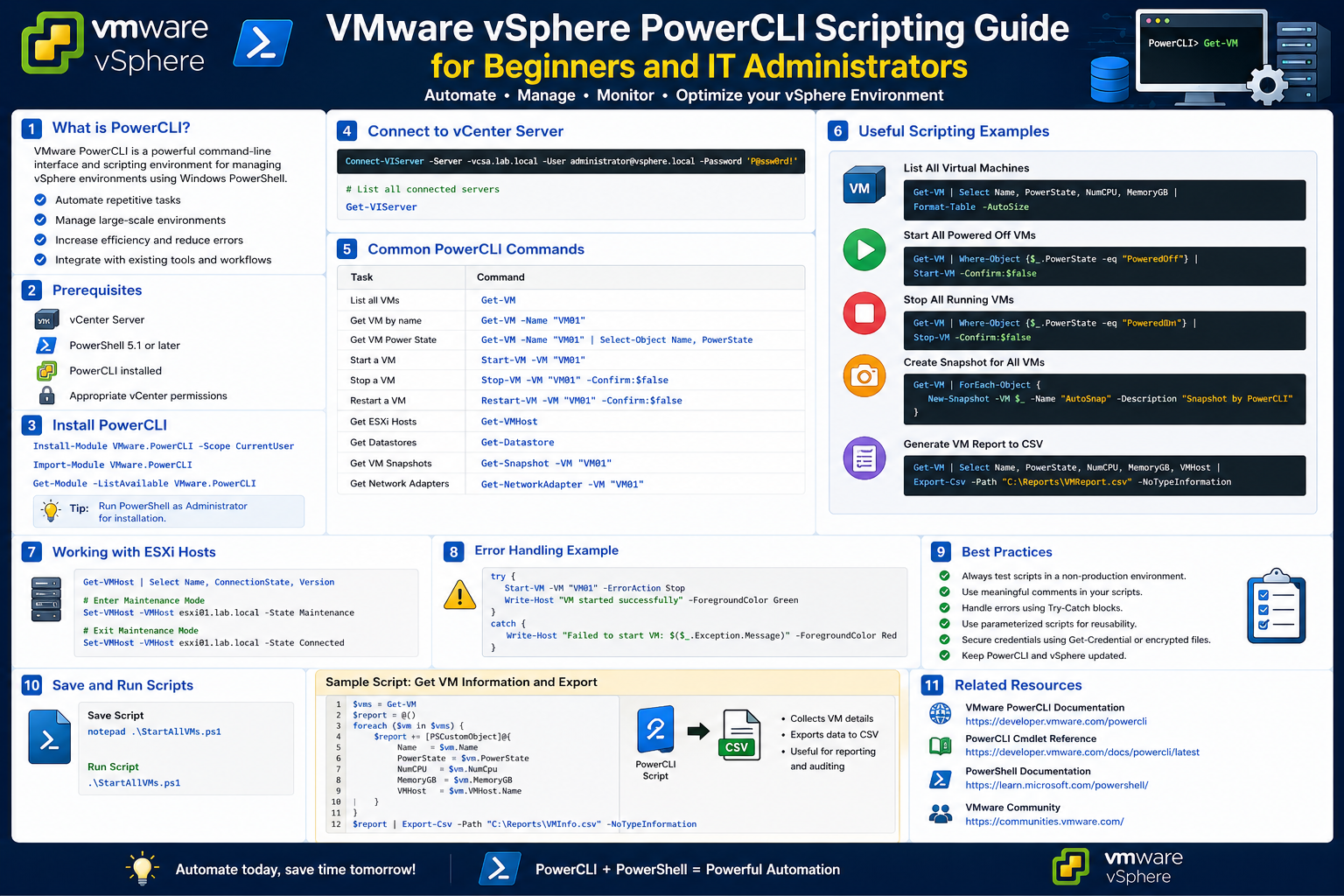
Managing virtual infrastructure has evolved significantly over the years, especially with platforms like VMware vSphere becoming central to enterprise IT environments. Administrators today are no longer limited to purely graphical tools for handling complex workloads, virtual machines, or host configurations. Instead, modern environments demand speed, automation, and repeatability, especially when managing multiple hosts, clusters, and hundreds of virtual machines at scale.
The VMware vCenter HTML5 interface provides a highly polished and user-friendly way to interact with ESXi hosts and virtual machines. It offers dashboards, menus, and visual controls that simplify many routine tasks. However, as environments grow, the limitations of manual interaction become more noticeable. Tasks that involve repetitive actions, bulk operations, or cross-environment consistency often become time-consuming when performed through graphical interfaces alone.
This is where scripting and command-line automation become valuable. Instead of navigating through multiple screens and clicking through repeated workflows, administrators can execute structured commands that perform tasks consistently and quickly. Among the most widely used tools for this purpose in VMware environments is PowerCLI, which is built on top of PowerShell and designed specifically for virtualization management.
Understanding the Shift from GUI to Scripting
The transition from graphical administration to script-based management is not about replacing one with the other, but rather about enhancing capability. The graphical interface is excellent for visualization, troubleshooting, and occasional configuration changes. However, it is not always efficient for large-scale or repetitive operations.
For example, consider a scenario where an administrator needs to check the status of dozens or even hundreds of virtual machines. Doing this manually through a GUI requires navigating through lists, filtering views, and inspecting individual objects. While possible, it is not efficient when time is critical or when the same operation must be repeated frequently.
Scripting introduces a different approach. Instead of interacting with each object visually, the administrator defines what needs to be done in a structured way, and the system executes it across all relevant objects. This shift allows operations to scale effortlessly from a single virtual machine to an entire data center.
Another important advantage of scripting is consistency. Human interaction often introduces variation, especially when multiple administrators are involved. Scripts ensure that the same logic is applied every time, reducing the chance of errors caused by missed steps or inconsistent procedures.
Foundations of Microsoft PowerShell
To understand PowerCLI, it is important to first understand the foundation it is built upon: Microsoft PowerShell. PowerShell is a command-line shell and scripting environment designed for system administration and automation. It was introduced as a way to provide more advanced control over system operations compared to traditional command-line tools.
Unlike older shells that primarily deal with plain text output, PowerShell operates using structured data. This means that when a command is executed, the output is not just text displayed on the screen, but structured objects containing properties and methods. This object-based approach is one of the key reasons PowerShell is so powerful in automation scenarios.
PowerShell is also designed to be extensible. While it includes many built-in commands for system administration, it can be extended using modules. These modules add new capabilities for specific platforms, services, or applications. This extensibility is what allows PowerShell to integrate with VMware environments through PowerCLI.
Over time, PowerShell has grown beyond the Windows ecosystem. It has been adapted for use on multiple operating systems, including Linux and macOS, making it a versatile tool for administrators working in diverse environments.
Objects, Cmdlets, and the Pipeline Concept
One of the most important concepts in PowerShell is the idea of objects. In traditional command-line tools, output is usually presented as text, which must be manually interpreted or parsed. In contrast, PowerShell treats everything as an object with structured properties.
For example, a virtual machine is not just a line of text describing its name or status. Instead, it is an object that contains multiple attributes such as its name, memory allocation, CPU configuration, power state, host association, and more. Each of these attributes can be accessed individually or collectively, depending on the task at hand.
Cmdlets are the building blocks of PowerShell operations. They are specialized commands designed to perform specific actions, such as retrieving information, modifying configurations, or executing operations. These cmdlets follow a consistent naming pattern that makes them easier to understand and use once the structure is familiar.
Another powerful concept is the pipeline. The pipeline allows the output of one command to be passed directly into another command for further processing. This enables complex workflows to be built using simple, chained operations. Instead of writing lengthy procedures, administrators can combine multiple steps into a single streamlined process.
Together, objects, cmdlets, and pipelines form the foundation of PowerShell’s flexibility and efficiency. They allow administrators to work with data in a way that is both structured and highly adaptable.
Why PowerShell Matters in Virtualization
Virtualization environments are inherently dynamic. Virtual machines are created, modified, moved, and deleted frequently. Hosts may enter maintenance mode, clusters may be rebalanced, and storage configurations may change based on workload demands. Managing this level of complexity manually becomes increasingly difficult as the environment grows.
PowerShell provides a way to manage this complexity by enabling automation and bulk operations. Instead of performing actions one by one, administrators can define rules or logic that apply across multiple objects simultaneously. This is particularly valuable in environments where consistency and speed are critical.
Another important aspect is reporting and visibility. PowerShell can be used to extract detailed information about virtual infrastructure in a structured format. This data can then be analyzed, stored, or used to make decisions about capacity planning, performance optimization, and resource allocation.
The ability to combine multiple operations into a single automated workflow also reduces the risk of human error. Tasks that might otherwise require repetitive manual steps can be executed reliably using scripted logic.
Introduction to PowerCLI in the VMware Ecosystem
PowerCLI is a specialized extension of PowerShell designed specifically for managing VMware environments. It provides a set of modules and commands that allow administrators to interact directly with vSphere infrastructure, including vCenter Server, ESXi hosts, virtual machines, datastores, and networking components.
Instead of relying solely on the graphical interface, PowerCLI enables administrators to perform the same operations through scripted commands. These commands interact with VMware’s underlying application programming interfaces, allowing for direct communication with the virtualization platform.
What makes PowerCLI particularly powerful is its deep integration with vSphere. It is not a separate tool that operates alongside VMware; it is designed to work directly with VMware’s management layer. This means it can retrieve detailed information, perform configuration changes, and execute administrative tasks with precision.
PowerCLI also inherits all the capabilities of PowerShell. This means that it can use pipelines, objects, and scripting logic to build complex workflows. As a result, it becomes more than just a management tool; it becomes an automation framework for virtualization environments.
How PowerCLI Communicates with vSphere
Behind the scenes, PowerCLI communicates with VMware infrastructure through application programming interfaces. These APIs act as intermediaries between the scripting environment and the virtualization platform. When a command is executed in PowerCLI, it is translated into API requests that are sent to vCenter or ESXi hosts.
The response from the infrastructure is then returned as structured data, which PowerShell processes as objects. This allows administrators not only to retrieve information but also to manipulate it in meaningful ways.
For example, when querying virtual machines, PowerCLI does not simply return a list of names. Instead, it returns detailed objects that include configuration settings, runtime status, and resource usage metrics. These objects can then be filtered, sorted, or passed into additional operations depending on the administrator’s needs.
This communication model is what enables PowerCLI to operate efficiently at scale. Whether interacting with a single host or an entire cluster, the underlying mechanism remains consistent, making it highly reliable for automation tasks.
Initial Interaction with Virtual Infrastructure Concepts
When first interacting with PowerCLI, administrators typically begin by exploring the environment rather than making changes. This involves retrieving information about virtual machines, hosts, clusters, and storage systems. The goal at this stage is to understand what data is available and how it is structured.
Virtual machines, for instance, are represented as objects containing multiple attributes such as power state, resource allocation, and host placement. ESXi hosts similarly contain information about CPU usage, memory availability, and connection status. These details provide a comprehensive view of the environment that is often more detailed than what is immediately visible in the graphical interface.
As familiarity increases, administrators begin to explore how these objects can be filtered and analyzed. Instead of viewing all virtual machines at once, they may focus on specific groups based on naming patterns, power state, or resource consumption. This selective approach allows for more targeted analysis and decision-making.
This stage of learning is essential because it builds the foundation for more advanced automation tasks. Understanding how data is structured and accessed is critical before moving on to configuration changes or automated operations.
Expanding Visibility Beyond the GUI
One of the most significant advantages of PowerCLI is its ability to reveal information that may not be immediately visible in the graphical interface. While the vCenter GUI provides a well-organized overview of the environment, it is often limited in terms of customization and bulk data extraction.
PowerCLI, on the other hand, allows administrators to access a much deeper level of detail. Every virtual machine, host, and resource component can be queried for specific attributes, enabling highly customized views of the environment.
This expanded visibility is particularly useful for auditing, troubleshooting, and capacity planning. Administrators can quickly gather insights about resource utilization, configuration consistency, and system health without manually navigating through multiple screens.
By moving beyond the limitations of the GUI, PowerCLI opens the door to a more data-driven approach to infrastructure management. It transforms static views into dynamic datasets that can be analyzed, filtered, and automated according to operational needs.
Building a Foundation for PowerCLI Usage
Working effectively with PowerCLI begins with understanding how it fits into the broader VMware administration workflow. Instead of treating it as an isolated tool, it should be seen as an extension of the virtualization environment itself. It acts as a bridge between human-readable instructions and the structured communication required by vSphere infrastructure.
Before performing any meaningful administrative task, it is essential to understand that PowerCLI operates in a session-based environment. This means interactions are not one-off actions but part of a continuous connection with a virtualization system. Within this session, administrators can query, analyze, and modify objects representing virtual machines, hosts, and clusters.
Another foundational aspect is the concept of modular functionality. PowerCLI is not a single monolithic tool; it is composed of multiple components that handle different aspects of virtualization management. These components can be loaded or extended depending on the operational requirements. This modular structure allows administrators to work with only the functionality they need, reducing complexity and improving performance in large environments.
Understanding this foundation is important because it shapes how all subsequent operations are performed. Every interaction, whether retrieving information or modifying configurations, is based on this structured and modular design.
Connecting and Working with vSphere Environments
The first practical step in using PowerCLI effectively is establishing a connection to a vSphere environment. This connection acts as the entry point for all subsequent operations. Without it, no interaction with virtual machines, hosts, or clusters is possible.
Once connected, PowerCLI communicates with the virtualization layer through vCenter Server or directly with ESXi hosts, depending on the environment configuration. This communication is secure and session-based, ensuring that all operations are authenticated and tracked.
In multi-vCenter environments, administrators may establish multiple concurrent connections. This allows centralized management across geographically distributed data centers. Each connection maintains its own context, enabling precise control over which environment is being managed at any given time.
Working within connected environments also introduces the concept of context awareness. PowerCLI understands which objects belong to which infrastructure layer, allowing administrators to query resources without needing to manually switch between systems. This is particularly valuable in large enterprises where infrastructure is segmented across multiple clusters or regions.
The ability to maintain and manage these connections efficiently is a key skill in PowerCLI administration, as it directly impacts how smoothly automation workflows can be executed.
Exploring VMware Objects in Depth
At the core of PowerCLI lies the concept of objects. Every component in a VMware environment is represented as an object with associated attributes. These objects are far more than simple data points; they encapsulate both configuration and operational state.
A virtual machine object, for example, contains information about its compute resources, storage configuration, network interfaces, and runtime status. Similarly, a host object represents not only hardware specifications but also performance metrics, connectivity state, and cluster membership.
One of the most powerful aspects of working with objects is that they are interconnected. A virtual machine object can reference the host it is running on, the datastore it uses, and the resource pool it belongs to. This relationship structure allows administrators to navigate the entire virtual infrastructure logically rather than manually.
Objects also support dynamic property evaluation. This means that certain attributes are not static but are calculated or updated in real time based on system conditions. This enables administrators to work with up-to-date information without requiring manual refreshes or repeated queries.
Understanding these object relationships is essential for building effective automation workflows. It allows administrators to think in terms of systems and relationships rather than isolated components.
Filtering and Selecting Information Efficiently
In large virtualization environments, the amount of available data can be overwhelming. Without proper filtering mechanisms, retrieving useful information becomes inefficient. PowerCLI addresses this challenge by allowing precise selection of objects based on specific criteria.
Filtering can be based on a wide range of attributes, such as names, power states, resource usage, or host associations. This flexibility allows administrators to isolate exactly the information they need without processing unnecessary data.
Selection mechanisms further refine the output by allowing administrators to focus on specific attributes within an object. Instead of viewing all available information, they can extract only the relevant properties needed for analysis or reporting.
This targeted approach significantly improves performance and readability, especially when working with large datasets. It also reduces the cognitive load on administrators by presenting only meaningful information.
Efficient filtering and selection are fundamental skills in PowerCLI usage because they directly influence the effectiveness of all subsequent operations, including reporting, automation, and troubleshooting.
Working with Bulk Operations and Automation Logic
One of the most powerful capabilities of PowerCLI is its ability to perform bulk operations. Instead of managing individual objects one at a time, administrators can apply actions across multiple virtual machines, hosts, or clusters simultaneously.
This is particularly useful in environments where consistency is critical. For example, applying configuration changes, updating settings, or performing maintenance tasks across a group of virtual machines can be done in a single structured operation.
Automation logic plays a key role in enabling these bulk operations. Conditional rules can be applied to determine which objects should be included in a given operation. This ensures that actions are executed only on relevant targets, reducing the risk of unintended changes.
Bulk operations also support iterative workflows, where actions are performed in sequence across multiple objects. This is useful for tasks such as rolling updates, staged deployments, or environment-wide configuration changes.
By combining bulk operations with automation logic, PowerCLI enables administrators to manage large-scale infrastructures with precision and efficiency that would be difficult to achieve manually.
Managing Virtual Machine Lifecycle Operations
Virtual machines follow a lifecycle that includes creation, configuration, operation, maintenance, and decommissioning. PowerCLI provides the ability to manage each stage of this lifecycle through structured commands and workflows.
During the creation phase, virtual machines can be provisioned with predefined configurations, ensuring consistency across deployments. Configuration tasks can include resource allocation, network assignment, and storage mapping.
During the operational phase, administrators can monitor performance, adjust resources, and manage power states. This allows virtual machines to adapt dynamically to workload demands.
Maintenance operations often involve tasks such as snapshots, updates, or migrations. PowerCLI enables these operations to be performed systematically across multiple virtual machines, ensuring minimal disruption.
Finally, during decommissioning, virtual machines can be safely removed from the environment in a controlled manner. This includes releasing associated resources and updating inventory records.
Managing the full lifecycle through automation ensures that virtual infrastructure remains consistent, efficient, and aligned with organizational requirements.
Handling ESXi Hosts and Cluster Awareness
ESXi hosts form the foundation of any VMware environment, and managing them effectively is critical for overall system stability. PowerCLI provides deep visibility into host configuration, performance, and status.
Administrators can monitor CPU and memory usage, track hardware health, and evaluate connectivity status. This information is essential for capacity planning and troubleshooting.
Clusters add another layer of complexity by grouping multiple hosts to provide load balancing and high availability. PowerCLI allows administrators to view cluster-level metrics and understand how workloads are distributed across hosts.
This cluster awareness is particularly important when performing maintenance or migrations. Understanding how virtual machines are distributed ensures that operations can be performed without impacting performance or availability.
By combining host-level and cluster-level insights, administrators gain a comprehensive understanding of infrastructure behavior, enabling more informed decision-making.
Data Collection and Reporting Workflows
One of the most practical applications of PowerCLI is data collection. Virtual environments generate large amounts of operational data, and PowerCLI provides a structured way to extract and organize this information.
Collected data can include inventory details, resource usage statistics, configuration settings, and performance metrics. This data can then be used for reporting, analysis, or historical tracking.
Reporting workflows often involve gathering information from multiple sources and combining it into a unified view. This allows administrators to identify trends, detect anomalies, and make capacity planning decisions.
Data collection can also be automated to run at scheduled intervals, ensuring that information remains up to date without manual intervention. This is particularly useful in environments where continuous monitoring is required.
By transforming raw infrastructure data into structured reports, PowerCLI supports more strategic decision-making processes within IT operations.
Safety Considerations and Controlled Execution Practices
While automation provides significant benefits, it also introduces the potential for unintended consequences if not managed carefully. Executing operations across multiple systems simultaneously requires a controlled approach.
One important principle is ensuring that actions are always targeted correctly. Misapplied operations can affect more systems than intended, leading to service disruptions. Careful filtering and validation are essential before executing any changes.
Another important aspect is controlled execution. Operations should be tested in non-production environments before being applied broadly. This helps identify potential issues without impacting critical systems.
Logging and tracking are also essential components of safe automation. Keeping records of executed operations allows administrators to review actions and diagnose issues if needed.
By incorporating safety practices into automation workflows, administrators can leverage the full power of PowerCLI while minimizing operational risk.
Organizing Scripts for Scalable Administration
As automation usage grows, organizing scripts becomes increasingly important. Poorly structured automation can lead to confusion, redundancy, and maintenance challenges.
Well-organized scripting practices involve grouping related operations, standardizing logic patterns, and maintaining clear separation between different administrative tasks. This ensures that scripts remain readable and maintainable over time.
Scalability is another important consideration. Scripts should be designed in a way that allows them to function effectively regardless of the environment size. Whether managing a small cluster or a large multi-vCenter infrastructure, the underlying logic should remain consistent.
Documentation also plays a key role in script organization. Clear descriptions of purpose and functionality help ensure that scripts can be understood and modified by other administrators when necessary.
By focusing on structure and scalability, PowerCLI workflows can evolve alongside growing infrastructure demands without becoming difficult to manage.
Advanced Automation Thinking in VMware Environments
As VMware environments grow in size and complexity, the need for structured automation becomes less of an option and more of a necessity. At a certain point, manual administration is no longer sustainable, especially when dealing with hundreds or thousands of virtual machines spread across multiple clusters and data centers. PowerCLI becomes most valuable when it is used not just as a command tool, but as a foundation for building automation logic that mirrors real operational workflows.
In advanced usage, administrators begin to think less in terms of individual commands and more in terms of systems and behaviors. Instead of asking “how do I perform this task once,” the focus shifts to “how do I define this process so it can run repeatedly and safely across changing environments.” This mindset change is what separates basic usage from advanced infrastructure automation.
Automation thinking also introduces the idea of abstraction. Rather than writing separate commands for each scenario, reusable logic is created that can adapt to different conditions. This allows administrators to scale operations without rewriting workflows each time the environment changes.
Designing Scalable Virtual Infrastructure Workflows
Scalability is one of the most important considerations when designing PowerCLI-based automation. A workflow that works efficiently in a small environment may behave differently when applied to a larger infrastructure. For this reason, automation logic must be designed with growth in mind from the beginning.
A scalable workflow is not dependent on fixed values or hardcoded assumptions. Instead, it relies on dynamic discovery of resources. This means that virtual machines, hosts, and clusters are identified based on conditions rather than static identifiers. As a result, the same workflow can operate effectively regardless of how many objects exist in the environment.
Another key element of scalability is modular design. Complex tasks are broken into smaller logical components that can be executed independently or combined as needed. This modular structure makes it easier to maintain and extend workflows over time.
Scalable design also improves resilience. When changes occur in the environment, such as new hosts being added or virtual machines being migrated, the automation logic continues to function without requiring major adjustments.
Intelligent Filtering and Dynamic Decision Making
In advanced PowerCLI usage, filtering is not just about selecting objects but about making intelligent decisions based on real-time conditions. This introduces a layer of logic that transforms static scripts into dynamic workflows.
For example, instead of selecting virtual machines based only on names, administrators can apply multiple conditions such as resource usage, power state, or host placement. This allows more precise control over which objects are affected by a given operation.
Dynamic decision making also enables conditional execution. Actions can be performed only when certain criteria are met, such as triggering maintenance tasks only when CPU usage exceeds a defined threshold or migrating workloads only when hosts reach capacity limits.
This level of intelligence reduces unnecessary operations and ensures that automation responds to actual infrastructure conditions rather than predefined assumptions. It also improves efficiency by focusing resources only where they are needed.
Lifecycle Automation of Virtual Machines at Scale
Managing the lifecycle of virtual machines manually becomes increasingly complex as environments grow. PowerCLI allows this lifecycle to be fully automated, from provisioning to decommissioning, ensuring consistency across all stages.
During provisioning, automation can define standard configurations for virtual machines based on workload types. This ensures that new systems are created with consistent resource allocation, network settings, and storage assignments.
During the operational phase, automation can monitor performance and make adjustments when needed. This includes scaling resources up or down based on usage patterns or migrating workloads to balance resource consumption across hosts.
Maintenance operations such as snapshots, updates, and patching can also be automated. This ensures that virtual machines remain secure and up to date without requiring manual intervention for each system.
Finally, decommissioning processes can be standardized to ensure that resources are properly released and inventory records are updated. This prevents resource leaks and keeps the environment clean and organized.
Infrastructure Awareness and Cluster-Level Intelligence
Advanced PowerCLI usage extends beyond individual virtual machines and focuses heavily on cluster-level awareness. Clusters represent the collective behavior of multiple hosts working together, and understanding this behavior is essential for efficient infrastructure management.
Cluster-level intelligence involves analyzing how workloads are distributed across hosts and how resources are being consumed at a collective level. This allows administrators to identify imbalance conditions, such as one host being overloaded while another remains underutilized.
This awareness also plays a critical role during maintenance operations. When a host requires updates or rebooting, workloads must be redistributed safely across the cluster. Automation ensures that this process happens smoothly without impacting service availability.
By integrating cluster-level intelligence into automation workflows, administrators gain a more holistic understanding of infrastructure behavior, enabling more efficient resource management and improved system stability.
Performance Monitoring and Continuous Analysis
Performance monitoring is a continuous process in virtualized environments, and PowerCLI provides the ability to collect and analyze performance data at scale. This includes metrics such as CPU usage, memory consumption, disk I/O, and network activity.
Continuous analysis of this data helps identify trends over time. For example, increasing resource consumption patterns may indicate the need for capacity expansion, while sudden spikes may signal performance issues or misconfigured workloads.
Automation can be used to collect performance data at regular intervals and store it for later analysis. This creates a historical view of infrastructure behavior, which is essential for long-term planning and optimization.
Performance monitoring also supports proactive administration. Instead of reacting to issues after they occur, administrators can define thresholds that trigger automated responses when certain conditions are met.
Event-Driven Automation in Virtual Environments
Event-driven automation introduces a more responsive approach to infrastructure management. Instead of running scripts manually or on schedules, actions are triggered by specific events occurring within the environment.
These events can include changes in virtual machine state, host status updates, or resource threshold breaches. When an event occurs, predefined automation logic is executed automatically.
This approach allows infrastructure to react in real time to changing conditions. For example, if a host fails, virtual machines can be automatically restarted on another host without manual intervention. Similarly, if a virtual machine becomes unresponsive, automated recovery actions can be triggered.
Event-driven automation improves responsiveness and reduces downtime by ensuring that corrective actions are taken immediately when required.
Error Handling and Operational Stability
In any automation system, error handling is a critical component. Without proper handling, unexpected conditions can cause scripts to fail or produce unintended results.
PowerCLI workflows must be designed to anticipate potential issues such as missing objects, permission limitations, or communication failures. By incorporating structured error handling, automation can continue functioning even when individual operations encounter problems.
Operational stability is achieved by ensuring that automation does not assume ideal conditions. Instead, workflows are designed to validate inputs, check system states, and verify results before proceeding to the next step.
This approach reduces the risk of partial execution, where some operations succeed while others fail, potentially leaving the environment in an inconsistent state.
Integrating External Systems with Virtual Infrastructure
Modern IT environments rarely operate in isolation. Virtual infrastructure is often connected to other systems such as monitoring tools, configuration databases, and identity management platforms.
PowerCLI can serve as a bridge between VMware environments and these external systems. By exchanging data, automation workflows can become more intelligent and context-aware.
For example, configuration data stored in external systems can be used to drive virtual machine provisioning. Similarly, infrastructure state information can be exported to monitoring systems for centralized visibility.
This integration allows organizations to build unified operational frameworks where different systems work together rather than operating independently.
Large-Scale Environment Management Strategies
Managing large-scale environments requires more than just technical knowledge; it requires structured operational strategies. PowerCLI plays a key role in implementing these strategies by providing the automation layer that connects planning with execution.
One common strategy is standardization. By ensuring that configurations, naming conventions, and resource allocations are consistent across the environment, automation becomes more predictable and easier to manage.
Another strategy is segmentation. Large environments are divided into logical groups based on function, geography, or workload type. Automation workflows can then be targeted at specific segments, improving control and reducing risk.
Capacity management is also a critical strategy. By continuously monitoring resource usage and forecasting future demand, administrators can ensure that infrastructure remains balanced and scalable.
Security and Controlled Access in Automation Workflows
Security is a fundamental consideration in any automated environment. PowerCLI workflows often require access to sensitive infrastructure components, making controlled access essential.
Authentication and permission management ensure that only authorized users can execute specific operations. This prevents unauthorized changes and protects critical systems from accidental or malicious actions.
Automation workflows should also follow the principle of least privilege, meaning that they operate with only the permissions necessary to complete their tasks. This reduces potential exposure in case of misuse or compromise.
Auditability is another important aspect. Every automated action should be traceable, allowing administrators to review what changes were made, when they were made, and by whom or what process initiated them.
Long-Term Evolution of Automation Practices
As environments evolve, so do automation practices. What begins as simple script execution often develops into fully integrated operational frameworks that manage entire infrastructure ecosystems.
Over time, automation becomes more intelligent, incorporating predictive logic and adaptive behavior. Instead of reacting to conditions, systems begin to anticipate them based on historical patterns and current trends.
This evolution also leads to greater abstraction, where administrators focus less on individual commands and more on defining desired outcomes. The underlying automation systems then determine how to achieve those outcomes efficiently.
As a result, PowerCLI becomes not just a tool for managing virtual machines but a foundation for building adaptive, scalable, and intelligent infrastructure operations that evolve alongside organizational needs.
Infrastructure Standardization and Configuration Consistency
One of the biggest challenges in virtualization environments is maintaining consistency across all components. As environments grow, different administrators may apply slightly different configurations, leading to inconsistencies that can impact performance and stability.
PowerCLI helps solve this problem by enabling infrastructure standardization. Administrators can define baseline configurations for virtual machines and hosts, ensuring that every new deployment follows the same structure. This includes CPU and memory allocation patterns, storage policies, network adapters, and security settings.
Consistency also extends to naming conventions and organizational structure. By automating naming rules, virtual machines and hosts can be grouped logically based on their function, environment type, or department. This improves visibility and simplifies management across the entire infrastructure.
Standardization is particularly valuable in environments that undergo frequent scaling. When new hosts or virtual machines are added, automation ensures they automatically conform to existing policies without requiring manual adjustments.
Automation in Disaster Recovery and High Availability Planning
Disaster recovery planning is a critical aspect of any virtual infrastructure strategy. PowerCLI plays a key role in ensuring that recovery processes are not only defined but also executable in a predictable and repeatable manner.
In disaster scenarios, time is a critical factor. Manual recovery procedures can be slow and prone to errors, especially under pressure. PowerCLI allows administrators to predefine recovery workflows that can be executed immediately when needed. These workflows may include restoring virtual machines from snapshots, reconfiguring network settings, or reallocating resources across available hosts.
High-availability environments also benefit from automation. When a host failure occurs, virtual machines must be restarted or migrated to other hosts quickly. PowerCLI can assist in orchestrating these failover actions, ensuring minimal disruption to services.
Additionally, recovery testing can be automated. Regular testing of disaster recovery plans ensures that systems behave as expected during real incidents. Automated scripts can simulate failure conditions and validate recovery processes without requiring manual intervention each time.
Resource Optimization and Intelligent Workload Distribution
Efficient resource utilization is a key objective in virtualized environments. Overprovisioning leads to wasted capacity, while underprovisioning can result in performance degradation. PowerCLI provides the tools needed to analyze and optimize resource distribution across the infrastructure.
By collecting performance data from hosts and virtual machines, administrators can identify underutilized or overutilized resources. This data can then be used to rebalance workloads across clusters, ensuring that no single host becomes a bottleneck.
Workload distribution can also be automated based on predefined rules. For example, virtual machines with high CPU usage can be moved to less-utilized hosts, while low-priority workloads can be consolidated onto fewer machines during off-peak hours.
This dynamic approach to resource management improves overall efficiency and reduces operational costs by maximizing the use of available infrastructure.
Automation for Patch Management and Maintenance Cycles
Patch management is another area where PowerCLI provides significant value. Keeping virtual infrastructure updated is essential for security, stability, and performance, but manually applying updates across large environments can be time-consuming.
With PowerCLI, patching processes can be automated to ensure consistency. This includes placing hosts into maintenance mode, migrating workloads, applying updates, and returning hosts to production once updates are complete.
Maintenance cycles can also be scheduled and coordinated across clusters to minimize disruption. Automation ensures that workloads are moved safely before maintenance begins and restored afterward without manual intervention.
This structured approach reduces downtime and ensures that infrastructure remains secure and up to date without requiring constant manual oversight.
Integration with Monitoring and Alerting Systems
Modern infrastructure management relies heavily on monitoring and alerting systems to maintain visibility into system health. PowerCLI enhances this by enabling direct integration with monitoring platforms.
Data collected through PowerCLI can be used to feed external monitoring systems, providing real-time insights into virtual infrastructure performance. This allows administrators to correlate VMware-specific data with broader system metrics for a more complete operational view.
Automation can also be triggered based on monitoring alerts. For example, if a monitoring system detects high CPU usage on a host, a PowerCLI script can automatically initiate workload redistribution or resource scaling actions.
This integration creates a feedback loop where monitoring systems detect issues and automation systems respond to them, reducing the need for manual intervention.
Governance, Compliance, and Infrastructure Control
In regulated industries, maintaining compliance is a critical requirement. PowerCLI plays an important role in enforcing governance policies across virtual environments.
Compliance checks can be automated to ensure that configurations align with required standards. This includes verifying security settings, access controls, and system configurations.
Audit trails generated through PowerCLI operations provide visibility into infrastructure changes over time. This helps organizations demonstrate compliance during audits and maintain accountability for system modifications.
Governance also extends to access control. By defining which users or systems can execute specific automation tasks, organizations can maintain strict control over infrastructure operations.
Continuous Improvement of Automation Practices
Automation is not a one-time implementation but an evolving process. As environments grow and requirements change, PowerCLI workflows must be continuously refined and improved.
One aspect of continuous improvement is optimization. Over time, scripts can be reviewed and refined to improve performance, reduce execution time, or simplify logic structures.
Another aspect is adaptability. As new technologies and infrastructure components are introduced, automation workflows must be updated to accommodate them. This ensures that automation remains relevant and effective in changing environments.
Feedback from operational usage also plays an important role. Real-world execution often reveals edge cases or unexpected behaviors that can be addressed through iterative improvements.
Conclusion
PowerCLI has become an essential extension of VMware vSphere administration by bridging the gap between manual management and large-scale automation. While the vCenter HTML5 interface remains valuable for visualization, monitoring, and day-to-day interaction, it is not always practical for handling repetitive or environment-wide operations. PowerCLI addresses this limitation by introducing a structured, script-based approach that allows administrators to interact with virtual infrastructure in a more efficient and controlled manner.
By building on top of PowerShell, PowerCLI inherits a powerful object-oriented model that enables precise control over virtual machines, hosts, clusters, and related resources. This object-based approach makes it possible to filter, analyze, and manipulate infrastructure components in ways that are not easily achievable through graphical tools alone. As environments grow in complexity, the ability to automate workflows, apply consistent configurations, and execute bulk operations becomes increasingly important.
Beyond efficiency, PowerCLI also enhances accuracy and reliability. Automated processes reduce the likelihood of human error and ensure that tasks are executed consistently across all systems. When combined with careful design, safety practices, and proper scripting structure, it becomes a dependable foundation for modern virtualization management.
Ultimately, PowerCLI empowers administrators to move from reactive management to proactive, intelligent infrastructure control, making it a key skill in today’s VMware environments.