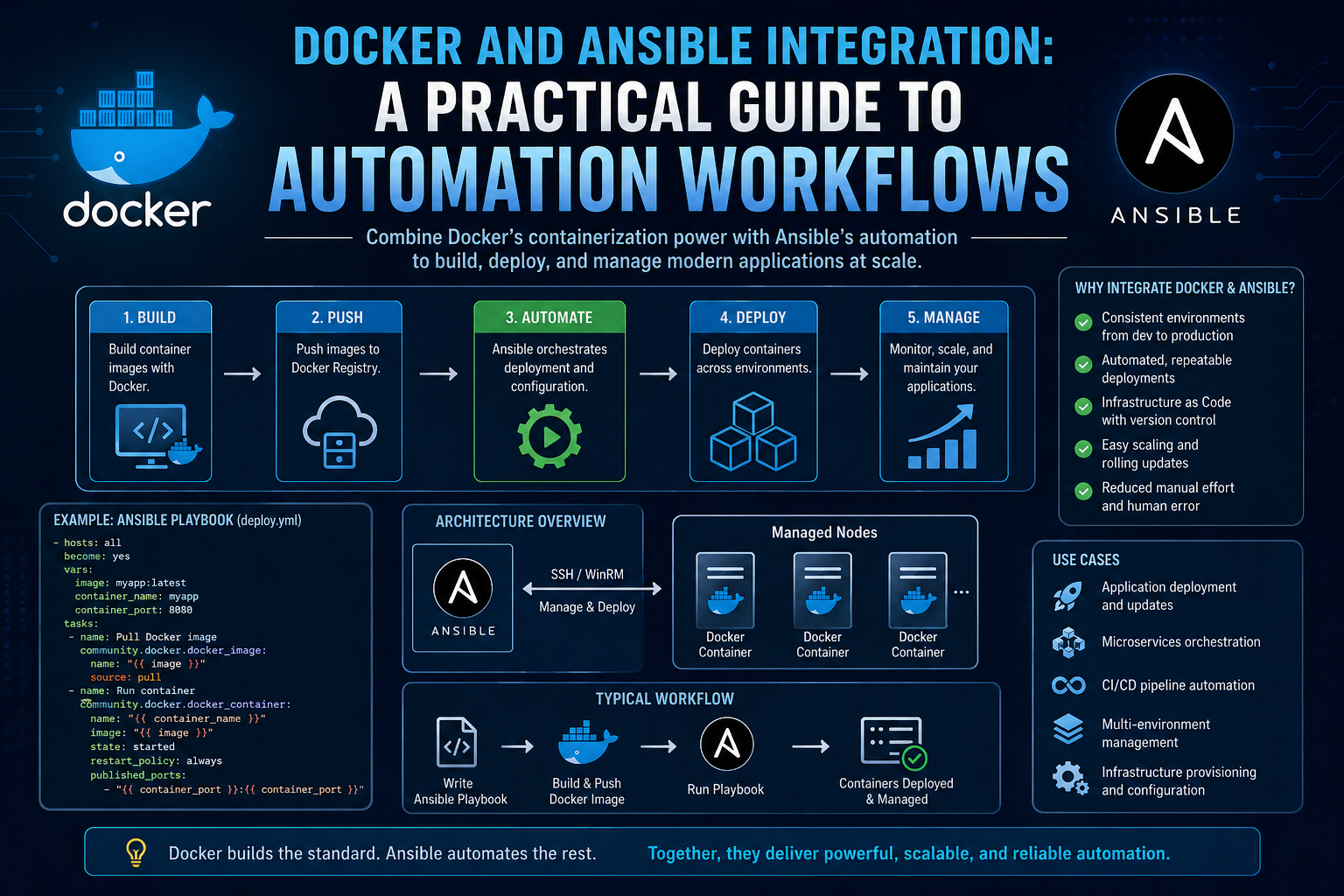
Modern infrastructure management increasingly depends on automation tools that can reduce manual effort, improve consistency, and make deployments more reliable across environments. Among these tools, Ansible has become widely adopted for configuration management and orchestration, while Docker has become a standard for packaging and running applications in isolated environments. When combined, they create a powerful workflow that allows automation logic to be packaged, distributed, and executed in a controlled and repeatable way.
Building and executing Ansible automation inside a Docker container introduces a structured approach to infrastructure management. Instead of relying on local machine setups that may differ between engineers or systems, everything required for automation is bundled into a single container image. This ensures that the same environment is used every time the automation runs, reducing inconsistencies and minimizing configuration drift.
In a typical workflow, Ansible runs directly on a system where Python, dependencies, SSH configurations, and collections must be installed manually. This approach can lead to challenges when scaling teams or moving automation across environments. Docker addresses this by providing a self-contained runtime environment where all dependencies are defined once and reused consistently.
By embedding Ansible into a containerized environment, teams can also improve portability. The automation can be moved between development, testing, and production systems without modification. This makes infrastructure automation more predictable and easier to maintain over time.
Why Combine Docker and Ansible in Automation Workflows
The integration of Docker and Ansible is not just about convenience; it fundamentally improves how automation pipelines are structured and executed. One of the key advantages is environmental consistency. In traditional setups, differences in operating systems, installed packages, or Python versions can lead to unexpected behavior. Docker eliminates these differences by ensuring that every execution happens inside a predefined environment.
Another major advantage is dependency isolation. Ansible projects often rely on specific Python packages, Ansible collections, and system-level tools. Managing these dependencies on multiple machines can become complex. Docker encapsulates all of them within the image, ensuring that no external dependency conflicts interfere with execution.
Scalability is another important factor. When automation is containerized, it becomes easier to integrate into larger CI/CD pipelines. The same container can be executed across multiple stages, such as development validation, staging deployment, and production rollout. This reduces duplication of setup effort and improves reliability.
Docker also improves reproducibility. If an automation run produces a specific result, that same result can be reproduced anywhere the container runs. This is particularly valuable in network automation and infrastructure management, where consistency is critical.
Finally, combining Docker and Ansible improves portability. Engineers can share a single container image rather than distributing complex setup instructions. This reduces onboarding time and ensures that all team members operate within the same standardized environment.
Understanding the Project Architecture for Automation
A well-structured automation project is essential for maintainability and scalability. In a Docker-based Ansible setup, the project is typically organized into distinct components, each serving a specific role in the automation workflow.
At the core of the architecture is the Ansible control logic, which defines what actions should be executed and on which systems. This is supported by configuration files that define how Ansible behaves, inventory files that specify target systems, and variable files that provide dynamic configuration values.
Roles play a central role in structuring automation logic. Instead of writing a single large script, Ansible encourages breaking automation into reusable components. Each role focuses on a specific function, such as configuring logging, managing users, or deploying services. This modular approach makes automation easier to understand and maintain.
In a Docker-based setup, all of these components are packaged into a single image. The image contains the automation logic, dependencies, configuration files, and execution instructions. When the container runs, it immediately has everything required to execute the automation without additional setup.
This architecture also supports the separation of concerns. The Dockerfile defines the environment, the Ansible configuration defines behavior, the inventory defines targets, and the roles define tasks. Each layer contributes to a clean and organized automation system.
Ansible Project Structure Overview in Containerized Environments
A structured project layout is essential for ensuring clarity and maintainability. In a containerized Ansible environment, the project is typically organized in a way that mirrors production-grade automation practices.
At the root level, configuration files define the behavior of Ansible. These include settings that control how connections are established, how hosts are verified, and how execution is managed. These configurations ensure that Ansible behaves consistently regardless of where it is executed.
Inventory files define the systems that Ansible will manage. These systems are grouped logically based on their role or function within the infrastructure. For example, network devices may be grouped separately from application servers. This grouping allows automation to be applied selectively and efficiently.
Variable directories provide a structured way to manage dynamic values. Instead of hardcoding configuration details, variables are defined separately for groups and individual hosts. This allows the same automation logic to be reused across different environments with minimal changes.
Roles contain the actual automation logic. Each role is designed to perform a specific function and is structured into standardized directories. This includes tasks that define actions, defaults that define fallback values, and handlers that respond to changes.
When all of these components are packaged into a Docker image, they form a complete automation system that can be executed in any environment supporting containerization.
Dependency Management Strategy for Ansible Automation
Managing dependencies is a critical aspect of building reliable automation systems. In a Docker-based Ansible setup, dependencies are explicitly defined and installed during the image build process, ensuring consistency across all executions.
Python serves as the foundation for Ansible execution. The project typically defines a specific version of Python to ensure compatibility with Ansible core and its required libraries. This avoids issues that may arise from version mismatches.
Ansible itself relies on additional Python packages and collections. These dependencies are defined separately and installed during the container build process. By explicitly listing required components, the automation environment becomes predictable and reproducible.
System-level dependencies are also important. Certain operations, such as SSH communication with network devices, require additional tools. These tools are installed within the container to ensure that Ansible can establish secure connections when needed.
An important aspect of dependency management in this setup is cleanup. After installing required packages, unnecessary files and caches are removed to reduce the size of the final container image. This improves performance and makes the container more efficient to distribute and run.
By managing dependencies at build time rather than runtime, the system ensures that every execution environment is identical, reducing the risk of unexpected behavior.
Python and Ansible Environment Design Principles
The foundation of a containerized Ansible system is the runtime environment. This environment is carefully designed to include all necessary components while maintaining simplicity and efficiency.
Python acts as the primary runtime for Ansible execution. Selecting a stable and compatible version of Python ensures that all automation logic runs without compatibility issues. This version is embedded directly into the container image.
Ansible is installed within this Python environment along with the required extensions. These extensions enable communication with different systems, including network devices and cloud platforms. The environment is designed to support these interactions without requiring external setup.
The design also emphasizes isolation. By running Ansible inside a container, it is separated from the host system. This prevents conflicts with other software installed on the machine and ensures that automation runs in a controlled environment.
Another important design principle is reproducibility. The environment is built using declarative instructions, meaning every step is defined in advance. This ensures that the same environment can be recreated exactly when needed.
This approach also simplifies troubleshooting. If an issue arises, it can be traced back to a specific layer of the container build process, making debugging more structured and efficient.
Ansible Configuration Strategy in Containerized Workflows
Configuration management is a key component of any automation system. In a Docker-based Ansible setup, configuration is centralized and standardized to ensure consistent behavior across executions.
Ansible configuration settings define how automation interacts with target systems. One important aspect is host verification. In many automated environments, host key checking is disabled to streamline connections, especially when dealing with dynamically managed infrastructure.
Connection behavior is also defined in configuration settings. This includes how Ansible communicates with remote systems, what protocols it uses, and how authentication is handled. These settings ensure smooth execution across diverse environments.
Another important configuration aspect is the default location of inventory and variable files. By standardizing these paths within the container, Ansible can locate required resources without additional input during execution.
The configuration also influences performance and reliability. Settings can be adjusted to control parallel execution, retry behavior, and logging levels. These adjustments help optimize automation workflows for different scales of infrastructure.
By embedding configuration within the container, the system ensures that every execution follows the same rules, reducing variability and improving predictability.
Inventory Design for Network and Infrastructure Automation
Inventory management is a fundamental part of Ansible automation. It defines the systems that will be managed and organizes them into logical structures.
In a containerized environment, inventory files are included directly within the image. This ensures that the automation has immediate access to all target systems without requiring external configuration.
Systems are typically grouped based on function or role. For example, network devices may be placed in one group, while application servers are placed in another. This grouping allows automation tasks to be applied selectively and efficiently.
Each system in the inventory includes specific connection details. These details define how Ansible should connect to the system, what authentication method to use, and what type of operating system is being managed.
Inventory design also supports scalability. As infrastructure grows, new systems can be added to existing groups without modifying the core automation logic. This makes the system flexible and adaptable to change.
By embedding inventory into the container, the automation becomes self-contained and ready to execute without external dependencies.
Variable Management Using Group and Host-Level Definitions
Variables play a crucial role in making automation flexible and reusable. Instead of hardcoding values, Ansible uses variable files to store dynamic configuration data.
Group-level variables define settings that apply to multiple systems within a group. This is useful when systems share common characteristics or configuration requirements. It reduces duplication and simplifies management.
Host-level variables provide more granular control. These variables apply to individual systems and allow specific configurations to be defined when needed. This ensures flexibility while maintaining structure.
In a containerized setup, these variable files are included within the image. This ensures that all necessary configuration data is available at runtime without external dependencies.
Variable management also improves maintainability. Changes can be made in a single location and automatically applied across all relevant systems. This reduces the risk of inconsistencies and configuration errors.
By separating variables from automation logic, the system becomes easier to understand and modify.
Role-Based Automation Design Philosophy
Roles are one of the most important concepts in Ansible automation design. They provide a structured way to organize automation logic into reusable components.
Each role focuses on a specific function within the infrastructure. For example, one role might handle logging configuration, while another manages system updates. This separation allows automation to be modular and scalable.
Roles also improve reusability. Once a role is created, it can be applied to multiple systems or environments without modification. This reduces duplication of effort and improves consistency.
In a Docker-based environment, roles are included within the container image. This ensures that all automation logic is packaged together and ready for execution.
Roles also support maintainability. Because each role is self-contained, changes can be made without affecting other parts of the system. This reduces complexity and makes troubleshooting easier.
The role-based design approach is a key reason why Ansible scales effectively in large environments.
Building a Scalable Automation Foundation with Docker and Ansible
A containerized Ansible system provides a strong foundation for scalable automation. By combining Docker’s isolation capabilities with Ansible’s configuration management features, organizations can build automation systems that are both flexible and reliable.
This foundation allows automation to be executed consistently across different environments. Whether running in development, testing, or production, the same container ensures identical behavior.
Scalability is achieved through modular design. Roles, variables, and inventory structures allow the system to grow without requiring major redesign. New systems can be added easily, and new automation logic can be integrated without disrupting existing workflows.
The containerized approach also supports integration with larger automation ecosystems. It can be incorporated into orchestration pipelines, scheduling systems, and continuous delivery workflows.
By standardizing the execution environment, teams reduce complexity and improve operational efficiency. This allows engineers to focus more on automation logic and less on environment setup and configuration issues.
Docker Image Build Process and Layer Optimization Strategy
Building a container image for Ansible automation involves transforming a structured project into a portable execution environment. The Docker build process takes a series of instructions and converts them into layered image components. Each instruction contributes to the final runtime environment that will execute the automation logic.
At a high level, the build process begins with selecting a base operating environment that already contains essential runtime capabilities such as Python. This base environment acts as the foundation upon which all automation dependencies are installed. From there, additional components are introduced step by step, including system utilities, Python packages, Ansible collections, and project-specific configuration files.
One of the most important aspects of this process is optimization. Each instruction in the build process creates a new layer. These layers are cached and reused whenever possible, which significantly improves build efficiency. When changes are made to the project, only the affected layers need to be rebuilt, while unchanged layers are reused from cache.
This layered structure is particularly important in automation workflows where frequent updates may be made to playbooks or roles. By organizing the build process carefully, teams can ensure that minor changes do not trigger full rebuilds of the entire environment.
Another key consideration is reducing image size. Large container images can slow down deployment and increase storage requirements. To address this, unnecessary files such as temporary package caches and unused system artifacts are removed during the build process. This ensures that the final image contains only what is required for execution.
The build process also emphasizes repeatability. Every time the image is built, the same environment is produced regardless of where or when the build occurs. This consistency is essential for reliable automation execution across different systems.
Understanding Container Layer Caching in Automation Builds
Container layer caching plays a critical role in optimizing the performance of Ansible-based Docker images. Each step in the image creation process is stored as a separate layer, and Docker intelligently reuses these layers when possible.
When a build process is executed, Docker checks whether a layer already exists that matches the current instruction and its context. If no changes are detected, the cached layer is reused instead of being rebuilt. This significantly reduces build time, especially in large automation projects where dependency installation can take several minutes.
In Ansible automation workflows, caching becomes particularly valuable when only parts of the project change. For example, modifying a playbook or role does not require reinstalling Python dependencies or system packages. Only the layers associated with those specific files are updated.
However, caching must be managed carefully. If dependencies change, earlier layers may need to be invalidated to ensure consistency. This ensures that outdated packages are not reused, which could lead to unpredictable behavior during execution.
Layer caching also supports iterative development. Engineers can make small adjustments to automation logic and quickly rebuild containers without waiting for the entire environment to be recreated. This accelerates testing and debugging cycles.
Overall, caching contributes to both efficiency and reliability, making it a core feature of containerized automation systems.
Installing Python and Ansible Dependencies Inside Containers
A key part of preparing a containerized Ansible environment is installing the necessary runtime dependencies. Python serves as the core execution engine for Ansible, and it must be configured correctly within the container.
The installation process begins with updating the system package manager to ensure access to the latest available software versions. Once updated, essential utilities required for secure communication and package management are installed.
Python package management is then used to install Ansible and its related libraries. These libraries enable automation tasks to interact with different systems, including servers, cloud platforms, and network devices. The installation process ensures that all required components are available within the container before execution begins.
An important part of this stage is version control. Specific versions of Python packages are often selected to ensure compatibility with Ansible core. This prevents unexpected behavior caused by version mismatches.
After installing Python dependencies, the system is cleaned to remove unnecessary files. Temporary installation artifacts and cached data are deleted to reduce image size and improve efficiency.
This approach ensures that the container remains lightweight while still providing all required functionality for automation execution.
Managing Ansible Collections and External Dependencies
Ansible collections extend the functionality of core Ansible by providing modules and plugins for specific platforms and technologies. In a containerized setup, these collections must be installed as part of the image build process.
Collections are typically defined in a structured dependency file that lists all required components. During the build process, Ansible’s collection management system retrieves and installs these components automatically.
This approach ensures that the automation environment includes all necessary modules for interacting with target systems. For example, collections may provide support for network device configuration, cloud resource management, or system administration tasks.
Managing these dependencies within a container ensures consistency across all execution environments. Without containerization, different systems might have different versions of collections installed, leading to inconsistent behavior.
Another advantage of this approach is portability. Once collections are installed within the container, the automation can be executed anywhere without additional setup. This reduces complexity when moving between development, testing, and production environments.
By centralizing dependency management, containerized Ansible systems maintain a high level of reliability and predictability.
Handling SSH Connectivity and Network Device Access in Containers
Secure communication between Ansible and target systems is a fundamental requirement for automation. In many cases, this communication occurs over SSH, especially when managing servers and network devices.
Within a containerized environment, SSH functionality must be explicitly supported. This includes installing necessary utilities that allow secure connections to be established and maintained.
Network automation introduces additional complexity because different devices may require specific authentication methods or encryption algorithms. Containers must be configured to handle these variations to ensure compatibility across diverse environments.
Another important aspect is credential management. Ansible typically uses authentication credentials to access remote systems. These credentials must be securely provided to the container without exposing sensitive information.
Connection settings are also defined within the automation configuration. These settings control how Ansible establishes sessions with remote systems, including timeouts, authentication methods, and protocol options.
By encapsulating SSH functionality within the container, the automation system becomes self-sufficient. It no longer depends on the host system’s SSH configuration, reducing variability and improving reliability.
Security Considerations in Containerized Ansible Execution
Security is a critical aspect of any automation system, especially when it involves access to production infrastructure. Containerized Ansible environments must be designed with security principles in mind.
One important consideration is minimizing the attack surface. This is achieved by including only necessary packages and removing unnecessary tools from the container. A smaller environment reduces the number of potential vulnerabilities.
Another consideration is credential handling. Sensitive information such as passwords and authentication keys should not be hardcoded into the container. Instead, they should be provided securely at runtime using controlled mechanisms.
Container isolation also enhances security. Since the automation runs inside a container, it is separated from the host system. This reduces the risk of system-wide impact in case of misconfiguration or failure.
Additionally, controlling user permissions within the container is important. Limiting privileges ensures that automation tasks only have access to what is required for execution.
Security updates also play a role. Since the container is built from a defined base image, updates can be applied systematically by rebuilding the image with updated components.
Together, these practices ensure that containerized automation remains secure while maintaining functionality.
Execution Flow of Ansible Inside Docker Runtime
When a container is executed, it follows a predefined runtime flow that determines how automation tasks are triggered. This flow begins immediately after the container starts.
The entry point of the container is configured to initiate Ansible execution automatically. This means that no manual intervention is required once the container is launched. The automation begins by reading configuration files and identifying target systems from the inventory.
Once the inventory is loaded, Ansible establishes connections to each defined system. These connections are used to gather information and execute tasks defined in roles and playbooks.
Each task is executed sequentially or in parallel, depending on configuration settings. The execution process includes gathering system information, applying configurations, and validating results.
During execution, Ansible maintains detailed logs of each operation. These logs provide insight into what actions were performed and whether they succeeded or failed.
Once all tasks are completed, the container finishes execution. Since containers are typically designed to run specific tasks and then exit, the lifecycle of the container aligns with the completion of automation workflows.
This structured execution flow ensures predictability and repeatability in automation processes.
Container Logging and Output Interpretation in Automation Runs
Logging is an essential component of automation execution. It provides visibility into what happens during each run and helps identify issues when they occur.
In a containerized Ansible environment, logs are generated directly within the container runtime. These logs include information about task execution, connection status, and system changes.
Because containers are ephemeral by nature, logs are often captured and forwarded to external systems for long-term storage and analysis. This ensures that execution history is preserved even after the container stops running.
Interpreting logs involves analyzing task-level output. Each task produces information about whether it succeeded, failed, or was skipped. This allows engineers to quickly identify the state of the automation run.
Logs also help in debugging. If a task fails, the log output provides context about the failure, including connection issues, configuration errors, or permission problems.
By centralizing logging within the container, the system provides a consistent view of automation execution across different environments.
Handling Configuration Drift Through Immutable Container Images
Configuration drift occurs when systems deviate from their intended state over time. Containerized Ansible automation helps mitigate this issue by promoting immutability.
An immutable container image ensures that the automation environment does not change between executions. Once built, the image remains consistent and is used as-is for every run.
This approach prevents unexpected changes in dependencies or configuration from affecting automation behavior. It also ensures that results remain consistent across different executions.
When updates are needed, a new container image is built rather than modifying the existing one. This ensures that changes are controlled and intentional.
By enforcing immutability, the system reduces complexity and improves reliability in long-term automation workflows.
Preparing Automation Containers for Scalable Deployment Workflows
Scalability is a key advantage of containerized automation. Once an Ansible image is built, it can be deployed across multiple environments without modification.
This scalability is achieved by ensuring that the container is self-contained. All dependencies, configurations, and automation logic are included within the image, making it portable across systems.
In larger environments, multiple containers can be executed simultaneously to manage different parts of the infrastructure. This parallel execution improves efficiency and reduces overall execution time.
Scalable deployment also supports integration with orchestration systems. Containers can be scheduled, triggered, or managed as part of larger automation pipelines.
By preparing automation containers in a structured and consistent way, organizations can expand their infrastructure automation capabilities without introducing additional complexity.
Executing Ansible Automation in Docker Runtime Environments
When a Docker container built for Ansible automation starts running, it immediately transitions from a static packaged environment into an active execution engine. This runtime phase is where all the previously defined components—inventory, roles, variables, and configuration—come together to perform real infrastructure operations.
The execution begins with the container’s entry command, which is typically configured to launch Ansible directly. This removes the need for manual intervention or additional setup steps after the container starts. The system automatically identifies the playbook defined as the main entry point and begins processing it.
At runtime, Ansible first reads its configuration to determine how it should behave. It loads inventory information to identify target systems and then evaluates group and host variables to customize execution for each system. This structured initialization ensures that every task is executed with the correct context.
Once initialization is complete, Ansible establishes communication with each target system defined in the inventory. This communication is usually handled through secure SSH channels for remote systems, or local execution channels when running against localhost. In containerized environments, this connectivity is handled internally within the container, ensuring consistency and isolation from the host system.
After connections are established, Ansible begins executing tasks defined in roles and playbooks. Each task is processed sequentially unless parallel execution is configured. During execution, Ansible evaluates the state of the target system and determines whether changes are required.
If a system is already in the desired state, Ansible skips unnecessary actions. This idempotent behavior ensures efficiency and prevents redundant changes. If a system is not in the desired state, Ansible applies the necessary configuration adjustments.
The runtime execution model ensures that automation is predictable, repeatable, and consistent across environments. Because the entire process occurs inside a container, external variability is eliminated.
Task Execution Flow and Role Processing Mechanism
Within Ansible, tasks are organized into roles, and roles define the logical structure of automation. When a playbook is executed inside a Docker container, Ansible processes these roles in a defined sequence.
Each role is loaded and interpreted before execution begins. The system identifies tasks within the role and prepares them for execution against target systems. This structured approach ensures that automation logic is modular and easy to manage.
During execution, each task is evaluated independently. Ansible determines whether the task needs to be executed based on the current state of the system. This decision-making process is based on facts gathered from the target environment.
When a task is executed, it performs a specific action such as configuring a service, modifying system settings, or applying network configurations. Once completed, Ansible records the result of the task, including whether it succeeded or changed the system state.
Roles may contain multiple tasks that build upon each other. The execution flow ensures that tasks are executed in the correct order to maintain system stability. If a task fails, subsequent tasks in the same role may be skipped depending on the configuration.
This structured execution model allows complex automation workflows to be broken down into manageable components, improving clarity and maintainability.
Container Lifecycle Behavior During Automation Runs
Docker containers follow a defined lifecycle that directly impacts how Ansible automation is executed. In most automation scenarios, containers are designed to run a specific task and then terminate once execution is complete.
When the container starts, it initializes the environment and launches the Ansible playbook. During execution, the container remains active, processing tasks and interacting with target systems.
Once all tasks are completed, the container reaches the end of its execution flow. At this point, it exits automatically. This behavior aligns with the concept of ephemeral execution environments, where containers are not intended to persist beyond their task.
This lifecycle model provides several advantages. It ensures that each automation run starts from a clean state, eliminating the risk of leftover data from previous executions. It also simplifies resource management, as containers are created and destroyed as needed.
Because each run is isolated, debugging and troubleshooting become easier. If an issue occurs, it is isolated to a specific container instance rather than affecting the entire system.
This lifecycle approach is particularly useful in continuous integration and deployment pipelines, where automation tasks are executed repeatedly in a controlled and consistent manner.
Handling Configuration Changes and System State Validation
A key feature of Ansible automation is its ability to validate system state before applying changes. This ensures that automation is only applied when necessary and prevents unnecessary modifications.
During execution, Ansible collects information from target systems. This information includes system configuration details, service states, and network settings. These facts are used to determine whether the current system state matches the desired configuration.
If a system already matches the desired state, Ansible skips the corresponding tasks. This reduces execution time and prevents redundant operations.
If a system does not match the desired state, Ansible applies the required changes to bring it into compliance. This process ensures consistency across all managed systems.
In containerized environments, this validation process is particularly efficient because the execution environment is standardized. This reduces variability and ensures that state comparisons are accurate.
By continuously validating system state, Ansible ensures that infrastructure remains consistent over time, even as changes occur in different parts of the environment.
Network Automation Execution Inside Containerized Environments
Network automation introduces additional complexity due to the diversity of devices and protocols involved. When Ansible runs inside a Docker container, it must be capable of interacting with network devices using standardized communication methods.
Most network automation tasks rely on secure communication channels to configure devices. These channels allow Ansible to send configuration commands and retrieve device state information.
Inside a container, these interactions are handled using preconfigured connection settings. These settings define how Ansible communicates with each device, including authentication methods and protocol behavior.
Network devices may require specific configuration modes or command structures. Ansible handles this by using specialized modules designed for different network platforms. These modules abstract the complexity of device interaction, allowing automation logic to remain consistent.
During execution, Ansible sends commands to network devices and evaluates responses to confirm successful configuration. This feedback loop ensures that changes are applied correctly and consistently.
Containerization enhances network automation by ensuring that all required tools and libraries are available in a consistent environment. This eliminates issues caused by missing dependencies or mismatched software versions.
Error Handling and Execution Recovery in Containerized Automation
Error handling is an essential part of any automation system. When executing Ansible inside a Docker container, errors may occur due to connectivity issues, configuration problems, or unexpected system states.
When an error occurs during task execution, Ansible records detailed information about the failure. This includes the task that failed, the reason for failure, and the affected system.
Depending on the configuration, Ansible may continue execution or stop the entire process when an error is encountered. This behavior can be adjusted based on the criticality of the automation task.
In containerized environments, error handling is simplified because each execution is isolated. If a failure occurs, it does not affect future runs, as each container starts from a clean state.
Recovery strategies may involve re-running the container or adjusting configuration parameters before re-execution. Because the environment is consistent, troubleshooting becomes more straightforward.
Error handling mechanisms ensure that automation remains reliable even when unexpected conditions occur.
Continuous Automation Execution Using Container Workflows
Containerized Ansible automation integrates naturally with continuous execution workflows. In such workflows, automation is triggered repeatedly based on events, schedules, or pipeline stages.
Each execution runs in a fresh container instance, ensuring consistency across runs. This model is ideal for environments where infrastructure changes frequently or where continuous validation is required.
In continuous workflows, containers may be triggered automatically when changes are detected in configuration repositories. This allows infrastructure changes to be validated and applied immediately.
The container-based approach also supports parallel execution. Multiple containers can run simultaneously, each handling a different part of the infrastructure. This improves scalability and reduces execution time.
Because each container is independent, failures in one execution do not affect others. This isolation improves reliability in large-scale automation systems.
Continuous execution workflows benefit from the predictable nature of containerized environments, ensuring that automation behaves consistently regardless of execution frequency.
Performance Considerations in Containerized Ansible Execution
Performance plays an important role in automation efficiency. Containerized Ansible environments are designed to optimize execution speed while maintaining consistency.
One factor that influences performance is image size. Smaller images load faster and reduce startup time. This is achieved by removing unnecessary packages and minimizing dependencies.
Another factor is caching. Frequently used components are cached during the build process, reducing the time required to initialize the environment.
Execution parallelism also impacts performance. Ansible can execute tasks across multiple systems simultaneously, reducing overall runtime.
Network latency may affect execution speed when interacting with remote systems. However, containerization does not introduce significant overhead in communication, as it uses standard network protocols.
Overall, containerized execution provides a balanced approach to performance and reliability, ensuring that automation runs efficiently across different environments.
Maintaining Consistency Across Distributed Automation Environments
In large-scale infrastructures, automation often runs across multiple environments. Maintaining consistency across these environments is essential for reliable operations.
Containerized Ansible automation ensures consistency by standardizing the execution environment. Every container runs the same version of Ansible, uses the same dependencies, and follows the same configuration rules.
This eliminates discrepancies between environments that could lead to inconsistent results. Whether running in development, staging, or production, the behavior remains identical.
Consistency is also maintained through version control of automation code. Since the container includes all required logic, any updates are applied through new image builds, ensuring controlled changes.
This approach reduces configuration drift and ensures that all environments remain synchronized over time.
Extending Containerized Ansible for Scalable Infrastructure Management
As infrastructure grows, automation systems must scale accordingly. Containerized Ansible provides a flexible foundation for this scalability.
New automation tasks can be added by updating roles and rebuilding the container image. This ensures that changes are consistently applied across all environments.
Multiple containers can be deployed to handle different segments of infrastructure. This distributed approach allows automation to scale horizontally without increasing complexity.
Integration with orchestration systems further enhances scalability. Containers can be scheduled, managed, and monitored as part of larger automation frameworks.
This extensibility ensures that containerized Ansible systems can evolve alongside infrastructure growth, supporting increasingly complex automation requirements over time.
Conclusion
Building and executing Ansible automation within Docker introduces a structured and highly repeatable approach to infrastructure management. By packaging the entire automation ecosystem—including playbooks, roles, dependencies, configuration files, and inventory—into a single container image, the execution environment becomes fully portable and consistent across all stages of deployment. This eliminates one of the most common challenges in automation workflows: environment inconsistency between development, testing, and production systems.
The container-based approach ensures that Ansible always runs in a predictable environment. Every execution starts from the same base image, with the same versions of Python, Ansible, and required collections. This stability significantly reduces configuration drift and dependency-related issues, which are often major sources of failure in traditional automation setups.
Another important advantage is reproducibility. Since the entire automation stack is defined inside a Docker image, the same results can be achieved regardless of where the container is executed. This makes troubleshooting easier, as issues can be replicated reliably in isolated environments without external interference. It also improves collaboration between teams, as the same container can be shared and executed without complex setup instructions.
Docker also enhances scalability in Ansible automation workflows. Containers can be deployed across multiple environments and executed in parallel, allowing automation tasks to scale horizontally with infrastructure growth. This is particularly valuable in large systems where configuration changes must be applied consistently across many devices or servers.
In addition, containerized execution integrates naturally with modern CI/CD pipelines. Automation tasks can be triggered automatically as part of deployment workflows, ensuring that infrastructure changes are validated and applied in a controlled manner. This supports continuous delivery practices and strengthens overall operational efficiency.
Security and isolation are also improved through containerization. Each execution runs in an isolated environment, reducing the risk of interference with the host system. Sensitive dependencies and tools are encapsulated within the container, ensuring a cleaner and more controlled runtime.
Overall, combining Ansible with Docker transforms infrastructure automation into a more reliable, scalable, and maintainable system. It simplifies dependency management, improves execution consistency, and enables seamless integration into modern DevOps practices. This approach represents a strong foundation for organizations aiming to build efficient and future-ready automation pipelines.