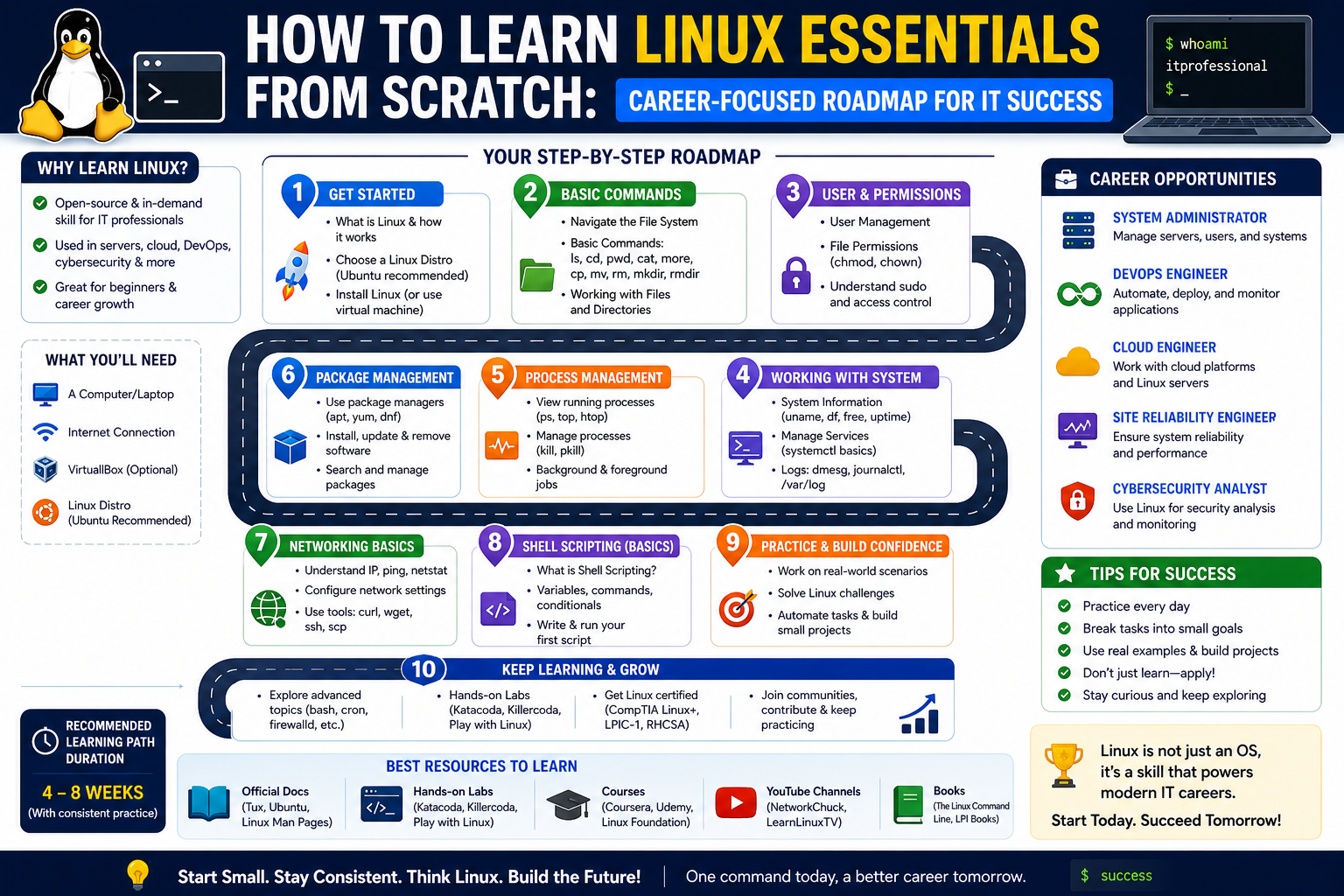
Linux has become one of the most influential operating systems in the modern technology ecosystem. It runs servers, cloud platforms, mobile systems, embedded devices, and even supercomputers. Because of this widespread adoption, understanding Linux is no longer optional for IT professionals—it has become a foundational skill that supports nearly every area of computing infrastructure.
The Linux Essentials certification exists to introduce learners to this ecosystem in a structured and accessible way. It is designed for individuals who are beginning their journey into open-source technologies and want to build a strong foundation before moving into more advanced roles. Rather than focusing on deep system engineering or complex infrastructure design, Linux Essentials emphasizes understanding how Linux works, how it is used in real environments, and how it connects to broader IT concepts.
This certification is not just about memorizing commands or technical details. It is about developing a mindset that aligns with open-source principles, collaborative development, and problem-solving in a Linux-based environment. Many learners approach Linux as a new language, and Linux Essentials helps translate that language into practical understanding.
For those entering the IT field, this certification often becomes the first structured step toward roles such as system administration, network support, cloud operations, or DevOps assistance. It also provides a strong bridge for learners coming from non-technical backgrounds who want to shift into technology careers.
The Role of Open Source in Shaping Modern Computing
To understand Linux Essentials fully, it is important to understand the philosophy behind open-source software. Open-source refers to software that is developed collaboratively and made freely available for use, modification, and distribution. This approach encourages transparency, innovation, and community-driven improvement.
Linux itself is one of the most successful examples of open-source development. It was built through global collaboration and continues to evolve through contributions from developers, companies, and independent contributors. Unlike proprietary systems, Linux is not controlled by a single organization, which makes it highly adaptable and widely trusted across industries.
The Linux Essentials certification introduces learners to this ecosystem by helping them understand how open-source communities operate. This includes learning about software licenses, community contributions, and the shared responsibility of maintaining and improving software systems.
Understanding open-source principles is not just theoretical knowledge. It directly impacts how IT professionals work in real environments. Many companies rely on open-source tools for cloud computing, cybersecurity, automation, and data management. A professional who understands this ecosystem is better prepared to adapt to modern IT environments.
Building Awareness of Linux Operating System Structure
One of the core goals of Linux Essentials is to help learners understand how the Linux operating system is structured. Unlike some operating systems that hide internal processes behind graphical interfaces, Linux encourages users to understand how the system works at a deeper level.
The Linux operating system is composed of several key components, including the kernel, system libraries, user interfaces, and system utilities. The kernel acts as the core of the system, managing hardware resources such as memory, processing power, and input/output operations. System libraries provide reusable functions that applications rely on, while system utilities allow users to interact with the operating system.
A major focus in Linux Essentials is understanding how these components interact. Instead of treating the system as a black box, learners are encouraged to explore how processes run, how files are managed, and how system resources are allocated.
This foundational understanding is critical because it shapes how professionals troubleshoot problems later in their careers. When something goes wrong in a Linux system, the ability to think in terms of processes, permissions, and system behavior becomes extremely valuable.
Introduction to the Command Line Environment
One of the most important aspects of Linux Essentials is gaining comfort with the command line interface. Unlike graphical interfaces, the command line allows users to interact with the system using text-based commands. While this may seem intimidating at first, it is one of the most powerful tools in Linux.
The command line provides direct access to system functions, file management, and administrative tasks. It is faster, more precise, and often more efficient than graphical tools. In professional environments, especially in server management and cloud computing, the command line is widely used.
Linux Essentials introduces learners to basic command-line navigation, including how to move between directories, list files, and manage system resources. It also helps learners understand how commands are structured and how small variations in syntax can produce different results.
Developing confidence in the command line is a gradual process. At first, learners may rely heavily on reference material, but over time, they begin to develop intuition. This shift is important because it transforms the command line from a technical barrier into a practical tool.
Understanding Files, Directories, and System Organization
In Linux, everything is treated as a file, including hardware devices, system processes, and configuration settings. This file-based approach creates a consistent structure that simplifies system management once it is understood.
Linux Essentials teaches learners how files and directories are organized within the system. The directory structure follows a hierarchical model, where everything originates from a single root directory. Each directory serves a specific purpose, such as storing system files, user data, configuration settings, or temporary files.
Understanding this structure is essential for navigating Linux systems efficiently. It also helps professionals locate important files, manage system configurations, and troubleshoot issues when they arise.
File management in Linux also includes understanding file permissions. Permissions determine who can read, write, or execute a file. This system is critical for maintaining security and ensuring that users only have access to appropriate resources.
Exploring User and Group Management Concepts
Another key area covered in Linux Essentials is user and group management. In multi-user systems like Linux, multiple users can operate on the same system simultaneously. Each user has a unique identity and a set of permissions that define what they can access.
User management involves creating, modifying, and deleting user accounts. It also includes assigning permissions and managing access to system resources. Groups are used to organize users and simplify permission management. Instead of assigning permissions to each user individually, administrators can assign them to groups.
This concept is fundamental in professional IT environments where multiple users need controlled access to shared systems. Understanding how to manage users and groups helps ensure system security and operational efficiency.
Linux Essentials introduces these concepts in a simplified way, allowing learners to understand how user identities are created and how they interact with system resources.
Introduction to Permissions and Security Fundamentals
Security is a central theme in Linux Essentials. Linux systems are known for their strong security model, which is built around permissions and user control. Every file and directory has a set of permissions that determine who can access it and what actions they can perform.
Permissions are typically divided into three categories: read, write, and execute. These permissions apply to the file owner, the group associated with the file, and all other users.
Understanding how permissions work is essential for maintaining system security. Incorrect permissions can expose sensitive data or allow unauthorized access to critical system functions. Conversely, overly restrictive permissions can prevent legitimate users from performing necessary tasks.
Linux Essentials introduces learners to the logic behind permission structures, helping them understand how to balance accessibility and security.
Introduction to Software and Application Management
Linux systems rely on a wide range of software applications to perform tasks. These applications can be installed, updated, and removed as needed. Linux Essentials provides a basic understanding of how software is managed within the Linux environment.
Unlike traditional operating systems where software installation may involve downloading executables, Linux often uses package management systems. These systems simplify the process of installing and maintaining software by handling dependencies and updates automatically.
Learners are introduced to the concept of software repositories, which are centralized locations where software packages are stored and maintained. This approach ensures that software remains consistent, secure, and up to date.
Understanding software management is important because it allows IT professionals to maintain system stability and ensure that applications function correctly.
Basic Concepts of Processes and System Behavior
In Linux, every running program is considered a process. Processes are essential for understanding how the operating system handles tasks and allocates resources. Linux Essentials introduces learners to the concept of processes and how they operate within the system.
Each process has a unique identifier and consumes system resources such as CPU and memory. Processes can be managed, monitored, and terminated based on system requirements.
Understanding process behavior is important for troubleshooting performance issues and ensuring system efficiency. For example, if a system becomes slow, analyzing running processes can help identify the cause.
Linux Essentials provides a foundation for understanding how processes interact with the operating system and how they contribute to overall system performance.
Introduction to Archiving and Data Compression
Data management is an important aspect of system administration. Linux Essentials introduces learners to basic concepts of archiving and compression, which are used to store and transfer data efficiently.
Archiving involves combining multiple files into a single file, while compression reduces the size of data to save storage space and improve transfer speed. These techniques are commonly used in backups, software distribution, and system maintenance.
Understanding how to manage compressed files is essential for handling large datasets and maintaining system efficiency.
Overview of Shell Environments and Scripting Basics
The shell is the interface that allows users to interact with the Linux operating system through commands. Linux Essentials introduces learners to the concept of shell environments and basic scripting.
A shell script is a sequence of commands stored in a file that can be executed automatically. This allows users to automate repetitive tasks and improve efficiency.
While Linux Essentials does not require advanced scripting skills, it introduces the foundational idea that automation is a key part of Linux system management.
Understanding how scripts work helps learners transition into more advanced topics such as system automation and DevOps practices.
Developing Practical Mindset for Linux Systems
Beyond technical knowledge, Linux Essentials encourages learners to develop a practical mindset. This includes learning how to approach problems logically, how to interpret system behavior, and how to experiment safely within a controlled environment.
Linux is a system that rewards exploration. Many concepts become clearer through practice and hands-on experience. Learners are encouraged to test commands, observe system responses, and gradually build confidence through repetition.
This mindset is essential for long-term success in IT careers. Professionals who understand how to learn independently and adapt to new systems are more likely to succeed in dynamic environments.
Preparing for Entry-Level IT Roles Through Linux Knowledge
Linux Essentials is often the starting point for careers in IT infrastructure. The knowledge gained through this certification can support roles such as system support, junior system administration, network assistance, and entry-level DevOps tasks.
Employers value candidates who understand Linux because it is widely used in servers, cloud platforms, and enterprise environments. Even basic familiarity with Linux can significantly improve employability in technical fields.
The certification helps bridge the gap between theoretical knowledge and practical application, making learners more confident in real-world scenarios.
Expanding Linux Competence Through Real-World System Usage
Moving beyond foundational concepts, true understanding of Linux begins when learners start engaging with real systems. Linux is not just a theoretical subject; it is an operating environment used in production servers, cloud infrastructure, embedded systems, and enterprise networks. As learners progress, they must begin thinking in terms of real operational environments rather than isolated commands or definitions.
In practical usage, Linux behaves as a living system where multiple components interact continuously. Applications run simultaneously, users access shared resources, and system processes constantly manage memory, storage, and performance. Understanding this dynamic environment is essential for developing confidence in system interaction.
One of the most important shifts at this stage is moving from “learning commands” to “understanding system behavior.” For example, instead of simply knowing how to list files or create directories, learners begin to understand why files are structured in certain ways, how system processes depend on file locations, and how system stability is affected by configuration choices.
Real-world Linux usage also introduces learners to variability. Unlike controlled learning environments, production systems differ based on distribution, configuration, and organizational requirements. This variability forces learners to rely on core principles rather than memorized instructions.
Exploring Linux Distributions and Their Ecosystems
Linux is not a single operating system but a family of distributions built around the Linux kernel. Each distribution is designed with specific goals, audiences, and system philosophies. Understanding these differences is an important step in developing practical Linux knowledge.
Some distributions prioritize stability and long-term support, making them suitable for enterprise servers. Others focus on user experience, offering more frequent updates and modern software packages. There are also specialized distributions designed for security testing, lightweight systems, or cloud environments.
Each distribution comes with its own package management system, configuration style, and default tools. While the underlying principles of Linux remain consistent, the user experience can vary significantly.
Learning to navigate multiple distributions helps professionals become adaptable. In real IT environments, systems are rarely uniform. A system administrator may encounter different distributions across servers, cloud instances, and development environments.
This exposure builds flexibility and reduces dependency on a single system structure. It also reinforces the importance of understanding Linux at a conceptual level rather than relying solely on interface familiarity.
Understanding Boot Processes and System Initialization
One of the more technical aspects of Linux involves understanding how the system starts. The boot process is a sequence of events that begins when the computer is powered on and ends when the system is fully operational.
At a high level, the boot process includes hardware initialization, loading of the bootloader, kernel activation, and system service startup. Each stage plays a critical role in ensuring the system becomes functional.
The bootloader is responsible for loading the Linux kernel into memory. Once the kernel is active, it initializes hardware components and prepares the system environment. After that, system services and background processes are started.
Understanding this sequence is important for troubleshooting system issues. If a system fails to start correctly, identifying which stage of the boot process failed can help diagnose the problem.
Linux Essentials introduces the conceptual foundation of this process, helping learners understand that system startup is not a single event but a coordinated sequence of operations.
Working with System Services and Background Processes
Modern Linux systems rely heavily on background services to perform essential tasks. These services manage networking, logging, scheduling, and hardware interaction. They run continuously without direct user interaction.
Understanding how services operate is essential for system management. Services can be started, stopped, restarted, and monitored depending on system requirements. Some services are critical for system stability, while others support optional functionality.
Background processes also play an important role in system performance. Many applications run as background processes, allowing users to perform multiple tasks simultaneously.
At this stage of learning, it becomes important to understand how system resources are shared among processes and how services interact with each other. Misconfigured services can affect system performance or even cause system instability.
Developing awareness of service behavior helps learners build stronger troubleshooting skills and improves their ability to manage Linux environments effectively.
Introduction to Networking Concepts in Linux Environments
Networking is a fundamental component of Linux systems, especially in server and cloud environments. Linux systems are often used to host websites, manage databases, and support communication between distributed systems.
Understanding basic networking concepts is essential for working with Linux effectively. This includes knowledge of IP addressing, network interfaces, routing, and connectivity.
Linux provides tools that allow users to inspect network configurations, test connectivity, and manage network settings. These tools are essential for diagnosing connectivity issues and ensuring systems communicate properly.
Networking in Linux is closely tied to system configuration. Many services depend on network availability, and misconfigured network settings can disrupt system functionality.
By developing a basic understanding of networking, learners gain the ability to work with distributed systems and cloud-based environments more effectively.
Introduction to Logging and System Monitoring
Linux systems generate logs to record system activity, errors, and events. These logs are essential for monitoring system behavior and diagnosing issues.
Logging provides a historical record of system activity, allowing administrators to review events that occurred over time. This includes system startup messages, application behavior, security events, and hardware interactions.
System monitoring involves observing system performance in real time. This includes tracking CPU usage, memory consumption, disk activity, and network traffic.
Together, logging and monitoring provide a complete view of system health. They allow administrators to identify problems before they become critical and ensure systems operate efficiently.
Understanding how to interpret logs is a valuable skill in Linux environments. It helps professionals identify root causes of issues and maintain system reliability.
Understanding File System Types and Storage Structures
Linux supports multiple file system types, each designed for different performance and reliability requirements. The file system determines how data is stored, accessed, and managed on storage devices.
At a conceptual level, the file system organizes data into structured formats that allow efficient retrieval and storage. It manages how files are named, stored, and protected.
Different file systems offer different features such as journaling, encryption support, and performance optimization. Understanding these differences helps professionals choose appropriate storage configurations based on system requirements.
Storage management also involves understanding disk partitions and mounting. Partitions divide storage devices into logical sections, while mounting connects those sections to the file system hierarchy.
These concepts are essential for system administration and data management tasks.
Introduction to Security Practices in System Environments
Security in Linux extends beyond file permissions. It includes system configuration, user management, network protection, and software control.
One of the core principles of Linux security is minimizing access. Users and processes should only have the permissions necessary to perform their tasks. This reduces the risk of unauthorized access or system damage.
Security also involves keeping systems updated, managing authentication methods, and monitoring system activity for suspicious behavior.
Linux systems provide multiple layers of security, allowing administrators to control access at the user, process, and network levels.
Understanding these security layers helps learners develop a strong awareness of system protection principles and prepares them for more advanced security concepts.
Introduction to Package Management Systems
Software installation in Linux is managed through package systems. These systems simplify the process of installing, updating, and removing software.
Package managers handle dependencies automatically, ensuring that required components are installed alongside applications. This reduces complexity and improves system stability.
Software packages are typically stored in repositories, which act as centralized sources for verified applications.
Understanding package management is essential for maintaining system consistency. It ensures that software remains compatible and secure across updates.
Different Linux distributions use different package management systems, but the underlying concept remains consistent across environments.
Understanding System Configuration and Environment Customization
Linux systems are highly configurable. Users can customize system behavior through configuration files, environment variables, and system settings.
Configuration files control how services operate, how applications behave, and how system resources are allocated. These files are often stored in specific directories and follow structured formats.
Environment variables define system-wide or user-specific settings that influence application behavior.
Understanding system configuration allows professionals to tailor Linux environments to specific needs. This is particularly important in server and enterprise environments where consistency and reliability are critical.
Introduction to Virtualization and Linux Environments
Virtualization has become a major part of modern IT infrastructure. It allows multiple operating systems to run on a single physical machine.
Linux plays a central role in virtualization technologies. Many virtual environments use Linux as a host or guest operating system.
Understanding virtualization helps learners grasp how systems are deployed in cloud environments and data centers.
It also introduces the concept of isolated environments, where systems operate independently but share underlying hardware resources.
This concept is essential for understanding modern computing architectures.
Linux in Cloud and Distributed Systems
Linux is widely used in cloud computing environments. Cloud platforms rely heavily on Linux-based systems for scalability, flexibility, and performance.
In cloud environments, systems are often distributed across multiple servers and regions. Linux provides the stability and efficiency required for managing these large-scale systems.
Understanding how Linux operates in cloud environments helps learners connect foundational knowledge to modern IT infrastructure.
It also introduces the idea that Linux is not limited to local machines but is a core component of global computing systems.
Developing Problem-Solving Skills in Linux Environments
As learners progress, problem-solving becomes a key skill. Linux systems often require troubleshooting, analysis, and logical thinking.
Problem-solving in Linux involves understanding system behavior, identifying anomalies, and applying structured reasoning to resolve issues.
This skill develops over time through experience and experimentation.
Rather than relying on memorization, learners begin to recognize patterns and apply concepts across different scenarios.
This analytical approach is one of the most valuable outcomes of learning Linux fundamentals.
Career Expansion Through Linux Knowledge Application
Linux knowledge opens pathways into multiple IT domains. Professionals with Linux skills can work in system administration, cloud operations, network support, cybersecurity, and infrastructure engineering.
As systems become more complex, Linux expertise becomes increasingly valuable. Many organizations rely on Linux for critical infrastructure, making it a key skill in technical roles.
Career development in this field often involves continuous learning and exposure to new technologies built on Linux foundations.
The ability to understand system behavior, manage configurations, and troubleshoot issues makes Linux-trained professionals highly adaptable in evolving IT environments.
Advancing Beyond Fundamentals into Professional Linux Environments
As learners move deeper into Linux, the focus naturally shifts from understanding how the system works to how it is used in real professional environments. At this stage, Linux is no longer just a learning subject—it becomes an operational platform that supports enterprise systems, cloud infrastructure, security frameworks, and large-scale automation.
In professional environments, Linux is rarely used in isolation. It exists as part of a larger ecosystem that includes networking systems, storage infrastructures, virtual machines, container platforms, and orchestration tools. Understanding Linux in this broader context is essential for building real-world competency.
The transition from foundational knowledge to professional application requires a change in mindset. Instead of viewing Linux as a collection of commands or concepts, learners begin to see it as an interconnected system where every component influences another. System performance, security, and stability are not isolated topics but outcomes of how well the entire environment is managed.
At this level, efficiency becomes as important as understanding. Professionals are expected to not only know how things work but also how to apply that knowledge quickly and accurately in high-pressure environments where systems must remain stable and available.
Understanding Enterprise-Level Linux Usage
Enterprise environments use Linux differently than personal or beginner systems. In large organizations, Linux is deployed across hundreds or thousands of machines, often distributed across multiple data centers or cloud regions.
These systems are designed for reliability, scalability, and security. Unlike beginner environments where experimentation is encouraged, enterprise systems require strict control and consistency.
In such environments, Linux is often used to power web servers, application servers, database systems, and backend services. These systems must remain operational 24/7, handling large volumes of traffic and data.
Understanding enterprise Linux means understanding how systems are designed for redundancy and fault tolerance. If one system fails, another must take over without interrupting service. This requires careful planning and configuration.
Professionals working in these environments must also understand deployment strategies, system monitoring, and automated recovery processes. Linux becomes a foundation for maintaining continuous service availability.
Deepening Knowledge of System Architecture and Performance
At an advanced level, understanding Linux system architecture becomes essential. This includes how the kernel interacts with hardware, how memory is allocated, how processes are scheduled, and how input/output operations are handled.
System performance is influenced by multiple factors, including CPU usage, memory consumption, disk speed, and network throughput. Linux provides tools that allow professionals to analyze and optimize these resources.
Performance tuning is not just about improving speed; it is about ensuring stability under varying workloads. Systems must be able to handle peak demand without failure or degradation.
Understanding how Linux manages resources helps professionals make informed decisions about system configuration. This includes balancing workloads, optimizing processes, and preventing resource bottlenecks.
At this stage, learners begin to appreciate that Linux is not just an operating system but a performance-driven environment where efficiency and stability must coexist.
Advanced File System Management and Storage Optimization
Storage systems in Linux environments become more complex at advanced levels. Beyond basic file management, professionals must understand how storage devices are configured, optimized, and maintained.
Linux supports advanced file systems that offer features such as journaling, encryption, and dynamic resizing. These features ensure data integrity and system reliability.
Storage optimization involves managing disk usage, improving read/write performance, and ensuring efficient data access. In enterprise environments, even small inefficiencies can have large-scale impacts.
Understanding how data flows through storage systems is essential for maintaining system health. This includes knowing how files are written to disk, how caching works, and how fragmentation can affect performance.
Professionals must also understand backup strategies and recovery mechanisms. Data protection is a critical aspect of system administration, and Linux provides multiple tools for creating reliable backup systems.
Mastering User Authentication and Identity Management
In professional Linux environments, user management evolves into identity and access management. Instead of simply creating users and assigning permissions, systems must manage authentication across multiple services and platforms.
Authentication ensures that users are who they claim to be. This is often handled through secure login systems, encrypted credentials, and centralized identity services.
Access control determines what users are allowed to do once they are authenticated. This includes file access, system commands, and service interactions.
In large organizations, user management is often centralized, allowing consistent access control across multiple systems. This reduces complexity and improves security.
Understanding identity management is critical for maintaining secure environments, especially in systems that support multiple users, services, and applications.
Strengthening Security Through Layered Protection Strategies
Security in advanced Linux environments is built on multiple layers. Instead of relying on a single protection mechanism, systems use a combination of tools, policies, and configurations to reduce risk.
These layers include user authentication, file permissions, network security, application isolation, and system monitoring.
Each layer contributes to overall system protection. If one layer is compromised, others continue to provide defense.
Security also involves proactive monitoring and threat detection. Systems must be continuously analyzed for unusual behavior, unauthorized access attempts, and potential vulnerabilities.
In enterprise environments, security is not a one-time configuration but an ongoing process. Systems must be regularly updated, audited, and tested to ensure they remain secure.
Understanding layered security helps professionals build resilient systems that can withstand evolving threats.
Advanced Networking in Linux Systems
Networking becomes significantly more complex at advanced levels of Linux usage. Systems are often connected across multiple networks, including internal corporate networks, external internet connections, and cloud-based environments.
Advanced networking involves configuring routing, managing network interfaces, optimizing bandwidth, and ensuring secure communication between systems.
Linux provides powerful networking tools that allow professionals to analyze traffic, troubleshoot connectivity issues, and optimize network performance.
Understanding how data moves between systems is essential for managing distributed environments. This includes knowledge of protocols, ports, and network services.
In cloud and enterprise environments, networking is a critical component of system architecture. Poorly configured networks can lead to downtime, security vulnerabilities, and performance issues.
Automation and Scripting in Professional Environments
Automation plays a major role in modern Linux environments. Instead of performing repetitive tasks manually, professionals use scripts and automation tools to streamline operations.
Automation improves efficiency, reduces human error, and ensures consistency across systems.
At a professional level, scripting is used for system deployment, configuration management, monitoring, and maintenance tasks.
Automation also supports scalability. As systems grow, manual management becomes impractical. Automated processes ensure that large environments remain manageable and stable.
Understanding automation is essential for roles in DevOps, cloud engineering, and system administration.
Working with Virtualization and Containerized Systems
Virtualization allows multiple operating systems to run on a single physical machine. Linux is widely used in virtualized environments, where systems are isolated but share underlying hardware resources.
Containers take this concept further by isolating applications rather than entire operating systems. This allows applications to run consistently across different environments.
Containerization has become a standard practice in modern software deployment. It enables faster development cycles, easier scaling, and improved system consistency.
Understanding virtualization and containers is essential for working in cloud-based environments where applications are deployed dynamically across distributed systems.
Linux serves as the foundation for many of these technologies, making it a critical skill for professionals in modern IT roles.
Linux in Cloud Infrastructure and Distributed Computing
Cloud computing has transformed how IT systems are built and managed. Linux plays a central role in this transformation, serving as the operating system behind many cloud platforms.
In cloud environments, systems are often distributed across multiple geographic locations. These systems must work together seamlessly to provide services to users around the world.
Linux provides the stability and flexibility required for managing these complex environments.
Understanding cloud infrastructure involves learning how systems are deployed, scaled, and managed dynamically. It also involves understanding how resources are allocated and monitored in real time.
Linux skills are essential for working in cloud environments because most cloud services rely on Linux-based systems at their core.
System Monitoring, Diagnostics, and Optimization Techniques
At advanced levels, system monitoring becomes a continuous process. Professionals must constantly analyze system performance, identify issues, and optimize configurations.
Monitoring involves tracking system metrics such as CPU usage, memory consumption, disk activity, and network traffic.
Diagnostics involves identifying the root cause of system issues. This requires understanding how different components interact and how system behavior changes under different conditions.
Optimization involves improving system performance without compromising stability.
Together, these practices ensure that systems remain reliable and efficient under varying workloads.
Building Operational Confidence in Linux Environments
As learners progress, confidence becomes an important part of professional development. Working with Linux systems requires decision-making under uncertainty, especially in live environments where mistakes can impact services.
Operational confidence comes from experience, practice, and understanding system behavior at a deep level.
Professionals develop the ability to anticipate system responses, recognize patterns, and make informed decisions quickly.
This confidence is essential for working in high-responsibility roles where system reliability is critical.
Career Progression Through Linux Expertise
Linux expertise opens pathways into multiple advanced IT careers. Professionals with strong Linux skills often move into roles involving system architecture, cloud engineering, cybersecurity, and infrastructure management.
Career progression is closely tied to the ability to understand complex systems and manage large-scale environments.
As technology continues to evolve, Linux remains a core component of modern IT infrastructure, ensuring that Linux skills remain highly relevant and in demand.
Professionals who continue developing their Linux knowledge often find opportunities in emerging fields such as container orchestration, DevOps engineering, and cloud-native development.
The depth of Linux knowledge directly influences career growth potential in technical industries.
Real-World Skill Integration and Long-Term Linux Growth
As Linux knowledge matures, its value becomes most visible when it is applied across different areas of IT work rather than being treated as a standalone skill. In real-world environments, Linux is rarely used in isolation. It becomes part of a larger workflow that includes cloud services, automation pipelines, security frameworks, and software deployment systems.
One of the most important developments at this stage is the ability to connect multiple concepts together. File systems, networking, process management, and security are no longer separate topics—they become interconnected parts of a single operating environment. For example, a misconfigured permission setting can affect application performance, while a network issue can impact system services and user access at the same time.
This interconnected understanding is what separates basic familiarity from professional capability. Instead of solving isolated problems, Linux professionals learn to analyze systems holistically, identifying how one issue may influence multiple components.
Another important aspect of long-term Linux growth is adaptability. Technology environments change rapidly, and Linux distributions, tools, and frameworks evolve continuously. Professionals who succeed in this field are those who can adapt to new tools without losing their understanding of core principles. The command line may remain consistent, but the tools built around it often change.
Automation also becomes increasingly important as systems scale. Manual processes that are manageable in small environments become inefficient in larger infrastructures. As a result, scripting and automation become essential skills for maintaining consistency and reducing operational workload. Even simple scripts can significantly improve efficiency when applied to repetitive administrative tasks.
Security awareness also deepens over time. Instead of focusing only on basic permissions, professionals begin to think in terms of system hardening, threat prevention, and access control strategies. Security becomes an ongoing responsibility rather than a fixed configuration. Systems must be continuously monitored, updated, and evaluated to ensure they remain protected against evolving risks.
In parallel, troubleshooting skills become more refined. Early-stage learners may rely on step-by-step instructions, but experienced professionals develop diagnostic thinking. They learn to interpret system behavior, analyze logs, and identify patterns that indicate underlying issues. This ability to diagnose problems efficiently is one of the most valuable outcomes of Linux experience.
Ultimately, Linux serves as a foundation for many modern IT careers. Whether working in cloud infrastructure, system administration, cybersecurity, or DevOps environments, Linux knowledge provides the structural understanding needed to manage complex systems. It is not just about operating a system but about understanding how modern computing environments function at a fundamental level.
Conclusion
Linux Essentials represents more than an entry-level certification; it functions as a structured gateway into the broader world of open-source systems and modern IT infrastructure. For many learners, it becomes the first meaningful step toward understanding how operating systems function beyond graphical interfaces and simplified user environments. The knowledge gained at this stage forms the groundwork for nearly every advanced specialization in IT, from system administration to cloud engineering and cybersecurity.
One of the most important outcomes of studying Linux Essentials is the shift in thinking it encourages. Instead of viewing technology as a collection of isolated tools, learners begin to understand systems as interconnected environments where processes, permissions, networks, and applications continuously interact. This systems-level thinking is essential in professional IT roles, where problems are rarely confined to a single layer of technology.
Another key takeaway is adaptability. Linux exists in many forms and distributions, each tailored to different environments and use cases. By learning core principles rather than relying on a single interface, learners develop the flexibility needed to work across diverse systems. This adaptability becomes increasingly valuable as organizations adopt hybrid infrastructures that combine on-premises systems with cloud-based platforms.
Linux Essentials also introduces learners to the importance of command-line proficiency, system structure awareness, and security fundamentals. These skills may appear basic at first, but they become indispensable in real-world environments where efficiency, precision, and control are critical. The ability to navigate systems quickly, interpret logs, and manage configurations directly impacts productivity and reliability in IT operations.
Equally important is the exposure to open-source philosophy. Understanding how collaborative development works, how communities contribute to software evolution, and how licensing affects usage helps learners appreciate the broader ecosystem in which Linux operates. This perspective is especially valuable in modern IT, where open-source tools are deeply integrated into enterprise solutions.
From a career perspective, Linux Essentials serves as a foundation for growth rather than a final destination. It prepares learners for more advanced certifications and technical roles by building confidence and practical awareness. Whether moving into system administration, cloud platforms, or infrastructure management, the concepts learned at this stage remain relevant throughout a professional career.
Ultimately, Linux Essentials is not just about learning an operating system—it is about developing a way of thinking that emphasizes structure, logic, and problem-solving. It encourages learners to engage with technology at a deeper level and prepares them for the complexity of real-world IT environments. For anyone pursuing a long-term career in technology, this foundational step provides both direction and momentum for continuous growth.