Cloud computing has transformed how modern computing systems are designed, deployed, and managed. Instead of relying solely on physical servers hosted within company data centers, organizations now increasingly depend on remote infrastructure provided over the internet. This shift has changed not only how businesses operate but also how IT professionals build their careers and technical skills.
Among all cloud providers, AWS has established itself as the most widely adopted infrastructure platform. Even though competitors such as Microsoft Azure, Google Cloud Platform, and Alibaba Cloud continue to expand their offerings, AWS maintains a leading position in terms of market share, global infrastructure presence, and service variety.
One of the main reasons AWS continues to dominate is its early entry into the cloud computing space. It offered scalable computing resources at a time when many organizations were struggling with expensive and inflexible on-premises infrastructure. Over time, AWS expanded its ecosystem to include storage, networking, databases, machine learning services, monitoring tools, and security solutions.
This wide ecosystem makes AWS not just a hosting platform but a complete computing environment. Businesses can build entire digital systems within AWS without needing traditional data centers. As a result, understanding AWS is no longer optional for IT professionals—it has become a foundational skill in modern infrastructure roles.
Why Linux and Cloud Computing Naturally Work Together
While AWS provides the infrastructure layer, Linux powers a significant portion of the workloads running on it. Linux has become the backbone of modern computing environments due to its flexibility, security, and open-source nature. It is widely used in web servers, enterprise systems, mobile devices, embedded systems, and cloud platforms.
One of the key reasons Linux dominates cloud environments is its efficiency. It requires fewer system resources compared to many proprietary operating systems, which makes it ideal for virtualized environments where resource optimization is critical. Cloud providers prefer operating systems that can run reliably at scale while maintaining low overhead, and Linux fits this requirement extremely well.
Another important factor is customization. Linux allows system administrators and developers to modify nearly every aspect of the operating system. This flexibility is particularly useful in cloud environments where workloads vary significantly. Whether it is hosting a simple website, running complex distributed applications, or managing containerized microservices, Linux can be adapted to meet those needs.
Security also plays a major role in its popularity. Linux systems benefit from a strong permission model, active community support, and frequent security updates. In cloud environments where systems are exposed to the internet, security is a top priority, making Linux a natural choice.
Because of these strengths, Linux and cloud computing have become tightly connected. Most cloud-based infrastructure today runs on Linux-based virtual machines or containers, making Linux knowledge essential for anyone working with cloud platforms like AWS.
Virtualization and the Foundation of AWS Infrastructure
At the core of AWS is the concept of virtualization. Instead of providing physical servers to each user, AWS uses virtualization technology to create multiple isolated environments on a single physical machine. These virtual environments are called instances.
Each instance behaves like an independent computer with its own operating system, storage, memory, and processing power. This abstraction allows AWS to efficiently allocate resources across millions of users while maintaining isolation and performance.
Linux plays a major role in this architecture. Many of AWS’s underlying systems run on Linux-based hypervisors and host operating systems. This ensures stability and scalability across its massive global infrastructure.
When users launch a virtual machine in AWS, they are essentially selecting a pre-configured image that defines the operating system and initial configuration. These images are known as Amazon Machine Images, commonly referred to as AMIs.
An AMI includes everything required to launch an instance: the operating system, system configurations, pre-installed software, and security settings. Users can choose from a wide variety of AMIs depending on their requirements, including different Linux distributions, security-hardened environments, or custom configurations.
This flexibility allows AWS users to quickly deploy systems without manually installing operating systems from scratch, significantly reducing setup time and complexity.
Introduction to Amazon Machine Images and Their Role
Amazon Machine Images are one of the most important components of AWS computing. They serve as templates for creating virtual machines. When a user launches an EC2 instance, they select an AMI that determines what the system will look like when it starts.
These images come in many forms. Some are minimal installations designed for maximum flexibility, while others include pre-installed software stacks for specific use cases. For example, a web server AMI might already include a web server, database client, and security configurations.
Linux-based AMIs are particularly common because of their stability and efficiency. Users can choose from various Linux distributions depending on their preferences and technical requirements.
One of the advantages of AMIs is repeatability. Once an image is configured, it can be reused to launch multiple identical instances. This is especially useful in large-scale environments where consistency across servers is important.
Another advantage is automation. AMIs can be integrated into deployment pipelines, allowing organizations to automatically launch systems with predefined configurations. This reduces human error and ensures consistency across environments.
Understanding Hardened Images and Security Standards
Security is a major concern in cloud environments, especially when systems are exposed to public networks. To address this, many organizations use hardened images when deploying cloud infrastructure.
A hardened image is a pre-configured operating system image that has been secured according to established security benchmarks. These benchmarks often include guidelines from recognized security standards such as CIS (Center for Internet Security) or OpenSCAP profiles.
Hardened images are designed to reduce vulnerabilities by disabling unnecessary services, applying security patches, configuring firewall rules, and enforcing strict access controls. This ensures that systems are protected from common attack vectors right from the moment they are deployed.
In AWS environments, hardened AMIs are widely used in enterprise settings where compliance and security requirements are strict. These images help organizations meet regulatory standards without requiring extensive manual configuration.
However, while hardened images provide strong security foundations, they may not always be ideal for learning purposes. Because many settings are pre-configured, users may not gain full visibility into system configuration processes. For individuals studying Linux or preparing for certifications, a more minimal installation is often preferred.
A minimal Linux image allows users to manually configure services, security settings, and system components. This hands-on approach provides deeper understanding of how Linux systems operate, especially in cloud environments.
The Relationship Between EC2 and Linux Systems
Amazon Elastic Compute Cloud, commonly known as EC2, is one of the core services within AWS. It allows users to launch and manage virtual machines in the cloud.
EC2 instances are where Linux systems are typically deployed within AWS. When a user launches an EC2 instance using a Linux-based AMI, they are essentially creating a cloud-based Linux computer.
These instances can vary in size, performance, and configuration. Smaller instances are often used for testing and learning, while larger instances support production workloads such as enterprise applications or large-scale data processing.
One of the key advantages of EC2 is scalability. Users can increase or decrease computing resources based on demand. This is particularly useful for applications that experience fluctuating workloads.
Linux is well-suited for EC2 environments because it performs efficiently across different hardware configurations. Whether running on a small virtual machine or a large compute-optimized instance, Linux maintains consistent behavior and performance.
EC2 also integrates with other AWS services, allowing Linux systems to interact with storage, networking, and database services. This creates a fully connected ecosystem where Linux serves as the operating layer for cloud applications.
The Importance of Linux Familiarity in Cloud Environments
As cloud computing continues to expand, Linux knowledge has become increasingly important for IT professionals. Many cloud-based systems rely on Linux as their underlying operating system, making it essential for managing servers, applications, and infrastructure.
Understanding Linux in a cloud context involves more than just knowing basic commands. It includes understanding system architecture, networking, security configurations, process management, and automation tools.
In AWS environments, Linux systems are often accessed remotely using secure shell connections. Administrators use command-line interfaces to configure servers, install software, monitor performance, and troubleshoot issues.
This hands-on interaction builds practical skills that are directly applicable to real-world IT environments. Unlike graphical interfaces, command-line management provides deeper control over system behavior and performance.
Additionally, Linux familiarity is valuable for DevOps practices, where automation and infrastructure management are key components. Many DevOps tools are designed to run on Linux systems, making it a foundational skill in modern development workflows.
Cloud Flexibility and the Value of Virtual Linux Environments
One of the major advantages of running Linux on AWS is flexibility. Users can quickly create, modify, and delete virtual machines without worrying about physical hardware limitations.
This flexibility allows for experimentation and learning without long-term commitment. Developers can test different configurations, try new software, and simulate production environments without needing dedicated hardware.
Virtual Linux environments also make it easier to replicate systems. If a configuration works well, it can be duplicated across multiple instances. This is particularly useful for scaling applications or testing distributed systems.
Another advantage is isolation. Each Linux instance runs independently, meaning changes made in one environment do not affect others. This reduces the risk of system-wide failures and improves stability during experimentation.
Cloud-based Linux systems also support automation tools that allow users to manage infrastructure programmatically. This is a key aspect of modern IT practices, where manual configuration is replaced with automated deployment scripts and infrastructure templates.
Linux Distributions in AWS Ecosystem
AWS supports a wide variety of Linux distributions, each with its own strengths and use cases. These distributions provide users with flexibility depending on their goals.
Some distributions are designed for stability and enterprise use, while others focus on security, ease of use, or customization. This variety ensures that users can select the most appropriate environment for their workload.
Different distributions also come with different package management systems, software repositories, and community support structures. These differences influence how systems are maintained and updated within AWS environments.
Choosing the right Linux distribution depends on several factors, including performance requirements, security needs, and user experience preferences. In cloud environments, this decision plays a key role in system efficiency and manageability.
Cloud Learning Through Linux-Based Systems
For many learners and IT professionals, AWS provides an accessible way to gain hands-on experience with Linux systems. Instead of setting up physical servers or complex virtual environments locally, users can launch Linux instances in the cloud and begin experimenting immediately.
This approach reduces barriers to entry and allows learners to focus on practical skills. They can explore system administration, networking, security configurations, and software deployment in a real cloud environment.
Because cloud instances are temporary and scalable, users can safely experiment without risk of damaging physical systems. This encourages exploration and deeper understanding of system behavior.
Linux on AWS therefore serves as both a learning platform and a professional tool. It bridges the gap between theoretical knowledge and real-world infrastructure experience, making it a valuable resource for anyone entering the IT field.
How Linux Workloads Are Deployed in AWS Infrastructure
Running Linux in AWS is not just about launching a virtual machine; it is about understanding how cloud infrastructure orchestrates computing resources behind the scenes. When a Linux instance is created in AWS, multiple layers of abstraction work together to deliver a fully functional system.
At the foundation is the physical hardware—large data centers filled with servers, storage devices, and networking equipment. However, users never interact with this hardware directly. Instead, AWS abstracts these resources into virtual components that can be allocated dynamically.
When a Linux instance is launched, AWS assigns compute power from a pool of available resources. This includes CPU cores, memory allocation, storage volumes, and network bandwidth. These resources are combined to form a virtual environment that behaves like a standalone machine.
The Linux operating system then runs inside this environment, unaware that it is not operating on physical hardware. This abstraction allows multiple Linux systems to run independently on the same physical server without interfering with each other.
This model makes Linux workloads highly scalable. If demand increases, additional instances can be launched quickly. If demand decreases, instances can be terminated to reduce resource consumption. This flexibility is one of the main advantages of cloud computing.
Understanding Instance Types and Resource Allocation
AWS provides a wide range of instance types designed to support different workloads. These instance types determine the amount of CPU power, memory, storage, and networking capacity available to a Linux system.
Smaller instance types are often used for development, testing, or learning environments. These instances provide limited resources but are sufficient for running basic Linux operations, experimenting with commands, or hosting lightweight applications.
Larger instance types are designed for production workloads. They offer higher performance, more memory, and increased network throughput. These are commonly used for enterprise applications, databases, and high-traffic web services.
Linux performs consistently across these different instance types because of its lightweight architecture. Unlike some operating systems that require significant system resources, Linux can operate efficiently even on minimal hardware configurations.
This makes Linux particularly suitable for cloud environments, where resource optimization is critical. Organizations can choose instance types based on workload requirements and scale them as needed.
The Role of Storage Systems in Linux-Based AWS Environments
Storage is a critical component of any computing system, and AWS provides multiple storage options for Linux instances. These storage systems determine how data is saved, accessed, and managed.
One of the primary storage mechanisms is block storage, which is typically attached to Linux instances as virtual hard drives. These storage volumes behave like physical disks and can be formatted with standard Linux file systems.
Block storage is commonly used for operating system files, application data, and databases. It provides high performance and low latency, making it suitable for workloads that require fast data access.
Another storage option is object storage, which is designed for storing large amounts of unstructured data. While not directly mounted to Linux systems in the same way as block storage, object storage is often accessed by Linux applications through APIs.
Linux systems in AWS frequently interact with both types of storage, depending on the application requirements. For example, a web server might use block storage for system files and object storage for media assets or backups.
Storage management in Linux involves tasks such as mounting volumes, configuring file systems, and managing permissions. These tasks are essential for ensuring data integrity and system stability.
Networking in Linux AWS Instances
Networking is a fundamental aspect of running Linux systems in the cloud. Every Linux instance in AWS is connected to a virtual network that enables communication with other systems, services, and the internet.
This virtual network is logically separated into private environments where instances can communicate securely. Each Linux instance is assigned a private IP address within this network, allowing internal communication between systems.
For external communication, instances can be assigned public IP addresses or connected through network gateways. This enables Linux systems to host websites, APIs, or other internet-facing services.
Network security is managed through virtual firewalls that control traffic flow to and from Linux instances. These firewalls define rules that specify which types of traffic are allowed or blocked.
Linux administrators must understand how networking works in cloud environments, including concepts such as routing, DNS resolution, and port management. These skills are essential for configuring secure and efficient systems.
Because cloud networking is software-defined, it offers a high level of flexibility. Network configurations can be modified without changing physical infrastructure, making it easier to adapt to changing requirements.
Identity and Access Control in Linux Cloud Systems
Security in AWS is not limited to the operating system itself. It also involves controlling who can access systems and what actions they are allowed to perform.
Identity and access management plays a critical role in Linux-based cloud environments. Instead of relying solely on system-level user accounts, AWS provides centralized identity controls that manage access to resources.
These controls define permissions for users, applications, and services. For example, a system administrator may have full access to Linux instances, while a developer may only have limited access to specific resources.
Within Linux systems themselves, traditional user management still applies. Users are created with specific permissions that determine what files and commands they can access.
The combination of cloud-level and system-level access control creates a layered security model. This reduces the risk of unauthorized access and helps enforce organizational security policies.
Understanding access control is essential for managing Linux systems in AWS. Misconfigured permissions can lead to security vulnerabilities or operational issues.
Security Practices for Linux in Cloud Environments
Security is one of the most important considerations when running Linux systems in AWS. Because cloud systems are accessible over the internet, they are exposed to potential threats if not properly configured.
One of the most basic security practices is controlling network access. Linux instances should only expose necessary services to the internet, while keeping internal services restricted to private networks.
Another important practice is system updates. Linux distributions frequently release security patches that address vulnerabilities. Keeping systems updated helps protect against known threats.
File permissions also play a critical role in Linux security. Properly configuring who can read, write, or execute files helps prevent unauthorized access to sensitive data.
Encryption is another key component of cloud security. Data stored on Linux systems can be encrypted to protect it from unauthorized access, even if storage devices are compromised.
Logging and monitoring are also essential. Linux systems generate logs that record system activity, which can be analyzed to detect unusual behavior or security incidents.
Security in AWS is a shared responsibility. While AWS provides secure infrastructure, users are responsible for configuring their Linux systems properly.
Automation and Infrastructure Management in Linux AWS Systems
One of the most powerful aspects of running Linux in AWS is the ability to automate infrastructure management. Instead of manually configuring systems, administrators can use automation tools to define and deploy environments.
Automation allows Linux systems to be created, configured, and managed consistently. This reduces human error and ensures that systems are deployed in a predictable manner.
In cloud environments, automation is often used to manage large numbers of Linux instances. For example, an organization might deploy hundreds of identical servers to handle web traffic. Automation ensures that all these systems are configured identically.
Linux is well-suited for automation because it supports scripting and command-line tools. These tools allow administrators to define system behavior in a repeatable way.
Automation also plays a role in scaling systems. When demand increases, new Linux instances can be automatically launched. When demand decreases, instances can be removed.
This dynamic scaling is one of the key advantages of cloud computing and allows organizations to optimize resource usage.
Software Installation and Package Management in AWS Linux Systems
Managing software on Linux systems is an important part of working in AWS environments. Linux distributions typically use package management systems to install, update, and remove software.
These systems allow administrators to easily install applications from trusted repositories. This ensures that software is properly configured and compatible with the operating system.
In cloud environments, package management is often used to install server software such as web servers, databases, and development tools.
Software updates are also managed through these systems. Keeping software up to date is important for security and performance.
Linux package management simplifies system administration by automating many of the tasks involved in software maintenance. This is particularly useful in cloud environments where systems may be frequently created and destroyed.
Monitoring and Performance Management of Linux Instances
Monitoring system performance is essential for maintaining stable Linux environments in AWS. Without proper monitoring, it becomes difficult to identify performance issues or system failures.
Linux systems generate a wide range of performance metrics, including CPU usage, memory consumption, disk activity, and network traffic. These metrics help administrators understand how systems are performing.
In cloud environments, monitoring tools collect and analyze this data in real time. This allows administrators to detect issues before they impact users.
Performance management also involves optimizing resource usage. If a Linux instance is under heavy load, additional resources can be allocated or additional instances can be deployed.
Monitoring is closely tied to scalability. By analyzing system performance, organizations can make informed decisions about when to scale infrastructure up or down.
Cost Considerations When Running Linux in AWS
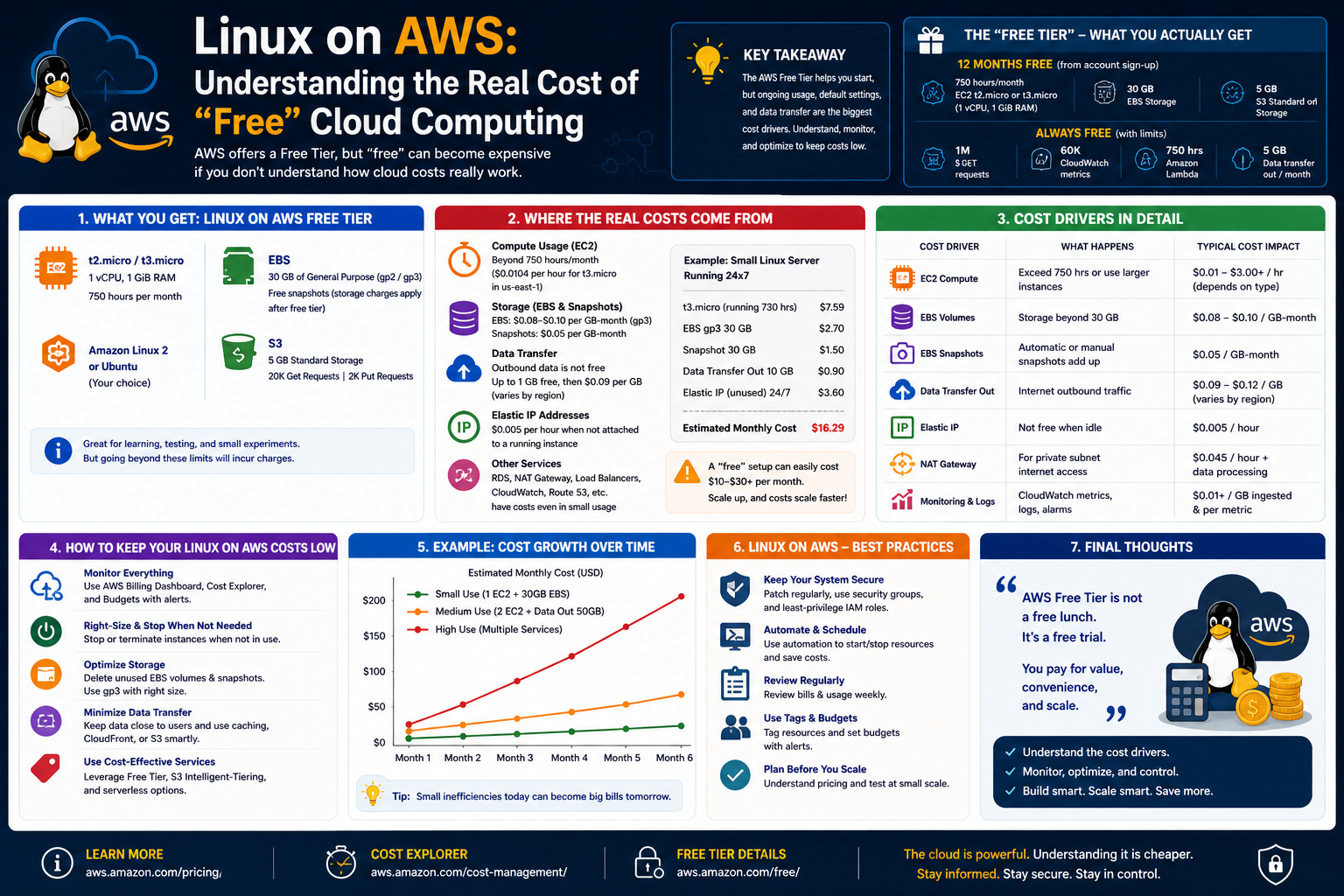
While Linux itself is open-source and free to use, running Linux in AWS involves infrastructure costs. These costs are associated with the resources consumed by virtual machines, storage, and networking.
One of the main cost factors is compute time. Linux instances are billed based on how long they run and the resources they consume.
Storage costs are another consideration. Data stored on virtual disks or object storage systems contributes to overall usage costs.
Network usage can also impact costs, especially when data is transferred between regions or external networks.
Understanding cost structure is important for managing cloud environments efficiently. By optimizing instance usage and resource allocation, costs can be controlled effectively.
Linux systems are often used in cloud environments because they are resource-efficient, helping reduce overall infrastructure costs.
Development and Testing Environments Using Linux on AWS
Linux on AWS is widely used for development and testing purposes. Developers can quickly create isolated environments to build and test applications.
These environments closely resemble production systems, allowing developers to identify issues before deployment. This reduces the risk of system failures in live environments.
Testing environments can be created and destroyed as needed, making them highly flexible. Developers can experiment with different configurations without affecting production systems.
Linux provides a stable and consistent environment for development workflows. Combined with cloud flexibility, it becomes a powerful platform for software development and system testing.
Containerization and Linux Integration in Cloud Systems
Modern cloud environments increasingly rely on containerization technologies. Containers allow applications to run in isolated environments that share the same operating system kernel.
Linux is particularly well-suited for containerization because of its kernel design and process management capabilities.
In AWS environments, containers often run on top of Linux instances. This allows multiple applications to run independently on the same system.
Containerization improves efficiency by reducing overhead and enabling faster deployment. It also enhances portability, allowing applications to run consistently across different environments.
Linux plays a central role in this architecture, serving as the foundation for containerized workloads in the cloud.
How Linux on AWS Powers Modern Digital Infrastructure
Linux running on AWS is not just a learning environment or a certification practice tool; it is the foundation of much of today’s global digital infrastructure. From websites and mobile applications to enterprise systems and data pipelines, Linux-based cloud instances are quietly powering the services people use every day.
Most modern applications are designed to be cloud-native, meaning they are built specifically to run in distributed cloud environments rather than on single physical machines. Linux is often the operating system of choice for these applications due to its stability, performance efficiency, and compatibility with open-source tooling.
In large-scale systems, Linux instances on AWS are often grouped into clusters. Each instance performs a specific role, such as handling web requests, processing data, or managing background tasks. These systems are designed to work together seamlessly, distributing workloads across multiple machines.
This distributed approach allows systems to handle high levels of traffic without crashing or slowing down significantly. If one Linux instance becomes overloaded, traffic can be redirected to others. This elasticity is one of the defining features of cloud-based Linux infrastructure.
Web Hosting and Application Deployment on Linux AWS Systems
One of the most common use cases for Linux on AWS is web hosting. Many websites and web applications run on Linux servers configured with web server software, application runtimes, and database connections.
Linux is particularly well-suited for hosting web applications because of its efficiency and compatibility with widely used web technologies. Many web stacks are built on Linux foundations, allowing developers to deploy applications quickly and reliably.
In a typical setup, a Linux instance hosts a web server that processes incoming requests from users. These requests may involve retrieving web pages, processing data, or interacting with backend systems.
Because AWS allows users to scale Linux instances dynamically, websites can handle sudden spikes in traffic without crashing. This scalability is especially important for businesses that experience unpredictable user demand.
Application deployment in Linux environments is also highly flexible. Developers can update applications without shutting down entire systems. This allows continuous delivery of new features and improvements.
Linux in Data Processing and Analytics Workloads
Beyond web hosting, Linux on AWS plays a major role in data processing and analytics. Organizations generate massive amounts of data, and Linux-based systems are often used to process, analyze, and transform this data into useful insights.
These workloads often run on clusters of Linux instances working together. Each instance processes a portion of the data, allowing tasks to be completed more quickly than on a single machine.
Linux is well-suited for data processing because of its strong support for scripting, automation, and distributed computing tools. These capabilities allow developers to build complex data pipelines that run efficiently in cloud environments.
Data analytics workloads often involve reading data from storage systems, processing it using compute instances, and writing results back to storage. Linux serves as the execution layer for these operations.
Because AWS allows systems to scale based on demand, data processing jobs can be expanded or reduced depending on workload size. This flexibility helps organizations manage large-scale data operations efficiently.
Security Use Cases and Ethical Hacking Environments
Linux on AWS is also widely used in cybersecurity and ethical hacking environments. Security professionals often use cloud-based Linux systems to test network defenses, analyze vulnerabilities, and simulate attack scenarios.
Certain Linux distributions are specifically designed for security testing and come pre-installed with tools for network scanning, penetration testing, and forensic analysis.
In AWS environments, these systems can be quickly deployed and isolated from production infrastructure. This makes them ideal for controlled security testing without risking real systems.
Security teams often use Linux instances to simulate attacks on their own infrastructure. This helps identify weaknesses before malicious actors can exploit them.
Cloud-based Linux environments also allow security professionals to test systems from different geographic locations, which is useful for understanding how systems behave under global network conditions.
DevOps Workflows and Continuous Integration Systems
Linux plays a central role in DevOps practices, which combine software development and IT operations into a unified workflow. In AWS environments, Linux systems are often used to automate building, testing, and deploying applications.
Continuous integration systems frequently run on Linux instances. These systems automatically test code changes whenever developers submit updates. If tests pass, the code can be deployed automatically to production environments.
This automation reduces manual effort and speeds up development cycles. Linux provides the stability and flexibility required to support these automated workflows.
Infrastructure as code is another important concept in DevOps. Instead of manually configuring systems, infrastructure is defined through code that can be executed to create consistent environments.
Linux systems are commonly used to execute these automation scripts. This allows entire environments to be recreated quickly and reliably.
Container Ecosystems and Microservices Architecture
Modern applications are increasingly built using microservices architecture, where applications are divided into smaller independent components. Each component performs a specific function and communicates with others through APIs.
Linux is a key enabler of this architecture because it supports containerization technologies. Containers allow applications to run in isolated environments while sharing the same underlying operating system kernel.
In AWS, Linux-based systems often host container platforms that manage multiple application containers. Each container runs independently, allowing applications to be updated or scaled without affecting others.
This architecture improves reliability and flexibility. If one service fails, it does not necessarily bring down the entire application.
Linux provides the necessary kernel features for container isolation, resource management, and process control, making it the preferred operating system for microservices environments.
Artificial Intelligence and Machine Learning Workloads
Linux on AWS is also widely used in artificial intelligence and machine learning workloads. These workloads often require large amounts of computational power and data processing capabilities.
Machine learning models are trained using large datasets that are processed across multiple Linux instances. These instances work together to perform complex calculations and model training.
Linux is preferred for these workloads because of its compatibility with scientific computing libraries, scripting languages, and distributed processing frameworks.
Cloud environments allow machine learning workloads to scale dynamically. When more processing power is needed, additional Linux instances can be added to the system.
Once training is complete, models can be deployed on Linux-based systems for inference, where they process real-time data and generate predictions.
IoT Systems and Embedded Cloud Integration
The Internet of Things (IoT) connects physical devices to the internet, allowing them to collect and exchange data. Linux plays an important role in IoT systems, especially when combined with cloud infrastructure like AWS.
Many IoT devices use lightweight versions of Linux as their operating system. These devices collect data from sensors and send it to cloud-based Linux systems for processing.
In AWS environments, Linux instances receive and process IoT data streams. This data is then analyzed, stored, or used to trigger automated actions.
The combination of Linux and cloud computing allows IoT systems to scale efficiently. Millions of devices can connect to cloud-based Linux systems without requiring centralized physical infrastructure.
Financial Systems and High-Performance Computing
Linux on AWS is also used in financial systems where performance and reliability are critical. Financial institutions often rely on cloud-based Linux systems for trading platforms, risk analysis, and transaction processing.
These systems require extremely low latency and high processing speed. Linux provides the efficiency needed to handle these workloads effectively.
High-performance computing workloads, such as simulations and complex mathematical modeling, also run on Linux-based cloud systems. AWS allows these workloads to be distributed across multiple instances, significantly reducing processing time.
Limitations of Running Linux on AWS
Despite its many advantages, running Linux on AWS also comes with limitations that users must understand.
One major limitation is abstraction from physical hardware. While cloud environments provide flexibility, they hide the underlying hardware, which can be important for certain technical roles.
Users do not have direct access to physical components such as memory modules, storage drives, or network hardware. This limits hands-on experience with physical system maintenance.
Another limitation is dependency on internet connectivity. Since AWS is a cloud-based platform, access to Linux systems requires a stable internet connection. This can be restrictive in environments with limited connectivity.
Cost management is another consideration. While Linux itself is free, cloud resources are billed based on usage. Without proper monitoring, costs can increase unexpectedly.
Additionally, cloud environments may introduce complexity. Managing distributed systems requires understanding networking, security, and automation concepts that may be challenging for beginners.
Learning Tradeoffs Between Cloud and Local Linux Systems
There is an important distinction between running Linux locally and running it on AWS. Both environments offer valuable learning experiences, but they focus on different aspects of system administration.
Local Linux environments provide direct access to hardware and allow users to experiment without incurring cloud costs. They are useful for learning basic system administration and software installation.
AWS-based Linux environments, on the other hand, provide exposure to real-world cloud infrastructure. They allow users to understand how systems scale, interact, and operate in distributed environments.
Both approaches complement each other. Local environments build foundational skills, while cloud environments provide practical industry experience.
Understanding when to use each environment is an important part of developing IT expertise.
Strategic Importance of Linux Skills in Cloud Careers
Linux skills are increasingly valuable in cloud computing careers. Many job roles in IT, DevOps, cybersecurity, and cloud engineering require strong Linux knowledge.
Because AWS relies heavily on Linux-based systems, professionals who understand Linux are better equipped to manage cloud infrastructure.
Linux skills also provide flexibility across different platforms. Since many cloud providers use Linux-based systems, knowledge gained on AWS is transferable to other environments.
This makes Linux one of the most important foundational skills in modern IT careers.
The Evolving Role of Linux in Cloud Ecosystems
As cloud computing continues to evolve, Linux remains at the center of infrastructure development. New technologies such as serverless computing, edge computing, and hybrid cloud systems still rely on Linux-based components.
Even when users do not directly interact with Linux systems, many backend services and infrastructure layers are still powered by Linux.
This ongoing relevance ensures that Linux will continue to play a critical role in cloud computing for the foreseeable future.
Cloud platforms may change and evolve, but Linux remains a constant foundation supporting modern digital systems across industries and technologies.
Conclusion
Linux running on AWS represents far more than a technical combination of an operating system and a cloud platform. It reflects the foundation of how modern digital infrastructure is built, scaled, and maintained. Across industries, from small startups to global enterprises, Linux-based cloud systems have become the default choice for running critical workloads. This shift has not happened by accident—it is the result of decades of Linux maturity combined with the flexibility and scalability offered by cloud computing.
One of the most important takeaways is how naturally Linux fits into the cloud environment. Its lightweight design, open-source nature, and strong security model make it ideal for virtualized systems where efficiency and stability are essential. AWS, as a leading cloud provider, enhances these strengths by offering scalable infrastructure that allows Linux systems to be deployed within minutes and adjusted dynamically based on demand. This combination enables organizations to move away from rigid physical infrastructure and toward flexible, on-demand computing.
For IT professionals, Linux on AWS is not just a tool—it is a learning pathway. It provides exposure to real-world system administration, networking, automation, and security practices. Instead of working in isolated or theoretical environments, users interact with systems that closely mirror production-grade infrastructure. This experience is especially valuable in today’s job market, where employers expect familiarity with cloud platforms and Linux-based systems.
At the same time, Linux on AWS highlights the tradeoffs inherent in cloud computing. While it offers convenience, scalability, and accessibility, it also abstracts away physical hardware and introduces dependency on cloud providers and internet connectivity. Users gain powerful tools, but they also lose direct control over underlying infrastructure. Understanding this balance is essential for making informed decisions about when and how to use cloud-based Linux systems effectively.
Another key insight is the economic dimension often described as “free” computing. Linux itself is open-source and does not carry licensing costs, and AWS offers limited free-tier usage. However, real-world usage quickly reveals that cloud computing is consumption-based. Resources such as compute time, storage, and network traffic all contribute to costs once usage exceeds free limits. This makes cost awareness an essential skill for anyone working with AWS. Efficient system design, proper monitoring, and careful resource management become just as important as technical knowledge.
Beyond cost and infrastructure, Linux on AWS plays a central role in modern software development practices. It supports DevOps workflows, continuous integration pipelines, containerization systems, and microservices architectures. These approaches depend heavily on automation and scalability, both of which are naturally supported by Linux and cloud environments. As a result, Linux has evolved from being simply an operating system into a core component of modern software delivery pipelines.
Security is another area where Linux on AWS demonstrates its importance. Cloud environments require careful configuration to ensure systems remain protected from unauthorized access and potential threats. Linux provides a strong security foundation, but it is ultimately the responsibility of users to configure systems correctly. This shared responsibility model reinforces the importance of understanding both operating system-level and cloud-level security practices.
Perhaps most importantly, Linux on AWS represents adaptability in a rapidly changing technological landscape. As new technologies emerge—such as artificial intelligence, machine learning, edge computing, and serverless architectures—Linux continues to serve as the underlying layer supporting these innovations. Its presence remains consistent even as higher-level tools and services evolve.
For learners and professionals alike, engaging with Linux on AWS is not just about gaining technical skills. It is about understanding how modern computing ecosystems operate at scale. It builds familiarity with distributed systems, reinforces problem-solving skills, and encourages a deeper appreciation for how digital services are delivered globally.
Ultimately, Linux on AWS stands at the intersection of tradition and innovation. Linux brings decades of proven reliability and openness, while AWS introduces elasticity, scalability, and global reach. Together, they form a powerful combination that defines much of today’s cloud computing world. Anyone looking to grow in IT, whether in administration, development, security, or data engineering, benefits significantly from understanding how these two technologies work together.
As cloud computing continues to expand and evolve, the importance of Linux within it is unlikely to diminish. Instead, its role is expected to grow even further, adapting to new paradigms and continuing to serve as the backbone of modern infrastructure.