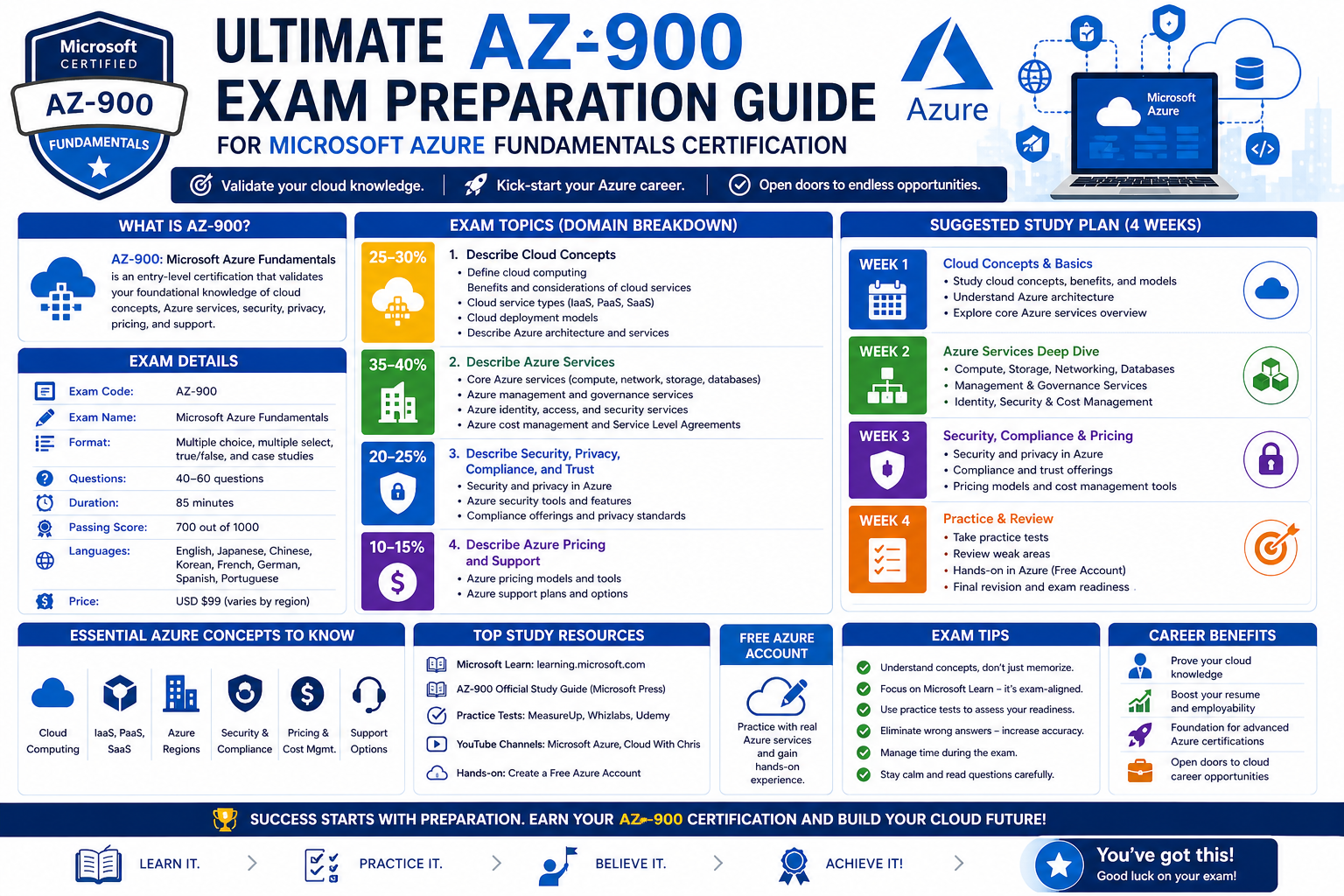
The Microsoft Azure Fundamentals certification is designed to introduce individuals to the essential ideas behind cloud computing and how Microsoft Azure operates as a cloud platform. It is structured for people who may not have extensive technical experience but want to understand how modern cloud services support businesses and digital systems. Rather than focusing on deep technical implementation, this level of certification emphasizes awareness of core concepts, basic services, and the general structure of cloud environments.
At its foundation, Azure Fundamentals helps learners understand what cloud computing means in practical terms. Instead of relying on traditional on-premises infrastructure, organizations increasingly use cloud platforms like Azure to host applications, store data, and manage computing resources. This shift allows businesses to scale more efficiently, reduce infrastructure costs, and improve accessibility to digital services from virtually anywhere in the world.
The purpose of this foundational certification is not to turn someone into a cloud engineer immediately, but to build a conceptual framework. This framework makes it easier to understand more advanced Azure topics in the future. It also ensures that individuals working in IT-related or business roles can communicate effectively about cloud technologies, even if they are not directly managing them.
Azure Fundamentals also plays an important role in bridging the gap between technical and non-technical professionals. Many organizations today operate in hybrid environments where collaboration between different teams is essential. Understanding the basics of Azure helps individuals contribute to discussions about cloud adoption, system migration, and digital transformation strategies.
Another important aspect of this certification is its focus on simplifying cloud concepts. It breaks down complex ideas into more understandable components, such as virtual machines, storage systems, and networking basics. This approach allows learners to gradually build confidence without feeling overwhelmed by advanced technical details.
Ultimately, Microsoft Azure Fundamentals serves as an entry point into the broader world of cloud computing. It provides a structured way to begin exploring how cloud platforms work, why they are important, and how they are shaping the future of technology across industries.
The Role of Cloud Computing in Modern IT Environments
Cloud computing has become a central part of modern IT systems, transforming how organizations store data, run applications, and manage infrastructure. Instead of relying solely on physical servers located in specific data centers, cloud computing allows access to computing resources over the internet. This shift has significantly changed how businesses operate and scale their digital services.
One of the key advantages of cloud computing is flexibility. Organizations can quickly adjust their computing resources based on demand. For example, during periods of high traffic, additional resources can be allocated automatically, and during quieter periods, those resources can be reduced. This dynamic approach helps optimize performance while avoiding unnecessary costs.
Another important aspect of cloud computing is accessibility. Users can access cloud-based applications and data from almost any location, as long as they have an internet connection. This has enabled remote work models, global collaboration, and faster access to business systems. It has also improved continuity, allowing organizations to maintain operations even when physical locations are unavailable.
Cloud computing also introduces efficiency in terms of maintenance and infrastructure management. Instead of managing physical servers, hardware upgrades, and maintenance tasks internally, organizations can rely on cloud providers to handle much of the underlying infrastructure. This allows IT teams to focus more on strategic tasks rather than routine maintenance.
Security is another critical component of cloud computing. While some may initially assume that storing data in the cloud is less secure, cloud providers invest heavily in advanced security systems. These include encryption, identity management, monitoring tools, and compliance frameworks designed to protect data and applications.
In addition, cloud computing supports innovation by making advanced technologies more accessible. Services such as artificial intelligence, machine learning, and big data analytics can be integrated into applications without requiring organizations to build complex systems from scratch. This lowers the barrier to entry for innovation and allows businesses of all sizes to experiment with new solutions.
Overall, cloud computing represents a major shift in how technology infrastructure is designed and managed. It enables scalability, efficiency, and flexibility while supporting modern digital demands across industries such as healthcare, finance, education, and retail.
Core Principles Behind Microsoft Azure Platform
Microsoft Azure is built on a set of core principles that guide how its services are designed and delivered. These principles focus on scalability, reliability, global reach, and integration with existing systems. Understanding these foundational ideas helps learners grasp how Azure functions as a comprehensive cloud platform.
One of the primary principles is scalability. Azure is designed to handle workloads of varying sizes, from small applications to large enterprise systems. This means that resources can be adjusted based on real-time needs, ensuring consistent performance without over-provisioning infrastructure.
Reliability is another key principle. Azure operates across a global network of data centers, ensuring that services remain available even in the event of hardware failures or regional disruptions. This distributed architecture helps maintain continuity and minimizes downtime for critical applications.
Global reach is also an important aspect of Azure’s design. With data centers located in multiple regions around the world, Azure enables organizations to deploy applications closer to their users. This reduces latency and improves performance, especially for globally distributed systems.
Integration is another foundational principle. Azure is designed to work seamlessly with existing IT environments, including on-premises systems and other cloud platforms. This hybrid capability allows organizations to transition gradually to the cloud without needing to completely replace their existing infrastructure.
Security and compliance are deeply embedded in Azure’s design. The platform includes built-in tools and frameworks that help organizations protect data, manage identities, and meet regulatory requirements. This ensures that businesses can operate in compliance with industry standards and legal obligations.
Another important principle is flexibility. Azure supports a wide range of programming languages, frameworks, and operating systems. This allows developers and organizations to use tools they are already familiar with, reducing the learning curve and improving productivity.
These core principles collectively define how Azure operates as a cloud platform. They ensure that it remains adaptable, secure, and capable of supporting a wide variety of workloads across different industries and use cases.
Overview of the AZ-900 Certification Structure and Focus Areas
The AZ-900 certification is structured to evaluate a candidate’s understanding of basic cloud concepts and the fundamental services offered by Microsoft Azure. It is not designed to test advanced technical skills but rather to assess conceptual knowledge and awareness of cloud environments.
The exam typically includes a range of questions that focus on understanding rather than implementation. These questions are designed to evaluate how well a candidate can recognize Azure services, understand their purpose, and identify appropriate use cases.
The content of the AZ-900 certification is generally divided into three main areas. The first area focuses on cloud concepts, including the benefits of cloud computing, different cloud models, and general principles of cloud adoption. This section helps establish a foundational understanding of why cloud computing is used and how it differs from traditional IT systems.
The second area focuses on Azure architecture and services. This includes understanding core components such as compute resources, storage solutions, and networking features. It also introduces learners to the structure of Azure and how different services interact within the platform.
The third area focuses on governance and management within Azure. This includes topics such as security controls, compliance standards, monitoring tools, and cost management principles. These concepts are essential for understanding how organizations maintain control over their cloud environments.
The structure of the certification ensures that learners are exposed to a balanced overview of Azure. It emphasizes breadth of knowledge rather than depth, making it suitable for beginners who are new to cloud computing.
By covering these areas, the AZ-900 certification helps individuals build a well-rounded understanding of cloud fundamentals. This knowledge can then be applied to more advanced studies or used in professional environments where cloud awareness is required.
Foundational Knowledge of Cloud Models and Deployment Approaches
Understanding cloud models and deployment approaches is essential for building a strong foundation in Azure and cloud computing in general. These models define how cloud services are delivered and how organizations choose to structure their IT environments.
There are different types of cloud deployment models, each serving specific business needs. The public cloud model involves services delivered over the internet and shared across multiple users. This model is widely used due to its cost efficiency and scalability. It allows organizations to access powerful computing resources without investing in physical infrastructure.
The private cloud model, on the other hand, is dedicated to a single organization. It provides greater control and customization but often requires more resources to manage. This model is typically used by organizations with strict security or compliance requirements.
The hybrid cloud model combines elements of both public and private clouds. It allows organizations to maintain sensitive workloads in a private environment while leveraging the scalability of the public cloud for other operations. This approach offers flexibility and balance between control and efficiency.
In addition to deployment models, understanding service models is also important. Infrastructure as a Service provides virtualized computing resources over the internet. Platform as a Service offers a development environment for building applications without managing the underlying infrastructure. Software as a Service delivers fully managed applications directly to users.
These models form the foundation of how cloud services are structured and consumed. They help organizations choose the right approach based on their technical requirements, budget constraints, and operational goals.
A clear understanding of these concepts is essential for anyone learning Azure, as they provide the context needed to understand how different services are delivered and managed within the platform.
Introduction to Key Azure Services and Their Functional Roles
Microsoft Azure offers a wide range of services that support different aspects of cloud computing, including computing, storage, networking, and application development. These services work together to form a complete cloud ecosystem that can support simple applications as well as complex enterprise solutions.
Compute services are responsible for running applications and workloads. These services allow users to deploy virtual machines and application hosting environments that can scale based on demand. They form the backbone of most cloud-based systems.
Storage services are used to store and manage data in different formats. These services support structured and unstructured data, making it possible to store everything from simple files to large databases. Storage systems in Azure are designed for durability, scalability, and accessibility.
Networking services enable communication between different cloud resources and external systems. These services help create secure connections, manage traffic flow, and ensure reliable access to applications and data.
Azure also provides services for application development and deployment. These tools allow developers to build, test, and release applications efficiently in cloud environments. They support modern development practices and continuous integration approaches.
In addition, Azure includes services for analytics and monitoring. These tools help organizations track performance, analyze data, and gain insights into system behavior. This information is essential for optimizing applications and ensuring reliability.
Together, these services form the building blocks of the Azure platform. Understanding their roles and interactions is an important step in developing a strong conceptual understanding of cloud computing.
Understanding Security, Privacy, and Compliance in Azure
Security, privacy, and compliance are essential components of any cloud environment, and Microsoft Azure places significant emphasis on these areas. As organizations move their data and applications to the cloud, ensuring protection and regulatory compliance becomes a top priority.
Azure incorporates multiple layers of security to protect data and systems. These include identity management systems that control user access, encryption technologies that protect data both in transit and at rest, and monitoring tools that detect unusual activity.
Privacy is also a key consideration in cloud environments. Azure is designed to give organizations control over their data and how it is used. This includes features that allow businesses to define data access policies and manage user permissions effectively.
Compliance is another important aspect, especially for organizations operating in regulated industries. Azure supports a wide range of compliance standards and frameworks, helping organizations meet legal and regulatory requirements across different regions.
These security and compliance features are integrated into the platform rather than added as separate tools. This ensures that protection is built into the foundation of the cloud environment, rather than being an optional layer.
Understanding these principles is essential for anyone working with Azure, as they form the basis of how cloud environments are secured and managed in real-world scenarios.
Building a Strong Conceptual Foundation for Azure Learning Journey
Developing a strong conceptual foundation is an important step in learning Microsoft Azure and cloud computing. Before moving into advanced technical topics, it is essential to understand how cloud systems are structured, how services interact, and why organizations adopt cloud solutions.
This foundation begins with understanding basic terminology and core concepts. These include ideas such as virtualization, scalability, availability, and resource management. These concepts form the language of cloud computing and are used throughout Azure environments.
A strong conceptual foundation also involves understanding how different Azure services work together. Instead of viewing services in isolation, it is important to see how they interact to support complete solutions. This systems-level thinking is essential for working effectively in cloud environments.
Another important aspect is developing awareness of real-world use cases. Cloud computing is used across many industries, and understanding how Azure supports different business needs helps contextualize technical knowledge.
Building this foundation also requires time and gradual learning. Cloud computing is a broad field, and understanding its principles step by step helps avoid confusion and builds long-term confidence.
With a solid conceptual base, learners are better prepared to explore more advanced topics and develop practical skills in cloud computing environments.
Understanding Azure Architecture and Core Structural Components
Microsoft Azure is built on a global architecture designed to deliver services with high availability, scalability, and resilience. At the heart of this architecture are physical data centers distributed across multiple geographic regions. These regions are strategically placed to ensure that users can access services with minimal delay while maintaining redundancy in case of failures.
Each Azure region consists of multiple data centers, and these data centers are further organized into availability zones. Availability zones are physically separate locations within the same region, designed to protect applications and data from localized failures such as power outages or hardware issues. This layered structure ensures that services remain operational even when one part of the infrastructure experiences disruption.
Another key component of Azure architecture is the concept of resource groups. Resource groups act as logical containers that hold related resources together. This helps in organizing workloads efficiently, making it easier to manage, monitor, and apply policies across multiple resources at once. Instead of managing individual services separately, resource groups provide a structured way to handle entire solutions.
Azure also uses a subscription-based model for resource management. A subscription defines the boundary for billing, access control, and resource usage. It allows organizations to separate environments such as development, testing, and production while maintaining control over costs and permissions.
At a higher level, Azure’s architecture is designed to support both cloud-native applications and hybrid solutions. This means organizations can integrate on-premises systems with cloud services, creating a unified environment that supports gradual cloud adoption without disrupting existing infrastructure.
Understanding this architecture is essential because it explains how Azure maintains reliability, scalability, and performance across global operations.
Exploring Azure Compute Services and Their Functional Purpose
Compute services in Azure form the foundation for running applications and workloads in the cloud. These services provide the processing power needed to execute software, host applications, and manage backend operations without requiring physical hardware.
One of the primary compute options is virtual machines. Virtual machines allow users to create and manage virtualized operating systems in the cloud. These machines function similarly to physical computers but are hosted within Azure’s infrastructure. They can be scaled up or down depending on workload requirements, making them flexible for different use cases.
Another important compute service category includes container-based solutions. Containers allow applications to be packaged with all their dependencies, ensuring consistent performance across different environments. This approach improves portability and efficiency, especially for modern application development.
Azure also supports serverless computing models, where developers can run code without managing underlying infrastructure. In this model, resources are automatically allocated when needed, and users are billed only for actual execution time. This approach simplifies application deployment and reduces operational overhead.
App hosting platforms are another key component of Azure compute services. These platforms allow developers to deploy web applications and APIs without directly managing servers. They provide built-in scaling, security, and monitoring features.
Together, these compute options give organizations flexibility in choosing how they run their applications. Whether they need full control over virtual machines or prefer automated serverless environments, Azure provides multiple approaches to meet different technical and business requirements.
Understanding Azure Storage Solutions and Data Management Concepts
Data storage is one of the most critical components of any cloud platform, and Azure provides a wide range of storage solutions to meet different needs. These solutions are designed to handle structured, semi-structured, and unstructured data efficiently.
One of the primary storage types is blob storage, which is used for storing large amounts of unstructured data such as images, videos, and documents. This type of storage is highly scalable and is commonly used for applications that require large data repositories.
File storage is another important option, allowing organizations to create shared file systems that can be accessed by multiple users or applications. This is useful in scenarios where traditional file sharing is required, but within a cloud environment.
Table storage provides a NoSQL data store that is optimized for fast access and scalability. It is used for applications that require large volumes of structured but non-relational data.
Azure also offers disk storage for virtual machines, which acts as the persistent storage layer for operating systems and applications. These disks ensure that data remains available even when virtual machines are restarted or moved.
In addition to storage types, Azure emphasizes data redundancy and replication. Data can be replicated across different locations to ensure durability and availability. This means that even in the event of hardware failure or regional disruption, data remains safe and accessible.
Understanding these storage concepts is essential for recognizing how cloud applications manage and protect data across different scenarios.
Azure Networking Fundamentals and Connectivity Principles
Networking in Azure is responsible for enabling communication between different cloud resources as well as external systems. It plays a critical role in ensuring that applications can interact with each other securely and efficiently.
At the core of Azure networking is the virtual network concept. A virtual network is a logically isolated network within the Azure environment. It allows resources to communicate privately without exposing them to the public internet unless explicitly configured.
Subnets are used within virtual networks to segment and organize resources. This segmentation helps improve security and traffic management by separating different workloads into distinct network zones.
Azure also provides load-balancing services that distribute incoming traffic across multiple resources. This ensures that no single resource becomes overwhelmed and helps maintain consistent application performance.
Another important networking feature is VPN connectivity. This allows organizations to securely connect their on-premises infrastructure to Azure, creating a hybrid environment. This connection is encrypted and ensures secure communication between environments.
Azure also includes content delivery mechanisms that help improve the performance of globally distributed applications. These systems store cached content closer to users, reducing latency and improving response times.
Security is deeply integrated into Azure networking through firewalls and network security groups. These tools help control inbound and outbound traffic, ensuring that only authorized communication is allowed.
Understanding networking principles is essential for designing secure and efficient cloud architectures within Azure.
Identity Management and Access Control in Azure Environments
Identity and access management is a critical aspect of cloud security, ensuring that only authorized users can access specific resources. Azure provides a centralized identity system that allows organizations to manage user authentication and authorization.
At the core of this system is user identity management. Each user is assigned a unique identity that defines their access rights within the environment. These identities can represent individuals, applications, or services.
Authentication is the process of verifying a user’s identity, while authorization determines what actions that user is allowed to perform. Together, these processes form the foundation of secure access control.
Role-based access control is used to assign permissions based on roles rather than individual users. This simplifies management by grouping permissions into predefined roles that can be assigned as needed.
Multi-factor authentication adds layer of security by requiring users to provide more than one form of verification. This reduces the risk of unauthorized access even if credentials are compromised.
Conditional access policies allow organizations to define specific conditions under which users can access resources. These conditions may include location, device type, or risk level.
Identity management also supports integration with external identity providers, enabling organizations to unify access across different systems.
A strong understanding of identity and access control is essential for maintaining secure cloud environments and protecting sensitive data.
Azure Governance and Policy Management Strategies
Governance in Azure refers to the set of rules, policies, and controls that ensure resources are used in a consistent, secure, and cost-effective manner. It helps organizations maintain order and compliance across cloud environments.
One of the primary governance tools is policy management. Policies define rules that govern how resources can be created and configured. For example, a policy may restrict the types of resources that can be deployed or enforce specific configuration settings.
Resource tagging is another important governance mechanism. Tags are metadata labels assigned to resources that help with organization, tracking, and cost allocation. They allow organizations to categorize resources based on departments, projects, or environments.
Azure also provides management groups, which allow organizations to organize subscriptions into hierarchical structures. This makes it easier to apply policies and controls across multiple subscriptions at once.
Compliance tracking is an important aspect of governance. Azure includes tools that help organizations monitor whether their resources meet regulatory and internal standards.
Another key element is resource lifecycle management. This involves controlling how resources are created, modified, and deleted over time to avoid unnecessary costs and maintain system efficiency.
Governance ensures that cloud environments remain structured, secure, and aligned with organizational goals, especially as they scale in size and complexity.
Cost Management and Optimization in Azure Usage
Cost management is an essential part of using cloud services effectively. Since cloud resources operate on a usage-based model, organizations must carefully monitor and optimize their consumption to avoid unnecessary expenses.
Azure provides tools that help track resource usage and analyze spending patterns. These tools allow organizations to understand where costs are coming from and identify areas where optimization is possible.
One of the key strategies for cost control is right-sizing resources. This involves adjusting resource capacity to match actual usage requirements rather than over-provisioning.
Another approach is implementing auto-scaling, which automatically adjusts resources based on demand. This ensures that resources are only used when needed, reducing waste.
Organizations can also use budgeting tools to set spending limits and receive alerts when usage approaches predefined thresholds. This helps prevent unexpected costs and improves financial planning.
Reserved capacity options allow organizations to commit to long-term usage in exchange for reduced pricing. This is useful for predictable workloads.
Cost allocation through tagging helps organizations understand which departments or projects are consuming resources, making it easier to manage budgets.
Effective cost management ensures that cloud adoption remains financially sustainable while maximizing the value of available resources.
Monitoring, Diagnostics, and Performance Insights
Monitoring is essential for maintaining the health and performance of cloud applications. Azure provides a range of tools that allow organizations to track system behavior, identify issues, and optimize performance.
Performance monitoring involves collecting data on how applications and resources are functioning. This includes metrics such as CPU usage, memory consumption, and response times.
Diagnostic tools help identify the root causes of issues when they occur. These tools provide detailed logs and error reports that assist in troubleshooting.
Alerting systems notify administrators when specific conditions are met, such as performance degradation or system failures. This enables proactive responses before issues escalate.
Log analysis is another important aspect of monitoring. Logs provide detailed records of system activity, which can be used to analyze trends and detect anomalies.
Application performance monitoring focuses specifically on user-facing applications, helping ensure that they deliver a smooth and reliable experience.
Together, these monitoring capabilities provide visibility into cloud environments and help maintain system reliability and efficiency.
Developing Practical Understanding Through Cloud Exposure
Gaining practical understanding of Azure requires more than theoretical knowledge. It involves observing how services interact in real environments and understanding how decisions impact performance, cost, and security.
Practical exposure helps reinforce conceptual learning by allowing individuals to see how cloud services behave under different conditions. This includes understanding how resources are deployed, configured, and managed in real time.
It also helps develop problem-solving skills by exposing learners to common challenges such as resource misconfiguration, performance bottlenecks, and access issues.
Through practical understanding, learners begin to connect individual concepts into a complete system. Instead of viewing services separately, they understand how compute, storage, networking, and governance work together.
This type of learning builds confidence and prepares individuals for more advanced cloud roles where real-world decision-making is required.
Practical exposure also encourages adaptability, which is essential in cloud environments that continuously evolve with new services and updates.
By combining conceptual knowledge with practical understanding, learners develop a more complete and usable skill set for working with Azure environments.
Azure Management Tools and Administrative Interfaces
Microsoft Azure provides a wide range of management tools that allow users to control, configure, and monitor cloud resources efficiently. These tools are designed to support different levels of technical expertise, from beginners managing basic resources to advanced administrators handling complex cloud environments.
One of the primary interfaces is a web-based management portal that offers a graphical view of all Azure services. Through this interface, users can create resources, configure settings, and monitor system performance without needing command-line tools. It provides a centralized dashboard that simplifies cloud administration and makes it easier to visualize resource usage.
In addition to graphical interfaces, Azure also supports command-line tools for users who prefer scripted or automated management. These tools allow administrators to perform repetitive tasks more efficiently and integrate cloud operations into automated workflows. This is particularly useful in large-scale environments where manual management would be time-consuming.
Azure also provides programmatic interfaces through APIs, enabling developers to interact with cloud services directly from applications. This allows organizations to build custom management solutions tailored to their specific needs.
Another important tool category includes automation services. These tools help organizations automate routine tasks such as resource provisioning, scaling, and configuration management. Automation reduces human error and improves consistency across environments.
Monitoring tools are also integrated into the management ecosystem. These tools provide real-time visibility into resource performance and health, allowing administrators to quickly identify and resolve issues.
Together, these management tools form a complete administrative ecosystem that supports efficient cloud operations at every level.
Understanding Azure Resource Deployment and Lifecycle Management
Resource deployment in Azure refers to the process of creating and configuring cloud services such as virtual machines, storage accounts, and networking components. This process is designed to be flexible, allowing resources to be deployed manually or automatically based on predefined templates.
One of the key concepts in deployment is infrastructure as code. This approach allows infrastructure to be defined using structured templates that describe how resources should be configured. These templates ensure consistency and repeatability across deployments.
Once resources are deployed, they enter a lifecycle that includes creation, modification, and eventual deletion. Managing this lifecycle effectively is essential for maintaining organized and cost-efficient cloud environments.
Resource updates are an important part of lifecycle management. As requirements change, resources may need to be scaled, reconfigured, or upgraded. Azure provides tools that allow these changes to be made without disrupting service availability.
Decommissioning is another critical phase in the lifecycle. When resources are no longer needed, they should be properly removed to avoid unnecessary costs and maintain system cleanliness.
Lifecycle management also involves tracking dependencies between resources. Many cloud services rely on each other to function correctly, and understanding these relationships is important when making changes.
Proper management of the resource lifecycle ensures that cloud environments remain efficient, organized, and aligned with operational needs.
Azure Security Architecture and Protection Layers
Security in Azure is built using multiple layers of protection designed to safeguard data, applications, and infrastructure. This layered approach ensures that even if one layer is compromised, additional protections remain in place.
At the physical level, Azure data centers are secured with strict access controls, surveillance systems, and environmental protections. Only authorized personnel can access these facilities, and multiple safeguards are in place to protect against physical threats.
At the infrastructure level, Azure uses isolation techniques to separate different customer environments. This ensures that resources belonging to one organization are not accessible to others.
At the network level, security controls are implemented to manage traffic flow and prevent unauthorized access. Firewalls and filtering systems help control communication between resources and external networks.
At the application level, security focuses on protecting software and services from vulnerabilities. This includes secure coding practices, regular updates, and monitoring for suspicious activity.
Identity security plays a central role in the overall architecture. By controlling user access and enforcing authentication policies, Azure ensures that only authorized individuals can interact with resources.
Data security is also a key focus area. Encryption technologies are used to protect data both when it is stored and when it is transmitted across networks. This ensures that sensitive information remains protected even if intercepted.
These combined layers create a comprehensive security framework that supports safe and reliable cloud operations.
Azure Identity Ecosystem and Authentication Mechanisms
Identity management is a core component of Azure security, providing the foundation for controlling access to resources. The identity ecosystem is designed to manage users, applications, and devices in a unified manner.
Authentication is the process of verifying identity before granting access to resources. This typically involves credentials such as usernames and passwords, but can also include additional verification methods.
Multi-factor authentication adds extra security by requiring multiple forms of verification. This reduces the risk of unauthorized access even if one authentication factor is compromised.
Once identity is verified, authorization determines what actions the user is allowed to perform. This is managed through role-based access control, which assigns permissions based on predefined roles.
Identity federation allows Azure to integrate with external identity systems. This enables organizations to use existing credentials from other platforms while maintaining centralized control.
Conditional access policies add another layer of control by evaluating specific conditions before granting access. These conditions may include user location, device compliance, or risk assessment.
The identity ecosystem also supports service identities, which are used by applications to securely access resources without human intervention.
Together, these mechanisms ensure secure, flexible, and scalable identity management across cloud environments.
Azure Subscription Models and Billing Structure
Azure operates on a subscription-based model that defines how resources are organized, accessed, and billed. A subscription acts as a container that holds all resources and determines how usage is tracked and charged.
Each subscription is associated with a billing account that records resource consumption. Costs are calculated based on actual usage, allowing organizations to pay only for what they use.
Subscriptions also define access boundaries. Users within a subscription can be granted specific permissions, ensuring controlled access to resources.
Organizations often use multiple subscriptions to separate environments such as development, testing, and production. This helps improve organization and prevents accidental changes across environments.
Billing structures are designed to provide transparency in cost tracking. Organizations can view detailed breakdowns of resource usage to understand where expenses are occurring.
Resource tagging is commonly used to improve cost allocation. By assigning tags to resources, organizations can categorize spending based on departments, projects, or functions.
Azure also provides pricing models that offer flexibility based on usage patterns. These models help organizations optimize costs based on workload requirements.
Understanding subscription and billing structures is essential for managing cloud environments efficiently and maintaining financial control.
Azure Compliance Frameworks and Regulatory Standards
Compliance is an important aspect of cloud computing, especially for organizations operating in regulated industries. Azure provides a comprehensive compliance framework designed to help organizations meet legal and industry standards.
This framework includes a wide range of certifications and standards that cover areas such as data protection, privacy, and security. These standards vary depending on region and industry requirements.
Azure compliance tools help organizations assess their current environment and identify areas where improvements are needed. These tools provide visibility into compliance status and help maintain adherence to regulations.
Data governance is a key part of compliance. It involves defining rules for how data is collected, stored, and used. Proper governance ensures that sensitive information is handled appropriately.
Audit capabilities allow organizations to track system activity and maintain records for compliance reporting. These logs provide evidence of adherence to regulatory requirements.
Azure also supports data residency controls, allowing organizations to specify where their data is stored. This is important for meeting regional data protection laws.
Compliance frameworks are continuously updated to reflect changing regulations and industry standards. This ensures that organizations remain compliant even as requirements evolve.
Azure Automation and Infrastructure Efficiency
Automation plays a significant role in improving efficiency and reducing manual effort in cloud environments. Azure provides tools that allow organizations to automate routine tasks and streamline operations.
One of the key benefits of automation is consistency. Automated processes ensure that tasks are performed the same way every time, reducing the risk of human error.
Automation can be applied to a wide range of tasks, including resource provisioning, configuration management, and system updates. This helps reduce the time required for routine operations.
Infrastructure as code is a common automation approach where infrastructure is defined using templates. These templates can be reused to deploy consistent environments across different stages of development.
Automation also supports scaling operations. Resources can be automatically adjusted based on demand, ensuring optimal performance without manual intervention.
Scheduled tasks allow organizations to run operations at specific times, improving efficiency and resource utilization.
By reducing manual effort, automation allows IT teams to focus on more strategic tasks such as optimization and innovation.
Conclusion
Microsoft Azure Fundamentals (AZ-900) serves as an important starting point for anyone entering the world of cloud computing. It introduces the essential ideas that shape modern digital infrastructure, helping learners understand how cloud services function and why they are widely adopted across industries. Rather than focusing on deep technical execution, it builds awareness of core principles such as scalability, flexibility, security, and global accessibility, which form the backbone of cloud platforms.
Through the exploration of Azure architecture, compute services, storage systems, networking, and identity management, it becomes clear how interconnected cloud environments are designed to support modern applications. Each component plays a specific role, yet they work together as part of a unified ecosystem that enables organizations to operate efficiently and reliably at scale.
The AZ-900 level knowledge also highlights the importance of governance, compliance, and cost management. These areas ensure that cloud resources are not only functional but also secure, well-organized, and financially sustainable. Understanding these aspects is essential for maintaining control over increasingly complex digital environments.
Another key takeaway is the value of foundational knowledge as a stepping stone. By building a strong conceptual understanding at the beginner level, learners create a solid base for progressing toward more advanced Azure certifications and specialized cloud roles. This gradual learning approach helps reduce complexity and improve long-term retention of important concepts.
In a broader sense, Azure Fundamentals reflects the shift in modern IT toward cloud-first strategies. Organizations today rely heavily on cloud platforms to drive innovation, improve efficiency, and remain competitive. As a result, understanding cloud fundamentals is becoming an essential skill not only for technical professionals but also for individuals in business and operational roles.
Overall, Azure Fundamentals provides the clarity and confidence needed to begin a structured journey into cloud computing and prepares learners for deeper exploration of Microsoft Azure and its advanced capabilities.