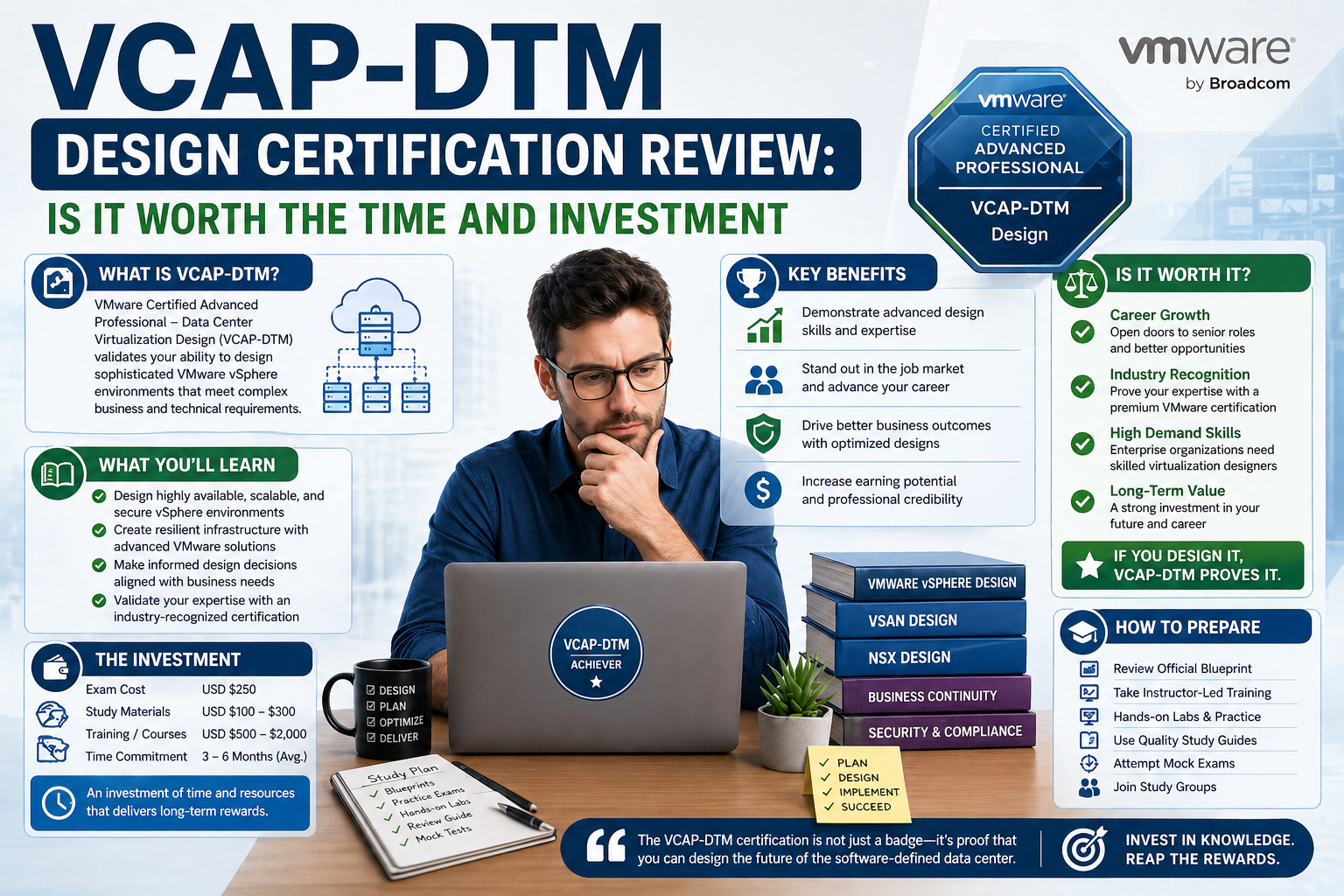
Virtual desktop infrastructure has become one of the defining pillars of modern enterprise computing. As organizations continue to expand across hybrid and remote work environments, the need to deliver consistent, secure, and manageable user experiences has grown significantly. VDI addresses this challenge by shifting desktop environments away from physical machines and into centralized infrastructure where they can be deployed, controlled, and maintained more efficiently.
Instead of relying on traditional endpoint computing, where each device holds its own operating system and applications, VDI allows organizations to host desktops in a controlled data center or cloud environment. Users connect to these virtual desktops through endpoints such as laptops, thin clients, or mobile devices. This separation between hardware and desktop environment gives IT teams greater flexibility in managing updates, enforcing security policies, and scaling resources based on demand.
One of the most important advantages of VDI is consistency. Regardless of where a user logs in from, they receive the same desktop environment with the same applications, settings, and security configurations. This consistency reduces support overhead and minimizes the risk of configuration drift, which is common in traditional endpoint environments.
VDI also plays a critical role in security strategy. Since data remains within the centralized infrastructure rather than being stored locally on endpoints, organizations can reduce exposure to data loss, theft, or unauthorized access. This becomes particularly important in industries with strict compliance requirements, such as finance, healthcare, and government sectors.
As enterprise environments evolve, VDI is no longer viewed as a niche technology but as a core component of digital workspace architecture. This shift has created a strong demand for professionals who understand not just how to deploy virtual desktops, but how to design scalable and efficient environments that align with business objectives.
VMware Horizon as a Core Enterprise VDI Platform
Among the various virtual desktop solutions available today, VMware Horizon stands out as one of the most widely adopted enterprise platforms. Built on VMware’s virtualization foundation, Horizon provides a comprehensive solution for delivering virtual desktops and published applications to end users across different devices and locations.
VMware Horizon integrates deeply with the broader VMware ecosystem, particularly vSphere, which serves as the underlying virtualization layer. This integration allows organizations to leverage existing infrastructure investments while expanding into desktop virtualization. Over the years, Horizon has evolved from a basic VDI solution into a full-fledged digital workspace platform capable of supporting complex enterprise requirements.
A key strength of VMware Horizon lies in its flexibility. Organizations can deploy it on-premises, in hybrid environments, or as part of cloud-based infrastructures. This adaptability makes it suitable for businesses of all sizes, from small enterprises to large global organizations with distributed workforces.
Another important feature of Horizon is its support for both persistent and non-persistent desktops. Persistent desktops maintain user-specific settings and data across sessions, while non-persistent desktops reset to a clean state after each login. This flexibility allows IT teams to design environments based on user roles and workload requirements, optimizing both performance and resource utilization.
Horizon also supports application virtualization, enabling organizations to deliver individual applications without deploying full desktops. This capability reduces infrastructure load and improves user experience by allowing faster access to required tools.
In addition to desktop and application delivery, VMware Horizon integrates with storage, networking, and identity management systems. This tight integration ensures that virtual desktop environments are not isolated systems but fully integrated components of enterprise IT architecture.
As businesses increasingly rely on digital workspaces, VMware Horizon continues to play a central role in enabling secure, scalable, and efficient end-user computing environments.
The Growing Importance of Desktop and Mobility Certifications
As virtual desktop technologies become more advanced, organizations are placing greater emphasis on hiring professionals who can design and manage these environments effectively. This has led to the development of specialized certification paths focused on desktop and mobility solutions.
These certifications are not just technical validations; they represent structured career pathways for IT professionals working in virtualization, cloud computing, and end-user computing environments. They help define skill levels ranging from foundational knowledge to advanced architectural expertise.
At the entry level, professionals typically begin with certifications that validate their ability to operate and manage virtual desktop environments. These certifications focus on understanding basic configuration, deployment, and maintenance tasks within platforms like VMware Horizon.
As professionals gain experience, they move into more advanced certifications that test their ability to design and architect large-scale environments. This is where certifications such as VCAP-DTM Design become particularly relevant. These advanced credentials assess not just technical knowledge but also the ability to apply design principles in real-world enterprise scenarios.
At the highest level, expert certifications validate mastery in both design and deployment across complex infrastructures. These professionals are expected to lead architecture decisions, design enterprise-wide solutions, and guide implementation strategies across large organizations.
The increasing adoption of remote work, cloud services, and hybrid infrastructures has made these certifications more valuable than ever. Organizations are actively seeking individuals who can bridge the gap between technical implementation and strategic design, ensuring that virtual desktop environments align with business needs.
In this context, desktop and mobility certifications serve as a benchmark for professional competence. They provide employers with a reliable way to assess expertise and ensure that candidates are capable of handling the complexities of modern virtual environments.
Positioning VCAP-DTM Design Within the Certification Landscape
The VCAP-DTM Design certification occupies a critical position in the VMware certification ecosystem. It is designed for professionals who have moved beyond operational roles and are now focused on designing enterprise-grade virtual desktop solutions.
Unlike foundational certifications that focus on implementation tasks, this certification emphasizes architectural thinking. Candidates are expected to understand how different components of a virtual desktop infrastructure interact and how design decisions impact performance, scalability, and user experience.
This includes designing logical and physical architectures for virtual desktop environments, considering factors such as compute resources, storage systems, networking configurations, and application delivery mechanisms. The certification evaluates the ability to create structured designs that meet business requirements while maintaining technical feasibility.
One of the defining aspects of VCAP-DTM Design is its focus on real-world design scenarios. Rather than testing isolated technical knowledge, it evaluates how professionals approach complex infrastructure challenges. This includes balancing performance with cost, ensuring scalability, and maintaining security across distributed environments.
Another important aspect is integration. Modern virtual desktop environments do not operate in isolation. They must interact with identity systems, cloud platforms, storage solutions, and endpoint devices. The certification assesses how well candidates can incorporate these elements into a unified design.
This level of expertise is what differentiates VCAP-DTM Design holders from more operationally focused professionals. It signals that an individual is capable of making high-level architectural decisions that influence the success of enterprise virtual desktop deployments.
The Expanding Role of End-User Computing in Enterprise Strategy
End-user computing has evolved from a support function into a strategic component of enterprise IT. Organizations now recognize that the way users access applications and data directly impacts productivity, security, and operational efficiency.
Virtual desktop infrastructure plays a central role in this transformation. By centralizing desktop environments, organizations gain greater control over how users interact with corporate systems. This allows for more consistent policy enforcement and reduces the complexity associated with managing diverse endpoint devices.
The shift toward remote and hybrid work models has further accelerated the importance of end-user computing strategies. Employees now expect seamless access to their work environments regardless of location or device. VDI technologies like VMware Horizon make this possible by delivering consistent desktop experiences across different platforms.
From an organizational perspective, end-user computing also contributes to cost optimization. Centralized management reduces the need for extensive endpoint support and simplifies software deployment processes. Updates, patches, and security configurations can be applied centrally, reducing operational overhead.
Security is another major factor driving the adoption of advanced end-user computing solutions. With increasing cybersecurity threats, organizations are prioritizing architectures that minimize data exposure. Virtual desktops help achieve this by keeping sensitive information within controlled environments rather than on individual devices.
As end-user computing continues to evolve, it is becoming increasingly integrated with cloud technologies, automation tools, and identity management systems. This integration requires professionals who understand both the technical and strategic aspects of virtual desktop design.
The VCAP-DTM Design certification aligns closely with this demand by focusing on the skills required to design scalable and secure end-user computing environments. It reflects the growing importance of architectural expertise in shaping the future of enterprise IT.
Building Enterprise-Grade Virtual Desktop Design Thinking
Designing a virtual desktop environment is not simply about enabling desktops on a server platform. It is a structured engineering discipline that requires balancing user experience, infrastructure capability, security requirements, and long-term scalability. In enterprise environments, a poorly designed VDI solution can quickly become expensive, unstable, and difficult to maintain. This is why design thinking is considered the most critical skill set for advanced virtualization professionals.
At its core, VDI design is about translating business requirements into technical architecture. This involves understanding how users work, what applications they depend on, how much performance they require, and how their digital workspace should behave under different conditions. Every design decision ultimately impacts user satisfaction and operational efficiency.
A strong design begins with clarity. Instead of jumping directly into infrastructure choices, architects first analyze user groups, workloads, and expected outcomes. For example, a task-based worker running a limited set of applications has very different requirements compared to a power user working with design tools or data analytics platforms. These differences shape everything from storage performance to CPU allocation and network design.
Design thinking also emphasizes predictability. In a virtual desktop environment, unpredictable performance leads to user frustration and increased support overhead. A well-structured design ensures consistent performance even during peak usage periods or unexpected demand spikes.
Understanding the Layers of VDI Design Architecture
A complete virtual desktop design is typically structured across multiple architectural layers. Each layer plays a distinct role in delivering a stable and efficient end-user experience. These layers include conceptual design, logical design, and physical design, each representing a deeper level of technical detail.
The conceptual layer focuses on high-level business requirements. It defines what the organization wants to achieve with virtual desktops. This may include improving remote access, enhancing security, reducing endpoint management complexity, or enabling workforce mobility. At this stage, technical details are minimal, and the focus remains on aligning IT strategy with business goals.
The logical layer translates these business needs into structured technical models. It defines how components interact without specifying exact hardware or configuration values. For example, it may define that user groups are segmented into different desktop pools or that certain applications are delivered through virtualization rather than installed locally.
The physical layer is where detailed infrastructure decisions are made. This includes selecting storage systems, configuring networking, defining compute resources, and establishing deployment parameters. It is the most detailed layer and requires deep technical expertise to ensure all components work together efficiently.
These layers are not isolated. Instead, they form a continuous design process where each layer influences the next. A weakness in the conceptual design will eventually impact physical implementation, while poor physical design can undermine even the strongest conceptual planning.
Designing for VMware Horizon Environments
VMware Horizon environments introduce a structured approach to virtual desktop delivery, but they also require careful planning to ensure optimal performance. Horizon is built on multiple integrated components, each contributing to the overall user experience.
At the core is the connection broker, which manages user authentication and desktop assignment. It ensures users are directed to the correct virtual desktop based on policies, entitlements, and availability. Supporting this are virtualization hosts that run the actual desktop workloads.
A key aspect of Horizon design is desktop pool architecture. Desktop pools define how virtual desktops are grouped and delivered to users. These pools can be persistent or non-persistent depending on organizational requirements. Persistent desktops maintain user state across sessions, while non-persistent desktops reset after logout, providing a clean and controlled environment.
Application delivery is another critical component. Instead of installing applications directly on virtual desktops, Horizon allows centralized application delivery. This reduces complexity and improves consistency across user environments. Applications can be assigned dynamically based on user roles or departments.
Profile management is also essential in Horizon environments. User profiles store personalization settings, application preferences, and configuration data. Without proper profile design, users may experience inconsistent environments or slow login times. Efficient profile handling ensures a seamless experience across sessions and devices.
Storage Design Considerations in Virtual Desktop Environments
Storage is one of the most critical components in any virtual desktop infrastructure. Since multiple desktops often share the same storage backend, performance and scalability become major design concerns.
In a VDI environment, storage must handle high levels of simultaneous input/output operations. When hundreds or thousands of users log in or perform tasks simultaneously, storage systems can become a bottleneck if not properly designed.
Designers must consider factors such as storage latency, throughput, and IOPS capacity. High-performance storage solutions are often required to ensure smooth desktop performance. Additionally, caching mechanisms are frequently used to reduce load on primary storage systems.
Another important consideration is storage tiering. Not all desktops require the same level of performance. Task-based users may operate efficiently on standard storage tiers, while power users or specialized workloads may require high-performance tiers.
Data reduction technologies such as deduplication and compression also play a role in optimizing storage usage. Since many virtual desktops share similar operating system files and applications, deduplication can significantly reduce storage consumption.
Proper storage design ensures that virtual desktops remain responsive even under heavy load conditions, making it one of the most important aspects of VDI architecture.
Networking Architecture for Virtual Desktop Performance
Networking is another foundational element in virtual desktop design. Since user interactions are transmitted between endpoints and centralized infrastructure, network performance directly impacts user experience.
Low latency is essential in VDI environments. Even small delays can result in noticeable lag in mouse movements, keyboard input, or screen updates. Therefore, network design must prioritize consistent and low-latency connectivity.
Bandwidth planning is equally important. While individual virtual desktops may not require high bandwidth, large-scale environments with many concurrent users can generate significant network traffic. Proper capacity planning ensures that network congestion does not degrade performance.
Segmentation is often used to isolate VDI traffic from other types of network traffic. This improves security and ensures that virtual desktop communication is not impacted by unrelated network activity.
Quality of Service (QoS) policies may also be implemented to prioritize VDI traffic. This ensures that critical user sessions receive priority over less important network traffic during periods of congestion.
In distributed environments, WAN optimization techniques may be used to improve performance across geographically separated locations. These techniques help reduce latency and improve responsiveness for remote users.
Designing Desktop Pools and User Segmentation Strategies
Desktop pools form the foundation of user experience in virtual desktop environments. A well-designed pool strategy ensures that users receive appropriate resources based on their roles and responsibilities.
User segmentation is typically based on workload type. Task workers, knowledge workers, and power users all have different performance requirements. Task workers may only require basic applications and limited computing resources, while power users may need high-performance virtual machines capable of handling intensive workloads.
Persistent desktop pools are often used for users who require personalized environments. These users need consistent access to their data and settings across sessions. Non-persistent pools, on the other hand, are ideal for environments where consistency and simplicity are more important than personalization.
Floating desktop pools assign random desktops to users each time they log in. This model is commonly used in large-scale environments where flexibility and resource optimization are priorities.
Dedicated pools assign specific desktops to specific users. This approach is used when user-specific configurations or data persistence are required.
Effective pool design ensures efficient resource utilization while maintaining a high-quality user experience.
Application Delivery and Virtualization Strategies
Application delivery is a critical component of modern virtual desktop environments. Instead of installing applications directly on virtual machines, organizations increasingly rely on centralized application delivery methods.
This approach reduces infrastructure complexity and simplifies application management. Updates can be applied centrally, ensuring that all users have access to the latest versions without requiring manual installation.
Applications can be delivered in multiple ways, including virtualization, streaming, or remote publishing. Each method has its own advantages depending on use cases and performance requirements.
Application layering is another strategy used in advanced environments. This allows different application components to be managed independently and combined dynamically based on user needs.
By separating applications from the underlying operating system, organizations gain greater flexibility and control over their software environments.
Endpoint Considerations in Virtual Desktop Design
Endpoints serve as the access points for virtual desktop environments. These can include laptops, desktops, thin clients, tablets, and mobile devices. Since the actual computing takes place in the data center or cloud, endpoints primarily function as display and input devices.
Designing for endpoints involves ensuring compatibility across different device types and network conditions. A well-designed VDI solution should provide a consistent user experience regardless of the endpoint being used.
Security is also a major consideration. Since endpoints connect to centralized infrastructure, secure authentication mechanisms are essential to prevent unauthorized access.
Device diversity must also be considered. Users may access virtual desktops from corporate-managed devices or personal devices, requiring flexible access control policies.
Performance Optimization and Scalability Planning
Scalability is one of the most important aspects of virtual desktop design. A well-designed system should be able to grow with organizational needs without requiring major architectural changes.
Scalability planning involves understanding how many users the system must support, what types of workloads will be running, and how resource demand may change over time.
Performance optimization focuses on ensuring that virtual desktops remain responsive under all conditions. This may involve adjusting resource allocation, optimizing storage performance, or improving network efficiency.
Load balancing is often used to distribute user sessions evenly across infrastructure resources. This prevents any single component from becoming overloaded.
Monitoring and performance analysis tools are also essential for maintaining system health. These tools provide visibility into resource usage and help identify potential bottlenecks before they impact users.
Security Design Principles in Virtual Desktop Environments
Security is a fundamental requirement in any virtual desktop design. Since VDI environments centralize user data and applications, they become high-value targets for cyber threats.
Authentication mechanisms must be strong and reliable. Multi-factor authentication is commonly used to ensure secure access.
Access control policies determine what users can access within the environment. These policies must be carefully designed to balance security with usability.
Data encryption is used to protect information both at rest and in transit. This ensures that sensitive data remains secure even if intercepted.
Isolation between user sessions is also critical. Each virtual desktop must operate independently to prevent data leakage or unauthorized access.
Security design must be integrated into every layer of the virtual desktop architecture rather than treated as a separate component.
Integrating Physical Design Decisions in VMware Horizon Environments
Physical design in a VMware Horizon environment represents the most concrete and implementation-ready stage of virtual desktop architecture. At this level, abstract planning transforms into real-world configuration choices that determine how the environment will actually function under production conditions. Every decision made here directly affects performance, scalability, resilience, and user experience.
Unlike conceptual or logical design stages, physical design requires precise definitions. There is no room for ambiguity because infrastructure components must be deployed, configured, and maintained according to exact specifications. This includes compute sizing, storage configuration, network topology, load balancing strategies, and desktop provisioning models.
A strong physical design ensures that all earlier planning stages are successfully translated into a functioning system. It also ensures that the environment can handle real-world workloads without degradation in performance. Poor physical design often results in bottlenecks that are difficult to diagnose and expensive to fix once the system is in production.
One of the key responsibilities at this stage is ensuring alignment between infrastructure capacity and user demand. This includes determining how many virtual machines each host can support, how storage resources are allocated, and how network traffic is distributed across the environment.
Physical design also requires a deep understanding of hardware capabilities. CPU performance, memory allocation, storage throughput, and network bandwidth all play critical roles in determining how efficiently virtual desktops operate. Even minor miscalculations at this stage can result in performance issues at scale.
Designing Compute Infrastructure for Virtual Desktop Workloads
Compute infrastructure forms the backbone of any virtual desktop environment. In VMware Horizon deployments, compute resources are typically delivered through virtualization hosts running a hypervisor layer. These hosts are responsible for running multiple virtual machines simultaneously, each representing a user’s desktop.
Designing a compute infrastructure requires careful planning of CPU and memory allocation. Unlike traditional server workloads, virtual desktop environments are highly concurrent, meaning that many users may be active at the same time. This creates unique challenges in resource distribution and contention management.
One of the most important design principles is understanding workload density. Workload density refers to how many virtual desktops a single physical host can support without degrading performance. This depends on user behavior, application requirements, and resource availability.
Lightweight users, such as task-based workers, require fewer compute resources and allow higher density per host. In contrast, power users running demanding applications such as design tools or data analysis software require more CPU and memory, reducing overall density.
Memory allocation is particularly important in VDI environments. Unlike traditional servers, virtual desktops often experience simultaneous login events, which can create memory spikes. Proper memory planning ensures that hosts do not become oversubscribed during peak usage periods.
CPU overcommitment is another key consideration. While virtualization allows multiple virtual machines to share physical CPU resources, excessive overcommitment can lead to performance degradation. Balancing CPU allocation is essential for maintaining responsiveness.
High availability is also a critical component of compute design. In case of host failure, virtual desktops must be able to restart or migrate to other hosts without disrupting user sessions. This requires careful clustering and redundancy planning.
Advanced Storage Architecture for Horizon Deployments
Storage design is one of the most complex and performance-sensitive aspects of virtual desktop infrastructure. Since multiple desktops share the same storage backend, the system must handle large volumes of simultaneous read and write operations.
One of the primary challenges in storage design is input/output operations per second (IOPS). Virtual desktops generate significant I/O activity, especially during login storms when many users access the system simultaneously. Storage systems must be capable of absorbing these spikes without introducing latency.
Different storage architectures can be used depending on performance requirements. Traditional SAN (Storage Area Network) systems provide centralized high-performance storage, while hyper-converged infrastructure integrates storage directly with compute nodes for improved scalability.
Tiered storage strategies are commonly used to optimize performance and cost. High-performance tiers are reserved for critical workloads, while lower-cost tiers are used for less demanding desktops. This approach ensures efficient resource utilization without sacrificing user experience.
Caching mechanisms play a significant role in improving storage performance. By storing frequently accessed data in faster storage layers, systems can reduce reliance on slower backend storage.
Deduplication is another important optimization technique. Since virtual desktops often share identical operating system files and applications, deduplication significantly reduces storage consumption. This improves efficiency and reduces infrastructure costs.
Snapshot management must also be carefully designed. While snapshots are useful for backup and recovery, excessive use can degrade performance. Proper lifecycle management ensures that snapshots do not accumulate unnecessarily.
Network Topology and Traffic Optimization Strategies
Networking plays a central role in delivering a responsive virtual desktop experience. Since user interactions are transmitted over the network, even minor latency can significantly impact usability.
A well-designed network topology ensures that traffic flows efficiently between endpoints and backend infrastructure. This includes optimizing routing paths, minimizing hops, and reducing congestion points.
Segmentation is a key design principle in VDI networking. Virtual desktop traffic is often separated from other enterprise traffic to ensure consistent performance and security isolation. This is typically achieved using VLANs or dedicated network segments.
Bandwidth planning is critical in large-scale deployments. While individual virtual desktops may not require high bandwidth, aggregate traffic from thousands of users can create a significant load on the network infrastructure.
Latency is often more important than raw bandwidth in virtual desktop environments. Even small delays can affect user experience, making low-latency network design essential.
Quality of Service (QoS) policies help prioritize virtual desktop traffic over less critical network activity. This ensures that user sessions remain responsive even during periods of network congestion.
For geographically distributed environments, WAN optimization techniques can improve performance across remote sites. These techniques reduce latency and improve data transfer efficiency over long distances.
Redundancy is also important in network design. Multiple network paths ensure that connectivity is maintained even in the event of hardware or link failures.
Designing Desktop Pools for Scalability and User Experience
Desktop pools are a fundamental component of VMware Horizon environments. They define how virtual desktops are assigned, managed, and delivered to users.
Effective pool design requires understanding user roles and workload requirements. Different users require different desktop configurations, and pools provide a mechanism for organizing these differences.
There are several types of desktop pools, each designed for specific use cases. Floating pools assign desktops dynamically, allowing users to connect to any available machine. This model is highly efficient for large-scale environments where personalization is not required.
Dedicated pools assign specific desktops to individual users. This is useful in environments where users require persistent configurations or specialized applications.
Persistent pools maintain user state across sessions, ensuring that data and settings are preserved. Non-persistent pools reset after each session, providing a clean and controlled environment.
Scalability is a key consideration in pool design. As user demand increases, pools must be able to expand dynamically without impacting performance.
Automation plays a major role in pool management. Automated provisioning ensures that new desktops can be deployed quickly in response to demand changes.
Load balancing across pools ensures that resources are distributed evenly, preventing any single pool from becoming overloaded.
Application Strategy in Large-Scale Virtual Desktop Environments
Application delivery is a critical component of end-user computing design. Instead of installing applications directly on each virtual desktop, modern environments rely on centralized application delivery mechanisms.
This approach simplifies management and ensures consistency across user environments. Applications can be updated centrally, eliminating the need for manual updates on individual desktops.
Application virtualization allows applications to run in isolated environments without full installation. This reduces conflicts between applications and improves system stability.
Remote application publishing enables users to access applications without launching a full desktop session. This improves efficiency and reduces resource consumption.
Application layering separates applications from the underlying operating system. This allows different application components to be managed independently and assigned dynamically based on user needs.
These strategies improve flexibility and reduce operational complexity in large-scale environments.
Endpoint Diversity and Access Control Considerations
Endpoints are the devices used by users to access virtual desktops. These can include laptops, desktops, thin clients, tablets, and mobile devices.
One of the key challenges in endpoint design is ensuring compatibility across different device types. Virtual desktop environments must deliver consistent user experiences regardless of the endpoint used.
Security is a major concern at the endpoint level. Since endpoints act as access points to centralized infrastructure, strong authentication mechanisms are essential.
Multi-factor authentication is commonly used to enhance security. This ensures that only authorized users can access virtual desktop environments.
Device management policies also play an important role. Organizations must decide whether to allow personal devices or restrict access to managed corporate devices.
Endpoint performance can also impact user experience. Low-performance devices may struggle to display high-resolution virtual desktops smoothly.
Network conditions at the endpoint level must also be considered. Users accessing virtual desktops over slow or unstable connections may experience reduced performance.
Performance Tuning and Optimization in Production Environments
Once a virtual desktop environment is deployed, ongoing performance tuning becomes essential. Even well-designed systems require adjustments based on real-world usage patterns.
Performance tuning involves monitoring system behavior and identifying bottlenecks. These bottlenecks may occur in the compute, storage, or network layers.
Resource allocation adjustments are often required to optimize performance. This may include increasing memory allocation, adjusting CPU distribution, or optimizing storage performance.
Session monitoring tools provide visibility into user activity and system performance. These tools help identify trends and potential issues before they impact users.
Load balancing adjustments ensure that workloads are distributed evenly across infrastructure components. This prevents overload on specific hosts or storage systems.
Optimization is an ongoing process rather than a one-time task. As user demand changes, the environment must adapt accordingly.
High Availability and Disaster Recovery in Virtual Desktop Design
High availability is essential in virtual desktop environments to ensure continuous access for users. Since these systems often support critical business operations, downtime must be minimized.
Redundant infrastructure components are used to eliminate single points of failure. This includes redundant hosts, storage systems, and network paths.
Failover mechanisms ensure that workloads can be automatically moved to healthy systems in the event of a failure.
Disaster recovery planning extends high availability concepts to entire site failures. In such cases, virtual desktop environments must be recoverable at alternate locations.
Data replication strategies ensure that user data and configurations are preserved across locations.
Recovery time objectives and recovery point objectives define how quickly systems must be restored and how much data loss is acceptable.
Proper disaster recovery planning ensures business continuity even in catastrophic scenarios.
Advanced Security Architecture for Virtual Desktop Environments
Security design in virtual desktop environments must address multiple layers of risk. Since these systems centralize user data and applications, they are high-value targets for attackers.
Identity management is the foundation of security architecture. Strong authentication ensures that only authorized users can access the environment.
Access control policies define what users are allowed to do within the system. These policies must be carefully structured to minimize risk while maintaining usability.
Data encryption protects sensitive information both at rest and in transit. This ensures that intercepted data cannot be easily exploited.
Network security measures such as firewalls and segmentation help isolate virtual desktop traffic from other systems.
Session isolation ensures that each virtual desktop operates independently, preventing unauthorized data access between users.
Continuous monitoring is essential for detecting suspicious activity and responding to potential threats in real time.
Automation, Monitoring, and Lifecycle Management in VDI Environments
Modern virtual desktop environments are no longer managed through manual configuration alone. As deployments scale into hundreds or thousands of desktops, automation becomes a necessary design principle rather than an optional enhancement. In VMware Horizon-based architectures, automation is deeply integrated into provisioning, maintenance, monitoring, and lifecycle management processes.
Automated provisioning ensures that virtual desktops can be created rapidly and consistently. Instead of manually configuring each desktop instance, administrators define templates that standardize operating systems, applications, and policies. These templates allow new desktops to be deployed in a predictable and repeatable manner. This consistency reduces configuration errors and improves overall system reliability.
Automation also plays a major role in updates and patch management. In traditional desktop environments, patching large numbers of devices can be time-consuming and error-prone. In a virtual desktop infrastructure, updates can be applied centrally to a base image and then propagated across all desktops. This approach ensures that every user receives the same security updates and application versions without disruption.
Monitoring is another essential component of operational design. A well-designed virtual desktop environment must include continuous visibility into system performance, user behavior, and infrastructure health. Monitoring tools track metrics such as CPU usage, memory consumption, storage latency, and network throughput. These metrics help administrators identify performance bottlenecks before they affect users.
User experience monitoring is particularly important in VDI environments. Unlike traditional infrastructure monitoring, which focuses on system health, user experience monitoring evaluates how end users perceive performance. This includes login times, application responsiveness, and session stability. By analyzing these metrics, administrators can detect subtle issues that may not be visible through infrastructure data alone.
Alerting systems are typically integrated into monitoring frameworks to provide real-time notifications when performance thresholds are exceeded. These alerts enable rapid response to potential issues, minimizing downtime and maintaining service quality.
Lifecycle Management and Operational Stability
Lifecycle management refers to the continuous process of maintaining, updating, and retiring virtual desktop resources throughout their operational life. In large-scale environments, desktops are not static assets; they evolve and must be managed dynamically.
A key aspect of lifecycle management is image management. Virtual desktop images serve as the foundation for all deployed desktops. These images must be regularly updated to include security patches, application updates, and configuration changes. Maintaining clean and optimized images ensures that desktops remain efficient and secure.
Version control is also important in image lifecycle management. Multiple image versions may exist simultaneously to support different user groups or testing environments. Proper versioning ensures that changes can be tracked and rolled back if necessary.
Desktop refresh and recomposition processes are used to maintain consistency in non-persistent environments. Over time, desktops may accumulate temporary data or configuration changes that affect performance. Rebuilding desktops from a clean image restores them to a known good state.
Decommissioning is another important part of lifecycle management. As users leave the organization or change roles, their virtual desktops must be safely removed or reassigned. Proper decommissioning ensures that resources are not wasted and that sensitive data is securely handled.
Capacity planning is closely tied to lifecycle management. As the number of users changes, infrastructure resources must be adjusted accordingly. This requires ongoing analysis of usage patterns and future demand projections.
Operational Challenges in Large-Scale Virtual Desktop Deployments
Operating a large-scale virtual desktop environment introduces several challenges that require careful planning and continuous management. One of the most common challenges is performance variability. Even in well-designed systems, user experience can fluctuate based on workload distribution, resource contention, and network conditions.
Another challenge is infrastructure complexity. Virtual desktop environments rely on multiple interconnected components, including compute clusters, storage systems, networking layers, and identity services. Managing these dependencies requires a deep understanding of system interactions.
User diversity also adds complexity. Different users have different performance expectations and application requirements. Designing a system that accommodates this diversity without overprovisioning resources is a significant challenge.
Scalability management becomes increasingly important as environments grow. Adding new users or expanding infrastructure must be done without disrupting existing services. This requires careful planning and modular design principles.
Security management is another ongoing challenge. As environments scale, maintaining consistent security policies across all desktops becomes more difficult. Automated policy enforcement and centralized management help address this issue, but continuous oversight is still required.
Troubleshooting in VDI environments can also be complex due to the layered architecture. Issues may originate in compute, storage, network, or application layers, making root cause analysis more difficult.
Conclusion
Virtual desktop infrastructure has become a core part of modern enterprise computing, reshaping how organizations deliver applications and desktop environments to users across different locations and devices. As businesses continue to adopt hybrid work models and cloud-driven strategies, the importance of well-designed VDI environments continues to grow.
VMware Horizon remains one of the most widely used platforms in this space, offering a flexible and scalable approach to delivering virtual desktops and applications. However, the success of any Horizon deployment depends heavily on design quality rather than just implementation. Careful planning across compute, storage, networking, security, and user experience layers ensures that environments remain stable and efficient under real-world conditions.
Advanced certifications such as VCAP-DTM Design reflect this shift toward architectural thinking. They emphasize the ability to translate business requirements into structured, scalable, and secure technical designs. This level of expertise is essential in environments where performance, availability, and user satisfaction are critical.
Ultimately, virtual desktop design is not just about technology—it is about creating reliable digital workspaces that support productivity, security, and long-term growth. As enterprise IT continues to evolve, professionals with strong design capabilities in VDI environments will remain highly valuable in shaping the future of digital work.