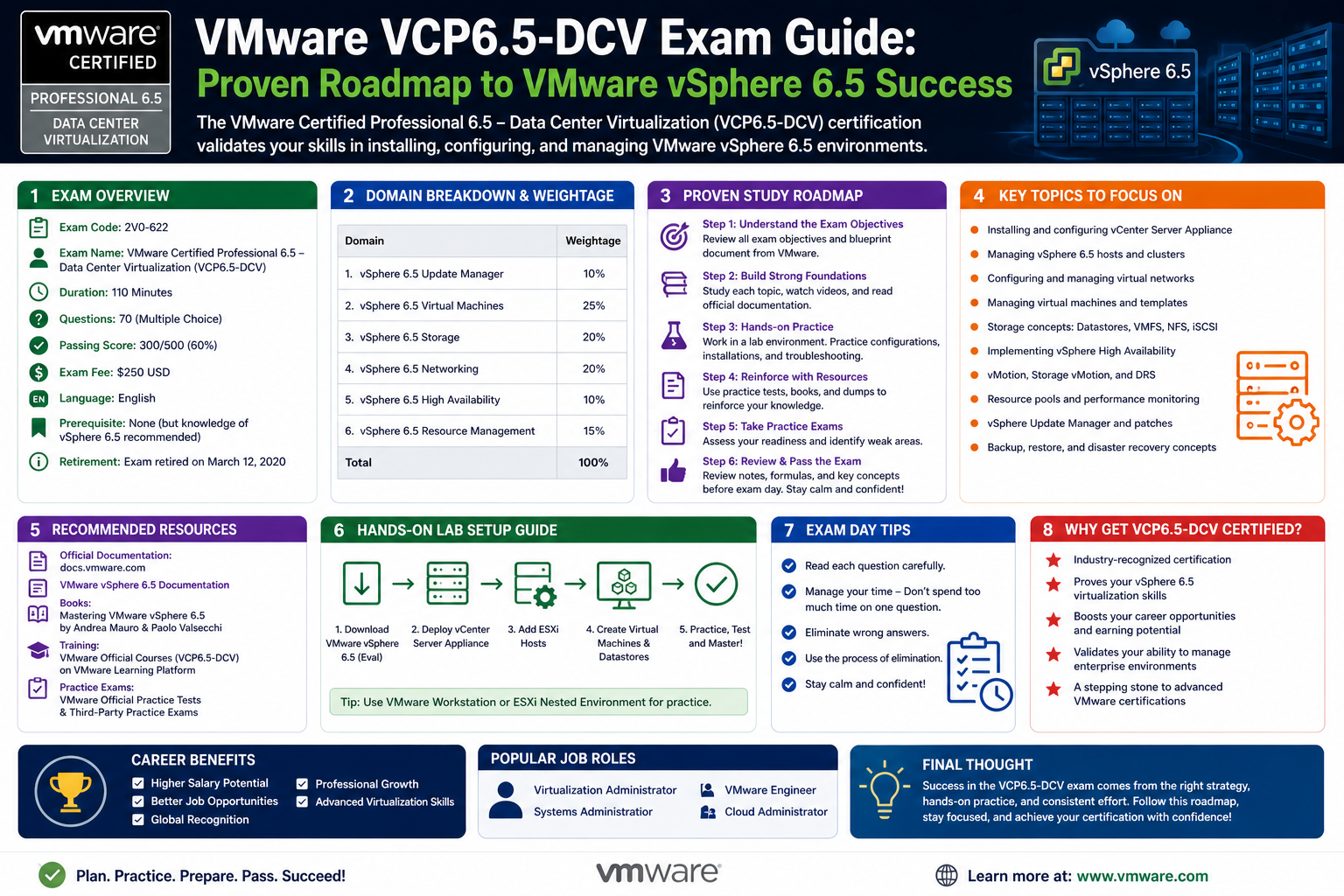
Virtualization has become one of the most influential technologies shaping modern IT infrastructure. At its core, it allows organizations to run multiple virtual systems on a single physical machine, improving efficiency, reducing hardware costs, and increasing flexibility in managing workloads. Instead of relying on dedicated physical servers for every application or service, businesses now consolidate resources, streamline operations, and respond more quickly to changing demands.
In enterprise environments, virtualization is not just a convenience but a strategic necessity. Data centers that once required extensive physical infrastructure can now operate with significantly fewer hardware resources while delivering higher performance and scalability. This shift has also changed the expectations placed on IT professionals. Skills related to virtual infrastructure design, deployment, and troubleshooting are now considered essential in many system administration and engineering roles.
Among the leading platforms driving this transformation is VMware, whose virtualization technologies are widely adopted in enterprise data centers across the globe. Their flagship platform, VMware vSphere 6.5 (VCP6.5-DCV), has played a key role in shaping how organizations design and manage virtual environments. Professionals who understand how to work within this ecosystem are often entrusted with maintaining critical business systems, ensuring uptime, and optimizing performance across complex infrastructures.
As companies continue to adopt cloud-based architectures and hybrid environments, virtualization expertise is increasingly viewed as a core competency. This is where structured certification pathways become valuable, as they provide a clear route for learners to develop, validate, and demonstrate their skills in a standardized way.
Understanding the VMware Certification Ecosystem
The VMware certification structure is designed to support professionals at different stages of their careers. Rather than focusing on a single exam or skill level, it offers a layered progression that reflects increasing depth of knowledge and technical capability. This structure ensures that learners can grow from foundational understanding to expert-level proficiency over time.
Within this ecosystem, certifications are grouped into major technology areas such as data center virtualization, network virtualization, cloud management, and end-user computing. Each track focuses on specific skill sets relevant to real-world IT environments. The Data Center Virtualization track, which includes the VCP6.5-DCV certification, is one of the most widely recognized and commonly pursued paths.
The certification levels typically include associate, professional, advanced professional, and expert tiers. The VMware Certified Professional level, where VCP6.5-DCV belongs, represents a critical milestone. It indicates that a candidate is capable of working independently with VMware technologies in real-world environments, handling configuration, management, and troubleshooting tasks with confidence.
Unlike some certification programs that require strict sequential progression, VMware’s structure allows some flexibility. While foundational knowledge is important, learners may not always need to complete every lower-level certification before progressing to professional-level exams. Instead, practical experience and required training courses often play a more significant role in determining eligibility.
Introduction to VCP6.5-DCV Certification
The VMware Certified Professional 6.5 – Data Center Virtualization certification is designed to validate a candidate’s ability to implement, manage, and troubleshoot virtual infrastructures built on vSphere 6.5. It is one of the most recognized certifications for IT professionals working in virtualization environments.
This certification focuses on practical, hands-on skills that are directly applicable in enterprise data centers. Candidates are expected to understand how virtual machines operate, how resources are allocated, and how the underlying infrastructure supports workloads efficiently. The certification also evaluates a professional’s ability to maintain system stability and respond to operational issues as they arise.
The VCP6.5-DCV certification is particularly valuable for individuals pursuing roles such as systems administrator, systems engineer, IT operations specialist, and infrastructure consultant. These roles require not only theoretical knowledge but also the ability to make informed decisions in real-time operational environments.
Because virtualization is deeply integrated into modern IT systems, professionals with this certification are often involved in managing critical business services. This includes ensuring high availability, optimizing performance, and maintaining secure and reliable infrastructure.
Core Skills Validated by the Certification
The VCP6.5-DCV certification is designed to measure a broad set of technical competencies. These include the ability to deploy and configure virtual machines, manage storage and networking within a virtual environment, and maintain system performance under varying workloads.
One of the key areas of focus is the configuration and management of ESXi hosts and vCenter Server environments. These components form the backbone of vSphere infrastructure and are essential for centralized management of virtual resources. Candidates must understand how to install, configure, and manage these systems effectively.
Another important skill area involves virtual networking. This includes configuring virtual switches, managing network policies, and ensuring proper communication between virtual machines and external networks. A strong understanding of networking concepts is essential, as virtualization environments often depend on complex network configurations.
Storage management is also a critical component. Candidates must be able to configure datastores, manage storage policies, and optimize storage performance. In enterprise environments, storage efficiency can significantly impact overall system performance and cost.
Additionally, troubleshooting is a major part of the certification. IT professionals must be able to identify and resolve issues related to performance degradation, connectivity problems, and system failures. This requires both technical knowledge and analytical thinking.
Prerequisites and Recommended Experience
While the certification does not strictly require formal prerequisites in every case, a strong foundation in IT concepts is highly recommended. Candidates are expected to have a basic understanding of virtualization principles, including how virtual machines operate and how resources are allocated within a physical host.
Experience with operating systems such as Windows Server is also beneficial, as many enterprise environments rely heavily on Microsoft-based infrastructure. Familiarity with Linux systems can further enhance a candidate’s ability to work in diverse environments.
Networking knowledge is another essential requirement. Understanding IP addressing, routing, switching, and subnetting provides the necessary foundation for working with virtual networks. Without this knowledge, managing virtual infrastructure can become significantly more challenging.
Hands-on experience with virtualization platforms is also strongly encouraged. Working with tools such as VMware Workstation or similar environments helps learners become comfortable with the concepts and workflows involved in managing virtual machines.
In general, candidates are advised to have at least several months of practical experience working with vSphere environments before attempting the certification. This experience helps bridge the gap between theoretical knowledge and real-world application.
Exam Structure and Assessment Approach
The VCP6.5-DCV certification exam is designed to evaluate both conceptual understanding and practical knowledge. It includes multiple-choice questions that test a candidate’s ability to apply technical concepts in real-world scenarios.
The exam typically covers a wide range of topics, including installation, configuration, management, optimization, and troubleshooting of vSphere environments. Candidates are expected to demonstrate a comprehensive understanding of how different components interact within a virtual infrastructure.
Rather than focusing solely on memorization, the exam emphasizes scenario-based thinking. This means candidates must be able to analyze situations and determine the most appropriate solution based on their knowledge of the system.
Time management is also an important factor during the exam. Candidates must answer a significant number of questions within a limited timeframe, requiring both accuracy and efficiency in decision-making.
Building a Structured Learning Approach
Preparing for the VCP6.5-DCV certification requires a structured and disciplined approach. Because the exam covers a wide range of technical topics, it is important to break down the learning process into manageable segments.
A typical learning path begins with foundational concepts in virtualization and gradually progresses toward more advanced topics such as system configuration and troubleshooting. This step-by-step approach helps ensure that each concept is fully understood before moving on to more complex material.
Hands-on practice plays a crucial role in this process. Virtual environments allow learners to experiment with different configurations, observe system behavior, and develop problem-solving skills. This practical experience is essential for reinforcing theoretical knowledge.
Consistency is also important. Regular study sessions and practical exercises help reinforce learning and improve retention. Over time, this consistent effort builds confidence and prepares candidates for real-world scenarios as well as the certification exam.
Importance of Real-World Application
One of the defining characteristics of virtualization certifications is their strong emphasis on real-world application. Unlike purely theoretical exams, the VCP6.5-DCV certification is designed to reflect actual tasks performed by IT professionals in enterprise environments.
This includes managing virtual machine lifecycles, optimizing resource allocation, and ensuring system reliability. In many cases, professionals are required to respond quickly to issues that could impact business operations. As a result, the ability to apply knowledge under pressure is just as important as understanding the underlying concepts.
Virtualization environments are often dynamic and complex, with multiple systems interacting simultaneously. This requires professionals to think critically and adapt to changing conditions. The certification helps prepare candidates for these challenges by simulating real-world scenarios through its exam structure and learning objectives.
Career Relevance of Virtualization Expertise
Virtualization skills are highly valued in the IT industry, and professionals who hold certifications in this area often find themselves in strong demand. Organizations rely on virtualization to reduce costs, improve efficiency, and support scalable infrastructure, making skilled professionals essential to their operations.
Roles that commonly align with VCP6.5-DCV certification include systems administrator, IT infrastructure engineer, data center specialist, and senior systems engineer. These positions involve managing complex environments where reliability and performance are critical.
As organizations continue to adopt cloud technologies and hybrid infrastructures, the importance of virtualization expertise is expected to grow further. Professionals who understand how to design and manage virtual environments are well-positioned to contribute to these evolving systems.
The certification also serves as a foundation for more advanced career paths. Many professionals choose to build on their virtualization knowledge by exploring cloud computing, network virtualization, or infrastructure automation.
The Broader Impact of Virtualization Knowledge
Beyond individual career development, virtualization knowledge contributes to broader organizational efficiency. Companies that effectively implement virtualization strategies can reduce hardware costs, improve resource utilization, and increase operational flexibility.
This has a direct impact on business performance, as IT infrastructure becomes more scalable and responsive to demand. In addition, virtualization supports disaster recovery and business continuity planning by enabling rapid system restoration and replication.
As a result, professionals with virtualization expertise play a key role in supporting business resilience. Their work ensures that critical systems remain available and that organizations can adapt to technological and operational changes with minimal disruption.
Moving from Foundational Knowledge to Professional Readiness
Advancing toward the VMware Certified Professional 6.5 Data Center Virtualization certification requires a shift in mindset from general IT familiarity to focused technical competence. At this stage, learners are expected to go beyond understanding basic virtualization concepts and begin working with systems in a structured, operational manner.
The environment built on VMware technologies demands precision. Every configuration decision impacts system performance, availability, and scalability. As a result, preparation for the VCP6.5-DCV certification is not simply about studying theory but about developing the ability to think like a systems administrator responsible for real infrastructure.
The platform at the center of this certification journey, VMware vSphere 6.5 (VCP6.5-DCV), introduces a range of components that work together to form a complete virtualization ecosystem. These include compute resources, storage layers, networking structures, and centralized management tools. Understanding how these components interact is essential for success at the professional level.
At this stage of preparation, learners typically begin focusing on scenario-based understanding. Instead of memorizing isolated facts, the emphasis shifts toward understanding how different configurations behave under operational conditions. This approach mirrors real-world environments where problems rarely occur in isolation.
Deep Dive into vSphere Architecture and Core Components
A strong understanding of vSphere architecture is essential for anyone preparing for the VCP6.5-DCV certification. The architecture is built around two primary layers: the compute layer and the management layer.
The compute layer is formed by ESXi hosts, which are responsible for running virtual machines. These hosts provide the physical resources—CPU, memory, storage, and networking—that virtual machines depend on. Each ESXi host operates independently but is managed centrally through vCenter Server.
The management layer is where centralized control and orchestration occur. vCenter Server allows administrators to manage multiple ESXi hosts as a single environment. This simplifies tasks such as resource allocation, monitoring, and configuration management.
Understanding this separation is important because many operational decisions depend on how these layers interact. For example, workload balancing, high availability, and resource scheduling all rely on communication between ESXi hosts and vCenter Server.
Another important concept is the vSphere cluster. A cluster groups multiple ESXi hosts together to pool resources and enable advanced features such as Distributed Resource Scheduler (DRS) and High Availability (HA). These features ensure that workloads are distributed efficiently and remain available even if a host fails.
ESXi Installation, Configuration, and Management Concepts
One of the most critical areas of preparation for the VCP6.5-DCV certification is understanding how to install and configure ESXi hosts. ESXi is a bare-metal hypervisor that installs directly onto physical servers, allowing them to run multiple virtual machines simultaneously.
During installation, administrators must consider hardware compatibility, storage configuration, and network setup. Each decision affects the performance and stability of the virtual environment. For example, improper storage configuration can lead to performance bottlenecks, while incorrect network setup can disrupt communication between virtual machines.
Once installed, ESXi hosts must be configured for management. This includes setting up management networks, configuring root access, and connecting the host to vCenter Server. Proper configuration ensures that the host can be monitored and controlled centrally.
Management tasks also include monitoring system performance, applying patches, and maintaining security settings. These tasks are essential for ensuring that the environment remains stable and secure over time.
Understanding ESXi at a deep level is important because it forms the foundation of all virtualization activities in vSphere environments. Without a properly configured host layer, higher-level services cannot function effectively.
vCenter Server Architecture and Administrative Control
vCenter Server plays a central role in managing virtualized environments. It acts as the control plane for vSphere infrastructure, allowing administrators to manage multiple hosts and virtual machines from a single interface.
In a professional environment, vCenter Server is responsible for coordinating many critical functions. These include resource allocation, performance monitoring, and automation of operational tasks. It also provides access control, ensuring that only authorized users can make changes to the environment.
Understanding how vCenter Server operates is essential for the VCP6.5-DCV certification. Candidates must be familiar with its architecture, deployment options, and administrative functions.
One of the key responsibilities of vCenter Server is managing clusters. When ESXi hosts are grouped into clusters, vCenter coordinates resource sharing and workload distribution. This enables advanced features such as load balancing and automated failover.
Another important function is the management of templates and virtual machine provisioning. Administrators can create standardized virtual machine templates, which can then be deployed quickly across the environment. This improves efficiency and ensures consistency.
vCenter Server also plays a key role in monitoring system health. It collects performance data from ESXi hosts and virtual machines, allowing administrators to identify potential issues before they impact operations.
Virtual Networking Concepts in vSphere Environments
Networking is one of the most complex and critical aspects of virtualization. In a vSphere environment, virtual networking allows virtual machines to communicate with each other, with physical networks, and with external systems.
Understanding virtual switches is essential. A virtual switch operates similarly to a physical network switch but exists within the hypervisor. It connects virtual machines to each other and to physical network adapters on the ESXi host.
There are different types of virtual switches, including standard switches and distributed switches. Standard switches are configured at the host level, while distributed switches are managed centrally through vCenter Server. Distributed switches provide more advanced features such as centralized configuration and better scalability.
Port groups are another important concept. A port group defines network policies for a group of virtual machine network interfaces. These policies may include VLAN configuration, security settings, and traffic shaping rules.
Networking in vSphere also involves understanding physical network adapters and how they connect to virtual switches. Proper configuration ensures that virtual machines can communicate efficiently with external networks.
Network troubleshooting is an important skill for certification candidates. Issues such as connectivity failures, misconfigured VLANs, or incorrect routing can significantly impact system performance. Understanding how to diagnose and resolve these issues is a key part of professional-level expertise.
Storage Architecture and Data Management in Virtual Environments
Storage is another foundational component of virtualization environments. In vSphere, storage is used to hold virtual machine files, system configurations, and data disks.
Datastores are logical storage containers that hold virtual machine files. These datastores can be based on different storage technologies, including local storage, network-attached storage, and storage area networks.
Understanding how to configure and manage datastores is essential for VCP6.5-DCV candidates. This includes tasks such as creating datastores, expanding storage capacity, and managing storage policies.
Storage performance is also a critical consideration. Poorly configured storage can lead to slow virtual machine performance and system instability. Administrators must understand how to balance performance, capacity, and redundancy.
Storage policies help define how virtual machines use storage resources. These policies can control factors such as redundancy levels and performance requirements.
Another important concept is virtual machine disk provisioning. There are different provisioning types, including thick and thin provisioning. Each type has advantages and trade-offs in terms of storage efficiency and performance.
Resource Management and Performance Optimization
Resource management is a core function of virtualization environments. Because multiple virtual machines share the same physical resources, it is essential to allocate resources efficiently to maintain performance and stability.
CPU and memory allocation are key areas of focus. Administrators must understand how to assign resources to virtual machines based on workload requirements. Over-allocation or under-allocation can lead to performance issues.
vSphere includes mechanisms for automated resource management. These systems monitor resource usage and adjust allocations dynamically to ensure optimal performance across the environment.
One of the key features in this area is workload balancing. When multiple hosts are part of a cluster, workloads can be distributed across them to prevent resource bottlenecks.
Performance monitoring tools provide visibility into system behavior. Administrators can track CPU usage, memory consumption, disk performance, and network activity. This data is essential for identifying inefficiencies and optimizing configurations.
Understanding how to interpret performance metrics is an important skill for certification candidates. It allows them to make informed decisions about resource allocation and system tuning.
Troubleshooting Methodologies in Virtualized Systems
Troubleshooting is one of the most important skills for any virtualization professional. In complex environments, issues can arise from multiple layers of the infrastructure, including compute, storage, networking, and management systems.
A structured approach to troubleshooting is essential. This typically involves identifying the problem, isolating the cause, testing possible solutions, and verifying the resolution.
Common issues in vSphere environments include virtual machine performance degradation, connectivity problems, and storage latency. Each of these issues requires a different diagnostic approach.
For example, performance issues may require analysis of CPU and memory usage, while network issues may involve checking virtual switch configurations and physical network connectivity.
Logs play an important role in troubleshooting. ESXi hosts and vCenter Server generate detailed logs that provide insight into system behavior. Understanding how to interpret these logs is essential for diagnosing problems effectively.
Troubleshooting also requires familiarity with system dependencies. Because virtual environments are interconnected, a problem in one area can affect multiple components.
Security Considerations in Virtualized Environments
Security is an essential aspect of virtualization management. Virtual environments must be protected from unauthorized access, data breaches, and configuration errors.
Access control is one of the primary security mechanisms in vSphere environments. Administrators must define roles and permissions carefully to ensure that users only have access to the resources they need.
Network security is also important. Virtual networks must be configured to prevent unauthorized access and ensure secure communication between systems.
Another important aspect is host security. ESXi hosts must be properly configured and maintained to prevent vulnerabilities. This includes applying patches, disabling unnecessary services, and monitoring system activity.
Virtual machine isolation is another key security feature. Each virtual machine operates independently, ensuring that issues in one system do not affect others.
Security awareness is a critical part of professional virtualization management, and it is reflected in the types of scenarios presented in the certification environment.
Developing Real Operational Thinking in Virtualized Environments
At the professional certification level, success is no longer defined by basic familiarity with virtualization concepts. Instead, it depends on the ability to think and operate like an infrastructure engineer responsible for complex, production-grade environments. In real-world data centers powered by VMware technologies, every decision affects system stability, performance, and business continuity.
The platform at the center of this expertise journey, VMware vSphere 6.5 (VCP6.5-DCV), is designed to simulate and support enterprise-scale workloads where downtime is costly and efficiency is critical. Professionals working in these environments must develop a mindset that balances technical precision with operational awareness.
Unlike early learning stages that focus on isolated components, this phase requires understanding how systems behave under load, how failures cascade across infrastructure layers, and how proactive configuration decisions can prevent outages before they occur. The shift is from “how does this work” to “how does this behave at scale and under pressure.”
Mastering High Availability and Fault Tolerance Strategies
One of the defining strengths of vSphere environments is their ability to maintain service continuity even in the presence of hardware or software failures. High Availability (HA) is a core feature that ensures virtual machines can automatically restart on alternate hosts if a physical server fails.
In enterprise environments, downtime is not simply inconvenient; it can lead to financial loss and operational disruption. HA is designed to minimize this risk by continuously monitoring host health and responding automatically when issues are detected.
Understanding HA requires more than just knowing how to enable it. Professionals must understand admission control policies, cluster configurations, and failover priorities. These settings determine how resources are reserved and how virtual machines are redistributed during failure events.
Fault Tolerance extends this concept further by providing continuous availability for critical workloads. Instead of restarting a virtual machine after failure, Fault Tolerance maintains a live shadow instance that mirrors the primary workload in real time. If the primary system fails, the secondary instance immediately takes over without interruption.
Working with these features requires careful planning. Not all workloads require Fault Tolerance, and improper configuration can lead to inefficient resource usage. Understanding when and how to apply these technologies is a key skill for advanced virtualization professionals.
Distributed Resource Scheduling and Intelligent Workload Balancing
Modern virtualization environments rely heavily on automation to manage resource distribution efficiently. One of the most important mechanisms for this is Distributed Resource Scheduling (DRS), which dynamically balances workloads across multiple hosts within a cluster.
DRS continuously evaluates resource usage and moves virtual machines between hosts to maintain optimal performance. This process is transparent to end users and helps prevent resource bottlenecks.
To understand DRS effectively, professionals must consider how CPU and memory demand fluctuate over time. Workloads are rarely static; they vary based on user activity, scheduled tasks, and system processes. DRS responds to these changes by adjusting placement decisions dynamically.
However, DRS is not simply an automated system that operates without oversight. Administrators can configure rules and constraints that influence how workloads are distributed. These include affinity rules, which determine which virtual machines should run together or separately.
Understanding these rules is critical in environments where certain applications must remain isolated or where specific performance requirements must be maintained.
DRS also works closely with cluster resource pools. These pools allow administrators to allocate resources to different groups of virtual machines, ensuring that critical workloads receive priority access during periods of high demand.
Advanced Virtual Machine Management Techniques
Virtual machines are the core operational units of any virtualization environment, and their lifecycle management is a critical responsibility for professionals working with vSphere.
Beyond basic creation and configuration, advanced management involves understanding snapshots, cloning, templates, and migration techniques.
Snapshots allow administrators to capture the state of a virtual machine at a specific point in time. This is useful for testing, updates, and recovery scenarios. However, snapshots must be managed carefully, as excessive or long-term snapshot usage can negatively impact performance and storage efficiency.
Cloning enables the creation of identical virtual machines from an existing system. This is commonly used in development environments or when deploying standardized systems across an organization.
Templates provide a more structured approach to deployment. A template is a master image that can be used to quickly provision new virtual machines with consistent configurations. This ensures standardization and reduces deployment time.
Migration is another essential capability in virtualized environments. Technologies such as vMotion allow virtual machines to move between physical hosts without downtime. This is critical for maintenance operations and load balancing.
Understanding how these mechanisms work together allows professionals to manage virtual machine lifecycles efficiently and safely.
Storage Optimization and Performance Engineering
Storage performance plays a critical role in the overall health of a virtualized environment. Even when compute resources are sufficient, poor storage design can lead to significant performance degradation.
In vSphere environments, storage is abstracted through datastores, which can be built on various underlying technologies. These may include traditional disk arrays, network-based storage systems, or high-performance flash storage solutions.
Optimizing storage requires understanding latency, throughput, and input/output operations per second (IOPS). Each workload has different requirements, and storage systems must be configured accordingly.
Thin provisioning is often used to improve storage efficiency by allocating disk space dynamically rather than reserving it in advance. While this improves utilization, it requires careful monitoring to prevent over-allocation.
Storage policies help enforce performance and availability requirements. These policies define how data is distributed, replicated, and protected within the storage infrastructure.
Professionals must also understand how storage interacts with compute and network layers. A bottleneck in any one of these areas can impact overall system performance.
Network Optimization and Traffic Management in Virtual Infrastructure
Networking in virtualized environments is more complex than traditional physical networking because it operates at both virtual and physical layers. This dual-layer structure requires careful configuration and ongoing management.
Virtual switches act as intermediaries between virtual machines and physical network adapters. These switches can be configured to handle traffic segmentation, security policies, and performance optimization.
Distributed virtual switches provide centralized control across multiple hosts, enabling consistent network configuration across the entire environment. This reduces administrative overhead and improves scalability.
Traffic management techniques such as VLAN tagging and traffic shaping are used to control how data flows through the network. VLANs help isolate traffic between different systems, improving security and performance.
Traffic shaping allows administrators to control bandwidth allocation, ensuring that critical workloads receive sufficient network resources.
Network troubleshooting requires a detailed understanding of both virtual and physical network components. Issues can arise from misconfigured switches, incorrect VLAN assignments, or physical connectivity problems.
Professionals must be able to analyze network behavior systematically, identifying where breakdowns occur and implementing corrective actions efficiently.
Automation and Lifecycle Efficiency in Virtual Environments
As virtual environments grow in complexity, automation becomes increasingly important. Manual management of large-scale infrastructure is inefficient and prone to errors.
Automation in vSphere environments can include tasks such as provisioning virtual machines, balancing workloads, applying updates, and monitoring system health.
By automating repetitive tasks, administrators can focus on higher-level decision-making and strategic planning.
Lifecycle management is another key area where automation plays a role. Virtual machines go through stages such as creation, operation, modification, and decommissioning. Automating these processes ensures consistency and reduces the risk of configuration errors.
Policies can be used to define how resources are allocated and managed over time. These policies help ensure that infrastructure remains aligned with organizational requirements.
Automation also supports scalability. As demand increases, automated systems can adjust resource allocation dynamically without requiring manual intervention.
Monitoring, Performance Analysis, and Capacity Planning
Effective infrastructure management requires continuous monitoring and analysis. Without visibility into system performance, it is impossible to identify issues or optimize resources.
vSphere environments provide detailed performance metrics covering CPU usage, memory consumption, disk activity, and network traffic. These metrics allow administrators to understand how systems are behaving in real time.
Capacity planning involves analyzing this data to predict future resource requirements. This helps organizations avoid performance bottlenecks and ensure that infrastructure can scale effectively.
Trend analysis is an important part of capacity planning. By examining historical data, administrators can identify usage patterns and anticipate future demand.
Performance analysis also involves identifying inefficient configurations. For example, virtual machines that consume excessive resources may need to be reconfigured or migrated to different hosts.
Monitoring is not just reactive; it is also proactive. Early detection of performance anomalies can prevent larger system failures.
Troubleshooting Complex Multi-Layer Failures
In advanced virtualization environments, problems rarely occur in isolation. A single issue can propagate across compute, storage, and network layers, making troubleshooting more challenging.
A structured approach is essential. This typically begins with identifying symptoms, narrowing down the scope of the issue, and isolating affected components.
Logs play a critical role in this process. ESXi hosts and vCenter Server generate detailed logs that provide insight into system behavior. These logs must be interpreted carefully to identify root causes.
Performance degradation is one of the most common issues in virtual environments. This can result from CPU contention, memory overcommitment, or storage latency.
Network-related issues can manifest as connectivity failures, packet loss, or inconsistent performance. Diagnosing these problems requires understanding both virtual and physical network configurations.
Storage-related issues often involve latency or capacity constraints. These can significantly impact virtual machine performance and require immediate attention.
Troubleshooting at this level requires experience, analytical thinking, and familiarity with system interdependencies.
Career Progression and Long-Term Skill Development
Virtualization expertise provides a strong foundation for long-term career growth in IT infrastructure and cloud computing. Professionals who master vSphere environments often progress into roles involving architecture design, infrastructure engineering, and cloud integration.
As organizations adopt hybrid and multi-cloud strategies, virtualization skills remain highly relevant. Understanding how virtual infrastructure integrates with cloud platforms is increasingly important.
Professionals may also expand into related areas such as network virtualization, automation engineering, or infrastructure security.
Continuous learning is essential in this field. Virtualization technologies evolve over time, and staying current with new features and best practices is necessary for maintaining professional relevance.
Hands-on experience remains one of the most valuable forms of learning. Working directly with complex environments helps reinforce theoretical knowledge and develop practical problem-solving skills.
Over time, professionals transition from operational roles to strategic positions where they influence infrastructure design and organizational technology direction.
Evolving Role of Virtualization in Modern IT Ecosystems
Virtualization continues to evolve alongside emerging technologies such as cloud computing, containerization, and software-defined infrastructure. While new technologies introduce additional layers of abstraction, virtualization remains a foundational component of modern IT systems.
In many environments, virtualization acts as the bridge between physical infrastructure and cloud-based services. It enables flexibility, scalability, and resource efficiency while supporting legacy and modern applications simultaneously.
The continued relevance of platforms like VMware vSphere 6.5 (VCP6.5-DCV) demonstrates the importance of strong foundational knowledge in infrastructure management.
Even as infrastructure becomes more automated and cloud-driven, the principles of resource management, system optimization, and operational reliability remain essential skills for IT professionals working in advanced environments.
Integration with Cloud and Hybrid Infrastructure Models
As enterprise IT continues to evolve, virtualization no longer exists as an isolated technology layer. Instead, it increasingly operates as part of broader hybrid and multi-cloud architectures. In many organizations, environments built on VMware technologies act as the foundation that connects on-premises infrastructure with cloud platforms, enabling consistent management across diverse computing environments.
This integration is especially important in modern workloads where applications are distributed across multiple locations. Some services remain on traditional data centers, while others are deployed in public cloud environments. Virtualization provides the abstraction layer that allows these systems to operate cohesively despite underlying differences in hardware or location.
One of the key advantages of virtualization in hybrid models is workload portability. Virtual machines can be moved, replicated, or extended across environments with minimal disruption. This flexibility allows organizations to respond quickly to changing business requirements without rebuilding entire infrastructures.
Hybrid environments also require strong governance models. Administrators must ensure that resources are allocated efficiently across both on-premises and cloud systems. This includes managing cost, performance, and compliance requirements simultaneously. Virtualization plays a central role in maintaining this balance by providing consistent operational controls.
Role of Network Virtualization in Modern Architectures
Beyond compute and storage, networking has become one of the most transformative areas in virtualization. Traditional physical networking models are often too rigid for dynamic workloads, which is why network virtualization has become increasingly important.
In advanced environments, network virtualization enables the creation of software-defined networks that operate independently of physical hardware constraints. This allows administrators to design, deploy, and modify network topologies programmatically.
A key component of this evolution is the ability to isolate traffic, enforce security policies, and optimize communication between virtual machines without relying solely on physical infrastructure changes. This improves agility while maintaining control and security.
Network virtualization also supports micro-segmentation, a security approach that divides workloads into smaller, isolated segments. This reduces the risk of lateral movement in case of security breaches and provides more granular control over network traffic.
As environments grow in complexity, network virtualization becomes essential for maintaining performance and security at scale. It allows infrastructure teams to respond quickly to application demands without waiting for physical network reconfiguration.
Operational Best Practices in Enterprise Virtualization
Maintaining a stable and efficient virtualized environment requires adherence to operational best practices. These practices are developed based on real-world experience and are designed to minimize risk while maximizing system performance.
One important principle is standardization. Consistent configuration across hosts, clusters, and virtual machines reduces complexity and makes environments easier to manage. Standardization also improves troubleshooting efficiency, as administrators can more easily identify deviations from expected behavior.
Another key practice is proactive monitoring. Instead of reacting to system failures, administrators continuously observe performance metrics and system logs to identify potential issues early. This helps prevent outages and ensures smoother operation.
Resource planning is also critical. Overcommitting resources without proper monitoring can lead to performance degradation. Careful planning ensures that CPU, memory, and storage are allocated appropriately based on workload requirements.
Security hygiene is another essential aspect. Regular updates, access control reviews, and configuration audits help maintain system integrity. In virtual environments, security must be applied consistently across all layers, including compute, network, and storage.
Conclusion
The journey toward mastering the VMware Certified Professional 6.5 Data Center Virtualization (VCP6.5-DCV) certification represents far more than preparing for a single exam. It reflects a broader progression into the world of modern IT infrastructure, where virtualization forms the backbone of enterprise computing. Built on technologies from VMware, and centered around platforms such as VMware vSphere 6.5 (VCP6.5-DCV), this certification pathway equips professionals with the knowledge and practical skills needed to operate in complex, high-demand environments.
Throughout this learning journey, the emphasis consistently shifts from theoretical understanding to applied expertise. Early stages focus on grasping core concepts such as virtual machines, resource allocation, and system architecture. As learners progress, they move deeper into operational responsibilities including networking, storage optimization, performance tuning, and troubleshooting multi-layer systems. This gradual transition mirrors real-world IT environments, where professionals are expected to manage systems that are both dynamic and mission-critical.
One of the most important takeaways from this certification path is the importance of integration. Virtualization does not operate in isolation; it connects compute, storage, networking, and management layers into a unified system. Understanding how these components interact allows professionals to design more efficient infrastructures and respond effectively to system challenges. This systems-level thinking is what distinguishes a certified professional from a beginner.
Equally important is the development of problem-solving skills. Virtual environments are complex, and issues rarely originate from a single source. The ability to analyze symptoms, trace root causes, and implement solutions systematically is a core competency for any infrastructure professional. This mindset extends beyond certification and becomes a critical asset in real-world operations.
Career-wise, virtualization expertise opens doors to a wide range of opportunities in systems administration, infrastructure engineering, and enterprise IT architecture. As organizations continue to adopt hybrid and cloud-based models, professionals with strong virtualization foundations remain highly valuable. Their skills help ensure that systems remain scalable, secure, and efficient in rapidly changing environments.
Ultimately, the VCP6.5-DCV pathway builds more than technical knowledge—it develops operational confidence and strategic understanding of how modern data centers function. It prepares professionals not just to manage technology, but to contribute meaningfully to the design and stability of the digital infrastructure that powers today’s organizations.