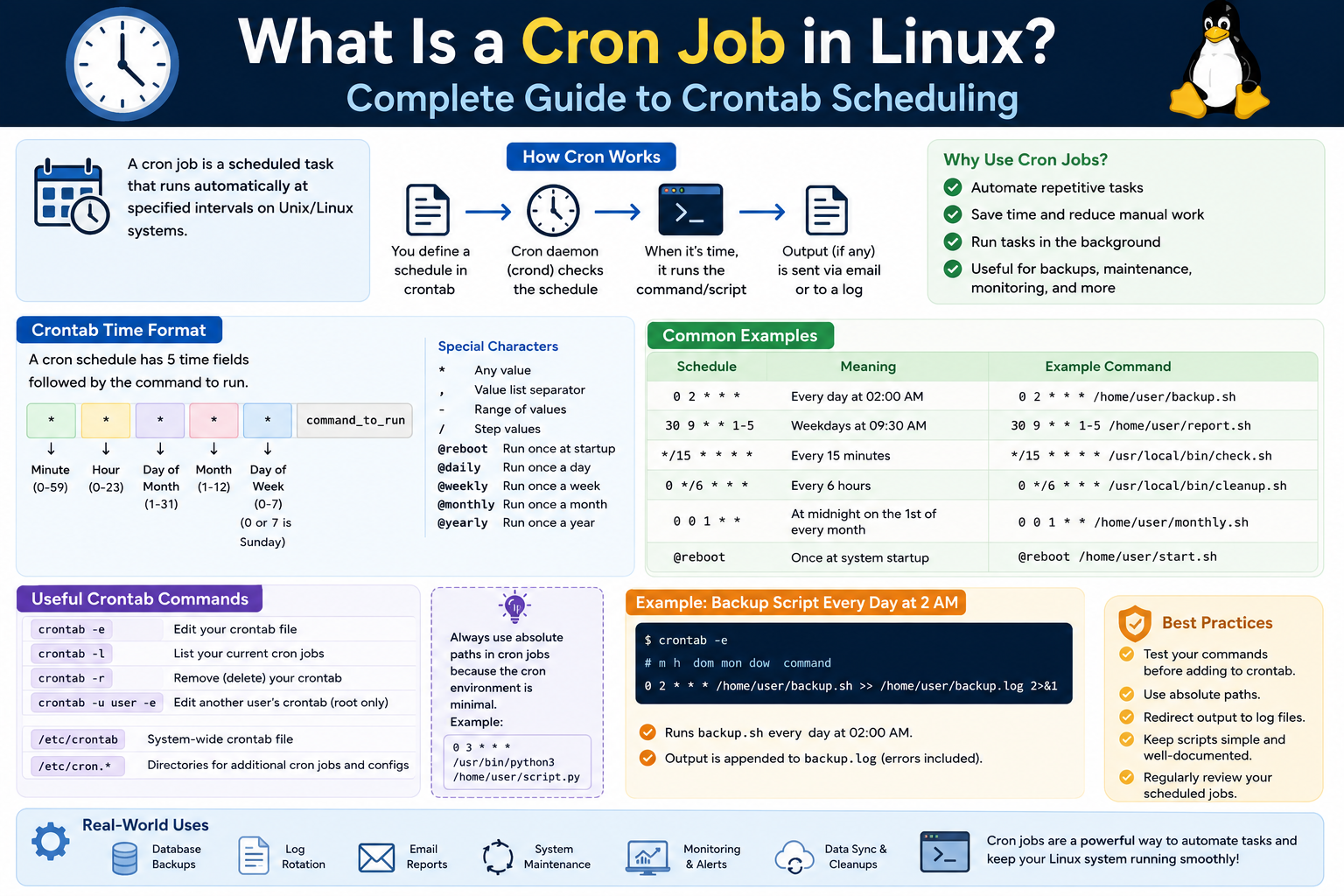
In the world of Linux, automation is not just a convenience—it is a necessity. Systems often run continuously, handling tasks that must be executed on time without human intervention. This is where cron jobs come into play. A cron job is essentially a scheduled task that runs automatically at a specified time or interval. It operates quietly in the background, ensuring that repetitive or time-sensitive operations are handled efficiently.
At the heart of this system is the cron daemon, a background service responsible for monitoring scheduled tasks and executing them at the appropriate moments. Once configured, a cron job requires no manual input. It simply runs when its schedule dictates. This makes cron an indispensable tool for administrators, developers, and anyone managing Linux systems.
The concept itself is straightforward. Imagine tasks like cleaning up temporary files, backing up important data, or sending system reports. These are activities that must happen regularly, yet performing them manually would be tedious and error-prone. Cron eliminates that burden by allowing users to define exactly when and how these tasks should run.
A cron job is defined within a configuration file known as a crontab, short for “cron table.” Each user in a Linux system can have their own crontab file, meaning tasks can be scheduled independently based on permissions and requirements. The cron daemon continuously checks these files and executes the commands listed within them according to their defined schedules.
What makes cron particularly powerful is its flexibility. Tasks can be scheduled to run every minute, every hour, once a day, or even on very specific dates and times. This level of control allows users to fine-tune automation in a way that aligns perfectly with system needs.
Beyond simple repetition, cron jobs can also handle more complex timing scenarios. For instance, a task can be configured to run only on weekdays, or only during certain months. This adaptability ensures that cron is not limited to basic automation but can support sophisticated scheduling strategies.
Despite its power, cron remains lightweight and efficient. It consumes minimal system resources and operates reliably in the background. This makes it suitable for both small personal systems and large-scale enterprise environments.
Another key aspect of cron jobs is that they execute commands exactly as specified. This means the system does not make assumptions about context or environment. As a result, users must provide complete and precise instructions, including full paths to scripts or commands. This level of explicitness ensures predictable behavior, which is crucial in automated systems.
Understanding cron jobs also involves recognizing the distinction between cron itself, crontabs, and individual cron jobs. Cron is the service that runs in the background. Crontabs are the files that store scheduling instructions. Cron jobs are the individual tasks defined within those files. Together, they form a complete system for task automation.
The reliability of cron makes it a foundational component of Linux systems. It has been used for decades and continues to be relevant because it solves a universal problem: how to execute tasks consistently without manual effort. Its simplicity is one of its greatest strengths, allowing users to quickly learn and apply it in practical scenarios.
In everyday use, cron jobs quietly handle many behind-the-scenes operations. They ensure that systems remain clean, data remains backed up, and processes run smoothly. Without cron, many of these tasks would require constant attention, increasing the risk of errors and inefficiencies.
Learning how to use cron effectively opens the door to better system management. It allows users to automate routine work, reduce manual intervention, and focus on more important tasks. Whether managing a personal server or a large infrastructure, cron provides a dependable way to keep everything running on schedule.
How Crontab Works and How to Create Scheduled Tasks
To truly understand how cron jobs function, it is essential to explore the structure and role of the crontab file. The crontab serves as the instruction manual for the cron daemon. It tells the system what tasks to run and when to run them. Each line in a crontab represents a separate scheduled task, making it easy to manage multiple jobs within a single configuration.
The scheduling mechanism used in crontab is based on five time fields. These fields represent minute, hour, day of the month, month, and day of the week. Together, they define the exact timing of a task. Instead of writing complex scripts to manage timing, users can simply fill in these fields to specify when a command should run.
One of the most distinctive features of this system is the use of the asterisk symbol. The asterisk acts as a wildcard, meaning “every possible value” for that field. For example, if all five fields contain asterisks, the task will run every minute. This simple notation allows for highly flexible scheduling without complicated syntax.
The order of the fields is important because each one corresponds to a specific unit of time. By combining values across these fields, users can create precise schedules. For instance, specifying a particular minute while leaving other fields as wildcards results in a task that runs at that minute every hour.
This structure may initially seem counterintuitive, especially when trying to create schedules like “once per hour.” However, the logic becomes clear with practice. Instead of defining how often a task runs, crontab defines when it runs. The repetition occurs naturally based on the matching of time conditions.
Another important aspect of crontab is that each command must be written clearly and completely. Since cron jobs run in a non-interactive environment, they do not inherit the same context as a regular shell session. This means environment variables, paths, and dependencies must be explicitly defined.
When creating cron jobs, users typically edit their crontab file using a command-line editor. Once the file is saved, the cron daemon automatically detects the changes and updates its schedule. There is no need to restart the service, which makes the process seamless and efficient.
Permissions also play a critical role in how cron jobs operate. Each crontab is associated with a specific user account, and tasks run with the permissions of that user. If a task requires elevated privileges, it must be configured accordingly. This ensures that sensitive operations are executed securely and only by authorized users.
Cron also supports running multiple commands within a single job. By structuring commands carefully, users can create more complex workflows that execute sequentially. This capability allows cron to handle more than just simple tasks, extending its usefulness in real-world scenarios.
There are limitations to consider as well. For example, cron does not natively support scheduling tasks at intervals shorter than one minute. However, creative approaches can be used to work around this limitation, such as introducing delays within commands. While these methods are effective, they require careful implementation to avoid unintended behavior.
Another key consideration is logging and monitoring. Since cron jobs run automatically, it is important to ensure that their output is tracked. This helps identify errors and confirm that tasks are executing as expected. Without proper monitoring, issues may go unnoticed, potentially leading to larger problems.
The simplicity of crontab is one of its greatest advantages. It provides a clear and concise way to define schedules, making it accessible to users with varying levels of experience. At the same time, its flexibility allows for advanced configurations that can handle complex automation needs.
As users become more familiar with cron and crontab, they begin to see patterns in how tasks are scheduled and executed. This understanding makes it easier to design efficient automation strategies and avoid common pitfalls.
Ultimately, mastering crontab is about understanding how time-based conditions translate into automated actions. Once this concept becomes intuitive, users can leverage cron to streamline workflows and maintain system efficiency with minimal effort.
Conclusion
Cron jobs represent one of the most practical and enduring features of Linux systems. They provide a reliable method for automating tasks, ensuring that important processes run consistently without manual intervention. By combining the cron daemon with the structured scheduling of crontab files, Linux offers a powerful yet accessible solution for time-based automation.
The strength of cron lies in its balance between simplicity and flexibility. It allows users to define schedules with precision while remaining easy to understand and implement. Whether handling routine maintenance, managing system resources, or executing complex workflows, cron adapts to a wide range of use cases.
Understanding how cron works is not just about learning commands or syntax. It is about recognizing how automation can improve efficiency, reduce errors, and free up valuable time. As systems grow in complexity, the ability to rely on automated processes becomes increasingly important.
By learning how to configure and manage cron jobs effectively, users gain greater control over their environments. They can ensure that tasks run exactly when needed, without constant oversight. This level of control is essential for maintaining stability and performance in any Linux system, improving reliability, reducing manual workload, preventing errors, and enabling seamless long-term automation across critical system processes.