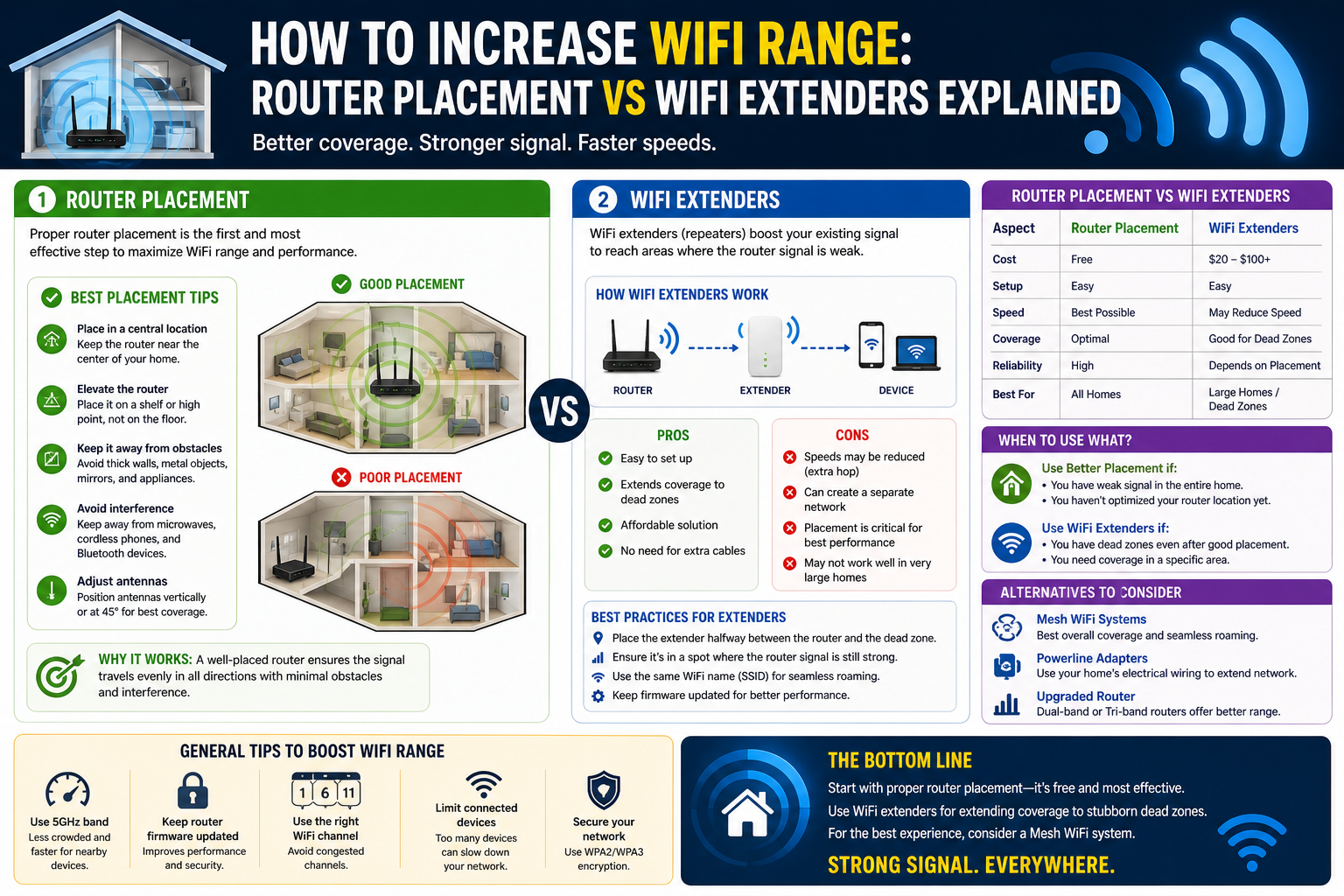
WiFi has become one of the most essential components of modern digital life, shaping how people work, communicate, learn, and entertain themselves. Unlike traditional wired connections that require physical cables running between devices and network hardware, WiFi uses radio waves to transmit data, allowing devices to connect to the internet and local networks without being physically tethered. This wireless nature has transformed environments such as homes, offices, schools, and public spaces into flexible digital ecosystems where mobility is not just a convenience but an expectation.
In today’s world, people rarely rely on a single device. Smartphones, laptops, tablets, smart TVs, gaming consoles, and even home appliances depend on stable wireless connectivity. As the number of connected devices increases, so does the demand on WiFi networks. This makes understanding how WiFi works not just a technical skill for IT professionals, but a practical necessity for everyday users who want reliable performance.
A strong WiFi experience depends on two core factors: coverage and speed. Coverage determines how far the signal reaches within a space, while speed determines how efficiently data is transmitted once connected. When either of these weakens, users experience buffering, dropped connections, or dead zones where the signal does not reach at all. Understanding the fundamentals behind these issues is the first step toward improving overall performance.
Building a Clear Picture of Your Existing WiFi Environment
Before attempting to improve WiFi range or speed, it is essential to understand the current network environment. Many connectivity issues are not caused by a single problem but by a combination of small inefficiencies that accumulate over time. A structured understanding of the network helps identify these weaknesses.
One of the most effective approaches is creating a detailed view of all connected devices and network components. This includes routers, modems, access points, extenders, switches, and even firmware versions running on each device. By organizing this information in a clear format, it becomes easier to track performance issues and identify outdated equipment that may be limiting network capabilities.
Beyond hardware, it is also important to understand how devices interact with the network. Some devices may consume more bandwidth than others, especially during streaming, gaming, or large file transfers. When multiple high-demand devices operate simultaneously, the network can become congested, resulting in reduced performance for everyone connected.
Another important aspect is monitoring how the WiFi signal behaves across different areas. Signal strength can vary significantly from one room to another depending on distance, building materials, and interference. Identifying these variations helps determine where improvements are needed most.
Understanding Wireless Standards and Their Impact on Performance
WiFi technology is governed by different wireless standards that define speed, efficiency, and range. These standards have evolved over time to accommodate increasing demands for faster and more reliable connections.
Older networks often rely on earlier standards that provide limited speed and coverage. As technology advances, newer standards introduce improvements that significantly enhance performance, particularly in environments with many connected devices. These newer systems are designed to handle modern internet usage patterns such as high-definition streaming, video conferencing, cloud computing, and online gaming.
One of the most important advancements in modern WiFi standards is improved efficiency in handling multiple devices simultaneously. Instead of treating each device as a separate request queue, newer systems manage data more intelligently, reducing delays and improving overall responsiveness.
Understanding which standard a router supports is critical because it directly affects the maximum potential performance of the entire network. Even if an internet service provider offers high-speed connectivity, an outdated router may not be capable of delivering those speeds effectively across all devices.
The Importance of Antennas and Signal Distribution
WiFi routers often use antennas to transmit and receive signals. These antennas play a key role in determining how far and how evenly the signal spreads across a given space. While it may seem that more antennas automatically mean better performance, the reality is more complex.
Modern routers often use advanced signal management technologies that allow them to direct signals more intelligently toward connected devices. Instead of broadcasting signals uniformly in all directions, some systems can focus transmission strength toward areas where devices are actively connected. This improves efficiency and reduces wasted signal energy.
Another important concept is how routers handle multiple connections at once. In environments with many devices, efficient signal distribution becomes essential. Without proper management, devices may compete for bandwidth, leading to slower speeds and inconsistent performance.
Signal quality is also affected by environmental factors. Walls, furniture, and appliances can weaken or distort wireless signals. Materials such as concrete, metal, and thick brick are particularly effective at blocking WiFi signals, which is why placement becomes such an important consideration in network design.
Security as a Core Component of Network Efficiency
While WiFi security is often discussed in terms of protecting personal data, it also has a direct impact on performance. An unsecured or poorly secured network can be accessed by unauthorized users, leading to unnecessary bandwidth consumption and reduced speed for legitimate users.
Older security methods are no longer considered safe and can be easily compromised. Modern security protocols are designed to provide strong encryption, ensuring that data transmitted over the network remains protected from unauthorized access. This not only protects sensitive information but also helps maintain consistent network performance by limiting access to trusted devices only.
In environments where multiple users share a network, security settings also help manage access control. By defining which devices are allowed to connect, network administrators can ensure that bandwidth is not being consumed by unknown or unnecessary devices.
Strong security also reduces the risk of malicious activity that can degrade network performance. Devices infected with malware or unauthorized software can generate excessive network traffic, causing congestion and instability. Proper security measures help prevent such issues from affecting overall connectivity.
Understanding WiFi Speed and Real-World Performance Limits
WiFi speed is often misunderstood as a fixed number determined solely by internet service providers. In reality, actual performance depends on several interconnected factors, including router capability, network congestion, signal strength, and environmental interference.
Even when a high-speed internet plan is in place, users may not experience full advertised speeds due to limitations in their internal network setup. The router acts as a bridge between the external internet connection and internal devices, meaning its performance plays a crucial role in determining real-world speed.
Network congestion is another major factor affecting speed. When multiple devices are actively using bandwidth simultaneously, the available speed must be distributed among them. This can result in slower performance for individual devices, especially during peak usage times.
Distance from the router also impacts speed. As devices move further away, the signal weakens, resulting in lower data transmission rates. This is why users often experience faster speeds when they are closer to the router compared to when they are in distant rooms or separate floors.
Frequency Bands and Channel Behavior in WiFi Networks
WiFi networks operate on different frequency bands, each with its own strengths and limitations. These frequency ranges determine how signals travel and how they interact with physical obstacles.
Lower frequency bands typically offer better range but lower speed, making them suitable for covering larger areas with moderate performance needs. Higher frequency bands, on the other hand, provide faster speeds but have reduced range and are more easily affected by obstacles.
In many modern environments, routers support multiple frequency bands simultaneously, allowing devices to choose the most appropriate connection based on their location and requirements. This flexibility improves overall network efficiency and helps balance performance across different usage scenarios.
Channel selection within frequency bands also plays an important role. In densely populated areas such as apartment buildings, multiple networks may operate on overlapping channels, causing interference. This interference can reduce signal quality and lead to inconsistent performance.
By selecting less congested channels, routers can minimize interference and improve stability. This process can significantly enhance performance in environments where many wireless networks coexist.
The Impact of Router Placement on Signal Strength
Router placement is one of the most critical yet often overlooked factors affecting WiFi performance. Even the most advanced router can underperform if placed in an unsuitable location.
Central placement within a building generally provides the most balanced coverage, allowing the signal to reach all areas more evenly. Placing a router in a corner or isolated room can lead to uneven distribution, where some areas receive strong signals while others experience weak or no connectivity.
Physical obstacles also play a significant role in signal degradation. Walls, floors, and large objects can absorb or reflect wireless signals, reducing their strength. This effect becomes more pronounced with denser materials such as concrete or metal structures.
Elevation can also influence performance. Positioning a router higher up, such as on a shelf or mounted location, can help reduce interference from ground-level obstructions and improve overall signal spread.
Environmental interference from other electronic devices can further impact WiFi performance. Devices such as microwaves, cordless phones, and Bluetooth equipment may operate on similar frequency ranges, leading to potential signal disruption.
Understanding these environmental factors is essential for creating an optimized wireless setup that delivers consistent performance across all connected devices.
How Physical Space Shapes Wireless Performance
WiFi signals behave very differently from wired signals because they travel through air and interact with everything in their environment. This makes physical space one of the most influential factors in wireless performance. While routers are often marketed based on speed capabilities, the real-world experience depends heavily on where and how the signal is deployed within a structure.
Every building has its own unique layout, and no two environments affect WiFi in exactly the same way. Open-plan rooms tend to allow signals to travel more freely, while segmented spaces with multiple walls create fragmented coverage zones. Even within the same building, small changes in router placement can produce noticeably different results.
One of the most important concepts in wireless optimization is signal propagation. This refers to how radio waves spread from the router into surrounding areas. In an ideal open environment, signals would travel evenly in all directions. However, real-world environments introduce obstacles that distort, absorb, or reflect these waves, creating uneven coverage.
Understanding this behavior helps explain why certain areas in a home or office consistently experience weak signals despite being relatively close to the router. Distance alone is not the only factor; the path the signal must take is often more important than the distance itself.
The Science of WiFi Dead Zones
Dead zones are areas where WiFi signals are extremely weak or completely unavailable. These zones are usually the result of physical barriers, interference, or poor router placement rather than complete network failure.
Walls made of dense materials such as concrete, brick, or stone are particularly effective at blocking wireless signals. Even internal structures like metal framing or reinforced insulation can significantly reduce signal strength. Floors and ceilings also contribute to signal loss, especially in multi-story buildings.
Furniture and large objects can also create unexpected signal shadows. Items such as bookshelves, cabinets, and appliances may not completely block signals but can weaken them enough to affect performance. The accumulation of multiple small obstructions often creates larger coverage gaps than expected.
Electronic interference is another major contributor to dead zones. Devices that operate on similar frequencies can disrupt WiFi signals, causing instability or reduced range. This interference may not completely block connectivity but can degrade performance to the point where the connection becomes unreliable.
Identifying dead zones is a key step in optimizing WiFi performance. Once these areas are mapped out, targeted solutions can be applied rather than attempting broad, inefficient fixes.
Strategic Router Placement for Maximum Coverage
Router placement is one of the simplest yet most effective ways to improve WiFi performance. Despite its importance, it is often overlooked or constrained by practical considerations such as cable access or room layout.
The ideal placement strategy focuses on maximizing signal reach across the entire environment. Central positioning is generally preferred because it allows the signal to radiate outward more evenly. When a router is placed at one edge of a building, a large portion of its coverage area is effectively wasted outside the usable space.
Elevation also plays a significant role. Placing a router higher up reduces the number of obstructions between the device and connected endpoints. Signals tend to travel more effectively when they are not blocked by furniture or ground-level objects. Even small adjustments in height can lead to noticeable improvements in coverage consistency.
Another important factor is isolation from interference sources. Keeping routers away from appliances, electrical panels, and other wireless devices can reduce signal disruption. While it may not always be possible to eliminate all sources of interference, minimizing proximity to high-interference devices improves stability.
Orientation of antennas can also influence performance. In multi-antenna systems, different antenna angles help distribute signals more evenly across vertical and horizontal planes. Adjusting antenna orientation can sometimes improve coverage in specific directions, particularly in multi-floor environments.
Extending Coverage Through Signal Repeaters and Range Devices
When router placement alone is not sufficient to eliminate coverage gaps, additional devices are often introduced to extend network reach. These devices work by receiving an existing signal and rebroadcasting it to areas with weak or no coverage.
Signal repeaters and extenders are commonly used in residential environments because they are relatively easy to install and require minimal configuration. They act as intermediary devices that bridge the gap between the main router and distant areas.
However, the effectiveness of these devices depends heavily on their placement. If an extender is placed too far from the main router, it will receive a weak signal and rebroadcast an equally weak connection. If it is placed too close, it may not effectively extend coverage into the desired dead zone.
This creates a need for careful positioning, often requiring experimentation to find the optimal balance between signal reception and coverage extension. Ideally, extenders should be placed in locations where the main router signal is still strong enough to be useful but close enough to the dead zone to provide meaningful coverage improvement.
One limitation of traditional extenders is that they share bandwidth with the main network. This means that while they improve coverage, they may also reduce overall speed, especially when multiple devices are connected through them. This trade-off must be considered when designing a network expansion strategy.
Wireless Access Points and Structured Expansion
In environments that require more robust and scalable connectivity, wireless access points provide a more advanced solution compared to basic extenders. Unlike simple repeaters, access points are typically connected directly to the main network infrastructure, often through wired connections.
This direct connection allows access points to provide stronger and more stable wireless signals without the performance degradation associated with rebroadcasting. They essentially act as additional entry points into the same network, distributing coverage more evenly across large areas.
Access points are particularly useful in multi-floor buildings, large offices, and environments with high device density. Because they are integrated into the network infrastructure, they can support a significantly higher number of simultaneous connections compared to basic extenders.
Proper placement of access points follows similar principles to router placement, with emphasis on central positioning within their coverage zones. However, because they are part of a larger network design, their placement must also consider overall network architecture and traffic distribution.
The Emergence of Mesh Network Systems
Mesh networking represents a more modern approach to WiFi coverage expansion. Instead of relying on a single router and separate extension devices, mesh systems use multiple interconnected nodes that work together as a unified network.
Each node in a mesh system communicates with the others, dynamically routing data through the most efficient path. This allows devices to maintain a stable connection even when moving between different areas of coverage.
One of the key advantages of mesh systems is seamless roaming. As a user moves through a building, their device automatically connects to the strongest available node without requiring manual switching. This creates a more consistent experience compared to traditional extender setups.
Mesh networks also reduce the complexity of placement decisions. While positioning still matters, the system is designed to self-optimize connections between nodes, reducing the risk of poorly placed devices causing major coverage issues.
However, mesh systems still rely on strategic node distribution. Placing nodes too far apart can weaken inter-node communication, while placing them too close together may result in redundant coverage.
Managing Interference in Dense Wireless Environments
Interference is one of the most common causes of poor WiFi performance, particularly in environments with many overlapping networks. This is especially common in apartment buildings, office complexes, and urban areas where multiple routers operate in close proximity.
Wireless signals operate on shared frequency bands, meaning that multiple networks can interfere with each other when using similar channels. This interference can result in slower speeds, unstable connections, and intermittent signal drops.
Channel selection is one method used to reduce interference. By choosing less congested channels, routers can operate with reduced competition from neighboring networks. However, in densely populated areas, truly free channels may be limited.
Another approach involves using different frequency bands. Higher frequency bands tend to experience less interference because they are less commonly used and have shorter range characteristics. While this reduces interference, it may also limit coverage in larger spaces.
Electronic devices within the same environment can also contribute to interference. Appliances such as microwaves and cordless phones can disrupt wireless signals temporarily, particularly when operating on overlapping frequency ranges. Even non-obvious devices such as wireless cameras or smart home equipment can add to the interference load.
Optimizing Network Load and Device Distribution
WiFi performance is not only influenced by signal strength and interference but also by how network traffic is distributed across connected devices. In modern environments, it is common for dozens of devices to share a single network simultaneously.
Each device consumes bandwidth differently depending on its activity. Streaming video, online gaming, video conferencing, and large downloads all place varying levels of demand on the network. When multiple high-demand activities occur simultaneously, congestion can develop.
Network optimization involves balancing this load so that no single area of the network becomes overwhelmed. This can be achieved through smarter device distribution, where high-demand devices are connected to stronger signal zones while low-demand devices operate in weaker coverage areas.
Routers with advanced traffic management capabilities can also help distribute bandwidth more efficiently. These systems prioritize certain types of traffic to ensure that critical applications maintain stable performance even under heavy load conditions.
Understanding how devices interact with network resources is essential for maintaining consistent performance in both home and professional environments.
Environmental Factors That Subtly Affect WiFi Range
Beyond obvious obstacles like walls and distance, there are many subtle environmental factors that influence WiFi performance. Temperature, humidity, and even air density can have minor effects on signal propagation.
While these factors are usually not the primary cause of connectivity issues, they can contribute to performance variations in extreme conditions or poorly optimized environments.
Structural aging of buildings can also affect signal behavior over time. As materials settle, shift, or accumulate additional layers of paint and insulation, their interaction with wireless signals can change slightly.
Even seasonal changes can indirectly influence WiFi performance in certain environments. For example, increased use of heating or cooling systems may introduce additional electronic interference or change the physical layout of indoor spaces.
Understanding these subtle influences helps create a more complete picture of wireless behavior, especially in environments where small performance improvements are critical.
Moving Beyond Basic WiFi Optimization
Once the fundamentals of WiFi placement, interference management, and coverage extension are understood, the next step is to focus on advanced optimization techniques. These go beyond simple fixes and instead involve designing a network that can adapt to changing demands, evolving devices, and increasingly complex usage patterns.
Modern WiFi environments are no longer static. A home network today may support video streaming, smart home systems, remote work tools, gaming consoles, and cloud-based applications all at once. Each of these applications places different demands on latency, bandwidth, and stability. Because of this, WiFi optimization is no longer just about “getting a signal everywhere,” but about ensuring consistent performance under varying conditions.
Advanced optimization requires thinking of WiFi not as a single device but as a system. This system includes the router, connected devices, environmental conditions, and user behavior. Each component influences the others, and changes in one area can impact the entire network.
Traffic Prioritization and Intelligent Bandwidth Management
One of the most important aspects of advanced WiFi optimization is managing how bandwidth is distributed. In traditional networks, devices often compete equally for available bandwidth, which can lead to inconsistent performance when the network becomes busy.
Modern routers increasingly include intelligent traffic management systems that prioritize certain types of data. For example, real-time communication such as video calls or online gaming requires low latency and stable connections. File downloads or background updates, on the other hand, can tolerate delays without affecting user experience.
By prioritizing time-sensitive traffic, networks can maintain responsiveness even under heavy load. This ensures that critical tasks remain smooth while less urgent tasks are temporarily slowed down in the background.
Another important aspect is fairness in bandwidth distribution. In households or offices with multiple users, it is important to ensure that no single device consumes excessive bandwidth at the expense of others. Intelligent systems can dynamically adjust allocations based on usage patterns, preventing congestion from a single high-demand device.
This kind of management becomes increasingly important as the number of connected devices grows. In modern environments, it is not uncommon for dozens of devices to compete for network resources simultaneously, making manual control impractical.
Device Density and Network Scalability Challenges
As WiFi networks evolve, one of the biggest challenges is device density. Device density refers to the number of devices connected to a network within a given area. Higher density places greater strain on routers, access points, and overall bandwidth capacity.
In older network designs, routers were typically expected to support a small number of devices such as computers and smartphones. Today, however, even a single household may include smart TVs, voice assistants, security cameras, wearable devices, laptops, tablets, and IoT sensors.
Each device may not consume large amounts of bandwidth individually, but collectively they create continuous background traffic. This constant activity increases the load on the network even when users are not actively streaming or downloading content.
Scalability becomes essential in such environments. A scalable network is one that can handle increasing numbers of devices without significant degradation in performance. Achieving this requires not only stronger hardware but also smarter network design.
This is where concepts like distributed access points and mesh systems become important. Instead of relying on a single central router, the network is distributed across multiple nodes, each handling a portion of the total load. This reduces congestion and improves overall stability.
Advanced Router Placement in Multi-Level Structures
While basic placement strategies focus on central positioning, advanced environments such as multi-floor buildings require more complex planning. In these cases, vertical signal distribution becomes just as important as horizontal coverage.
WiFi signals tend to weaken as they pass through floors due to reinforced materials, wiring, and structural density. This means that a router placed on one level may not adequately serve devices on another level without additional support.
One advanced strategy involves staggered placement of network nodes across different floors. Instead of relying on a single central point, coverage is distributed vertically so that each floor has a strong local signal source.
Another approach involves aligning access points or nodes in positions that minimize structural interference. For example, placing devices near stairwells or open vertical spaces can improve signal flow between floors.
In some cases, careful placement of networking equipment near shared structural openings can significantly reduce the need for additional hardware. However, this requires a detailed understanding of building layout and material composition.
Signal Optimization Through Environmental Mapping
Advanced WiFi optimization often involves mapping signal behavior across an entire environment. This process identifies how signals move through different areas and where performance drops occur.
Instead of relying on assumptions, environmental mapping uses real-world measurements to determine coverage quality. This allows for precise adjustments rather than trial-and-error placement.
Mapping typically reveals patterns that are not immediately obvious. For example, a room that appears close to the router may still experience weak signal due to hidden structural barriers. Conversely, a distant area may receive strong coverage if there are fewer obstructions in the signal path.
Once these patterns are identified, targeted improvements can be made. This may include repositioning hardware, adding additional nodes, or adjusting antenna orientation.
Environmental mapping also helps identify overlapping coverage zones. While overlap is generally beneficial for seamless roaming, excessive overlap can lead to interference between nodes, reducing overall efficiency.
Mesh Network Coordination and Self-Healing Behavior
One of the most significant advancements in modern WiFi systems is the concept of self-healing networks. In mesh architectures, nodes continuously communicate with each other to maintain optimal routing paths.
If one node becomes overloaded or fails, the network automatically reroutes traffic through alternative nodes. This ensures that connectivity remains stable even in the presence of hardware issues or environmental disruptions.
Self-healing behavior is particularly valuable in large or complex environments where manual intervention would be impractical. It reduces downtime and improves resilience against unexpected failures.
Mesh systems also dynamically adjust routing based on network conditions. If one path becomes congested, traffic is redirected through less busy routes, improving overall efficiency.
This adaptability makes mesh networks particularly well-suited for environments with changing usage patterns, such as homes with multiple users or offices with fluctuating workloads.
Latency Optimization and Real-Time Performance Demands
While speed is often the most discussed aspect of WiFi performance, latency is equally important, especially for real-time applications. Latency refers to the delay between sending and receiving data, and even small delays can significantly impact user experience in certain scenarios.
Applications such as video conferencing, online gaming, and live streaming are highly sensitive to latency. Even if overall bandwidth is sufficient, high latency can result in lag, delays, or synchronization issues.
Reducing latency requires minimizing unnecessary processing delays within the network. This includes optimizing routing paths, reducing interference, and ensuring that high-priority traffic is processed efficiently.
Network congestion is one of the primary causes of increased latency. When too many devices compete for bandwidth, data packets may be delayed in queues before being transmitted. Intelligent traffic management helps reduce this issue by prioritizing time-sensitive data.
Physical distance also contributes to latency. The farther data must travel between devices and routers, the longer the delay. While this cannot be eliminated entirely, it can be minimized through strategic placement of networking equipment.
Future Trends in WiFi Technology Evolution
WiFi technology continues to evolve rapidly, driven by increasing demand for faster speeds, lower latency, and greater device density support. Future developments are expected to focus on improving efficiency rather than just raw speed.
One major trend is improved spectrum utilization. As more devices compete for limited wireless frequencies, future systems are being designed to use available spectrum more intelligently. This includes better channel allocation and dynamic frequency management.
Another emerging trend is increased integration with smart environments. WiFi networks are becoming more aware of device behavior and environmental conditions, allowing them to adjust performance dynamically based on real-time usage.
There is also a growing focus on reducing energy consumption. As more devices rely on wireless connectivity, optimizing power efficiency becomes increasingly important, especially for battery-powered devices.
Additionally, future systems are expected to provide more seamless integration between indoor and outdoor environments. This will allow users to maintain consistent connectivity as they move between different physical spaces without noticeable interruptions.
Real-World Deployment Strategies for Complex Environments
In real-world scenarios, WiFi deployment is rarely straightforward. Complex environments such as multi-floor offices, industrial facilities, and large residential buildings require carefully planned strategies to ensure consistent performance.
One of the most effective strategies is layered network design. Instead of relying on a single type of solution, multiple technologies are combined to achieve optimal coverage. This may include a mix of routers, access points, mesh nodes, and wired backhaul connections.
Another important strategy is redundancy. By ensuring that multiple pathways exist for data transmission, networks can remain operational even if individual components fail or become overloaded.
Scalability must also be considered from the beginning. Networks designed with future expansion in mind are better able to adapt to increasing device density and changing usage patterns without requiring complete redesigns.
Proper planning also involves anticipating peak usage scenarios. Understanding when and how network demand will increase allows for better allocation of resources and prevents performance degradation during critical periods.
Long-Term Maintenance and Network Stability
Maintaining a stable WiFi network requires ongoing attention rather than a one-time setup. Over time, changes in device usage, environmental conditions, and technology updates can all affect performance.
Firmware updates play an important role in maintaining stability and security. These updates often include performance improvements, bug fixes, and compatibility enhancements that help keep networks running efficiently.
Monitoring network performance over time also helps identify emerging issues before they become significant problems. Gradual changes in signal strength or speed may indicate underlying issues that require adjustment.
Physical changes in the environment can also impact performance. Furniture rearrangement, new electronic devices, or structural modifications can all influence signal behavior.
A well-maintained network adapts to these changes through periodic evaluation and adjustment, ensuring that performance remains consistent even as conditions evolve.
Fine-Tuning WiFi Performance in Real Environments
Even after applying advanced optimization techniques, WiFi performance can often be improved further through small, precise adjustments that refine how the network behaves under everyday conditions. These refinements usually focus on subtle inefficiencies that are easy to overlook but can have a noticeable impact when addressed correctly.
One important area is device behavior management. Many connected devices continue to communicate with the network even when they are not actively being used. Background processes such as automatic updates, cloud synchronization, and application refresh cycles can quietly consume bandwidth. When multiple devices perform these tasks simultaneously, they create invisible congestion that affects overall responsiveness. Managing when and how these background activities occur can help maintain smoother performance during peak usage periods.
Another often-overlooked factor is router aging. Over time, network hardware can gradually lose efficiency due to prolonged heat exposure, constant workload, and outdated firmware compatibility. While the device may still function, its ability to handle modern traffic loads may decline compared to newer hardware. Recognizing when performance issues are hardware-related rather than environmental can prevent unnecessary troubleshooting in other areas.
Signal reflection is another subtle influence on WiFi behavior. In enclosed spaces, wireless signals do not simply stop when they hit an obstacle; they bounce, scatter, and overlap in unpredictable ways. These reflections can sometimes strengthen coverage in unexpected areas, but they can also create interference patterns that weaken stability. Small adjustments in router orientation or repositioning nearby objects can sometimes improve these conditions more than major equipment changes.
Temperature and ventilation also play a minor but real role in long-term network stability. Routers that operate in poorly ventilated or heat-prone environments may throttle performance or become unstable under sustained load. Ensuring adequate airflow around networking equipment helps maintain consistent output and reduces the likelihood of performance degradation during high usage periods.
Another refinement involves understanding how different devices interpret and prioritize WiFi signals. Not all devices are equally efficient at maintaining stable connections, especially older hardware or budget devices. In mixed-device environments, the weakest devices can sometimes influence overall network performance by repeatedly requesting reconnections or lower-quality signal paths. Identifying and isolating these devices can improve stability for the rest of the network.
Finally, periodic reassessment of network layout is essential. As usage patterns evolve, the original placement strategy may no longer be optimal. A setup that works well for a small number of devices may become inefficient as new devices are added or as usage shifts between rooms or floors. Re-evaluating signal distribution periodically ensures that the network continues to match real-world demands rather than remaining static while conditions change around it.
Further Refinement: Micro-Optimizations That Improve Everyday WiFi Stability
Beyond the more obvious adjustments in placement, hardware, and network structure, there are smaller, often overlooked refinements that can further stabilize WiFi performance in real-world environments. These micro-optimizations do not usually require new equipment or major redesigns, but they help eliminate subtle inefficiencies that accumulate over time.
One key area is reducing unnecessary network chatter. Modern devices tend to maintain constant communication with the router even when idle. Smart home devices, for instance, may frequently check for updates or send status signals. While each individual request is small, the combined effect of many devices doing this simultaneously can create background noise on the network. Reducing unnecessary device activity, especially during peak usage hours, can improve responsiveness for active tasks.
Another refinement involves managing connection consistency. Devices that frequently switch between WiFi bands or repeatedly disconnect and reconnect can introduce instability into the network. This is often caused by borderline signal strength areas where a device struggles to decide between stronger and weaker connections. Adjusting placement so that devices remain firmly within a stable coverage zone helps reduce this constant switching behavior and improves overall reliability.
Network congestion can also occur in short bursts rather than sustained periods. These micro-congestion events happen when multiple devices initiate data-heavy tasks at the same time, such as syncing cloud storage or updating applications. While they may only last a few seconds, they can cause noticeable lag. Staggering high-traffic activities where possible can smooth out these spikes and create a more consistent experience.
Another subtle but important factor is channel stability over time. Even if a router selects an optimal channel initially, surrounding networks may change their behavior, gradually increasing interference. Periodically reassessing channel conditions helps ensure the network continues operating in a relatively clean spectrum environment, especially in densely populated areas.
Physical micro-adjustments can also make a difference. Slight changes in router orientation, even by a few degrees, can alter how signals interact with surrounding surfaces. Similarly, moving nearby objects such as metallic furniture or large electronics away from the router can reduce unexpected signal distortion.
Finally, maintaining consistency in network configuration helps avoid performance drift. Frequent unnecessary changes to settings can sometimes introduce instability rather than improvements. A balanced approach, where adjustments are made gradually and based on observed performance patterns, ensures that the network remains stable while still benefiting from optimization over time.
Conclusion
Improving WiFi range is rarely about a single fix. It is the result of understanding how wireless signals behave, how environments shape those signals, and how network devices respond under real-world conditions. Placement and extenders often appear to be competing solutions, but in practice they are part of the same larger strategy: building a network that is both stable and adaptable.
Good placement forms the foundation. A router positioned thoughtfully—away from obstructions, interference sources, and poor structural zones—can eliminate many common connectivity issues before they even begin. It ensures that the original signal is distributed as efficiently as possible, reducing the need for additional hardware in some cases.
Extenders, access points, and mesh systems then build on that foundation. They are not replacements for proper placement but tools that expand coverage when physical or architectural limitations prevent a single router from doing the job alone. Each has its own strengths, and their effectiveness depends heavily on how well they are integrated into the overall network design.
Equally important is the recognition that WiFi performance is dynamic. Devices are constantly joining and leaving the network, applications continuously demand different levels of bandwidth, and environmental conditions subtly change signal behavior over time. A network that performs well today may require adjustment tomorrow as usage patterns evolve.
This is why optimization is not a one-time task. It is an ongoing process of observation, adjustment, and refinement. Small improvements—such as reducing interference, balancing device load, or adjusting placement slightly—can collectively produce significant gains in stability and speed.
Ultimately, the most effective WiFi setup is one that matches the specific environment it operates in. There is no universal configuration that works everywhere. Instead, success comes from combining technical understanding with practical experimentation, ensuring that both placement and extension strategies are used where they are most effective.
A well-optimized WiFi network does more than provide internet access; it supports seamless communication, uninterrupted work, and reliable connectivity across all devices, making it an essential part of modern digital life.